
Legal Compliance: How to Launch a Credit Card Surcharge
Last Updated on November 10, 2026 by Dimitri Akhrin
What You Will Achieve: A Fully Compliant Surcharge Program
By the end of this tutorial, you will have completed the core steps to launch a credit card surcharge program that follows card-brand rules and the state laws that apply to you. You will know which states prohibit surcharging, how to notify your acquiring bank, how to calculate your maximum allowable surcharge and how to configure compliant disclosures at every customer touchpoint.
Your success criteria are simple: a surcharge that appears as a separate line item on every receipt, your 30-day surcharge notice confirmed in writing, signage posted at every entrance and point of sale and zero exposure to the jurisdictions that ban the practice. This is the legal compliance sequence that protects your revenue and your reputation when you launch a credit card surcharge.
TL;DR
- Check state eligibility first – Visa lists Connecticut, Maine, Massachusetts, Oklahoma and Puerto Rico as prohibiting surcharges and NFIB’s 2025 guide adds California. States like New Jersey and New York allow surcharging with their own rules.
- Give 30 days’ notice before you start – Visa requires notice to your acquirer and Mastercard requires notice to both Mastercard and your acquirer. Keep dated proof on file.
- Cap your surcharge correctly – Visa caps it at your merchant discount rate or 3%, whichever is lower (Mastercard’s cap is 4%). Use the lower limit and never surcharge debit or prepaid cards.
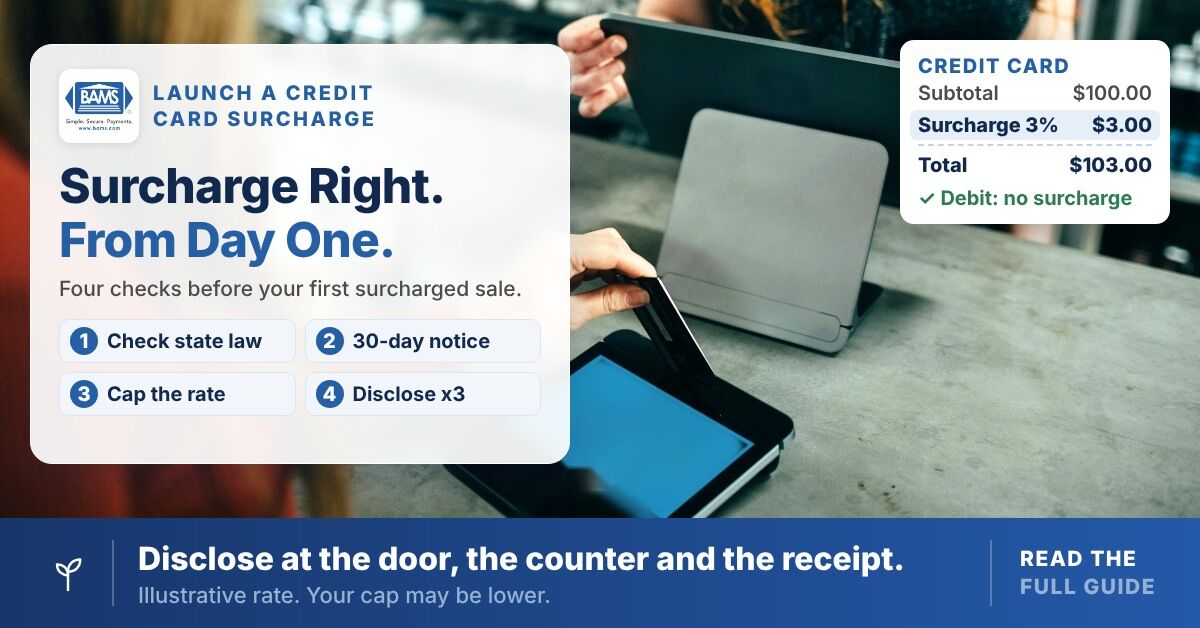
- Disclose at three touchpoints – Customers must see the surcharge notice at the point of entry (or website landing), at the point of sale and as a separate line item on the receipt.
- Treat compliance as ongoing – Surcharging bills were introduced in more than a dozen states in 2024, so review your state list, signage and POS setup every quarter.
Prerequisites and Setup Checklist
Before you begin, confirm you have the following in place. Missing even one item can stall the process or create liability.
- Active merchant processing account with a U.S. acquiring bank (your payment processor)
- Your current merchant discount rate (MDR), found on your most recent processing statement
- A list of every state where you accept in-person or online credit card payments
- Access to your POS system’s configuration panel (or your eCommerce platform’s checkout settings)
- Signage materials for every entrance and checkout point
- 30+ days of lead time before your intended launch date
Time estimate: The administrative steps take 2 to 4 hours of active work, but the mandatory 30-day waiting period means you should start at least 5 weeks before you want to go live. The most common blocker is discovering your state prohibits surcharging after you have already ordered signage.
Why This Sequence Matters
Most surcharge violations happen not because merchants act in bad faith, but because they skip steps or execute them out of order. A merchant who posts signage before confirming state eligibility, or who begins charging before giving notice, can face card-brand fines, state penalties and customer disputes.
Surcharging-related bills were introduced in more than a dozen states in 2024 alone, so the rules shift frequently. Treating this as a one-time checklist rather than an ongoing compliance obligation is a common and costly mistake. The steps below follow a safe order built on Visa and Mastercard rules, with state-level checks at the right decision points.
Step 1: Confirm State Eligibility for Every Location You Serve
Open your list of states where you accept credit card payments. This includes states where you have a physical location and states where you ship to or serve online customers. Compare every state on your list against the current prohibition list.
Visa’s merchant guidance (current as of February 2024) lists five U.S. jurisdictions that prohibit credit card surcharges: Connecticut, Maine, Massachusetts, Oklahoma and Puerto Rico. The NFIB Legal Center’s 2025 guide also lists California as prohibiting surcharges and marks Oklahoma as unclear, so check a current source and your attorney before launch. If you operate in a prohibited jurisdiction, you cannot surcharge transactions there.
Expected result: A written list of eligible states and a separate list of excluded states. If all your locations fall in prohibited states, stop here.
Common failure: Merchants forget about eCommerce. If a customer in Massachusetts places an order on your website, that transaction cannot carry a surcharge even if your business is based in Texas. Build state-detection logic into your checkout flow or exclude surcharges from online orders until you can.
Watch for State-Specific Restrictions, Not Just Bans
Some states allow surcharging but impose their own rules on top of card-brand requirements. New Jersey’s 2023 surcharge law limits the fee to the seller’s actual credit card processing cost and requires disclosure at both the point of entry and point of sale for in-person transactions. New York’s law, effective February 11, 2024, requires you to post the total price including the surcharge (or a two-tier cash and card price) and carries civil penalties of up to $500 per violation. Colorado caps surcharges at 2%.
Document every state-specific rule that applies to your business. You will need this documentation in Step 5 when you configure disclosures.
Step 2: Calculate Your Maximum Allowable Surcharge
Pull your most recent merchant processing statement. Locate your merchant discount rate (MDR). This is the total percentage your processor charges you per credit card transaction, including interchange, assessments and processor markup.
Visa limits a credit card surcharge to the merchant discount rate or 3%, whichever is lower. Mastercard’s cap is the lower of your average effective merchant discount rate or 4%. Since most merchants accept both, plan around the stricter limit. If your MDR is 2.4%, your maximum surcharge is 2.4%. If your MDR is 3.5%, your Visa maximum is 3%. Some states set lower limits.
Expected result: A single percentage figure you will program into your POS and use on all legal documentation and signage.
Common failure: Using a blended average rate when your processor charges different rates for different card types. Use the rate that applies to the specific transaction type you are surcharging. When in doubt, use the lowest applicable rate to stay safely within limits.
Step 3: Give 30 Days’ Notice (Acquirer and Mastercard)
Contact your payment processor or acquiring bank and formally notify them that you intend to implement a credit card surcharge program. Visa requires merchants to notify their acquiring bank at least 30 days before beginning a surcharge program. Mastercard requires notice to both Mastercard and your acquirer at least 30 days ahead, using its online registration form.
Action: Call or email your processor’s merchant support line. Request written confirmation that your surcharge notification has been received and that the 30-day clock has started. Save this confirmation along with your Mastercard form submission. Together they are your proof of notice.
Expected result: A dated confirmation (email, letter, or portal notification) from your acquirer acknowledging your surcharge program enrollment.
Common failure: Assuming your processor will handle the card-brand notification automatically. Some processors require you to fill out a specific form. Ask explicitly whether anything else needs to be submitted and file the Mastercard notice yourself if it hasn’t been. If you process with BAMS, your dedicated account representative can help you confirm what has been filed.
Step 4: Confirm Debit Card Exclusion in Your POS
Surcharges may only be applied to credit card transactions. Visa and Mastercard prohibit surcharges on debit and prepaid cards, including debit cards run as credit.
Action: Open your POS system’s surcharge configuration. Verify that debit cards (including signature debit) are excluded from the surcharge calculation. If your POS cannot distinguish between credit and debit at the time of authorization, do not enable automatic surcharging until it can.
Expected result: A test transaction with a debit card that shows $0.00 in the surcharge field.
Common failure: Many POS systems apply surcharges based on card brand (Visa, Mastercard) rather than card type (credit vs. debit). This is the single most common source of surcharge violations. Run test transactions with both a credit card and a debit card before going live. If you need clarity on the distinction between surcharges and other fee types, this breakdown of convenience fees vs. surcharges explains how each model treats different card types.
Step 5: Build Your Disclosure Stack
Visa requires surcharge disclosure at the point of entry and the point of sale or transaction and the surcharge must appear as a separate charge on every receipt. Missing any one of these creates a violation.
Point of Entry (Storefront or Website Landing)
Post a sign at every entrance to your business. The sign must clearly state that a surcharge will be applied to credit card transactions and should display the exact percentage. In New York, also post the total price including the surcharge (or a cash and card price). For eCommerce, place a disclosure banner on your homepage or cart page before the customer begins checkout.
Example language: “We apply a surcharge of [X]% to credit card transactions. No surcharge applies to debit or prepaid cards.”
Point of Sale (Terminal or Checkout Page)
Post a second disclosure at the register, on the payment terminal screen, or on the checkout page where the customer enters payment information. The customer must see the surcharge amount before they confirm the transaction.
Receipt
Configure your POS or payment gateway to print the surcharge as a separate line item on every receipt. It must appear distinct from the transaction total, tax and tip. The receipt should show the base transaction amount, the surcharge and the total. Mastercard requires the surcharge amount on the receipt, so show both the percentage and the dollar amount.
Expected result: A customer walking into your store sees the surcharge notice at the door, again at the register and on their receipt. An online customer sees it before checkout and on their email receipt.
Common failure: Using vague language like “a fee may apply.” The disclosure must specify that the fee is a surcharge on credit cards and must state the percentage. In states like New Jersey, the disclosure must also confirm that the surcharge does not exceed your actual processing cost.
Step 6: Configure Your Receipt Template
This step deserves its own section because receipt errors are the most auditable evidence of noncompliance. Open your POS receipt editor or your payment gateway’s receipt template settings.
Action: Add a line item labeled “Credit Card Surcharge” (or similar clear language). Map it to the surcharge percentage you calculated in Step 2. Ensure the line item calculates dynamically based on the transaction subtotal, not as a flat fee.
Checkpoint: Run three test transactions at different dollar amounts. Verify that the surcharge line shows the correct percentage of the subtotal each time, that it appears as a separate line from tax and that the total reflects subtotal + surcharge + tax.
If you are unclear on how surcharges should appear on receipts versus how convenience fees are structured, this guide on surcharge vs. convenience fee rules covers the formatting differences in detail.
Step 7: Run a Pre-Launch Compliance Audit
Before your 30-day waiting period expires, walk through every customer touchpoint as if you were a first-time visitor. Use this checklist:
- Is the surcharge notice visible at every entrance?
- Is the surcharge notice visible at the register or on the checkout page?
- Does the receipt show the surcharge as a separate line item with the correct percentage?
- Are debit card transactions excluded from the surcharge?
- Does the surcharge percentage match or fall below your MDR?
- Does the surcharge percentage fall at or below 3% and any lower state cap?
- Do you have written confirmation from your acquirer and your Mastercard notice on file?
- Have you excluded all transactions originating in prohibited states?
Expected result: Every box checked. If any item fails, do not launch until it is corrected.
Step 8: Go Live and Document Everything
Once your 30-day waiting period has passed and your audit is clean, enable surcharging in your POS system. On launch day, photograph your signage, screenshot your online disclosures and save a sample receipt. Store these files in a dedicated compliance folder.
Why document: If a customer files a complaint or a card brand initiates an inquiry, your documentation proves you followed every required step. Date-stamped photos and acquirer confirmation emails are your strongest defense.
Common failure: Launching on day 29 instead of day 31. Count carefully from the date your acquirer confirmed receipt of your notification, not the date you sent it.

About five weeks from first check to compliant go-live.
Avoiding Surcharge Violations: Configuration and Customization
Several variables in your surcharge setup can (and should) be adjusted based on your business model.
- Surcharge percentage: You are not required to surcharge the maximum. Setting a lower rate can reduce customer friction while still recovering part of your processing costs.
- Online vs. in-store: You can choose to surcharge only in-store transactions if your eCommerce platform cannot reliably detect customer state. This avoids accidental violations in prohibited jurisdictions.
- Signage language: Use plain, direct language. Avoid legal jargon. “We add a [X]% surcharge to credit card payments” is clearer than “A variable processing recovery fee may be assessed.”
- Multi-location consistency: If you operate in multiple states, each location’s surcharge percentage may differ if your MDR varies by location. Do not apply a blanket rate across locations without verifying each one individually.
Safe default: Set your surcharge at the lowest MDR across all your locations. This guarantees compliance everywhere, even if it means slightly under-recovering at your highest-cost location.
Verification and Testing
After going live, run the following tests within the first 48 hours:
- Process a credit card transaction and verify the surcharge appears correctly on the receipt.
- Process a debit card transaction and verify zero surcharge is applied.
- Run a prepaid card transaction and verify zero surcharge is applied.
- If you sell online, place a test order from a prohibited state (use a Connecticut billing address, for example) and confirm no surcharge is added.
- Review your end-of-day settlement report to confirm surcharge amounts are itemized separately from standard revenue.
Success definition: All five tests pass without manual intervention. If any test requires you to override or manually adjust, your configuration has a gap that must be fixed before processing real customer transactions.
Common Errors and How to Fix Them
Error: Surcharge Applied to Debit Transactions
Symptom: Customer complaints or disputes referencing debit card surcharges. Cause: POS system does not differentiate credit from debit at authorization. Fix: Contact your POS vendor and enable BIN-level card type detection. If unavailable, switch to a processor or POS that supports it.
Error: Surcharge Exceeds 3% or MDR
Symptom: Card-brand compliance inquiry or customer dispute. Cause: MDR increased after initial setup, or the surcharge was set to a rounded-up figure. Fix: Re-pull your current processing statement, recalculate your MDR and lower the surcharge percentage immediately.
Error: Missing Point-of-Entry Disclosure
Symptom: Customer complaint filed with state attorney general. Cause: Signage was removed, fell down, or was never posted at a secondary entrance. Fix: Audit every entrance monthly. Use adhesive-mounted signs that are harder to dislodge.
Error: Surcharging in a Prohibited State
Symptom: Regulatory fine or card-brand penalty. Visa says the acquirer may be assessed an immediate $1,000 fine when a merchant surcharges improperly. In New York, civil penalties can reach $500 per violation. Cause: Online checkout did not filter by customer billing state. Fix: Implement state-based surcharge rules in your payment gateway. Disable surcharging for all prohibited jurisdictions.
Error: Surcharge Not Separated on Receipt
Symptom: Card-brand audit finding. Cause: POS bundles the surcharge into the transaction total instead of listing it as a distinct line. Fix: Reconfigure the receipt template per Step 6. Test again before resuming surcharging.
Next Steps and Extensions
Once your surcharge program is running compliantly, consider these follow-on actions to strengthen your position:
- Quarterly compliance reviews: Re-check the list of prohibited states every quarter. Legislation changes frequently, as the 2024 wave of state bills showed.
- Dual pricing evaluation: Some merchants find that displaying cash and card prices side by side (dual pricing) achieves similar cost recovery with less customer friction. Ask your processor whether dual pricing is available as an alternative or complement.
- Staff training: Train every customer-facing employee to explain the surcharge clearly and calmly. A well-informed team member prevents complaints before they escalate.
Surcharging is not a set-it-and-forget-it feature. It is an ongoing compliance obligation that rewards merchants who treat it with the same rigor they apply to tax collection and legal documentation when they launch a credit card surcharge. Execute the steps above in order, document everything and revisit your setup regularly.
Frequently Asked Questions
Can I surcharge debit cards or prepaid cards?
No. Visa and Mastercard rules prohibit surcharging debit card transactions, including signature debit and prepaid card transactions. Your POS system must be configured to detect card type at authorization and exclude non-credit cards from any surcharge calculation. This is the most common source of violations.
What happens if I surcharge in a state that prohibits it?
You face potential regulatory fines, card-brand penalties and customer complaints filed with your state attorney general. In New York, for example, civil penalties can reach $500 per violation. For online merchants, the customer’s billing state determines whether the surcharge is permissible, not your business’s home state.
How do I know my maximum surcharge percentage?
Under Visa’s rules, your maximum surcharge is the lower of your merchant discount rate (MDR) or 3% (Mastercard’s cap is 4%) and some states set lower limits. Find your MDR on your most recent processing statement. If your MDR is 2.6%, your cap is 2.6%. If your MDR is 3.4%, your cap is 3%. You are never required to charge the maximum and can set it lower to reduce customer friction.
Do I need to notify Visa and Mastercard directly?
For Mastercard, yes. Mastercard requires notice to both Mastercard and your acquirer at least 30 days before you start, through its registration form. For Visa, you notify your acquiring bank. Ask your processor for dated confirmation and keep both records on file.
What disclosures are required for an online store?
You must disclose the surcharge before the customer enters payment information (equivalent to point of entry), on the checkout or payment page (point of sale) and on the digital receipt or order confirmation email. The disclosure must state that the fee is a credit card surcharge and specify the percentage.
Is a cash discount program the same as a surcharge?
No. A cash discount program posts the card price and offers a discount for paying with cash, while a surcharge adds a fee on top of the listed price for credit card payments. The legal requirements, card-brand rules and customer perception differ significantly between the two approaches. Understanding how convenience fees and surcharges differ can also help clarify which model fits your business.

