Three Different Types of Mobile Payments Explained
Last Updated on September 4, 2026 by Dimitri Akhrin
Mobile Payments Are Now Part of Everyday Commerce
Mobile devices have become an ingrained and integral part of our daily lives. The original version of this article noted that more than 80% of U.S. adults owned smartphones. That number has continued to grow.
According to Pew Research Center’s latest survey, 91% of U.S. adults now own a smartphone. For some consumers, the phone is even their primary connection to the internet. Pew reports that 16% of U.S. adults own a smartphone but do not subscribe to home broadband.
That makes the mobile experience impossible for merchants to treat as secondary.
People use their phones to discover products, compare prices, order food, buy tickets, manage subscriptions and make purchases both online and in person. The Federal Reserve’s latest payments research also shows how firmly electronic payments have become embedded in everyday commerce. Cards accounted for more than three-quarters of U.S. noncash payments by number in 2024.
For businesses, the question in 2026 is no longer whether customers will want to pay through mobile devices. It is whether the payment experience makes doing so easy.
Merchants looking to support mobile commerce can use several different approaches. The three below cover some of the most common ways customers use smartphones and tablets to complete purchases today.
TL;DR
- Mobile payments now cover several different checkout experiences – Customers can pay through digital wallets, mobile web checkouts and QR codes, while compatible smartphones can also act as contactless payment acceptance devices for merchants.
- Digital wallets use tokenization instead of simply exposing the customer’s card number – Wallets such as Apple Pay and Google Pay can use device-specific payment tokens along with authentication methods such as biometrics or a passcode to complete transactions.
- NFC is the technology merchants should focus on for modern contactless payments – In-person wallet payments generally require an NFC-enabled terminal or compatible mobile acceptance solution that lets customers tap a card, smartphone or wearable.
- A mobile-friendly website is not enough if checkout still creates friction – Merchants should optimize the entire mobile purchase flow with shorter forms, clear shipping costs, guest checkout, express payment options and an experience designed for smaller screens.
- Choose mobile payment methods based on how customers actually buy from your business – Digital wallets work well for fast online and contactless checkout, mobile web payments support standard eCommerce purchases and QR codes can be useful for restaurants, invoices, events and other flexible payment environments.
Three Types of Mobile Payments

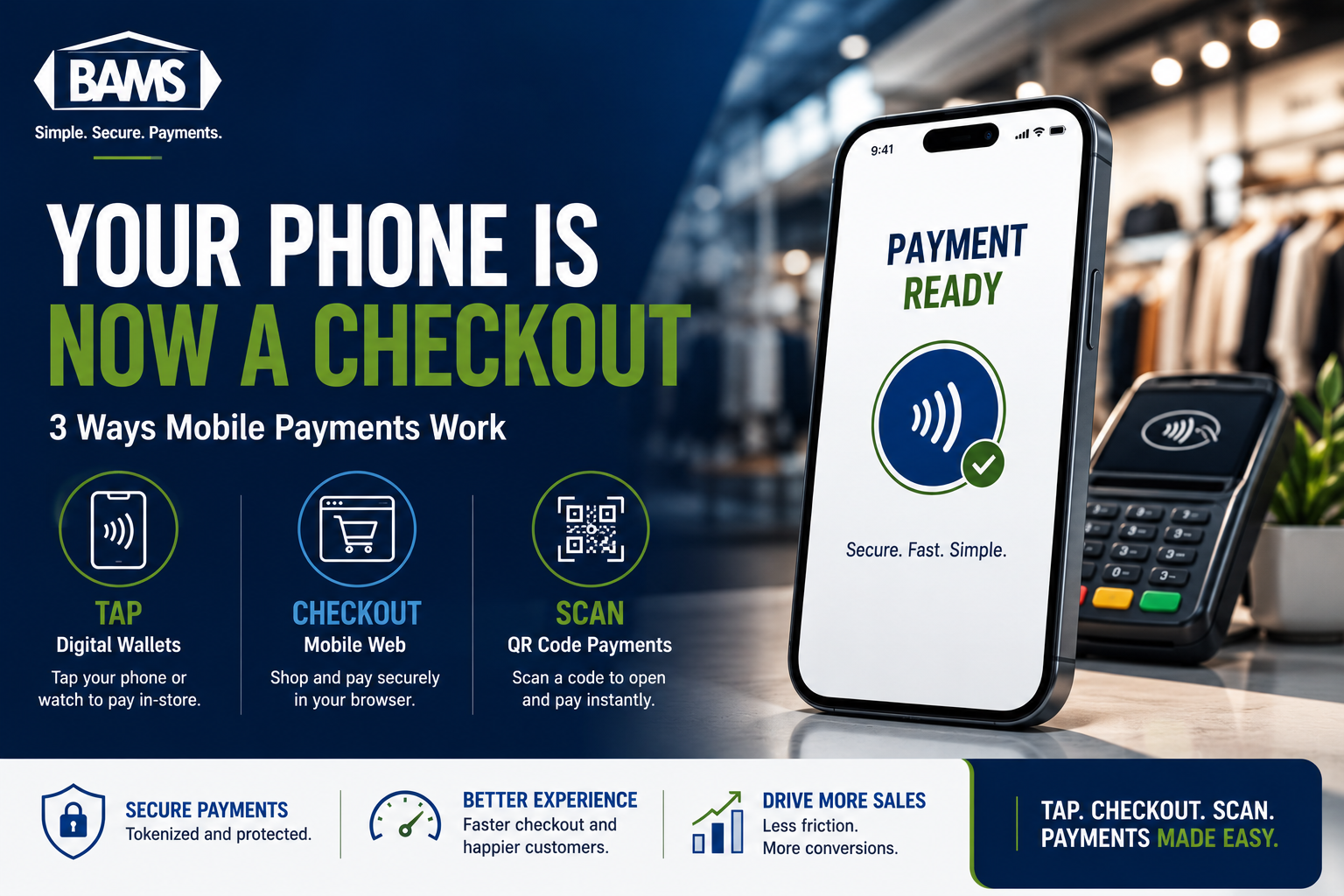
Customers can use smartphones to pay through digital wallets, mobile web checkouts and QR code payment experiences.
1. Digital Wallets
Digital wallets allow customers to add eligible credit and debit cards to a secure wallet on a phone, tablet, computer or wearable device. Familiar examples include Apple Pay, Google Pay and Samsung Wallet.
Once a card is provisioned to a digital wallet, customers can use the wallet instead of manually entering or physically presenting the card.
In-store, that usually means holding a smartphone or wearable near a contactless payment terminal. Online or inside an app, the customer can select a digital wallet during checkout and authenticate the purchase without typing the full card number into the merchant’s payment form.
Digital Wallets Do Not Simply Store a Copy of Your Card
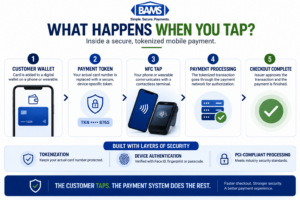
Mobile wallet payments use NFC and tokenized payment credentials to move a transaction securely from the customer’s device through the payment network.
This is an important update to the original explanation.
Modern digital wallets generally use payment tokenization. Instead of sending the customer’s actual primary account number through the transaction, the wallet uses a digital token that represents the underlying card.
Visa explains that when an eligible card is added to a digital wallet, its 16-digit account number can be replaced by a device-specific payment token. Adding the same card to a phone and a tablet can even produce separate device credentials.
That limits exposure of the underlying card information during payment.
Wallet transactions can also require authentication such as Face ID, a fingerprint, device passcode or another approved verification method.
That combination of tokenization and device authentication helps digital wallets provide a fast checkout experience without requiring the merchant to receive the customer’s actual card number from the wallet.
How Do Merchants Accept Digital Wallets In Person?
For an in-person transaction, the merchant generally needs a contactless payment terminal that supports near-field communication (NFC).
The customer brings a compatible card, smartphone or wearable close to the NFC reader. The device and terminal exchange the payment credential over a very short distance, and the transaction follows the normal authorization process.
The original version of this article also referenced magnetic secure transmission, or MST. That technology played a larger role in earlier mobile-payment systems. In 2026, NFC is the standard technology merchants should focus on when evaluating modern contactless acceptance.
BAMS’ current EMV and contactless payment solutions support chip cards, tap-enabled cards and mobile wallets including Apple Pay and Google Pay through compatible terminals.
How Do Merchants Accept Digital Wallets Online?
Online acceptance works differently because there is no physical tap.
The merchant’s eCommerce platform, gateway and processor need to support the wallet. Once properly configured, an eligible shopper may see an Apple Pay or another supported wallet button directly in the checkout.
The customer can then select the wallet, authenticate the transaction and use stored payment and, where supported, shipping information without completing a traditional card-entry form.
This is one reason digital wallets can be particularly useful on smartphones. Typing a card number, expiration date, security code, billing address and shipping information onto a small screen creates more opportunities for friction.
BAMS supports Apple Pay acceptance for compatible eCommerce environments and can help merchants integrate wallet payments into their existing payment setup.
Digital Wallets and Mobile Checkout Are Not the Same Thing
It is easy to treat “mobile payment” and “digital wallet” as interchangeable terms, but they describe different things.
A digital wallet is a payment method.
A mobile checkout describes the environment where the customer is making the purchase.
A customer shopping in a mobile browser could manually enter a card, use a stored credential, select Apple Pay or complete another supported payment method. All of those are mobile transactions, but only some are digital-wallet transactions.
That distinction becomes important when designing the checkout experience.
2. Browser-Based Mobile Web Payments
Browser-based mobile payments use the same basic eCommerce infrastructure as purchases completed on a desktop computer, but the shopping and payment experience is optimized for smartphones and tablets.
The customer browses a mobile website, adds products to a cart and completes payment through the store’s online checkout.
That payment might involve manually entering card information, selecting saved payment credentials or using an express checkout option.
Unlike in 2021, simply having a website that technically loads on a phone is not enough. Mobile shoppers expect the entire purchase journey to work properly on a smaller screen.
Mobile Optimization Has to Extend Through Checkout
A mobile-friendly store should make it easy to browse products, select options, view the cart and complete checkout without zooming, excessive scrolling or repeatedly correcting form fields.
Useful mobile checkout practices include:
- Large buttons and tap targets
- Short, clearly labeled checkout forms
- Address autocomplete where appropriate
- Guest checkout
- Clear shipping costs before the final payment screen
- Wallet and express checkout options
- Easy-to-read error messages
- A checkout that loads quickly on mobile connections
Each additional step creates another opportunity for the shopper to stop.
This is why merchants should evaluate mobile payments as part of their broader eCommerce payment strategy, not as a separate add-on.
Express Checkout Is More Accurate Than “One-Click Checkout”
The original article recommended one-click checkout as a best practice. The idea is still useful, but express checkout is a better description in 2026.
A merchant should not necessarily eliminate the cart or order review completely. Customers may still need to confirm quantity, shipping, taxes or other purchase details.
The goal is to eliminate unnecessary entry.
If the payment method can securely provide the information the merchant needs, the customer should not have to type the same information again simply because they are using a phone.
Tokenization Can Improve Mobile Checkout Security
Tokenization is not limited to digital wallets.
Modern online payment environments can replace sensitive card credentials with tokens for saved cards, recurring payments and other card-not-present transactions.
Visa describes tokenization as replacing sensitive payment information with a unique digital identifier so the actual card data does not need to remain exposed throughout the payment flow.
For merchants, this can help reduce sensitive-data exposure while supporting smoother repeat purchases.
Security still depends on the complete payment environment. Merchants accepting online payments also need to understand their PCI DSS responsibilities and ensure the gateway, checkout and other systems involved in payment acceptance are properly secured.
3. QR Code Payments
QR codes are matrix-style barcodes that a smartphone camera can quickly read. The code can contain a web address, payment information or instructions that send the customer into a specific payment flow.
For mobile payments, QR codes can work in several ways.
A merchant might display a code that opens a payment page on the customer’s phone. A restaurant might put a QR code on the table or check so a guest can view the bill and pay without waiting for a terminal. A merchant’s app could also scan a checkout-generated QR code and complete payment through credentials already stored in the app.
Merchant-Presented vs Customer-Presented QR Codes
It helps to separate QR payments into two basic models.
Merchant-presented: The business displays a QR code and the customer scans it. The code may open a payment page, invoice or wallet experience on the customer’s phone.
Customer-presented: The customer’s app generates a payment code or credential that the merchant scans at checkout.
Either approach can eliminate some physical payment hardware depending on how the system is implemented.
Where QR Payments Fit in 2026
QR payment adoption varies considerably by market and payment ecosystem.
In the United States, NFC contactless payments and conventional card checkout remain more familiar for many general retail transactions. QR codes can still be particularly useful where opening a mobile payment experience is more practical than installing a traditional terminal.
Restaurants, events, invoices, charitable giving, pop-up sales and app-based retail ecosystems are all examples where QR payments can make sense.
Merchants should not add QR payments simply because the technology exists. They should add them when the QR flow actually removes friction for the customer.
Mobile Payments Have Changed on the Merchant Side Too
Mobile payment innovation is no longer limited to the customer’s phone.
Newer payment technology can turn a merchant’s compatible smartphone into a contactless acceptance device. The customer can tap a contactless card, smartphone or wearable directly against the seller’s NFC-enabled phone rather than using a separate countertop terminal.
Visa refers to this approach as Tap to Phone. The company reported significant global adoption growth in 2025, particularly among small businesses, mobile sellers and merchants operating without traditional checkout counters.
This creates another meaning for “mobile payments”: the customer’s payment method can be mobile, the merchant’s acceptance hardware can be mobile, or both can happen at the same time.
BAMS also offers mobile merchant services for businesses that need to accept payments outside a traditional fixed checkout environment.
Which Mobile Payment Method Should a Merchant Offer?
There is no reason most merchants need to pick only one.
| Mobile Payment Type | How It Works | Best Fit |
|---|---|---|
| Digital Wallet | Customer pays using tokenized payment credentials through a compatible digital wallet. | Fast online checkout and NFC contactless payments in person. |
| Mobile Web Checkout | Customer completes an eCommerce purchase through a smartphone or tablet browser. | Businesses selling products or services through a mobile-responsive website. |
| QR Code Payment | Customer scans a QR code to open a secure payment page or compatible payment experience. | Restaurants, invoices, events, pop-up sales and other flexible checkout environments. |
A strong payment setup can support several of these experiences simultaneously.
An eCommerce customer might manually enter a credit card or use Apple Pay. A customer visiting the same merchant in person might tap that same card or digital wallet at the terminal. Another customer could receive a payment link or scan a QR code.
The merchant account sits behind those experiences and ultimately routes the transactions through the appropriate payment infrastructure.
What Merchants Need to Accept Mobile Payments
The requirements depend on where the payment happens.
- For in-person mobile wallets: use a compatible NFC contactless payment terminal or supported mobile acceptance solution.
- For online mobile payments: use a mobile-responsive eCommerce checkout connected to a secure payment gateway.
- For digital wallets: confirm that the eCommerce platform, gateway and processor support the wallet you want to offer.
- For QR payments: make sure the QR code connects customers to a secure payment system rather than simply adding another step to checkout.
Whichever method the business chooses, security, PCI compliance, reporting and settlement should remain part of the decision.
Do Not Forget What Happens After the Tap
Mobile payment convenience is primarily a front-end benefit. Merchants also need to evaluate what happens after the customer approves the transaction.
How quickly is the payment authorized? How does the transaction appear in reporting? When will the batch settle? When will the money reach the business bank account? What happens if the customer later disputes the transaction?
A digital wallet does not determine the merchant’s funding schedule by itself. The processor and merchant-account configuration still matter.
That is why mobile acceptance should be evaluated as part of the entire payment system instead of as a checkout button in isolation.
Mobile Payments in 2026: What Changed Since 2021?
| 2021 View | 2026 Update |
|---|---|
| More than 80% of U.S. adults owned smartphones. | Pew now reports smartphone ownership at 91% of U.S. adults. |
| Digital wallets were still described as rapidly emerging. | Digital wallets are now an established part of online and contactless payments. |
| Apple Pay was forecast to reach a certain share by 2025. | Past forecasts are no longer useful for evaluating today’s checkout. Merchants should look at their own customer and device data. |
| NFC and MST were discussed together for wallet acceptance. | NFC is the contactless technology merchants should focus on for modern tap payments. |
| One-click checkout was the goal. | Express checkout and reduced form entry are better ways to think about lowering mobile friction. |
| The focus was mainly on customers paying with phones. | Compatible smartphones can now also act as merchant contactless acceptance devices. |
Frequently Asked Questions
What are the main types of mobile payments?
Three common types are digital-wallet payments, browser-based mobile web payments and QR code payments. Other mobile payment methods include payment links, in-app payments and peer-to-peer payment services.
What is a digital wallet?
A digital wallet is a software-based payment tool that lets users access eligible payment credentials from a smartphone, tablet, computer or wearable. Modern wallets generally use tokenization rather than sending the customer’s actual card number during payment.
What technology is used for contactless mobile payments?
Modern in-person mobile-wallet payments generally use NFC, or near-field communication. The customer brings a compatible smartphone or wearable close to the merchant’s contactless reader to initiate the transaction.
Can an EMV terminal accept Apple Pay?
Many modern EMV terminals also include NFC contactless capability and can accept supported mobile wallets such as Apple Pay. Merchants should confirm that contactless functionality is enabled on their specific equipment.
Are digital wallets more secure than manually entering a card?
Digital wallets can reduce exposure of the underlying card number through tokenization and can require device authentication such as biometrics or a passcode. Security still depends on the complete checkout and payment environment.
Do customers need an app for browser-based mobile payments?
No. A customer can complete a normal eCommerce checkout directly through a mobile browser. An app or digital wallet may provide additional express-payment options but is not required for a standard mobile web transaction.
How do QR code payments work?
A QR code can direct the customer to a secure payment page or interact with a payment app. Depending on the system, either the customer scans a merchant’s code or the merchant scans a code generated by the customer’s app.
Can a smartphone accept contactless card payments?
Supported smartphones can increasingly act as contactless acceptance devices through Tap to Phone or similar technologies, allowing customers to tap compatible cards, smartphones or wearables against the merchant’s phone.
Does BAMS support mobile payments?
Yes. BAMS currently supports mobile merchant services, EMV and NFC contactless hardware, payment gateways and digital wallet acceptance including Apple Pay for compatible payment environments.
Give Customers More Ways to Pay
A variety of other mobile payment systems exist today, including payment links, in-app payments, peer-to-peer services and emerging account-based payment options. The exact technology will continue to change, but the customer expectation behind it is unlikely to reverse: people want checkout to be fast, familiar and easy on whatever device they already have in their hands.
Merchants seeking to leverage mobile payments can use a BAMS merchant account with compatible point-of-sale systems, eCommerce platforms and modern payment hardware. BAMS’ current EMV solutions support chip, NFC contactless and mobile-wallet transactions, while its eCommerce and gateway integrations support mobile checkout online.
To find out more about how BAMS can expand your payment options and improve your customers’ mobile shopping experience, request your free five-point price comparison today.