
Why It’s Important for Your Payment Processor to Offer a Free Authorize.net Gateway Setup
Last Updated on September 28, 2026 by Dimitri Akhrin
Your Payment Processor and Gateway Need to Work Together
Choosing Authorize.Net is only one part of building a reliable payment setup.
The payment processor behind the gateway also matters.
A merchant may have a capable gateway but still run into unnecessary problems if the processor cannot support the integration, help configure the account or troubleshoot issues when transactions do not move correctly between systems.
That is why businesses should ask more than whether a processor “offers Authorize.Net.”
The better question is whether the processor can help connect Authorize.Net with the merchant account and the business software the company already relies on.
TL;DR
- Authorize.Net support should go beyond simply providing gateway access – A payment processor should be able to help connect the gateway with the merchant account, existing software and payment workflows the business already uses.
- Integration compatibility should be confirmed before switching processors – Merchants should verify that their eCommerce platform, shopping cart, recurring billing system or other business software can continue working with Authorize.Net.
- Authorize.Net offers tools beyond basic online payment acceptance – The platform supports recurring billing, customer payment profiles, ACH and eCheck transactions, fraud management and transaction reporting.
- Gateway security does not eliminate the merchant’s PCI responsibilities – Businesses still need to understand how payment information enters their environment and which security responsibilities remain with them.
- Do not choose a processor based only on a free setup offer – Gateway fees, merchant account pricing, support, integration quality and ongoing payment costs matter more over the life of the account.

Strong Authorize.Net support should cover the complete integration from compatibility and setup through testing and ongoing troubleshooting.
What Does It Mean for a Payment Processor to Support Authorize.Net?
Supporting a payment gateway involves more than adding its name to a list of compatible products.
The processor and gateway need to work together so transactions can move from the merchant’s checkout or payment application into the broader processing environment.
A useful Authorize.Net payment processor should be able to help the merchant understand:
- Whether Authorize.Net works with the existing software
- How the merchant account connects with the gateway
- Which credentials or configuration settings are required
- How transactions should be tested before launch
- Who provides support if an integration problem appears
- Which gateway and processing fees apply
This becomes particularly important for established merchants that already have a functioning eCommerce store or business application.
Changing the payment processor should not automatically mean rebuilding every piece of technology surrounding the gateway.
Authorize.Net Supports More Than Basic Online Checkout
Authorize.Net can support several payment workflows within one gateway environment.
The Authorize.Net Developer Center documents functionality for payment transactions, customer profiles, recurring billing, eCheck transactions, in person payments, fraud management and transaction reporting.
That means Authorize.Net can be relevant to businesses that need more than a standard “Pay Now” button.
Depending on the integration, merchants may use it for:
- eCommerce payments
- Subscription billing
- Repeat customer transactions
- ACH and eCheck payments
- Virtual payment workflows
- In person acceptance
- Fraud review
- Transaction reporting
The specific configuration should reflect how the business actually collects payments.
Integration Compatibility Should Come Before the Processor Switch
One of the most important questions to answer before changing merchant services providers is whether the new processing relationship will work with the systems already in place.
BAMS maintains a directory of Authorize.Net certified integrations that businesses can use to review compatible software and applications.
Compatibility can matter across:
- eCommerce platforms
- Shopping carts
- Accounting systems
- Subscription tools
- POS environments
- Customer management systems
- Custom applications
For example, merchants using BigCommerce can review the BAMS guide explaining how to connect Authorize.Net with a BigCommerce store.
The goal should be to identify compatibility before opening the new merchant account rather than discovering an integration problem after the processor change begins.
Good Processor Support Can Make Authorize.Net Onboarding Easier
Gateway setup can involve several parties.
The merchant may have a website developer, shopping platform, payment gateway and processor involved in the same transaction flow.
That makes a clear onboarding process valuable.
BAMS’ current Authorize.Net integration process includes supplying merchant account credentials for configuration and running a test transaction before the setup moves into production.
A structured onboarding process can help confirm that:
- The merchant account is connected correctly.
- The gateway can submit transactions successfully.
- The merchant’s existing integration remains functional.
- Transaction reporting is working as expected.
- Problems are identified before customers encounter them.
The exact technical steps depend on the merchant’s environment but testing before launch should be part of any serious payment integration.
Customer Profiles Can Support Repeat Payments
Businesses with repeat customers may benefit from Authorize.Net customer profile functionality.
Authorize.Net states that customer profiles can securely store sensitive payment information on its servers so merchants can reference the profile during future transactions rather than requiring customers to enter the same information repeatedly.
This can be useful for businesses that:
- Process repeat purchases
- Bill customers at irregular intervals
- Manage ongoing customer relationships
- Need stored payment profiles
- Want to simplify repeat checkout
The functionality can also reduce the need for merchants to build their own payment credential storage systems.
Recurring Billing Can Be Managed Through the Gateway
Authorize.Net also supports Automated Recurring Billing for merchants that charge customers according to a recurring payment schedule.
Authorize.Net’s recurring billing documentation explains that merchants can create scheduled card or eCheck payments while sensitive payment information remains on Authorize.Net’s secure servers.
Potential use cases include:
- Memberships
- Subscriptions
- Installment plans
- Recurring professional services
- Regular customer payments
Merchants should still make sure their billing practices follow applicable card network rules and that customers have properly authorized recurring transactions.
ACH and eCheck Can Expand Payment Options
Authorize.Net also supports electronic check transactions through eCheck.Net.
Its developer documentation explains that customers with U.S. bank accounts can use ACH transactions as another payment option.
This can be useful for businesses that accept larger payments or want to offer another method besides cards.
ACH transactions work differently from card transactions.
Authorize.Net notes that eCheck transactions do not receive the same immediate authorization as card payments and can require additional time to clear before funding.
Merchants should therefore understand the settlement and return characteristics of ACH rather than treating it exactly like card acceptance.
Fraud Management Should Be Part of the Integration
Authorize.Net includes fraud management capabilities that can help merchants identify transactions that require additional review.
Its developer tools support reviewing, approving or declining transactions that have been held for fraud review.
That can help merchants build fraud controls into the payment workflow instead of treating fraud detection as something that happens only after an order has been accepted.
Useful controls may consider factors such as:
- Address verification
- Card verification results
- Transaction velocity
- Order characteristics
- Merchant configured fraud rules
The settings should be appropriate for the merchant’s business model.
Controls that are too loose can expose the business to unnecessary fraud while controls that are too aggressive can block legitimate customers.
Payment Security Still Belongs to Both the Provider and the Merchant
A secure gateway can reduce a merchant’s direct exposure to sensitive payment information but it does not automatically make the business PCI compliant.
The PCI Security Standards Council’s merchant resources explain that PCI DSS responsibilities depend on the merchant’s payment environment and the role of third party service providers.
Merchants should understand:
- Where card information is entered
- Which system hosts the payment form
- Which scripts can affect checkout
- Whether merchant systems touch payment data
- Which service providers are involved
- What PCI validation applies to the business
The gateway is one part of that security environment.
Why a Strong Processor Relationship Still Matters
A payment gateway can be technically capable and still create frustration if nobody takes ownership when something goes wrong.
Consider a failed checkout.
The issue might originate with:
- The eCommerce platform
- The gateway
- The merchant account
- The processor
- The card network
- The issuing bank
A merchant should know who to contact and how the issue will be investigated.
That is one reason processor support matters even when the merchant uses a widely established gateway.
A provider that understands the integration can help determine which part of the payment chain needs attention rather than leaving the merchant to coordinate every vendor independently.
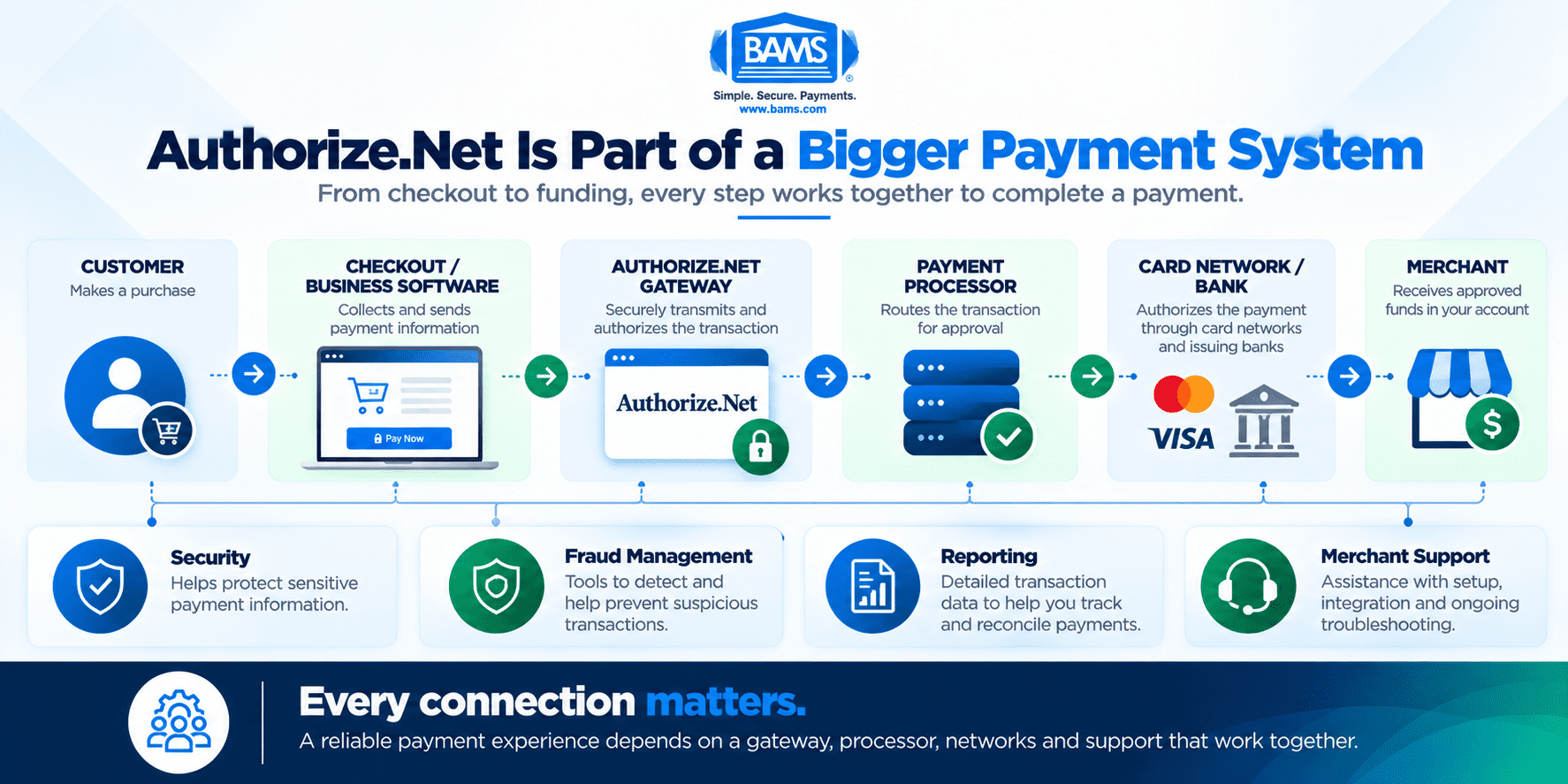
Authorize.Net is one part of a larger payment environment connecting checkout technology with processors, networks, banks and merchant funding.
Authorize.Net Is Part of a Larger Payment Environment
A gateway should not be evaluated in isolation.
Visa Acceptance Solutions describes Authorize.Net as a gateway that can streamline payment acceptance, support fraud management and store sensitive payment information securely. Visa also emphasizes that gateways, processors and merchant accounts work together as parts of the broader payment process.
That means the gateway decision should account for the systems around it.
An eCommerce merchant may need an eCommerce merchant account alongside the gateway while another business may require several online and physical payment channels.
BAMS also provides an integrated payment gateway for merchants whose requirements are better suited to another gateway environment.
Authorize.Net is one strong option but the right choice depends on how the merchant accepts payments and which applications need to connect with the processor.
Free Setup Should Not Be the Main Reason You Choose a Processor
The original version of this article focused on finding a processor that offered Authorize.Net setup at no cost.
That is no longer the strongest way to evaluate the relationship.
A one time setup fee can matter but ongoing payment costs usually matter much longer.
Merchants should review:
- Gateway monthly fees
- Gateway transaction charges
- Processor markup
- Merchant account fees
- PCI related expenses
- Chargeback fees
- Optional gateway services
BAMS offers transparent interchange plus pricing for merchants that want clearer visibility into processing costs.
The right payment relationship should combine appropriate technology with competitive total pricing rather than relying on one free setup promotion.
What Should You Ask a Processor About Authorize.Net?
| Question | Why It Matters |
|---|---|
| Do you support Authorize.Net? | Confirms that the gateway can connect with the merchant account. |
| Will my current integration continue working? | Helps avoid unnecessary changes to existing business software. |
| Who handles onboarding? | Establishes who will configure and test the new payment relationship. |
| Who handles technical problems? | Provides a clear support path if transactions stop working correctly. |
| What gateway fees apply? | Setup cost is only one part of the ongoing gateway expense. |
| What merchant account fees apply? | The processor’s pricing affects the complete payment cost. |
| Which Authorize.Net features can I use? | Recurring billing, customer profiles and other functionality may matter to the business. |
| What are my PCI responsibilities? | The gateway setup can affect the merchant’s payment security environment. |
| Can you support future integrations? | The payment setup should be able to grow as the business changes. |
Frequently Asked Questions
Why does my payment processor need to support Authorize.Net?
The processor and gateway need to work together so payment transactions can move from the merchant’s checkout or application into the processing environment. Processor support can also make onboarding and troubleshooting easier.
Can Authorize.Net support recurring payments?
Yes. Authorize.Net provides Automated Recurring Billing for eligible card and eCheck payment schedules.
Can Authorize.Net store customer payment profiles?
Yes. Authorize.Net customer profiles allow merchants to reference securely stored customer payment information for future transactions.
Does Authorize.Net support ACH?
Yes. Authorize.Net eCheck.Net supports ACH transactions for eligible U.S. bank accounts.
Does Authorize.Net have fraud management tools?
Yes. Authorize.Net supports fraud management functionality including the ability to review transactions that have been held for fraud evaluation.
Does Authorize.Net automatically make a merchant PCI compliant?
No. The merchant still has PCI DSS responsibilities based on its payment environment and how the gateway is integrated.
Can I keep Authorize.Net if I switch payment processors?
Potentially. It depends on processor compatibility and the merchant’s existing gateway configuration. BAMS supports Authorize.Net and can review whether the current integration can be connected to a BAMS merchant account.
Where can I see which systems work with BAMS and Authorize.Net?
BAMS maintains an Authorize.Net certified integrations directory that includes compatible applications and business software.
Should I choose a processor because Authorize.Net setup is free?
Not based on that factor alone. Merchants should compare ongoing gateway costs, merchant account pricing, integration support, security and payment features before choosing a provider.
Sources
- Authorize.Net Developer Center – Developer Guides
- Authorize.Net Developer Center – Recurring Billing
- PCI Security Standards Council – Merchant Resources
- Visa Acceptance Solutions – Secure Global Payments and Authorize.Net
Choose the Processor Behind the Gateway Carefully
Authorize.Net provides a broad set of payment capabilities but merchants still depend on the surrounding payment relationship to make those capabilities work effectively.
Compatibility, onboarding, support, pricing and security should all be evaluated before changing processors.
Businesses considering BAMS can review the Authorize.Net certified integrations currently supported by BAMS and determine whether their existing applications can remain part of the payment environment.
If you want to compare your current Authorize.Net and merchant account costs with BAMS, request a free five-point Merchant Account Price Comparison.


