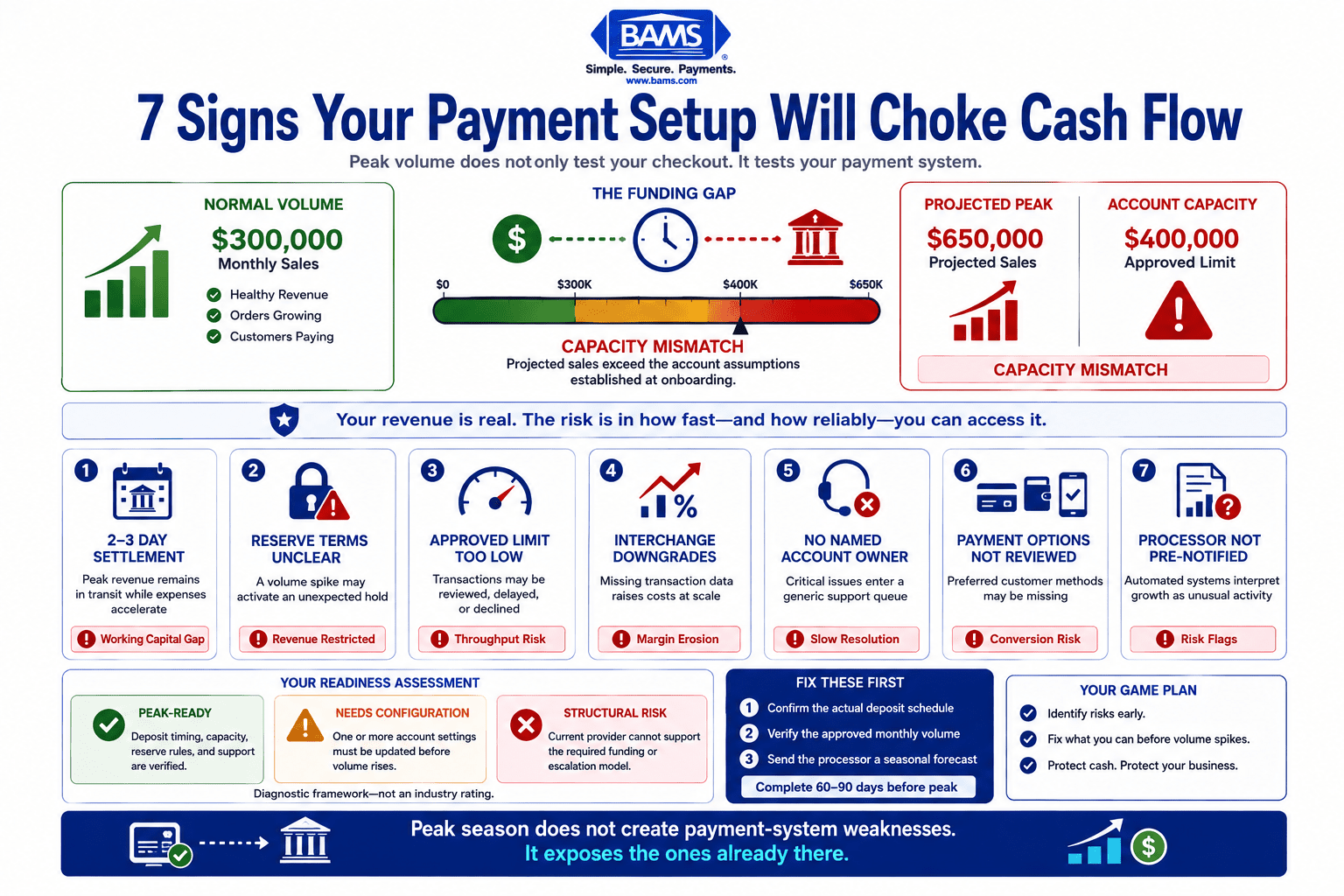
7 Signs Your Payment Setup Will Choke Cash Flow
A pre-season diagnostic for the back-end issues that lock up revenue during peak volume
Learn seven diagnostic signals hiding in your payment configuration — from deposit timing to reserve triggers — that predict whether your setup will support or suffocate cash flow during the holiday rush. Built for eCommerce managers who already have a processor and need to audit it before volume spikes.
TL;DR
- Deposit timing is a cash flow lever – If your processor settles in 2 to 3 days instead of next-day, peak season revenue gets trapped in transit while you need capital for inventory and fulfillment.
- Volume spikes trigger risk flags – Processors treat unexpected transaction surges as threats, not sales events. Pre-notify your processor with a seasonal forecast 30 to 60 days before peak to prevent automated reserve holds.
- Your effective rate rises with volume if data quality drops – Interchange downgrades from missing Level 2/3 data fields silently inflate costs at scale. Audit your gateway’s data passthrough before volume climbs.
- Start with three fixes – Check your deposit timeline, verify your approved volume cap, and send a seasonal forecast to your processor. These three actions address the most common causes of holiday cash flow disruption.
- The pre-season window is diagnostic, not decorative – Structural limitations like slow settlement, unnamed support contacts, and outdated volume caps can’t be fixed mid-rush. Audit now or absorb the cost later.
Your Payment Setup Is a Ticking Clock Before Peak Season
Seasonal volume spikes place additional stress on payment systems, settlement schedules, and processor risk controls, making pre-season payment configuration an important operational priority for eCommerce businesses. For eCommerce managers, that surge should mean a cash windfall. Instead, it often triggers a cash flow crisis nobody planned for.
The problem isn’t checkout UX or site speed. It’s what happens after the sale: delayed deposits, surprise reserve holds, processor risk flags, and rate structures that quietly inflate when volume spikes. Most seasonal volume optimization guides skip these back-end mechanics entirely, focusing on conversion tactics while your capital sits locked in a settlement queue.
This gap between revenue earned and cash accessible is where holiday seasons break eCommerce operations. And the window to fix it isn’t during the rush. It’s right now, in the weeks before volume climbs.
What This Guide Covers (and What It Doesn’t)
This is for eCommerce managers at established online businesses running 10 to 50 employees who already have a payment system in place. You’re not choosing your first processor. You’re trying to figure out why your current one might fail you when it matters most.
This guide does not cover checkout design, cart abandonment tactics, or marketing strategy. It focuses on seven diagnostic signals inside your payment configuration, deposit timing, and account structure that predict whether your setup will support or suffocate cash flow during peak season.
How These Seven Signs Were Selected
Each signal was chosen because it meets three criteria: it’s invisible during normal volume, it becomes acute during seasonal spikes, and it’s fixable before peak season if caught early. These aren’t theoretical risks. They’re the specific account configuration issues, reserve triggers, and settlement gaps that blindside growing eCommerce brands every holiday cycle.
Seven Signs Your Payment Setup Will Choke Your Cash Flow

Peak volume does not only test your checkout. It tests whether your payment account, settlement schedule, and risk settings were built to handle growth.
1. Your Deposit Timeline Stretches Beyond One Business Day
Why it matters: During peak weeks, eCommerce order volume can rise 2.5x to 4x compared to baseline months. If your processor settles funds on a two or three-day cycle, you’re financing inventory replenishment, ad spend, and fulfillment labor out of pocket while your revenue sits in transit. As James Hadley of Deloitte noted, liquidity visibility becomes critical as businesses move into seasonal peaks. A two-day delay on $5,000 in daily sales is manageable. That same delay on $20,000 per day creates a gap that forces difficult decisions.
What it looks like today: Many processors still default to 48 to 72-hour settlement windows, especially for accounts they classify as higher risk or newer. Some batch settlements only on business days, meaning Friday sales don’t arrive until Tuesday or Wednesday.
How to apply it: Check your current settlement schedule in your processor dashboard or your most recent statement. If you’re not receiving funds the next business day, contact your processor to request accelerated funding. If they can’t offer it, that’s a structural limitation worth addressing before volume climbs.
2. You Have No Idea What Triggers a Reserve Hold on Your Account
Why it matters: Processors use rolling reserves and holdbacks as risk mitigation tools. When your transaction volume suddenly doubles or triples, many processors interpret that spike as a risk event, not a sales event. The result: a percentage of your revenue gets held in reserve without warning, sometimes for 90 to 180 days.
What it looks like today: Reserve triggers are buried in your merchant agreement, often in vague language about “unusual activity” or “material changes in processing patterns.” Most eCommerce managers don’t read these clauses until after money is already held.
The Office of the Comptroller of the Currency’s Merchant Processing Handbook explains how merchant acquirers evaluate processing risk, reserve requirements, and ongoing account monitoring as part of merchant processing relationships.
How to apply it: Pull your merchant agreement and search for the terms “reserve,” “holdback,” and “material change.” Identify the specific volume thresholds or chargeback ratios that activate reserves. Then contact your processor to pre-notify them of expected seasonal volume increases. A documented heads-up can prevent automated holds
3. Your Processing Volume Cap Hasn’t Been Updated Since You Signed
Why it matters: When you opened your merchant account, your processor approved you for a monthly volume ceiling based on your sales at that time. If your business has grown (or if peak season pushes you past that ceiling), transactions above the cap can be declined, delayed, or flagged for manual review. This creates a bottleneck at the exact moment you need frictionless throughput.
What it looks like today: Volume caps aren’t always visible in your dashboard. They live in your original application or underwriting file. Many eCommerce managers don’t realize they’ve been operating near their cap until a batch of transactions gets held.
How to apply it: Request your current approved monthly volume limit from your processor. Compare it to your projected peak-season revenue using last year’s data plus your growth rate. If the gap is significant, submit a volume increase request at least 30 days before your peak period begins. Underwriting reviews take time.
4. Your Effective Rate Climbs When Volume Increases (and You Don’t Know Why)
Why it matters: A payment system review often reveals that effective processing rates creep upward during high-volume months. This happens because of interchange downgrades: transactions that fail to pass required data fields (like Level 2 or Level 3 data) get routed to higher-cost interchange categories. More transactions means more downgrades, which means higher costs per sale at scale.
What it looks like today: If you’re on interchange-plus pricing, your markup stays flat, but the interchange component fluctuates based on data quality. Many gateways silently drop tax, freight, or line-item fields before they reach the card networks, causing preventable cost inflation. For a deeper breakdown, see this analysis of the data gap behind your eCommerce rates.
Visa publishes merchant guidance explaining how transaction data quality affects payment processing and merchant operations, making it an important resource when reviewing payment acceptance and processing performance. Learn more in Visa’s payment processing guidance.
How to apply it: Compare your effective rate (total fees divided by total volume) across three months of statements. If it rises with volume, request a transaction-level detail report and look for interchange downgrades. Work with your processor to ensure your gateway passes the data fields required for optimal qualification.
5. You Can’t Name Your Processor’s Escalation Contact
Why it matters: When a batch fails to settle on Black Friday morning, a generic support ticket won’t cut it. A large majority of merchants say payment failures directly hurt customer satisfaction and repeat purchase intent. The speed at which you resolve a processing issue during peak season is determined by whether you have a direct line to someone who can actually intervene, not a queue number.
What it looks like today: Most processors route support through tiered call centers. Ecommerce managers often discover during a crisis that their “dedicated support” is a shared team with no context on their account. Providers like BAMS assign dedicated account managers who know your account history and can act on issues in real time, which becomes a meaningful difference when minutes of downtime translate to lost holiday revenue.
How to apply it: Before peak season, identify your processor’s escalation path. Get a direct phone number or email for a named contact. If your processor can’t provide one, document that gap. Test the response time now, not during a crisis.
6. Your Payment Method Mix Hasn’t Been Audited This Year
Why it matters: Offering payment methods that align with customer preferences helps reduce checkout friction while ensuring merchants can balance customer experience with processing costs and operational efficiency. During peak season, that abandonment rate compounds across thousands of additional sessions. Mobile wallet usage increased 17% year over year in recent peak retail periods. If your checkout still only supports cards and PayPal, you’re leaving conversion on the table at the worst possible time.
What it looks like today: Payment method preferences shift faster than most eCommerce teams update their checkout. Apple Pay, Google Pay, buy-now-pay-later options, and regional methods all carry different interchange profiles and customer expectations. Each one also has its own processing cost structure.
Consumer payment preferences continue to evolve, making regular payment method reviews an important part of checkout optimization. Mastercard discusses these trends in its overview of one-click checkout and digital payment experiences.
How to apply it: Review your checkout analytics to identify where abandonment spikes. Cross-reference with your current payment method offerings. Add high-demand methods at least four to six weeks before peak season to allow for testing and fraud rule adjustments. Evaluate each method’s processing cost alongside its conversion lift.
7. You Have No Seasonal Forecast Tied to Your Processing Account
Why it matters: Sharing accurate seasonal forecasts with your processor helps align underwriting expectations with anticipated transaction volume, reducing the likelihood that legitimate growth will trigger unnecessary risk reviews. But most eCommerce teams build sales forecasts without connecting them to their payment processing configuration. Your forecast should inform your processor about expected volume, average ticket size shifts, and new product launches, because all three affect underwriting risk models and interchange qualification.
What it looks like today: Transaction volume forecasting lives in marketing or finance spreadsheets. It rarely gets shared with the processor. This disconnect means your processor’s risk systems react to your growth as an anomaly instead of an expected pattern. The result is holds, reviews, and friction. Understanding what a merchant services partner can do for you starts with recognizing that proactive communication prevents reactive penalties.
How to apply it: Build a one-page seasonal forecast that includes projected monthly volume, expected average transaction size, and any new sales channels or product categories. Send it to your processor 30 to 60 days before peak season. Ask them to confirm your account is configured to handle the projected load without triggering automated risk actions.
The Pattern Across All Seven Signs
Every signal on this list shares a common root: the gap between what your payment system was configured to handle and what peak season actually demands. Volume changes don’t just stress technology. They stress underwriting assumptions, risk models, settlement schedules, and data pipelines that were calibrated for your baseline, not your ceiling.
The second pattern is that these problems are all preventable with advance communication. Processors aren’t adversaries. But their automated systems treat unexpected volume spikes as threats. When you pre-notify, document, and forecast, you convert your growth from a red flag into a green light. The merchants who treat their processor relationship as a seasonal planning input (not just a vendor invoice) are the ones who avoid cash flow surprises.
Where to Start: Prioritizing Your Payment System Review
The safest time to fix settlement, reserve, capacity, and support problems is before seasonal sales begin—not while revenue is already at risk.
You don’t need to fix all seven before the next peak season. Start with three: check your deposit timeline (sign 1), verify your volume cap (sign 3), and send a seasonal forecast to your processor (sign 7). These three actions address the most common causes of cash flow disruption during volume spikes and take the least time to execute.
If your current processor can’t accommodate next-day funding, transparent reserve policies, or a named escalation contact, those are structural limitations, not configuration tweaks. That’s when the conversation shifts from optimization to evaluation. The pre-season window is the right time for that assessment, not the week before Black Friday.
Frequently Asked Questions
When should businesses review their payment processing setup before peak seasons?
Start your payment system review 60 to 90 days before your expected volume increase. This gives you enough time to request volume cap increases (which require underwriting review), test new payment methods, and communicate seasonal forecasts to your processor. Waiting until 30 days out limits your options if structural changes are needed.
How can payment processors optimize their services for seasonal fluctuations in volume?
The most impactful optimizations happen at the account configuration level: adjusting approved volume ceilings, ensuring gateway data fields pass Level 2 and Level 3 information to prevent interchange downgrades, and setting up accelerated settlement schedules. These changes require coordination between you and your processor, not just a software update.
What is a seasonal volume playbook in merchant services optimization?
A seasonal volume playbook is a pre-peak checklist that aligns your payment account settings with your projected sales activity. It typically includes a volume forecast shared with your processor, a review of reserve and holdback triggers, an audit of your payment method mix, and confirmation of your escalation contacts for issue resolution during high-traffic periods.
How can businesses use data to forecast transaction volume for seasonal planning?
Start with last year’s monthly transaction volume and revenue data from your processor statements. Layer in your year-over-year growth rate and any planned promotions or product launches. The output should be a simple projection of monthly volume, average ticket size, and peak daily transaction counts. Share this directly with your processor to prevent automated risk flags.
Why do processing costs increase during high-volume months even with interchange-plus pricing?
Interchange-plus pricing keeps your processor’s markup constant, but the interchange component (set by card networks) varies based on transaction data quality. When volume spikes, more transactions may fail to include required data fields like tax amounts or shipping details. These “downgraded” transactions route to higher-cost interchange categories, inflating your effective rate even though your markup hasn’t changed.
What causes a processor to place a reserve hold on a merchant account?
Reserve holds are triggered by risk signals in your account activity. Common triggers include sudden volume increases that exceed your approved processing cap, rising chargeback ratios, large average ticket size changes, or selling in new product categories. These triggers are defined in your merchant agreement. Reviewing and understanding them before peak season is the single most effective way to avoid surprise holds.
Sources
- https://corporate.visa.com/en/solutions/acceptance/process-payments.html
- https://www.mastercard.com/us/en/news-and-trends/stories/2025/one-click-checkout.html
- https://www.occ.treas.gov/publications-and-resources/publications/comptrollers-handbook/files/merchant-processing/pub-ch-merchant-processing.pdf


