
7 Apple Pay Integration Signals That Reveal Cash Flow
Last Updated on August 14, 2026 by Dimitri Akhrin
The deposit timing and funding schedule diagnostics eCommerce managers miss before signing with a processor
Learn to evaluate Apple Pay integrations through cash flow timing, interchange qualification, and chargeback economics. This diagnostic framework surfaces the deposit and funding signals that actually move your P&L.
TL;DR
- Deposit timing varies by payment method – Some processors delay settlement on tokenized Apple Pay transactions even when they advertise next-day funding. Audit your deposit logs against your transaction records to find gaps.
- Interchange savings aren’t automatic – Apple Pay can qualify for 0.5–1% lower interchange fees, but only if your processor passes the right data fields and uses interchange-plus pricing. Flat-rate pricing hides these savings from you.
- Chargeback defense needs Apple Pay’s metadata – Biometric authentication data and tokenization proof should flow automatically into dispute responses. Pair this with pre-dispute alerts to resolve issues before they become costly chargebacks.
- Demand method-level reporting – If your processor can’t break out costs, authorization rates, and chargeback rates by payment method (Apple Pay vs. standard card entry), you can’t verify whether your integration is actually saving money.
- Negotiate rate reviews tied to payment mix – As Apple Pay adoption grows among your customers, your risk profile improves. Your contract should allow rate renegotiation when wallet transactions cross a meaningful threshold of total volume.
The Cash Flow Signals Behind Your Apple Pay Integration
Most eCommerce managers evaluate an Apple Pay integration by asking one question: does it speed up checkout? That matters. But it skips the financial mechanics that determine whether faster checkout actually translates to faster deposits, lower fees, and fewer chargebacks eating into your margin.
The gap is significant. Apple Pay on the Web delivers lower interchange fees compared to standard payment methods. than standard card transactions and pushes fraud rates below 0.05%. Yet those savings only materialize if your payment gateway and processor handle tokenized transactions correctly, fund you on a schedule that matches your operating reality, and give you the data to defend disputes before they become losses.
Apple’s official Apple Pay documentation explains how tokenization and device authentication work together to secure wallet transactions while maintaining a streamlined checkout experience.
This isn’t a feature comparison. It’s a diagnostic framework for evaluating processors through the lens that actually moves your P&L: cash flow timing, interchange qualification, and chargeback economics.
Visa Token Service explains how network tokenization protects payment credentials throughout the transaction lifecycle while supporting secure digital wallet transactions.

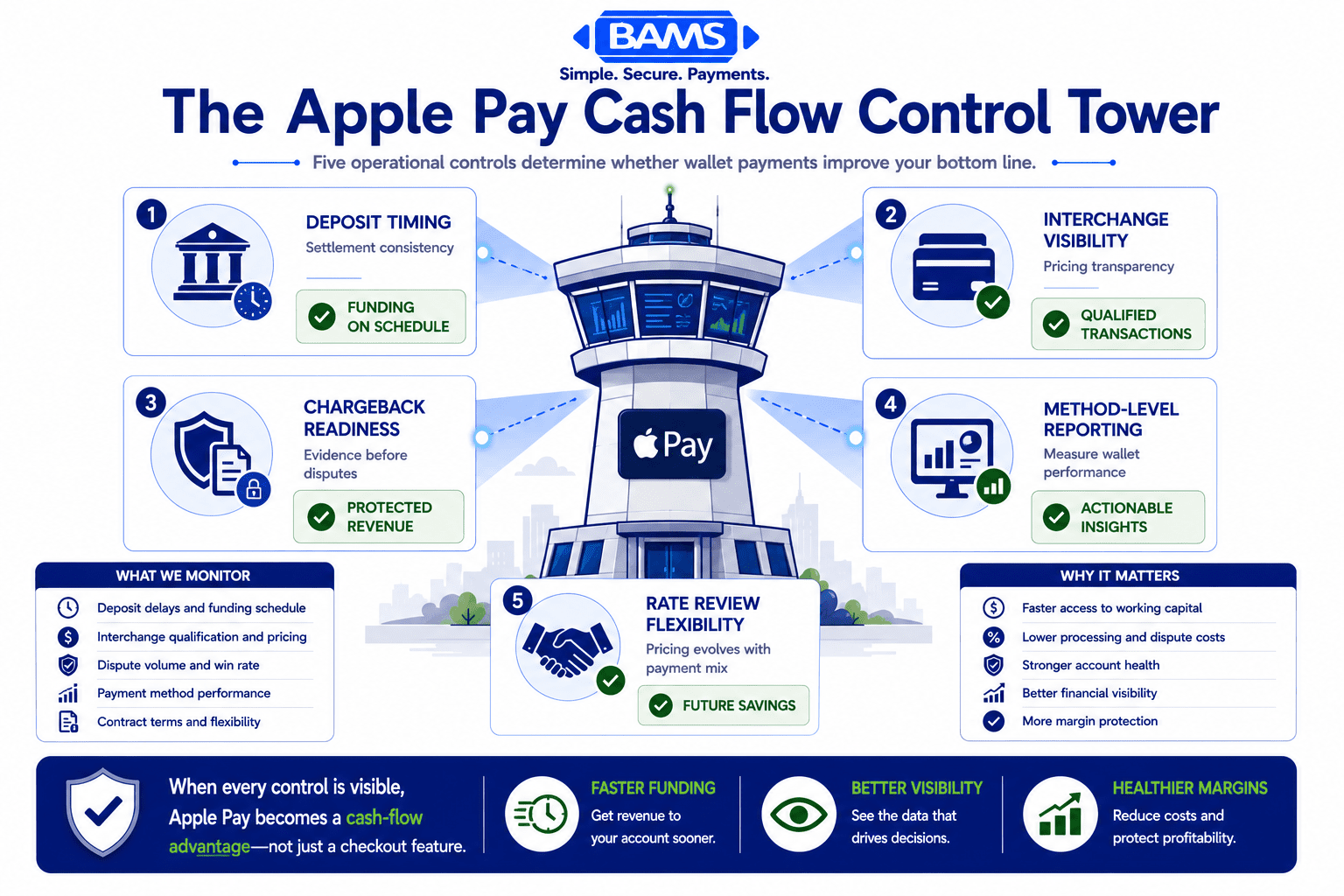
A successful Apple Pay integration depends on more than checkout speed. Funding, pricing, reporting, and dispute workflows determine whether the financial benefits reach your business.
Who This Is For (and What It Skips)
This list is built for eCommerce managers at established online businesses with 10 to 50 employees who already accept (or plan to accept) Apple Pay. You manage real transaction volume, you feel the pain of delayed deposits, and you suspect your processing costs are higher than they need to be.
We’re not covering how to add an Apple Pay button to your checkout page. If you need that, start with this guide to accepting Apple Pay in your eCommerce store. We’re also skipping consumer-facing marketing tactics. Instead, every item below targets a specific financial lever most processor evaluations ignore entirely.
How We Selected These Signals
Each item was chosen because it meets three criteria: it directly affects cash flow or processing cost, it’s commonly overlooked during processor evaluation, and it’s actionable without requiring a platform migration. The goal is to give you a diagnostic checklist you can apply to your current processor or use to vet a new one.
7 Deposit and Cash Flow Signals to Evaluate Before You Sign
1. Deposit Timing on Tokenized Transactions
Why it matters: Apple Pay transactions use device-specific tokens (MPANs) instead of raw card numbers. Some processors treat tokenized transactions differently in their settlement queue, batching them separately or holding them for additional verification. This can add 24 to 48 hours to your funding cycle without any visible flag in your dashboard.
What it looks like today: Many processors advertise “next-day funding” but apply it selectively. Tokenized wallet transactions, recurring payments processed through stored MPANs, and transactions above certain thresholds may fall outside that window. The result is unpredictable cash flow despite a predictable sales pattern.
How to apply it: Ask your processor directly: do Apple Pay transactions settle on the same schedule as standard card-present or card-not-present transactions? Request written confirmation. Then audit your last 30 days of deposits against your transaction log to identify any timing gaps specific to wallet payments.
A payment is not finished when it is approved. Funding speed, reporting quality, and dispute readiness determine when revenue actually becomes usable cash.
2. Interchange Qualification for Wallet Transactions
Why it matters: Apple Pay’s tokenization can qualify transactions for lower interchange tiers because of reduced fraud risk. But qualification depends on your processor submitting the right data fields. If your gateway strips or fails to pass Level 2 or Level 3 data (tax amounts, item-level detail, merchant category codes), you lose the interchange discount even though the transaction itself is lower risk.
What it looks like today: Apple Pay on the Web delivers lower interchange fees compared to standard payment methods. are documented, but they’re not automatic. Processors using interchange-plus pricing make these savings visible. Those using flat-rate or tiered pricing absorb the discount themselves. You pay the same rate regardless of risk profile.
How to apply it: Review your processing statements for interchange category codes on Apple Pay transactions. If you’re on flat-rate pricing, calculate your effective rate on wallet transactions versus standard card transactions. If the rates are identical, your processor is pocketing the interchange difference.
3. Chargeback Defense That Starts Before the Dispute
Why it matters: Apple Pay’s biometric authentication (Face ID, Touch ID) and tokenization already reduce fraud rates dramatically. But chargebacks aren’t only about fraud. “Item not received,” “not as described,” and subscription billing disputes account for a large share of eCommerce chargebacks. Your processor’s response to these non-fraud disputes determines whether a $40 chargeback costs you $40 or $140 after fees and penalties.
What it looks like today: Most processors offer a dispute portal. Fewer offer proactive alerts that let you refund a customer before the chargeback is formally filed, saving you the $25 to $100 chargeback fee entirely. Even fewer connect Apple Pay’s transaction metadata (device ID, biometric confirmation, tokenization proof) to your dispute response automatically.
How to apply it: Ask your processor two questions. First, do you offer pre-dispute alerts (like Ethoca or Verifi alerts) that let me resolve issues before they become chargebacks? Second, does your dispute response workflow automatically include Apple Pay’s authentication data? If the answer to either is no, you’re leaving money on the table. BAMS, for example, pairs proactive chargeback defense with next-day funding so that dispute resolution doesn’t stall your cash flow.
4. Authorization Rates on Apple Pay vs. Traditional Card Entry
Why it matters: Higher authorization rates mean more completed sales. Apple Pay transactions carry stronger authentication signals (biometric confirmation, device binding, tokenized credentials), which should translate to higher approval rates from issuing banks. But if your processor routes these transactions through the same generic authorization path as manually keyed card numbers, you lose that advantage.
What it looks like today: Apple Pay on the Web delivers lower interchange fees compared to standard payment methods. when routed correctly. Some processors maintain direct connections to major issuers that recognize tokenized transactions as lower risk, resulting in fewer soft declines. Others route everything through a single acquirer path regardless of payment method.
How to apply it: Pull your authorization rate report segmented by payment method. If Apple Pay transactions aren’t outperforming standard card-not-present transactions by at least 2 to 4 percentage points on approval rate, your routing may be the bottleneck. Raise this with your processor and ask about issuer-direct routing for wallet transactions.
5. Funding Holdback Policies on High-Volume Days
Why it matters: Many processors apply rolling reserves or funding holdbacks when transaction volume spikes. Flash sales, seasonal peaks, and viral product moments can trigger automated risk flags. If your processor’s risk engine doesn’t distinguish between a legitimate volume spike (supported by Apple Pay’s strong authentication) and a potential fraud pattern, your funds get held precisely when you need them most.
What it looks like today: Holdback policies are often buried in your processing agreement’s risk management section. Some processors apply a flat percentage holdback (5 to 10%) on all transactions above a rolling average. Others use dynamic risk scoring that factors in payment method. Apple Pay’s tokenization and biometric verification should lower your risk score, but only if your processor’s model accounts for it.
How to apply it: Review your merchant agreement for holdback triggers. Ask your processor: does Apple Pay’s authentication data reduce my holdback risk score? If they can’t answer specifically, their risk model likely treats all payment methods equally, which means you’re being penalized for risk that doesn’t exist on wallet transactions.
6. Reporting Granularity on Wallet Transaction Costs
Why it matters: You can’t optimize what you can’t measure. Most processor dashboards show aggregate transaction data. Few break out processing costs by payment method, which means you can’t compare the true cost of an Apple Pay transaction against a standard Visa card-not-present transaction. Without this visibility, interchange savings, authorization rate differences, and chargeback rate variations by method remain invisible.
What it looks like today: Processors that offer interchange-plus pricing with itemized statements give you the raw data. But even among those, wallet-specific reporting is often an add-on or requires manual export and analysis. The gap is especially pronounced for businesses running multiple payment gateways where Apple Pay data may be siloed in one platform’s reporting.
How to apply it: Request a sample statement from any processor you’re evaluating. Look for line-item detail that identifies payment method (Apple Pay, Google Pay, card-on-file, keyed entry) alongside interchange category, authorization result, and net deposit amount. If the statement lumps everything together, you won’t be able to verify whether your Apple Pay integration is actually saving you money.
7. Contractual Flexibility on Rate Reviews
Why it matters: Interchange rates change twice a year (April and October for Visa and Mastercard). As Apple Pay adoption grows (Apple Pay adoption continues to expand across eCommerce and retail, and transaction share continues climbing), your transaction mix shifts. A processor that locked your rates 18 months ago based on a different payment method distribution may be overcharging you today. The ability to trigger a rate review based on payment method mix changes is a contract term most merchants never negotiate.
What it looks like today: Long-term contracts with early termination fees are still common in merchant services. Some processors offer month-to-month agreements with quarterly rate reviews. Others will renegotiate only at renewal. The difference can be tens of thousands of dollars annually for a business processing $500K or more per month.
How to apply it: Before signing, negotiate a clause that allows a rate review if your wallet transaction volume exceeds a defined threshold (for example, 30% of total transactions). This protects you as Apple Pay adoption among your customers grows. If your processor won’t agree, it signals they benefit more from your current rate structure than from your actual risk profile.
The Pattern Across These Signals
Every item on this list shares a common thread: the financial advantages of Apple Pay (lower fraud, stronger authentication, faster authorization) only convert to real savings when your processor’s infrastructure, pricing model, and contract terms are designed to pass those advantages through to you. Most aren’t.
The second pattern is visibility. Processors that aggregate wallet transactions into generic reporting categories make it structurally impossible for you to audit your own costs. This isn’t an oversight. Opacity benefits the processor, not the merchant. The eCommerce managers who save the most are the ones who demand method-level reporting and use it to negotiate from data.
The third pattern is timing. Deposit schedules, holdback triggers, and chargeback resolution windows all interact. A chargeback on a transaction that was already funded next-day creates a different cash flow impact than one on a transaction held for 72 hours. Understanding these interactions gives you leverage that a feature checklist never will.
Where to Start
You don’t need to act on all seven signals at once. Start with three: pull your deposit timing data on Apple Pay transactions (Signal 1), request a method-level cost breakdown from your processor (Signal 6), and review your contract for rate review triggers (Signal 7). These three steps take less than a week and give you the data foundation to evaluate everything else.
If your current processor can’t provide clear answers on deposit timing for tokenized transactions or won’t share interchange-level detail by payment method, that tells you something important about the relationship. The goal isn’t to chase the lowest advertised rate. It’s to ensure the savings Apple Pay generates at the transaction level actually reach your bank account on a schedule that supports your operations.
Frequently Asked Questions
What fees do merchants actually pay when accepting Apple Pay?
Apple itself charges merchants nothing for Apple Pay acceptance. Your costs come from your payment processor and the card networks. You pay interchange fees (set by Visa, Mastercard, etc.), processor markup, and any gateway fees. The key difference is that Apple Pay’s tokenization can qualify transactions for lower interchange tiers, potentially saving 0.5–1% per transaction. Whether you see those savings depends on your processor’s pricing model. Interchange-plus pricing passes the discount through. Flat-rate pricing typically does not.
How does Apple Pay reduce chargeback costs for eCommerce businesses?
Apple Pay requires biometric authentication (Face ID or Touch ID) for every transaction, which virtually eliminates unauthorized use. This addresses the largest category of “true fraud” chargebacks. However, non-fraud chargebacks (item not received, subscription disputes) still occur. The real savings come from pairing Apple Pay’s authentication data with a processor that offers pre-dispute alerts and automatically includes tokenization proof in dispute responses, reducing both the frequency and cost of chargebacks.
Does Apple Pay improve mobile conversion rates?
Yes. Research suggests Apple Pay meaningfully reduces mobile cart abandonment rates. compared to traditional multi-field checkout forms. One retailer documented a 19% increase in overall mobile conversion after launching Apple Pay, with iPhone users converting at 33% higher rates. The speed and simplicity of biometric-authenticated checkout removes the friction that causes most mobile abandonment.
How can I tell if my processor is pocketing my Apple Pay interchange savings?
Compare your effective processing rate on Apple Pay transactions against standard card-not-present transactions. If you’re on flat-rate or tiered pricing and both rates are identical, your processor is likely absorbing the interchange difference. Request an interchange-level statement that shows the actual interchange category for each transaction. If your processor can’t or won’t provide this, consider switching to one that offers interchange-plus pricing with method-level reporting.
Which payment processors support Apple Pay for online merchants?
Most major processors and gateways support Apple Pay, but support quality varies significantly. Key differences include how they route tokenized transactions (generic path vs. issuer-direct), whether they pass through interchange savings, deposit timing on wallet transactions, and the granularity of their reporting. For a broader comparison of gateway options, see this guide to payment gateways for eCommerce.
Should I promote Apple Pay to my customers over other payment methods?
Surfacing Apple Pay early in the checkout flow for eligible iOS users is worth testing. Research from major payment platforms shows that displaying relevant wallet options at the start of the checkout journey lifts conversion. From a cost perspective, Apple Pay transactions carry lower fraud risk and can qualify for lower interchange rates, making them financially favorable for merchants. The key is presenting it as a prominent option for eligible devices rather than hiding it behind a “more payment options” link.


