

Credit Card Processing Fees: Apple Pay vs PayPal vs Google Pay
Last Updated on October 1, 2026 by Dimitri Akhrin
How interchange qualification, fraud costs, and pricing models change what each payment method really costs you
Learn how credit card processing fees actually compare across Apple Pay, Google Pay, PayPal, and manual card entry. This breakdown covers interchange qualification, fraud exposure, and true cost-per-transaction to help you decide which methods to promote.
TL;DR
- Apple Pay has the lowest true cost — No wallet fee, better interchange qualification through tokenization, and the strongest fraud protection of any payment method. Promote it as your default checkout option.
- PayPal is the most expensive — At 3.49% + $0.49 per transaction (plus steep cross-border fees), PayPal costs roughly $0.63 more per $75 order than Apple Pay. Keep it available but don’t feature it prominently.
- Manual card entry is the riskiest — No biometric authentication, no tokenization, worst interchange qualification, and highest chargeback exposure. Minimize it wherever possible.
- Your pricing model matters more than the wallet — Interchange-plus pricing lets you capture the savings from tokenized wallets. Tiered pricing hides those savings in bundled rates.
- Chargebacks are the hidden cost multiplier — Apple Pay’s biometric authentication directly reduces fraud-related disputes, saving you $20–$100 per avoided chargeback on top of the recovered transaction amount.
What You’re Really Comparing: Credit Card Processing Fees Across Payment Methods
You’ve probably seen the headline: Apple Pay is free for merchants. That’s technically true. Apple doesn’t charge you a dime. But the credit card processing fees running underneath every Apple Pay transaction are very real, and they vary based on your processor, your pricing model, and how the transaction qualifies at the interchange level.
The question isn’t whether Apple Pay costs money. It does. The question is whether it costs more or less than PayPal, Google Pay, or manual card entry once you factor in interchange qualification, fraud-related losses, and chargeback expenses. If you’re an eCommerce manager trying to reduce your effective cost per transaction, the answer matters more than the marketing.
This comparison breaks down transaction fees across four common payment methods, using real rate structures and operational cost factors. We’re not comparing wallet features or consumer adoption curves. We’re comparing what each method actually costs you to accept.
Quick Verdict: Which Payment Method Saves You More?
Choose Apple Pay or Google Pay if you want lower fraud exposure, better interchange qualification on card-present transactions, and faster checkout that reduces cart abandonment. Choose PayPal if your customer base expects it and you’re willing to pay a premium for conversion. Avoid promoting manual card entry whenever possible, as it carries the highest fraud risk and often the worst interchange rates.

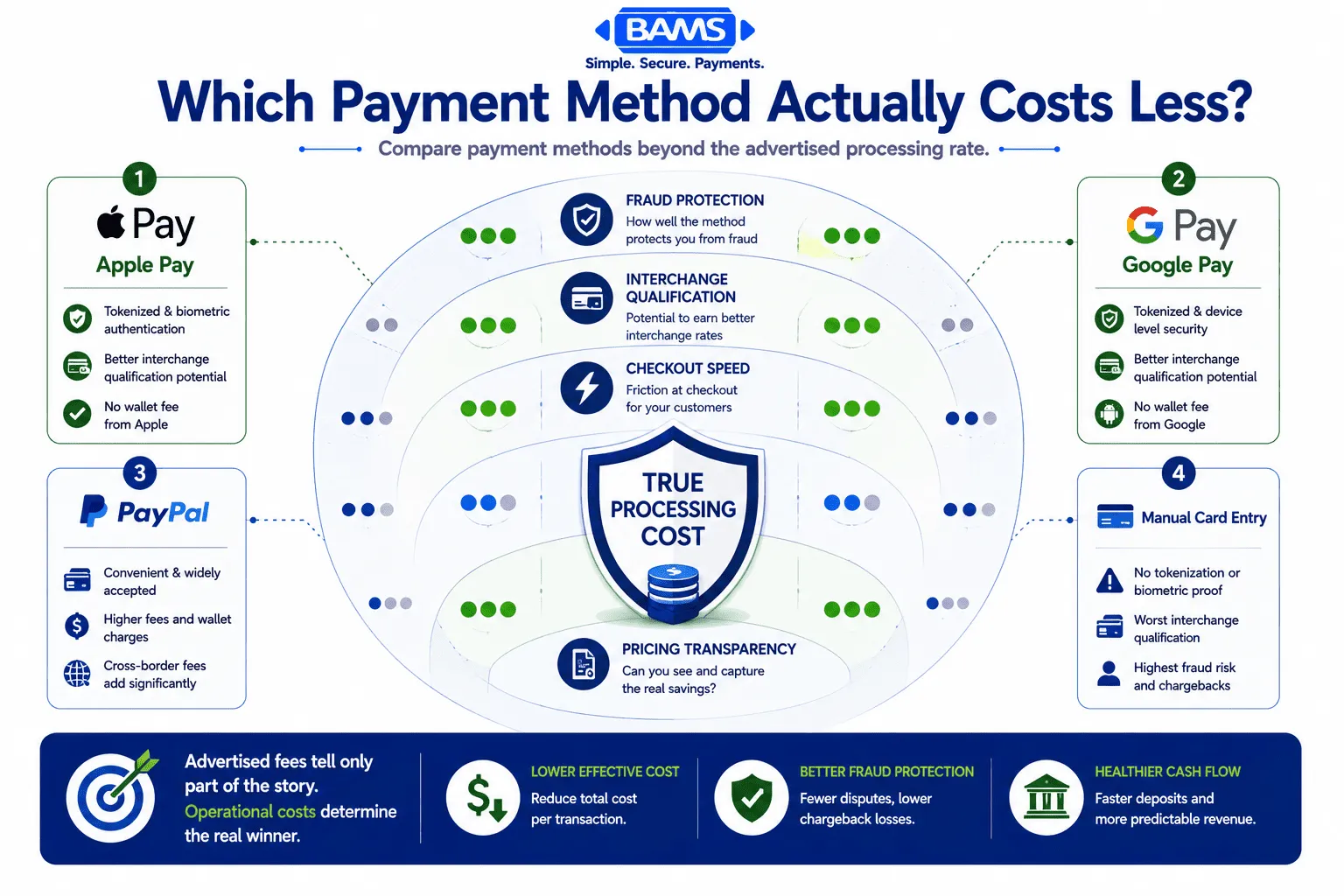
The cheapest payment method is not always the one with the lowest advertised rate. Interchange qualification, fraud costs, and funding speed determine the true cost of every transaction.
The real savings come not from picking one wallet but from understanding how each method interacts with your processor’s pricing model and your chargeback rate.
| Criterion | Apple Pay | Google Pay | PayPal | Manual Card Entry | Best Option |
|---|---|---|---|---|---|
| Base Transaction Fee (US) | 2.7%–2.9% + $0.05–$0.30 | 2.9% + $0.30 | 3.49% + $0.49 | 2.9% + $0.30 (typical) | Apple Pay |
| Interchange Qualification | Card-present rates (tokenized) | Card-present rates (tokenized) | Card-not-present rates | Card-not-present rates | Apple Pay / Google Pay |
| Fraud & Chargeback Risk | Low (biometric auth + tokenization) | Low (device auth + tokenization) | Medium (buyer protection disputes) | High (no device auth) | Apple Pay |
| Cross-Border Costs | Processor-dependent | +1.5% intl + 1% conversion | +1.5% intl + 3%–4% conversion | Processor-dependent | Apple Pay |
| Checkout Speed & Conversion | Fast (biometric) | Fast (device unlock) | Redirect-based (slower) | Slowest (manual fields) | Apple Pay / Google Pay |
| Cash Flow Timing | Processor-dependent | Processor-dependent | Hold periods common | Processor-dependent | Depends on processor |
Evaluation Criteria: What Actually Drives Your Cost Per Transaction
Surface-level rate comparisons miss the point. A payment method’s true cost includes six dimensions that compound across thousands of transactions per month.
- Base transaction fees — The percentage and fixed fee your processor charges. This is the number most merchants fixate on, but it’s only one layer.
- Interchange qualification — How the card networks (Visa, Mastercard) categorize the transaction. Tokenized wallet transactions often qualify at lower interchange tiers than manually keyed entries. If you’re on interchange-plus pricing, this difference flows directly to your bottom line.
- Fraud and chargeback costs — Every chargeback costs you the transaction amount plus fees (typically $20–$100 per dispute). Methods with stronger authentication reduce this exposure.
- Cross-border and currency fees — International transactions carry surcharges that vary dramatically by method.
- Checkout conversion rate — A faster checkout means fewer abandoned carts. The revenue you don’t lose is savings you don’t see on a statement.
- Funding speed — How quickly you access your money affects cash flow, purchasing power, and operational flexibility.
The processing fee is only the visible layer. Interchange, fraud losses, funding delays, and operational costs determine what each payment method really costs your business.
Head-to-Head: Transaction Fees and True Costs by Payment Method
Base Transaction Fees
Apple Pay charges merchants nothing directly. Your processor applies its normal card processing fees because Apple Pay works through your existing payment processor rather than introducing a separate merchant fee. Apple’s official documentation explains that Apple Pay uses your existing payment infrastructure, allowing merchants to accept payments without additional Apple transaction fees.
PayPal is generally the most expensive option for many online merchants because it applies its own merchant pricing schedule in addition to standard payment processing costs. Current rates vary by transaction type and region and are published on PayPal’s official merchant fee schedule. Businesses should compare those fees against their processor’s Apple Pay and Google Pay pricing to determine the lowest total cost.
Manual card entry typically matches digital wallet rates on paper (2.9% + $0.30 through most processors), but the real cost divergence happens at the interchange level.
Verdict: Apple Pay wins on base fees. PayPal is the most expensive option by a wide margin.
Interchange Qualification
Apple Pay and Google Pay use tokenization, replacing the actual card number with a device-specific token. For in-person (tap-to-pay) transactions, this often qualifies at card-present interchange rates, which are lower than card-not-present rates. Even in eCommerce, tokenized transactions can qualify for better rates depending on your processor’s integration and the card network’s rules.
PayPal and manual card entry both process as card-not-present transactions. They don’t benefit from tokenization-based interchange downgrades. If you’re on a tiered pricing model, you may not even see this difference on your statement because your processor bundles it into opaque “qualified” and “non-qualified” buckets. If you’re on interchange-plus, the savings from better qualification are transparent and immediate.
This is where many merchants underestimate their true costs. As detailed in this breakdown of hidden processing fee layers, the gap between your quoted rate and your effective rate often runs 20–40% higher than expected.
Verdict: Apple Pay and Google Pay tie for best interchange outcomes. Manual entry and PayPal lose here.
Fraud and Chargeback Costs
Apple Pay requires biometric authentication (Face ID or Touch ID) for every transaction. The card number is never transmitted. This makes it extremely difficult to use a stolen card through Apple Pay, which directly reduces your fraud-related chargebacks.
Google Pay offers similar protections through device-level authentication and tokenization, though its implementation varies slightly across Android devices.
PayPal introduces a different risk. While PayPal has its own fraud detection, its buyer protection program makes it easy for customers to open disputes. Merchants frequently report higher dispute rates through PayPal compared to direct card payments, and PayPal’s resolution process often favors the buyer.
Manual card entry carries the highest fraud risk. No biometric check, no device verification, no tokenization. Every manually entered transaction is a potential chargeback waiting to happen, and each dispute costs you the sale plus $20–$100 in fees.
Verdict: Apple Pay is the strongest fraud reducer. Manual entry is the weakest.
Cross-Border and Currency Fees
If you sell internationally, payment method choice significantly impacts your margins. Google Pay itself does not set merchant processing fees. Instead, international surcharges and currency conversion costs are determined by your payment processor and the underlying card networks. Google Pay’s documentation explains that transactions are processed through participating payment providers, making your processor’s pricing structure the primary factor in cross-border costs.
Apple Pay’s cross-border costs depend entirely on your payment processor. Some processors apply the same international surcharges regardless of wallet type. Others pass through lower network fees for tokenized transactions. This is a question worth asking your processor directly.
Verdict: Apple Pay is typically cheapest for international sales. PayPal is the most expensive.
Checkout Speed and Conversion Impact
Apple Pay and Google Pay both enable one-tap checkout. No typing card numbers, no filling address fields, no redirects. For mobile shoppers (who now represent the majority of eCommerce traffic), this friction reduction translates directly into higher conversion rates.
PayPal requires a redirect to PayPal’s site or app, adding a step that increases drop-off. Manual card entry is the slowest method, requiring customers to type 16+ digits, expiration dates, CVVs, and billing addresses. Every additional field is a chance for the customer to leave.
Verdict: Apple Pay and Google Pay tie for best conversion impact. Manual entry is the worst.
Cash Flow and Funding Speed
Neither Apple Pay, Google Pay, nor manual card entry controls when you get your money. That’s determined by your payment processor. Some processors hold funds for 2–3 business days. Others, like BAMS, offer next-day funding regardless of payment method, which means the cash from today’s Apple Pay transactions hits your account tomorrow morning.
PayPal is different. PayPal holds your funds in a PayPal balance, and transfers to your bank account can take 1–3 business days (or longer for newer accounts or flagged transactions). This delay creates real cash flow drag, especially for businesses with tight inventory cycles.
Verdict: Funding speed depends on your processor, not the wallet. But PayPal’s built-in holding periods make it the slowest path to cash.
Use Case Mapping: Which Method to Promote and When
If you run a mobile-heavy eCommerce store with US customers, promote Apple Pay as the primary checkout option. You get the lowest base fees, best interchange qualification, strongest fraud protection, and fastest checkout experience. The math favors it on every dimension.
If you sell internationally and want to minimize cross-border costs, favor Apple Pay or Google Pay over PayPal. PayPal’s currency conversion fees (3–4%) can eat your margin on international orders.
If your customer demographic skews toward PayPal loyalists, keep PayPal as an option but don’t make it the default. Some customers will only buy if PayPal is available, and that conversion is worth the higher fee. Just don’t promote it over cheaper alternatives.
If you process B2B transactions with Level 2/3 data, manual card entry through a processor that supports Level 2/3 data capture can qualify for significantly lower interchange rates. In this specific scenario, the payment method matters less than the data you submit with the transaction.
If you operate in-store with tap-to-pay terminals, Apple Pay and Google Pay both qualify at card-present interchange rates. There’s no reason to encourage customers to swipe or insert when tapping is cheaper for you.
What All Payment Methods Get Wrong
No digital wallet solves the fundamental problem of opaque processing pricing. Whether you accept Apple Pay, Google Pay, or PayPal, your actual cost depends on your processor’s markup, your pricing model (tiered vs. interchange-plus), and the specific interchange categories your transactions qualify for. The wallet is just the front door. The pricing model is the house.
Additionally, none of these wallets give you real-time visibility into your effective rate per transaction. You still need to audit your processing statements monthly to catch rate creep, downgrades, and hidden fees.
Migration and Switching Costs
Switching between payment methods is relatively painless on the customer-facing side. Most modern payment gateways support Apple Pay, Google Pay, and PayPal simultaneously. Enabling or disabling a method typically requires a settings change, not a platform migration.
The more impactful switch is changing your payment processor. If you’re currently on a tiered pricing model and want to capture the interchange savings from Apple Pay’s tokenization, you need to move to interchange-plus pricing. That switch involves updating your merchant account, potentially changing your gateway integration, and migrating stored card tokens.
Lock-in factors to watch: PayPal’s ecosystem can create dependency if you use PayPal for invoicing, recurring billing, and working capital loans. Extracting yourself from that ecosystem takes planning. For Apple Pay and Google Pay, there’s virtually no lock-in because they sit on top of your existing processor.
The switching cost that matters most is the one you’re paying right now by not optimizing. If your current processor charges the same rate for every payment method and doesn’t pass through interchange savings, you’re subsidizing their margin on every Apple Pay transaction. BAMS structures its merchant accounts on interchange-plus pricing with transparent statements, so the interchange advantages of tokenized wallets actually show up as savings on your end.
Final Recommendation: Optimize for the Method That Costs You Least
Promote Apple Pay as your default checkout option. It carries the lowest base fees, qualifies at the best interchange tiers, reduces fraud and chargebacks, and converts better on mobile. Google Pay is a close second with similar economics. Keep PayPal available for customers who insist on it, but don’t feature it prominently. Minimize manual card entry wherever possible.
But here’s the part most guides skip: none of this optimization matters if your processor bundles everything into opaque tiers. You need interchange-plus pricing to see the savings. You need next-day funding to use the savings. And you need proactive chargeback defense to keep the savings from evaporating into dispute fees. Get those three things right, and the payment method comparison becomes a genuine competitive advantage instead of an academic exercise.
Frequently Asked Questions
What fees do merchants actually pay when accepting Apple Pay?
Apple charges merchants nothing. Your payment processor charges its standard credit card processing fees, typically 2.7%–2.9% plus $0.05–$0.30 per transaction. The key difference is that Apple Pay transactions often qualify at lower interchange tiers due to tokenization, which can reduce your effective rate if you’re on interchange-plus pricing.
How does Apple Pay compare to PayPal in total transaction costs?
Apple Pay is significantly cheaper. On a $75 order, Apple Pay costs roughly $2.48 (at 2.9% + $0.30) while PayPal costs about $3.11 (at 3.49% + $0.49). That $0.63 gap compounds quickly. PayPal also charges higher cross-border fees (1.5% international + 3–4% currency conversion) compared to Apple Pay’s processor-dependent rates.
Why does Apple Pay reduce chargeback costs for merchants?
Every Apple Pay transaction requires biometric authentication (Face ID or Touch ID), and the actual card number is never shared with the merchant. This makes it nearly impossible for someone to use a stolen card through Apple Pay. Fewer fraudulent transactions means fewer chargebacks, and fewer chargebacks means you keep more of your revenue.
When should a business promote Apple Pay over other payment methods?
Promote Apple Pay when your customer base skews mobile, when you want to reduce fraud exposure, and when you’re on interchange-plus pricing (so you actually capture the interchange savings). For in-store retail, promote tap-to-pay with Apple Pay or Google Pay over chip-insert or swipe to qualify at lower card-present interchange rates.
Does the payment method affect how fast I get my money?
The wallet itself doesn’t control funding speed. Your payment processor does. Apple Pay, Google Pay, and manual card entry all settle through your processor’s timeline. PayPal is the exception: it holds funds in your PayPal balance first, and bank transfers can take 1–3 business days. If cash flow speed matters, choose a processor that offers next-day funding.
Do I need to switch processors to benefit from Apple Pay’s lower interchange rates?
Not necessarily, but you do need interchange-plus pricing. If your current processor uses tiered pricing, the interchange savings from Apple Pay’s tokenization get absorbed into their bundled rates, and you never see the benefit. Switching to interchange-plus pricing (with or without changing processors) is the key step to unlocking those savings.


