Best Clover Apps for 2020 – Take Your Clover POS to the Next Level with these Plugins
Last Updated on October 13, 2026 by Dimitri Akhrin
Take Your Clover POS Beyond Basic Payment Processing
The best Clover apps can help merchants extend a POS system beyond payment acceptance. Depending on the app, businesses can add accounting automation, employee management, operational tools and other functions to their Clover setup.
Clover is a popular POS system that provides both software and hardware solutions to merchants in industries like retail, service and dining. In addition to their leading POS application and sleek hardware options like the Clover Mini and Clover Flex, the company also has an app store offering a huge variety of native and third-party applications. The following are four of the most popular and most useful of those apps available to merchants in 2020, but there are hundreds of options available for download, covering everything from inventory management, to fundraising, to games for customers.
What to Consider When Choosing Clover POS Apps Today
An app should solve a real operational problem rather than add another system for employees to manage. Before installing one, consider how it fits your existing workflows, what information it needs access to and whether your staff will actually use its features.
This becomes especially important when an app connects with payments or checkout. Visa highlights security, operational efficiency and customer experience as important parts of modern payment processing. Merchants should look for apps that improve operations without creating unnecessary friction around the payment experience.
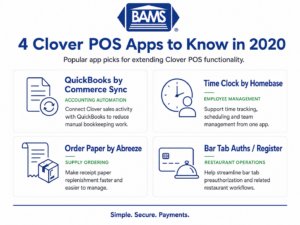
Clover POS apps can extend a payment system with tools for accounting, employee management and everyday business operations.
QuickBooks by Commerce Sync
QuickBooks, one of the world’s most popular bookkeeping tools, is used by a large percentage of restaurants and retailers. Traditionally, QuickBooks has been a standalone desktop application and taking care of the books required an enormous amount of manual data entry. The QuickBooks Clover app by Commerce Sync helps to eliminate a lot of that manual work by integrating QuickBooks directly with a merchant’s Clover POS. That integration saves businesses 300 hours per year on average and large restaurants and retailers can expect to save even more.
Click to learn more about QuickBooks by Commerce Sync
Accounting integrations can be particularly useful for businesses that want to reduce repetitive data entry. Merchants should still review how the app transfers sales, taxes, payment information and other data into their accounting workflow before relying on automation.
Time Clock by Homebase
Time Clock is an app designed to simplify time tracking and make payroll management easier. Its effectiveness has earned it a spot in Clover’s “must-have” apps, along with a large and loyal userbase. As the app’s name might suggest, Time Clock offers an efficient employee time tracking system, but its functionality goes well beyond punching in and out. It also offers complete employee scheduling, including important scheduling information on everything from labor costs to weather forecasts! Time Clock also includes team collaboration and job posting functions, making it a highly versatile addition to any Clover POS setup.
Click here to learn more about Time Clock by Homebase
Employee-management apps can help centralize tasks that would otherwise require separate systems. Before adopting one, businesses should compare the app’s scheduling, time tracking, payroll and permission features with the processes they already use.
Order Paper by Abreeze Technology
Running out of receipt paper is a pain and Order Paper by Abreeze aims to make sure it never happens again. This extremely popular Clover app – with a 4.9 overall rating – makes it possible to replenish paper products in as few as three clicks. Once the app is set up, users only need to select the quantity of each paper type they want to order and then confirm their address prior to submitting. Shipment is free and payment is automatically handled through the app, making the ordering process as fast and simple as it can possibly be. Abreeze Technology guarantees both the fit and quality of paper products delivered, letting businesses rest easy that they’ll never have to worry about getting stuck without the ability to print receipts unexpectedly.
Click here to learn more about Order Paper by Abreeze
Simple operational apps can be valuable when they remove recurring manual tasks. Businesses should compare ordering terms, product compatibility and current app pricing before deciding whether an automated purchasing tool fits their needs.
Bar Tab Auths / Register
Bar Tab Auths is a free app from Clover that enables restaurants to streamline the process of preauthorizing credit cards on newly opened bar tabs. It’s a simple way to shave a little bit of time off a common, repetitive task and to make things as easy as possible for service staff. For users that also want to assign those preauthorizations to specific tables or orders, an advanced functionality version of Bar Tab Auths, called the Register App, is also available from Clover.
Click here to learn more about Bar Tab Auths and Register
Current availability note: This section reflects the Clover App Market information available when the original article was written. Merchants interested in this functionality should confirm the current app listing and available alternatives in their Clover account before making a decision.
Check Security and Permissions Before Installing an App

Review more than features when choosing Clover apps. Compatibility, security, permissions and cost all affect whether an app fits your business.
Convenience should not come at the expense of payment security. Review what information an app can access and limit permissions to what the application actually needs. Businesses should also remove applications they no longer use and keep connected software current.
The PCI Security Standards Council recommends building payment security around people, process and technology. Its merchant guidance also encourages businesses to use appropriate technology and implement it correctly to protect payment data.
Merchants can review BAMS PCI compliance resources when evaluating the broader security requirements connected with their payment environment.
Look for Apps That Reduce Manual Work
The strongest POS apps should make a process easier to manage. Accounting synchronization can reduce repetitive entry. Employee tools can centralize scheduling. Inventory or supply apps can automate routine tasks. The value comes from reducing work without introducing unnecessary complexity.
Automation continues to influence payment operations as well. Mastercard’s 2025 commercial card research highlights automation and AI among the technologies businesses can use as payment acceptance evolves. While every merchant has different needs, the broader lesson is useful: technology should simplify an existing process and make the operation more efficient.
Review the Complete Cost of Your Clover Setup
App fees are only one part of the cost of running a POS system. Merchants should also consider payment processing rates, hardware, software subscriptions and any additional services connected to the account.
BAMS offers transparent interchange plus pricing for merchants that want a clearer view of how payment processing costs are structured.
Clover’s extensive app store makes it a great choice for retailers and restauranteurs of all stripes, but whichever POS a merchant ends up using, it’s important that it can be seamlessly integrated with a low-cost payment processor to ensure that the costs of processing electronic transactions are kept to a minimum. BAMS merchant services integrate with Clover, as well as a host of other leading POS systems and the BAMS interchange-plus pricing model offers some of the lowest rates available. To find out more about how a BAMS merchant account could help you eliminate a significant chunk of your monthly account statement, signup with BAMS today!
Frequently Asked Questions
What are Clover apps?
Clover apps extend the functions available through a Clover POS system. Depending on the application, they can support accounting, employee management, inventory, customer engagement and other business operations.
Are the apps listed in this article still available?
The original article describes apps that were available in 2020. App listings and features can change, so merchants should verify current availability in the Clover App Market before installing any application.
How should I choose an app for my Clover POS?
Start with the business problem you want to solve. Then review the app’s functionality, compatibility, permissions, pricing and support before adding it to your POS environment.
Can Clover apps affect payment security?
Some applications may interact with systems or information connected with the payment environment. Merchants should review app permissions, maintain PCI compliance and use trusted applications that fit their security requirements.
Should I install as many Clover apps as possible?
No. More apps do not automatically create a better POS system. Each application should provide a clear operational benefit and fit the workflows your business already uses.
Do Clover apps replace payment processing?
No. Apps extend the functionality of a POS system while payment processing handles the electronic transaction itself. Merchants should evaluate both the software tools and the processing arrangement behind their Clover setup.
What costs should I review with a Clover POS?
Consider hardware, software subscriptions, app fees and payment processing costs. Reviewing the complete setup can give you a clearer picture of what the system costs your business each month.