How to Reduce Chargeback Fees for Merchants
Last Updated on October 15, 2026 by Dimitri Akhrin
How to Cut Chargeback Fees by 40-60% in 90 Days
A step-by-step defense system for eCommerce merchants processing $50K+ monthly
Build a complete chargeback prevention system with early warning alerts, response protocols, and documentation practices. This tutorial transforms reactive firefighting into proactive revenue protection.
TL;DR
- Chargebacks cost 3-4x the transaction value when you factor in fees, lost product, shipping, and labor. Prevention saves far more than winning disputes.
- Set up chargeback alerts immediately to get 24-72 hours notice before disputes become formal chargebacks. This single step can eliminate most chargeback fees.
- Fix your billing descriptor so customers recognize charges on their statements. Many fraud claims are actually confused customers who do not recognize your business name.
- Build an evidence library automatically by configuring your eCommerce platform to save IP addresses, delivery confirmations, and customer communications for every transaction.
- Monitor your chargeback ratio weekly because card networks flag merchants above 0.9-1.0%. Catching problems early prevents account termination and fee increases.
What You Will Achieve
By the end of this tutorial, you will have a complete chargeback defense system that can reduce your dispute-related losses by 40-60%. You will implement specific prevention tactics, configure early warning alerts, and establish response protocols that protect your revenue.
Your success criteria: a measurable drop in chargeback fees within 60-90 days, clear documentation for every transaction, and a dispute response process that takes minutes instead of hours. Most importantly, you will shift from reactive firefighting to proactive protection.
This tutorial works for eCommerce businesses processing $50,000 or more monthly. If you are seeing more than 5 chargebacks per month, these steps become urgent.
Prerequisites and Setup Checklist
Before you start, gather these items:
- Access to your payment processor dashboard with admin permissions
- Your current chargeback rate (find this in your monthly processor statement)
- Transaction data export capability from your eCommerce platform
- Customer service email templates and response time metrics
- Your merchant services provider contact information
Time estimate: 3-4 hours for initial setup, then 30 minutes weekly for maintenance.
Potential blockers: If your current payment processor does not offer chargeback alerts or detailed dispute data, you may need to switch providers. This tutorial will help you identify that gap.
Why This Approach Works
Most merchants treat chargebacks as an unavoidable cost of doing business. They wait for disputes to arrive, scramble to respond, and accept the outcome. Customer disputes often originate from unrecognized or unclear transactions, making prevention strategies more effective than reactive dispute handling, as outlined by Visa.
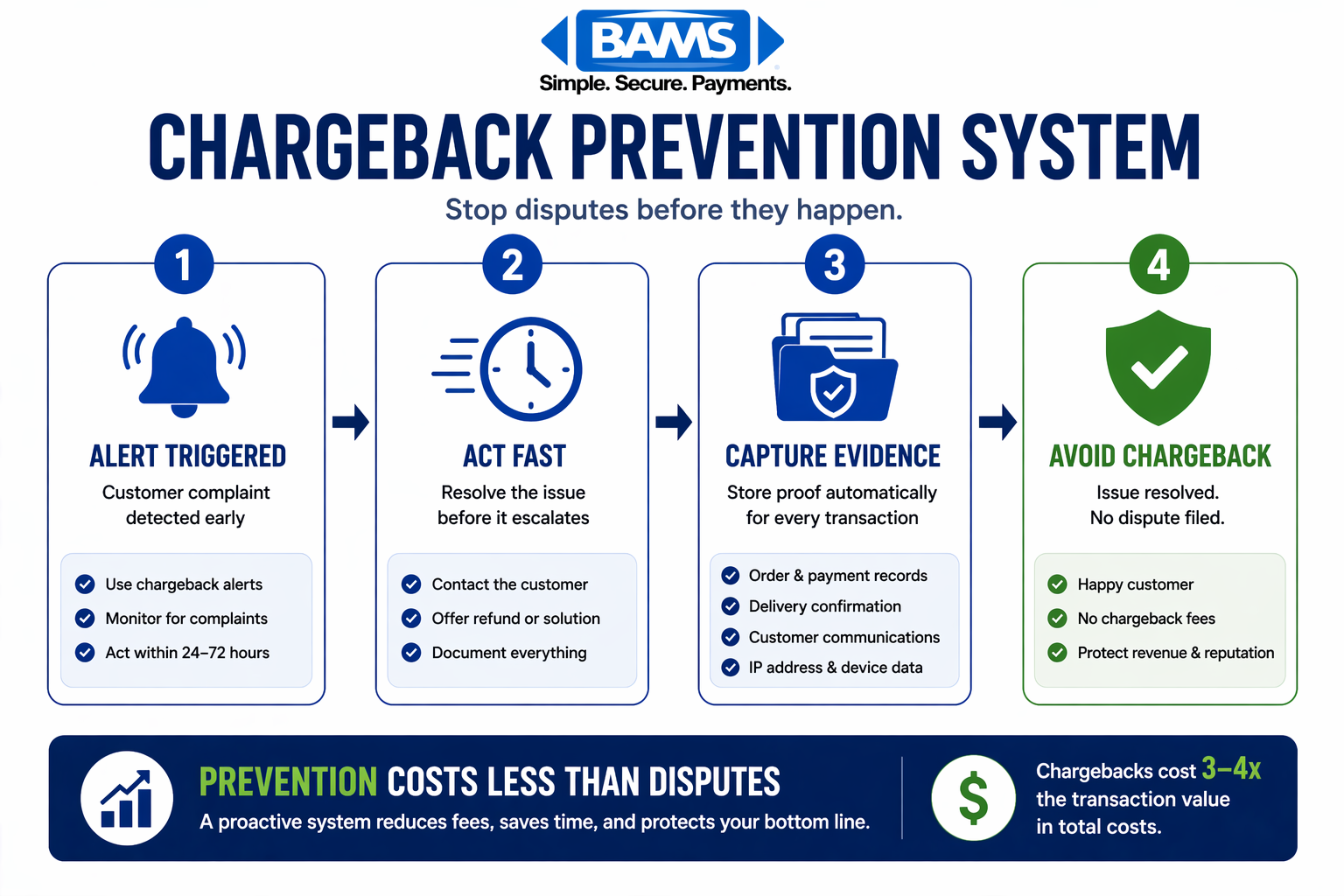
A simple chargeback prevention system showing how early alerts, fast action, and proper documentation stop disputes before they happen.
The proactive method in this tutorial targets chargebacks before they become disputes. You will intercept problems at the customer complaint stage, automate evidence collection, and build relationships with your merchant services provider that give you faster resolution options.
Alternative approaches like chargeback insurance or third-party representment services have their place, but they cost money and still leave you vulnerable. Prevention costs nothing and compounds over time.
Step 1: Calculate Your True Chargeback Cost
Action: Export your last 90 days of chargeback data and calculate the real financial impact.
Log into your payment processor dashboard. Navigate to the disputes or chargebacks section. Download a CSV file containing all disputes from the past three months. You need: transaction amount, chargeback fee charged, dispute outcome, and reason code. Card payment costs include interchange fees, network assessments, and processing charges, which together determine the overall cost structure merchants must manage as outlined by the Federal Reserve.
Create a spreadsheet with these columns: Transaction Value, Chargeback Fee, Product Cost, Shipping Cost, Labor Time (estimate 30 minutes per dispute at your hourly rate). Sum each column.
Expected result: A total cost figure that will likely shock you. The average chargeback costs merchants $190 per dispute when you include transaction value, fees, shipping, labor, and reputational damage.
Common failure: If your processor does not provide reason codes, call their support line and request detailed dispute reports. You cannot fix problems you cannot categorize.
Step 2: Categorize Disputes by Reason Code
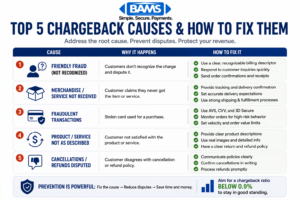
A quick checklist of the most common chargeback causes and the actions that prevent them.
Action: Sort your chargebacks into the four main categories to identify your biggest vulnerability.
Using your exported data, tag each dispute with one of these categories:
- Fraud (codes 10.x on Visa, 4837 on Mastercard): Unauthorized transaction claims
- Authorization (codes 11.x, 4808): Technical processing errors
- Processing Errors (codes 12.x, 4834): Duplicate charges, wrong amounts
- Consumer Disputes (codes 13.x, 4853): Product not received, not as described
Calculate the percentage in each category. Most eCommerce businesses see 60-70% of chargebacks in the Consumer Disputes category, which means customer experience fixes will have the biggest impact.
Expected result: A clear picture of where to focus. If fraud dominates, you need better verification. If consumer disputes dominate, you need better communication and fulfillment.
Common failure: Reason codes can be misleading because customers sometimes claim fraud when they actually forgot about a purchase. Look for patterns in product types and customer demographics.
Step 3: Implement Chargeback Alerts
Action: Set up early warning systems that notify you before a dispute becomes a chargeback.
Contact your merchant services provider and ask about their chargeback alert program. Services like Verifi CDRN and Ethoca alerts give you 24-72 hours to refund a transaction before it becomes a formal dispute. This prevents the $10 to $50 chargeback fee that applies regardless of transaction size or outcome.
Payment systems that provide faster transaction visibility and notification capabilities enable businesses to act before disputes escalate, improving overall dispute prevention outcomes according to Modern Treasury.
If your current processor lacks proactive tools, implementing chargeback defense solutions with real-time alerts and support can significantly reduce dispute volume before fees are triggered.
Configuration steps:
- Enable email and SMS notifications for all alert types
- Set your response window to 12 hours (not the full 24-72 hours allowed)
- Create a decision tree: refund automatically if under $50, review manually if over
Expected result: You will start seeing alerts within 1-2 weeks. Each alert you resolve prevents a chargeback fee and protects your chargeback ratio.
Common failure: Alerts require quick action. If you cannot respond within 24 hours consistently, assign a backup person or automate low-value refunds.
Step 4: Optimize Your Billing Descriptor
Action: Change your billing descriptor so customers recognize charges on their statements.
Log into your payment processor settings. Find the billing descriptor field (sometimes called statement descriptor). Change it to include your recognizable business name and a phone number or URL.
Good example: YOURSTORE.COM 800-555-1234
Bad example: PARENT COMPANY LLC or random alphanumeric codes
Many “fraud” chargebacks are actually customers who do not recognize a charge. They see an unfamiliar name, panic, and call their bank instead of you. A clear descriptor with contact information gives them an alternative.
Expected result: A 10-15% reduction in “unauthorized transaction” disputes within 30-60 days.
Common failure: Some processors limit descriptor length to 22 characters. Prioritize recognition over completeness. Your business name matters more than your phone number if you must choose.
Step 5: Build Your Evidence Library
Action: Create a system that automatically collects and organizes dispute-winning documentation.
For every transaction, you need to capture and store:
- IP address and device fingerprint at checkout
- AVS (Address Verification Service) and CVV match results
- Delivery confirmation with signature if applicable
- Customer communication history (emails, chat logs)
- Screenshots of product listings and terms accepted
Configure your eCommerce platform to automatically save this data. Most platforms like Shopify, WooCommerce, and BigCommerce have apps or plugins that compile dispute evidence packages.
Capturing accurate transaction data is easier with an integrated payment gateway that centralizes payment, customer, and transaction information for faster dispute resolution.
Expected result: When a dispute arrives, you can generate a complete evidence package in under 5 minutes instead of scrambling for hours.
Common failure: Data retention policies sometimes delete records after 90 days. Extend retention to at least 540 days (the maximum chargeback window for some card networks).
Step 6: Create Response Templates
Action: Build pre-written response templates for each reason code category.
Create a document with four sections matching your reason code categories. For each, write:
- A professional opening acknowledging the dispute
- Bullet points listing the evidence you will attach
- A clear statement of why the charge was valid
- A closing that references the specific card network rules
For consumer disputes (your likely biggest category), your template should emphasize delivery proof, product-as-described evidence, and any customer communication where they confirmed satisfaction.
Expected result: Response time drops from 2-3 hours to 15-20 minutes per dispute. Consistency improves your win rate.
Common failure: Templates become stale. Review and update them quarterly based on which arguments win and which lose.
Step 7: Establish Customer Recovery Protocols
Action: Create a process to contact customers before they escalate to their bank.
Set up automated emails triggered by:
- Delivery delays exceeding your stated timeframe
- Refund requests that take more than 24 hours to process
- Customer service tickets that remain open for 48+ hours
Each email should acknowledge the problem, provide a specific resolution timeline, and offer direct contact with a real person. Include your phone number prominently.
Train your customer service team to use the phrase: “I can resolve this for you right now” rather than “You will need to wait for…” Empowerment to issue immediate refunds or replacements prevents chargebacks.
Expected result: Customers who feel heard contact you instead of their bank. Your consumer dispute chargebacks should drop 20-30% within 60 days.
Common failure: Understaffed customer service creates the delays that cause chargebacks. If response times exceed 24 hours consistently, this is a hiring problem, not a process problem.
Step 8: Negotiate Better Chargeback Fees
Action: Contact your merchant services provider to discuss fee structures and thresholds.
Schedule a call with your account manager (or request one if you do not have a dedicated contact). Prepare your data: current chargeback rate, total fees paid last quarter, and your improvement plan from steps 1-7.
Ask these specific questions:
- What is my current chargeback fee per dispute?
- Do you offer reduced fees for merchants below 0.5% chargeback rate?
- What additional tools or alerts can you provide?
- What happens if my rate exceeds 1%?
If your provider cannot offer competitive rates or proactive support, this conversation becomes your evaluation criteria for switching.
Expected result: Either improved terms with your current provider or clear reasons to evaluate alternatives like BAMS, which offers dedicated account management and proactive chargeback defense.
Common failure: Accepting “standard fees” without negotiation. Processors have flexibility, especially for merchants who demonstrate commitment to reducing disputes.
Step 9: Monitor Your Chargeback Ratio Weekly
Action: Set up a weekly dashboard review to catch problems before they become critical.
Create a simple spreadsheet or use your processor’s reporting tools to track:
- Total transactions processed
- Number of chargebacks received
- Chargeback ratio (chargebacks divided by transactions)
- Win rate on disputed chargebacks
- Total fees paid
Card networks flag merchants when chargeback ratios exceed 0.9% (Visa) or 1.0% (Mastercard).
Schedule a 15-minute weekly review every Monday morning. Look for sudden spikes that indicate a product problem, fraud attack, or fulfillment issue.
Expected result: Early detection of problems before they trigger monitoring programs or account termination.
Common failure: Monthly reviews are too infrequent. A fraud attack can push you over threshold limits in days, not weeks.
Configuration and Customization
Adjust these settings based on your business model:
Auto-refund threshold: Start at $25 for alert-triggered refunds. Increase to $50-75 as you see results. Never auto-refund high-ticket items without manual review.
Evidence retention period: Default to 540 days. Reduce to 180 days only if storage costs become significant and your chargeback window is confirmed shorter.
Response time targets: Set internal deadlines at 50% of the allowed window. If you have 7 days to respond, target 3.5 days. This buffer prevents missed deadlines.
Alert notification channels: Email plus SMS for the primary responder. Email-only for backups. Avoid notification fatigue by limiting alerts to actionable items.
Customer contact timing: Reach out within 4 hours of a delivery delay notification. Within 2 hours of a refund request. Speed correlates directly with chargeback prevention.
Verification and Testing
Confirm your system works with these tests:
Alert test: Ask your processor to send a test alert (or wait for a real one). Time how long it takes from notification to resolution. Target: under 4 hours.
Evidence test: Pick a random transaction from last week. Can you compile a complete evidence package in under 10 minutes? If not, your documentation system needs work.
Template test: Use your response templates on three actual disputes. Track the outcome. If your win rate is below 40%, revise your templates based on the rejection reasons.
Dashboard test: Check that your weekly metrics update automatically. Manual data entry creates gaps and errors.
Run these tests monthly for the first quarter, then quarterly after your system stabilizes.
Common Errors and Fixes
Error: “Chargeback alert received but no matching transaction found”
Cause: Your alert service and processor use different transaction identifiers. Fix: Contact your merchant services provider to confirm the ID mapping between systems. Request a reconciliation report.
Error: Dispute response rejected for “insufficient evidence”
Cause: Missing required documentation or wrong file format. Fix: Check the card network’s specific requirements. Visa and Mastercard have different evidence standards. Convert all files to PDF and ensure they are under 10MB total.
Error: Chargeback ratio spikes suddenly despite stable sales
Cause: Delayed chargebacks from transactions 60-90 days ago. Fix: Investigate what changed in your business 2-3 months prior. New product launch? Shipping carrier change? Promotion that attracted low-quality customers?
Error: Customer claims “I never received my order” despite tracking showing delivered
Cause: Porch piracy or delivery to wrong address. Fix: Require signature confirmation for orders over $100. Include delivery photos if your carrier provides them. Add shipping insurance for high-value items.
Error: “Your account has been placed in monitoring program”
Cause: Chargeback ratio exceeded network thresholds. Fix: Immediately implement all steps in this tutorial. Contact your processor for a remediation plan. Consider pausing advertising to reduce transaction volume while you fix underlying issues.
Next Steps and Extensions
Once your basic system is running, consider these advanced tactics:
Fraud scoring integration: Add a pre-authorization fraud check that blocks high-risk transactions before they process. Services like Signifyd or Kount can reduce fraud chargebacks by 50% or more.
Chargeback representment service: For merchants with high dispute volumes, dedicated representment services can improve win rates from 20-30% to 50-60%. Evaluate providers based on their success rate with your specific reason codes.
Interchange optimization: Work with your merchant services provider to ensure you are qualifying for the lowest possible credit card processing fees. Proper transaction data (Level 2 and Level 3) can reduce interchange fees by 0.5-1.0%.
Your chargeback defense system should evolve quarterly. Review your metrics, update your templates, and stay current on card network rule changes that affect dispute resolution.
Frequently Asked Questions
What are credit card processing fees and how do they relate to chargebacks?
Credit card processing fees include interchange fees (paid to the card-issuing bank), assessment fees (paid to card networks like Visa), and processor markup. Chargebacks add additional fees on top of these, typically $10 to $50 per dispute regardless of the transaction amount. High chargeback rates can also trigger increased processing fees or account termination.
Why do merchants have to pay chargeback fees even when they win the dispute?
Chargeback fees cover the administrative cost of processing the dispute through the card network system. Your payment processor and the card networks incur costs regardless of the outcome. This is why prevention matters more than winning disputes. Avoiding the chargeback entirely saves both the fee and the time spent on representment.
How can I tell if my chargeback rate is too high?
Visa flags merchants at 0.9% chargeback ratio (chargebacks divided by total transactions). Mastercard’s threshold is 1.0%. The industry average sits around 0.60%. Check your monthly processor statement for your current ratio. If you are above 0.5%, implement prevention measures immediately before you trigger monitoring programs.
What is the difference between a chargeback alert and a chargeback?
A chargeback alert notifies you that a customer has contacted their bank about a transaction, but the formal dispute has not been filed yet. You typically have 24-72 hours to issue a refund and prevent the chargeback. A chargeback is the formal dispute that triggers fees and affects your ratio. Alerts give you a window to resolve issues before they become costly disputes.
How long do I have to respond to a chargeback?
Response windows vary by card network and reason code, but typically range from 7 to 30 days. Your payment processor will specify the deadline in the dispute notification. Always respond well before the deadline because late responses result in automatic losses. Set internal targets at 50% of the allowed time to build in a safety buffer.
Can switching merchant services providers reduce my chargeback fees?
Yes. Providers differ significantly in their chargeback fees, alert services, and dispute support. Some charge $15 per chargeback while others charge $50. More importantly, providers with proactive chargeback defense tools can help you prevent disputes before they happen. When evaluating providers, ask specifically about their chargeback fee structure and prevention tools.