
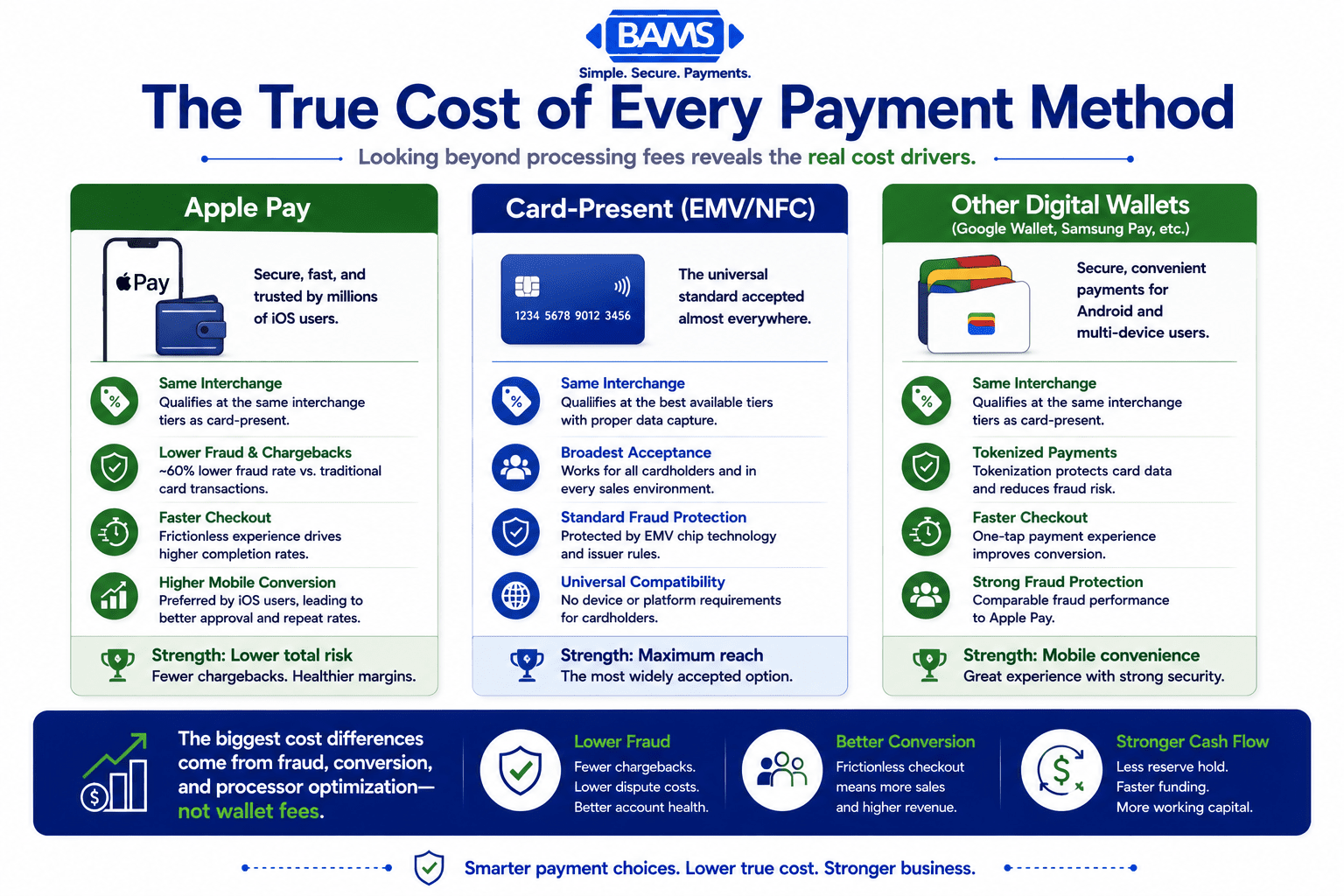
Apple Pay vs. Card-Present vs. Digital Wallets: True Cost
Last Updated on October 7, 2026 by Dimitri Akhrin
How interchange qualification, tokenization, and fraud rates create real processing cost differences across checkout methods
Compare Apple Pay, standard card-present, and competing digital wallets on interchange profiles, chargeback exposure, and fraud savings. Learn which checkout method deserves priority placement based on actual processing cost benchmarks.
TL;DR
- Interchange rates are identical across all three methods – Apple Pay, Google Wallet, and standard card-present transactions all qualify at the same interchange tiers. The wallet itself doesn’t change your base processing cost.
- Fraud reduction is where digital wallets save real money – Digital wallets reduce exposure to unauthorized payment fraud through tokenization and device-based authentication, helping merchants lower fraud-related operational costs and chargeback risk compared with traditional card transactions.
- No wallet charges merchants extra – Apple’s 0.15% fee hits issuing banks, not you. Focus your cost optimization on interchange qualification and processor markup instead.
- Match wallet priority to your audience – Promote Apple Pay if your traffic is iOS-heavy, Google Wallet for Android-dominant audiences, and keep standard card acceptance as the universal fallback.
- Your processor matters more than your wallet – The biggest cost levers (Level 3 data capture, chargeback defense, funding speed) depend on your payment processor’s capabilities, not which digital wallet a customer chooses.
Apple Pay vs. Standard Card-Present vs. Digital Wallets: What Actually Changes Your Processing Costs
If you manage payments for an established online business, you’ve probably heard that Apple Pay costs merchants nothing extra. That’s technically true, but it obscures the real story. The interchange qualification behavior behind each contactless payment method, whether it’s Apple Pay, a competing digital wallet, or a traditional card-present tap, creates measurable cost differences that affect your bottom line every month.
This comparison breaks down those differences across interchange profiles, fraud-related savings, chargeback exposure, and cash flow impact. The goal is to help you decide which checkout method deserves priority placement, not just which one sounds cheapest on paper.
Quick Verdict: Apple Pay, Card-Present, and Digital Wallets
Choose Apple Pay if your customer base skews toward iOS users and you want to reduce fraud-driven chargebacks. Its tokenization and biometric authentication produce measurably lower dispute rates. Choose standard card-present (EMV/NFC tap) if you need the broadest customer compatibility and already qualify for the best interchange tiers. Choose Google Wallet or Samsung Pay if your audience is Android-heavy and you want similar tokenization benefits without platform lock-in.
No single method “wins” outright. The real savings come from understanding how each qualifies at the interchange level and where fraud reduction compounds into lower costs.
| Criterion | Apple Pay | Standard Card-Present (EMV/NFC) | Other Digital Wallets (Google/Samsung) | Edge |
|---|---|---|---|---|
| Interchange Qualification | Same tiers as card-present | Best available tiers (with proper data) | Same tiers as card-present | Tie |
| Fraud Rate / Chargeback Risk | ~60% lower fraud rate | Baseline EMV chip security | Tokenized, comparable to Apple Pay | Apple Pay (slight) |
| Additional Wallet Fees to Merchant | $0 | $0 | $0 | Tie |
| Checkout Speed / Mobile Conversion Rates | Fast (biometric + one-tap) | Moderate (insert/tap + PIN possible) | Fast (biometric + one-tap) | |
| Customer Reach | iOS only (~55% U.S. smartphones) | Any card, any device | Android (~44% U.S. smartphones) | Card-Present |
| Data Portability / Lock-in | Merchant tokens (MPANs) tied to Apple ecosystem | Standard card data, processor-portable | Merchant tokens, Google/Samsung ecosystem | Card-Present |
Evaluation Criteria: What Actually Moves the Needle on Cost

The payment method with the lowest visible fee isn’t always the lowest total cost. Fraud, chargebacks, conversion rates, and customer reach all influence payment profitability.
Not all comparison dimensions matter equally. Here are the six we’re measuring and why each one deserves weight in your decision.
- Interchange qualification: This is the single largest component of your processing cost (typically 70-80% of the total fee). Whether a transaction qualifies at the best available tier determines more than any wallet-level fee ever could.
- Fraud and chargeback exposure: Chargebacks cost $20-$100+ per dispute in fees alone, before you count lost merchandise. A payment method that structurally reduces disputes creates compounding savings.
- Wallet-level fees to merchants: Does the wallet itself add a surcharge? This is the question most content answers, but it’s actually the least impactful factor.
- Checkout friction and mobile conversion rates: Abandoned carts cost more than interchange. A faster checkout method that converts more sales can offset slightly higher per-transaction costs.
- Customer reach: A payment method only saves you money if customers actually use it.
- Data portability and switching costs: Tokenized wallets create ecosystem dependencies. If you switch processors, can you keep your stored payment credentials?
Head-to-Head Breakdown
Interchange Qualification: The Cost Layer Everyone Ignores
Apple Pay transactions process through the same card network rails as any other card-present transaction. Visa, Mastercard, and Amex do not assign Apple Pay a separate interchange category. A Visa Signature card tapped via Apple Pay qualifies at the same rate as that card tapped via a standard NFC terminal or inserted via EMV chip.
The same is true for Google Wallet and Samsung Pay. None of these wallets trigger a different interchange tier by themselves. The Federal Reserve’s 2023 data shows the average interchange fee for covered dual-message debit transactions was $0.222, regardless of whether a wallet was involved.
Where qualification does diverge is in how well your processor captures Level 2 and Level 3 transaction data. Enhanced data fields (tax amount, customer code, line-item detail) can push B2B and corporate card transactions into lower interchange tiers. This has nothing to do with the wallet and everything to do with your payment processor’s capabilities.
Verdict: Tie. The wallet doesn’t determine your interchange tier. Your processor’s data capture does.
Fraud Rate and Chargeback Costs: Where Apple Pay Pulls Ahead
Apple Pay combines device-based authentication with network tokenization to reduce exposure to unauthorized payment fraud. Apple’s official Apple Pay documentation explains how Face ID, Touch ID, and secure payment tokens work together to protect payment credentials during every transaction.
Google Wallet and Samsung Wallet rely on the same network tokenization principles. Mastercard Developers explains how Device Primary Account Numbers (DPANs) replace sensitive card numbers during digital wallet transactions while preserving secure payment processing.
Standard card-present EMV transactions are secure, but they transmit the actual PAN (primary account number). If your systems are compromised, that data is exposed. EMV chip transactions dramatically reduced counterfeit fraud compared to magnetic stripe, but they don’t match the tokenization layer that digital wallets add.
For an eCommerce manager, the chargeback math matters most. If your average chargeback costs $40 in fees plus the lost product value, and you process 5,000 transactions monthly, even a modest reduction in dispute rates translates to thousands in annual savings.
Verdict: Apple Pay wins narrowly over other digital wallets, and all digital wallets beat standard card-present on fraud prevention.
Direct Wallet Fees: The Non-Issue That Dominates the Conversation
Apple Pay charges merchants $0 in additional fees. Merchants continue to pay standard card processing fees based on their processor’s pricing model and the applicable interchange category. The wallet itself does not introduce an additional merchant fee.
Apple does charge issuing banks 0.15% (15 basis points) per credit card transaction. The U.S. Department of Justice has characterized this as a “significant new cost” for banks. But this cost sits on the issuer side, not the merchant side. It does not appear on your processing statement.
Google Wallet and Samsung Pay operate similarly: no direct merchant fees beyond standard processing. The competitive dynamics here are effectively identical.
Verdict: Tie. None of these wallets add merchant-facing fees. Stop worrying about this and focus on interchange qualification and fraud costs.
Checkout Speed and Mobile Conversion Rates
Checkout friction kills conversions. Apple Pay and competing digital wallets reduce the number of steps between “add to cart” and “order confirmed” to as few as two taps plus a biometric confirmation. For eCommerce, this is where Apple Pay functions as a mobile commerce accelerator, pre-filling shipping and billing information stored on the device.
Standard card-present transactions in physical retail are already fast with NFC tap. But in eCommerce, manual card entry remains the default fallback, and it’s where you lose customers. Mobile conversion rates improve measurably when digital wallets are available because they eliminate form fields, reduce typos, and remove the need to retrieve a physical card.
Google Wallet offers similar one-tap checkout in supported apps and websites. Samsung Pay has narrower online integration but works well in physical retail through both NFC and MST (magnetic secure transmission) on older terminals.
Verdict: Apple Pay and Google Wallet tie for eCommerce speed. Both outperform manual card entry significantly. Standard card-present NFC is fast in-store but irrelevant for online checkout.
Customer Reach: The Constraint You Can’t Optimize Away
Apple Pay’s share of eligible U.S. in-store transactions reached about 10% recently, up from 8.9% the prior year. Over 30% of consumers now use a digital wallet in-store weekly, more than double the 14% from the previous year. Adoption is accelerating, but it’s still a minority of total transactions.
Standard card-present acceptance covers virtually 100% of customers who carry a payment card. No wallet dependency, no device requirement. For maximum reach, you can’t beat a terminal that accepts any card.
The strategic question isn’t whether to accept digital wallets (you should accept all of them). It’s whether to prioritize one in your checkout flow. If 55% of your site traffic comes from iOS devices, surfacing Apple Pay first makes sense. If your analytics show Android dominance, lead with Google Wallet.
Verdict: Standard card-present wins on raw reach. But for targeted optimization, match the wallet to your audience’s device mix.
Data Portability and Processor Lock-in
When customers pay with Apple Pay online, your processor stores a merchant payment account number (MPAN), not the underlying card number. If you switch processors, those tokens don’t transfer automatically. You may need customers to re-authenticate their payment method, which creates friction and potential churn for subscription or recurring payment models.
Google Wallet tokens work similarly. Standard card-on-file data (encrypted PANs) can be migrated between processors more easily, though PCI compliance requirements add complexity.
This matters less for one-time purchases and more for businesses running recurring payments or subscription models. If you’re evaluating a processor switch, factor in the cost of re-tokenizing your stored payment credentials.
Verdict: Standard card data is more portable. Digital wallet tokens create mild lock-in that increases switching costs.
Use Case Mapping: Which Method Fits Your Business
- If you run a subscription eCommerce business with mostly iOS customers, prioritize Apple Pay at checkout. The fraud reduction compounds over recurring billing cycles, and the one-tap signup removes the friction that kills trial conversions.
- If you operate a high-volume retail store with diverse customer demographics, keep standard card-present (EMV/NFC) as your primary method and accept all digital wallets equally. Don’t prioritize one wallet over another.
- If you sell high-ticket items online and face frequent chargebacks, actively promote digital wallet checkout (Apple Pay or Google Wallet). The tokenization and biometric layers give you stronger evidence in dispute resolution.
- If you process significant B2B or corporate card volume, focus less on the wallet and more on Level 3 data capture. Your interchange savings from enhanced data fields will dwarf any wallet-related optimization. A processor like BAMS can help you identify where your transactions are downgrading and capture the data needed to qualify at lower interchange tiers.
- If you’re considering switching processors soon, audit how many stored payment credentials are wallet tokens vs. card-on-file. High token dependency increases your migration complexity and cost.
What All Three Methods Get Wrong
Processing fees are only one part of payment profitability. Hidden operational costs often have a much greater impact on long-term margins.
None of these payment methods solve the fundamental problem of interchange opacity. Merchants still can’t easily see which interchange tier each transaction qualified at in real time. You find out after the fact, on your monthly statement, when it’s too late to fix a downgrade.
Additionally, none of these methods address the cash flow gap between when you fulfill an order and when you receive funds. Whether a customer pays with Apple Pay or a physical Visa card, most processors still hold your money for 2-3 business days. That delay costs you working capital, and no wallet fixes it on its own.
Migration and Switching Costs: What It Takes to Change
Switching from one payment method priority to another is essentially free. You can reorder checkout buttons in an afternoon. The real switching cost comes when you change processors, not wallets.
If you’ve accumulated thousands of stored Apple Pay or Google Wallet tokens for recurring customers, migrating to a new processor means those tokens may not transfer. You’ll need to trigger re-authentication flows, and some percentage of customers won’t complete them. For a subscription business processing 10,000 recurring charges monthly, even a 5% re-authentication failure rate means 500 lost billing relationships.
Standard card-on-file migrations are smoother but still require PCI-compliant data handling. Budget 2-4 weeks for a clean processor migration, and negotiate token portability terms upfront with any new provider. BAMS offers dedicated account management for merchants accepting digital wallets, including guidance on migration planning and next-day funding that closes the cash flow gap most processors leave open.
Final Recommendation: Prioritize Based on Where You Lose Money
If chargebacks are your biggest cost leak, push digital wallets (especially Apple Pay) to the top of your checkout flow. The 60% fraud reduction is real, and it compounds into lower dispute fees, fewer lost products, and better standing with your acquiring bank.
If interchange qualification is your biggest cost leak, the wallet doesn’t matter nearly as much as your processor’s ability to capture enhanced transaction data. Focus there first.
If cash flow timing is your constraint, neither the wallet nor the interchange tier matters as much as how quickly your processor deposits funds. Next-day funding turns every transaction, regardless of payment method, into usable capital 24-48 hours sooner than the industry standard.
Accept all payment methods. Promote the ones that reduce your specific cost drivers. And make sure your processor gives you the visibility to tell the difference.
Frequently Asked Questions
What fees do merchants pay when accepting Apple Pay?
Apple Pay charges merchants $0 in additional fees. You pay the same interchange and processing rates you’d pay for any card-present or card-not-present transaction. Apple collects 0.15% from the issuing bank, not from you. Your total cost per Apple Pay transaction depends entirely on your processor’s markup and the interchange tier the transaction qualifies for.
How does Apple Pay compare to traditional credit card processing fees?
The base interchange rates are identical. A Visa Signature card processed through Apple Pay qualifies at the same interchange tier as that card tapped on a standard NFC terminal. The cost difference comes from downstream effects: Apple Pay’s lower fraud rate means fewer chargebacks (which carry $20-$100+ in fees each), and its faster checkout can improve conversion rates, generating more revenue per session.
Does Apple Pay actually reduce chargebacks for merchants?
Yes. Apple Pay’s tokenization replaces the real card number with a device-specific token, and biometric authentication (Face ID/Touch ID) verifies the cardholder. This combination produces a fraud rate approximately 60% lower than traditional card transactions. Fewer fraudulent transactions means fewer chargebacks, fewer dispute fees, and a healthier merchant account standing.
When should businesses actively promote Apple Pay to customers?
Promote Apple Pay when your site analytics show a high percentage of iOS traffic, when you experience above-average chargeback rates, or when you run a subscription model where one-tap re-enrollment reduces churn. If your customer base is predominantly Android, give equal or greater visibility to Google Wallet instead.
Which payment processors support Apple Pay for merchants?
Most major payment processors support Apple Pay, including Stripe, Square, Adyen, Braintree, and merchant services providers like BAMS. The key differentiator isn’t whether a processor supports Apple Pay but how well they handle interchange optimization, chargeback defense, and funding speed alongside wallet acceptance.
Can I switch processors without losing my stored Apple Pay tokens?
Token portability is limited. Apple Pay merchant tokens (MPANs) are typically tied to your current processor’s integration. When you switch, customers may need to re-authenticate their payment method. For businesses with significant recurring billing, this creates real churn risk. Negotiate token migration terms with your new processor before signing, and budget time for customer re-enrollment flows.


