What are POS Integrations? How POS Software Delivers More Value
Last Updated on September 4, 2026 by Dimitri Akhrin
Your POS Can Do Much More Than Ring Up Sales
Point-of-sale systems are mission-critical tools for retailers and restaurants, providing the system through which sales are made and inventory is controlled. But POS systems can do a lot more than just process transactions if a merchant has the right integrations.
Integrations allow merchants to squeeze extra value out of their POS systems, simplifying tasks, leveraging automation and getting more bang for their buck. So, what are POS integrations, why are they so valuable, and how can they help every merchant operating a point-of-sale system?
In 2026, that question matters even more because the POS often sits at the center of a much larger technology stack. Payments, accounting, inventory, online ordering, employee scheduling, payroll, loyalty and reporting may all need information from the same sale.
Without integrations, employees become the connection between those systems. With the right integrations, much of that data can move automatically.
TL;DR
- POS integrations connect the systems your business already relies on – A point-of-sale can share information with payment processing, accounting, inventory, online ordering, scheduling, payroll, CRM, loyalty and reporting tools instead of keeping each system isolated.
- The biggest benefit is reducing repetitive manual work – When systems are properly integrated, transaction data can move automatically between applications, reducing duplicate entry, saving employee time and lowering the chance of avoidable data-entry errors.
- Not every integration works the same way – Native integrations are usually the simplest to maintain, third-party integrations connect compatible platforms through approved applications and custom API integrations provide more flexibility when an existing connection does not meet the business’s needs.
- Payment processor compatibility should be confirmed before choosing a POS – Some POS platforms support several processors while others operate within more restricted payment ecosystems, so merchants should verify that their preferred POS, processor and software can work together before committing.
- Choose integrations based on the way your business actually operates – Restaurants may prioritize online ordering, scheduling and payroll while retailers may need inventory, accounting, loyalty and eCommerce connections. The goal is not to have the most integrations but to connect the systems that remove the most work from your operation.
What Are POS Integrations?
POS integrations are secure connections between a point-of-sale system and some other third-party software used elsewhere in a business.
There are a few ways POS systems can be integrated. Many point-of-sales are designed specifically to allow easy integration with common business tools like accounting software. In some cases, third-party connectors like Zapier can be used to create outside connections and integrated workflows between different programs, having an event in one program, like the POS, trigger an outside event in another system, like an email marketing platform.
Finally, custom integration solutions can be built directly through a POS platform’s API when an off-the-shelf connection does not exist.
2026 update: Custom integrations are no longer limited only to the largest chains. Cloud POS platforms increasingly provide APIs, developer tools and partner marketplaces that make custom connections more accessible. Complexity and cost still vary significantly depending on the systems involved.
Not Every Integration Works the Same Way
It helps to separate integrations into three general categories.
Native integrations are built directly into the POS or offered through its official ecosystem.
Third-party integrations connect the POS with another software provider through an approved application or connector.
Custom API integrations are built specifically for a business when an existing connection does not meet its needs.
Native integrations are usually the easiest to maintain. Custom APIs can offer greater flexibility but may require development resources and ongoing maintenance.
Why Are POS Integrations So Valuable?
POS integrations offer merchants an enormous amount of value because they accomplish three important things:
- They expand the capability of the point-of-sale software.
- They automate tasks, saving employees valuable time and reducing manual errors.
- They centralize workflows and reduce unnecessary switching between systems.
For example, in a restaurant with a point-of-sale that isn’t integrated with the company’s accounting software, a manager may need to manually export the day’s transactions from one system and input them into the other.
That takes time, requires employees to understand the export and import process and creates another opportunity for data-entry mistakes.
In an integrated system, the POS can automatically send transaction data to the accounting platform according to the workflow supported by the integration.
The result is less manual entry and a more consistent flow of information between systems.
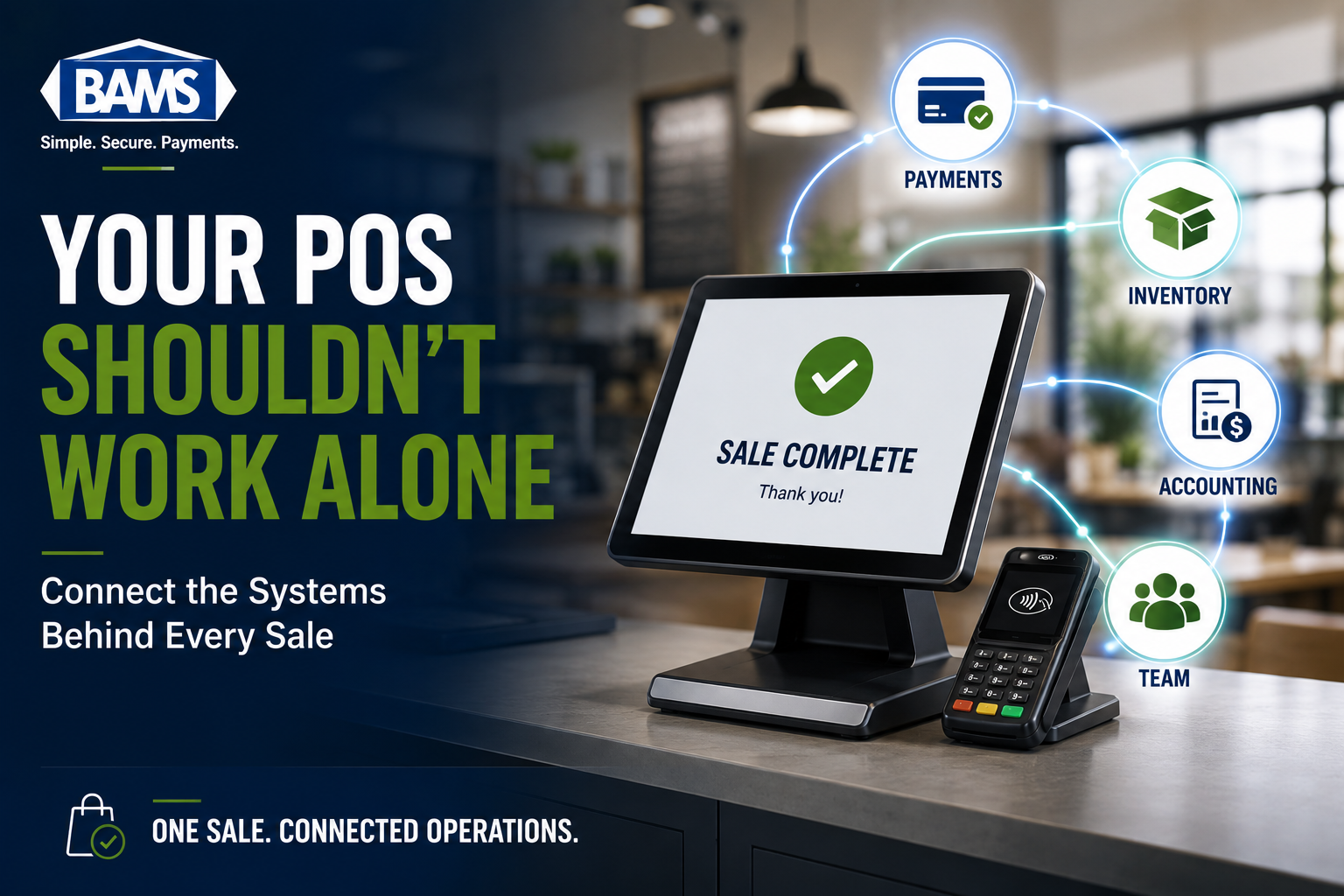
One Sale Can Touch Several Business Systems
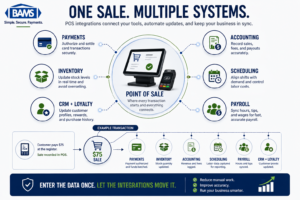
POS integrations allow sales data to move between payment, accounting and operational systems without unnecessary manual re-entry.
A customer sees one transaction at checkout. Behind the scenes, that sale may need to update several different systems.
A $75 restaurant order could simultaneously:
- Process the customer’s card payment
- Reduce ingredient or product inventory
- Record sales revenue
- Add tips to employee records
- Update labor-versus-sales reporting
- Add loyalty points to a customer account
- Feed transaction data into management reports
Without integrations, employees may have to move parts of that information manually.
That is the real value of POS integration: the transaction becomes the trigger for the rest of the workflow.
What Kinds of POS Integrations Are Available?
Third-party connection solutions and POS application marketplaces can open compatible systems to hundreds of applications and automated workflows.
In practice, most businesses benefit from integrations in a handful of important areas.
Payment Processing Integration
A point-of-sale is fundamentally a sales tool, and it needs a compatible payment-processing connection to securely authorize card transactions and route funds through the payment network.
The original version of this article stated that most POS systems could integrate with most processors. That is no longer a safe assumption.
Some POS platforms allow merchants to choose among several compatible processors. Others operate more closed payment ecosystems or require merchants to use approved processing partners.
That is why compatibility should be confirmed before selecting either the POS or the processor.
BAMS currently supports a broad catalog of POS and software integrations across restaurant, retail and hospitality environments, allowing many merchants to keep the system they already use when moving their payment processing to BAMS.
Accounting Integration
As mentioned earlier, accounting software like QuickBooks can integrate with many POS environments.
Syncing payment and sales information with accounting software can reduce repetitive bookkeeping work and make reconciliation easier.
BAMS currently lists QuickBooks among its featured retail integrations.
The goal should not be to remove accounting oversight. It should be to eliminate unnecessary re-keying of information so the accounting team can spend more time reviewing the numbers and less time moving them between systems.
Inventory Integration
Inventory is another natural extension of the POS.
When a product sells, the inventory system can reduce the available quantity automatically. Restaurants can use similar integrations to track ingredients, menu items or purchasing requirements.
This becomes especially valuable when businesses sell through several channels.
A retailer might sell the same inventory through a physical store and an eCommerce site. Integrated inventory can help keep those channels synchronized instead of maintaining separate stock counts.
Online Ordering and Delivery Integration
Restaurants increasingly receive orders from outside the dining room.
Online ordering and delivery integrations can send orders directly into the POS rather than requiring staff to read an order from a separate tablet and manually enter it again.
That can reduce double entry and help keep pricing, menus and reporting more consistent across channels.
For restaurants, BAMS currently supports a wide range of POS environments including systems such as Aloha, Clover, LAVU, Lightspeed, MICROS and Revel Systems.
Scheduling Integration
Many POS systems offer either built-in scheduling features or integrations with workforce-management software.
That capability can be especially valuable in restaurants and retail businesses where staffing needs change throughout the week.
Sales information from the POS can also help managers compare labor against demand. Instead of building a schedule without context, an integrated system can combine historical sales activity with employee availability and labor costs.
Employees may also be able to review schedules, submit availability or receive shift reminders through the connected workforce-management platform.
Payroll Integration
Some POS systems offer payroll integrations, such as the Labor Center connection between Toast POS and Dolce.
That integration continues to operate today and connects scheduling, timekeeping, tip distribution, labor compliance and payroll output.
Payroll integration has expanded considerably since this article was originally published. Toast, for example, now also offers its own payroll system that pulls employee hours and tips directly from the POS.
The value is straightforward.
If employees already clock in and out through the POS, those records can flow into payroll instead of someone manually recreating the timesheet somewhere else.
That can reduce repetitive work and help minimize errors caused by duplicate entry.
CRM and Loyalty Integration
The POS can also help connect transactions with customer relationships.
A loyalty or CRM integration can connect a purchase with a customer’s profile, update rewards and provide the business with a more complete history of customer activity.
This can support loyalty programs, targeted promotions and customer service without forcing employees to maintain an entirely separate transaction history.
Reporting and Analytics Integration
Transaction data becomes far more useful when businesses can analyze it alongside deposits, locations, payment methods and other operational information.
BAMS merchants currently receive access to reporting and analytics tools that provide searchable transactions, deposit information, statements and multi-account visibility.
For multi-location businesses, integrations and centralized reporting can also make it easier to compare performance across stores or restaurants without manually combining separate spreadsheets.
Integrations Reduce Duplicate Data Entry
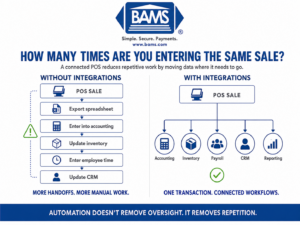
Integrated POS systems can reduce repetitive data entry by automatically sharing information with connected business software.
One of the simplest ways to evaluate the value of an integration is to count how many times employees enter the same information.
If an employee enters an order into the POS, another employee exports it into accounting, a manager enters the employee hours into payroll and someone else updates inventory, the business is maintaining several manual bridges between systems.
Every bridge takes time.
It also creates another opportunity for information to become delayed, duplicated or entered incorrectly.
An integration will not guarantee that every record is perfect. Software can still be configured incorrectly, mappings can fail and workflows still need monitoring.
The benefit is that the business removes unnecessary repetitive entry and creates a more consistent path for the data.
POS Integrations Can Improve the Customer Experience Too
Most integration benefits happen behind the scenes, but customers can feel the difference.
Consider a retailer whose inventory is synchronized between its POS and online store. Customers are less likely to order an item online that the physical store already sold out of.
Or consider a restaurant where online orders flow directly to the same operational system employees use for dine-in orders. Staff spend less time re-entering tickets and more time preparing orders.
Loyalty integrations can recognize returning customers. Payment integrations can support chip and contactless checkout. CRM integrations can make purchase history easier to find when a customer needs help.
Better-connected systems can therefore improve both efficiency behind the counter and consistency in front of it.
What to Check Before Adding a POS Integration
An integration should eliminate work, not create another system employees have to babysit.
| What to Check | Why It Matters |
|---|---|
| Compatibility | Confirm that the exact POS, processor and software versions can work together. |
| Data direction | Know whether information moves one way or synchronizes in both directions. |
| Update frequency | Some integrations sync in real time while others update on a schedule. |
| Fields synchronized | An integration may transfer sales totals without transferring every transaction detail you need. |
| Security | Understand what data the integration can access and how sensitive information is protected. |
| Support | Know who owns the problem if the connection stops working. |
| Cost | Some integrations are included while others require subscriptions, partner fees or development work. |
Do Not Choose a POS Based Only on the Number of Integrations
A marketplace with hundreds of applications sounds impressive, but most businesses will only use a small number of them.
The better question is whether the POS integrates with the tools that matter to your operation.
A restaurant may care about online ordering, kitchen systems, scheduling and payroll.
A retailer may care more about inventory, accounting, loyalty and eCommerce.
A hotel may need its POS and payment environment to work with property-management software.
BAMS’ current integration catalog reflects those differences, with separate integration options across restaurant, retail, hospitality and eCommerce environments.
Frequently Asked Questions
What is a POS integration?
A POS integration is a connection between a point-of-sale system and another software or payment system. It allows information to move between the platforms without requiring employees to manually recreate every record.
What software can integrate with a POS?
Depending on the POS, integrations can include payment processing, accounting, inventory, online ordering, delivery, scheduling, payroll, CRM, loyalty and reporting platforms.
Can every POS work with every payment processor?
No. Processor compatibility varies by POS platform. Some systems support several payment processors while others operate more restricted or closed payment environments. Merchants should confirm compatibility before changing either system.
Does BAMS integrate with existing POS systems?
Yes. BAMS currently supports dozens of integrations across restaurant, retail and hospitality environments, including systems such as Aloha, Clover, LAVU, Lightspeed, MICROS, NCR Silver, Revel Systems and others.
Can QuickBooks integrate with POS systems?
Yes. Many POS systems can connect with QuickBooks or accounting applications to reduce manual transaction entry. BAMS also currently lists QuickBooks among its retail integrations.
Can POS integrations automate payroll?
Some can. Compatible systems can send employee time, tip and wage information from the POS into payroll or workforce-management software. The exact capabilities depend on the POS and payroll integration.
Are POS integrations always real-time?
No. Some integrations update immediately while others synchronize at scheduled intervals. Merchants should confirm the update frequency before relying on an integration for time-sensitive information.
Do POS integrations eliminate errors?
No. Integrations can reduce manual data-entry errors, but software still needs proper configuration and monitoring. Failed synchronization, incorrect mappings or other technical issues can still occur.
Build a POS Around the Way Your Business Actually Works
BAMS is a leading payment processor offering merchant-account integration with a broad range of POS systems across the dining, hospitality and retail sectors.
Its current integration catalog includes systems ranging from Clover and Lightspeed to MICROS, Aloha, QuickBooks, Revel Systems and many others. :contentReference[oaicite:2]{index=2}
The advantage is choice. Businesses can evaluate the hardware and software that fit their operation instead of treating payment processing as an isolated system.
BAMS also currently emphasizes seamless integrations across its restaurant, retail and hospitality merchant-account solutions, allowing compatible businesses to use existing POS or property-management systems with a BAMS merchant account. :contentReference[oaicite:3]{index=3}
To find out more about how a BAMS merchant account can integrate with your ideal POS and help reduce your monthly processing costs, get started with a free comprehensive five-point price comparison today.