
Apple Pay for Business: Why Settlement Matters More Than Setup
Last Updated on October 5, 2026 by Dimitri Akhrin
The post-transaction layer—fee structure, funding speed, processing costs—is the variable actually worth optimizing
Learn why optimizing your Apple Pay checkout is only half the equation. This piece breaks down how fee structures, settlement speed, and funding eligibility quietly erode margins on every contactless sale.
TL;DR
- The integration isn’t the problem – Apple Pay setup is mature and straightforward. The real cost driver is what happens after the transaction: settlement speed, fee structure, and funding timelines.
- Deposit delays silently erode margins – Multi-day settlement on contactless payments locks up working capital, forces reliance on credit, and compounds costs that most merchants never attribute to their processor.
- Funding speed is a strategic lever – The difference between next-day and three-day funding on digital wallet sales can mean tens of thousands in accessible working capital at any given time.
- Evaluate processors by funding cycles, not features – The right question isn’t “do we accept Apple Pay?” It’s “how many hours stand between a sale and spendable cash?”
Your Apple Pay Button Works Fine. Your Deposit Timeline Doesn’t.
Here’s a pattern we see constantly: an eCommerce team spends weeks integrating Apple Pay for business, testing the checkout flow, celebrating the launch. Then the first batch of contactless payments clears, and the funds sit in limbo for three to five business days. The button works. The cash flow doesn’t.
The conversation about digital wallets has been stuck on the wrong layer for years. And it’s costing merchants real money every single week.
Everyone Optimizes the Checkout. Almost Nobody Optimizes the Settlement.
Search for anything about Apple Pay integration and you’ll find the same content recycled endlessly: NFC terminal compatibility, tokenization explainers, step-by-step setup guides. That content made sense five years ago, when contactless payments were novel and merchants needed convincing.
Today? Contactless payments account for more than 75% of Mastercard’s network transactions. Digital wallets are projected to represent roughly 56% of global eCommerce value. Apple Pay isn’t a feature you “add.” It’s how a growing majority of your customers already expect to pay.
The integration question is settled. What happens after the customer taps “pay” is where most businesses are still losing ground.
The Real Decision Isn’t Whether to Accept Apple Pay. It’s How Fast You Get Paid.

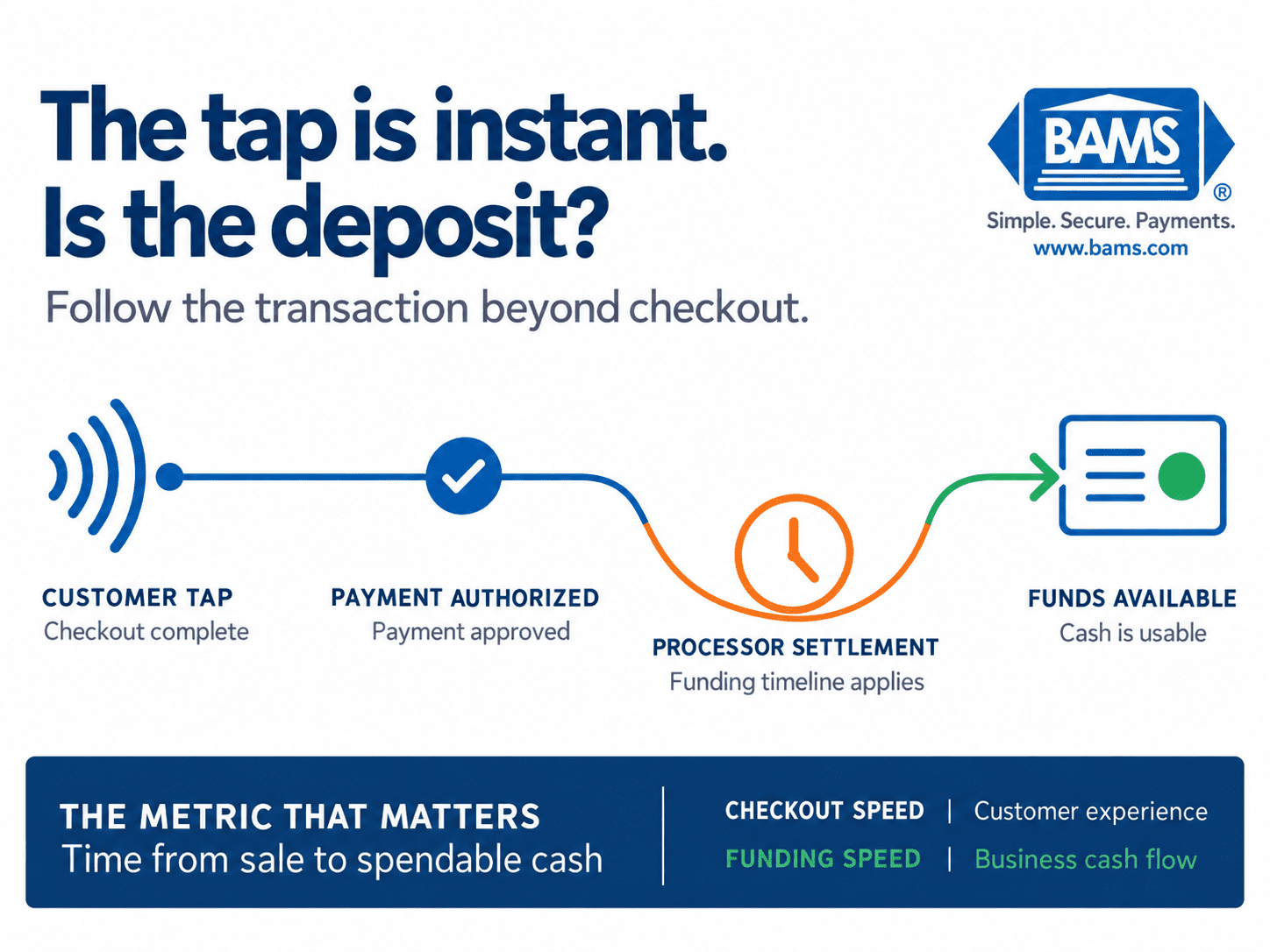
A fast checkout does not always mean fast access to funds. Merchants should evaluate the full path from Apple Pay transaction to usable deposit.
We believe the post-transaction layer (fee structure, settlement speed, funding eligibility) is the actual business variable worth evaluating, not the technical integration steps that most content exhausts. The checkout button is table stakes. The deposit timeline is the competitive edge.
Where Contactless Payments Actually Cost You Money
Consider what a typical Apple Pay transaction looks like from the merchant’s side. A customer taps their phone. The payment processes. Then, depending on your processor, the funds enter a settlement queue that could take anywhere from 24 hours to nearly a week before they reach your operating account.
That gap isn’t just an inconvenience. It’s a compounding drag on your business.
The scale of the problem is growing
Roughly three in four U.S. iPhone users have activated Apple Pay, and in-store Apple Pay spending hit an estimated $268 billion in 2024. That’s not a niche payment method. That’s a primary revenue channel for many online and omnichannel businesses. When your primary revenue channel has a multi-day deposit delay baked in, every growth milestone amplifies the cash flow problem.
We’ve seen eCommerce operators running 10 to 50 person teams who process the majority of their sales through digital wallets, yet still operate on settlement timelines designed for a slower era. They’re funding payroll, inventory, and ad spend on credit while their earned revenue sits in a processing queue.
Fees hide in the wrong places
Apple Pay transaction fees don’t exist in isolation. They sit inside a layered stack of interchange rates, processor markups, gateway fees, and network assessments. Most merchants evaluate their “Apple Pay cost” by looking at the checkout conversion rate. Few evaluate the total cost of the transaction lifecycle, including the implicit cost of delayed access to funds.
A processor that charges a marginally lower per-transaction rate but holds your funds for 72 hours is more expensive than one that charges slightly more but deposits next day. The math isn’t complicated. It’s just rarely presented honestly.
Funding speed is a strategic lever, not a perk
For a business doing $500,000 per month through contactless payments, the difference between next-day funding and three-day funding is roughly $50,000 in working capital that’s either available or locked up at any given time. That’s the difference between restocking a bestseller on Monday or Thursday. Between running a flash sale with confidence or hesitating because your bank balance doesn’t reflect what you’ve actually earned.
Tools like BAMS address this directly with next-day funding and transparent pricing, turning Apple Pay transactions into predictable cash flow rather than a guessing game about when deposits land. When your merchant services partner treats settlement speed as a core feature (not an upgrade tier), every contactless sale becomes a same-week asset instead of a delayed promise.
If This Is Right, Your Processor Choice Matters More Than Your Checkout Design
If the post-transaction layer is the real variable, then most eCommerce teams are spending their optimization energy in the wrong place. They’re A/B testing button placement while ignoring the fact that their processor’s settlement schedule is silently eroding their margins.
This has downstream effects. Delayed deposits force reliance on credit lines. Credit lines carry interest. Interest eats into the margin you thought you were protecting by negotiating a lower interchange rate. The whole system feeds on itself.
It also means that when you evaluate whether to accept Apple Pay as a merchant, the question shouldn’t stop at “does my platform support it?” It should extend to: what is my effective cost per dollar of revenue, measured from tap to deposit? And how many days does that measurement span?
For teams managing chargeback exposure on top of all this, the stakes compound further. A processor with proactive chargeback defense and fast funding creates a fundamentally different operating reality than one that simply routes transactions and sends a monthly statement.
Stop Thinking in Checkout Features. Start Thinking in Funding Cycles.
Merchants can evaluate Apple Pay more clearly by reviewing every stage between customer authorization and available funds.
Here’s the reframe: every contactless payment your business processes is not a “transaction.” It’s a funding event with a timeline, a cost structure, and a cash flow consequence. The merchants who win aren’t the ones with the sleekest Apple Pay button. They’re the ones who’ve engineered the shortest, cheapest path from customer tap to operating account.
The real metric isn’t “do we accept digital wallets?” It’s “how many hours stand between a sale and spendable cash?”
That question changes everything about how you evaluate processors, negotiate terms, and structure your payment stack.
The Button Was Never the Hard Part
Accepting Apple Pay is easy. The setup guides exist. The technology is mature. Your competitors have already done it.
The hard part, the part almost nobody talks about, is making sure every one of those taps turns into cash you can use tomorrow, not Thursday. That’s not a checkout problem. That’s a processing partner problem. And it’s the one worth solving.
Frequently Asked Questions
Why are my Apple Pay deposits delayed even though transactions process instantly?
Authorization and settlement are separate stages. The Office of the Comptroller of the Currency defines merchant processing as the settlement of credit or debit card payment transactions for merchants. When funds reach your account depends on your processor’s funding schedule, batching rules and account terms.
Do Apple Pay transactions cost more to process than regular card payments?
Apple Pay transactions typically carry the same interchange rates as card-not-present or contactless card transactions, but total cost depends on your processor’s markup, gateway fees, and settlement terms. A lower per-transaction fee with slower funding can actually cost more than a slightly higher rate with next-day deposits.
How can I qualify for next-day funding on digital wallet sales?
Eligibility varies by processor. Look for merchant services providers that offer next-day funding as a standard feature rather than a premium add-on, and confirm that mobile wallet transactions (not just traditional card swipes) are included in that funding timeline.
Sources
-
- https://www.mastercard.com/us/en/news-and-trends/stories/2025/contactless-payments-2025.html
- https://www.consumerfinance.gov/data-research/research-reports/big-techs-role-in-contactless-payments-analysis-of-mobile-device-operating-systems-and-tap-to-pay-practices/full-report/
- https://www.occ.treas.gov/publications-and-resources/publications/comptrollers-handbook/files/merchant-processing/pub-ch-merchant-processing.pdf


