Interchange Fees Explained: The Real Cost of Apple Pay
Last Updated on October 6, 2026 by Dimitri Akhrin
How interchange tiers, assessment fees, and processor markups create hidden costs in every Apple Pay transaction
Learn how the layered fee structure behind Apple Pay transactions actually works. This guide breaks down interchange qualification tiers, network assessments, and processor markups so eCommerce managers can identify and reduce their real payment processing costs.
TL;DR
- Apple Pay isn’t free, it’s invisible – Apple charges banks, not merchants, but you still pay interchange (0.5%-2.5%), assessment (0.13%-0.15%), and processor markup (0.2%-1.0%) on every Apple Pay transaction.
- Unbundle your statement first – Request interchange-plus pricing so you can see each fee layer separately. You can’t optimize what you can’t see, and flat-rate or tiered pricing hides where your money actually goes.
- Fix interchange downgrades for quick wins – Missing data fields (AVS, CVV, order details) or delayed settlement can push transactions to higher interchange tiers. Proper gateway configuration alone can save 0.2%-0.5% per transaction.
- Chargebacks compound costs beyond the fee – Each chargeback costs the fee ($20-$100), the transaction amount, the product, and the original processing fee. Proactive dispute alerts and clear billing descriptors prevent most escalations.
- Deposit timing is a hidden cost – Every day your processor holds funds is capital you can’t use. Next-day funding eliminates this gap without changing your processing fees.
Guide Orientation: What This Covers and Who It’s For
This guide breaks down the layered fee structure behind every Apple Pay transaction so you can identify where your real credit card processing fees live and start reducing them. We focus specifically on the cost levers most eCommerce managers never see itemized: interchange qualification tiers, network assessment fees, and processor markups.
If you manage payments for an established online business (roughly 10 to 50 employees) and you’ve been told “Apple Pay is free for merchants,” this guide is for you. By the end, you’ll understand exactly how each fee layer works, how Apple Pay transactions interact with interchange tiers, and how to turn chargeback reduction and cash flow timing into measurable savings.
We won’t cover Apple Pay’s consumer-side setup or general mobile wallet comparisons. This is purely about cost structure, optimization, and the operational decisions that affect your bottom line.
Why Interchange Fees and Payment Processing Costs Deserve Your Attention Now
Credit and debit card processing fees totaled $236.4 billion in 2024. That figure has grown by more than 25% compared to prior estimates, and it reflects a reality eCommerce managers can’t ignore: the cost of accepting payments is climbing, even as the methods customers prefer (contactless, digital wallets) promise convenience and speed.
The surface-level answer about Apple Pay is technically correct. Apple doesn’t charge merchants a fee. Although merchants don’t pay Apple directly for accepting Apple Pay, every transaction still passes through the same interchange, card network, and payment processing ecosystem as a traditional card payment. Those underlying payment acceptance costs remain the primary expense for merchants.
But the statement “Apple Pay is free” obscures the fact that every Apple Pay transaction still flows through the same interchange, assessment, and processor markup layers as any other card payment. And those layers are where your costs actually accumulate.
The cost of inaction here isn’t dramatic. It’s incremental and persistent. If you’re processing $500,000 per month and your effective rate is even 0.3% higher than it should be, that’s $18,000 per year in avoidable fees. Pair that with chargebacks you could have prevented and deposit timing that delays your access to working capital, and the compounding effect becomes significant. Understanding the fee structure isn’t optional for eCommerce managers who want to protect margins.
Core Concepts: The Three Fee Layers You’re Actually Paying
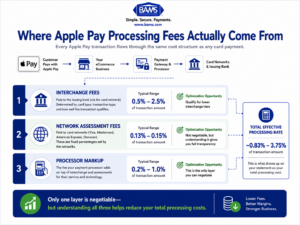
Apple Pay doesn’t add a merchant fee, but every transaction still passes through three separate cost layers. Understanding each layer is the first step toward lowering your effective processing rate.
Every Apple Pay transaction (and every card transaction) passes through three distinct fee layers. Most merchant statements lump them together, which makes it nearly impossible to optimize any single one. Here’s what each layer actually is.
Layer 1: Interchange Fees
Interchange is the largest component of your processing cost. It’s the fee your acquiring bank pays the cardholder’s issuing bank every time a transaction settles. Interchange is the largest component of most payment acceptance costs. The exact amount varies based on factors such as card type, merchant category, transaction method, and interchange qualification rather than a single fixed percentage. These rates are set by card networks (Visa, Mastercard), not by your processor.
According to the Federal Reserve Bank of St. Louis, interchange fee revenue collected by U.S. banks continued to increase during 2025, reflecting the growing importance of card payments in the U.S. economy.
Layer 2: Assessment Fees
Assessment fees (sometimes called network fees or brand fees) go directly to the card networks. They’re typically around 0.13% to 0.15% of the transaction value. These are non-negotiable. No processor can reduce them. But knowing they exist helps you understand what portion of your effective rate is fixed versus variable.
Layer 3: Processor Markup
Processor markup varies by provider, pricing model, merchant risk profile, and services included. Unlike interchange and assessment fees, this is typically the portion merchants can negotiate. This is the only layer where you have direct negotiating power, and it’s where pricing models (interchange-plus, tiered, flat-rate) create the biggest variance between merchants.
A Common Misconception
Many eCommerce managers believe Apple Pay transactions cost less because they’re “more secure” or “digital.” In reality, Apple Pay transactions use the same interchange tables as the underlying card. A Visa Signature Rewards card processed via Apple Pay hits the same interchange tier as that same card tapped on a physical terminal or keyed into a checkout page. The security benefits of tokenization can reduce fraud (and therefore chargebacks), but they don’t automatically lower interchange rates. PCI Security Standards Council guidance explains how tokenization and EMV technologies help protect payment credentials during modern digital wallet transactions.
For a deeper look at how interchange fees work across different scenarios, it’s worth understanding the rate tables your transactions actually qualify for.
The Framework: From Fee Visibility to Real Savings
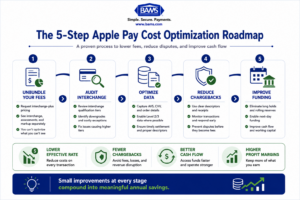
Reducing your payment processing costs isn’t a single action. It’s a system with five interconnected stages. Each stage builds on the previous one, and skipping ahead (for example, negotiating processor rates before you understand your interchange qualification) leads to suboptimal outcomes.
Here’s the sequence:
- Stage 1: Unbundle your fees. Separate interchange, assessments, and processor markup on your statements.
- Stage 2: Audit interchange qualification. Identify which transactions are downgrading to higher-cost tiers and why.
- Stage 3: Optimize transaction data. Submit the data fields that qualify you for lower interchange categories.
- Stage 4: Reduce chargebacks proactively. Prevent disputes before they escalate into fees, penalties, and lost revenue.
- Stage 5: Align cash flow timing. Ensure your deposit schedule supports operations rather than creating artificial cash gaps.
Each stage is detailed below with specific execution guidance, anti-patterns to avoid, and indicators that tell you the step is working.
Step-by-Step Breakdown: Turning Fee Awareness Into Savings
Step 1: Unbundle Your Processing Statement
Objective: See each fee layer (interchange, assessment, processor markup) as a separate line item so you know exactly where your money goes.
Most processors provide statements that obscure the breakdown. Tiered pricing models (qualified, mid-qualified, non-qualified) are the worst offenders because they group interchange and markup together into opaque buckets. Flat-rate models are simpler but prevent you from seeing whether you’re overpaying on low-risk transactions that should qualify for lower interchange.
Request an interchange-plus statement from your processor. This format shows the actual interchange rate for each transaction category, plus the processor’s fixed markup on top. If your processor won’t provide this breakdown, that’s a signal worth paying attention to. Transparency in pricing is a baseline expectation, not a premium feature.
What to avoid: Don’t accept a summary statement that shows only your effective rate (total fees divided by total volume). An effective rate of 2.4% could mean you’re on excellent interchange tiers with a high processor markup, or terrible interchange tiers with a low markup. The optimization path is completely different in each case.
Success indicator: You can identify the exact interchange category, assessment fee, and processor markup for at least 80% of your transaction volume. If you can’t, your statement isn’t detailed enough.
Step 2: Audit Your Interchange Qualification
Objective: Determine which transactions are qualifying at higher (more expensive) interchange tiers and identify the correctable causes.
Interchange rates aren’t random. They’re determined by a matrix of factors: card type, merchant category code, how the transaction was authorized, whether it was settled within the required timeframe, and what data fields were submitted. A transaction that should qualify at 1.65% can easily downgrade to 2.30% or higher if settlement is delayed or required data fields are missing.
For eCommerce specifically, card-not-present transactions already start at higher interchange tiers than card-present ones. But within the card-not-present category, there are still significant tier differences. Transactions that include AVS (Address Verification Service) data, CVV verification, and timely settlement qualify for better rates than those that don’t.
Apple Pay transactions are interesting here. Because they use device-specific tokenization, they can qualify for certain card-present or “digital secure remote commerce” interchange programs depending on how your payment gateway categorizes them. This is worth verifying with your processor because the difference between card-present and card-not-present interchange can be 0.3% to 0.5% per transaction.
What to avoid: Don’t assume all your transactions qualify at the same tier. Even a single missing data field can cause a downgrade. Also, don’t confuse the interchange rate your processor quotes you with the rate your transactions actually qualify for. They’re often different.
Success indicator: You have a list of your top five interchange categories by volume and can identify at least two categories where downgrades are occurring. Understanding common myths about credit card tier differences helps you avoid assumptions that inflate costs.
Step 3: Optimize Transaction Data Submission
Objective: Submit the specific data fields required to qualify each transaction for the lowest available interchange tier.
This is where technical execution meets real savings. Card networks publish detailed interchange qualification guides that specify exactly which data fields must be present for each tier. For eCommerce transactions, the most impactful fields include:
- AVS data (billing address and zip code match)
- CVV/CVC verification
- Order number and invoice number
- Settlement within 24 hours of authorization
- Level 2/Level 3 data (for B2B transactions: tax amount, customer code, line-item detail)
Level 3 data capture is particularly underutilized. If your business sells to other businesses or government entities, submitting Level 3 data can reduce interchange by 0.5% to 1.0% per transaction. Most eCommerce platforms support this, but it often requires configuration that isn’t enabled by default.
For Apple Pay specifically, ensure your payment gateway passes the tokenized transaction with full data enrichment. Some gateways strip data fields during tokenization, which can cause unnecessary downgrades. Confirm with your gateway provider that AVS, CVV, and order-level data are transmitted even when the payment originates from a digital wallet.
What to avoid: Don’t treat data optimization as a one-time project. Payment gateway updates, platform migrations, and even plugin updates can silently break data field transmission. Build a quarterly review into your operations calendar.
Success indicator: Your interchange downgrade rate drops below 5% of total transactions, and your effective rate decreases measurably within one to two billing cycles.
Step 4: Reduce Chargebacks Before They Become Fees
Objective: Prevent disputes from escalating into chargebacks that carry fees, penalties, and long-term cost increases.
Chargebacks are the most expensive fee category most eCommerce managers underestimate. Each chargeback carries a direct fee ($20 to $100 depending on your processor), but the real damage compounds: you lose the transaction amount, the product, the original processing fee, and you pay the chargeback fee on top. If your chargeback ratio exceeds network thresholds (typically 1% of transactions), you enter monitoring programs that add per-transaction penalties and can ultimately result in account termination.
Apple Pay’s tokenization does reduce certain fraud vectors. Because the actual card number is never transmitted, stolen card data from breaches can’t be used for Apple Pay transactions. This genuinely reduces fraud-related chargebacks. But “friendly fraud” (legitimate customers disputing valid charges) remains unaffected by tokenization, and it accounts for the majority of eCommerce chargebacks.
Proactive chargeback defense requires three things: clear billing descriptors so customers recognize charges, responsive customer service that resolves complaints before they become disputes, and alert systems that notify you of disputes in real time so you can issue refunds before the chargeback is filed. Tools like BAMS offer proactive chargeback defense with instant alerts and dedicated account management, which gives eCommerce teams the response window needed to resolve disputes before they hit your chargeback ratio.
Understanding whether chargeback fees or interchange fees represent your larger cost exposure helps you prioritize where to focus optimization efforts first.
What to avoid: Don’t ignore chargebacks because they seem infrequent. Even a small number of chargebacks can push you past monitoring thresholds if your transaction volume dips seasonally. Also, don’t rely solely on Apple Pay’s fraud reduction as a chargeback strategy. It addresses one type of dispute, not all of them.
Success indicator: Your chargeback ratio stays below 0.5% consistently, and you’re resolving at least 30% of disputes before they convert to formal chargebacks. If your payment processing tools aren’t providing chargeback protection, that gap is costing you more than you think.
Step 5: Align Deposit Timing With Cash Flow Needs
Objective: Ensure your settlement and funding schedule supports operational cash flow rather than creating unnecessary delays.
This step is often overlooked in fee optimization discussions, but deposit timing directly affects your cost of doing business. If your processor holds funds for 48 to 72 hours (standard for many providers), you’re effectively extending an interest-free loan on every transaction. For a business processing $500,000 monthly, a two-day delay means roughly $33,000 in capital is perpetually inaccessible.
Next-day funding eliminates this gap. It doesn’t reduce your processing fees directly, but it improves your working capital position, reduces reliance on credit lines (which carry their own interest costs), and gives you the flexibility to pay suppliers on better terms or take advantage of early-payment discounts.
Apple Pay transactions settle through the same funding timeline as other card transactions. There’s no inherent delay or acceleration based on the payment method. Your funding speed is determined entirely by your processor’s settlement schedule. If your current processor batches settlements weekly or holds reserves, you’re paying a hidden cost that doesn’t appear on any statement.
What to avoid: Don’t confuse authorization with settlement. A transaction can be authorized instantly but not settled for days. Also, don’t accept reserve holds (where a processor withholds a percentage of your deposits) without understanding the specific risk criteria that triggered them. Reserves are sometimes applied by default rather than based on actual risk assessment.
Success indicator: You receive deposited funds within one business day of batch settlement, and you have zero unexplained reserve holds on your account.
Practical Examples: Mapping the Framework to Real Scenarios
Lower Apple Pay processing costs come from optimizing the entire payment workflow—not from negotiating a single rate.
Scenario A: The “Everything Looks Fine” Audit
An ecommerce retailer processing $300,000/month on a flat-rate plan at 2.9% + $0.30 per transaction assumes their costs are competitive. After unbundling, they discover their average interchange rate is 1.75% (because most customers use debit cards), assessments are 0.14%, and their processor markup is effectively 1.01%. On interchange-plus pricing, their total would drop to approximately 2.19%, saving roughly $2,130 per month.
The flat-rate model was costing them more because it charged the same rate regardless of card type. Debit transactions, which carry lower interchange, were subsidizing the processor’s margin.
Scenario B: The Chargeback Spiral
A subscription-based ecommerce company sees chargebacks rise from 0.4% to 0.9% over three months. They’re not yet in a monitoring program, but they’re close. Each chargeback costs them an average of $85 in fees plus the lost transaction value. At 45 chargebacks per month, that’s $3,825 in direct fees alone, plus approximately $6,750 in lost revenue (average order value of $150).
By implementing real-time dispute alerts, updating billing descriptors to match their customer-facing brand name, and adding a pre-cancellation flow for subscribers, they reduce chargebacks to 0.3% within 60 days. The monthly savings: approximately $7,000 in combined fees and recovered revenue.
Scenario C: The Apple Pay Data Gap
An online retailer enables Apple Pay and sees higher conversion rates at checkout. But their gateway strips AVS data from tokenized transactions, causing 40% of Apple Pay orders to downgrade to a higher interchange tier. The downgrade costs an extra 0.4% per transaction. On $80,000/month in Apple Pay volume, that’s $320/month in avoidable interchange. A gateway configuration update fixes the data pass-through, and the downgrades stop within one billing cycle.
Common Mistakes and Pitfalls
The most predictable failure is treating payment processing as a “set it and forget it” operation. Fee structures change. Card networks update interchange tables. Your transaction mix shifts as your customer base evolves. What was optimized six months ago may not be optimized today.
Another common mistake is optimizing for the wrong metric. Chasing the lowest per-transaction rate while ignoring chargeback costs, funding delays, and interchange downgrades is like negotiating a lower rent while ignoring a leaking roof. Total cost of acceptance (fees plus chargebacks plus capital cost of delayed funding) is the number that matters.
Finally, many eCommerce managers assume their payment gateway handles optimization automatically. It doesn’t. Gateways transmit data. Whether that data is complete, correctly formatted, and submitted within settlement windows depends on your configuration and your processor’s capabilities. Assume nothing is optimized until you’ve verified it.
What to Do Next
Start with Step 1. Request an interchange-plus statement from your processor this week. If they can’t or won’t provide one, that tells you something important about their pricing model and your visibility into your own costs.
You don’t need to overhaul your entire payment stack at once. Identify your single largest cost lever (usually interchange downgrades or chargebacks) and focus there first. Even a 0.2% reduction in effective rate on $300,000/month in volume saves $7,200 annually. That’s real money recovered from a system you’re already using.
Revisit this guide quarterly as your transaction volume, customer mix, and payment method adoption change. The fee landscape shifts, and your optimization should shift with it.
Frequently Asked Questions
What fees do merchants actually pay when accepting Apple Pay?
Apple itself charges merchants nothing. Instead, Apple collects approximately 0.15% from the issuing bank, not from you. Your costs come from the same three layers as any card transaction: interchange fees (0.5% to 2.5%), network assessment fees (0.13% to 0.15%), and your processor’s markup (0.2% to 1.0%). The total typically falls within the global average of approximately 2.4% of the transaction value.
How does Apple Pay compare to traditional credit card processing fees?
The processing fees are essentially identical because Apple Pay uses the underlying card’s interchange tier. A Visa Rewards card processed via Apple Pay costs the same interchange as that card swiped or keyed in. The potential savings come indirectly: Apple Pay’s tokenization can reduce fraud-related chargebacks, and proper gateway configuration can help transactions qualify for card-present or digital commerce interchange tiers, which are sometimes lower than standard card-not-present rates.
Why is Apple Pay beneficial for reducing fraud costs?
Apple Pay replaces actual card numbers with device-specific tokens and requires biometric authentication (Face ID or Touch ID) for each transaction. This means stolen card data from breaches can’t be used through Apple Pay, reducing fraud-related chargebacks. However, “friendly fraud” (legitimate customers disputing valid charges) isn’t affected by tokenization, so Apple Pay alone isn’t a complete chargeback prevention strategy.
How can merchants optimize costs when using Apple Pay?
Focus on three areas. First, verify your payment gateway passes complete transaction data (AVS, CVV, order details) even for tokenized Apple Pay payments, since missing fields cause interchange downgrades. Second, settle Apple Pay transactions within 24 hours of authorization to avoid late-settlement surcharges. Third, confirm with your processor whether Apple Pay transactions qualify for digital commerce interchange programs, which can offer lower rates than standard card-not-present categories.
When should businesses actively promote Apple Pay to customers?
Promote Apple Pay when your customer base skews toward mobile shoppers and when your gateway is properly configured to pass full transaction data. The checkout speed improvement can increase conversion rates, and the fraud reduction from tokenization lowers your chargeback exposure. However, promoting Apple Pay before fixing data pass-through issues in your gateway could actually increase your costs through interchange downgrades.
What’s the difference between interchange fees and chargeback fees, and which costs more?
Interchange fees are a percentage of every transaction and represent your largest ongoing processing cost. Chargeback fees are per-incident ($20 to $100 each) but come with additional costs: lost merchandise, lost transaction revenue, and potential monitoring program penalties. For most merchants, interchange is the bigger total number, but chargebacks deliver more damage per incident and can threaten your ability to process payments entirely if your ratio exceeds network thresholds.