6 Fee Triggers That Spike Processing Costs After Peak Season
How high-volume periods activate compounding charges most eCommerce managers never see coming
Learn the six specific fee mechanisms that compound during peak season and erode your margins weeks later. A diagnostic checklist for eCommerce managers who’ve watched processing costs outpace revenue growth.
TL;DR
- Seasonal volume doesn’t just multiply costs, it compounds them – Six specific fee triggers (interchange downgrades, chargeback monitoring, reserve holds, deposit delays, fraud screening, PCI gaps) interact and escalate together during peak periods.
- Most damage is invisible until January – Bundled pricing hides interchange downgrades, chargeback monitoring penalties arrive 30 to 60 days after peak, and reserve holds persist for months. Run a payment system review before peak season, not after.
- Cash flow timing is a hidden processing cost – Deposit delays of 2 to 3 days during your highest-revenue period force expensive borrowing. Next-day funding from providers like BAMS can eliminate this seasonal cost entirely.
- Update your approved volume before you spike – Processors can impose rolling reserves when your sales exceed your approved limits. A quick pre-season conversation prevents a five-figure hold on your deposits.
- Start with three diagnostics – Request a qualification report, verify your approved volume ceiling, and calculate last season’s borrowing costs from deposit gaps. These three steps take under a week and reveal where your margin is leaking.
The Post-Season Shock: Why Processing Costs Spike When You Least Expect It
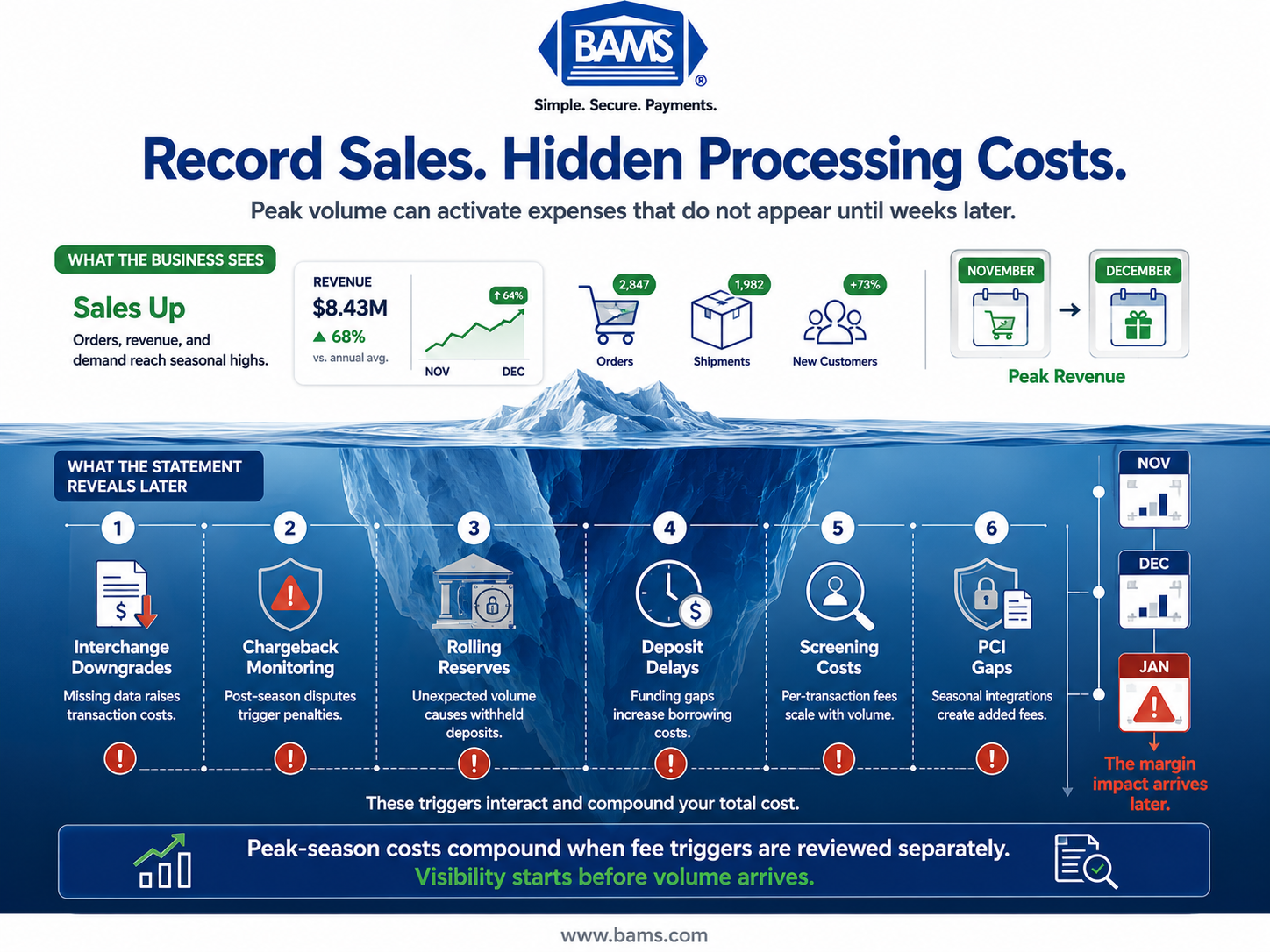
Most eCommerce managers budget for higher ad spend and inventory costs during peak season. Fewer budget for the processing cost spike that shows up weeks later on their merchant statement. The reason is structural: seasonal business challenges don’t just increase your transaction count. They trigger compounding fee mechanisms that flat-rate assumptions can’t predict.
Peak-season eCommerce order volumes rise sharply during November and December, creating operational and payment processing challenges that extend beyond higher transaction counts.
The result? You generate record revenue in November and December, then spend January figuring out where the margin went.
Record sales appear above the surface. The costs triggered by that volume often emerge weeks later.
Who This Is For and What It Covers
This guide is for eCommerce managers at established online businesses (roughly 10 to 50 employees) who’ve survived at least one peak season and noticed their processing costs didn’t scale the way they expected. If you’re running a growing brand and your payment processing costs feel unpredictable, this is your diagnostic checklist.
We’re not covering generic checkout optimization or enterprise-level treasury management. Instead, we’re isolating six specific fee triggers that compound during high-volume periods. Each one is a cost reduction initiative you can evaluate before your next peak season hits, not after.
How We Selected These Six Triggers
Every trigger on this list meets three criteria: it escalates disproportionately with volume (not linearly), it’s commonly missed in standard payment system review processes, and it’s addressable with changes a mid-market eCommerce team can actually make. We prioritized triggers that interact with each other, because the real damage happens when two or three compound simultaneously.
6 Fee Triggers That Compound During Seasonal Volume Spikes
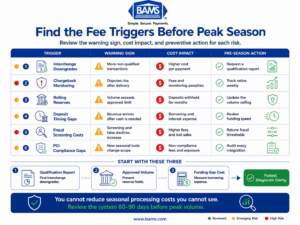
A pre-season payment review can identify the fee triggers most likely to erode margins after sales return to normal.
1. Interchange Downgrades From Degraded Data Quality
Why it matters: Interchange rates aren’t fixed. They shift based on the data you submit with each transaction. During peak season, rushed integrations, temporary storefronts, and higher volumes of manual orders often strip transactions of the Level II or Level III data fields that qualify them for lower interchange tiers. Each downgraded transaction costs you 0.5% to 1.0% more, and at peak volume, that adds up fast.
What it looks like today: Your processor’s statement shows a higher percentage of “non-qualified” or “mid-qualified” transactions in November and December compared to quieter months. You may not notice because most statements don’t flag the reason for the downgrade.
How to apply it: Run a payment system review 60 days before peak season. Check that your gateway passes all required data fields (AVS, tax amount, customer code for B2B). Ask your processor for a qualification report from last year’s peak months to see where downgrades clustered. Switching to interchange-plus pricing makes these downgrades visible instead of hiding them inside a bundled rate.
2. Chargeback Volume That Triggers Monitoring Programs
Why it matters: Chargebacks don’t just cost you the disputed amount plus a fee. When your chargeback ratio crosses 0.9% of transactions (Visa) or 1.0% (Mastercard), you enter a monitoring program with escalating monthly fines that can reach $25,000 or more. See Visa’s Acquirer Monitoring Program for current monitoring requirements.
During peak season, higher order counts combined with shipping delays, gift purchases, and “friendly fraud” push ratios up. Mastercard reports that global eCommerce fraud losses exceeded $48 billion in 2023, and a significant portion of that pressure lands during Q4.
What it looks like today: You might keep chargebacks low in absolute numbers during off-peak months. Then a seasonal surge in orders, combined with longer delivery windows, produces a spike in disputes 30 to 60 days after peak. By then, you’re already flagged.
How to apply it: Track your chargeback ratio weekly starting in October, not monthly. Deploy order confirmation emails with tracking numbers immediately. Consider proactive chargeback defense tools that resolve disputes before they become formal chargebacks. A merchant services partner with dedicated account management can alert you when your ratio approaches danger zones, rather than letting you discover it on a statement.
3. Rolling Reserve Requirements Triggered by Volume Anomalies
Why it matters: Most processors include clauses allowing them to hold a percentage of your deposits (typically 5% to 10%) when your processing volume deviates significantly from your approved monthly volume. This is a rolling reserve, and it’s the fee trigger that blindsides growing eCommerce brands the hardest. You hit a record sales month, and your processor responds by withholding thousands of dollars for 6 to 12 months.
What it looks like today: Your approved monthly volume was set when you onboarded, possibly years ago. You’ve grown 40% since then, but never updated your processing agreement. When November volume spikes 64% above your annual average, your processor’s risk system flags it automatically.
How to apply it: Contact your processor before peak season and request a volume increase on your merchant account. Provide sales projections and historical data. This is a five-minute conversation that can prevent a five-figure hold. If your current processor won’t adjust proactively, that’s a signal to evaluate whether your processor fits your growth trajectory.
4. Deposit Timing Gaps That Force Expensive Borrowing
Why it matters: This isn’t a line-item fee, but it functions like one. Standard processing deposits take 2 to 3 business days. During peak season, you need capital immediately to restock inventory, fund shipping, and cover ad spend. When deposits lag behind your cash needs, you borrow (credit lines, short-term loans) to bridge the gap. That borrowing cost is a direct consequence of your payment processing setup.
What it looks like today: You sell $80,000 on Black Friday. You need to reorder inventory Monday morning. Your deposit arrives Wednesday. You use a credit line at 15% to 24% APR to cover two days of operations. Multiply this across every high-volume day in a six-week season.
How to apply it: Evaluate processors that offer next-day funding as a standard feature, not a premium add-on. BAMS, for example, provides next-day funding to help merchants reinvest revenue without bridging gaps through debt. Even a one-day improvement in deposit speed across a 45-day peak season can eliminate thousands in borrowing costs.
5. Fraud Screening Costs That Scale With Transaction Count
Why it matters: Many fraud prevention tools charge per transaction screened. During peak season, your transaction count can nearly double, and so does your fraud screening bill. Worse, aggressive fraud filters tuned for off-peak patterns often produce more false declines during peak, rejecting legitimate orders and costing you revenue on top of the screening fee.
What it looks like today: Your fraud tool charges $0.05 to $0.10 per transaction. At 10,000 monthly transactions, that’s manageable. At 25,000 during peak, it’s a meaningful line item. Meanwhile, your decline rate creeps up because the tool flags unusual purchasing patterns (higher AOV, new shipping addresses, gift orders) that are actually normal seasonal behavior.
How to apply it: Adjust fraud thresholds before peak season, not during. Review your decline reports from the previous peak to identify false-positive patterns. Review fraud thresholds using historical seasonal transaction data and current performance metrics before peak season begins. Adjust fraud rules to reflect expected changes in purchasing behavior rather than relying on settings optimized for off-peak periods.
6. PCI Compliance and Non-Compliance Fees on Overlooked Seasonal Infrastructure
Why it matters: Seasonal infrastructure changes (temporary checkout pages, pop-up integrations, new fulfillment partner connections) can inadvertently pull you out of PCI compliance. Many processors charge monthly non-compliance fees of $20 to $100. More importantly, a compliance gap during your highest-volume period creates your highest-exposure window for a breach, which carries costs orders of magnitude larger than the monthly fee.
What it looks like today: You add a new payment method or checkout flow for holiday promotions. The integration doesn’t meet PCI standards, but nobody checks until the annual self-assessment questionnaire. Meanwhile, you’ve been paying a non-compliance surcharge for months without realizing it.
How to apply it: Complete your PCI compliance review at least 90 days before peak season. Audit any new integrations, plugins, or third-party tools against your compliance scope. Complete your PCI compliance review in accordance with guidance from the PCI Security Standards Council at least 90 days before peak season. Ask your processor whether seasonal changes (new domains, additional MIDs, temporary storefronts) affect your compliance status. A dedicated account manager at your merchant services provider should flag these proactively.
The Pattern: Seasonal Costs Compound Because They’re Connected
These six triggers don’t operate in isolation. A deposit timing gap forces borrowing, which tightens cash flow, which delays your ability to respond to chargebacks, which pushes your ratio toward monitoring thresholds. A volume spike triggers a reserve hold, which worsens the cash gap, which makes the borrowing problem worse. Meanwhile, interchange downgrades and fraud screening costs quietly inflate every transaction.
The pattern is clear: seasonal processing costs compound when merchants treat each fee as independent. The businesses that control costs during peak season are the ones that run a unified payment system review before volume arrives, not after the statements land in January. Combining historical transaction trends with current operational data allows merchants to identify emerging cost increases earlier and make adjustments before they significantly impact margins.
Where to Start: Prioritizing Your Cost Reduction Initiatives
You don’t need to address all six triggers at once. Start with the three that produce the fastest diagnostic results: request a qualification report from your processor to check for interchange downgrades (Trigger 1), verify your approved monthly volume matches your projected peak (Trigger 3), and calculate what deposit timing gaps actually cost you in borrowing last season (Trigger 4).
These three actions take less than a week and give you a clear picture of where seasonal costs are leaking. From there, layer in chargeback monitoring, fraud threshold adjustments, and a PCI compliance check. The goal isn’t perfection. It’s visibility. You can’t reduce costs you can’t see, and most of these triggers are invisible until you know where to look.
Frequently Asked Questions
When should businesses review their payment processing setup before peak season?
Start your payment system review at least 60 to 90 days before your expected volume spike. This gives you time to update approved volume limits, complete PCI compliance checks, adjust fraud thresholds, and negotiate pricing changes with your processor. Waiting until October for a November peak leaves almost no room to make meaningful changes.
How can payment processors optimize their services for seasonal fluctuations in volume?
The most impactful optimizations are proactive volume limit adjustments (to prevent reserve holds), next-day funding (to eliminate cash flow gaps), and dedicated account management that monitors chargeback ratios in real time. Processors that treat seasonal spikes as routine, rather than as risk events, save merchants significant costs.
What is a seasonal volume playbook in merchant services optimization?
A seasonal volume playbook is a pre-peak checklist that covers approved processing limits, interchange qualification, chargeback monitoring cadence, fraud filter adjustments, PCI compliance scope, and deposit timing. It turns reactive cost discovery into proactive cost management by addressing known fee triggers before volume arrives.
How can businesses use data to forecast transaction volume for seasonal planning?
Pull 12 to 24 months of transaction data from your processor and identify monthly volume patterns, average ticket size shifts, and chargeback timing. Layer in marketing calendar events (promotions, product launches) and external signals like industry trend reports. AI-powered forecasting tools can improve accuracy by 35% to 40% compared to manual methods based on historical averages alone.
Why do processing costs spike after peak season even though sales return to normal?
Several fee triggers have delayed effects. Chargebacks from peak-season orders arrive 30 to 60 days later. Rolling reserves imposed during high-volume months continue to withhold funds for 6 to 12 months. Non-compliance fees may persist until your next PCI assessment. These trailing costs create a “hangover” effect that inflates Q1 expenses even as revenue normalizes.
Which strategies help manage peak retail season processing costs effectively?
The highest-impact strategies are: switching to interchange-plus pricing for fee visibility, updating your approved monthly volume before peak, securing next-day funding to avoid bridging loans, tracking chargeback ratios weekly instead of monthly, and auditing fraud filter settings against last year’s false-decline data. Start with the three that give you the fastest diagnostic clarity and layer in the rest.
Sources
- https://www.mastercard.com/news/eemea/en/newsroom/press-releases/en/2026/may/checkout-com-and-mastercard-report-reveals-mena-emerges-as-one-of-the-fastest-growing-regions-to-adopt-tokenization-at-344-9/
- https://corporate.visa.com/content/dam/VCOM/corporate/visa-perspectives/security-and-trust/documents/visa-acquirer-monitoring-program-fact-sheet-2025.pdf
- https://www.pcisecuritystandards.org/