Apple Pay Checkout: A Guide to Reducing Cart Abandonment
Last Updated on September 2, 2026 by Dimitri Akhrin
How smart payment-step decisions lower mobile abandonment and accelerate your cash flow
Learn how Apple Pay checkout works as a conversion lever, not just a feature toggle. This guide covers checkout flow positioning, settlement timelines, and deposit strategies that turn faster mobile payments into measurable revenue gains.
TL;DR
- Placement drives conversion, not just availability — Surfacing Apple Pay early in checkout (cart or product page) delivers up to 2x higher conversion versus showing it at the final step. Position it before form friction, not after.
- Apple Pay improves more than speed — Tokenized transactions mean lower decline rates (less than half of standard cards), 5.8x fewer chargebacks, and often higher average order values. These compound into real cost savings.
- Deposit delays undermine conversion gains — If your processor holds Apple Pay funds for 48-72 hours, you’re losing the cash flow benefit of faster sales. Next-day funding turns conversion lift into operational advantage.
- Measure four metrics, not one — Track conversion rate, average order value, effective processing cost, and funding speed separately for Apple Pay. Conversion alone tells an incomplete story.
- Your processor choice matters more than your checkout design — The same Apple Pay button can perform very differently depending on how your processor handles token data, settlement timing, and fee structures. Evaluate the full transaction lifecycle, not just the front end.
Guide Orientation: What This Covers and Who It’s For
This guide examines how Apple Pay checkout functions as a conversion lever for eCommerce businesses, then goes further than most resources by addressing what happens after the sale: settlement timelines, deposit delays, and cash flow implications. Most content on mobile payment solutions stops at setup instructions. This guide picks up where those leave off.
It’s built for eCommerce managers at established online businesses who already understand the basics of payment processing but want to reduce checkout friction, speed up deposits, and lower total processing costs. By the end, you’ll understand how to position Apple Pay earlier in your checkout flow, evaluate your current settlement timeline against what’s possible, and make decisions that turn faster payments into a measurable operational advantage.
This guide does not cover in-store NFC terminal setup, Apple Pay developer API documentation, or basic device compatibility. For foundational setup, see Apple Pay Basics.
Why Eliminating Deposit Delays on Mobile Wallet Sales Matters Now
Checkout friction is invisible until you measure it. It doesn’t announce itself with error messages or customer complaints. It shows up in abandoned carts, declining conversion rates and revenue that never materializes. Visa emphasizes the importance of giving customers convenient ways to pay. For eCommerce merchants, supporting payment methods that fit how customers prefer to check out can help remove unnecessary friction at the moment of purchase.
The shift toward mobile wallets has accelerated this dynamic. Shoppers on mobile devices expect to authenticate with a fingerprint or face scan, not type a 16-digit card number on a small screen. When they can’t, they leave. A significant share of Canadians abandon a purchase because of friction at checkout., and the pattern holds across North American eCommerce broadly.
But here’s the gap most merchants miss: even after you enable Apple Pay and recover those lost conversions, the money still has to reach your bank account. Many processors batch mobile wallet transactions with standard card payments, applying the same 48- to 72-hour settlement window. For businesses managing inventory, payroll, and ad spend on tight margins, that delay creates a cash flow bottleneck that undermines the very speed you just gave your customers. Eliminating deposit delays on mobile wallet sales isn’t a back-office concern. It’s the second half of the conversion equation.
Core Concepts: Apple Pay User Experience, Settlement, and the Conversion Gap
Apple Pay Checkout vs. Standard Card Entry
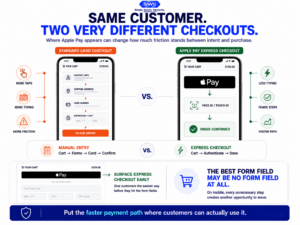
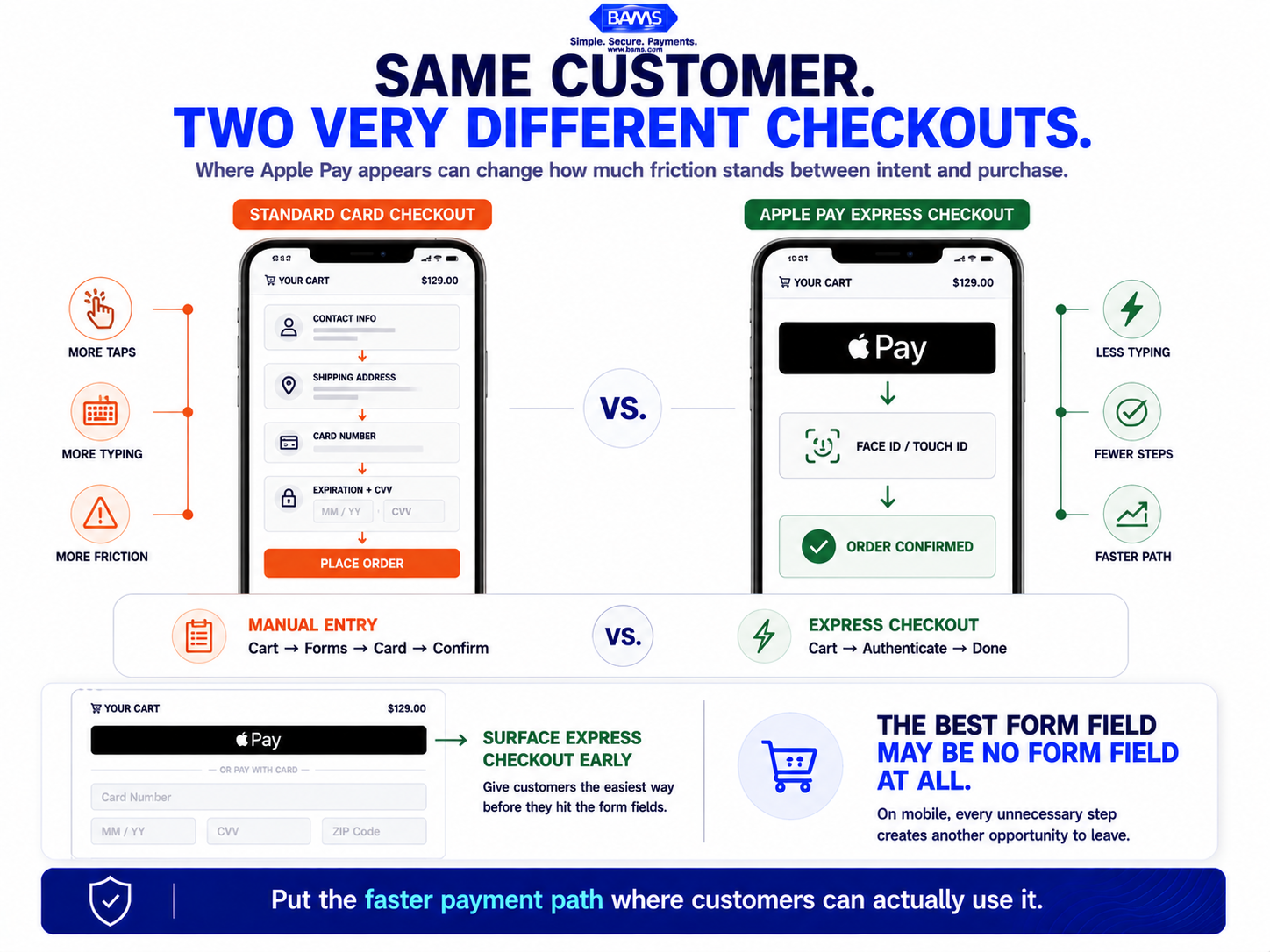
Apple Pay works best when customers see it before checkout friction begins. Early express checkout placement can remove card entry and unnecessary form steps from the purchase path.
Apple Pay checkout can reduce the amount of information a customer must manually enter during a purchase. Instead of typing card details into the checkout form, eligible customers can select Apple Pay and authenticate the payment using their supported device. This can make the payment step more streamlined, particularly for mobile shoppers where lengthy forms create additional friction.
Tokenization and Why It Affects More Than Security
Apple Pay uses tokenization so the merchant does not receive the customer’s actual card number during the transaction. Tokenized payment credentials can strengthen payment security while allowing the transaction to continue through the card payment ecosystem. This makes proper token handling an important part of both the security and performance of an Apple Pay integration.
Settlement vs. Funding: A Critical Distinction
Settlement is when the card network confirms the transaction is valid and moves money from the issuing bank. Funding is when your processor deposits that money into your business account. These are separate steps, and the gap between them is where deposit delays live. Many processors settle Apple Pay transactions on the same schedule as traditional cards, but the lower risk profile of tokenized wallet transactions can qualify for faster funding when your processor supports it.
The Conversion Gap
Most eCommerce teams optimize the front end of the funnel (traffic, landing pages, product pages) and the checkout step itself. The conversion gap is the unoptimized space between a completed transaction and usable cash in your account. Closing this gap means your Apple Pay sales fund operations faster, not just look good in your analytics dashboard.
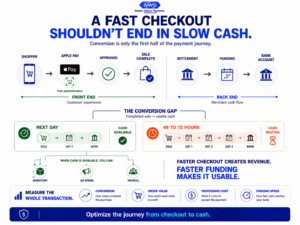
Modern BAMS graphic illustrating the complete Apple Pay revenue journey from checkout conversion to payment approval and usable cash in the merchant bank account.
The Framework: From Checkout Friction to Cash Flow Velocity
This guide follows a five-stage framework that treats Apple Pay not as a feature toggle but as an end-to-end revenue system. Each stage builds on the previous one, moving from customer-facing checkout optimization through to back-office cash flow acceleration.
- Stage 1: Audit Your Current Checkout Friction — Identify where mobile buyers drop off and what payment options they see (or don’t see).
- Stage 2: Position Apple Pay for Maximum Conversion Impact — Place the wallet option where it intercepts abandonment, not where it’s an afterthought.
- Stage 3: Optimize Transaction Approval Rates — Reduce declines and chargebacks through tokenization and proper configuration.
- Stage 4: Evaluate and Accelerate Your Settlement Timeline — Examine the gap between transaction completion and deposit arrival.
- Stage 5: Measure the Full Revenue Impact — Track not just conversion lift but funding speed, decline rates, and net processing cost.
These stages are sequential for initial implementation but cyclical for ongoing optimization. Once you’ve completed the first pass, you’ll revisit Stages 1 and 5 regularly as your transaction volume and customer behavior evolve.
Step-by-Step Breakdown: Turning Apple Pay Into a Cash Flow Advantage
Step 1: Audit Your Current Checkout Friction
Objective: Identify exactly where mobile buyers abandon your checkout and whether missing or poorly placed payment options contribute to drop-off.
Start with your analytics. Pull your checkout funnel data segmented by device type. Look at the step-by-step drop-off rate for mobile sessions specifically. If your platform supports it, compare conversion rates for sessions where a digital wallet was available versus sessions where only standard card entry was offered. The gap between these two numbers is your friction tax.
Next, walk through your own checkout on an iPhone. Time how long it takes from “Add to Cart” to order confirmation using standard card entry. Then do the same with Apple Pay enabled. The difference is your customer’s experience of friction, measured in seconds and taps. If you don’t currently offer Apple Pay, this exercise still reveals how many form fields, page loads, and authentication steps stand between your customer and a completed purchase.
Review your payment method mix report from your processor. What percentage of transactions come through digital wallets versus manual card entry? If wallet transactions are below 15-20% of your mobile sales and you serve a consumer audience, you likely have either a visibility problem (Apple Pay isn’t prominent enough) or an availability problem (it isn’t enabled at all). For platform-specific setup guidance, see how to capture more orders from mobile devices with Apple Pay.
Anti-patterns: Don’t rely on aggregate conversion rates. Mobile and desktop behave differently, and blending them hides the mobile-specific friction you’re trying to fix. Don’t assume low Apple Pay adoption means low demand; it often means low visibility.
Success indicators: You have device-segmented funnel data, a documented list of friction points in your mobile checkout, and a baseline measurement of your current wallet transaction share.
Step 2: Position Apple Pay for Maximum Conversion Impact
Objective: Place Apple Pay where it intercepts the highest-intent buyers before they encounter form friction.
Placement matters because an express payment option can only reduce checkout friction if customers see it before they encounter the forms it is designed to bypass. Apple Pay should therefore be considered for prominent placement on the cart or another appropriate early checkout step rather than being buried below billing and card-entry fields at the end of the process.
The logic is straightforward: by the time a mobile shopper reaches the last step of a multi-page checkout, you’ve already lost the buyers who didn’t want to fill out forms. Express checkout options (Apple Pay button on the cart page or even the product detail page) let high-intent buyers skip the entire form sequence. They authenticate with biometrics, confirm their shipping address from their Apple Pay profile, and complete the purchase in seconds.
When implementing this, test two placements: one on the cart page and one on the product page. Measure conversion rate, average order value, and return rate for each. Product-page placement can drive impulse purchases but may increase returns if buyers skip the review step. Cart-page placement balances speed with buyer confidence. Your optimal position depends on your product category and average order value.
Anti-patterns: Don’t hide Apple Pay behind a “More payment options” accordion or toggle. Don’t show it only to users who have already entered their email and shipping address, as that defeats the purpose. Don’t treat it as equivalent to other payment methods in visual hierarchy; it should be visually prominent on mobile.
Success indicators: Apple Pay is visible above the fold on mobile cart or product pages. You’re running a placement test with clear conversion metrics. Wallet transaction share begins increasing within the first two weeks.
Step 3: Optimize Transaction Approval Rates
Objective: Maximize the percentage of Apple Pay transactions that complete successfully by reducing declines and chargebacks.
One of Apple Pay’s important advantages is the security built into the payment experience. Tokenization helps protect the underlying card credentials while device-based authentication adds another layer to the transaction. These protections can help merchants manage payment fraud risk, but Apple Pay transactions can still be disputed. Visa explains how chargebacks can reverse completed payments and why merchants should actively manage disputes.
To maximize this advantage, ensure your payment gateway is passing the correct token data and device information with each transaction. Misconfigured integrations can strip the tokenization benefits, causing the issuing bank to treat the transaction like a standard card-not-present payment. Work with your processor to verify that Apple Pay transactions are being flagged correctly in authorization requests.
Review your decline reason codes monthly. Separate Apple Pay declines from standard card declines. If your Apple Pay decline rate is approaching your standard card rate, something is wrong with your integration, as the two should differ significantly. Common culprits include outdated payment gateway plugins, incorrect merchant category codes, or processors that don’t fully support network tokenization.
Also consider the chargeback implications for your overall processing costs. Lower chargebacks mean you stay further from your processor’s chargeback threshold, which protects your account standing and can qualify you for lower processing rates over time. This is where the Apple Pay user experience creates a compounding financial benefit beyond the initial conversion lift.
Anti-patterns: Don’t assume all payment gateways handle Apple Pay tokens identically. Don’t ignore decline analytics for wallet transactions just because overall approval rates look healthy. Don’t treat chargebacks as a customer service problem only; they directly affect your processing costs and account stability.
Success indicators: Apple Pay decline rates are measurably lower than standard card decline rates. Chargeback ratios on wallet transactions are tracked separately. Your gateway is confirmed to pass full tokenization data with each Apple Pay authorization.
Step 4: Evaluate and Accelerate Your Settlement Timeline
Objective: Close the gap between a completed Apple Pay transaction and cash arriving in your bank account.
This is the step most guides skip entirely, and it’s where eCommerce operators leave the most operational value on the table. You’ve optimized checkout, increased conversions, and improved approval rates. But if your processor holds funds for 48 to 72 hours (or longer), your Apple Pay revenue is sitting in limbo while you need it for inventory replenishment, ad spend, and payroll.
Start by requesting your current settlement schedule from your processor. Ask specifically: what is the average time from transaction authorization to deposit for Apple Pay transactions? Is it different from standard card transactions? Many processors don’t differentiate, which means your lower-risk, tokenized wallet transactions are being treated with the same caution as higher-risk manual card entries.
Next, evaluate whether your processor offers next-day funding. Not all do, and among those that do, eligibility criteria vary. Some require minimum monthly volumes. Others restrict next-day funding to certain transaction types or merchant categories. The key question is whether your Apple Pay transactions qualify for the fastest available funding tier.
This is where your choice of merchant services partner has an outsized impact. BAMS offers next-day funding as a standard feature for qualifying merchants, which means your Apple Pay sales from Monday are in your account Tuesday morning. For eCommerce operators managing tight cash cycles, that 24- to 48-hour acceleration in funding can mean the difference between restocking inventory on time and missing a sales window.
Anti-patterns: Don’t assume your settlement timeline is fixed and non-negotiable. Don’t ignore the difference between “settlement” (network confirmation) and “funding” (money in your account), as your processor controls the latter. Don’t accept a 72-hour funding window for tokenized transactions that carry lower risk than standard card payments.
Success indicators: You know your exact settlement-to-funding timeline for Apple Pay transactions. You’ve confirmed whether your processor offers next-day funding and whether your account qualifies. If there’s a gap, you’ve initiated a conversation with your processor (or begun evaluating alternatives).
Step 5: Measure the Full Revenue Impact
Objective: Track the complete financial picture of Apple Pay, from conversion lift through funding speed and net processing cost.
Most merchants measure Apple Pay success by conversion rate alone. That’s incomplete. The full picture includes four metrics: conversion rate lift, average order value, net processing cost per transaction, and funding speed.
Offering a streamlined digital payment option can support conversion by reducing unnecessary steps during checkout. But conversion and revenue are only part of the picture. You also need to know what you’re paying per transaction and how quickly you can access the proceeds. That is why Apple Pay performance should be evaluated across the full payment lifecycle rather than by conversion rate alone.
Build a simple monthly dashboard that tracks these metrics separately for Apple Pay versus standard card transactions:
- Conversion rate by payment method — Are Apple Pay sessions converting at a higher rate?
- Average order value by payment method — Compare the average value of Apple Pay orders with standard card transactions to determine whether wallet users behave differently on your store.
- Effective processing rate — Calculate your total processing fees divided by total Apple Pay revenue. Compare this to your standard card rate. Factor in lower chargeback costs.
- Average funding speed — Track the actual number of hours between transaction and deposit. If you’ve switched to next-day funding, verify it’s consistently delivering.
Review this dashboard monthly. Look for trends, not snapshots. A single month of data can be misleading due to seasonal variation, promotional activity, or changes in traffic mix. Three months of consistent data gives you a reliable baseline for decision-making.
Anti-patterns: Don’t measure Apple Pay by conversion rate alone. Don’t ignore the cost side of the equation (processing fees, chargeback costs, funding delays). Don’t compare Apple Pay performance to a period before implementation without controlling for other variables (traffic changes, pricing changes, seasonal shifts).
Success indicators: You have a monthly dashboard tracking all four metrics. You can articulate the net financial impact of Apple Pay on your business, not just the conversion lift. You’re making data-informed decisions about payment method placement, processor selection, and funding options.
Practical Examples: How This Plays Out in Real eCommerce Operations
Scenario A: The Apparel Brand with High Mobile Traffic
An online clothing retailer with 70% mobile traffic had Apple Pay enabled but buried on the final checkout page, below the billing address form. Their mobile conversion rate was 1.8%. After moving the Apple Pay button to the cart page (express checkout position), mobile conversion climbed to 2.4% within six weeks. That 0.6 percentage point increase, on 50,000 monthly mobile sessions, translated to 300 additional orders per month.
At a hypothetical $100 average order value, those 300 additional orders would represent $30,000 in additional monthly revenue. If the retailer’s processor funded transactions on a three-business-day schedule, that additional revenue would still be subject to the same funding delay. Moving to next-day funding could make those proceeds available sooner for inventory, advertising and other operating needs.
Scenario B: The Specialty Food eCommerce Store
A gourmet food brand with a $65 average order value enabled Apple Pay on their BigCommerce store and saw an immediate drop in checkout abandonment on mobile. Their chargeback rate on Apple Pay transactions was effectively zero over the first quarter, compared to a 0.4% rate on standard card transactions. The chargeback reduction alone saved them approximately $1,200 per quarter in dispute fees and lost merchandise.
The less obvious benefit was account stability. Their previous chargeback ratio had occasionally triggered processor reviews, which threatened to increase their processing rates. With a growing share of transactions flowing through Apple Pay’s lower-risk channel, their blended chargeback ratio dropped well below the review threshold, protecting their current rate structure.
Common Mistakes and Pitfalls
Treating Apple Pay as a checkbox, not a system. Enabling Apple Pay and leaving it at default placement is the most common mistake. The conversion impact depends on visibility, timing, and integration quality, not just availability.
Ignoring post-transaction economics. Merchants who celebrate conversion lifts without examining settlement speed and processing costs are seeing half the picture. A 22% conversion increase means less if your funds are locked for three days and your effective rate is higher than necessary.
Assuming all processors handle Apple Pay equally. Token handling, decline rates, funding speed, and fee structures vary significantly across processors. The same Apple Pay integration can perform very differently depending on who’s processing the transaction on the back end.
Not segmenting analytics by payment method. Blending Apple Pay data with standard card data obscures the specific advantages (and any issues) of your wallet implementation. Separate reporting is essential for informed optimization.
Over-optimizing checkout while neglecting cash flow. The best checkout experience in the world doesn’t help your business if the revenue takes a week to land in your account. Treat funding speed as a first-class metric alongside conversion rate.
What to Do Next
Start with one action: pull your current settlement timeline from your processor and compare it to what’s available. If you’re waiting more than one business day for Apple Pay deposits, that’s a concrete, fixable problem with a measurable payoff. You don’t need to overhaul your entire payment stack at once.
If you haven’t enabled Apple Pay yet, begin with accepting Apple Pay in your eCommerce store and prioritize express checkout placement from day one. If you’ve already enabled it, audit your placement (is it visible before the billing form?) and your analytics (are you tracking wallet transactions separately?).
Use this guide as a reference you return to quarterly. Your traffic mix, customer behavior, and processing costs will shift over time. The framework stays the same: reduce friction at checkout, maximize approval rates, accelerate funding, and measure the full financial impact. Each cycle of review tightens the system and compounds the advantage.
Frequently Asked Questions
What is Apple Pay and how does it work for merchants?
Apple Pay is a digital wallet that lets customers pay using biometric authentication (Face ID or Touch ID) instead of entering card details manually. For merchants, it works through your existing payment gateway. The customer’s card number is replaced with a device-specific token, which your processor handles like a standard card-not-present transaction but with lower fraud risk and higher approval rates. You receive the funds through your normal settlement process.
Why should my business accept Apple Pay as a payment method?
Apple Pay can reduce checkout friction by allowing eligible customers to complete a purchase without manually entering their card information. This can be particularly useful for mobile-heavy eCommerce stores where lengthy payment forms create additional steps between purchase intent and order completion. Apple Pay also uses tokenized payment credentials and device authentication to help protect payment information.
How does Apple Pay affect transaction fees and processing costs?
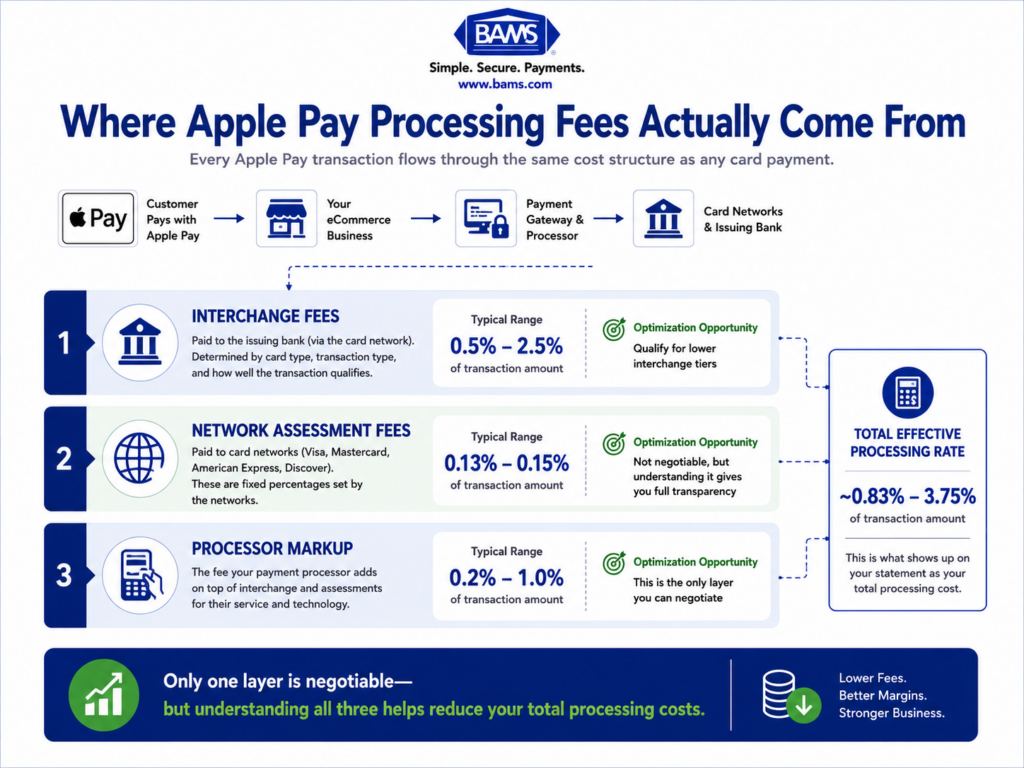
Apple Pay transactions typically process at the same interchange rates as standard card-not-present transactions, though the exact cost depends on your processor’s pricing structure. The net cost advantage comes from lower chargebacks (reducing dispute fees and lost merchandise), higher approval rates (fewer lost sales), and potentially qualifying for better processing tiers due to improved account health.
When do I receive funds from Apple Pay transactions?
Funding speed depends entirely on your payment processor, not on Apple Pay itself. Some processors batch Apple Pay with standard card transactions on a 48- to 72-hour settlement cycle. Others, like BAMS, offer next-day funding for qualifying merchants. Ask your processor specifically about settlement timelines for digital wallet transactions and whether they differentiate from standard card funding.
Which payment processors support Apple Pay integration?
Most major payment processors and gateways support Apple Pay, including those integrated with Shopify, WooCommerce, BigCommerce, and Magento. The more important question isn’t whether a processor supports Apple Pay, but how well they handle it: proper token passing, competitive processing rates, and fast funding. Not all integrations are equal in quality or financial terms.
How does Apple Pay ensure secure transactions for customers?
Apple Pay uses tokenization, replacing the customer’s actual card number with a unique device token for each transaction. The real card number is never stored on the device or shared with the merchant. Each transaction also requires biometric authentication (Face ID, Touch ID, or passcode), adding a layer of verification that standard card entry doesn’t provide. This combination of tokenization and biometric authentication is why Apple Pay transactions show significantly lower fraud and chargeback rates.
Sources