7 Ways to Evaluate a Payment Processor Beyond Setup
Last Updated on October 1, 2026 by Dimitri Akhrin
Settlement speed, fee transparency, and support quality matter more than compatibility checklists
Learn how to compare payment processors based on what happens after the sale. This guide covers funding speed, batching policies, and fee structures that directly impact your cash flow.
TL;DR
- Deposit delays aren’t caused by Apple Pay – They’re caused by your processor’s batching policies, risk review triggers, and settlement schedules. Apple Pay uses the same card network rails as standard transactions.
- Confirm wallet-specific settlement terms in writing – Some processors batch mobile wallet transactions separately or add 48 to 72 hours of extra review time. Ask directly and get the funding timeline documented in your agreement.
- Next-day funding should cover all transaction types – Including Apple Pay. If your processor charges extra for it or excludes wallet payments, that’s a sign to renegotiate or switch.
- Audit your fees at the transaction level – Apple charges merchants nothing for Apple Pay acceptance, but your processor may apply higher markups to tokenized payments without disclosing it on your statement.
- Start with two steps – Request a transaction-level fee breakdown and confirm whether wallet transactions settle on the same schedule as card payments. Those two answers reveal whether your current processor is quietly costing you time and money.
The Real Problem With Mobile Wallet Deposits
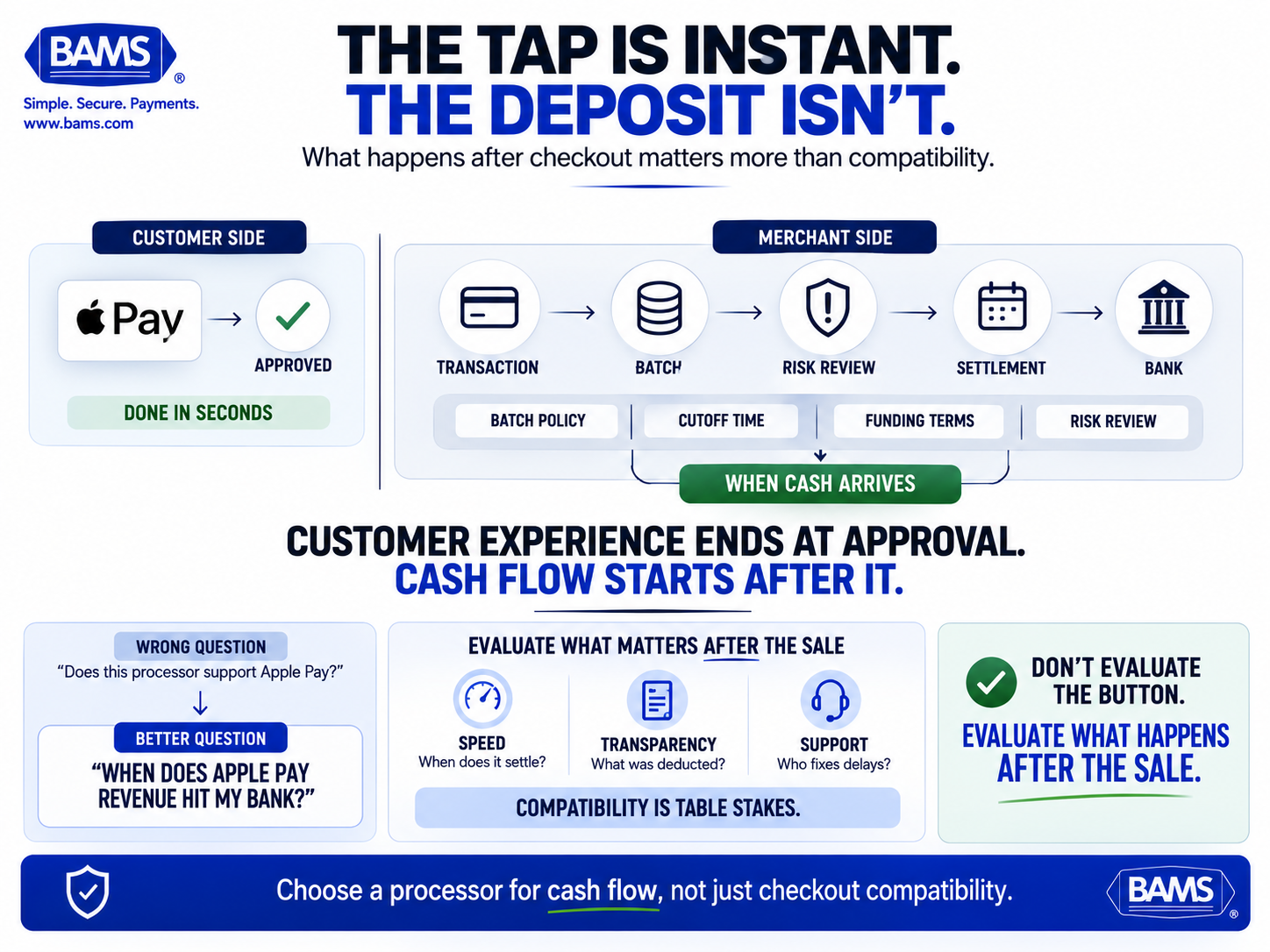
The customer experience may end with one tap, but the merchant’s payment journey is just beginning. Settlement speed depends on what the processor does after the transaction.
Your checkout flow is fast. A customer taps their phone, Apple Pay confirms the purchase in under two seconds, and the order ships. But your money? That can take two, three, sometimes five business days to land in your bank account. For eCommerce managers running lean operations, that gap between transaction and deposit creates real pressure on payroll, inventory, and vendor payments.
Most payment processor comparison guides focus on who supports Apple Pay for merchants. That’s table stakes now. The question that actually affects your bottom line is what happens after the customer taps. Settlement timelines, batching policies, and funding speed vary dramatically between processors, and those differences compound across hundreds of daily transactions.
This guide skips the setup tutorials and compatibility checklists. It focuses on the post-transaction decisions that determine how fast you get paid.
Who This Is For and What It Covers
This is for eCommerce managers at established online businesses (roughly 10 to 50 employees) who already accept digital wallet payments and are frustrated by deposit delays or unclear fee structures. If you’re still evaluating whether to accept Apple Pay, start with this primer on digital transactions and mobile payments first.
This list does not cover POS hardware selection, in-store NFC terminal setup, or Apple Pay developer integration. It focuses exclusively on what you can change or negotiate to get your mobile wallet revenue deposited faster, with fewer surprises on your statements.
How We Evaluated These Strategies
Each item was selected based on three criteria: direct impact on funding speed for mobile wallet transactions, applicability across multiple processor relationships, and whether it addresses a gap that most merchant-facing content ignores. We prioritized strategies that eCommerce operators can act on within their current processor agreement or use as leverage when renegotiating terms.
7 Ways to Eliminate Deposit Delays on Mobile Wallet Sales
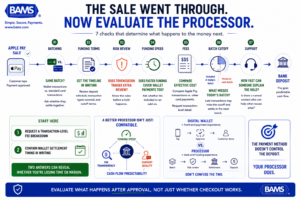
Processor quality shows up after the transaction. Review batching, funding terms, fees, cutoff times, risk policies and support before assuming your wallet deposits are working as efficiently as they should.
1. Confirm Whether Your Processor Batches Wallet Transactions Separately
Why it matters: Not all processors treat Apple Pay transactions identically to standard card-present or card-not-present payments during settlement. Some processors batch mobile wallet transactions separately or add extra review steps that can extend settlement by one to three days. If your processor treats wallet payments as a distinct batch, you’re experiencing a delay that has nothing to do with the card networks.
What it looks like today: Most merchants assume Apple Pay settles on the same timeline as a regular Visa or Mastercard transaction. In many cases it does, because Apple Pay transactions are processed through the payment service provider, acquirer, and card network. But the processor and acquirer control the actual deposit schedule, and wallet-specific batching policies can quietly add 48 to 72 hours.
How to apply it: Ask your processor directly: “Are mobile wallet transactions batched and settled on the same schedule as standard card transactions?” Get the answer in writing. If they batch separately, ask why and whether you can opt into unified batching.
2. Negotiate Explicit Funding Timelines Into Your Merchant Agreement
Why it matters: Funding speed is often presented as a marketing feature (“next-day deposits!”) but rarely codified in the merchant agreement itself. When delays occur, you have no contractual basis to escalate. This is especially common with mobile wallet transactions, where processors may apply additional risk review without disclosing the policy upfront.
What it looks like today: Apple Pay transactions pass through a payment service provider, acquirer, and card network for processing. The processor’s funding schedule then determines when those funds reach your bank account. Some processors offer same-day or next-day funding as an add-on; others include it as a default for qualifying merchants.
How to apply it: Before signing or renewing, request a funding schedule addendum that specifies deposit timelines for all transaction types, including Apple Pay and other digital wallets. If your processor won’t commit to a specific timeline in writing, treat that as a signal about their actual capability.
3. Evaluate Your Processor’s Risk Review Triggers for Tokenized Payments
Why it matters: Apple Pay uses tokenization to replace card numbers with device-specific tokens, which is excellent for security. But some processors flag tokenized transactions for additional fraud review, especially when transaction volumes spike or average order values shift. That review adds time before funds are released.
What it looks like today: Processors with outdated risk models sometimes treat the tokenization layer as an additional variable that triggers manual review. More modern systems recognize that Apple Pay’s biometric authentication (Face ID, Touch ID) actually reduces fraud risk compared to manually entered card numbers.
How to apply it: Ask your processor how tokenized transactions are handled in their risk engine. If Apple Pay transactions are flagged at a higher rate than standard card transactions, request a risk threshold adjustment based on your chargeback history. A clean track record should earn you faster clearing.
4. Choose a Processor That Offers Next-Day Funding as a Default
Why it matters: The difference between a two-day and a next-day deposit cycle, multiplied across hundreds of daily transactions, can represent tens of thousands of dollars in working capital that’s either available to you or sitting in a processor’s holding account. For eCommerce businesses managing inventory purchases and ad spend, that gap matters.
What it looks like today:Some payout methods take two to three business days via electronic funds transfer, and wire transfers can take five to seven business days. Meanwhile, processors like BAMS offer next-day funding as a standard feature for qualifying merchants, covering Apple Pay and other mobile wallet transactions without requiring a premium add-on. That kind of predictability turns payment processing from a cash flow variable into a cash flow constant.
How to apply it: When comparing processors, ask three specific questions: Is next-day funding included or an add-on? Does it apply to all transaction types including mobile wallets? Is there a cutoff time, and what happens to transactions processed after it?
5. Audit Your Apple Pay Transaction Fees Against Your Blended Rate
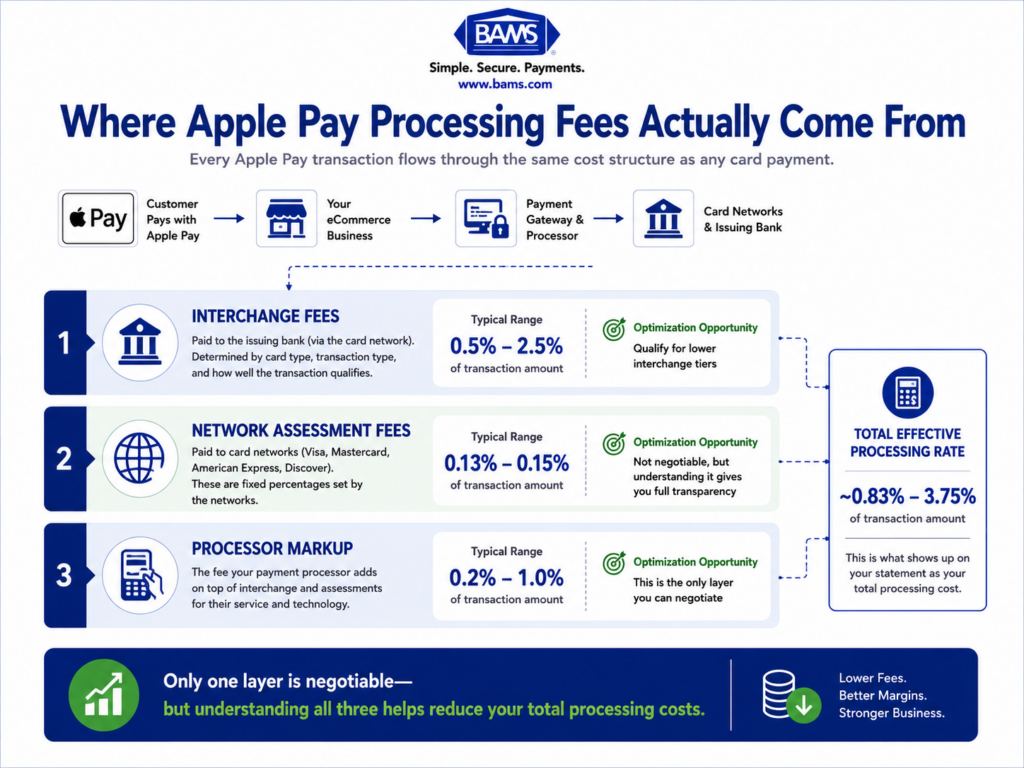
Why it matters: Apple Pay transaction fees are often buried inside a blended processing rate, making it impossible to see whether wallet transactions cost you more than standard card payments. Some processors apply higher interchange markups to contactless or tokenized payments without disclosing the difference on your monthly statement.
What it looks like today: Apple charges no additional fee to merchants for Apple Pay acceptance. The fees you pay come entirely from your processor and the card networks. But the way your processor categorizes and marks up those transactions can vary. A merchant paying 2.6% blended may actually be paying 2.9% on Apple Pay transactions if the processor applies a different tier.
How to apply it: Request a transaction-level fee breakdown from your processor that separates mobile wallet payments from other card types. Compare the effective rate on Apple Pay transactions to your overall blended rate. If there’s a gap, ask your processor to justify it or match it. Transparent pricing should mean transparent across all payment methods.
6. Align Your Batch Cutoff Time With Your Sales Cycle
Why it matters: Most processors have a daily batch cutoff time, typically in the late afternoon or early evening. Transactions processed after that cutoff roll into the next day’s batch, adding a full business day to your deposit timeline. For eCommerce businesses with significant evening or late-night sales (which is common), this can mean a large portion of daily revenue is always a day behind.
What it looks like today: Many merchants accept the default cutoff time without realizing it’s configurable with some processors. Others don’t even know what their cutoff time is. Combined with mobile payment solutions that process transactions around the clock, a misaligned cutoff can systematically delay deposits.
How to apply it: Check your processor’s batch cutoff time and compare it to your peak sales hours. If most of your Apple Pay transactions happen after the cutoff, ask whether the time can be adjusted. Even shifting the cutoff by two hours can move a significant portion of your daily revenue into the current-day batch.
7. Get a Dedicated Account Manager Who Understands Wallet Settlement
Why it matters: When a deposit is delayed or a hold is placed on your funds, the speed of resolution depends entirely on whether you can reach someone who understands your account. Generic support tickets and chatbots can’t resolve settlement disputes or explain why a specific batch of Apple Pay transactions was held for review.
What it looks like today: Most large processors route merchant support through tiered call centers. Wallet-specific issues (tokenization errors, settlement discrepancies, risk holds on contactless transactions) often require escalation to a specialist, adding days to resolution. Processors that assign dedicated account managers, like BAMS, can address these issues in hours instead of days.
How to apply it: Ask your processor whether you’ll have a named account manager or a support queue. Ask specifically how wallet-related settlement issues are escalated. If the answer involves a ticket system with no guaranteed response time, factor that into your total cost of doing business with that processor.
What These Strategies Have in Common
Every item on this list points to the same underlying principle: the speed and reliability of your deposits are determined by your processor’s policies, not by the payment method your customer chooses. Apple Pay, Google Pay, and other digital wallets are front-end experiences. Settlement is a back-end operation controlled by your acquirer and processor.
The second pattern is that most deposit delays are policy-driven, not technology-driven. Separate batching, conservative risk thresholds, misaligned cutoff times, and opaque fee structures are all decisions your processor made. They can be changed, negotiated, or avoided by choosing a processor that doesn’t impose them in the first place.
The third pattern is that transparency compounds. When you can see your fees by transaction type, know your exact cutoff time, and reach a human when something goes wrong, small improvements in each area combine to create meaningfully faster, more predictable cash flow.
Where to Start
You don’t need to overhaul your entire payment stack at once. Start with two actions: request a transaction-level fee breakdown from your current processor, and confirm in writing whether mobile wallet transactions are batched and settled on the same schedule as standard card payments. Those two data points will tell you whether your current setup is costing you time and money you didn’t know about.
If the answers reveal gaps, use items 2 and 4 from this list as your evaluation framework when comparing alternatives. Funding speed, fee transparency, and support quality are the criteria that separate a payment processor that works on paper from merchant services that work for your business.
Frequently Asked Questions
Does Apple Pay itself cause deposit delays for merchants?
No. Apple Pay is a front-end payment method that uses tokenization and the existing card network rails. Settlement timelines are controlled by your payment processor and acquirer, not by Apple. If your Apple Pay deposits are slower than your standard card deposits, the cause is almost certainly your processor’s batching or risk review policies.
How long do Apple Pay transactions typically take to settle?
Under standard card-network batch processing, Apple Pay purchases typically settle in one to three business days. However, some processors add extra review steps or batch wallet transactions separately, which can extend that window by an additional one to three days. The actual timeline depends on your processor’s policies.
Can I get next-day funding on Apple Pay transactions?
Yes, if your processor supports it. Some processors offer next-day funding as a default feature for qualifying merchants, covering all transaction types including mobile wallets. Others offer it as a paid add-on or don’t offer it at all. Ask your processor whether next-day funding applies to Apple Pay transactions specifically, not just standard card payments.
Are Apple Pay transaction fees higher than regular card processing fees?
Apple does not charge merchants an additional fee for accepting Apple Pay. All processing fees come from your processor and the card networks. However, some processors apply different interchange markups to tokenized or contactless payments, which can make Apple Pay transactions slightly more expensive. Request a transaction-level breakdown from your processor to verify.
Why should my business accept Apple Pay as a payment method?
Apple Pay reduces checkout friction, improves conversion rates on mobile devices, and offers strong security through biometric authentication and tokenization. For eCommerce businesses, offering Apple Pay meets customer expectations for fast, convenient checkout. The key is pairing acceptance with a processor that settles wallet transactions quickly and transparently.
What should I look for in a payment processor if I accept digital wallets?
Focus on three things: funding speed (does next-day funding apply to wallet transactions?), fee transparency (can you see per-transaction costs broken out by payment type?), and support quality (do you get a dedicated account manager who can resolve settlement issues quickly?). These criteria matter more than compatibility checklists, since nearly all modern processors support Apple Pay.