
Negotiate Credit Card Processing Fees and Save More
Last Updated on October 27, 2026 by Dimitri Akhrin
A step-by-step tutorial to audit your merchant statements, benchmark costs, and cut processor markup by 15-40 basis points
Learn how to audit your merchant statements, identify hidden fees, and negotiate lower credit card processing fees. This tutorial walks you through building a cost baseline and securing an interchange-plus agreement that saves thousands annually.
TL;DR
- Audit before you negotiate – Pull three months of statements, calculate your effective rate, and document every fee line item before calling your processor
- Demand interchange-plus pricing – It’s the only model that separates pass-through costs from processor markup, making real negotiation possible
- Target 0.20-0.40% over interchange – eCommerce merchants should aim for interchange + 0.20% + $0.08 per transaction as a realistic benchmark
- Kill the junk fees – PCI non-compliance, statement, batch, and IRS reporting fees are often negotiable to zero and add up to $75-$200/month
- Verify every statement – Rates drift and fees creep; quarterly audits protect the savings you worked to negotiate
What You’ll Achieve: A Transparent Processing Agreement With Lower Rates
By the end of this tutorial, you’ll have a fully audited merchant statement, a benchmarked cost baseline, and a negotiated contract that cuts your credit card processing fees by 15-40 basis points or more. You’ll know exactly what you pay in interchange, assessments, and processor markup, with zero hidden fees buried in monthly statements.
Success looks like this: an interchange-plus pricing agreement in writing, documented removal of junk fees (PCI non-compliance, statement fees, batch fees), and a clear path to guaranteed next-day funding. For an eCommerce business processing $500,000 monthly, a 0.30% reduction means $18,000 saved per year, money that goes straight to your bottom line.
Prerequisites & Setup
Before you start negotiating payment processor rates, gather your ammunition. This tutorial takes 3-5 hours of focused work spread over 2-3 weeks.
- Last 3 months of merchant statements (PDF copies, all pages including fee schedules)
- Current processing contract and any addendums
- Monthly processing volume broken down by card type (credit vs. debit, swiped vs. keyed)
- Average ticket size and total transaction count
- Chargeback ratio from the past 6 months
- A spreadsheet tool (Google Sheets or Excel) for fee analysis
- Two to three competitive quotes from alternative processors
Potential blockers: early termination fees (ETFs) of $295-$495, liquidated damages clauses, and auto-renewal windows. Check your contract’s cancellation terms first, many processors require 30-90 days written notice before renewal.
Context: Why Interchange-Plus Beats Every Other Model
Flat-rate and tiered pricing models hide processor markup inside bundled rates, making cost reduction nearly impossible to measure.
Interchange-plus pricing separates the three fee components: interchange (paid to card-issuing banks), assessments (paid to Visa and Mastercard), and processor markup (the only negotiable piece). This transparency is the foundation of payment cost reduction. You can’t negotiate what you can’t see.
Expect moderate difficulty. Processors rely on complexity to protect margins. Your job is to force clarity.

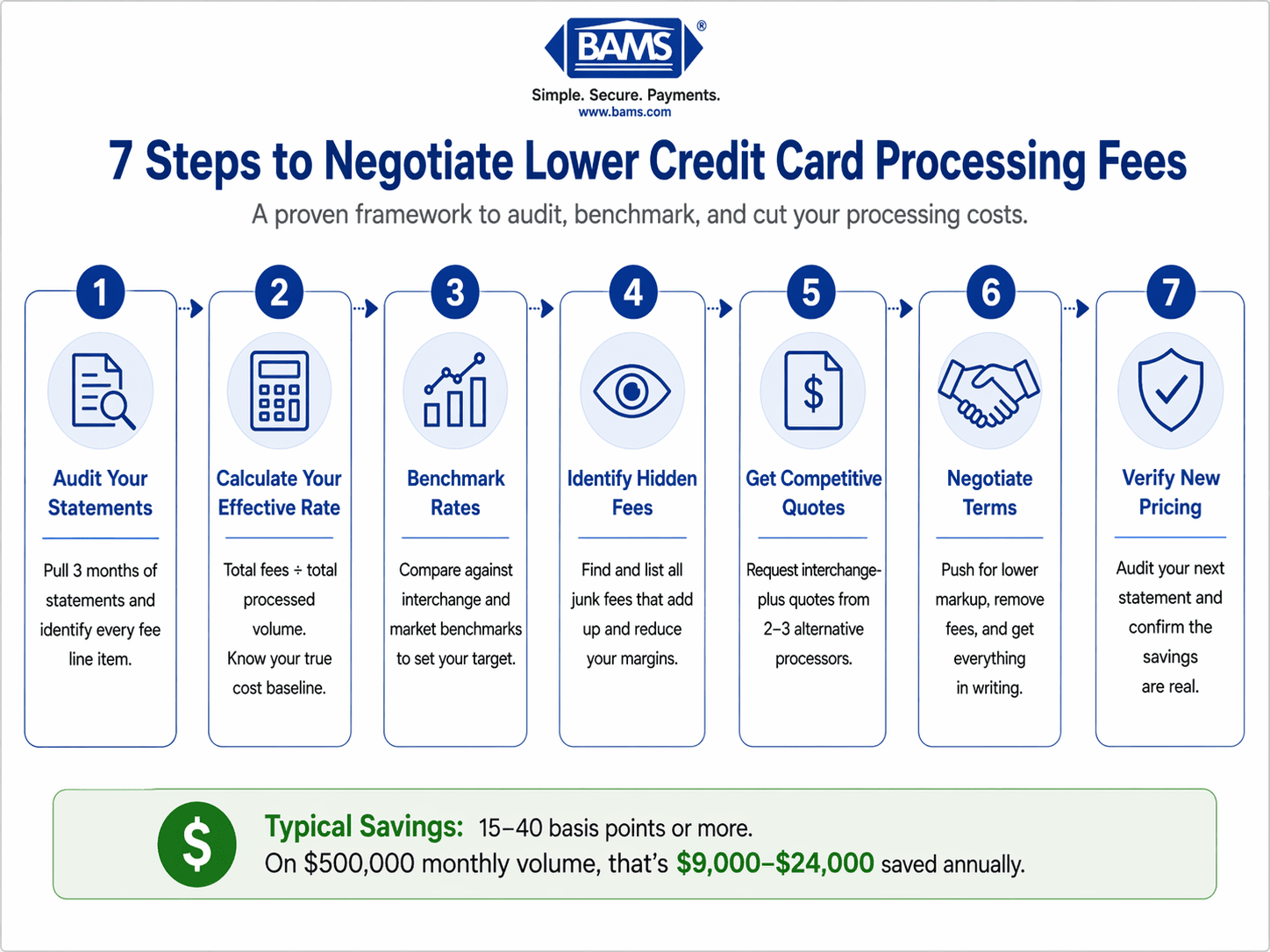
A simplified step-by-step framework for auditing and negotiating lower payment processing rates.
Step 1: Audit Your Current Merchant Statement
Pull the last three statements and build a line-item inventory. Identify every fee: interchange, dues and assessments, processor discount rate, transaction fees, monthly minimums, PCI fees, statement fees, batch fees, gateway fees, and chargeback fees.
Calculate your effective rate: total fees divided by total processed volume. For example, $14,500 in fees on $500,000 processed equals a 2.90% effective rate.
Checkpoint: You should have a spreadsheet listing every fee category, dollar amount, and percentage of volume.
Common failure: Missing pages. Processors often separate interchange details into a supplementary report. Call your rep and request the “full interchange qualification report” if you don’t see card-type breakdowns.
Step 2: Benchmark Against Real Market Rates
Compare your effective rate to industry benchmarks. The Federal Reserve reports average interchange at roughly 1.8% for credit and 0.3% for debit. A fair interchange-plus markup for eCommerce ranges from 0.15% to 0.40% plus $0.05-$0.10 per transaction.
If your effective rate exceeds 2.6% and your average ticket is above $40, you’re overpaying. If you see “qualified,” “mid-qualified,” or “non-qualified” buckets on your statement, you’re on tiered pricing, the least transparent model available.
Checkpoint: Document your target rate. A realistic goal for most eCommerce merchants: interchange + 0.20% + $0.08 per transaction.
Step 3: Identify and List Every Hidden Fee
A breakdown of common processing fees and how merchants can eliminate or reduce them.
Flag fees that shouldn’t exist or are inflated. Hidden fees are where processors quietly reclaim margin. Common offenders:
- PCI non-compliance fee: $20-$40/month, eliminated by completing your annual SAQ
- Statement fee: $10-$25/month, often waivable for digital delivery
- Batch fee: $0.10-$0.30 per batch, negotiable to zero
- IRS reporting fee: $3-$5/month, often a junk fee
- Annual fee: $99-$199, frequently negotiable
- Gateway fees: $10-$25/month plus per-transaction costs
Checkpoint: You have a written list of junk fees totaling their monthly impact. For a typical merchant, this adds up to $75-$200/month that shouldn’t be there.
Step 4: Request Competitive Quotes
Request interchange-plus quotes from two or three alternative processors. Provide identical data to each: monthly volume, average ticket, card mix, and chargeback history. Ask specifically for:
- Discount rate over interchange (basis points)
- Per-transaction authorization fee
- All monthly fees itemized
- Funding timeline (next-day vs. standard)
- Contract length and early termination terms
Providers that offer transparent payment gateway solutions with interchange-plus pricing and next-day funding give you leverage when comparing against processors that lock you into 3-year agreements with liquidated damages.
Checkpoint: Written quotes in hand, side-by-side comparison built.
Step 5: Prepare Your Negotiation Package
Build a one-page negotiation brief for your current processor. Include:
- Your current effective rate and target rate
- Specific junk fees you want removed
- Competitive quote summary (you don’t need to share names)
- A firm deadline (14 days is reasonable)
Lead with facts, not frustration. Example opener: “I’ve audited my last three statements. My effective rate is 2.94%. I have written quotes at 2.45% interchange-plus. I’d like to discuss matching or beating that rate, and removing the $29 PCI fee and $15 statement fee.”
Checkpoint: One-page document ready to share via email or phone call.
Step 6: Negotiate and Document Every Concession
Call your account manager, not customer service. Retention teams have authority that frontline reps don’t. Request in writing:
- Switch to interchange-plus pricing model
- Specific basis-point markup (e.g., interchange + 0.25%)
- Removal or reduction of listed junk fees
- Waiver of early termination fee
- Month-to-month agreement (no long-term lock-in)
Expected result: Most processors will counter. Accept nothing verbal. Request an amended agreement or pricing addendum signed by an authorized representative.
Common failure: Getting a rate reduction but staying on tiered pricing. Reject this. Tiered pricing lets processors re-categorize transactions and claw back savings within 60-90 days.
Step 7: Verify the New Pricing on Your Next Statement
Audit your first post-negotiation statement line-by-line. Confirm:
- Interchange is listed separately from processor markup
- Your negotiated basis points appear as a distinct line item
- Removed junk fees are actually gone
- Effective rate matches your projections
Recalculate your effective rate. If it doesn’t match expectations within 0.05%, call immediately. Billing “errors” that favor the processor are common in the first 1-2 cycles after a pricing change.
Checkpoint: Statement matches negotiated terms, effective rate confirmed.
Configuration & Customization
Once your baseline is locked in, tune these variables for further payment cost reduction:
- Card-present vs. card-not-present optimization: Ensure AVS and CVV data flows correctly to qualify for lower interchange tiers on eCommerce transactions
- Level 2 and Level 3 data: If you serve B2B customers, passing enhanced data can cut interchange by 0.50-1.00% on commercial cards
- Surcharge or cash discount programs: Where legal, these shift credit card costs to customers who choose to pay with credit
- Transaction batching: Batch once daily before the cutoff to avoid downgrade fees
- Next-day funding: Usually worth a small premium for cash flow improvement
Safe defaults: interchange-plus pricing, month-to-month contract, daily batching. Must-change settings: any tiered pricing structure, any auto-renewal clause longer than 30 days, any ETF above $0.
Verification & Testing
Run a 90-day verification. Each month, repeat your statement audit. Compare effective rate across three cycles to catch creeping fees. Processors sometimes add new fees via “notice of change” buried in statement footers, watch for them.
Test edge cases: refund a transaction and verify the interchange refund is credited back. Process a corporate card and confirm Level 2/3 data capture. Trigger a chargeback (if possible) and verify the fee matches your contract.
Success definition: Effective rate within 0.05% of target across three consecutive months, no new fees appearing, funding timeline matches agreement.
Common Errors & Fixes
Next Steps & Extensions
You now have a transparent, negotiated processing setup. Extend this work in three directions:
- Deep-dive into pricing models: Review your processor’s fee structure and benchmark it quarterly
- Evaluate your pricing structure: Compare interchange-plus against any flat-rate or tiered offers you receive in the future
- Build chargeback defense: A 1% chargeback ratio can wipe out your rate savings, so implement proactive prevention
Schedule quarterly statement audits. Rates drift. Fees creep. The merchants who keep the savings are the ones who keep checking.
Frequently Asked Questions
How much can I realistically save by negotiating payment processor rates?
Most eCommerce merchants processing $250,000+ monthly can cut 15-40 basis points off their effective rate. On $500,000 monthly volume, that’s $9,000-$24,000 annually. Savings come from three places: moving to interchange-plus pricing, removing junk fees, and eliminating downgrade categories.
Which pricing model is better: interchange-plus or flat rate?
Interchange-plus wins for any merchant processing more than $10,000 monthly. Flat rate feels simple but bundles processor markup inside a single number you can’t negotiate. Interchange-plus separates pass-through costs from processor margin, giving you visibility and leverage. Flat-rate processors typically charge 2.6-2.9%, while interchange-plus often lands at 2.2-2.5% effective for the same business.
When should I consider switching payment processors?
Switch when your current processor refuses to move you to interchange-plus, your effective rate exceeds 2.8% on standard eCommerce volume, you have unexplained fees on statements, or your contract includes liquidated damages. Also switch if funding takes longer than two business days, next-day funding is standard now.
What are the most common hidden fees in merchant services?
The frequent offenders: PCI non-compliance fees ($20-$40/month), statement fees ($10-$25/month), batch fees ($0.10-$0.30 each), IRS reporting fees, annual fees, and gateway fees. Also watch for “network access fees,” “regulatory recovery fees,” and “tier downgrade fees” because these are often processor markup disguised with official-sounding names.
Can I negotiate rates if I’m a small business with low volume?
Yes, though leverage is limited below $20,000 monthly. Focus negotiation on removing junk fees rather than cutting the base rate. A $30/month PCI fee waiver equals $360/year, meaningful for any business. Also push for month-to-month contracts so you can renegotiate as volume grows.
How often should I audit my merchant statements?
Every month for the first 90 days after any pricing change, then quarterly thereafter. Processors regularly pass through card brand increases and occasionally add new fees via statement footnotes. A 20-minute quarterly audit protects the savings you negotiated.


