9 Statement Signals That Inflate Payment Processing Fees
Last Updated on October 6, 2026 by Dimitri Akhrin
A diagnostic checklist for spotting interchange downgrades caused by missing tax, freight, and line-item data
Learn how to read your merchant statement for specific data qualification failures that silently push payment processing fees higher. This checklist maps missing fields to interchange downgrades so eCommerce managers can pinpoint and fix costly leaks.
TL;DR
- Missing tax and freight fields cause silent interchange downgrades – Your platform collects this data, but if the gateway doesn’t pass it to the processor, every affected transaction costs you more.
- Level 2 and Level 3 data qualification can cut interchange by 0.3% to 1.0% – Tax amounts, shipping charges, customer codes, and line-item detail are the specific fields that unlock lower rates on commercial card transactions.
- AVS mismatches and late settlement batches downgrade all transaction types – These operational issues affect consumer and commercial cards alike, making them high-priority fixes with broad impact.
- Start with a 20-transaction audit – Check whether tax_amount and shipping_amount fields populate in your gateway. If they’re blank, you’ve found your first (and often largest) source of unnecessary cost.
- Fix data before you negotiate rates – Cleaning up qualification failures reduces your effective rate from the inside out, giving you a stronger position when you approach your processor about markup.
Why Your Payment Processing Fees Climb When Tax and Freight Fields Go Missing
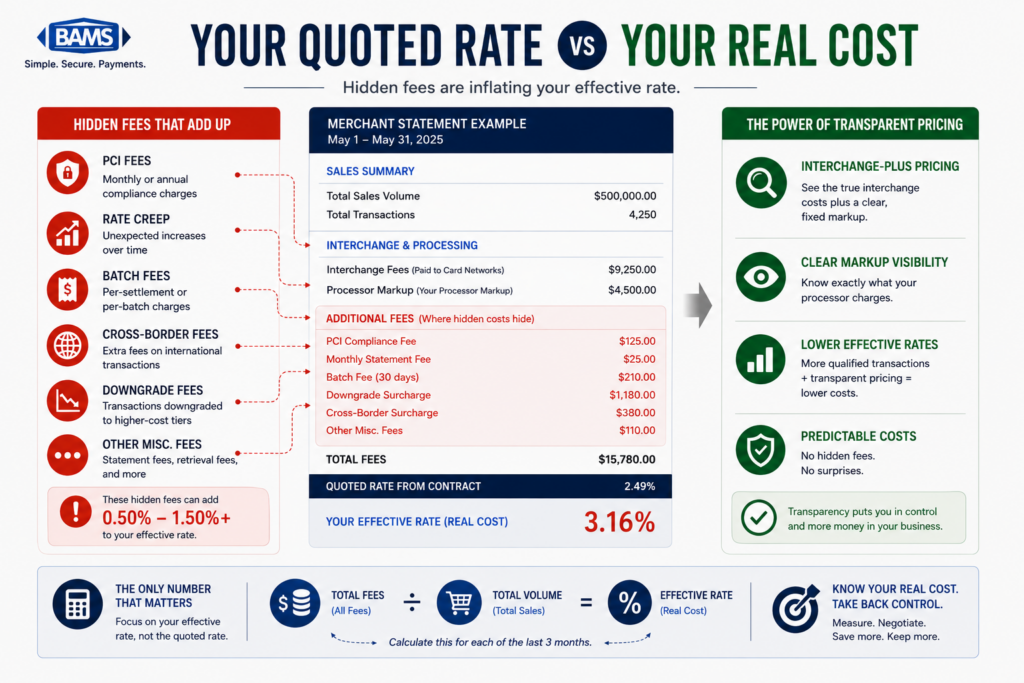
Most eCommerce managers review their payment processing fees at the total line. They see a percentage, compare it to their contract, and move on. But buried inside that number are interchange downgrades triggered by missing or malformed transaction data, specifically tax amounts, freight charges, and product-level detail that card networks expect but rarely receive from online platforms.
When your gateway fails to pass these fields correctly, Visa and Mastercard reclassify the transaction into a higher-cost tier. The result: you pay more per sale without changing anything about your product, pricing, or customer. Hidden qualification failures, interchange downgrades, and operational inefficiencies can quietly increase payment acceptance costs over time. According to the Federal Reserve’s Small Business Credit Survey, managing operating expenses remains a significant challenge for many businesses as they work to improve profitability and cash flow.
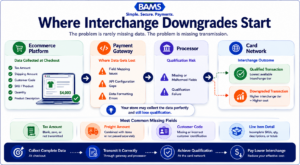
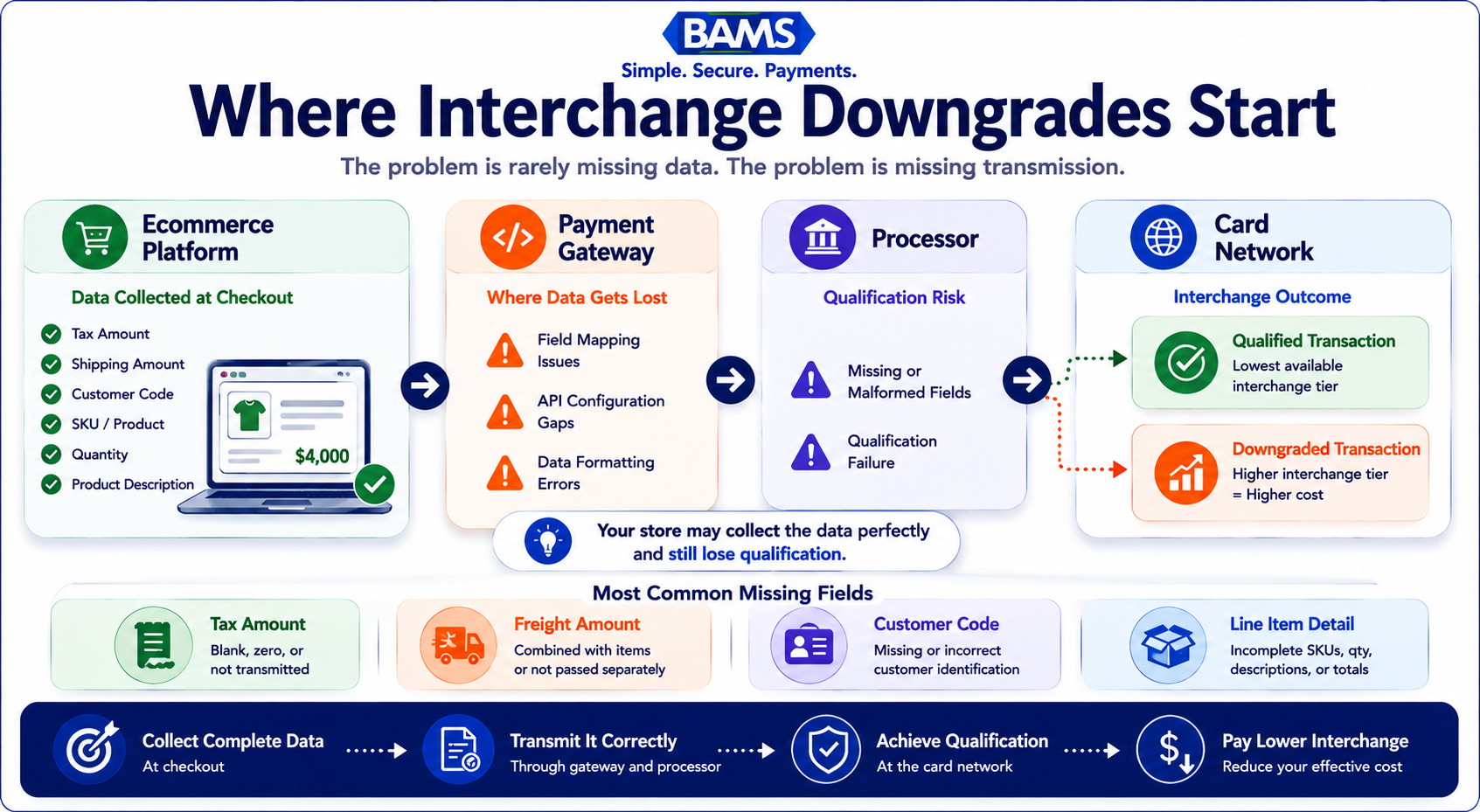
Most interchange downgrades begin when data already collected by your store never reaches the card network correctly.
What This Checklist Covers (and What It Doesn’t)
This guide is for eCommerce managers running established online stores who want to reduce processing costs by fixing the data their platforms send at the transaction level. If you process B2B or B2G transactions, the savings potential is even larger because Level 2 and Level 3 interchange categories offer steeper discounts for enriched data.
We’re not covering general fee negotiation, PCI compliance checklists, or platform migration. Instead, each item below maps a specific field (tax, freight, line-item detail) to the interchange qualification it unlocks, then shows where that field typically breaks across common eCommerce setups.
How We Selected These Downgrade Signals
Each item was chosen based on three criteria: how frequently the field causes downgrades in card-not-present environments, how difficult it is to detect on a standard merchant statement, and how directly an ecommerce manager can fix it without changing processors. The list prioritizes signals you can match against your own statements today.
8 Tax and Freight Field Failures That Quietly Inflate Your Interchange Costs

Most merchants already have the information needed to reduce costs. The challenge is identifying where qualification fails.
1. Tax Amount Field Submitted as Zero or Blank
Why it matters: Visa and Mastercard require a tax amount in the authorization message for Level 2 qualification. When your platform submits $0.00 or leaves the field null, the transaction drops to a standard (higher) interchange tier, even if you collected tax from the customer. This is the single most common L2 downgrade trigger in eCommerce.
What it looks like today: Many Shopify and WooCommerce configurations calculate tax at checkout but don’t pass the tax total through the payment gateway’s API. The tax shows on the customer receipt but never reaches the processor’s authorization request.
How to apply it: Pull a sample of recent transactions from your gateway dashboard and check whether the tax_amount field populates. If it reads 0 or null, work with your gateway’s integration documentation (or your developer) to map your platform’s tax calculation to the gateway’s Level 2 data fields.
2. Tax Indicator Mismatched to Tax Amount
Why it matters: Card networks use a tax indicator flag (taxable, tax exempt, not provided) alongside the tax amount. If the indicator says “tax exempt” but a tax amount is present (or vice versa), the transaction fails qualification. The mismatch creates a silent downgrade that won’t appear as an error in your gateway logs.
What it looks like today: This commonly occurs when merchants sell across multiple states. A tax-exempt B2B order gets processed with the default “taxable” indicator, or a taxable consumer order inherits an exemption flag from a misconfigured customer profile.
How to apply it: Audit your tax exemption workflows. Confirm that when a tax-exempt certificate is on file, both the tax indicator and tax amount fields reflect zero. Run a monthly spot-check on 10 to 15 transactions from mixed-tax jurisdictions.
3. Freight/Shipping Amount Not Passed Separately
Why it matters: Level 2 and Level 3 interchange categories expect the freight or shipping charge as a distinct field, not bundled into the transaction total. When freight is invisible to the processor, the entire transaction can downgrade. For merchants with average order values above $100, this single field can shift interchange by 0.3% to 0.5% per transaction.
What it looks like today: Most eCommerce platforms calculate shipping at checkout, but many payment integrations lump shipping into the gross total. The gateway sees one number. The card network sees missing freight data and applies a higher rate.
How to apply it: Check your gateway’s API documentation for a shipping_amount or freight_amount parameter. If it exists but your integration doesn’t populate it, that’s your fix. If your gateway doesn’t support the field, flag it as a limitation for your next processor evaluation.
4. Missing Customer Code on B2B Transactions
Why it matters: For commercial, purchasing, and corporate card transactions, card networks require a customer_code (sometimes called a PO number or reference ID) to qualify at Level 2 rates. Without it, a $5,000 B2B order processes at the same interchange tier as a $30 consumer purchase. The cost difference on a single transaction can exceed $25.
What it looks like today: B2B eCommerce stores often use the same checkout flow as B2C. No field exists for the buyer to enter a PO number, so none gets passed. The processor can’t submit what it doesn’t receive.
How to apply it: Add a PO/reference number field to your checkout for logged-in wholesale or business customers. Map that field to your gateway’s customer_code parameter. Even a static value (like the order ID) can satisfy the requirement and prevent the downgrade.
5. Line-Item Detail Absent for Level 3 Qualification
Why it matters: Level 3 data includes item descriptions, quantities, unit costs, commodity codes, and unit of measure for each product in the order. Passing complete transaction detail can help qualifying commercial card transactions access more favorable interchange categories. The Visa Commercial Enhanced Data Program highlights how enhanced transaction data supports commercial card qualification programs. Many merchants leave these potential savings opportunities unclaimed because the data exists in their platform but is never transmitted to the processor.
What it looks like today: Platforms like Shopify, BigCommerce, and WooCommerce store all of this data internally, but their default payment integrations rarely transmit it to the gateway at the line-item level. The data exists. The pipeline doesn’t.
How to apply it: If your annual commercial card volume exceeds $500,000, prioritize Level 3 integration. Work with your processor to confirm their gateway accepts L3 fields, then map your product catalog’s SKU, description, quantity, and unit price to the corresponding API parameters. For merchants using BAMS, their account management team can help identify which transactions qualify for L3 rates and guide the field mapping process.
6. Merchant Category Code (MCC) Doesn’t Reflect Your Actual Business
Why it matters: Your MCC influences which interchange table applies to every transaction. If your account was set up with a generic retail code but you sell digital goods, subscriptions, or wholesale products, certain card-network programs (with lower rates) become inaccessible. This isn’t a field you pass per transaction; it’s a one-time configuration that affects all of them.
What it looks like today: Many merchants inherit an MCC assigned during onboarding and never revisit it. As business models evolve (adding subscriptions, expanding into B2B), the code becomes a poor match, and interchange rates reflect that mismatch.
How to apply it: Ask your processor what MCC is on file. Compare it to Visa’s and Mastercard’s published MCC lists. If a more specific code fits your primary revenue stream, request a change. This takes one conversation and can shift your baseline interchange on every future transaction.
7. AVS and CVV Response Codes Failing Silently
Why it matters: Address Verification Service (AVS) and Card Verification Value (CVV) checks aren’t just fraud tools. Card networks use their response codes as qualification inputs. A transaction that returns an AVS mismatch or missing CVV can downgrade to a non-qualified rate, potentially increasing processing costs through downgraded transaction treatment. Visa’s payment processing guidance emphasizes the importance of accurate transaction data and compliance with network requirements to support proper transaction qualification. Silent AVS failures are a frequent contributor to unnecessary processing costs.
What it looks like today: Ecommerce platforms collect billing addresses, but typos, autofill errors, and international address formats cause AVS mismatches that the merchant never sees. The order completes. The downgrade happens invisibly.
How to apply it: Review your gateway’s AVS response code reports. Flag transactions returning “N” (no match) or “U” (unavailable) codes. If mismatch rates exceed 5%, investigate whether your checkout address fields are formatted to match issuer expectations. Consider implementing stronger fraud-prevention controls that also improve data quality.
8. Settlement Timing Exceeding Network Windows
Why it matters: Visa requires settlement within 24 hours of authorization for card-not-present transactions to qualify at the target interchange rate. Mastercard has similar windows. If your platform batches settlements once daily but your authorization timestamp falls just outside the window (common with late-night orders and delayed batch closes), the transaction downgrades automatically.
What it looks like today: Merchants using manual batch settlement or platforms with configurable batch times often don’t realize their settlement window has drifted. A batch that closes at 11 PM instead of 5 PM can push morning authorizations past the 24-hour mark.
How to apply it: Confirm your batch settlement schedule with your processor. If you’re on manual batch close, switch to automatic daily settlement. If your platform allows you to set the batch cutoff time, align it with your peak order hours to minimize the gap between authorization and settlement.
Reduce Processing Costs by Seeing the Pattern
These eight signals share a common structure: data your platform already collects fails to reach the processor in the format card networks require. The problem is never that the information doesn’t exist. It’s that the pipeline between your eCommerce platform, your payment gateway, and your processor drops or distorts it.
Three patterns emerge. First, tax and freight fields are the lowest-effort, highest-impact fixes because they unlock Level 2 qualification across all commercial card transactions. Second, line-item detail (Level 3) offers the steepest discounts but requires more integration work, making it a priority only above certain B2B volume thresholds. Third, operational signals like AVS mismatches and settlement timing affect every transaction type, not just commercial cards, which means fixing them compounds savings across your entire volume.
The merchants who consistently pay less in interchange aren’t negotiating harder. They’re passing cleaner data.
Where to Start: Prioritizing Your First Fixes
You don’t need to fix all eight at once. Start with three actions this week:
- Pull 20 recent transactions from your gateway and check whether tax_amount and shipping_amount fields are populated. If they’re blank, you’ve found your first downgrade source.
- Ask your processor for a downgrade report. Most processors can generate one. It will show exactly which transactions failed qualification and why, giving you a prioritized fix list.
- Confirm your settlement batch timing. This is a five-minute check that can eliminate an entire category of downgrades overnight.
If you process significant B2B volume, add Level 3 field mapping and ACH routing to your 90-day roadmap. The per-transaction savings on commercial cards make the integration investment recoverable within months for most mid-market merchants.
Frequently Asked Questions
What are the best strategies to reduce payment processing fees?
The most effective strategies focus on data quality rather than rate negotiation alone. Ensure your platform passes tax amounts, freight charges, and line-item detail to your gateway so transactions qualify at the lowest interchange tier. Combine this with interchange-plus pricing (which makes downgrades visible), regular statement audits, and proper AVS/CVV implementation. Merchants who fix data qualification issues before negotiating rates typically see larger, more durable savings.
Why is interchange-plus pricing more beneficial than flat-rate pricing?
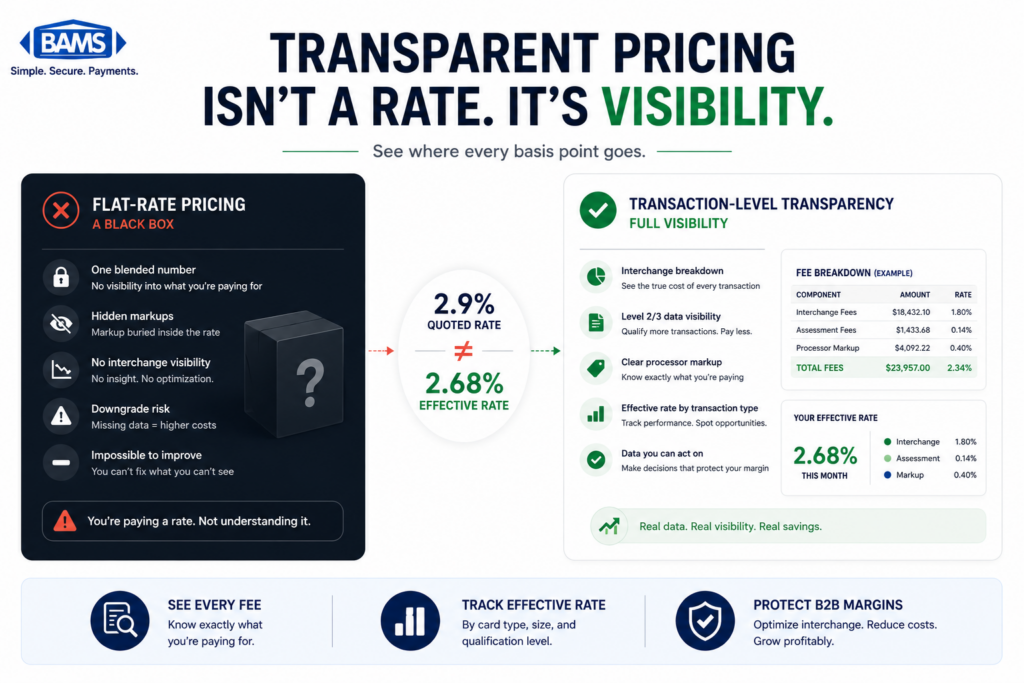
Interchange-plus pricing separates the card network’s base cost (interchange) from your processor’s markup. This transparency lets you see exactly when transactions downgrade to higher tiers, so you can diagnose and fix the root cause. Flat-rate pricing bundles everything into one number, which means you pay the same rate whether your data qualifies at Level 1 or Level 3. For merchants processing over $20,000 monthly, interchange-plus almost always costs less because you benefit directly from every qualification improvement you make.
How can I audit my payment processing statements for hidden fees?
Request a detailed statement (not a summary) from your processor that shows interchange categories per transaction. Look for line items labeled “standard,” “non-qualified,” or “downgrade” because these indicate transactions that failed to meet data requirements. Compare the count of downgraded transactions to your total volume. If more than 5% to 10% of transactions are downgrading, your tax, freight, or AVS fields likely need attention. Ask your processor for a dedicated downgrade report if your statement doesn’t break this out.
How does optimizing transaction data affect processing fees?
Card networks like Visa and Mastercard set interchange rates partly based on the data richness of each transaction. Level 1 (basic) data gets the highest rate. Level 2 (tax amount, customer code) and Level 3 (line-item detail, commodity codes, freight) data qualify for progressively lower rates. For commercial and purchasing card transactions, the difference between Level 1 and Level 3 can be 0.5% to 1.0% per transaction. Passing the right fields through your gateway is the mechanism that unlocks these lower tiers.
When should I negotiate my processing rates with my payment provider?
Negotiate after you’ve cleaned up your transaction data, not before. If your tax and freight fields are missing and your AVS mismatch rate is high, you’re negotiating from a weak position because your effective rate is inflated by downgrades, not just processor markup. Fix qualification issues first, then approach your processor with your improved metrics. Merchants who optimize data before negotiating have concrete evidence of their transaction quality, which strengthens their case for lower markups.
Which payment methods should I encourage to lower processing costs?
For B2B orders, ACH transfers typically cost a flat fee (often under $1) compared to 2% to 3% for card transactions. Encouraging ACH for high-ticket wholesale orders can eliminate interchange entirely on those sales. For consumer transactions, debit cards generally carry lower interchange than credit cards. Offering incentives for lower-cost payment methods at checkout, or routing B2B buyers to ACH by default, can meaningfully reduce your blended processing cost.