Merchant Account Setup: Align Config to Sales Data
Last Updated on September 29, 2026 by Dimitri Akhrin
How default processor settings silently delay your deposits and inflate fees—and which changes fix it
Learn how default merchant account setup configurations misalign with your actual transaction patterns, costing you money and slowing deposits. This guide walks you through auditing your settings against real sales data and making targeted changes that unlock faster funding.
TL;DR
- Processor defaults aren’t optimized for you — They’re set to minimize processor risk, not maximize your cash flow. Your deposit timeline, pricing tier, and reserve requirements are all shaped by default settings that may not match your actual sales pattern.
- Audit your real data against your processor’s profile — Compare your actual monthly volume, average ticket, and transaction mix to what your processor has on file. Gaps between the two are where hidden costs and funding delays originate.
- Batch timing is the single fastest lever — Adjusting your batch cutoff to align with your sales cycle can move deposits forward by a full business day, often with a single configuration change.
- Interchange plus pricing eliminates tier-based overcharges — eCommerce transactions default to the most expensive tier under tiered pricing models. Switching to interchange plus gives you transparent, lower-cost processing.
- Review quarterly, not once — Your transaction patterns evolve. If your processor settings don’t evolve with them, you’ll gradually drift back into misalignment, paying more and waiting longer for your money.
Guide Orientation: What This Covers and Who It’s For
This guide is about the hidden fees and delayed deposits that stem from default settings in your merchant account setup. Specifically, it walks you through how processor setup defaults silently misalign with your actual transaction patterns, costing you money and slowing your cash flow without any obvious warning.
It’s written for eCommerce managers at established online businesses (roughly 10 to 50 employees) who already accept payments but suspect their deposit timelines or merchant processing fees aren’t as optimized as they could be. If you’ve ever wondered why funds take longer to arrive than your processor promised, this is for you.
By the end, you’ll understand exactly which default configurations create hidden costs, how to audit your current setup against your real sales data, and which changes unlock faster funding. This guide does not cover POS hardware selection or basic “how to open a merchant account” steps. It assumes you already have one and focuses on what happens after setup.
Why Merchant Account Setup Defaults Cost You More Than You Think
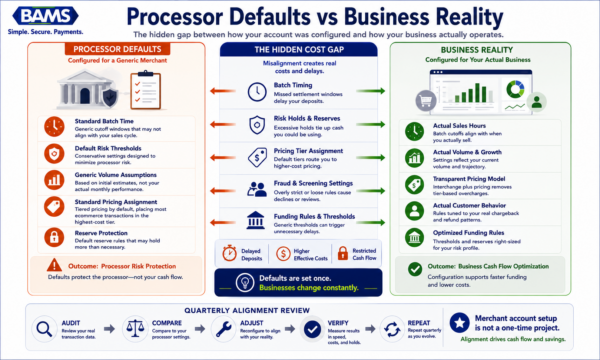
Most merchant accounts are configured for a generic merchant, not your actual sales behavior.
When processors onboard new merchants, they apply default configurations designed to minimize their own risk exposure. These defaults cover everything from batch settlement windows and risk reserve thresholds to pricing tier assignments and fraud screening sensitivity. They’re built for a generic merchant profile, not your specific sales pattern.
The problem is that eCommerce businesses don’t look like generic merchants. Your average ticket size, monthly volume, refund frequency, and chargeback ratio form a unique fingerprint. When your processor’s defaults don’t match that fingerprint, three things happen silently: settlement windows stretch longer than necessary, transactions get routed into higher-cost pricing tiers, and risk holds trigger on perfectly normal sales spikes.
Merchant account applications typically require estimated monthly processing volume, average ticket size, highest anticipated ticket, and transaction mix to underwrite risk and set terms. But here’s the gap: the information you provide during onboarding sets the initial configuration, and most merchants never revisit those settings even as their business evolves. A business processing $50,000 per month with a $35 average ticket operates in a fundamentally different risk profile than one processing $200,000 per month with a $150 average ticket, yet both might be running on the same default configuration.
According to the U.S. Small Business Administration, maintaining accurate financial and operational information helps businesses secure appropriate financing and service arrangements.
The cost of inaction is tangible.
Cash flow visibility remains a major concern for growing businesses. According to the Federal Reserve’s 2025 Small Business Credit Survey, many small businesses continue to identify operating expenses and cash flow management as important financial challenges, making deposit timing and funding predictability increasingly important. Delayed deposits restrict your working capital. Misclassified transactions inflate your effective processing rate. And risk holds triggered by volume spikes can freeze funds precisely when your business needs them most. None of these costs appear as a line item on your statement. They hide inside the gap between your defaults and your reality.
Core Concepts: Understanding the Configuration Layer
Settlement vs. Funding
Settlement is the process of reconciling transactions between your processor, the card networks, and the issuing banks. Funding is when the money actually arrives in your business checking account. A merchant account can hold funds for one to two days before they reach the business checking account. These are separate timelines, and your configuration affects both.
Batch Timing
Your gateway collects transactions throughout the day and submits them to the processor in a “batch.” The time your batch closes determines when settlement begins. A batch that closes at 11 PM Eastern instead of 5 PM Eastern can push your deposit forward by a full business day, every single day.
Risk Reserves and Holds
Processors may withhold a percentage of your deposits (a rolling reserve) or place holds on individual transactions that exceed your stated parameters. These aren’t fees in the traditional sense, but they restrict your cash flow just as effectively. The thresholds that trigger holds are set during onboarding based on the volume and ticket data you provided, and they rarely adjust automatically as your business grows.
Pricing Tier Assignment
Many processors use tiered pricing models that classify transactions as “qualified,” “mid-qualified,” or “non-qualified.” The criteria for each tier are defined in your merchant agreement, and default settings often route eCommerce transactions (which are card-not-present) into the most expensive tier. This is one of the most common sources of hidden cost. Understanding the difference between tiered pricing and interchange plus pricing is essential to identifying whether your current model is working against you.
The Misconception
The most dangerous assumption is that your processor optimized your account for your benefit during setup. Processors optimize for their own risk management. Optimization for your cash flow and cost structure is your responsibility, or the responsibility of a merchant services partner who aligns incentives with yours.
The Framework: Sales-Pattern Alignment
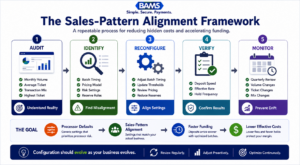
Most merchant account problems are not pricing problems. They’re configuration problems.
The method this guide follows is called Sales-Pattern Alignment. Instead of treating merchant account setup as a one-time onboarding task, it treats configuration as an ongoing calibration between your processor’s settings and your actual transaction behavior. The framework has five stages:
- Audit — Extract your real transaction data and compare it to the parameters your processor has on file.
- Identify — Pinpoint the specific defaults creating hidden costs or funding delays.
- Reconfigure — Adjust batch timing, risk thresholds, pricing models, and gateway settings to match your current sales pattern.
- Verify — Run controlled tests to confirm that changes produce the expected deposit timing and cost improvements.
- Monitor — Establish a recurring review cycle so your configuration stays aligned as your business evolves.
Each stage builds on the previous one. Skipping the audit and jumping straight to reconfiguration is a common mistake that leads to new misalignments. The sections below walk through each stage in detail.
Step-by-Step: Eliminating Hidden Fees Through Sales-Pattern Alignment
Step 1: Audit Your Transaction Data Against Processor Parameters
Objective: Build a clear picture of the gap between your actual sales behavior and what your processor believes about your business.
Start by pulling three months of transaction data from your gateway or payment platform. Calculate your real average ticket size, your actual monthly processing volume, your highest single transaction, and your transaction mix (percentage of credit vs. debit, domestic vs. international, one-time vs. recurring). Then request your merchant profile from your processor. This is the set of parameters they used to underwrite your account and configure your defaults.
Processors evaluate average volume, average ticket, highest anticipated ticket, and transaction percentages during onboarding. If your business has grown or shifted since you opened the account, these numbers are almost certainly outdated. A business that estimated $30,000 per month during setup but now processes $80,000 per month is operating outside its underwritten parameters, which can trigger risk holds and delay funding without any notification.
Anti-patterns: Don’t rely on your memory of what you submitted during onboarding. Don’t assume your processor has updated your profile automatically. Don’t skip international transaction percentages if you sell cross-border.
Success indicators: You have a side-by-side comparison showing your real data versus your processor’s profile, with specific discrepancies highlighted. You can quantify how far your actual volume and ticket size have drifted from the original parameters.
Step 2: Identify Default Settings Creating Hidden Costs
Objective: Translate the gaps you found in Step 1 into specific configuration settings that are costing you money or delaying deposits.
There are four primary areas where defaults create hidden costs for eCommerce businesses:
- Batch cutoff timing: Many processors set default batch close times that don’t align with your peak sales hours. If your heaviest transaction volume occurs in the evening but your batch closes at midnight, you may be splitting a natural sales day across two settlement cycles.
- Risk and fraud thresholds: Default fraud screening sensitivity is typically set high for card-not-present merchants. This means legitimate transactions get flagged, reviewed, and delayed. If your chargeback ratio is low and your customer base is stable, you’re paying for a level of scrutiny you don’t need.
- Pricing model misalignment: If you’re on tiered pricing, examine which tier your eCommerce transactions are landing in. Card-not-present transactions frequently default to “non-qualified” rates, which can be significantly higher than what you’d pay under an interchange plus pricing model.
- Reserve requirements: Rolling reserves (where the processor withholds 5% to 10% of each deposit for a set period) are common for new accounts or high-risk categories. If your account has been active with a clean history for six months or more, you may be eligible to have reserves reduced or eliminated, but processors rarely volunteer this.
Anti-patterns: Don’t focus exclusively on the per-transaction rate. Hidden costs from batch timing, reserves, and fraud holds often exceed the impact of a few basis points on your rate. Don’t assume that because a setting was appropriate at launch, it’s still appropriate now.
Success indicators: You’ve identified at least two to three specific default settings that are misaligned with your current transaction patterns, and you can estimate the dollar impact of each (in delayed deposits, excess fees, or withheld reserves).
Step 3: Reconfigure for Your Actual Sales Pattern
Objective: Adjust the settings identified in Step 2 to align with your real transaction behavior, unlocking faster funding and lower costs.
This step requires direct engagement with your processor or merchant services partner. For each misaligned setting, prepare a specific request backed by your data:
Batch timing: Request a batch cutoff time that captures your full sales day in a single settlement cycle. For most eCommerce businesses, this means setting the cutoff after your last significant sales window closes. Optimizing your online payment gateway setup for faster deposits often starts with this single change. Moving your batch close from a default midnight window to an optimized time aligned with your sales pattern can shift deposits forward by a full business day.
Risk thresholds: Present your chargeback ratio and fraud rate data. If both are below industry averages, request that your fraud screening sensitivity be reduced or that specific hold triggers (like transactions above a certain dollar amount) be raised to match your actual highest ticket. Providers evaluate processing history statements and chargeback ratios during setup, but these thresholds are adjustable post-onboarding when you have the data to support a change.
Risk thresholds are commonly established using historical processing activity, chargeback performance, and business risk assessments. Guidance from the Visa payment acceptance framework highlights the importance of ongoing transaction monitoring and risk management practices. Merchants with a strong processing history can often request adjustments to these thresholds as their business evolves.
Pricing model: If you’re on tiered pricing and a significant percentage of your transactions are landing in the mid-qualified or non-qualified tiers, request a switch to interchange plus pricing. This passes the actual card network cost through to you with a fixed markup, eliminating the opaque tier classifications that inflate ecommerce costs.
Reserves: If your account has a clean processing history (low chargebacks, consistent volume, no fraud incidents), formally request a reserve reduction or release. Provide your processing statements as evidence.
For businesses that want this handled proactively, BAMS structures merchant accounts around the business’s actual sales pattern from the start, including next-day funding and interchange plus pricing, so these misalignments don’t accumulate silently.
Anti-patterns: Don’t make multiple configuration changes simultaneously without documenting each one. Don’t accept “that’s our standard policy” as a final answer on reserves or thresholds. Processors have flexibility, but you need to ask with data in hand.
Success indicators: You have written confirmation of each configuration change, including the new batch cutoff time, adjusted risk thresholds, updated pricing model, and any reserve modifications.
Step 4: Verify That Changes Produce Real Results
Objective: Confirm that the reconfigured settings are actually delivering faster deposits and lower costs, not just theoretically improving them.
After changes go live, run a structured verification process over two to four weeks. This is where most merchants drop the ball. They make changes, assume they’re working, and don’t check until a problem surfaces months later.
Track three metrics daily during your verification window:
- Deposit timing: Record the exact time and date each deposit hits your business checking account. Compare this to the batch close time. If your batch closes at 6 PM and you’re expecting next-day funding, deposits should arrive by the following business day. If they’re arriving two days later, something in the settlement chain isn’t configured correctly.
- Effective rate: Calculate your total fees divided by total processing volume for each statement period. Compare this to your previous effective rate. If you switched to interchange plus pricing, you should see a measurable decrease, particularly on transactions that were previously classified as non-qualified.
- Hold frequency: Track how many transactions are being flagged, held, or delayed by fraud screening. If you adjusted risk thresholds, hold frequency should decrease without a corresponding increase in chargebacks.
Use the verification framework outlined in this guide on verifying your payment gateway setup to structure your testing process systematically.
Anti-patterns: Don’t verify for just one or two days. Settlement behavior can vary by day of week and transaction volume. Don’t ignore small discrepancies. A deposit arriving six hours late consistently indicates a configuration issue that will compound over time.
Success indicators: Over a two-week period, deposits consistently arrive within the expected window. Your effective rate has decreased. Transaction holds have decreased without an increase in fraud or chargebacks.
Step 5: Establish a Recurring Alignment Review
Objective: Prevent configuration drift by building a simple, repeatable review process that keeps your processor settings aligned with your evolving business.
Your transaction patterns are not static. Seasonal sales spikes, new product launches, expansion into new markets, and changes in your customer payment preferences all shift your volume, average ticket, and transaction mix. If your processor settings don’t shift with them, you’ll gradually slide back into the same misalignment that created hidden costs in the first place.
Set a quarterly review cadence. Every 90 days, pull your transaction data and compare it to your processor’s current profile parameters. Focus on three questions:
- Has your average monthly volume changed by more than 20%?
- Has your average ticket size shifted significantly?
- Has your transaction mix changed (for example, more international orders, more recurring billing, or a shift in card brand distribution)?
If the answer to any of these is yes, repeat Steps 2 and 3 for the affected settings. If your volume has grown substantially, proactively notify your processor before they flag it as anomalous activity. Unexpected volume spikes that exceed your underwritten parameters are one of the most common triggers for funding holds and reserve increases.
Anti-patterns: Don’t treat this as a one-time project. Don’t wait for a problem (delayed deposit, unexpected fee increase, frozen funds) to trigger a review. Don’t delegate this entirely to your processor. They have no incentive to optimize for your cash flow unprompted.
Success indicators: You have a calendar reminder set for quarterly reviews. Your processor profile parameters are current within the last 90 days. You have not experienced an unexpected funding hold or reserve increase since implementing the review cycle.
Practical Examples: Configuration Alignment in Action
Scenario A: The Seasonal Ecommerce Business
An online retailer processes $60,000 per month for nine months of the year, then spikes to $180,000 per month during the holiday season. Their merchant account was set up with a stated monthly volume of $60,000. During their first holiday season after setup, their processor placed a rolling reserve on 10% of deposits because the volume exceeded underwritten parameters by 200%. This locked up $18,000 per month in reserves during the exact period when the business needed maximum cash flow for inventory replenishment.
The fix: before the next holiday season, the merchant updated their processor profile to reflect seasonal volume projections, provided three months of prior-year processing statements as evidence, and requested a temporary volume increase with no additional reserve. The processor approved the adjustment because the merchant had a clean chargeback history and provided documentation proactively.
Scenario B: The Subscription Business with Misaligned Batch Timing
A SaaS company billing $45 per month per customer processes the majority of its recurring charges on the 1st of each month. Their default batch cutoff was set to 11:59 PM Eastern. Because their billing system initiated charges starting at midnight, the first day’s transactions were split across two batches, delaying settlement on a significant portion of their monthly revenue by a full day. By adjusting their batch cutoff to 2 AM Eastern (after their billing cycle completed), they consolidated all first-of-month charges into a single batch and received the full deposit one business day sooner.
Common Mistakes and Pitfalls
The most predictable failure is treating merchant account setup as a one-time event. Processors don’t penalize you for this, they simply continue applying defaults that may no longer fit your business. The cost accumulates invisibly.
Another common mistake is focusing exclusively on the per-transaction rate while ignoring the structural costs of batch timing, reserves, and fraud hold settings. A merchant paying 2.4% with next-day funding and no reserves is often in a better cash flow position than one paying 2.1% with two-day funding and a 5% rolling reserve.
Merchants also frequently underestimate the importance of proactive communication with their processor. Surprising your processor with a volume spike is one of the fastest ways to trigger a funding hold. Informing them in advance, with data, is one of the fastest ways to prevent one.
Finally, many businesses assume that switching processors will solve configuration problems. Sometimes it does. But if you don’t understand which settings caused the problem, you’ll replicate the same misalignment with a new provider.
What to Do Next
Start with Step 1. Pull your last three months of transaction data and request your merchant profile from your processor. The comparison alone will reveal whether your account is configured for your business as it operates today, or for the business you described when you first applied.
You don’t need to overhaul everything at once. Even a single change, like adjusting your batch cutoff time, can shift your deposit timeline forward by a full business day. That’s real cash flow improvement from a 10-minute configuration change.
Revisit this guide quarterly as a reference. Your business will evolve, and your processor settings should evolve with it. The goal isn’t perfection. It’s alignment, maintained consistently over time.
Frequently Asked Questions
What documents do I need to gather before switching merchant service providers?
At minimum, collect your last three to six months of processing statements, your current merchant agreement (including the fee schedule and reserve terms), your chargeback and refund history, and your real transaction data (average ticket, monthly volume, highest ticket, transaction mix). Having this ready allows a new provider to configure your account accurately from day one, rather than applying generic defaults.
Why is it important to keep my old merchant account open during the transition?
Your old account will continue to receive chargebacks and refund requests for transactions processed before the switch. Card networks allow cardholders to dispute charges for up to 120 days (and sometimes longer for certain dispute types). Closing the old account prematurely can complicate dispute resolution and result in unrecoverable losses. Keep it open for at least 90 to 120 days after your last transaction.
How do batch cutoff times affect my deposit speed?
Your batch cutoff time determines when your day’s transactions are submitted for settlement. Transactions captured before the cutoff enter the current settlement cycle. Transactions captured after the cutoff roll into the next cycle. If your cutoff is misaligned with your peak sales hours, you could be adding a full business day to your deposit timeline unnecessarily. Adjusting this single setting is often the fastest way to accelerate funding.
Which pricing model is best for eCommerce businesses?
For most eCommerce businesses, interchange plus pricing is more transparent and cost-effective than tiered pricing. Tiered models classify card-not-present transactions (which is every eCommerce sale) into higher-cost tiers, inflating your effective rate. Interchange plus passes the actual card network cost through to you with a fixed, visible markup, so you always know exactly what you’re paying and why.
How can I tell if my processor is holding a reserve on my account?
Check your merchant agreement for reserve terms, and compare your daily batch totals to the deposits arriving in your bank account. If deposits are consistently lower than your batch totals by a fixed percentage, a rolling reserve is likely in effect. You can also contact your processor directly and ask for your current reserve balance and release schedule. If your account has a clean history, request a reduction.
How often should I review my merchant account configuration?
Quarterly is the recommended cadence. Every 90 days, compare your actual transaction data (volume, average ticket, transaction mix) to the parameters your processor has on file. If your business has experienced a significant change (a new product launch, seasonal spike, or market expansion), review sooner. The goal is to prevent configuration drift before it creates hidden costs or funding delays.