7 Credit Card Optimization Fixes Hidden in Your Statement
Last Updated on October 7, 2026 by Dimitri Akhrin
Processor-side diagnostic checkpoints your eCommerce team can act on without a single integration project
Learn how to read your processing statement like a diagnostic tool, not just a bill. These seven checkpoints reveal missed interchange tiers, silent downgrades, and Level 2 eligibility gaps your processor never flagged.
TL;DR
- Your statement summarizes costs but doesn’t diagnose them – Bundled interchange categories, hidden downgrades, and missing card-type segmentation mean you’re paying penalties you can’t see.
- Level 2 data eligibility is likely going unclaimed – If you process any commercial card orders (and you probably do), missing Level 2 fields are costing you 0.3% to 0.5% per transaction in avoidable interchange.
- Batch timing and recurring flags are low-effort, high-impact fixes – Delayed settlement and unflagged subscription transactions trigger automatic downgrades that add up monthly.
- Your processor’s pricing model may reward your downgrades – On tiered pricing, non-qualified surcharges are processor revenue. Ask whether your processor earns more when your transactions qualify poorly.
- Start with three actions: request an interchange detail report, run a BIN analysis, and verify batch settlement timing – These require no integration work and will reveal whether your biggest cost leaks are already fixable.
Your Processing Statement Is a Summary, Not a Diagnosis
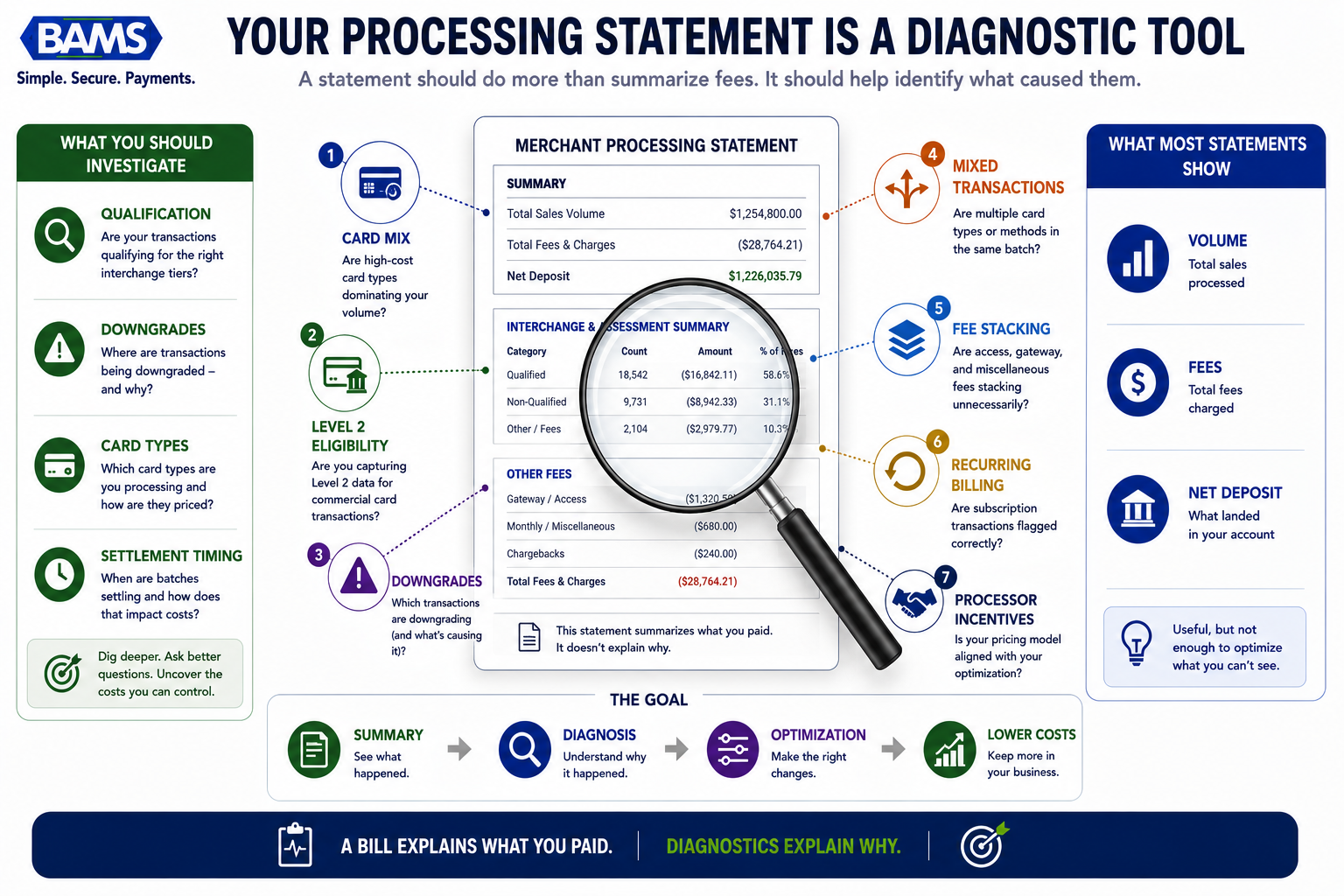
Every month, your processing statement arrives with a tidy set of totals: volume processed, fees charged, net deposit. It looks complete. It isn’t. For eCommerce teams running 10 to 50 people, the statement is the financial equivalent of a doctor handing you a bill without explaining what’s wrong. You can see what you paid, but not why you paid it, and certainly not whether you overpaid.
The real story lives below the summary line. It’s in interchange qualification tiers your transactions missed, in commercial card orders that downgraded silently, and in credit card optimization opportunities your processor never surfaced. Most cost reduction strategies in payment processing assume you need to rebuild something: new gateway, new checkout, new platform. The seven diagnostic checkpoints below don’t require any of that. They require reading your statement differently.
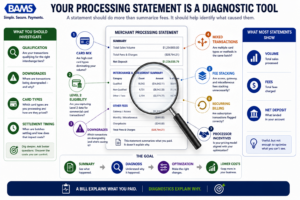
A statement should do more than summarize fees. It should help identify what caused them.
Who This Is For (and What It Skips)
This is for eCommerce operations managers and finance leads at established online businesses processing a mix of consumer and commercial card transactions. If you manage payments but don’t have a dedicated payments engineer, this list is built for you.
We’re not covering gateway migrations, POS hardware upgrades, or full ERP integrations. We’re also not rehashing the standard “negotiate your rates” advice. Instead, these are processor-side signals you can identify on your current statement, verify with your current provider, and act on without launching a project.
How We Selected These Checkpoints
Each item meets three criteria. First, it’s diagnosable from a standard processing statement or a single conversation with your processor. Second, it addresses a cost leak that compounds monthly (not a one-time savings). Third, it doesn’t require replacing your payment stack. If a checkpoint demands an integration project, it didn’t make this list.
7 Signals Your Processing Statement Hides From You
1. Bundled Interchange Categories Mask Your Actual Card Mix
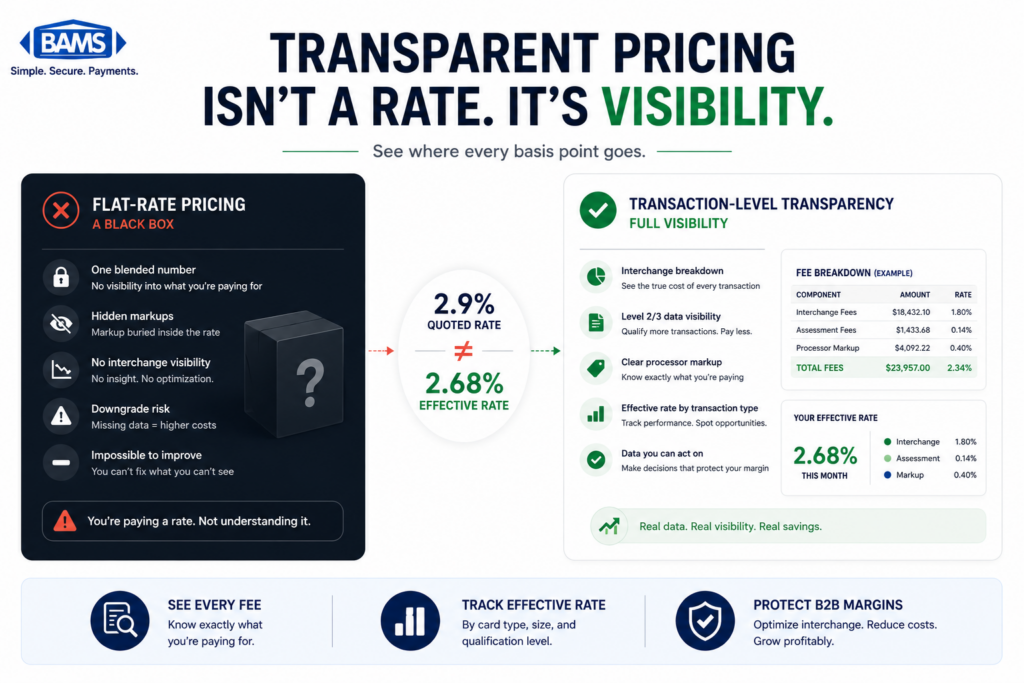
Why it matters: Many processors roll dozens of interchange categories into a handful of summary lines. You see “Qualified” and “Non-Qualified” buckets instead of the 300+ interchange tiers that Visa and Mastercard actually use. This makes it impossible to know which card types are driving your costs.
What it looks like today: Your statement shows three or four rate tiers. Meanwhile, 12% of your transactions might be commercial cards qualifying at the most expensive default rate because no one flagged them. You’d never know from the summary.
How to apply it: Request an interchange detail report from your processor. If they can’t (or won’t) provide one, that’s a signal in itself. Compare the number of unique interchange categories against your bundled statement. The gap between those two numbers represents your visibility deficit.
2. Level 2 Processing Eligibility Goes Unclaimed on Commercial Cards
Why it matters:Level 2 processing requires passing additional data fields (tax amount, customer code, merchant postal code) with each transaction. When these fields are present, commercial card transactions qualify for lower interchange rates. The Visa Commercial Enhanced Data Program highlights how enhanced transaction data supports qualification for commercial card programs. When they’re absent, those transactions downgrade to standard or even the highest tier. Most eCommerce merchants don’t realize they’re already receiving commercial card orders.
What it looks like today: Your gateway may already support Level 2 fields, but they’re not being populated at checkout. The result: every corporate purchasing card order you process costs more than it should. As outlined in our breakdown of signs corporate purchasing cards are hidden in your sales, these transactions often go undetected in mixed consumer/commercial volumes.
How to apply it: Ask your processor to flag which of your transactions qualified at Level 1 versus Level 2 over the past 90 days. If any commercial cards settled at Level 1, you have an immediate savings opportunity. In many cases, enabling Level 2 fields requires a configuration change, not a new integration.
3. EIRF and Standard Downgrades Appear as “Non-Qualified” Surcharges
Why it matters: EIRF (Electronic Interchange Reimbursement Fee) is Visa’s penalty rate for transactions that fail to meet basic data or timing requirements. Mastercard has its own equivalent. These downgrades add 0.5% to 1.0% per transaction, but on a bundled statement, they just show up as a vague “non-qualified” surcharge. You’re paying the penalty without knowing the cause.
What it looks like today: A common trigger is delayed settlement. If your batch doesn’t close within 24 hours of authorization, transactions can downgrade automatically. Another trigger is missing AVS (Address Verification Service) data on card-not-present transactions. Visa’s payment processing guidance emphasizes the importance of accurate transaction data and proper processing practices to support qualification.
How to apply it: Review your batch settlement timing. Confirm with your processor whether auto-close is enabled and at what time. Then ask for a downgrade report that shows the specific reason code for each non-qualified transaction. Fixing settlement timing alone can eliminate a category of downgrades across your entire volume.
4. Mixed Transaction Detection Is Missing Entirely
Why it matters: If you sell to both consumers and businesses, your transaction stream contains a mix of personal credit cards, corporate cards, purchasing cards, and possibly government cards. Each card type has different interchange economics. Without mixed transaction detection, you’re applying a one-size-fits-all processing approach to a diverse card mix.
What it looks like today: Your processor treats every transaction identically. No BIN (Bank Identification Number) analysis flags which orders come from commercial accounts. You have no visibility into what percentage of your revenue comes from cards eligible for interchange savings through enhanced data.
How to apply it: Request a BIN analysis of your last three months of transactions. This report segments your volume by card type (consumer, commercial, rewards, government). If commercial cards represent even 5% to 10% of your volume, the interchange gap between optimized and unoptimized processing is significant enough to act on.
5. Your Effective Rate Hides Fee Stacking
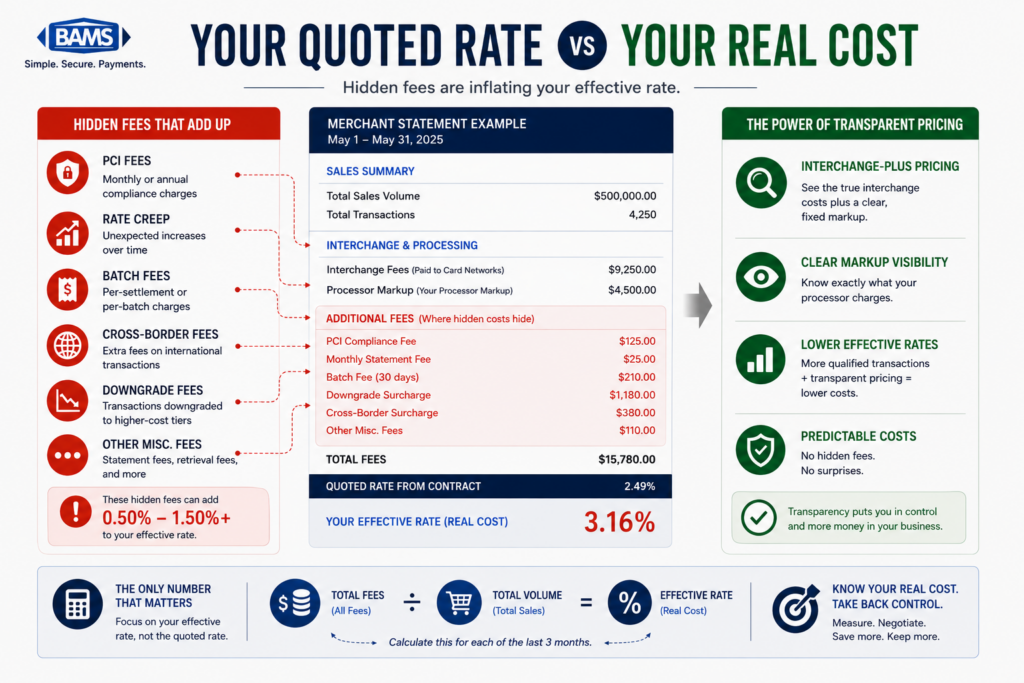
Why it matters: The “effective rate” (total fees divided by total volume) is the most commonly cited metric in processing cost discussions. It’s also the least useful. An effective rate of 2.7% could mean clean interchange-plus pricing with normal qualification, or it could mean low interchange with high markup, assessment fees, PCI non-compliance fees, and batch fees stacked on top.
What it looks like today: Processors who quote a single effective rate are giving you an average that obscures the composition of your costs. You can’t optimize what you can’t decompose. For a deeper look at what statement-level analytics miss, this analysis of B2B margin leakage signals walks through specific line items to question.
How to apply it: Break your monthly statement into four layers: interchange (paid to card networks), assessments (paid to Visa/Mastercard), processor markup, and ancillary fees. If your processor doesn’t separate these clearly, ask for a fee decomposition. The processor markup layer is the only one you can negotiate directly; the others require qualification improvements.
6. Recurring Billing Transactions May Not Be Flagged Correctly
Why it matters: Visa and Mastercard offer specific interchange categories for recurring transactions that can be lower than standard card-not-present rates. But your transactions only qualify if they’re properly flagged with the recurring payment indicator at the gateway level. Many eCommerce platforms don’t set this flag by default.
What it looks like today: Subscription orders and repeat billing cycles process at standard eCommerce interchange rates. You’re paying a premium on predictable, low-risk revenue. This is especially costly for businesses with subscription models or retainer-based billing.
How to apply it: Confirm with your gateway provider whether the recurring transaction indicator is being passed for applicable orders. Then check your statement for the presence of recurring-specific interchange categories. If they’re absent, the flag likely isn’t set. This is typically a gateway configuration adjustment, not a code change. Tools like BAMS can help identify whether your recurring transactions are qualifying at the correct tier and flag where they’re not.
7. Your Processor’s Incentive Structure Isn’t Aligned With Your Optimization
Why it matters: On tiered and bundled pricing models, your processor may actually earn more when your transactions downgrade. A non-qualified surcharge that costs you an extra 0.75% doesn’t cost your processor anything; it’s revenue. This creates a structural misalignment: your processor profits from the opacity that costs you money.
What it looks like today: Processors on tiered models have no financial incentive to help you qualify transactions at lower interchange tiers, pass Level 2 data, or fix batch timing. They may offer “optimization” advice, but the pricing model itself works against it. For businesses routing high-ticket orders through cards, comparing ACH versus card costs for B2B orders can reveal whether cards are even the right rail.
How to apply it: Ask your processor one question: “Do you earn more when my transactions downgrade?” If the answer is yes (or unclear), consider whether interchange-plus pricing would create better alignment. On interchange-plus, the processor’s markup is fixed, so they have no incentive to let your transactions qualify poorly.
The Pattern Across All Seven Signals
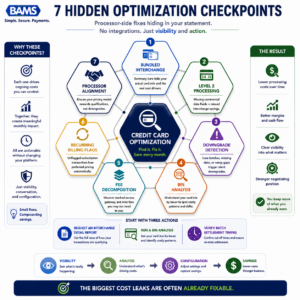
Most processing improvements begin with visibility, not integrations.
Every checkpoint above shares a root cause: your processing statement was designed for accounting, not for diagnostics. It tells you what happened. It doesn’t tell you what should have happened, or what it cost you when it didn’t.
The second pattern is structural. Processors who bundle, tier, or obscure interchange data aren’t necessarily acting in bad faith, but their pricing models don’t reward transparency. When your cost reduction strategies depend on visibility your processor doesn’t provide, you’re optimizing blind. The shift from passive statement review to active transaction-level evaluation is where real interchange savings begin, and it doesn’t require a platform change. According to the Federal Reserve’s 2025 Small Business Credit Survey, managing operating expenses remains a significant challenge for many businesses, making transaction-level cost visibility increasingly important.
Where to Start Without Overcommitting
You don’t need to tackle all seven at once. Start with three actions this month. First, request an interchange detail report and a BIN analysis from your processor. These two documents will reveal whether checkpoints 1, 2, and 4 apply to you. Second, verify your batch settlement timing (checkpoint 3), which is a five-minute check with an immediate payoff. Third, ask your processor the alignment question from checkpoint 7.
If your processor can’t provide these reports or answer these questions clearly, that gap is itself the most important finding. Transparency isn’t a feature request. It’s the baseline for any meaningful credit card optimization work.
Frequently Asked Questions
What is Level 2 processing and how does it reduce interchange costs?
Level 2 processing involves passing additional transaction data (such as tax amount, customer code, and merchant postal code) to the card networks at the time of settlement. When this data is present on eligible commercial card transactions, Visa and Mastercard qualify those transactions at lower interchange tiers. The savings typically range from 0.3% to 0.5% per transaction compared to the default rate for commercial cards processed without enhanced data.
What is Level 3 data in merchant services?
Level 3 data extends beyond Level 2 by including invoice-quality line-item detail: product descriptions, quantities, unit costs, commodity codes, and freight amounts. It’s most commonly associated with B2B and B2G (business-to-government) transactions. While most existing guidance frames Level 3 as an enterprise play requiring ERP integration, even midsize eCommerce merchants processing commercial card orders can benefit. The key is first identifying whether you have eligible volume, which a BIN analysis can reveal.
How can I tell if corporate purchasing cards are in my transaction mix?
Most processing statements don’t distinguish between consumer and commercial cards. The clearest way to identify commercial card volume is to request a BIN analysis from your processor, which segments transactions by card type. Common indicators include higher-than-expected non-qualified surcharges, EIRF downgrades, and interchange categories you don’t recognize on detailed reports.
What’s the difference between interchange-plus and tiered pricing?
Interchange-plus pricing separates the actual interchange cost (set by card networks) from the processor’s markup, giving you full visibility into both. Tiered pricing bundles interchange into broad categories like “Qualified” and “Non-Qualified,” which obscures the actual cost structure. On tiered models, processors can earn more when transactions downgrade, creating a misalignment between your costs and their revenue.
Why do transactions downgrade to non-qualified rates?
Downgrades happen when a transaction fails to meet the card network’s data or timing requirements for a given interchange tier. Common causes include delayed batch settlement (beyond 24 hours), missing address verification data, absent Level 2 fields on commercial cards, and transactions where the authorization and settlement amounts don’t match. Each downgrade adds roughly 0.5% to 1.0% in additional cost.
Do I need to change my payment gateway to start optimizing interchange?
In most cases, no. Many of the optimizations discussed here (enabling Level 2 fields, fixing batch timing, setting recurring transaction indicators) are configuration changes within your existing gateway or processor setup. The first step is diagnosing which issues apply to your transaction mix, then confirming with your provider what’s already supported. A gateway migration is only necessary if your current provider fundamentally lacks the capability.