
Pricing Transparency Checkout: Fix Cart Abandonment
Last Updated on October 1, 2026 by Dimitri Akhrin
7 Pricing Transparency Tactics That Fix Checkout Abandonment
How smart payment gateway integration turns confused browsers into confident buyers
Learn specific strategies connecting transparent pricing to higher conversion rates. This guide shows eCommerce managers how payment gateway integration and clear cost breakdowns reduce checkout abandonment.
TL;DR
- Show all costs early – Display taxes, shipping, and fees before the final checkout step to eliminate surprise abandonment
- Offer multiple payment methods – Digital wallets account for nearly half of global e-Cmmerce transactions; make them prominent, especially on mobile
- Choose transparent gateway pricing – Your ability to price clearly for customers depends on predictable processing costs from your provider
- Build trust signals into payment flow – Security badges, visible contact info, and clear refund policies reduce hesitation at the moment of purchase
- Start with two changes – Implement early cost display and payment method variety first, then address gateway transparency before adding complexity
The Hidden Cost of Confusing Checkout Pages
Your customers are ready to buy. They have added items to their cart, entered their shipping details, and reached the final step. Then they see unexpected fees, unclear totals, or a payment process that feels like a maze. They leave. This scenario plays out millions of times daily across eCommerce sites.

Clear, upfront pricing builds trust and reduces cart abandonment, while hidden fees create friction and lost sales.
Modern payment systems are evolving toward faster, more transparent checkout experiences, with improved infrastructure enabling real-time pricing visibility and smoother transactions according to Modern Treasury.
The connection between your payment gateway integration and conversion rates runs deeper than transaction processing. Modern mobile commerce strategies demand clarity at every step, especially when money changes hands. Customers who understand exactly what they are paying, and why, complete purchases at significantly higher rates than those left guessing.
What This Guide Delivers
This guide is for eCommerce managers at established online businesses who are tired of watching potential revenue disappear at checkout. You already know the basics of running an online store. What you need are specific, implementable strategies that connect transparent pricing to measurable conversion improvements.
We are not covering general UX principles or rehashing advice about reducing form fields. Instead, we focus on the intersection of payment gateway integration and pricing clarity, showing how the right checkout optimization approach transforms hesitant browsers into confident buyers.
Each strategy includes the reasoning behind it, current implementation methods, and practical steps you can take this week.
How We Selected These Strategies
Every strategy here meets three criteria: it directly impacts conversion rates through pricing transparency, it can be implemented without rebuilding your entire checkout system, and it has proven effective across multiple business types. We prioritized approaches that work with existing payment infrastructure while acknowledging that some require specific gateway capabilities.
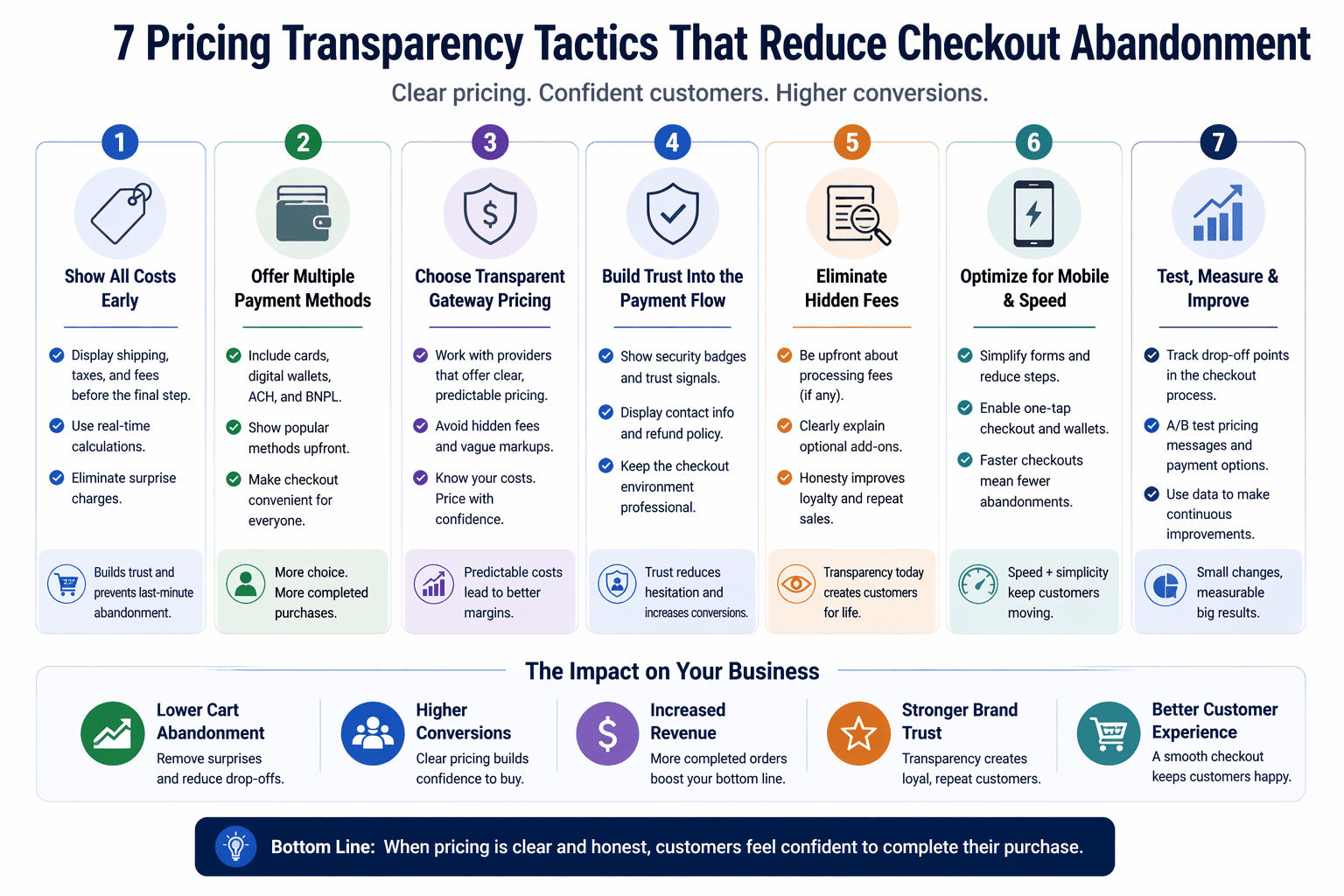
Seven practical tactics to improve pricing transparency, reduce checkout friction, and increase eCommerce conversion rates.
1. Display All Costs Before the Final Step
Why It Matters
Surprise fees are the leading cause of cart abandonment. When customers discover additional costs at the last moment, they feel deceived, even if those fees are legitimate. This emotional response overrides their purchase intent.
What It Looks Like Today
Modern integrated payment gateway solutions enable real-time cost calculation that displays shipping, taxes, and fees as customers shop. Progressive disclosure shows estimated totals on product pages, updates them in the cart, and confirms final amounts before payment submission.
How to Apply It
Audit your current checkout flow by completing a test purchase. Note every point where costs appear or change. Configure your gateway to calculate and display taxes and shipping earlier in the process. If your platform supports it, show estimated totals on product pages using geolocation for basic tax estimates.
2. Offer Multiple Payment Methods with Clear Labels
Why It Matters
Payment method variety directly correlates with conversion rates. Customers who cannot pay their preferred way often abandon rather than adapt. Digital wallets and tokenized payments reduce friction and improve transaction success rates by simplifying authentication and minimizing manual entry, as outlined by Visa.
What It Looks Like Today
Effective mobile checkout optimization presents payment options with recognizable icons and brief descriptions of each method’s benefits. Apple Pay for eCommerce and similar digital wallets appear prominently for mobile users, while traditional card options remain available for those who prefer them.
How to Apply It
Review your payment gateway’s supported methods and enable all relevant options. Order payment methods by popularity in your customer base. Add brief text explaining benefits like “Pay securely without entering card details” for wallet options.
3. Eliminate Hidden Fees Through Upfront Gateway Pricing
Why It Matters
Your payment processing costs affect what you charge customers. When your gateway has unpredictable fees, you either absorb unexpected costs or pass them to customers in ways that feel arbitrary. Transparent interchange plus pricing enables consistent, defensible customer pricing.
What It Looks Like Today
Payment processors now offer interchange-plus pricing that shows exactly what each transaction costs. This clarity lets you set prices that account for processing without hidden margins. Next-day funding options also improve cash flow predictability, letting you price more confidently.
How to Apply It
Request a detailed fee breakdown from your current processor. Compare it against interchange-plus alternatives. Calculate your effective rate across different transaction types. If you find inconsistencies, consider providers that offer transparent, predictable pricing structures.
4. Build Trust Signals Into the Payment Flow
Why It Matters
Strong payment security standards are essential for protecting customer data and maintaining trust during checkout, as defined by the PCI Security Standards Council.
Your customers know the risks. Trust signals in checkout reassure them that their payment information is secure and that you are a legitimate business worth buying from.
What It Looks Like Today
Effective trust signals in checkout go beyond security badges. They include visible contact information, clear refund policies linked near the payment button, and real-time transaction confirmations. Payment processing security features like tokenization and 3D Secure now operate invisibly while providing protection.
How to Apply It
Place security indicators near payment form fields, not just in the footer. Display your business phone number and support hours on the checkout page. Link to your refund policy with specific language about how disputes are handled. Ensure your gateway supports modern security standards without adding friction.
5. Streamline Mobile Checkout with One-Click Options
Why It Matters
Mobile screens make lengthy forms painful. Each additional field increases the chance of errors and abandonment. One-click checkout options that use stored payment credentials remove this friction entirely for returning customers.
What It Looks Like Today
Modern payment gateway integration supports tokenized payment storage that enables single-page checkout experiences. Mobile commerce tools like Apple Pay use device authentication to complete purchases with a fingerprint or face scan. These methods are particularly effective for repeat purchasers.
How to Apply It
Enable saved payment methods for customer accounts with clear opt-in language explaining the benefits. Integrate digital wallet options that support one-click checkout. For WooCommerce stores or BigCommerce platforms, follow platform-specific guides for wallet integration. Test the experience on actual mobile devices, not just browser emulators.
6. Show Real-Time Order Summaries That Update Dynamically
Why It Matters
Static order summaries create uncertainty. When customers add items, apply coupons, or change shipping options, they need immediate confirmation that their changes registered correctly. Delays or page reloads introduce doubt about what they are actually purchasing.
What It Looks Like Today
API-driven payment gateways enable real-time updates without page refreshes. As customers modify their orders, totals recalculate instantly. This checkout process analysis happens client-side, providing immediate feedback while maintaining security for sensitive operations.
How to Apply It
Ensure your checkout uses asynchronous updates for quantity changes and coupon applications. Display itemized breakdowns that show exactly how each element contributes to the total. Include visual confirmation when changes are applied, such as brief animations or color changes that indicate successful updates.
7. Provide Clear Post-Purchase Communication
Why It Matters
Transparency does not end at payment confirmation. Unclear post-purchase communication creates support tickets, chargebacks, and negative reviews. When customers understand exactly what happens after they pay, they trust your business more on future purchases.
What It Looks Like Today
Integrated payment systems trigger automated emails with detailed receipts, expected delivery timelines, and clear instructions for questions or issues. Proactive chargeback management starts here, with documentation that helps resolve disputes before they escalate.
How to Apply It
Review your confirmation emails for clarity. Include itemized receipts with the same breakdown shown at checkout. Set realistic delivery expectations and provide tracking information promptly. Include direct contact methods for support rather than generic form links.
The Connecting Thread
These strategies share a common principle: reduce uncertainty at every point where money is involved. Customers who feel informed make decisions faster and with more confidence. They also return more often and generate fewer support requests.
Notice that several strategies depend on your payment gateway’s capabilities. The right payment gateway integration does not just process transactions; it enables the transparency features that drive conversion rate improvement. When evaluating providers, assess their support for real-time calculations, multiple payment methods, and clear fee structures alongside basic processing capabilities.
The tradeoff to acknowledge: some transparency features require development resources to implement properly. The investment typically pays for itself through reduced abandonment and support costs, but the initial effort is real.
Where to Start
You do not need to implement all seven strategies simultaneously. Start with the first two: displaying all costs early and offering multiple payment methods with clear labels. These changes typically require configuration adjustments rather than custom development.
Once those are in place, audit your current gateway’s fee structure. If you find hidden fees or unpredictable pricing, address that before investing in additional checkout optimization. Your pricing transparency to customers depends on the transparency you receive from your payment processor.
Finally, test every change on mobile devices. Your mobile checkout experience increasingly determines your overall conversion rate.
Frequently Asked Questions
What is checkout optimization and why is it important?
Checkout optimization is the process of improving your payment flow to reduce abandonment and increase completed purchases. It matters because even small improvements in checkout completion rates translate directly to revenue gains without requiring additional marketing spend or traffic.
How can I reduce cart abandonment during the checkout process?
Focus on eliminating surprise costs, offering preferred payment methods, and reducing form fields. Display all fees early in the process, enable digital wallet options for mobile users, and consider guest checkout options for first-time buyers who may not want to create accounts.
What are the key features of an effective payment gateway?
Look for transparent pricing structures, support for multiple payment methods including digital wallets, real-time calculation capabilities, strong security features, and reliable uptime. Next-day funding and responsive support also matter for day-to-day operations.
When should I consider implementing a one-page checkout solution?
Consider single-page checkout when your analytics show significant drop-off between checkout steps, when mobile users represent a large portion of your traffic, or when you sell products with simple purchase decisions that do not require extensive configuration.
Which payment methods should I offer to optimize my checkout experience?
At minimum, offer major credit cards, digital wallets like Apple Pay and Google Pay, and PayPal. Review your customer data to identify regional preferences. If you serve international customers, consider local payment methods popular in your key markets.
How can I build trust with customers during the checkout process?
Display security badges near payment fields, show your contact information prominently, link to clear refund policies, and use recognizable payment method logos. Ensure your checkout page URL shows HTTPS and matches your main domain.


