How Checkout Transparency Reduces Cart Abandonment
Last Updated on October 14, 2026 by Dimitri Akhrin
A practical framework for eliminating hidden fees and building the trust that converts browsers into buyers
Learn why 48% of cart abandonments stem from surprise costs and how to fix it. This guide gives you a step-by-step framework for auditing your checkout, structuring fees transparently, and implementing trust signals that boost conversions.
TL;DR
- Hidden costs kill conversions – 48% of cart abandonments happen because of unexpected fees revealed at checkout. Move shipping, tax, and fee disclosures upstream to product and cart pages.
- Simplify ruthlessly – Optimized checkouts use 7 fields versus the 14.88 average. Guest checkout reduces abandonment by 24%. Every extra step or field is a chance for customers to leave.
- Payment variety matters – PayPal integration achieves 88.7% checkout conversion rates. Buy now, pay later options increase conversion by 78%. Offer choices without overwhelming customers.
- Trust signals work when genuine – Display real security badges, clear policies, and visible contact information. Avoid cluttering with meaningless certifications that actually reduce trust.
- Recovery systems catch what you miss – Cart recovery emails generate 50% conversion rates. Set up automated sequences, but use abandonment data to fix root causes rather than just chasing lost sales.
What This Guide Covers
This guide shows you how to use transparent pricing at checkout to improve your conversion rates. You’ll learn why hidden costs kill sales, how to structure fees so customers trust you, and the specific steps to optimize your checkout for maximum completions.
We’re writing for eCommerce managers at established online businesses who want to stop losing sales at the final step. By the end, you’ll have a clear framework for auditing your checkout, eliminating conversion killers, and building the kind of trust that turns browsers into buyers.
This guide focuses on pricing transparency and trust signals in checkout. We won’t cover product page optimization, traffic acquisition, or post-purchase retention strategies.
Why Transparent Pricing Matters Now
Your customers have been burned before. They’ve added items to carts, reached checkout, and watched the total spike with surprise fees. Modern eCommerce payment experiences are shifting toward real-time pricing visibility and faster checkout flows, driven by improvements in payment infrastructure and transaction transparency according to Modern Treasury.
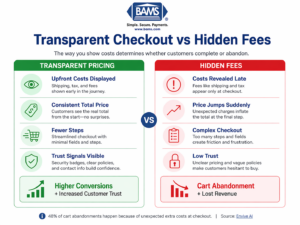
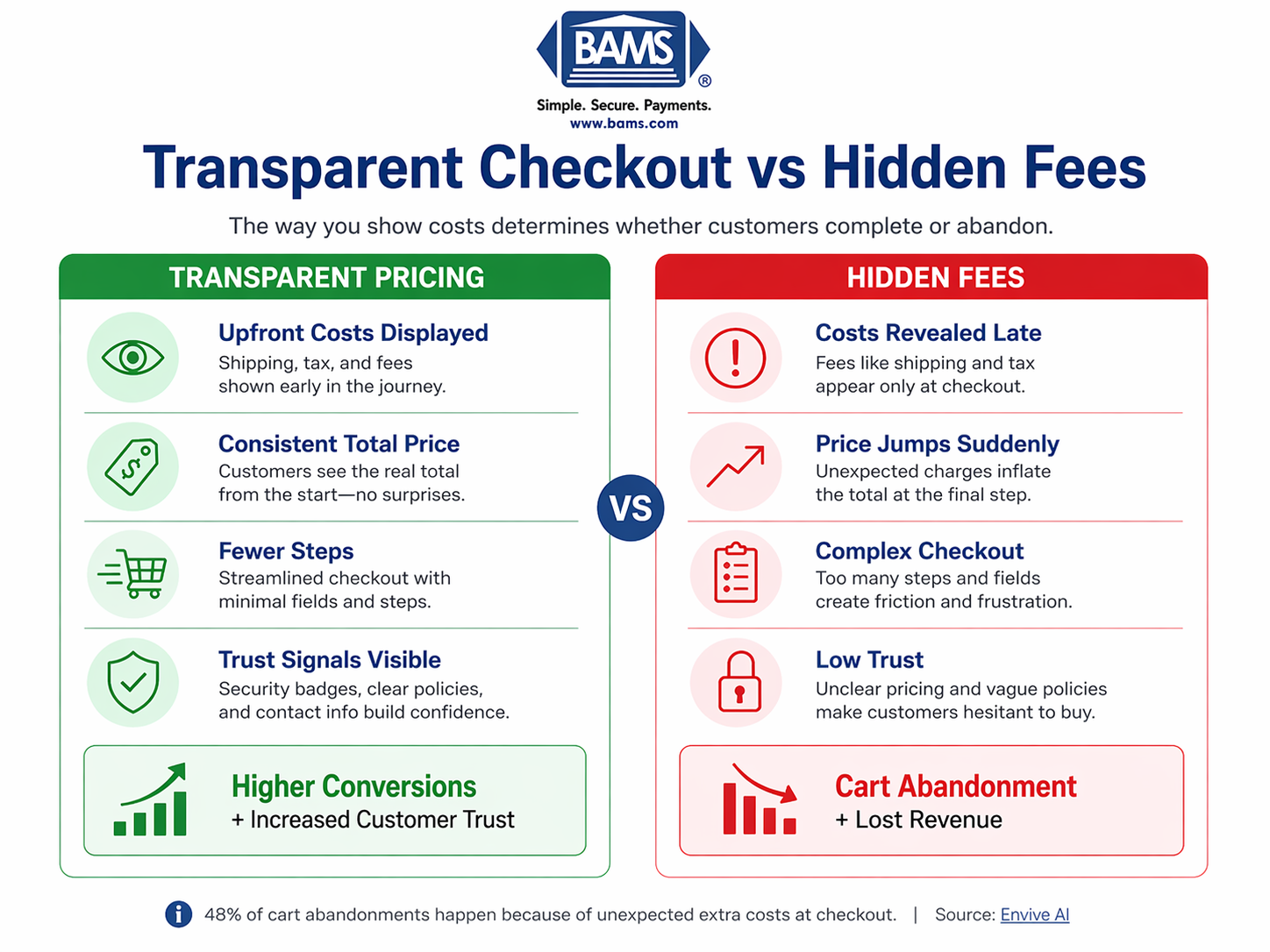
A clear comparison of how transparent pricing improves conversions while hidden fees drive cart abandonment.
The stakes are higher than ever. With average eCommerce conversion rates sitting between 2.5% and 3%, even small improvements create significant revenue gains. Top performers achieve 3.2% or higher, and transparent checkout practices are a key differentiator.
Meanwhile, your processing costs eat into margins. Every abandoned cart represents not just lost revenue but wasted acquisition spend. When customers trust your checkout, they complete purchases, return for more, and cost less to serve over time.
Core Concepts You Need to Understand
What Checkout Optimization Actually Means
Checkout optimization is the systematic process of removing friction between “add to cart” and “order confirmed.” It covers form design, payment options, page speed, and critically, how you present costs.
Many eCommerce managers focus on adding features (more payment methods, more fields for data collection) when subtraction often works better. The goal is completion, not comprehensiveness.
Trust Signals vs. Trust Theater
Trust signals in checkout are elements that genuinely reduce customer anxiety. Security badges, clear return policies, and transparent pricing all qualify. Trust theater is the opposite: flashy badges that mean nothing, vague guarantees, or security logos from companies that don’t actually protect the transaction.
Customers have learned to spot the difference. Real trust comes from consistency between what you promise and what they experience.
The Hidden Cost Problem
Hidden costs aren’t always intentional deception. Sometimes they’re operational convenience (calculating shipping at checkout because it’s easier), legal requirements (taxes vary by location), or legacy system limitations. Understanding why costs appear late helps you fix the problem at its source.
The distinction between convenience fees and surcharges matters here. Surcharges feel punitive. Convenience fees, framed correctly, can add perceived value. But the best approach is often reducing processing costs at the source rather than passing them to customers.
The Transparent Checkout Framework
Conversion rate improvement through transparent interchange plus pricing follows a four-stage cycle: Audit, Restructure, Signal, and Verify.
Audit identifies where hidden costs and friction currently exist in your checkout. Restructure moves costs earlier in the journey or eliminates them entirely. Signal adds trust elements that reinforce your transparency. Verify measures results and feeds insights back into the next audit.
These stages aren’t one-time activities. Customer expectations shift, competitors adapt, and your own product mix changes. Treat this as an ongoing optimization cycle, not a project with a finish line.

A structured 5-step framework to eliminate hidden fees, simplify checkout, and improve eCommerce conversion rates through transparency.
Step-by-Step Implementation
Step 1: Audit Your Current Checkout Experience
Objective: Identify every point where costs appear or increase during the checkout process.
Start by completing a purchase on your own site as if you were a first-time customer. Document every screen, every field, and every moment where the displayed total changes. Note the exact point when shipping costs appear, when taxes calculate, and whether any fees surprise you.
Then do the same on mobile. Count your fields. Every unnecessary input is a chance for abandonment.
Review your analytics for drop-off points. Where do customers leave? If abandonment spikes after shipping calculation, that’s your smoking gun.
What to avoid: Don’t assume you know the customer experience. Your familiarity with the site blinds you to friction that first-time visitors feel immediately.
Success indicators: You have a documented list of every cost disclosure point and form field, plus analytics showing where abandonment concentrates.
Step 2: Move Costs Upstream
Objective: Show customers the true total before they reach checkout.
The most effective checkout optimization happens before checkout begins. Display shipping costs on product pages or in the cart. Show estimated taxes based on IP geolocation before customers enter their address. If you charge processing fees, make them visible from the start.
Consider flat-rate or free shipping thresholds. Customers accept clear rules; they reject surprises.
Build shipping calculators into product pages for heavy or oversized items. Let customers know the full cost before they commit emotionally to the purchase.
What to avoid: Don’t hide behind “calculated at checkout” when you could provide estimates. Vague language signals that you’re hiding something.
Success indicators: The total at checkout matches or closely matches what customers expected from earlier pages. Cart abandonment at the shipping calculation step decreases.
Step 3: Simplify the Checkout Flow
Objective: Reduce steps and fields to the minimum required for order completion.
You can invite customers to create an account after purchase, when they’re already committed.
Consolidate to a single-page checkout where possible. Every additional page is a decision point where customers can leave. Show progress indicators if you must use multiple steps.
Remove optional fields entirely or hide them behind “add more information” toggles. Required fields should be obvious. Error messages should appear immediately and explain exactly what’s wrong.
What to avoid: Don’t collect data you won’t use. Every field you add should have a clear business purpose that justifies the friction cost.
Success indicators: Checkout completion time decreases. Form error rates drop. The ratio of checkout initiations to completions improves.
Step 4: Offer Payment Method Variety
Objective: Let customers pay the way they prefer without adding confusion.
Payment flexibility directly impacts conversion. But more isn’t always better. Present payment options clearly without overwhelming customers. Lead with the most popular methods for your audience. Use recognizable logos and consistent styling. Optimized payment flows improve authorization rates and reduce transaction friction through tokenization and secure authentication methods, as outlined by Visa.
Ensure your integrated payment gateway handles transactions smoothly without redirecting customers to unfamiliar pages. The checkout should feel like your site throughout, not a handoff to a third party.
What to avoid: Don’t add payment methods that create friction (like options requiring new account creation) just to check a box. Each addition should serve a real customer segment.
Success indicators: Payment method usage data shows customers actively choosing different options. Failed transaction rates decrease.
Step 5: Add Meaningful Trust Signals
Objective: Reinforce security and reliability at the moment of highest customer anxiety.
The checkout page is where customers hand over payment information. They need reassurance. Display security badges from your actual payment processor and SSL provider. Show clear links to your privacy policy and return policy.
Include contact information visibly. A phone number or chat option at checkout tells customers they can reach a human if something goes wrong. This alone can prevent shopping cart abandonment from anxious buyers.
Strong checkout security standards are essential for protecting payment data and maintaining customer trust, as defined by the PCI Security Standards Council.
If you offer guarantees (money-back, price matching, satisfaction), state them clearly at checkout. Don’t make customers hunt for reassurance.
What to avoid: Don’t clutter the page with every badge and certification you can find. Overcrowded trust signals look desperate and actually reduce trust.
Success indicators: Customer service inquiries about security decrease. Checkout page bounce rate drops.
Step 6: Implement Recovery Systems
Objective: Recapture customers who abandon despite your optimization efforts.
Some abandonment is inevitable. Customers get distracted, need to consult partners, or want to compare options.
Set up automated email sequences that trigger when customers leave items in cart. The first email should go out within an hour. Keep the message simple: “You left something behind” with a direct link back to their cart.
Consider whether the abandonment reveals a transparency problem. If customers consistently abandon after seeing the total, your recovery email won’t fix the root cause. Use abandonment data to inform your next audit cycle.
What to avoid: Don’t spam customers with aggressive recovery attempts. Three emails maximum, spaced appropriately, with easy unsubscribe options.
Success indicators: Recovery email conversion rates meet or exceed benchmarks. Recovered customers show similar lifetime value to non-abandoners.
Practical Application: Before and After
Scenario: Mid-Size Apparel Retailer
Before: Shipping calculated at checkout based on weight. Taxes added after shipping. Processing fee disclosed on final confirmation page. Result: 34% checkout abandonment rate, with the largest drop-off occurring when shipping costs appeared.
After: Flat-rate shipping tiers displayed on product pages. Free shipping threshold prominently shown in cart. Taxes estimated based on IP location before checkout. Processing fee eliminated by switching to a transparent payment processor. Guest checkout enabled.
Result: Checkout abandonment dropped to 22%. Average order value increased 8% as customers added items to reach free shipping threshold. Customer service tickets about “unexpected charges” decreased by 60%.
Scenario: B2B Equipment Supplier
Before: Complex checkout requiring account creation, tax exemption documentation upload, and multiple approval steps. Shipping quoted manually after order submission.
After: Streamlined guest checkout for standard orders. Tax exemption handled post-purchase for qualified accounts. Real-time shipping calculator integrated with carriers. Clear breakdown of all costs before payment.
Result: Conversion rate improvement of 41% on standard orders. Repeat purchase rate increased as customers found reordering easier.
Common Mistakes That Undermine Transparency
Hiding fees in “service charges”: Vague fee names make customers suspicious. If you charge for something, name it clearly. “Payment processing” is better than “service fee.”
Calculating shipping last: This is the single biggest trust killer. Even if your shipping rates are reasonable, revealing them at the end feels like a bait-and-switch.
Requiring accounts for first purchases: You’re asking customers to commit to a relationship before they’ve completed a single transaction. Let them buy first, then invite them to create an account.
Optimizing for data collection over conversion: Every field you add reduces completions. Collect only what you need to fulfill the order. Get additional information later through post-purchase surveys or account preferences.
Ignoring mobile experience: Your checkout might work perfectly on desktop and fail completely on phones. Test both. Optimize both. Mobile commerce continues to grow.
What to Do Next
Start with the audit. Complete a purchase on your own site today, documenting every cost disclosure and friction point. That single exercise will reveal your highest-priority fixes.
Then pick one improvement. Maybe it’s adding shipping estimates to product pages. Maybe it’s enabling guest checkout. Maybe it’s reducing form fields. One change, implemented well, beats five changes planned but never executed.
Return to this guide as a reference when you’re ready for the next stage. Checkout optimization is ongoing work, and your customers’ expectations will continue to evolve. The businesses that win are the ones that keep improving.
Your payment processing partner matters in this equation. Next-day funding, transparent pricing, and proactive support make it easier to offer the checkout experience your customers deserve. When your own costs are predictable, you can pass that clarity on to buyers.
Frequently Asked Questions
What is checkout optimization and why is it important?
Checkout optimization is the process of removing friction between adding items to cart and completing a purchase. It matters because even small improvements in checkout completion rates translate to significant revenue gains. With average eCommerce conversion rates between 2.5% and 3%, reducing abandonment by just a few percentage points can substantially impact your bottom line.
How can I reduce cart abandonment during the checkout process?
The most effective approach is eliminating surprise costs. Show shipping and tax estimates before checkout begins. Enable guest checkout so customers don’t need to create accounts. Reduce form fields to the minimum required. Offer multiple payment methods including digital wallets and buy now, pay later options. Display trust signals like security badges and clear return policies at the moment of purchase.
What are the key features of an effective payment gateway?
Look for transparent pricing without hidden fees, fast settlement times (next-day funding helps cash flow), strong security that doesn’t create friction, support for multiple payment methods, and reliable uptime. The gateway should integrate smoothly so customers stay on your site throughout checkout rather than being redirected to unfamiliar pages.
When should I consider implementing a one-page checkout solution?
Consider single-page checkout if your analytics show significant drop-off between checkout steps, if your current process requires more than three pages, or if mobile users abandon at higher rates than desktop users. Single-page checkout reduces decision points and keeps customers focused on completion rather than navigation.
Which payment methods should I offer to optimize my checkout experience?
Start with credit and debit cards, then add PayPal or similar digital wallets. Consider buy now, pay later options if your average order value supports it. The right mix depends on your customer demographics and order values. Review payment method usage data regularly and add options that serve real customer segments rather than just checking boxes.
How can I build trust with customers during the checkout process?
Display security badges from your actual payment processor and SSL provider. Show clear links to privacy and return policies. Include visible contact information so customers know they can reach someone if needed. State any guarantees clearly. Most importantly, be transparent about all costs from the beginning. Customers trust businesses that don’t surprise them with hidden fees.