
Reducing Processing Costs That Spike With Seasonal Volume
Last Updated on September 17, 2026 by Dimitri Akhrin
How to Prevent Payment Processor Holds Before Peak Season
Seven signals that your payment setup will trigger a processor hold the moment your Black Friday traffic hits
Examines fraud detection algorithms and reserve triggers as diagnostic checkpoints rather than abstract risk concepts, surfacing the system-level vulnerabilities eCommerce brands overlook during routi
TL;DR
- Processor holds during peak season aren’t random – They’re triggered by specific mismatches between your account profile and your actual transaction behavior during volume spikes.
- Seven signals to audit before peak season – Volume caps, average ticket size shifts, chargeback ratios, fraud filter calibration, authentication friction, MCC accuracy, and funding/reserve terms.
- Start your payment system review 60 days out – Most of these signals are preventable with advance communication to your processor, but nearly impossible to resolve once a hold is active.
- Prioritize three signals first – Volume cap approval, chargeback ratio check, and funding timeline clarity create the most immediate protection against seasonal disruptions.
- Next-day funding and proactive chargeback defense reduce compounding risk – When reserves or holds do occur, faster funding and lower dispute rates limit the cash flow damage during your most profitable window.
Why Your Payment Setup Breaks When You Need It Most
Every eCommerce manager has experienced the same gut-punch scenario: traffic surges, orders flood in, and then your processor freezes deposits, flags transactions, or quietly routes revenue into a rolling reserve. The timing is never random. Processors use automated risk models that treat sudden volume spikes as anomalies, and those models don’t distinguish between a legitimate Black Friday rush and suspicious activity.
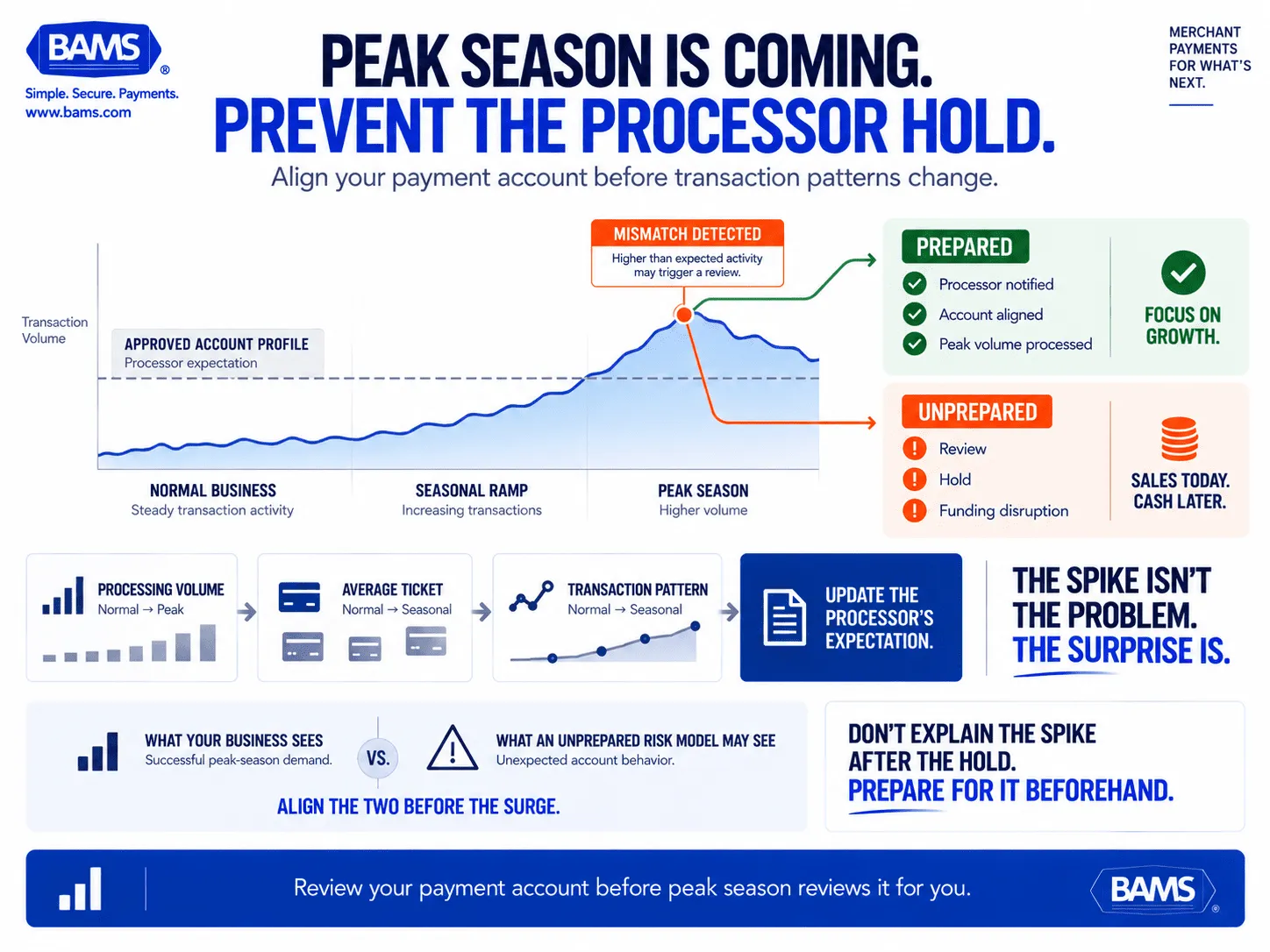
The core issue isn’t seasonal demand itself. It’s that most payment configurations were built for average months, not peak ones. When transaction velocity, ticket sizes, and chargeback ratios shift simultaneously, your account profile no longer matches the baseline your processor expects. That mismatch is what triggers holds, manual reviews, and delayed funding during the exact window when cash flow matters most.
A thorough payment system review before peak season can prevent these disruptions. But most merchants don’t know which signals processors actually monitor, or how to address them before the flags fire.
What This Guide Covers (and What It Doesn’t)
This guide is for eCommerce managers at established online businesses who process enough volume that a seasonal spike creates real financial exposure. If you’re doing under $5,000 a month, processor holds are unlikely to be your primary concern.
We’re not covering generic checkout optimization tips or broad “get ready for the holidays” advice. Instead, we’re examining seven specific signals that processor risk systems use to evaluate your account during volume surges, and the concrete account review steps that neutralize each one before it becomes a problem.
How We Identified These Seven Signals
Each signal was selected based on three criteria: it’s directly monitored by processor risk algorithms, it’s commonly overlooked in routine payment system reviews, and it can be addressed with specific, pre-season action. We drew on fraud benchmarking data, processor risk documentation, and patterns observed across seasonal eCommerce operations.
 Peak-season growth can look unusual to automated risk systems when your processor is still expecting normal-month behavior. Review the account before transaction patterns change.
7 Signals That Trigger Processor Holds During Seasonal Volume Spikes
1. Your Approved Processing Volume Doesn’t Match Your Projected Volume
Why it matters: Every merchant account has a monthly processing cap, often set during onboarding based on your volume at that time. When Black Friday traffic pushes you 200-300% above that cap, the processor’s system reads it as abnormal activity. This is the single most common reason for sudden holds, and it’s entirely preventable.
What it looks like today: Most processors set these thresholds quietly during underwriting. You may not even know your cap until you hit it. The hold notification often arrives after funds are already frozen.
How to apply it: Contact your processor 30-60 days before peak season and request a temporary volume increase. Provide documentation: last year’s peak numbers, marketing spend projections, and inventory commitments. Get the approved increase in writing. If your processor can’t accommodate the request or makes the process difficult, that’s a signal to evaluate your payment processing provider before the rush starts.
2. Your Average Transaction Size Is About to Shift Dramatically
Why it matters: Fraud detection algorithms monitor average ticket size as a core risk indicator. If your normal average is $45 and your holiday bundles push it to $120, the system interprets the deviation as potential fraud, not a successful promotion. This triggers transaction-level reviews that slow authorization and can cascade into account-level scrutiny.
What it looks like today:Merchants manually screened about 20% of online orders in 2023, declining around 14% of those reviewed. During peak season, when ticket sizes spike, the percentage flagged for review climbs even higher.
How to apply it: Audit your planned promotions and calculate expected average ticket sizes for your peak period. Notify your processor of the anticipated range change. If you’re running bundles, limited editions, or high-value gift sets, document the pricing structure. Processors respond well to advance notice because it lets them adjust your risk profile without triggering automated flags.
3. Your Chargeback Ratio Is Already Close to Threshold
Why it matters: Card networks set chargeback thresholds (typically 1% of transactions). If you’re sitting at 0.8% heading into peak season, even a modest uptick in disputes from holiday buyers can push you into a monitoring program. Processors preemptively protect themselves by placing holds or reserves on accounts approaching this line.
What it looks like today: Holiday transactions carry inherently higher dispute risk due to gift purchases, buyer’s remorse, and delivery delays. Mastercard reports that the global cost of chargebacks is forecast to reach $42 billion by 2028, with nearly half reported as fraudulent, reinforcing the need to monitor dispute exposure before a major sales surge.
How to apply it: Pull your chargeback ratio 60 days before peak season. If you’re above 0.5%, treat it as urgent. Tighten your refund and return policies to reduce friendly fraud. Ensure order confirmation emails include clear merchant descriptors so customers recognize charges. Proactive chargeback defense, where disputes are intercepted before they become formal chargebacks, can make a measurable difference here. BAMS includes proactive chargeback defense as part of its merchant services, which helps keep ratios below threshold during high-volume periods.
4. Your Fraud Filters Haven’t Been Recalibrated for Peak Patterns
Why it matters: Fraud detection algorithms tuned for normal traffic often become either too aggressive (blocking legitimate orders) or too permissive (letting fraud through) when volume patterns change. Both outcomes cost you. Over-blocking kills revenue during your highest-traffic window. Under-blocking creates chargebacks that trigger the holds described in Signal 3.
What it looks like today: Fraud pressure can increase sharply around major shopping periods. Visa reported that suspected fraudulent transactions rose 200% globally during the 2024 holiday weekend and that it blocked nearly 85% more suspected fraud on Cyber Monday than the previous year.
How to apply it: Review your velocity limits, geographic filters, and AVS/CVV settings at least 30 days before peak season. Adjust thresholds based on expected traffic patterns (more orders from new customers, more gift-shipping to alternate addresses). Test your filters against last year’s peak data to identify where legitimate orders would have been blocked.
5. Your Payment Authentication Flow Creates Friction That Mimics Fraud Signals
Why it matters: When customers abandon 3D Secure challenges, retry payments with different cards, or refresh checkout pages repeatedly, each action generates data points that risk systems interpret as testing behavior. During peak season, higher traffic means more of these friction-driven signals, which can elevate your account’s risk score even when no actual fraud is occurring.
What it looks like today: Peak shopping periods also bring elevated fraud pressure. Visa reported a 200% increase in suspected fraudulent transactions globally during the 2024 holiday weekend. Processors are therefore operating in a higher-risk environment when authentication anomalies appear.
How to apply it: Test your entire checkout flow under load conditions. Identify where authentication steps cause drop-offs or retries. Ensure your 3DS implementation uses risk-based authentication (exempting low-risk transactions) rather than challenging every order. Reduce unnecessary redirects. A clean authentication flow produces cleaner data, which keeps your risk profile stable during volume surges.
6. Your Merchant Category Code or Business Description Is Outdated
Why it matters: Your Merchant Category Code (MCC) and business description were set during onboarding. If your product mix has evolved (you added subscriptions, digital goods, or high-value categories), but your MCC hasn’t been updated, the processor sees a mismatch between what you’re supposed to sell and what your transaction data shows. During peak season, this mismatch gets amplified and can trigger underwriting reviews.
What it looks like today: Many eCommerce brands expand their product lines gradually without notifying their processor. The discrepancy sits dormant until a volume spike draws automated attention to the account.
How to apply it: Review your MCC and business description on file with your processor. Compare it against your current product catalog, especially any categories added in the past 12 months. If you’ve added digital products, pre-orders, or subscription components, request an update. This is a five-minute fix that can prevent a multi-day hold.
7. Your Funding Timeline Doesn’t Account for Reserve Triggers
Why it matters: Processors can impose rolling reserves (holding 5-10% of your daily transactions for 90-180 days) when risk indicators change. During peak season, even a small reserve percentage applied to dramatically higher volume creates a significant cash flow gap. If you’re relying on standard 2-3 day funding, the combination of reserves and delayed deposits can leave you unable to restock or fulfill orders during your most profitable window.
What it looks like today: Most merchants don’t learn about reserve requirements until they’re imposed. The notification typically arrives alongside a funding delay, creating a compounding cash flow problem during peak season. Businesses running on flat-rate processors often have less visibility into when and why reserves are triggered.
How to apply it: Ask your processor directly: under what conditions would a reserve be placed on your account? Get the specific triggers in writing. If your processor can’t or won’t answer clearly, that’s a problem. Next-day funding arrangements reduce the cash flow impact of any reserve that does get triggered, because you’re not stacking a reserve delay on top of an existing 2-3 day funding lag. A dedicated account manager who can intervene when automated systems flag your account is equally valuable.
Processor holds often begin with a mismatch between the account your processor approved and the transaction behavior it sees during peak season. Audit these seven areas before volume changes.
The Pattern Behind These Signals
All seven signals share a common root: your account profile, as your processor understands it, no longer matches your actual business activity. Processor risk systems aren’t evaluating whether your business is legitimate. They’re evaluating whether current behavior matches the established baseline. Every seasonal spike creates deviation from that baseline.
The second pattern is timing. Each of these signals is preventable with 30-60 days of lead time, but nearly impossible to resolve once the hold is in place. The difference between a merchant who sails through Black Friday and one who watches deposits freeze is almost always preparation, not business quality.
A comprehensive payment system review before peak season treats these signals as a diagnostic checklist rather than abstract risk concepts. The goal isn’t to eliminate risk. It’s to ensure your processor’s model of your business matches the business you’re actually running.
Where to Start: Prioritizing Your Pre-Season Payment System Review
You don’t need to address all seven signals simultaneously. Start with the three that create the most immediate exposure:
- Signal 1 (Volume Cap): This is the most common hold trigger and the simplest to fix. One call or email to your processor, 30 days out.
- Signal 3 (Chargeback Ratio): Pull your current ratio today. If it’s above 0.5%, you have work to do before volume amplifies the problem.
- Signal 7 (Funding Timeline): Understand your reserve triggers and funding speed now, while you still have time to negotiate or switch providers.
The remaining signals (ticket size, fraud filters, authentication flow, MCC accuracy) are important but less likely to cause an immediate account freeze. Address them in your second pass. The goal is to enter peak season with a processor relationship that’s been stress-tested, not one that’s about to be stress-tested for you.
Frequently Asked Questions
When should businesses review their payment processing setup before peak seasons?
Start your payment system review at least 60 days before your anticipated volume spike. This gives you time to request volume cap increases, recalibrate fraud filters, and resolve any MCC discrepancies. If your chargeback ratio needs attention, 60 days is the minimum window to bring it down meaningfully before peak traffic amplifies the problem.
How can payment processors optimize their services for seasonal fluctuations in volume?
Processors can pre-approve temporary volume increases, adjust risk scoring thresholds for known seasonal patterns, and assign dedicated account managers who can intervene when automated systems flag legitimate spikes. The key is communication: merchants who proactively share projected volume data, marketing calendars, and product mix changes give processors the information needed to adjust models before flags fire.
What is a seasonal volume playbook in merchant services optimization?
A seasonal volume playbook is a documented set of pre-peak actions that align your merchant account settings with expected transaction patterns. It typically includes volume cap adjustments, fraud filter recalibration, chargeback ratio monitoring, authentication flow testing, and funding timeline verification. The playbook turns reactive crisis management into a repeatable process.
How can businesses use data to forecast transaction volume for seasonal planning?
Start with last year’s peak period data: daily transaction counts, average ticket sizes, chargeback rates, and refund volumes. Layer in current-year factors like planned marketing spend, new product launches, and email list growth. Share this forecast with your processor so they can adjust your account parameters. Even rough projections are far more useful than no communication at all.
Why do processor holds happen more often during Black Friday and Cyber Monday?
Processor risk systems are calibrated to your normal transaction patterns. When Black Friday creates a sudden 200-400% volume increase alongside shifts in ticket size, customer geography, and order velocity, the system interprets these deviations as potential fraud or financial instability. The holds are automated responses to statistical anomalies, not manual judgments about your business.
What’s the difference between a rolling reserve and a processor hold?
A processor hold freezes all or most of your funds temporarily, usually pending a manual review of your account. A rolling reserve withholds a percentage of each day’s transactions (typically 5-10%) for a set period (often 90-180 days). Both reduce your available cash flow, but reserves are ongoing while holds are usually resolved within days. Either one during peak season can create serious operational problems.


