7 Credit Card Processing Fees eCommerce Operators Overpay
Last Updated on September 28, 2026 by Dimitri Akhrin
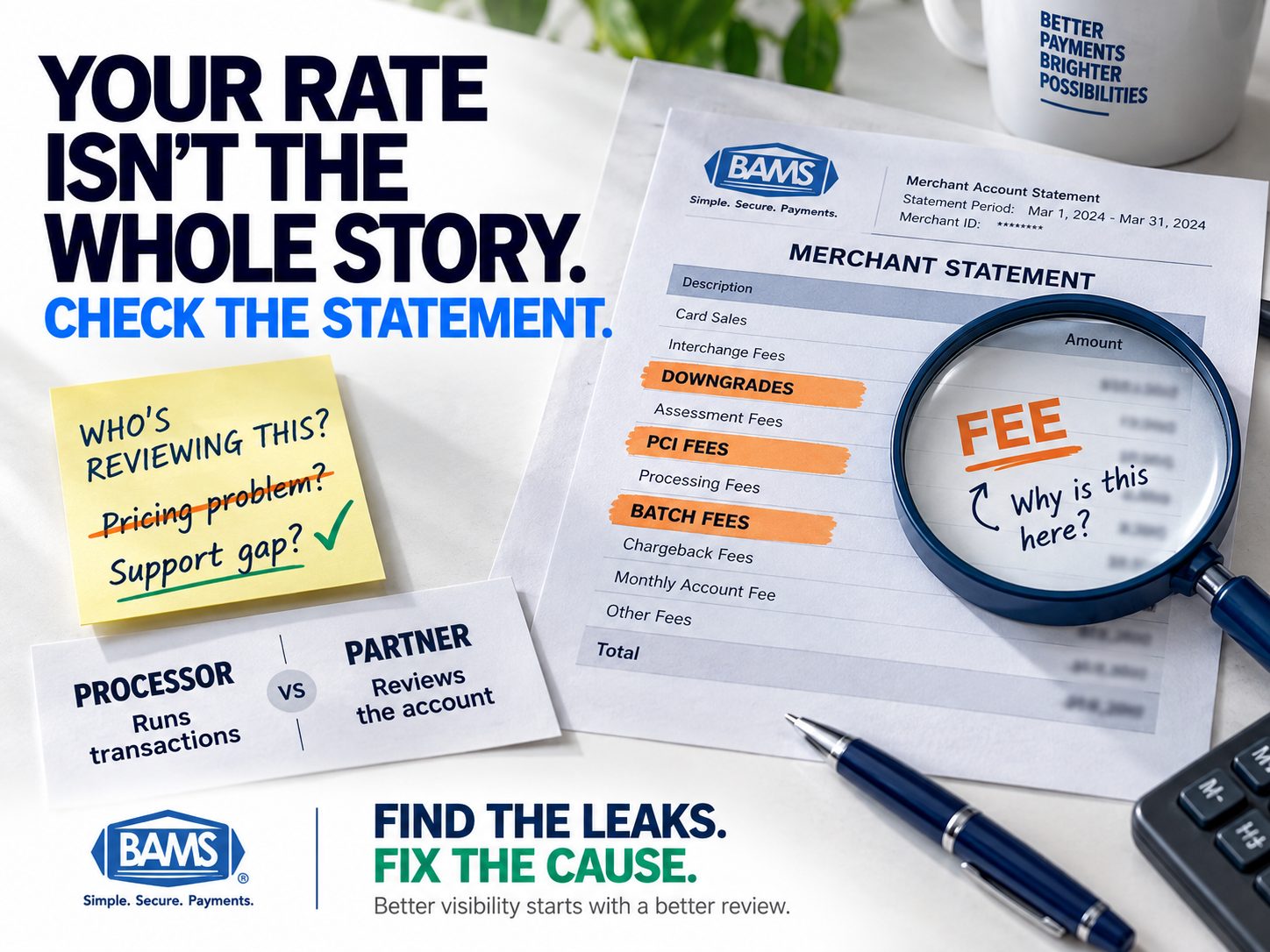
The billing line items that signal a support gap — not a pricing problem — with your payment processor
Learn which credit card processing fees eCommerce businesses consistently overpay and why interchange overcharges usually point to missing account support rather than predatory pricing. This guide turns each line item into a diagnostic signal.
TL;DR
- Overpaying usually signals a support gap, not a pricing problem – Most interchange overcharges happen because no one at your processor reviews your statements or flags issues proactively.
- Seven common line items leak margin silently – Interchange downgrades, inflated assessments, PCI non-compliance fees, duplicate batch fees, misrouted debit transactions, uncontested chargebacks, and slow funding all compound when left unchecked.
- Interchange-plus pricing is the baseline for visibility – If you can’t see interchange, assessments, and markup as separate line items, you can’t verify what you’re paying or optimize it.
- Start with three quick wins – Check your PCI compliance status, count your monthly batch fees, and request a downgrade report. If your processor can’t help with these in one call, that’s your answer.
- A payment partner reviews your account; a payment processor just runs transactions – The difference shows up in your effective rate, your chargeback win rate, and your cash flow timing.
Higher processing costs are not always caused by the headline rate. Statement-level issues can quietly compound when no one is actively reviewing the account.
The Billing Line Items eCommerce Operators Keep Overpaying
If you run an established eCommerce operation, you already know that credit card processing fees are one of your largest variable costs. U.S. merchants paid $187.20 billion in card processing fees in 2024 on $11.903 trillion in purchase volume, equal to approximately $1.57 in fees for every $100 in card payments accepted. Your share of that number is probably higher than it needs to be.
The uncomfortable truth? Most interchange overcharges aren’t the result of predatory pricing. They’re the result of a support gap. No one at your processor is reviewing your statements, flagging misqualified transactions, or explaining why your effective rate crept up 15 basis points last quarter. The math isn’t hard. The problem is that nobody walks you through it.
This guide identifies the specific billing line items where eCommerce businesses consistently leak margin, and reframes each one as a diagnostic signal: proof that your payment partner isn’t doing the job you’re paying them to do.
Who This Is For (and What It Doesn’t Cover)
This is for eCommerce managers at businesses with 10 to 50 employees who process enough volume to feel the sting of high transaction fees and delayed deposits but don’t have a dedicated treasury team to audit every statement. You’ve likely been on the same processor for a year or more and suspect you’re overpaying without knowing exactly where.
This list doesn’t cover enterprise-level optimization platforms, acquiring bank negotiations, or card-present retail scenarios. It focuses on the recurring, identifiable line items that a competent account manager should catch for you, and what it means when no one does.
How We Selected These Items
Each item on this list meets three criteria. First, it appears on a significant percentage of eCommerce merchant statements. Second, it’s frequently misunderstood or overlooked by the merchant. Third, a proactive account review (not a software dashboard, not a chatbot) is the most reliable way to catch and correct it. These are support-layer problems disguised as pricing problems.
7 Credit Card Processing Fees That Signal a Support Gap

Processing costs can reveal operational problems beyond the advertised rate. These seven signals show where merchants should investigate their statements and processor support.
1. Downgrades on Card-Not-Present Transactions
Why it matters: Interchange rates aren’t static. Transactions must meet specific qualification requirements to receive particular rates. Mastercard explains that qualification can depend on factors including merchant category, the time between authorization and clearing, enhanced transaction data and transaction volume. When a transaction fails to meet the applicable criteria, it can qualify differently and increase your processing cost.
What it looks like today: Your statement shows a cluster of transactions qualifying at “EIRF” or “Standard” instead of the preferred eCommerce rate. You don’t notice because the line items are buried in a multi-page PDF no one reads.
How to apply it: Ask your processor for a downgrade report. If they can’t produce one, or if they don’t know what you’re asking for, that’s your first red flag. A dedicated account manager should be monitoring qualification rates monthly and advising you on what data fields (AVS, CVV, order ID) to pass to avoid downgrades.
2. Inflated Assessment Fees
Why it matters: Assessment fees are set by Visa, Mastercard, Discover, and Amex and passed through to merchants. They’re small (typically 0.13% to 0.15%) but non-negotiable. The problem arises when processors bundle assessments into a flat rate and pocket the spread, or when they mark up assessment fees beyond the published network schedules.
What it looks like today: On a tiered or flat-rate pricing model, it can be difficult to see which portion of your total cost comes from network fees versus processor pricing. Visa publishes information on its interchange structure and explains that merchants pay a merchant discount to their financial institution that may include multiple processing services. Transparent pricing makes it easier to compare the fees on your statement with current network information.
How to apply it: Request interchange-plus pricing if you don’t already have it. Then compare your assessment line items against the current network schedules. If your processor resists transparency here, they’re profiting from your inability to verify.
3. PCI Non-Compliance Fees
Why it matters: PCI compliance is a requirement, not an upsell. Many processors charge a monthly “PCI non-compliance fee” ($19.95 to $49.95 per month is typical) that silently appears on your statement if you haven’t completed your annual Self-Assessment Questionnaire. Some processors never remind you it’s due. Others make the compliance portal so difficult to find that merchants give up.
What it looks like today: A recurring monthly charge labeled “PCI Non-Compliance” or “Security Fee” that you’ve been paying for months or years. It’s small enough to ignore, large enough to add up to $600 per year.
How to apply it: Complete your PCI SAQ immediately. If your processor hasn’t reminded you about it, hasn’t provided a clear portal, or charges you the fee even after you’ve completed it, escalate. A partner invested in your account would have flagged this on day one.
4. Batch Fee Accumulation
Why it matters: Every time you settle your daily transactions, you pay a batch fee (typically $0.10 to $0.30). For most eCommerce businesses running a single daily batch, this is negligible. But misconfigurations in your gateway or POS can trigger multiple batches per day, multiplying this cost without your knowledge.
What it looks like today: Your statement shows 60 to 90 batch fees in a 30-day period instead of 30. You’re paying double or triple because your system settles transactions in fragments rather than a single end-of-day batch.
How to apply it: Count the batch fees on your last three statements. If the number exceeds the number of business days in the month, your gateway settings need adjustment. This is a five-minute fix for an account manager who’s actually looking at your account. The fact that no one caught it tells you everything about the relationship.
5. Misrouted Debit Transactions
Why it matters: Debit routing can affect how an online debit transaction is processed. Federal Reserve guidance under Regulation II requires issuers to enable at least two unaffiliated networks for debit transactions, including card-not-present transactions, and prohibits issuers or networks from inhibiting a merchant’s ability to direct routing over an enabled network. Your actual routing options depend on the networks enabled on the card and the capabilities supported by your acquirer or processor.
What it looks like today: All debit transactions on your statement show Visa or Mastercard interchange categories rather than a mix of debit network rates. You’re paying credit-tier fees on transactions that could route at half the cost.
How to apply it: Ask your processor which debit networks are available for your card-not-present transactions and how routing preferences are configured. If they do, confirm it’s enabled. If they don’t, you’re leaving money on the table every day. Tools like interchange optimization strategies can help you understand the full impact on your margins.
6. Uncontested Chargebacks Eating Your Revenue
Why it matters: A chargeback doesn’t just cost you the sale. It costs you the chargeback fee ($15 to $100 per incident), the product, the shipping, and potentially your processing tier if your ratio climbs too high. Many eCommerce operators don’t contest chargebacks because the process is opaque and time-consuming, especially when your processor offers no guidance.
What it looks like today: You receive chargeback notifications by email or mail with a deadline to respond. You miss the window, or you respond without compelling evidence because no one helped you build the case. The dispute is auto-resolved in the cardholder’s favor.
How to apply it: Review your chargeback win rate over the last six months. If it’s below 30%, your representment process needs work. A payment partner like BAMS provides proactive chargeback defense with dedicated support that helps you build and submit compelling cases before deadlines pass. If your current processor treats chargebacks as your problem alone, that’s a support failure with direct revenue consequences.
7. Slow Funding Disguised as “Standard”
Why it matters: Most processors deposit funds in two to three business days and call it standard. For an eCommerce business managing inventory, ad spend, and payroll on tight cycles, those extra days create real cash flow strain. Slow funding isn’t a technical limitation. It’s a business decision your processor made on your behalf without asking.
What it looks like today: You batch out on Monday night. Funds arrive Wednesday or Thursday. You cover the gap with a line of credit or delay vendor payments. The cost of that float never appears on your processing statement, but it’s real.
How to apply it: Ask your processor about next-day funding options. Compare any associated fees against the cost of your current cash flow gap (interest on credit lines, late payment penalties, missed early-pay discounts from suppliers). For many eCommerce businesses processing $50K or more per month, next-day funding pays for itself.
The Pattern Across All Seven
None of these line items require advanced financial modeling to identify. A competent account manager reviewing your statements quarterly would catch most of them in under an hour. The pattern isn’t that processors are charging illegitimate fees. It’s that no one on their side is accountable for reviewing whether those fees are correct, necessary, or optimized for your business.
This is the core distinction between a payment processor and a payment partner. A processor runs transactions. A partner reviews your account, flags anomalies, and initiates corrections before you have to ask. When your relationship with your processor consists entirely of a login portal and a 1-800 number, these seven items compound silently. Choosing a merchant service provider based on rate alone misses this entirely.
Where to Start
You don’t need to tackle all seven at once. Start with the three that require the least effort and produce the fastest results: check your PCI compliance status (item 3), count your batch fees (item 4), and request a downgrade report (item 1). If your processor can’t help you with any of these within a single phone call, that tells you more about the relationship than any rate comparison ever will.
The goal isn’t to become an expert in payment processing fees reduction. The goal is to work with someone who already is, and who picks up the phone when something looks wrong.
Frequently Asked Questions
How do I know if I’m being overcharged on credit card processing fees?
The clearest indicator is whether you’re on interchange-plus pricing, which separates interchange, assessments, and processor markup into visible line items. If you’re on tiered or flat-rate pricing, you can’t verify what you’re actually paying for each component. Request a full fee breakdown from your processor and compare it against published network interchange schedules.
What causes interchange downgrades on eCommerce transactions?
Downgrades happen when a transaction fails to meet the card network’s data requirements for the preferred rate category. Common causes include missing AVS (Address Verification Service) data, not passing CVV, settling batches late, or omitting order-level detail. Each missing data element can push the transaction into a higher-cost interchange tier.
Is interchange-plus pricing always better than flat-rate pricing?
For businesses processing more than roughly $10,000 per month, interchange-plus pricing almost always results in lower overall costs because it eliminates the hidden markup embedded in flat rates. It also gives you visibility into exactly where your money goes, which makes optimization possible. Flat-rate pricing can be simpler for very small or very low-volume merchants.
What is least-cost debit routing and does it apply to eCommerce?
Least-cost routing (sometimes called “merchant choice routing”) lets you route debit card transactions through the lowest-cost network available, rather than defaulting to Visa or Mastercard. It applies to eCommerce through PIN-less debit networks. Not all processors support it, so you need to ask specifically whether it’s enabled on your account.
How often should my payment processor review my account?
At minimum, quarterly. A thorough account review should cover your effective rate trend, downgrade frequency, chargeback ratio, batch settlement patterns, and any new fee categories that appeared on your statement. If your processor has never proactively initiated a review, you’re likely overpaying in at least one of the areas covered in this guide.
When should a business consider switching merchant service providers?
Consider switching when you can’t get a human on the phone within a reasonable timeframe, when your processor can’t produce a downgrade or fee analysis report, when your effective rate has increased without explanation, or when chargebacks go uncontested due to lack of support. These are signs of a relationship that’s costing you more than the processing fees themselves.