7 Signals Apple Pay for Business Is Helping or Idle
Diagnostic checks that reveal whether your Apple Pay setup is actually lifting conversion or just decorating checkout
Learn the operational and processor-level signals that determine whether Apple Pay for business is driving real revenue lift. This guide helps eCommerce managers diagnose deposit delays, hidden fees, and checkout placement issues that quietly stall conversions.
TL;DR
- Adding Apple Pay isn’t the finish line – The real conversion and cash flow gains come from what your payment processor does after the transaction: settlement speed, fee transparency, and chargeback handling.
- Check your deposit timeline – Many processors settle Apple Pay transactions on the same 48-to-72-hour schedule as traditional cards. Next-day funding is available but rarely the default.
- Placement matters more than availability – Surfacing Apple Pay earlier in checkout (on the cart page or above form fields) can significantly increase adoption and average order value.
- Compare your Apple Pay fees to your card rates – Some processors classify wallet transactions at a different (higher) interchange tier. Request an itemized breakdown to find hidden cost gaps.
- Start with three actions – Audit your settlement timeline, compare wallet fees to negotiated card rates, and ask about next-day funding eligibility. These require one afternoon and zero engineering work.
The Real Problem With Adding Apple Pay and Walking Away
Most eCommerce businesses treat Apple Pay for business as a checkbox. They flip it on, see the logo in their checkout, and assume the work is done. But adding a digital wallet and actually converting with it are two different things.
The gap shows up in places you might not expect: deposit delays that choke cash flow, interchange fees that quietly eat margin, and checkout placements that bury the wallet button below three form fields nobody wants to fill out. With 54% of U.S. mobile-payment users reporting Apple Pay use in-store and 33% using it online, the demand side is no longer the bottleneck. The bottleneck is what happens after the tap.
This piece treats Apple Pay adoption as a diagnostic exercise, not a setup tutorial. If you already accept Apple Pay, the question is whether it’s actually moving your conversion rate or sitting idle.
Who This Is For (and What It Skips)
This is for eCommerce managers at established online businesses (roughly 10 to 50 employees) who already process meaningful transaction volume and care about two things: faster access to funds and lower processing costs. If you’re still deciding whether to accept Apple Pay at all, this setup guide is a better starting point.
We’re skipping device compatibility lists, tokenization explainers, and generic “why mobile wallets matter” arguments. Instead, this list surfaces the operational and processor-level signals that determine whether your Apple Pay integration delivers measurable revenue lift or just decorates your checkout page.
How We Selected These Signals
Each item below was chosen based on three criteria: it addresses a post-transaction or operational factor most Apple Pay content ignores, it’s something an eCommerce manager can diagnose without engineering support, and it has a direct line to either conversion rate, deposit speed, or processing cost. If it only applies to in-store POS, it didn’t make the cut.
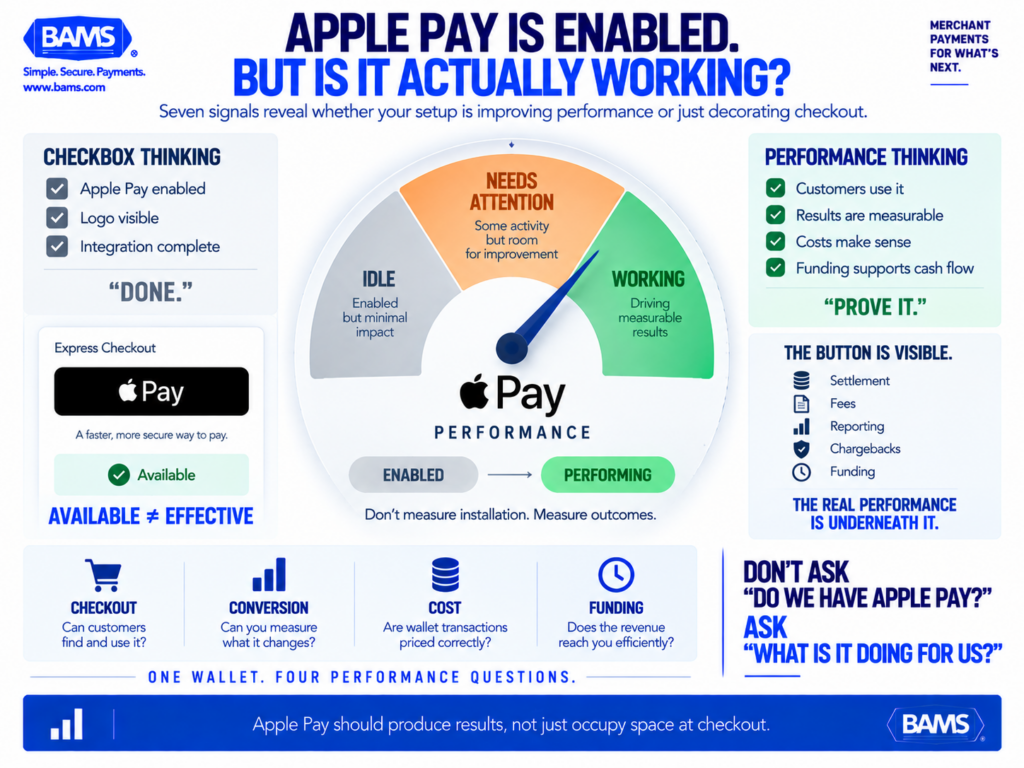
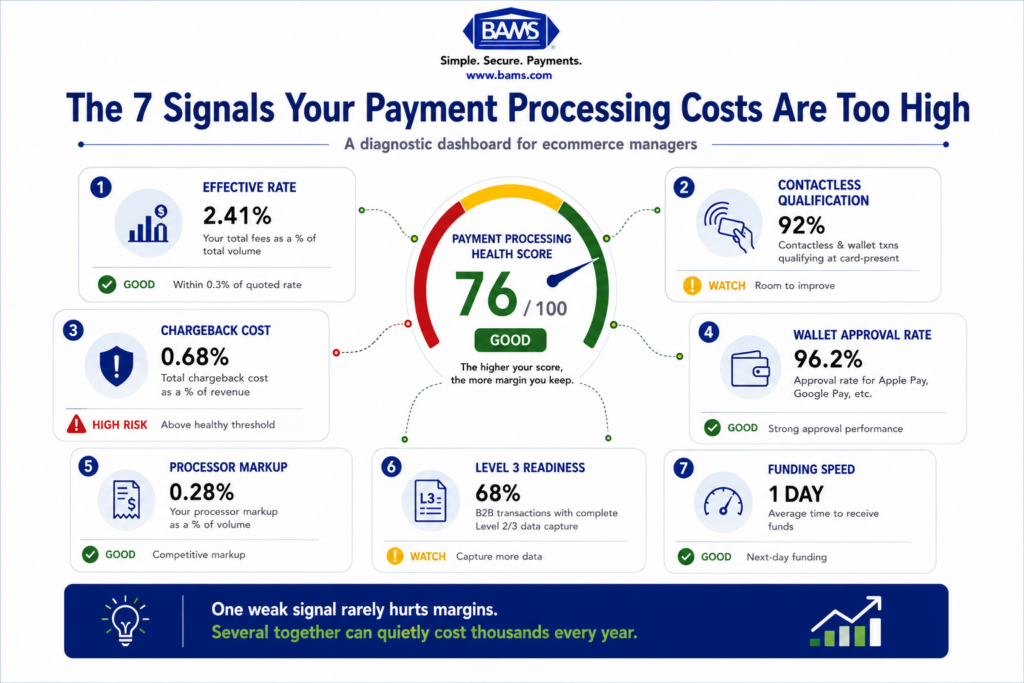
Enabling Apple Pay is only the beginning. Merchants still need to verify whether it is improving checkout behavior, maintaining competitive processing costs and moving revenue into the bank efficiently.
7 Signals That Tell You If Apple Pay Is Actually Working for Your Business
1. Your Settlement Timeline Is Longer Than 24 Hours
Why it matters: The entire point of a frictionless checkout is speed, for the customer and for you. But many merchants who accept Apple Pay don’t realize their payment processor batches mobile wallet transactions on the same slow schedule as traditional card payments. A two-to-three day settlement window on Apple Pay sales creates the same cash flow drag you’d get without the wallet.
What it looks like today: Most processors default to 48-to-72-hour funding cycles. Some offer next-day or same-day options, but only if your merchant account qualifies and you’ve explicitly opted in. Mobile wallet transactions aren’t automatically fast-tracked.
How to apply it: Pull your last 30 days of Apple Pay transactions and compare the timestamp of each sale to when the deposit hit your bank. If the gap exceeds one business day consistently, your processor’s settlement schedule is the bottleneck, not Apple Pay itself. Ask your processor whether next-day funding is available for digital wallet transactions specifically.
2. You Can’t Isolate Apple Pay Conversion Data From Other Payment Methods
Why it matters: If you can’t see Apple Pay’s conversion rate as a separate line item, you’re flying blind. You won’t know whether the wallet is pulling its weight or whether customers are selecting it and then abandoning at a higher rate than card payments.
What it looks like today: Many eCommerce platforms lump all payment methods into a single “completed orders” metric. Some payment gateways offer transaction-level breakdowns, but you often need to configure reporting filters manually. Without this data, you can’t diagnose placement issues, fee discrepancies, or drop-off patterns.
How to apply it: Check your payment gateway dashboard (not just your eCommerce platform) for a filter by payment method or wallet type. If that filter doesn’t exist, your gateway may not be passing wallet-level data. This is a conversation to have with your payment processor before your next quarterly review.
3. Apple Pay Appears Only at the Final Checkout Step
Why it matters: Placement determines usage. Klarna’s Apple Pay case study reported a 27% higher average order value when Apple Pay was surfaced earlier in the shopping journey. Stripe’s research on Express Checkout placement suggests that showing wallet options before the traditional form can double conversion versus placing them at the end. The pattern is consistent: earlier visibility, higher adoption.
What it looks like today: With the majority of U.S. retailers now accepting Apple Pay, availability is no longer the differentiator. Checkout placement and UX are. Yet many eCommerce sites still bury the Apple Pay button below email, shipping, and billing fields, which defeats the purpose of a one-tap experience.
How to apply it: Audit your checkout flow on a mobile device. If a customer has to scroll past form fields to find the Apple Pay button, test moving it above the fold or onto the cart page itself. Most major platforms (Shopify, BigCommerce, WooCommerce) support express checkout placement with minimal configuration.
4. Your Apple Pay Transaction Fees Don’t Match Your Negotiated Card Rates
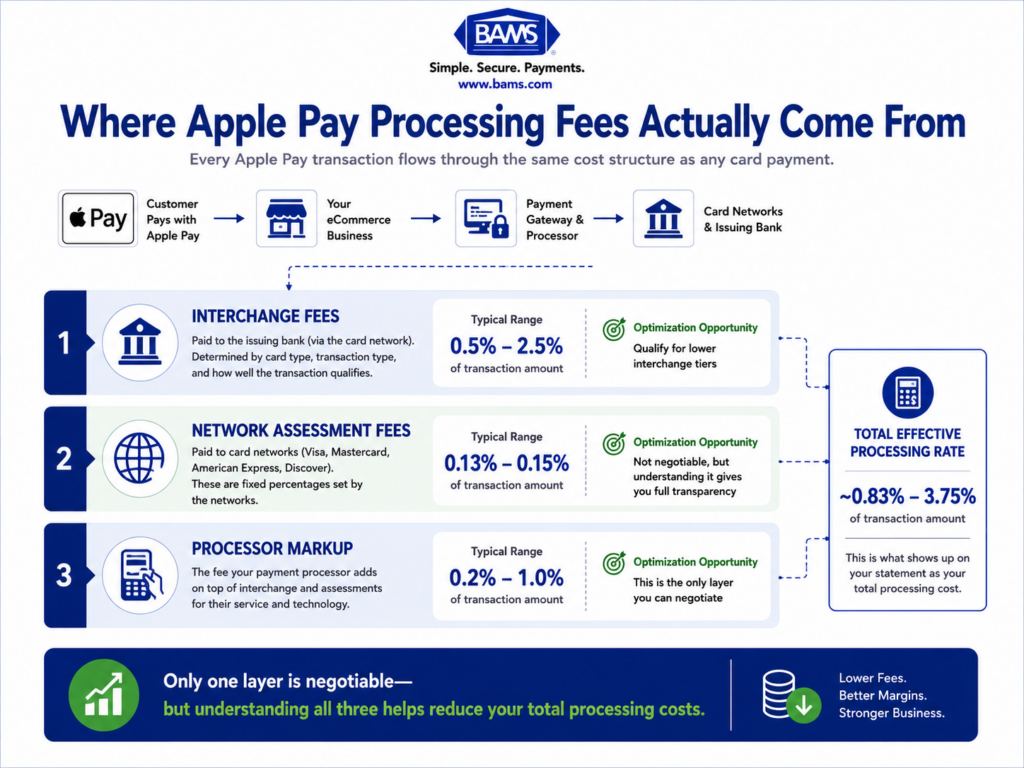
Why it matters: Apple charges the issuing bank a small fee (typically 0.15% for credit cards in the U.S.), but that cost often gets passed through in ways that aren’t transparent on your merchant statement. Some processors treat Apple Pay transactions at a different interchange tier or add a surcharge for “digital wallet” processing. If you negotiated competitive card-present or card-not-present rates, those rates may not automatically apply to wallet transactions.
What it looks like today: Processors vary widely in how they classify Apple Pay. Some treat it as a standard card-not-present transaction. Others classify it under a separate “wallet” or “token” category with different pricing. The difference can be 10 to 30 basis points per transaction, which compounds quickly at volume.
How to apply it: Request an itemized statement from your processor that separates Apple Pay transactions from standard card transactions. Compare the effective rate (total fees divided by total volume) for each. If Apple Pay costs more per transaction with no clear reason, you have leverage to renegotiate or switch processors.
5. You Haven’t Tested Apple Pay Against Guest Checkout Abandonment
Why it matters: Apple Pay’s primary value in eCommerce isn’t brand perception. It’s eliminating the guest checkout form. If your guest checkout abandonment rate is high and Apple Pay adoption is low, the wallet isn’t solving the problem it was designed to solve. That usually points to a visibility or trust issue, not a demand issue.
What it looks like today:744 million active Apple Pay users globally means a meaningful share of your mobile visitors already have the wallet configured. The friction isn’t on their side. It’s in whether your checkout makes the option obvious and whether your site’s domain verification is properly configured so the Apple Pay button actually renders.
How to apply it: Compare your mobile guest checkout abandonment rate before and after Apple Pay was enabled. If the rate didn’t move, check two things: is the Apple Pay button rendering on all supported browsers (Safari, Chrome on iOS), and is your domain verification with Apple current? A broken or missing button is invisible to you but visible to every customer who expected to see it.
6. Your Processor Doesn’t Offer Proactive Chargeback Defense for Wallet Transactions
Why it matters: Apple Pay transactions use device-specific tokens instead of raw card numbers, which reduces fraud. But “reduced” doesn’t mean “eliminated.” Friendly fraud (customers disputing legitimate purchases) still happens on wallet transactions, and if your processor treats chargebacks reactively, you’re absorbing losses that could have been prevented with early alerts or representment support.
What it looks like today: Many processors handle chargebacks the same way regardless of payment method. They notify you after the dispute is filed and leave you to gather evidence. A processor with proactive chargeback defense flags disputes earlier, provides pre-built response templates, and can sometimes resolve cases before they hit your chargeback ratio. This matters for wallet transactions because the tokenized data can actually strengthen your representment case, if your processor knows how to use it.
How to apply it: Ask your processor two questions: do you offer early chargeback alerts for Apple Pay transactions, and do you use tokenization data in representment evidence? If the answer to either is no, you’re leaving money on the table. Providers like BAMS include proactive chargeback defense and dedicated account management as part of their merchant services, which can make a measurable difference for eCommerce businesses processing significant wallet volume.
7. You Enabled Apple Pay but Never Revisited Your Funding Structure
Why it matters: Adding a faster checkout method without updating your funding arrangement is like widening a highway on-ramp but keeping the same single-lane toll booth. Customers complete purchases faster, but you still wait two or three days for deposits. The operational mismatch creates a false sense of efficiency.
What it looks like today: Most eCommerce businesses set up their merchant account once and never revisit the funding terms. But as your transaction volume grows (especially through mobile payment solutions), you may qualify for next-day funding or improved batch processing windows that weren’t available when you first signed up.
How to apply it: Contact your processor and ask: what is my current funding timeline for Apple Pay transactions, and what would I need to qualify for next-day funding? Some processors, including BAMS, offer next-day funding as a standard feature for qualifying merchants, which directly addresses the deposit delay problem that most Apple Pay content never mentions. Even shaving one business day off your settlement cycle can meaningfully improve cash flow predictability.
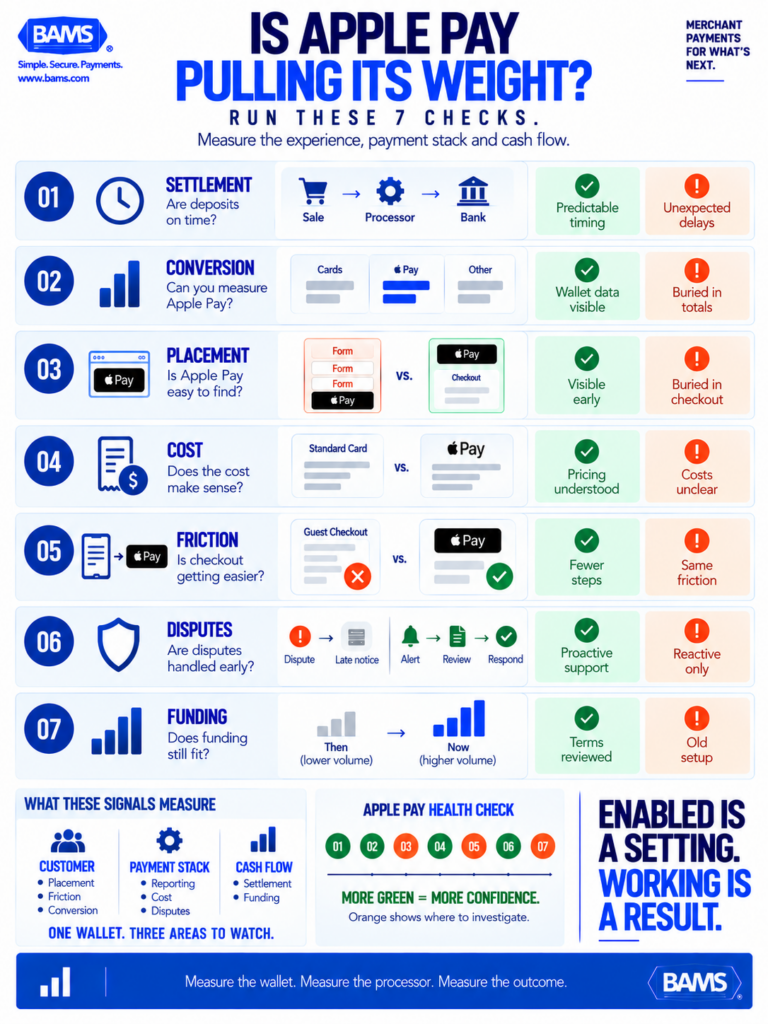
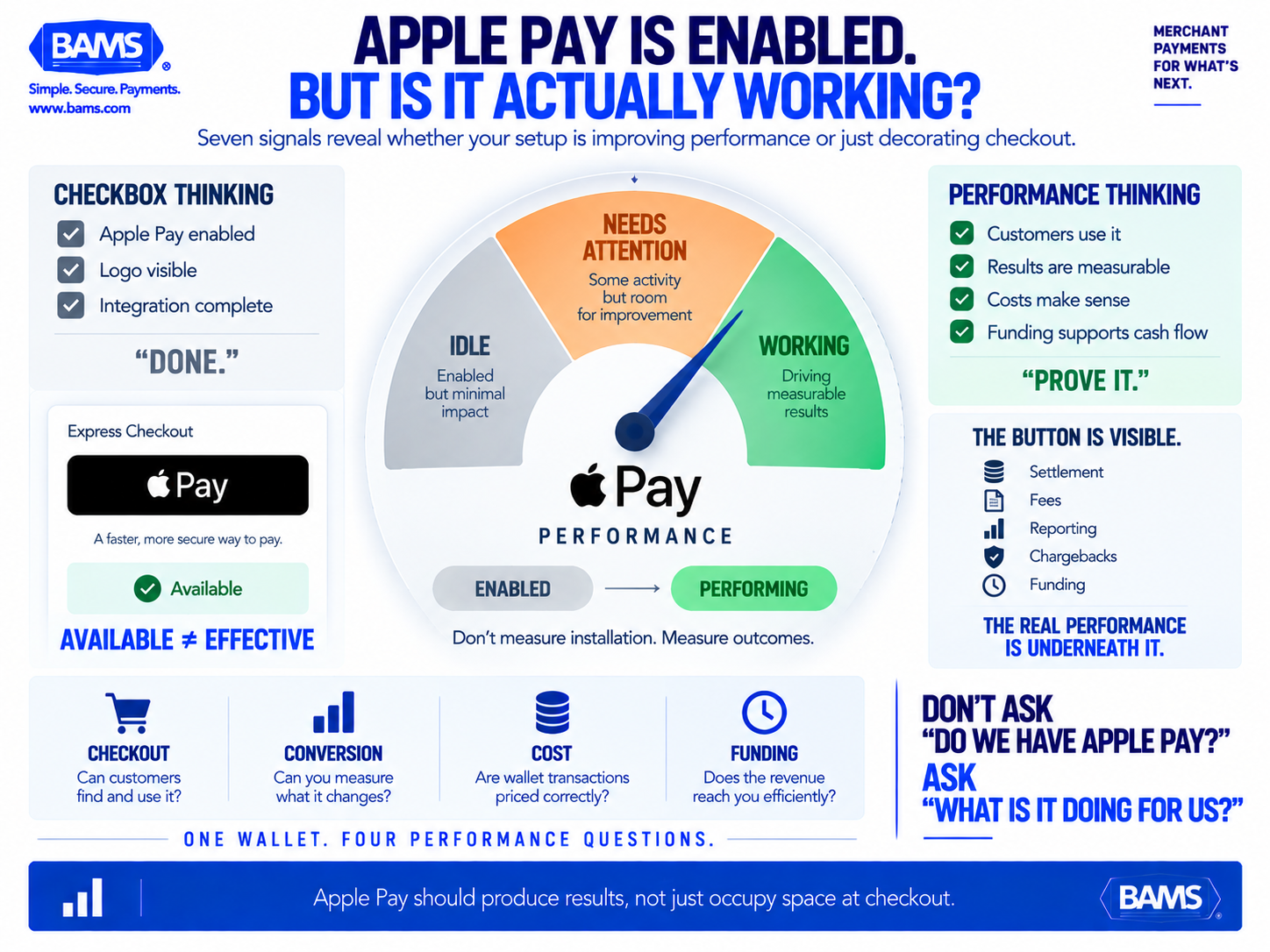
Apple Pay performance goes beyond whether the button appears. These seven checks reveal whether the wallet is improving customer experience while supporting better reporting, pricing, dispute handling and funding.
What These Signals Have in Common
Every item on this list points to the same underlying pattern: the value of Apple Pay for business isn’t captured at the moment of integration. It’s captured (or lost) in the operational layer beneath it, specifically your processor’s settlement speed, fee transparency, chargeback handling, and reporting granularity.
The businesses getting real lift from Apple Pay aren’t the ones who added it first. They’re the ones who treat it as a system, where checkout placement, funding timelines, and cost structures all connect. A fast checkout that feeds into a slow deposit cycle doesn’t improve cash flow. A visible wallet button that routes through an opaque fee structure doesn’t improve margin.
The second-order insight: your payment processor matters more than your wallet selection. Two businesses can accept the same digital wallet and get completely different results based on how their processor handles settlement, disputes, and pricing.
Where to Start
You don’t need to address all seven signals at once. Start with the three that have the most direct line to cash flow: check your settlement timeline (Signal 1), compare your Apple Pay fees to your negotiated card rates (Signal 4), and ask about next-day funding eligibility (Signal 7). These three actions take one afternoon and zero engineering resources.
If you find gaps in any of those areas, that’s your diagnostic telling you the problem isn’t Apple Pay adoption. It’s what your processor does with the transaction after your customer taps.
Frequently Asked Questions
What is Apple Pay and how does it work for merchants?
Apple Pay is a digital wallet that lets customers pay using their iPhone, Apple Watch, iPad, or Mac. For merchants, it works like a standard card-not-present transaction in eCommerce. The customer authenticates with Face ID or Touch ID, and a device-specific token (not the actual card number) is sent to your payment gateway. Your payment processor then routes and settles the transaction. The key difference from traditional card payments is reduced checkout friction and stronger fraud protection through tokenization.
Why should my business accept Apple Pay as a payment method?
The primary reason is conversion. Apple Pay eliminates the manual entry of card numbers, billing addresses, and shipping details for returning users. For mobile shoppers (who now represent the majority of eCommerce traffic), this can meaningfully reduce cart abandonment. With 744 million active users globally, the installed base is large enough that a significant share of your visitors likely already have it configured.
How do Apple Pay transaction fees compare to regular credit card fees?
Apple charges issuing banks approximately 0.15% on U.S. credit card transactions, but this cost is typically embedded in interchange rather than billed to you directly. However, your payment processor may classify Apple Pay transactions differently than standard card payments, sometimes at a higher effective rate. The only way to know is to request an itemized statement that separates wallet transactions from card transactions and compare the effective rates.
Which payment processors support Apple Pay integration?
Most major payment processors and gateways now support Apple Pay, including Stripe, Square, Adyen, Braintree, and merchant services providers like BAMS. The more important question isn’t whether your processor supports Apple Pay, but how it handles settlement timing, fee classification, and chargeback defense for wallet transactions. Those operational details vary significantly between processors and directly affect your bottom line.
How does Apple Pay ensure secure transactions for customers?
Apple Pay uses a combination of device-level tokenization and biometric authentication (Face ID, Touch ID, or passcode). When a customer pays, the actual card number is never transmitted to the merchant. Instead, a unique device account number and a one-time dynamic security code are used. This makes intercepted transaction data useless to attackers and reduces your exposure to card-number-based fraud.
Can accepting Apple Pay actually speed up how fast I get my deposits?
Not automatically. Apple Pay speeds up the customer’s checkout experience, but your deposit timeline is controlled by your payment processor’s settlement schedule, not by the wallet itself. If your processor batches on a 48-to-72-hour cycle, Apple Pay transactions settle on that same timeline. To get faster deposits, you need to confirm your processor offers next-day funding for digital wallet transactions and that your account qualifies for it.
Sources
- https://www.statista.com/statistics/1389498/apple-pay-adoption-in-usa/
- https://www.bams.com/blog/accept-apple-pay-in-your-business-now-its-easy/
- https://www.klarna.com/international/enterprise/case-studies/apple-pay/
- https://www.bams.com/blog/apple-pay-and-bigcommerce/
- https://realgrowthmatters.com/learn/case-studies/apple-pay-mobile-payments-2014-present/
- https://bams.com
- https://www.bams.com/blog/advantages-of-mobile-merchant-account-services/