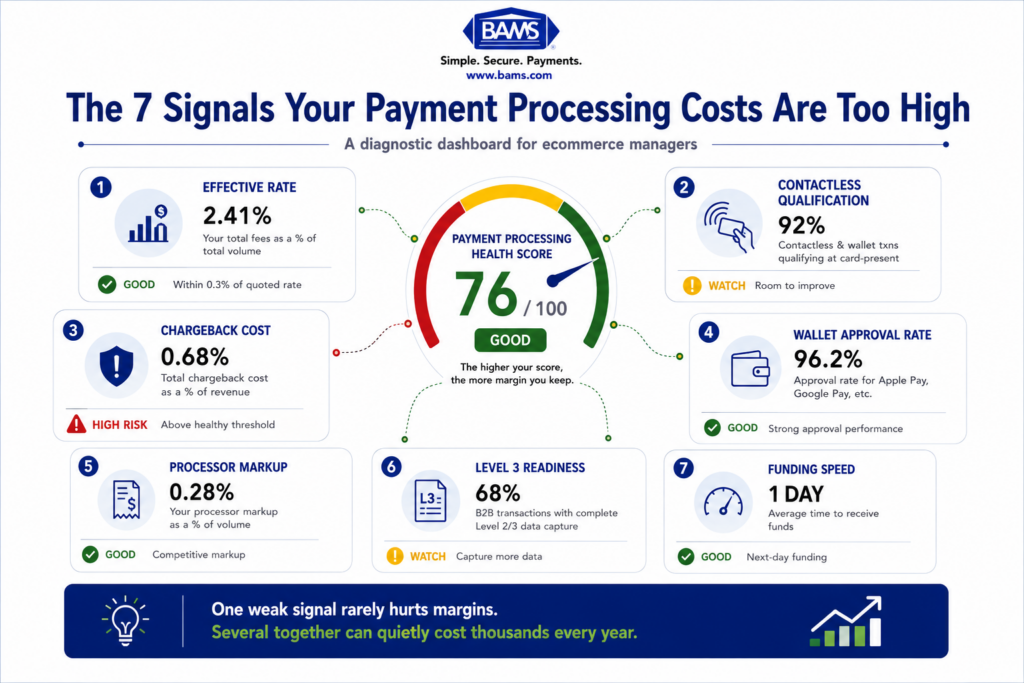
Apple Pay Integration: A Guide to Gateway Costs
Last Updated on October 14, 2026 by Dimitri Akhrin
How to evaluate payment gateways by transaction fees, deposit speed, and real cash flow impact
Learn how to choose a payment gateway for Apple Pay integration based on total processing cost and settlement speed. This guide covers net fees, deposit timelines, and the operational factors that directly affect your cash flow.
TL;DR
- Apple Pay costs come from your processor, not Apple — Apple charges merchants nothing. Your gateway’s interchange handling, markup, and funding schedule determine your total cost and deposit speed.
- Deposit delays are a gateway problem, not a technology problem — Misaligned batch cutoffs, secondary settlement queues for tokenized transactions, and default funding tiers are the most common causes of slow deposits on mobile wallet sales.
- Evaluate gateways on effective rate and funding speed, not feature lists — Nearly every processor supports Apple Pay. The differentiator is what it costs per transaction and when the money reaches your bank account.
- Next-day funding is often available but not activated — Many merchants already qualify for faster deposits but haven’t asked. Contact your processor’s account team with 90 days of statements and negotiate your funding tier.
- Ongoing monitoring prevents optimization decay — Interchange rates change twice a year, processor terms evolve, and batch timing can drift. Monthly metric reviews and quarterly statement audits keep your cash flow optimized.
Guide Orientation: What This Covers and Who It’s For
This guide is about one specific problem: the gap between when an Apple Pay transaction clears and when the money actually lands in your bank account. If you manage eCommerce operations for a business doing meaningful volume, deposit delays cost you real money in missed payroll windows, delayed inventory orders, and unnecessary credit line usage.
By the end, you’ll understand exactly why mobile wallet deposits get delayed, how your payment gateway choice determines settlement speed, and what to evaluate when selecting (or switching) processors to eliminate funding lag on Apple Pay integration transactions.
This guide does not cover the technical setup of Apple Pay on your storefront. It picks up where those tutorials end: after the customer taps “Pay,” what happens to your money, and how do you get it faster?
Why Deposit Speed on Apple Pay Matters More Than You Think
Most content about Apple Pay for merchants stops at the checkout button. It covers tokenization, device compatibility, and conversion lift. That’s useful, but it ignores the operational reality that eCommerce managers live with every day: cash flow depends on when funds settle, not when transactions authorize.
The gap between authorization and deposit is where margin quietly erodes. A two-day or three-day settlement window on a high-volume day means you’re floating thousands of dollars that belong to you. Multiply that across a month of mobile wallet sales (which are growing as a share of total eCommerce volume), and you’re looking at a persistent cash flow drag that forces reliance on credit lines or delays vendor payments.
Here’s what makes this worse: Apple does not charge an additional fee when Apple Pay is used in stores, online or in apps. Apple Pay transactions still pass through your payment service provider for processing, so your processor’s pricing and settlement terms remain important. That means every dollar of delay and every basis point of markup is a decision your payment stack is making for you. If you haven’t actively chosen a gateway based on settlement terms, you inherited someone else’s timeline.
The cost of inaction isn’t dramatic. It’s incremental. It’s the compounding effect of slow deposits on working capital, inventory cycles, and your ability to reinvest revenue quickly. Fixing it starts with understanding what’s actually happening between the tap and the deposit.

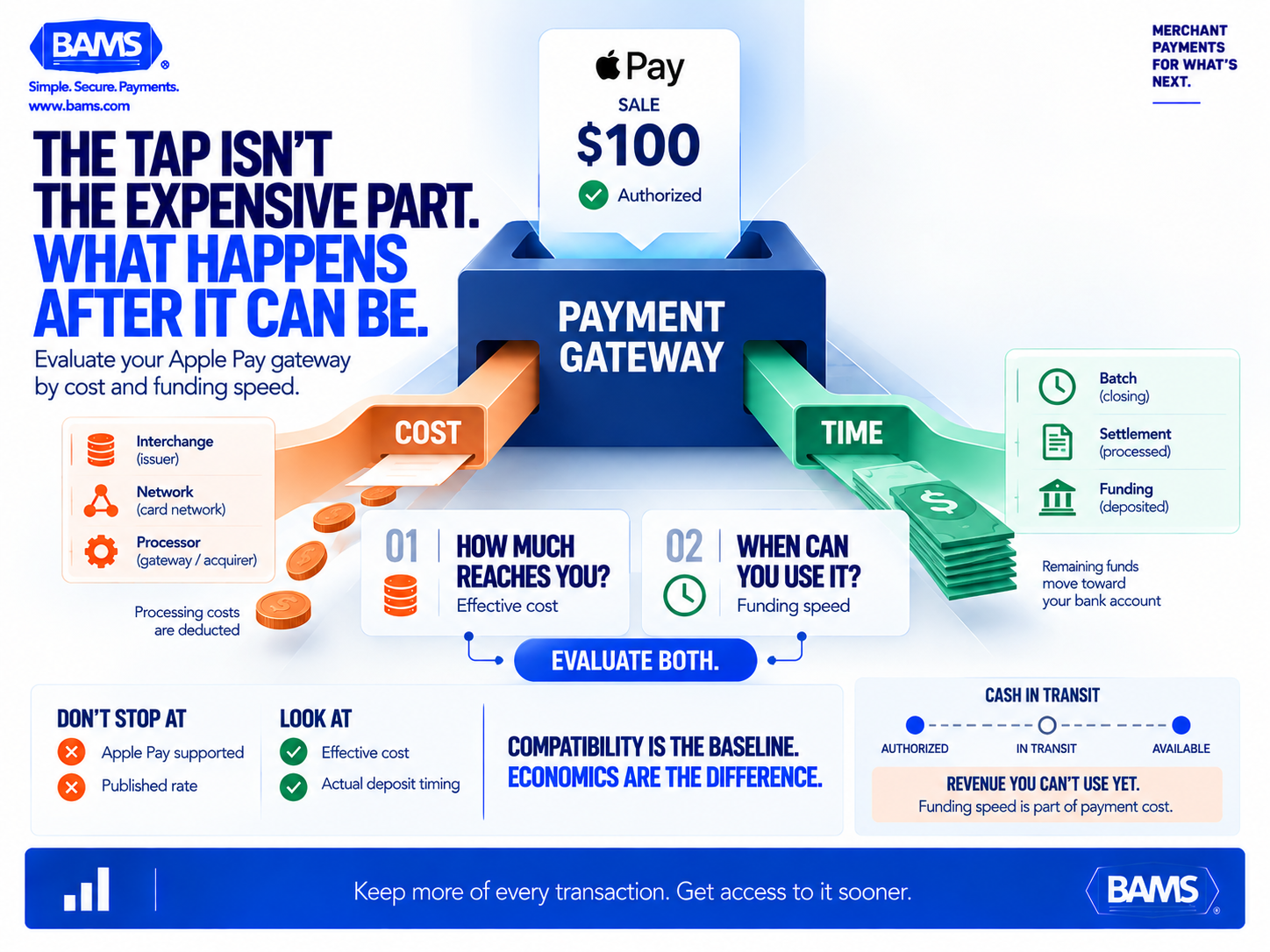
Apple Pay can make checkout fast but gateway economics determine what happens afterward. Processing cost and funding speed ultimately decide how much value reaches the merchant.
Core Concepts: What Determines When You Get Paid
The Three-Layer Cost Stack
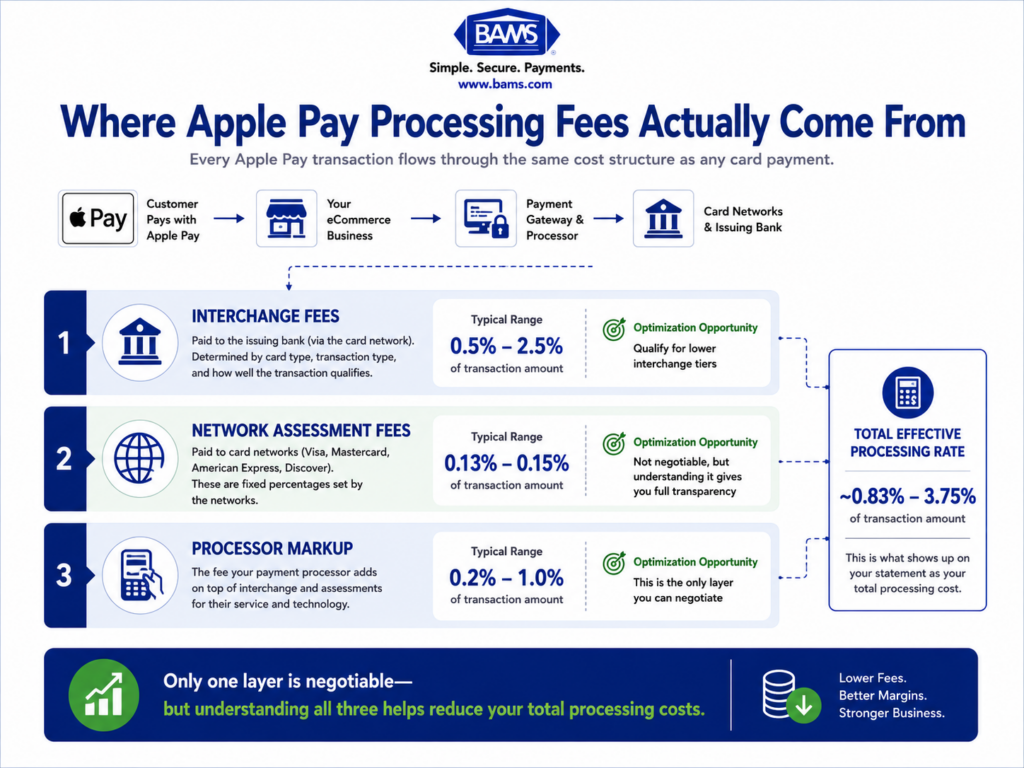
Apple Pay transaction fees aren’t a single line item. They break into three layers: interchange (paid to the card-issuing bank), network assessment (paid to Visa, Mastercard, etc.), and processor markup (paid to your gateway or acquirer). Interchange typically ranges from 0.5% to 2.5%, network assessments run about 0.13% to 0.15%, and processor markup varies from 0.2% to 1.0%.
Understanding this breakdown matters because your gateway controls only one of these layers (its own markup), but it influences the other two through how it submits transaction data and how it structures your settlement.
Authorization vs. Settlement vs. Funding
Authorization happens instantly: the customer’s bank confirms the card is valid and funds are available. Settlement is when your processor batches completed transactions and submits them to the card networks. Funding is when the money moves from the acquiring bank into your business account.
Delays can occur at any of these stages. The most common bottleneck for eCommerce managers is the gap between settlement and funding, which is entirely determined by your processor’s payout schedule and your account’s funding tier.
Why Mobile Wallet Transactions Can Settle Differently
A common misconception is that Apple Pay transactions settle identically to standard card-not-present transactions. In practice, tokenized transactions can qualify for different interchange categories. Visa’s Apple Pay data shows lower fraud rates compared with manual key entry, which can affect how networks route and price these transactions. If your gateway isn’t optimized for token-based submissions, you may be paying higher interchange than necessary, and your settlement may be slower due to data mismatches.
The Framework: Four Stages of Deposit Optimization
Eliminating deposit delays on mobile wallet sales requires a structured evaluation across four stages. Each builds on the previous one, and skipping ahead typically results in solving symptoms rather than root causes.
- Stage 1: Audit — Map your current settlement timeline and identify where delays originate.
- Stage 2: Evaluate — Compare gateway options using deposit speed, effective rate, and operational support as primary criteria.
- Stage 3: Negotiate — Qualify for faster funding tiers and negotiate terms based on your transaction volume and risk profile.
- Stage 4: Monitor — Establish ongoing tracking to catch settlement regressions and fee creep before they compound.
These stages apply whether you’re switching gateways entirely or renegotiating terms with your current processor. The goal is to move from passive acceptance of deposit timelines to active management of your cash conversion cycle.
A gateway should be evaluated by what Apple Pay transactions actually cost and how quickly revenue becomes usable. These six checks reveal where merchants can improve both.
Step-by-Step: Eliminating Deposit Delays on Apple Pay Sales
Step 1: Audit Your Current Settlement Timeline
Objective: Establish a precise baseline of how long it takes Apple Pay revenue to reach your bank account, broken down by day of week and transaction type.
Start by pulling 30 days of transaction data from your processor dashboard. For each Apple Pay transaction, note the authorization timestamp, the batch settlement time, and the actual deposit date in your bank account. Calculate the average hours between each stage. Most eCommerce managers discover that their perceived “two-day” settlement is actually closer to three days when weekends and batch cutoff times are factored in.
Pay special attention to batch cutoff times. If your processor batches at 9 PM ET but your highest sales volume hits between 9 PM and midnight, those transactions roll into the next day’s batch, adding a full 24 hours to your funding timeline. Also check whether Apple Pay transactions are batched separately from standard card transactions. Some gateways process tokenized payments in a secondary batch cycle, which introduces additional delay.
Anti-patterns: Don’t rely on your processor’s stated settlement timeline without verifying it against actual bank deposits. Marketing materials often cite best-case scenarios. Don’t average across all payment methods; isolate Apple Pay specifically, since tokenized transactions can behave differently in the settlement queue.
Success indicators: You can state, with data, the exact average hours from Apple Pay authorization to bank deposit, and you’ve identified which stage (batching, settlement, or funding) contributes the most delay.
Step 2: Evaluate Gateways on Deposit Speed, Not Just Compatibility
Objective: Build a comparison framework that prioritizes cash flow impact over feature checklists.
Most gateway comparison content focuses on whether a processor “supports” Apple Pay. Today, nearly every major gateway does. The differentiating question is: what does each gateway actually cost per transaction and when does the money arrive? Apple Developer explains that Apple Pay payment tokens are passed to the payment service provider for processing as card transactions, so there is no single standard Apple Pay merchant rate. Effective costs depend on the underlying card, interchange qualification and your processor’s pricing.
Build a comparison spreadsheet with these columns: stated processing rate, effective rate (after all fees), batch cutoff time, standard funding timeline, next-day funding availability, next-day funding cost (if any), and chargeback handling. Request actual merchant statements from each processor, not rate sheets. Rate sheets show the processor markup; merchant statements show the total effective cost including interchange and assessments.
When evaluating Apple Pay for eCommerce, also ask each gateway how they handle token-based interchange qualification. A gateway that submits complete Level 2 or Level 3 data on tokenized transactions can help you qualify for lower interchange categories, reducing your effective rate by 0.2% to 0.5% per transaction.
Anti-patterns: Don’t evaluate gateways based on published pricing alone. A gateway advertising 2.6% + $0.10 may have slower funding than one at 2.4% + $0.25 with next-day deposits. Don’t ignore the cost of slow money: if a cheaper gateway delays your deposits by two extra days, the working capital cost may exceed the rate savings.
Success indicators: You have a side-by-side comparison of at least three gateways using effective rate and verified funding timelines, not just advertised features.
Step 3: Qualify for Next-Day (or Same-Day) Funding
Objective: Secure the fastest available funding tier based on your business profile and transaction history.
Faster funding isn’t automatic. Most processors offer tiered funding speeds, with next-day or same-day deposits available to merchants who meet specific criteria: consistent processing volume, low chargeback ratios, established processing history, and sometimes a minimum monthly volume threshold. The key is understanding what your current processor requires and whether you already qualify but haven’t activated it.
Contact your processor’s account management team (not general support) and ask three direct questions: What is my current funding tier? What are the requirements for next-day funding? Is there an additional cost, and if so, is it a flat monthly fee or a per-transaction surcharge? Some processors charge 0.5% to 1.0% extra for accelerated funding, which may or may not be worth it depending on your cash flow needs. Others, like BAMS, include next-day funding as a standard feature for qualifying merchants, eliminating the surcharge entirely.
If you’re switching processors, negotiate funding terms before signing. Your processing history with a previous gateway is leverage. Bring 90 days of statements showing consistent volume, low chargebacks, and a clean processing record. This documentation typically qualifies you for preferred funding tiers from day one, rather than waiting through a probationary period.
Anti-patterns: Don’t assume next-day funding is unavailable to you because you didn’t ask. Many merchants process for years on standard two-day or three-day settlement without realizing they qualify for faster tiers. Don’t accept a blanket “next-day funding costs extra” without asking what the specific cost is and whether it’s negotiable based on volume.
Success indicators: You have written confirmation of your funding tier, the specific cutoff time for next-day deposits, and any associated costs.
Step 4: Optimize Batch Timing and Transaction Data Submission
Objective: Ensure every Apple Pay transaction enters the settlement queue as quickly as possible and qualifies for the best available interchange rate.
Batch timing is the most overlooked lever in deposit speed. If your eCommerce platform auto-batches at a fixed time that doesn’t align with your processor’s cutoff, you’re losing hours on every settlement cycle. Work with your gateway to set your batch close time to 15-30 minutes before their cutoff. This ensures same-day inclusion without risking a missed window due to processing lag.
On the data side, interchange downgrades on Apple Pay happen when transaction data is incomplete. For card-not-present Apple Pay transactions, ensure your gateway submits: the tokenized card number, the cryptogram, the transaction amount, and any enhanced data fields (like order ID and shipping information) that qualify the transaction for lower interchange tiers. Missing data fields can push a transaction from a qualified to a non-qualified interchange rate, adding 0.5% or more to your effective cost.
If you’re on a platform like BigCommerce, verify that your Apple Pay integration passes all required data fields through to your processor. Some platform plugins strip enhanced data during the tokenization handoff, which silently inflates your costs and can delay settlement if the processor flags incomplete submissions for manual review.
Anti-patterns: Don’t set batch times and forget them. Seasonal volume changes may require adjusting cutoffs. Don’t assume your platform’s default Apple Pay integration passes all data fields; verify with a test transaction and review the settlement detail.
Success indicators: Your batch close time is documented and aligned with your processor’s cutoff. A sample of recent Apple Pay transactions shows qualified interchange rates (not downgrades).
Step 5: Implement Proactive Chargeback Defense
Objective: Prevent chargebacks from triggering funding holds or slower settlement tiers.
This step surprises many eCommerce managers, but chargebacks directly affect deposit speed. Processors monitor chargeback ratios, and merchants who exceed thresholds (typically 1% of transactions) can be moved to slower funding tiers, placed in reserve programs, or subjected to rolling holds on deposits. A single bad month can take weeks to recover from.
Apple Pay’s tokenization does reduce fraud compared to manual card entry, which helps. But friendly fraud (customers disputing legitimate charges) is unaffected by tokenization. Your defense needs to be proactive: send order confirmations immediately, provide tracking numbers within 24 hours, make your return policy visible before checkout, and respond to chargeback notifications within 48 hours with complete documentation.
BAMS offers proactive chargeback defense as part of its merchant services, which can help flag disputes before they escalate to formal chargebacks. This kind of early intervention keeps your chargeback ratio low and your funding tier intact.
Anti-patterns: Don’t treat chargebacks as a customer service issue only. They’re a cash flow issue. Don’t wait for your processor to notify you of a ratio problem; monitor weekly. Don’t ignore “inquiry” stage disputes, since resolving them early prevents the chargeback from being filed.
Success indicators: Your chargeback ratio stays below 0.5% (well under the 1% threshold). You have a documented response workflow with assigned ownership and time targets.
Step 6: Establish Ongoing Monitoring and Fee Auditing
Objective: Catch settlement regressions and fee increases before they compound into material cash flow impact.
Settlement speed and processing costs are not static. Interchange rates change twice a year (April and October for most networks). Processor markups can increase with contract renewals or volume changes. Batch timing can drift if your platform updates its payment plugin. Without active monitoring, optimizations you make today can erode within months.
Set a monthly calendar reminder to review three metrics: average hours from Apple Pay authorization to bank deposit, effective processing rate (total fees divided by total volume), and chargeback ratio. Compare each to your baseline from Step 1. If any metric moves more than 10% in the wrong direction, investigate immediately.
Also review your monthly processor statement line by line at least quarterly. Look for new fee categories, rate changes, or “miscellaneous” charges that weren’t in your original agreement. Processors sometimes introduce fees (like PCI non-compliance fees or account maintenance charges) that appear small individually but add up over a year.
Anti-patterns: Don’t assume your optimized setup will maintain itself. Don’t delegate statement review to someone who doesn’t understand interchange categories. Don’t wait for annual contract reviews to catch fee changes; by then, you’ve already paid them for months.
Success indicators: You have a documented monthly review process, a dashboard or spreadsheet tracking the three key metrics, and a clear escalation path when metrics deviate from baseline.
Practical Example: Before and After Gateway Optimization
Scenario: Mid-Size eCommerce Brand, $250K Monthly Volume
Consider an online retailer processing $250,000 per month, with 35% of transactions coming through Apple Pay. Before optimization, their gateway charged a flat 2.9% + $0.30 per transaction with standard three-day funding. Their effective rate, after interchange downgrades from incomplete data submission, was actually 3.2%.
Monthly cost before: $8,000 in processing fees. Average deposit delay: 3.2 business days. Working capital tied up at any given time: approximately $40,000.
After auditing their settlement timeline (Step 1), they discovered that their batch cutoff was misaligned by four hours, adding a full day to settlement. They evaluated three alternative gateways (Step 2) and switched to a processor offering interchange-plus pricing with next-day funding. They negotiated preferred rates based on their clean processing history (Step 3) and fixed their data submission to eliminate interchange downgrades (Step 4).
Monthly cost after: $6,250 in processing fees (effective rate of 2.5%). Average deposit delay: 1.1 business days. Working capital tied up at any given time: approximately $12,500.
The annual savings: $21,000 in reduced processing fees plus the operational benefit of $27,500 less capital locked in transit at any given time. No change to the customer experience. No new technology. Just a smarter gateway decision.
Common Mistakes and Pitfalls
Choosing a gateway based on the checkout experience alone. A smooth Apple Pay button means nothing if your deposits take four days. Customer-facing polish and back-end efficiency are separate evaluations.
Treating all card-not-present transactions as identical. Apple Pay’s tokenized transactions have different fraud profiles and can qualify for different interchange tiers. Lumping them with standard online card payments means missing optimization opportunities.
Ignoring the cost of slow money. A gateway that’s 0.3% cheaper but settles two days slower may cost you more in credit line interest, missed early-payment vendor discounts, or delayed inventory restocking than the rate savings justify.
Assuming your current processor can’t do better. Many merchants never ask about faster funding tiers or rate reductions. Processors expect negotiation from established merchants. If you don’t ask, you’ll stay on default terms indefinitely.
Setting up once and walking away. Payment processing is a recurring operational cost, not a one-time configuration. Interchange rates change, processor terms evolve, and your business volume shifts. Quarterly reviews are the minimum for maintaining optimized terms.
What to Do Next
Start with Step 1. Pull 30 days of Apple Pay transaction data and map your actual settlement timeline. This single exercise often reveals that deposits are slower than you assumed, and it gives you the baseline you need to evaluate any change.
If the audit confirms delays, move through the framework sequentially. You don’t need to switch processors immediately. Sometimes a conversation with your current gateway’s account team about funding tiers and batch timing solves the problem without a migration.
If you do decide to evaluate alternatives, use the comparison framework from Step 2. Prioritize effective rate and verified funding speed over feature lists. And revisit this guide quarterly as a reference point for your ongoing monitoring in Step 6. The goal isn’t perfection on day one. It’s building a system where your Apple Pay revenue reaches your bank account as fast as the technology allows, every single day.
Frequently Asked Questions
Does Apple charge merchants a fee for accepting Apple Pay?
No. Apple does not charge an additional fee when Apple Pay is used in stores, online or in apps. Payment processing costs still depend on the underlying card transaction and your payment service provider’s pricing. This is why gateway selection matters far more than Apple Pay compatibility for controlling costs.
Why are my Apple Pay deposits slower than regular card transactions?
Tokenized Apple Pay transactions can be routed through secondary batch cycles by some gateways, adding delay. Incomplete data submission can also flag transactions for manual review. Additionally, if your batch cutoff time doesn’t align with your processor’s settlement window, Apple Pay transactions processed after the cutoff roll into the next day’s cycle, adding 24 hours to your funding timeline.
What are typical Apple Pay transaction fees for eCommerce?
Apple Pay transaction fees mirror standard card-not-present rates because the cost comes from your processor, not Apple. A common structure is around 2.6% + $0.10 for in-person and 2.9% + $0.30 for online transactions, though effective rates vary based on interchange qualification, data submission quality, and your processor’s markup. Interchange alone typically ranges from 0.5% to 2.5%.
How do I qualify for next-day funding on Apple Pay transactions?
Most processors require consistent monthly volume, a low chargeback ratio (under 1%), and an established processing history. Contact your processor’s account management team directly and ask about funding tier requirements. Bring 90 days of statements showing clean processing history if you’re negotiating with a new provider. Some processors include next-day funding at no extra cost, while others charge a per-transaction surcharge.
Can interchange downgrades happen on Apple Pay transactions?
Yes. If your gateway doesn’t submit complete transaction data (tokenized card number, cryptogram, order details, shipping information), the transaction can be downgraded to a higher interchange category. This can add 0.5% or more to your effective cost per transaction. Verifying data submission with test transactions is essential after any integration change.
How often should I review my Apple Pay processing costs and settlement speed?
Review your three key metrics (average deposit delay, effective processing rate, and chargeback ratio) monthly. Conduct a detailed line-by-line statement review quarterly. Interchange rates change twice a year, and processor terms can shift with contract renewals, so ongoing monitoring is necessary to maintain optimized terms.