

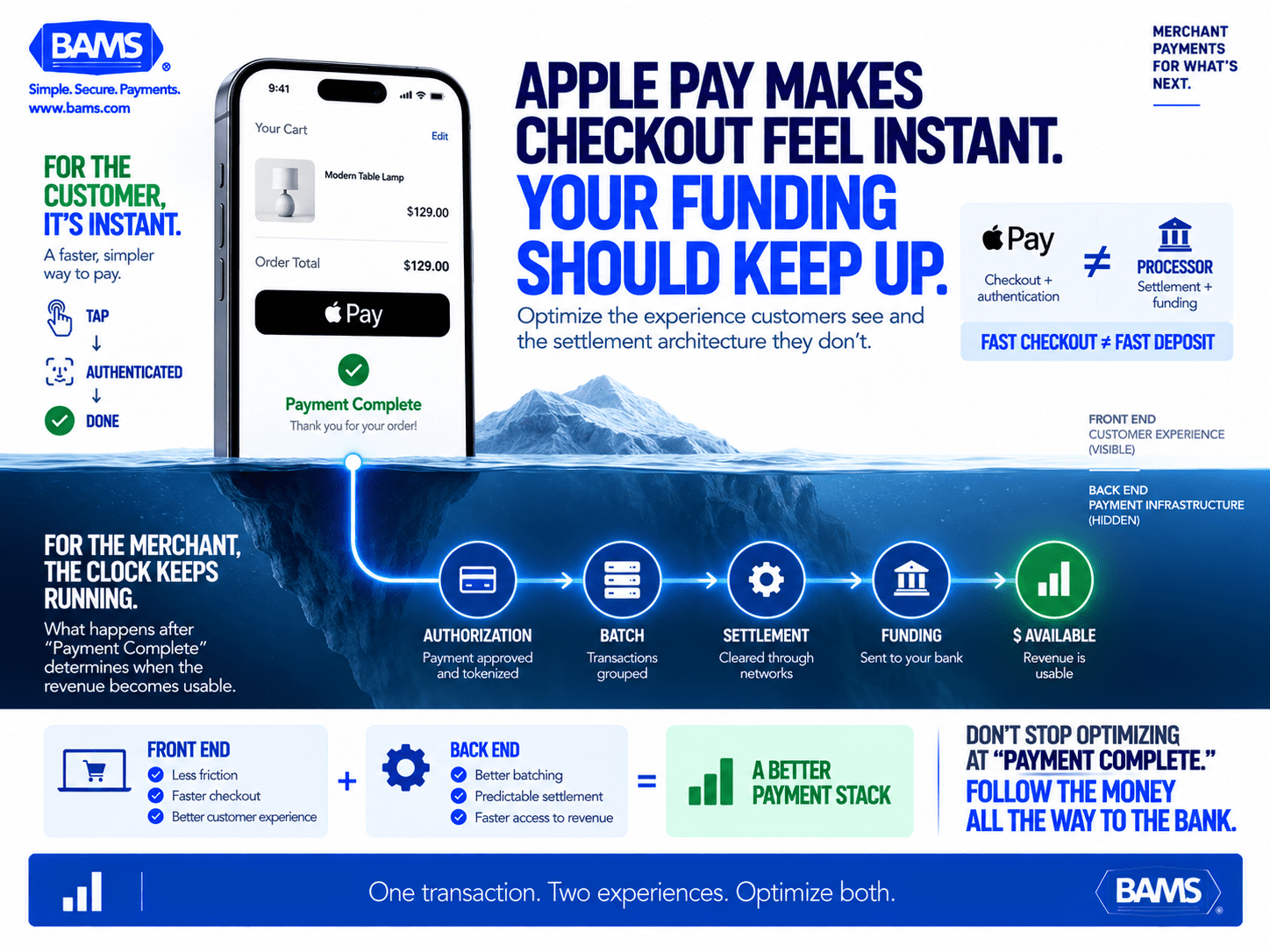
Apple Pay Checkout: Optimize Both Conversion and Funding
Last Updated on October 6, 2026 by Dimitri Akhrin
How to align your front-end checkout experience with back-end settlement architecture for next-day deposits
Learn how Apple Pay checkout integration decisions affect not just conversion rates but also how fast revenue reaches your bank account. This guide covers settlement architecture, common deposit delays, and how to structure processor relationships for next-day funding.
TL;DR
- Apple Pay doesn’t control your deposit speed – It’s a front-end checkout layer. How fast you get paid depends entirely on your payment processor’s settlement architecture, batching schedule, and funding tier.
- Treat integration as a dual-purpose decision – Every Apple Pay integration choice affects both the buyer’s checkout experience and your back-end funding timeline. Optimizing only the front end leaves cash stuck in the settlement pipeline.
- Batch cutoff times are your biggest lever – A poorly timed batch cutoff can delay an entire evening’s worth of high-volume sales by a full business day. Align your cutoff with your peak sales hours and confirm whether your processor offers weekend settlement.
- Audit your actual deposit timeline – Most eCommerce managers have never measured their average settlement time on Apple Pay transactions specifically. Pull 90 days of data and calculate the hours between authorization and deposit arrival.
- Factor funding speed into total processing cost – Next-day funding may carry a small per-transaction premium, but if it eliminates credit lines or borrowing used to cover deposit gaps, the net cost can be zero or negative.
Guide Orientation: What This Covers and Who It’s For
This guide addresses a specific blind spot in most Apple Pay checkout strategies: the gap between a completed transaction and the moment that money actually lands in your bank account. If you manage eCommerce payments for a business doing real volume, you already know that a smooth front-end checkout means nothing if your deposits sit in limbo for three to five business days.
This guide is for eCommerce managers at established online businesses (roughly 10 to 50 employees) who have already integrated or plan to integrate Apple Pay, and who care as much about settlement speed as conversion rates. By the end, you’ll understand exactly how settlement architecture works behind mobile wallet transactions, what causes deposit delays, and how to structure your processor relationship so Apple Pay revenue hits your account the next business day.
We won’t cover basic Apple Pay setup tutorials or device compatibility checklists. That ground is well-trodden. Instead, we focus on the post-transaction pipeline that most guides ignore entirely.
Why Apple Pay Integration Decisions Affect More Than Checkout
Apple Pay’s growth trajectory makes it impossible to ignore. U.S. shoppers made $268 billion in Apple Pay purchases in 2024, up 28.9% from the prior year. An estimated 60.2 million U.S. consumers now use Apple Pay, and the wallet holds roughly 49% of the U.S. mobile wallet user base. If you sell online, a meaningful share of your revenue already flows through this channel or will soon.
Most content about Apple Pay focuses on the buyer-facing experience: tokenized security, one-tap convenience, reduced cart abandonment. These are real advantages. But they represent only half the equation. The other half is what happens after the customer sees “Payment Complete” and closes their browser.
When your Apple Pay integration routes transactions through a processor with slow settlement cycles, you’ve created a paradox. You optimized the customer’s experience to be instant while your own experience of receiving that money stretches to days. For businesses managing payroll, inventory reorders, or ad spend on tight cycles, those days matter. A two-day deposit delay on a $50,000 weekend of Apple Pay sales means $50,000 that can’t be deployed on Monday morning.
The cost of inaction isn’t dramatic. It’s chronic. Slow deposits compound into cash flow gaps that force borrowing, delay purchasing decisions, and create operational drag that’s hard to trace back to its source: your payment settlement architecture.
Core Concepts: How Apple Pay Checkout Transactions Actually Settle
The Transaction Lifecycle Beyond the Tap
When a customer completes an Apple Pay checkout on your site, the visible part of the transaction ends in about two seconds. Behind the scenes, a multi-stage process begins. The transaction is authorized (funds are held on the customer’s card), then batched (grouped with other transactions), then settled (moved from the card network through your processor to your bank). Each stage introduces potential delay.
Authorization vs. Settlement
Authorization confirms the customer has available funds. It does not move money. Settlement is the actual transfer. Many eCommerce managers conflate these, assuming that an authorized Apple Pay transaction means money is on its way. In reality, settlement depends entirely on your processor’s batching schedule and funding timeline.
Batching Windows
Processors collect your transactions into batches, typically once per day. The time your batch closes determines when settlement begins. If your batch closes at 10 PM Eastern but your processor doesn’t initiate settlement until the following business morning, you’ve already lost half a day. Processors with optimized batching can close and initiate settlement in the same cycle, shaving 12 to 24 hours off your deposit timeline.
Funding Speed Is Not a Feature of Apple Pay
This is the most common misconception. Apple Pay itself has no role in how fast you get paid. It is a front-end authentication and tokenization layer. Funding speed is determined entirely by your payment processor and your merchant account configuration. Two merchants accepting identical Apple Pay transactions can receive deposits one day apart simply because of different processor relationships.

Apple Pay can make checkout feel instant for the customer but the merchant’s money still depends on processor batching, settlement and funding. A strong payment strategy optimizes both sides.
The Dual-Purpose Framework: Front-End Experience, Back-End Architecture
This guide uses a dual-purpose framework that treats every Apple Pay integration decision as having two outputs: one affecting the buyer’s experience and one affecting your funding speed. Most integration guides treat these as separate concerns. They aren’t.
The framework has four phases:
- Phase 1: Checkout Placement — Where and how Apple Pay appears in your purchase flow (front-end impact: conversion; back-end impact: transaction routing)
- Phase 2: Processor Selection — Which processor handles the transaction (front-end impact: reliability and speed; back-end impact: settlement timeline and fees)
- Phase 3: Settlement Configuration — How batching, cutoff times, and funding tiers are set up (front-end impact: none visible; back-end impact: deposit speed)
- Phase 4: Ongoing Optimization — Monitoring transaction costs, dispute rates, and funding consistency (front-end impact: sustained checkout quality; back-end impact: maintained or improved cash flow)
Each step in the breakdown below maps to one or more of these phases, showing you how a single decision can improve both your customer’s experience and your deposit timeline.
Apple Pay optimization has two sides. Checkout decisions shape the customer’s buying experience while processor and settlement decisions determine when the merchant can actually use the revenue.
Step-by-Step: Eliminating Deposit Delays on Apple Pay Sales
Step 1: Audit Your Current Apple Pay User Experience and Settlement Timeline
Objective: Establish a factual baseline for both checkout performance and deposit speed on Apple Pay transactions specifically.
Before changing anything, you need to know exactly how your current setup performs. Pull two data sets: your Apple Pay conversion metrics (completion rate, abandonment at payment step, average order value) and your deposit records for Apple Pay transactions over the past 60 to 90 days. Calculate the average time between transaction authorization and deposit arrival. Many eCommerce managers have never isolated this metric for mobile wallet transactions specifically.
Compare your Apple Pay deposit timeline against your standard credit card deposit timeline. If they’re identical, your processor treats them the same in settlement, which is expected. If Apple Pay deposits are slower, there may be a routing or risk-flagging issue worth investigating with your processor. Document your current batch cutoff time. If you don’t know it, call your processor and ask. This single data point explains more about your deposit speed than any other variable.
Anti-patterns: Don’t assume your deposit speed is “fine” because you haven’t received complaints. Cash flow drag is silent. Don’t average your deposit times across all payment methods; isolate Apple Pay and card-present vs. card-not-present transactions separately.
Success indicators: You have a documented average deposit timeline (in hours, not days) for Apple Pay transactions, a known batch cutoff time, and a clear comparison against other payment methods.
Step 2: Evaluate Your Processor’s Funding Model Against Your Cash Flow Needs
Objective: Determine whether your current processor’s settlement speed matches your operational requirements.
Payment processors offer different funding tiers. Standard funding typically means two to three business days. Next-day funding means deposits arrive the following business day. Same-day funding exists but is rare and usually carries premium fees. Your goal is to identify which tier you’re currently on and whether upgrading is possible, practical, and cost-effective.
Ask your processor three specific questions: What is my current funding tier? What are the requirements to qualify for next-day funding? What additional cost, if any, does next-day funding carry? Some processors offer next-day funding as a default for merchants meeting volume thresholds. Others charge a per-transaction premium. A few don’t offer it at all for eCommerce transactions, only for card-present retail.
This is the step where your processor relationship either supports your growth or constrains it. If your processor cannot offer next-day funding on Apple Pay eCommerce transactions, or charges an unreasonable premium for it, you have a structural problem that no amount of checkout optimization will fix. BAMS, for example, provides next-day funding as a core feature for qualifying merchants, including on mobile wallet transactions, which eliminates the most common source of deposit delays without requiring merchants to pay inflated per-transaction fees.
Anti-patterns: Don’t accept vague answers like “deposits typically arrive in one to two days.” Get contractual specifics. Don’t evaluate funding speed in isolation from processing fees; a processor offering next-day funding at significantly higher interchange markups may cost more than the cash flow benefit is worth.
Success indicators: You have written confirmation of your funding tier, the requirements to qualify for faster funding, and a clear cost comparison that accounts for both processing fees and the operational value of faster deposits.
Step 3: Optimize Apple Pay Checkout Placement for Conversion and Clean Transaction Data
Objective: Position Apple Pay in your checkout flow to maximize completed transactions while minimizing data issues that can delay settlement.
Checkout placement directly affects conversion. Businesses have seen a 2x increase in conversion when Apple Pay is surfaced earlier in the checkout flow (such as on the cart page or product page) rather than buried as a final payment option at the end of a multi-step process. This is the front-end benefit. But placement also has a back-end benefit that’s rarely discussed.
When Apple Pay is offered early, transactions tend to carry cleaner data. The tokenized payment information bypasses manual entry errors, mismatched billing addresses, and incomplete form fields that can trigger fraud screening or processor holds. Cleaner transactions settle faster because they pass through automated risk checks without flagging. If your processor’s risk engine holds transactions for manual review, every flagged Apple Pay transaction adds 12 to 48 hours to your deposit timeline for that batch.
If you run your store on a platform like BigCommerce, review our guide on Apple Pay and BigCommerce for platform-specific placement options. For broader ecommerce platform guidance, see our walkthrough on capturing more orders from mobile devices with Apple Pay.
Anti-patterns: Don’t hide Apple Pay behind a “More payment options” toggle. Don’t require account creation before presenting Apple Pay as an option, as this defeats the purpose of one-tap checkout. Don’t use Apple Pay buttons that are visually inconsistent with Apple’s Human Interface Guidelines, which can reduce trust and completion rates.
Success indicators: Apple Pay is visible without scrolling on your cart or checkout page. Your Apple Pay completion rate is equal to or higher than your standard card checkout completion rate. Your transaction hold/review rate on Apple Pay transactions is below 2%.
Step 4: Configure Batch Cutoff Times to Align With Your Sales Patterns
Objective: Set your transaction batching schedule so the maximum number of daily transactions are included in the earliest possible settlement cycle.
Your batch cutoff time is the single most controllable variable in your deposit timeline. If your batch closes at 3 PM Eastern and a customer completes an Apple Pay purchase at 3:15 PM, that transaction won’t begin settlement until the following day’s batch. On a Friday afternoon, that means the transaction may not settle until Monday or Tuesday.
Work with your processor to understand your options. Some processors allow you to set custom batch cutoff times. Others use fixed windows. If your highest-volume sales hours are in the evening (common for ecommerce), a 3 PM batch cutoff means your peak revenue consistently misses the day’s settlement cycle. Moving that cutoff to 10 PM or 11 PM can shift an entire day’s worth of high-value transactions into an earlier funding cycle.
For businesses with significant weekend volume, ask whether your processor settles on weekends or only on banking days. Processors that initiate settlement on Saturday for Monday funding give you a meaningful advantage over those that don’t begin processing weekend transactions until Monday morning.
Anti-patterns: Don’t assume your batch cutoff time is optimized just because your processor set it during onboarding. Don’t change cutoff times without understanding how it affects your processor’s fraud screening window; some processors require a minimum window between batch close and settlement initiation.
Success indicators: Your batch cutoff time captures at least 85% of your daily transaction volume. You’ve confirmed whether weekend settlement is available and, if so, activated it. Your average authorization-to-deposit time has decreased by at least 12 hours after adjustment.
Step 5: Reduce Friction Points That Trigger Holds and Delays
Objective: Identify and eliminate transaction characteristics that cause your processor to hold funds or delay settlement.
Even with next-day funding and optimized batch times, individual transactions can be delayed by risk triggers. Common causes include: unusually large order amounts that exceed your account’s average ticket, shipping addresses that don’t match billing data, high-velocity orders from the same device token, and transactions from geographic regions flagged by your processor’s risk model.
Apple Pay transactions carry inherent security advantages. Tokenization means the actual card number never touches your systems, and biometric authentication (Face ID or Touch ID) provides strong cardholder verification. These features should, in theory, reduce fraud flags. But many processors apply the same risk rules to Apple Pay transactions as they do to manually-entered card transactions, ignoring the additional security layer. Ask your processor whether their risk engine differentiates Apple Pay (tokenized, biometrically authenticated) transactions from standard card-not-present transactions. If it doesn’t, you’re being penalized for a risk level that doesn’t match reality.
Additionally, monitor your chargeback rate on Apple Pay transactions. Apple Pay held 49% of U.S. mobile wallet users in 2024, and as adoption grows, so does the potential for friendly fraud disputes. A chargeback rate above your processor’s threshold can trigger reserve holds or delayed funding across your entire account, not just on disputed transactions.
Anti-patterns: Don’t ignore processor hold notifications or treat them as routine. Each hold represents delayed cash flow. Don’t disable fraud screening entirely to speed up settlement; this trades short-term speed for long-term risk.
Success indicators: Your transaction hold rate is below 1%. Your processor confirms that Apple Pay transactions receive appropriate risk scoring that accounts for tokenization and biometric authentication. Your chargeback rate remains below 0.65% of total transactions.
Step 6: Align Apple Pay Transaction Fees With Total Processing Cost Goals
Objective: Ensure that faster deposits and Apple Pay acceptance don’t erode your margins through hidden or misunderstood fee structures.
Apple Pay transactions are processed over standard card network rails (Visa, Mastercard, Amex). The interchange fees are typically identical to the underlying card type. However, some processors add a digital wallet surcharge or classify Apple Pay transactions in a higher-fee tier. This is a pricing decision by your processor, not a requirement from Apple or the card networks.
Request a fee breakdown from your processor that separates interchange, assessment, and processor markup for Apple Pay transactions vs. standard card transactions. If Apple Pay carries a higher effective rate, ask why. In many cases, the markup is a legacy pricing structure that hasn’t been updated as Apple Pay volume has grown. For context, Apple Pay captured about 54% of all U.S. in-store mobile wallet transactions in 2024, and online adoption continues to accelerate. As volume grows, your leverage to negotiate competitive rates increases.
Factor in the value of faster deposits when evaluating total cost. If next-day funding on Apple Pay transactions costs an additional 0.05% per transaction but eliminates a $15,000 short-term credit line you maintain to cover deposit gaps, the net cost may be negative. Run the actual math for your business rather than evaluating fees in isolation.
Anti-patterns: Don’t evaluate Apple Pay fees without comparing effective rates (total fees divided by total volume). Don’t accept bundled pricing that obscures the actual cost of Apple Pay transactions within a blended rate.
Success indicators: You have a line-item fee comparison for Apple Pay vs. standard card transactions. Your effective rate on Apple Pay transactions is within 0.10% of your standard card rate. You’ve calculated the net cost or savings of faster funding when factoring in reduced borrowing or improved purchasing power.
Step 7: Build a Monitoring Cadence for Ongoing Settlement Performance
Objective: Establish a recurring review process that catches deposit delays, fee creep, and settlement anomalies before they become systemic problems.
Settlement optimization isn’t a one-time project. Processors change their systems, risk models evolve, and your transaction patterns shift seasonally. Set a monthly review that covers three metrics: average deposit timeline for Apple Pay transactions, transaction hold rate, and effective processing cost per Apple Pay dollar.
Create a simple dashboard or spreadsheet that tracks these three numbers month over month. Look for trends, not just snapshots. A gradual increase in deposit time from 18 hours to 26 hours over three months might not trigger alarm on any single statement, but it represents a meaningful cash flow impact at scale. Similarly, a creeping effective rate suggests your processor may be adjusting pricing without explicit notification.
If you work with a processor that provides a dedicated account manager, schedule a quarterly review specifically focused on settlement performance. This is where the human relationship matters. Automated dashboards show you what happened; a knowledgeable account manager can explain why and what to do about it. BAMS assigns dedicated account managers who proactively monitor settlement patterns and flag anomalies, which is the kind of support that prevents small delays from compounding into significant cash flow problems.
Anti-patterns: Don’t rely solely on your processor’s reporting portal without independent verification against your bank statements. Don’t wait for a cash flow crisis to investigate settlement performance.
Success indicators: You have a documented monthly review process. Your three core metrics (deposit time, hold rate, effective cost) are stable or improving quarter over quarter. You have a named contact at your processor who can address settlement questions within 24 hours.
Practical Examples: Two Scenarios, Two Outcomes
Scenario A: The Optimized Front End With a Neglected Back End
An online retailer selling specialty kitchen equipment implements Apple Pay prominently on product pages and cart. Conversion from mobile devices increases 35% in the first quarter. Weekend sales surge. But the retailer’s processor batches at 2 PM Eastern and funds on a T+2 (transaction plus two business days) schedule with no weekend settlement. Friday and Saturday Apple Pay sales, often the highest-volume days, don’t arrive until Wednesday. The retailer maintains a $25,000 line of credit specifically to cover the gap between weekend revenue and midweek deposits. Interest on that line costs roughly $3,200 annually.
Scenario B: Dual-Purpose Integration
A comparable retailer makes the same front-end Apple Pay improvements but also switches to a processor offering next-day funding with an 11 PM batch cutoff and Saturday settlement initiation. Friday Apple Pay sales arrive Monday. Saturday sales arrive Tuesday. The retailer eliminates their credit line entirely. The processor’s per-transaction rate is 0.08% higher than the previous provider, costing approximately $1,900 annually on their volume. Net savings: $1,300 per year, plus the operational benefit of predictable daily cash flow and reduced financial management overhead.
The difference between these scenarios isn’t technical sophistication. Both retailers integrated Apple Pay correctly. The difference is that Scenario B treated the integration decision as a dual-purpose choice affecting both buyer experience and funding architecture.
Common Mistakes and Pitfalls
The most frequent mistake is treating Apple Pay integration as purely a front-end project. Ecommerce managers invest significant time optimizing button placement, testing checkout flows, and tracking conversion lifts while never questioning whether their processor’s settlement timeline matches their operational needs.
A close second is assuming all processors handle Apple Pay transactions identically. They don’t. Batching schedules, risk scoring for tokenized transactions, funding tiers, and fee structures vary significantly. The processor that was ideal for your business at $500,000 in annual volume may be a poor fit at $2 million.
Third, many managers overlook the compounding effect of weekend settlement gaps. If your business does 30% or more of its weekly volume on Friday through Sunday (common in eCommerce), a processor without weekend settlement effectively delays a third of your revenue by two to three extra days every single week.
Finally, don’t confuse Apple Pay’s security benefits with immunity from chargebacks or fraud flags. Tokenization reduces certain fraud vectors but doesn’t eliminate friendly fraud, and a rising chargeback rate can trigger account-wide funding holds regardless of payment method.
What to Do Next
Start with Step 1. Pull your deposit records for the past 90 days and calculate your actual average settlement time on Apple Pay transactions. That single number will tell you whether this guide is a priority project or a reference for later. If your average exceeds 36 hours from authorization to deposit, you have room to improve.
If you’re already considering a processor change, use the questions in Step 2 as your evaluation checklist. Funding speed, batch flexibility, and Apple Pay-specific fee transparency are the three variables that separate processors built for modern eCommerce from those still operating on legacy settlement infrastructure.
This guide is designed to be revisited. Bookmark it, return quarterly, and measure your progress against the success indicators in each step. Settlement optimization is incremental, not transformational. Small improvements in deposit timing compound into meaningful cash flow advantages over the course of a year. For a broader look at accepting Apple Pay in your eCommerce store, including platform-specific setup guidance, pair this guide with our integration walkthrough.
Frequently Asked Questions
Does Apple Pay itself control how fast merchants receive deposits?
No. Apple Pay is a front-end authentication and tokenization layer. It handles the customer’s payment authorization but has no role in settlement or funding. Your deposit speed is determined entirely by your payment processor’s batching schedule, funding tier, and settlement infrastructure.
Why are my Apple Pay deposits slower than my regular credit card deposits?
In most cases, they shouldn’t be. Apple Pay transactions settle over the same card network rails as standard credit card transactions. If you’re seeing slower deposits, your processor may be applying additional risk screening to digital wallet transactions or routing them through a different settlement pathway. Contact your processor and ask whether Apple Pay transactions receive different treatment in their risk engine or batching process.
Which payment processors support next-day funding on Apple Pay transactions?
Not all processors offer next-day funding, and among those that do, availability may depend on your monthly volume, business type, and account history. When evaluating processors, ask specifically about next-day funding eligibility for card-not-present (eCommerce) Apple Pay transactions, as some processors only offer accelerated funding for in-store payments.
How do Apple Pay transaction fees compare to standard credit card fees?
Apple Pay transactions carry the same interchange fees as the underlying card because they process over standard Visa, Mastercard, or Amex rails. However, some processors add a digital wallet surcharge or classify these transactions in a higher pricing tier. Request an itemized fee breakdown from your processor to verify whether Apple Pay carries any additional markup beyond standard interchange and assessments.
Can optimizing Apple Pay checkout placement actually affect deposit speed?
Indirectly, yes. When Apple Pay is placed early in the checkout flow, transactions tend to carry cleaner data due to tokenization bypassing manual entry errors. Cleaner transactions pass through automated risk checks with fewer flags, which reduces the chance of individual transaction holds that delay settlement for those specific payments.
What batch cutoff time should I set for my ecommerce store?
Your batch cutoff should capture the majority of your daily transaction volume. For most ecommerce businesses, peak sales occur in the evening hours. A batch cutoff of 10 PM or 11 PM Eastern typically captures 85% or more of daily transactions. Ask your processor whether custom batch cutoff times are available and whether later cutoffs affect your settlement initiation timing.
Sources
- https://chargebacks911.com/apple-pay-statistics/
- https://www.bams.com
- https://www.linkedin.com/posts/maritimer_stripe-did-a-case-study-measuring-merchant-activity-7316198369276710912-bxl-
- https://www.bams.com/blog/apple-pay-and-bigcommerce/
- https://www.bams.com/blog/checkout-with-apple-pay-for-ecommerce-how-to-capture-more-orders-from-mobile-devices/
- https://www.bams.com/blog/accepting-apple-pay-in-your-ecommerce-store/


