Commercial Card Transactions: The Hidden Cost Guide
How corporate purchasing cards silently inflate your interchange fees — and why your processor’s statement won’t show it
Learn why commercial card transactions are quietly draining your eCommerce margins and how to spot them. This guide shows you how to identify hidden interchange costs your processor never surfaces and pursue rate reduction without overhauling your tech stack.
TL;DR
- Your processing statement hides the real problem — It averages interchange costs across all card types, making expensive commercial card downgrades invisible. You can’t see what’s costing you extra.
- Commercial cards are in your mix, even if you sell to consumers — Corporate purchasing cards, business credit cards, and virtual cards flow through standard eCommerce checkouts. Global commercial card spending exceeded $4 trillion in 2023.
- Data level determines your interchange rate — Most processors submit only Level 1 data by default. Submitting Level 2 or Level 3 data on commercial card transactions can reduce interchange by 0.30% to 0.75% per transaction.
- You probably don’t need to change your tech stack — Your platform already captures the required data. The right processor pulls it automatically and submits it to card networks on your behalf.
- Start by requesting transaction-level interchange reports — If your processor can’t show you the interchange category on each transaction, you don’t have the visibility needed to reduce costs. That’s the first question to ask.
Guide Orientation: What This Guide Covers and Who It’s For
This guide explains why your processing statement fails to reveal the true cost of commercial card transactions hiding in your sales, and what you can do about it. It’s written for eCommerce managers at established online businesses who suspect their payment processing costs are higher than they should be but can’t pinpoint the source from their monthly statements alone.
By the end, you’ll understand how corporate purchasing cards silently inflate your interchange fees, why your processor’s standard reporting obscures this problem, and how to pursue interchange rate reduction without overhauling your tech stack. This guide does not cover enterprise ERP integrations, B2G contract compliance, or large-scale procurement card programs. It focuses squarely on the eCommerce merchant processing a mix of consumer and commercial transactions.

Commercial card transactions often look identical to consumer purchases, but without transaction-level visibility and enhanced data submission, they can silently increase interchange costs and reduce profit margins.
Why Your Payment Processing Costs Are Higher Than Your Statement Suggests
Most eCommerce merchants review their processing statements monthly, check the total fees, and move on. The statement says you paid a certain percentage. The math seems to add up. But the statement is doing something quietly destructive: it’s averaging your costs across every transaction type, making expensive commercial card orders invisible.
According to the Federal Reserve’s 2025 Small Business Credit Survey, controlling operating expenses remains a priority for many businesses, making payment cost optimization an increasingly valuable operational strategy.
Commercial cards—including purchasing cards, corporate cards, business credit cards, and virtual cards—are widely used for business purchases and often flow through the same eCommerce checkout as consumer cards. These transactions follow different interchange qualification rules, making proper data submission increasingly important for merchants that serve business buyers. That spending doesn’t just flow through enterprise procurement departments. It flows through your checkout page every time a buyer uses a corporate purchasing card, a virtual card issued by their company’s expense platform, or a small business credit card tied to a rewards program.
These transactions look identical to consumer orders on your end. Same checkout flow. Same confirmation email. But at the interchange level, they cost significantly more, sometimes 0.5% to 1.0% higher per transaction. If you’re processing $50,000 per month and even 15% of that volume is commercial, you could be losing $300 to $500 monthly in avoidable fees. Over a year, that’s $3,600 to $6,000 in margin that never shows up as a line item on your statement.
The cost of inaction isn’t dramatic. It’s erosive. It quietly compresses your margins while you focus on conversion rates and ad spend, never realizing that the payment itself is the leak.
Core Concepts: What Your Processor Isn’t Explaining
Interchange Isn’t One Rate
Interchange is the fee your processor pays to the card-issuing bank on every transaction. It’s not a flat percentage. Visa and Mastercard publish hundreds of interchange categories, each with different qualification criteria. A standard consumer credit card might qualify at one rate, while a corporate purchasing card qualifies at a higher rate, sometimes dramatically higher, depending on the data submitted with the transaction.
Visa’s payment processing guidance explains how interchange varies by transaction characteristics, card type, and the information submitted during authorization and settlement.
Data Levels: Level 1, Level 2, and Level 3
Card networks evaluate transactions based on the depth of data submitted. Level 1 is basic: card number, amount, date. While, level 2 adds tax amount and customer code. Level 3 includes invoice-quality data such as line-item detail, product codes, unit costs, and freight amounts. The more data you submit, the lower the interchange rate the networks assign to commercial card transactions. Most eCommerce processors submit only Level 1 data by default.
The Visa Commercial Enhanced Data Program explains how enhanced transaction data supports commercial card qualification and lower interchange categories for eligible transactions.
Downgrades: The Hidden Penalty
When a commercial card transaction doesn’t receive enough data to qualify for its best interchange rate, it “downgrades” to a more expensive category. Your processor still processes the transaction successfully. You still get paid. But you pay a premium that never appears as a separate charge on your statement. It’s baked into the interchange line, averaged with everything else, and effectively invisible.
The Averaging Problem
Standard processing statements report aggregate interchange costs. They don’t break out which transactions qualified at preferred rates and which downgraded. This averaging is the core mechanism that prevents merchants from seeing the problem. You can’t fix what you can’t see, and your statement is designed for simplicity, not diagnosis.
The Framework: Four Stages From Invisible Cost to Recovered Margin
Addressing the gap between what your statement shows and what you’re actually paying follows a clear progression. Think of it as moving from blindness to clarity to action to verification.
- Stage 1: Identify — Determine whether commercial card volume exists in your transaction mix.
- Stage 2: Quantify — Calculate the actual cost difference between what you’re paying and what you could be paying.
- Stage 3: Optimize — Submit the right data to qualify commercial transactions at lower interchange rates.
- Stage 4: Verify — Confirm that optimization is working through transaction-level evaluation, not statement-level averages.
Each stage builds on the previous one. Skipping identification and jumping straight to optimization is the most common mistake merchants make, usually because a sales pitch promises savings without first proving the problem exists in your specific transaction data.
Step-by-Step: How to Uncover and Reduce Hidden Commercial Card Costs
Step 1: Audit Your Transaction Mix for Commercial Card Volume
Objective: Determine what percentage of your transactions come from commercial, corporate, or purchasing cards.
Your processing statement won’t tell you this directly. What it might show, if you look carefully, are interchange categories with names like “Commercial,” “Business,” “Purchasing,” or codes like “EIRF” (Electronic Interchange Reimbursement Fee), which indicates a downgraded transaction. If you see EIRF or “Standard” interchange categories appearing regularly, that’s a signal that transactions are failing to qualify for their best rate.
Request a transaction-level interchange report from your processor, not just the monthly summary. If your processor can’t or won’t provide one, that itself is diagnostic. You need to see each transaction’s interchange category, not the blended average. Look for BIN (Bank Identification Number) data that reveals whether a card is consumer, business, corporate, or purchasing. Many payment gateways can surface this information if you ask.
For a deeper breakdown of the specific signals to look for, see this guide on identifying corporate purchasing cards hidden in your sales.
Anti-patterns: Don’t assume your commercial card volume is zero because you sell to consumers. Many individual buyers use business credit cards. Average monthly spend per business credit card reached $13,000 in the US, and much of that spending happens at general eCommerce retailers, not just B2B suppliers.
Success indicator: You can state, with data, what percentage of your monthly transactions come from commercial card types and which interchange categories they’re qualifying at.
Step 2: Calculate Your Downgrade Exposure
Objective: Quantify the dollar amount you’re overpaying due to interchange downgrades on commercial transactions.
Once you know your commercial card volume, compare the interchange rate each transaction actually qualified at against the best available rate for that card type. The difference is your downgrade exposure. For example, a Visa Commercial card processed at Level 1 data might qualify at 2.65% + $0.10. The same card processed with Level 3 data could qualify at 1.90% + $0.10. On a $500 order, that’s a difference of $3.75 per transaction.
Multiply that gap across your monthly commercial card volume. If you process 200 commercial card transactions per month at an average of $300, and the average downgrade penalty is 0.50%, you’re losing $300 per month, or $3,600 per year. These numbers compound quickly for businesses with higher average order values or growing B2B customer segments.
Anti-patterns: Don’t rely on your processor’s summary to calculate this. The averaging effect masks the true cost. You need transaction-level data, not category-level summaries. Also, don’t assume small percentages are negligible. A 0.40% difference applied across significant volume is real money.
Success indicator: You have a specific dollar figure representing your annual downgrade exposure, broken down by card type and interchange category.
Step 3: Understand What Data Your Processor Currently Submits
Objective: Determine whether your processor submits Level 1, Level 2, or Level 3 data on your transactions, and whether they do so automatically.
This is the step most merchants skip because they assume their processor handles everything optimally. They don’t. Most standard eCommerce processors submit Level 1 data by default. Some submit Level 2 data (tax amount and customer code) on certain transactions. Very few submit Level 3 data (line-item detail, product codes, quantities, freight) without specific configuration or a processor that actively manages this for you.
Ask your processor three direct questions: What data level do you submit on my transactions? Do you differentiate between consumer and commercial cards? Do you automatically submit enhanced data on commercial card transactions to qualify for lower interchange rates? If the answers are vague or if your processor doesn’t distinguish between card types, you’ve found the gap.
Your payment gateway matters here too. Some gateways support Level 2 and Level 3 data fields natively. Others don’t. But the gateway’s capability is only half the equation. Your processor must also be configured to pass that data through to the card networks. A capable gateway paired with a processor that ignores the data fields accomplishes nothing.
Anti-patterns: Don’t assume that because your gateway supports Level 3 fields, the data is actually being submitted. Capability and execution are different things. Also, don’t accept “we optimize your rates” as a sufficient answer from your processor. Ask for specifics.
Success indicator: You have written confirmation from your processor about exactly what data level they submit, broken down by card type, and whether they actively optimize commercial card transactions.
Step 4: Implement Level 2 and Level 3 Data Submission
Objective: Ensure commercial card transactions are submitted with enough data to qualify for the lowest available interchange rates.
This is where many guides lose eCommerce merchants by describing complex ERP integrations and enterprise-grade data mapping. The reality for most online businesses is simpler. Level 2 data requires your tax amount and a customer code (often the order number). Your eCommerce platform almost certainly captures both. Level 3 data requires line-item detail: product descriptions, quantities, unit costs, commodity codes, and freight amounts. Your order management system already has this information.
The challenge isn’t generating the data. It’s getting it from your platform to the card networks through your processor. This is where your choice of processor becomes the decisive factor. Some processors offer automated data capture that pulls Level 2 and Level 3 fields from your existing transaction data without requiring you to change your checkout, your gateway, or your platform. BAMS, for example, handles Level 2 and Level 3 data submission on behalf of merchants, working with your existing setup to qualify commercial card transactions at lower interchange rates without requiring platform changes.
For a detailed walkthrough of how this works in practice, see this guide on reducing payment processing costs on commercial cards.
Anti-patterns: Don’t attempt to build a custom Level 3 data integration unless you have dedicated development resources and a clear ROI model. For most eCommerce businesses, the right processor handles this operationally. Also, don’t delay implementation waiting for perfect data. Level 2 data alone can reduce interchange costs on commercial cards, and it’s far simpler to implement than Level 3.
Success indicator: Your processor confirms that commercial card transactions are now being submitted with Level 2 or Level 3 data, and you can see the interchange category changing on those transactions.
Step 5: Verify Results at the Transaction Level
Objective: Confirm that optimization is producing measurable interchange rate reduction, not just promised savings.
After implementation, don’t just check your next monthly statement and look for a lower total. Remember, the statement averages everything. Instead, request transaction-level interchange reports and compare the interchange categories on your commercial card transactions before and after optimization. You should see transactions moving from downgraded categories (like EIRF or Standard) to preferred categories (like Commercial Level 3 or Purchasing Level 3).
Track three metrics monthly: the percentage of commercial card transactions qualifying at preferred rates, the average interchange rate on commercial transactions specifically, and the total dollar savings compared to your pre-optimization baseline. If any of these metrics stall or regress, investigate immediately. Card network rules change, and data submission can break silently if your platform updates or your processor modifies their integration.
For a deeper look at what transaction-level payment analytics should reveal, see this article on what your statement isn’t showing you.
Anti-patterns: Don’t treat optimization as a one-time project. Interchange categories and qualification rules evolve. What qualifies today may not qualify next quarter. Also, don’t accept percentage-based savings claims from your processor without seeing the underlying transaction data. “We saved you 15%” means nothing without a baseline and transaction-level proof.
Success indicator: You have a monthly report showing the interchange category, rate, and data level for every commercial card transaction, with a clear trend toward preferred qualification rates.
Step 6: Reassess Your Processor Relationship
Objective: Evaluate whether your current processor is equipped and incentivized to maintain ongoing interchange optimization.
This step is uncomfortable but necessary. Many processors benefit from your ignorance about interchange downgrades. On certain pricing models (bundled or tiered pricing), the processor pockets the difference between what they charge you and what they actually pay in interchange. If your commercial card transactions downgrade, some processors pay the higher interchange to the issuing bank but charge you the same flat rate regardless, keeping the margin. Others pass through the higher interchange cost to you without explanation. Neither scenario serves your interests.
The most transparent pricing model for identifying and reducing commercial card costs is interchange-plus pricing, where you see the actual interchange rate on each transaction plus a fixed processor markup. This model makes downgrades visible and gives you the data you need to hold your processor accountable.
Evaluate your processor on four criteria: Do they provide transaction-level interchange reporting? Do they automatically submit Level 2 and Level 3 data on commercial cards? Do they use interchange-plus pricing? Do they proactively alert you to downgrade patterns? If the answer to any of these is no, you’re likely overpaying, and your statement is designed to prevent you from realizing it.
Anti-patterns: Don’t switch processors based solely on a lower quoted rate. A processor quoting 2.5% flat may cost you more than one quoting interchange-plus 0.30% if your commercial card volume is significant. The structure matters more than the headline number.
Success indicator: You can clearly articulate what your processor does (and doesn’t do) with your commercial card transactions, and you have a data-backed assessment of whether their pricing model and data practices serve your margin goals.
Practical Examples: What This Looks Like in Real eCommerce
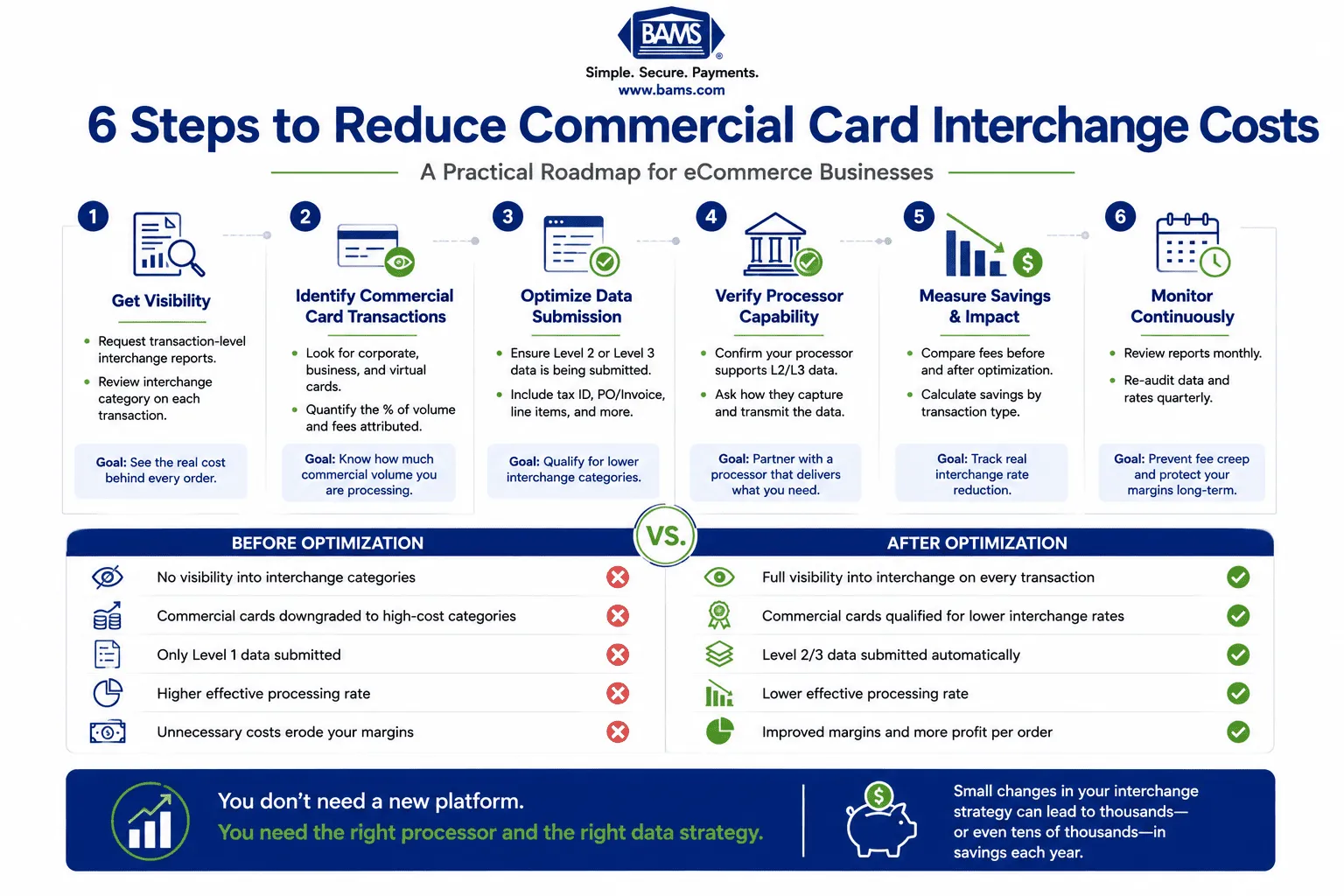
A practical roadmap showing how businesses can uncover hidden commercial card processing costs, optimize data submission, and reduce interchange fees without replacing their existing payment platform.
Scenario A: The Specialty Retailer Who Didn’t Know
An online retailer selling industrial supplies processes $80,000 per month. Their statement shows an effective rate of 2.75%. They assume this is normal. A transaction-level audit reveals that 22% of their volume comes from corporate purchasing cards and virtual cards issued by procurement platforms. Those transactions are all downgrading to EIRF because the processor submits only Level 1 data. The downgrade penalty averages 0.65% per transaction on that commercial volume. Annual cost: approximately $13,700 in avoidable interchange fees.
After switching to a processor that submits Level 3 data automatically, the same commercial transactions qualify at preferred rates. Their effective rate drops to 2.35% with no changes to their website, checkout flow, or gateway.
Scenario B: The DTC Brand With Surprise B2B Volume
A direct-to-consumer brand selling premium office furniture assumes their customer base is entirely individual buyers. A BIN analysis reveals that 18% of transactions use business credit cards, likely employees furnishing home offices on company cards. Virtual card transactions were valued at around $5 trillion globally, and much of that volume flows through standard eCommerce checkouts. The brand’s processor never flagged these as commercial transactions, and no enhanced data was submitted. Implementing Level 2 data submission alone (tax amount and order number as customer code) reduced interchange on those transactions by 0.30%, recovering over $5,000 annually.
Common Mistakes and Pitfalls
Trusting the statement as a complete picture. Your processing statement is a billing document, not a diagnostic tool. It tells you what you paid, not why you paid it or whether you should have paid less.
Assuming commercial cards don’t apply to you. If you sell anything that a business might buy (office supplies, furniture, electronics, software, equipment, even apparel for company events), commercial cards are in your mix. Mastercard’s commercial payments overview describes the range of business payment products used by organizations, including purchasing cards, corporate cards, and virtual cards.
Confusing gateway capability with processor execution. Your gateway may support Level 3 data fields. That doesn’t mean your processor is submitting them. Verify the full chain from platform to network.
Treating optimization as a one-time fix. Card network rules change. Platform updates can break data submission. Monitor monthly, not annually.
Chasing a lower quoted rate instead of structural transparency. A low flat rate with hidden downgrades costs more than a transparent interchange-plus model with proper data submission.
What to Do Next
Start with one action: ask your processor for a transaction-level interchange report covering the last three months. Not the summary. Not the monthly statement. The actual interchange category assigned to each transaction. If they can provide it, look for downgraded categories on commercial card types. If they can’t provide it, that tells you something important about the relationship.
You don’t need to overhaul your payments infrastructure today. You need visibility. Once you can see which transactions are costing more than they should and why, the path to reducing those costs becomes straightforward. Use this guide as a reference point, not a checklist to complete in a single sitting. Revisit it as your transaction volume grows and your card mix evolves.
The gap between what your statement shows and what you’re actually paying is real. Closing it starts with asking better questions of your processor, and knowing which answers to accept.
Frequently Asked Questions
What is Level 3 data in merchant services?
Level 3 data is the most detailed tier of transaction information submitted to card networks. It includes line-item detail such as product descriptions, quantities, unit costs, commodity codes, and freight amounts. When submitted on commercial card transactions, Level 3 data qualifies those transactions for the lowest available interchange rates, reducing your processing costs significantly compared to Level 1 (basic) or Level 2 (tax and customer code) submissions.
How do I know if I’m processing commercial card transactions?
Most eCommerce merchants can’t tell from their standard processing statement alone. You need a transaction-level interchange report that shows the BIN (Bank Identification Number) data for each card used. BIN data reveals whether a card is consumer, business, corporate, or purchasing. You can also look for interchange categories labeled “Commercial,” “Business,” “Purchasing,” or downgrade indicators like “EIRF” or “Standard” on your statement. For more detail, review this guide on signs that corporate purchasing cards are hidden in your sales.
Why are commercial card transactions more expensive to process?
Commercial cards carry higher base interchange rates than consumer cards because they offer additional benefits to the cardholder (rewards, expense tracking, extended payment terms). However, card networks offer lower interchange rates on commercial cards when merchants submit enhanced data (Level 2 or Level 3) that helps the issuing bank with reporting and reconciliation. Without that data, transactions default to the highest interchange tier for that card type.
Do I need to change my payment gateway or eCommerce platform to submit Level 3 data?
In most cases, no. Your eCommerce platform already captures the data fields required for Level 2 and Level 3 processing (tax amounts, order numbers, line-item details). The key factor is whether your processor is configured to pull that data from your transactions and submit it to the card networks. Some processors handle this automatically without requiring any platform or gateway changes on your end.
What’s the difference between interchange-plus pricing and flat-rate pricing?
Interchange-plus pricing shows you the actual interchange rate on each transaction plus a fixed processor markup. This makes downgrades and commercial card costs visible. Flat-rate pricing charges you the same percentage regardless of card type, which means the processor absorbs or profits from interchange variations without transparency. For merchants with commercial card volume, interchange-plus pricing is essential for identifying and reducing hidden costs.
Which types of transactions are eligible for Level 3 interchange rates?
Level 3 interchange rates apply primarily to commercial card types: corporate cards, purchasing cards, business credit cards, and virtual cards issued through corporate expense platforms. Consumer credit and debit cards are not eligible for Level 3 interchange rates. The savings opportunity exists specifically on the commercial card portion of your transaction mix, which is why identifying that volume is the critical first step.


