Faster Deposits for eCommerce: Payment Setup Guide
Configure next-day funding and boost authorization rates to 95% with this step-by-step implementation system
Learn to cut your payment-to-bank timeline from days to hours. This tutorial walks you through gateway configuration, authorization rate optimization, and automated recovery workflows.
TL;DR
- Enable next-day funding in your processor settings and verify your bank account details are current to eliminate the most common deposit delay.
- Improve authorization rates by 8-15% through automatic card updaters, smart retry logic, and network tokenization in your payment gateway.
- Automate customer payment recovery with dunning sequences that retry failed payments and notify customers, recapturing 20-40% of declined transactions.
- Align settlement timing with your processor’s batch cut-off (typically 4-6 PM Eastern) to ensure same-day transactions hit the next deposit cycle.
- Add digital wallet payments for higher authorization rates and reduced fraud flags that can trigger deposit holds.
What You Will Achieve: Faster Access to Your eCommerce Revenue

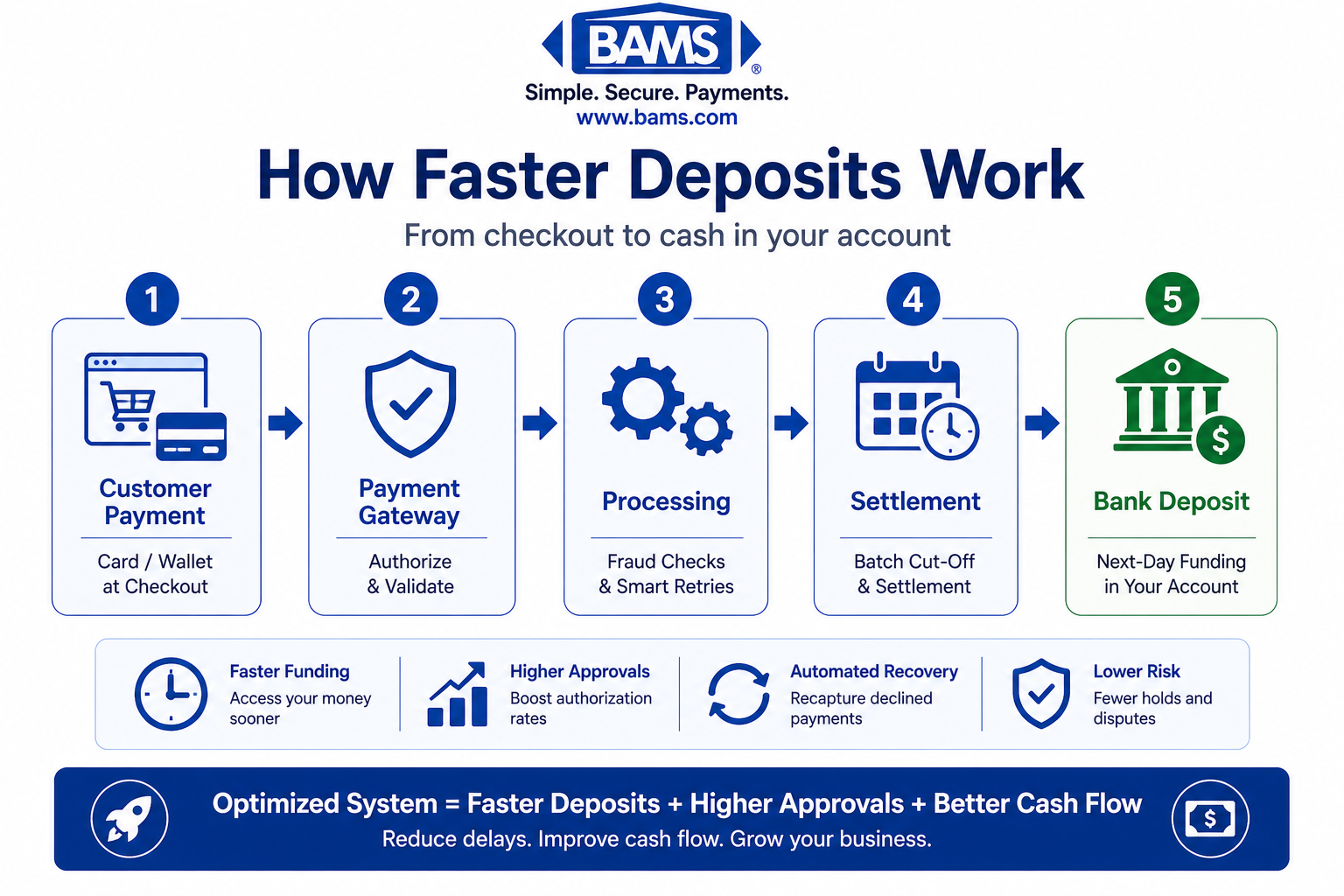
A simplified payment system flow showing how optimized gateway settings and funding configurations reduce the time from transaction to deposit.
By the end of this tutorial, you will have implemented a complete system for faster deposit strategies that cuts your payment-to-bank timeline from days to hours. You will configure next-day funding, optimize your payment gateway settings, and establish processes that improve your authorization rate improvement by 15-25%.
Your success criteria are clear: deposits hitting your account within 24 hours of transaction, authorization rates above 95%, and a documented customer payment recovery workflow that recaptures failed transactions automatically. These changes directly impact your cash flow and reduce the operational headaches that come with delayed deposits.
Prerequisites and Setup Checklist
Before you begin, confirm you have these items ready. Missing any of these will create blockers mid-process.
- Merchant account access with admin privileges to modify settings
- Payment gateway dashboard login (Stripe, Authorize.net, or similar)
- Bank account verified for ACH deposits with your processor
- Transaction history export from the last 90 days (CSV format)
- Current authorization rate data from your processor’s reporting dashboard
- SSL certificate active on your checkout pages
Time estimate: 2-3 hours for initial setup, plus 1 hour weekly for optimization during the first month. The main blocker most eCommerce managers encounter is outdated banking information on file, so verify this first.
Why This Approach Works for eCommerce Deposit Acceleration
Delayed deposits stem from three sources: batch processing schedules, high decline rates triggering holds, and manual review queues. This tutorial addresses all three simultaneously rather than treating them as separate problems.
Alternative approaches like switching processors entirely or negotiating custom terms take months. The method here uses your existing infrastructure with configuration changes that produce results within days. Core deposit growth at U.S. commercial banks accelerated to 4% in 2025, indicating that optimized deposit strategies are becoming standard practice.
Expect moderate difficulty if you have basic familiarity with your payment dashboard. The technical steps are straightforward, but you will need to make decisions about risk tolerance and funding speed tradeoffs.
Step 1: Audit Your Current Deposit Timeline
Action: Export your last 90 days of transactions and calculate your actual deposit timeline.
Log into your payment processor dashboard. Navigate to Reports, then Payouts or Deposits. Export all transactions with these fields: transaction date, settlement date, deposit date, amount, and status. Open the export in a spreadsheet and add a column calculating days between transaction and deposit. Card payments include interchange fees, network assessments, and processor charges, which together determine how funds move through the payment system and impact merchant cash flow as outlined by the Federal Reserve.
Expected result: You should see your average deposit delay in days. Most processors without optimization show 2-4 business days. If you see 5+ days consistently, flag those transactions for review in Step 7.
Common failure: Export shows “pending” status without dates. Fix: Contact your processor to request access to settlement-level reporting, which may require a support ticket.

A before-and-after comparison showing how optimizing your payment setup reduces deposit timelines and improves cash flow.
Step 2: Enable Next-Day Funding Settings
Action: Configure your merchant account for the fastest available funding option.
In your processor dashboard, navigate to Settings, then Payout Schedule or Funding Options. Look for options labeled “Fast Payout,” “Instant Deposit,” or “Next-Day Funding.” Select the fastest option available for your account tier. Confirm your bank account details are current, including routing number and account number verification. Configuring guaranteed next day funding ensures transactions settle into usable cash within the next business day instead of sitting in standard processing delays.
Expected result: Your payout schedule should now show “T+1” or “Next Business Day” as the default. Some processors charge 0.5-1% for this feature, so note any fee changes displayed.
Common failure: Option grayed out or unavailable. Fix: This typically means your account needs additional verification. Submit updated business documentation (EIN letter, bank statement) through the verification portal. Banks using streamlined processes achieved 288% increases in completed applications by reducing friction, and the same principle applies to merchant verification.
Step 3: Optimize Your Payment Gateway for Authorization Rate Improvement
Action: Configure retry logic and network tokenization in your integrated payment gateway settings.
Access your gateway’s advanced settings. Enable “Automatic Retry” or “Smart Retries” for soft declines. Set retry attempts to 3 over 24 hours. Enable network tokenization if available (this replaces card numbers with tokens that update automatically when cards are reissued). Turn on “Account Updater” services to automatically refresh expired card data.
Expected result: Your gateway should show these features as “Active” in the configuration summary. Authorization rates typically improve 8-15% within 30 days of enabling these features.
Common failure: Error message “Feature requires PCI compliance verification.” Fix: Complete the Self-Assessment Questionnaire (SAQ) in your processor’s compliance portal. Most eCommerce setups qualify for SAQ A or SAQ A-EP, which take 30-60 minutes to complete.
Step 4: Implement Address Verification and CVV Matching
Action: Strengthen fraud protection to reduce holds and manual reviews that delay deposits.
In your gateway settings, locate Fraud Tools or Risk Settings. Set AVS (Address Verification System) to require “Partial Match” minimum. Enable CVV/CVC requirement for all transactions. Configure velocity checks to flag (not block) more than 3 transactions from the same IP in 10 minutes.
Expected result: Your fraud filter summary should show AVS and CVV as “Required.” This reduces false positives that trigger deposit holds while maintaining security. Strong chargeback prevention strategies also keep your account in good standing with faster funding eligibility.
Common failure: Legitimate orders blocked after enabling strict AVS. Fix: Change AVS setting from “Exact Match Required” to “Partial Match Accepted,” which allows transactions where street number matches but zip code differs slightly.
Step 5: Configure Real-Time Transaction Monitoring
Action: Set up alerts that notify you of authorization issues before they accumulate.
Navigate to Notifications or Alerts in your processor dashboard. Create alerts for: authorization rate dropping below 90%, single transaction declines over $500, and daily decline count exceeding 10. Set delivery to email and SMS for critical alerts. Enable the daily summary report sent to your operations email. Modern payment infrastructure improves transaction visibility and settlement timing, enabling businesses to identify issues earlier and manage deposit speed more effectively according to Modern Treasury.
Expected result: You should receive a test notification confirming alert setup. These alerts let you address issues same-day rather than discovering problems in weekly reports.
Common failure: Alerts not triggering despite test transactions. Fix: Check that your notification email is not in the spam folder. Add your processor’s sending domain to your email whitelist.
Step 6: Establish Customer Payment Recovery Workflows
Action: Build automated sequences that recover failed payments without manual intervention.
In your eCommerce platform (Shopify, WooCommerce, or similar), navigate to Settings, then Checkout or Payments. Enable “Abandoned Checkout Recovery” with email triggers at 1 hour, 24 hours, and 72 hours post-abandonment. For subscription or recurring payments, configure dunning management: retry failed payments on days 1, 3, and 7 with customer notification emails at each attempt.
Expected result: Your automation dashboard should show active recovery sequences. Platforms enabling streamlined processes reduce abandonment and accelerate acquisition, and recovery workflows apply this same principle to failed transactions.
Common failure: Recovery emails not sending. Fix: Verify your email service (Klaviyo, Mailchimp, or native platform email) is connected and has sending permissions enabled in your platform’s integration settings.
Step 7: Reduce Batch Processing Delays
Action: Adjust your settlement timing to align with processor cut-off times.
Contact your processor support or check documentation for their daily batch cut-off time (typically 4-6 PM Eastern). In your gateway settings, locate “Auto-Capture” or “Settlement Timing.” Enable same-day capture for all authorized transactions. If you manually capture payments, set a daily reminder 2 hours before cut-off to process pending authorizations.
Expected result: Transactions authorized before cut-off should appear in the next day’s deposit batch. Transactions after cut-off will appear in the following day’s batch.
Common failure: Authorizations expiring before capture. Fix: Reduce your authorization-to-capture window. Most authorizations expire in 7 days, but capturing within 24 hours ensures the best rates and prevents re-authorization requirements.
Step 8: Implement Level 2 and Level 3 Processing for B2B Transactions
Action: If you sell to businesses, configure enhanced data submission for faster processing and lower fees.
In your payment gateway, locate “Level 2/3 Processing” or “Enhanced Data” settings. Enable submission of: customer code, tax amount, item descriptions, and purchase order numbers. Configure your checkout or invoicing system to collect these fields from business customers.
Expected result: B2B transactions should show “Level 2” or “Level 3” qualification in your transaction details. These transactions process faster and qualify for interchange rate reductions of 0.5-1%.
Common failure: Transactions not qualifying despite data submission. Fix: Verify all required fields are populated. Missing tax amount or customer code are the most common disqualifiers. Check your gateway’s Level 3 requirements documentation for the complete field list.
Step 9: Add Digital Wallet Payment Options
Action: Enable Apple Pay, Google Pay, and Shop Pay to increase authorization rates through tokenized payments.
In your eCommerce platform, navigate to Payment Methods. Enable each digital wallet option and complete the verification process (Apple Pay requires domain verification, Google Pay requires business profile completion). Test each method with a small transaction to confirm functionality.
Expected result: Digital wallet buttons should appear at checkout. These payment methods have 5-10% higher authorization rates than manual card entry because they use biometric verification and tokenized credentials.
Common failure: Apple Pay showing “Domain Not Verified” error. Fix: Download the domain verification file from your payment processor, upload it to your website’s .well-known folder, and re-trigger verification in your processor dashboard.
Step 10: Review and Optimize Monthly
Action: Establish a recurring review process to maintain and improve your deposit velocity.
Schedule a monthly calendar reminder. During each review: export authorization rate trends, compare deposit timing week-over-week, review recovered payment totals from your dunning sequences, and check for any new funding options from your processor. Document changes and results in a simple spreadsheet tracking month, authorization rate, average deposit days, and recovered revenue.
Expected result: After 90 days, you should see measurable improvement in all three metrics. Most eCommerce businesses achieve 95%+ authorization rates and consistent next-day deposits within this timeframe.
Key Configuration Settings to Customize
Several settings in this tutorial have adjustable parameters. Here are the safe defaults and situations where you should change them.
- Retry attempts (default: 3): Increase to 5 for subscription businesses with high customer lifetime value. Reduce to 2 if you see customer complaints about multiple charge attempts.
- AVS strictness (default: Partial Match): Change to Exact Match only if you have high fraud rates from specific regions. Keep Partial Match for general eCommerce.
- Recovery email timing (default: 1h, 24h, 72h): Adjust based on your purchase urgency. High-urgency products (event tickets, limited items) benefit from faster sequences (30min, 4h, 24h).
- Velocity check threshold (default: 3 transactions/10 minutes): Increase for wholesale businesses where single buyers place multiple orders. Decrease for consumer products where this pattern indicates fraud.
Always test configuration changes during low-traffic periods and monitor for 48 hours before considering them stable.
Verification and Testing Procedures
Confirm your setup is working correctly with these tests.
Deposit timing test: Process a small transaction ($1-5) at 10 AM Eastern on a Tuesday. Track when funds appear in your bank account. With proper configuration, you should see the deposit by end of business Wednesday.
Authorization rate test: Use your processor’s test card numbers to simulate declines and verify retry logic triggers. Check that customer notification emails send correctly during the retry sequence.
Recovery workflow test: Abandon a cart with a test email address. Verify you receive recovery emails at the configured intervals. Click through and complete purchase to confirm the full flow works.
Edge cases to verify: transactions exactly at batch cut-off time, international card authorizations, and high-value transactions that may trigger fraud review. Test each scenario and document expected versus actual behavior.
Common Errors and How to Fix Them
Error: “Funding Delayed – Account Under Review”
Symptom: Deposits not appearing despite successful transactions. Cause: Sudden volume increase or high-value transactions triggered risk review. Fix: Contact processor support immediately with documentation of legitimate business activity. Provide recent invoices, shipping confirmations, or customer communications proving transaction validity.
Error: “Authorization Declined – Do Not Honor”
Symptom: Increasing decline rates with generic bank responses. Cause: Issuing banks flagging transactions due to missing data or suspicious patterns. Fix: Enable 3D Secure (Verified by Visa, Mastercard SecureCode) for transactions over $100. This shifts liability and increases issuer approval rates.
Error: “Settlement Failed – Invalid Account”
Symptom: Transactions authorized but not settling. Cause: Bank account details changed or verification expired. Fix: Re-verify your bank account through your processor’s dashboard. This typically requires micro-deposit verification (2-3 business days) or instant verification via bank login.
Error: “Retry Limit Exceeded”
Symptom: Recovery sequence stopping without successful charge. Cause: Card permanently invalid (closed account, reported stolen). Fix: Send final email offering alternative payment method. Include direct link to update payment information rather than relying on automated retries.
Error: “Digital Wallet Transaction Failed”
Symptom: Apple Pay or Google Pay declining despite valid card on file. Cause: Token refresh failed or domain verification expired. Fix: Re-verify domain ownership in processor dashboard. For persistent issues, ask customer to remove and re-add card to their digital wallet.
Next Steps and Extensions
With your faster deposit system operational, consider these extensions to further improve cash flow.
Recurring payments optimization: If you offer subscriptions, implement smart billing dates that align with customer paydays (1st and 15th of month) to reduce involuntary churn.
International expansion: Add local payment methods for key markets. European customers prefer SEPA and iDEAL; Asian markets favor Alipay and WeChat Pay. Local methods often have higher authorization rates than cross-border card transactions.
Real-time reporting integration: Connect your payment data to business intelligence tools for daily cash flow forecasting. This lets you make purchasing and staffing decisions based on confirmed incoming deposits rather than estimated revenue. Your optimized system positions you to capture this momentum.
Frequently Asked Questions
What are faster deposit strategies in merchant services?
Faster deposit strategies are configuration and process changes that reduce the time between customer payment and funds arriving in your bank account. These include enabling next-day funding, optimizing batch settlement timing, and improving authorization rates to avoid holds. Most eCommerce businesses can achieve next-day deposits with proper setup.
How can I improve my payment authorization rates?
Authorization rate improvement comes from multiple factors: enabling automatic card updater services, implementing smart retry logic for soft declines, adding digital wallet options, and using network tokenization. Proper AVS and CVV configuration also helps by reducing false fraud flags while maintaining security. Most businesses see 8-15% improvement within 30 days of implementing these changes.
Why do my deposits take longer than my processor advertises?
Advertised deposit times assume optimal conditions. Delays occur when transactions miss batch cut-off times, when fraud filters flag transactions for manual review, or when your account triggers risk holds due to unusual activity. Auditing your actual deposit timeline against transaction timestamps reveals which factor is causing your specific delays.
What is customer payment recovery and how does it work?
Customer payment recovery refers to automated systems that recapture failed transactions through retry logic and customer communication. When a payment declines, the system automatically attempts the charge again at optimal intervals while sending the customer emails about the issue. Effective recovery workflows recapture 20-40% of initially failed payments.
Will enabling faster funding cost me more in processing fees?
Some processors charge 0.5-1% additional for next-day or same-day funding. However, this cost is often offset by improved cash flow (reducing need for credit lines), higher authorization rates (reducing lost sales), and better interchange qualification through enhanced data submission. Calculate your cost of delayed capital against the funding fee to determine net benefit.
How do digital wallets improve deposit speed?
Digital wallets like Apple Pay and Google Pay use tokenized credentials with biometric verification, resulting in 5-10% higher authorization rates than manual card entry. Higher authorization rates mean fewer declined transactions, which reduces risk flags on your account and maintains your eligibility for fast funding programs.
Sources