

Interchange Fees on Apple Pay: A Cost Optimization Guide
Last Updated on August 12, 2026 by Dimitri Akhrin
How to diagnose interchange downgrades and stop overpaying on mobile wallet transactions
Learn why some Apple Pay transactions cost more than others and how to fix it. This guide covers interchange qualification tiers, data submission best practices, and processor-level optimizations that reduce your effective rate.
TL;DR
- Apple Pay isn’t free, it’s invisible – You still pay interchange, network assessments, and processor markup on every transaction. The wallet itself adds no fee, but the interchange tier your transaction lands in determines your real cost.
- Interchange downgrades are the main cost leak – Even secure Apple Pay transactions can qualify for more expensive interchange categories if required verification or settlement data isn’t submitted correctly. Regular gateway audits help prevent unnecessary processing costs.
- You need interchange-plus pricing to optimize anything – Flat-rate and tiered pricing hide the fee layers. Without visibility into interchange categories, you can’t identify or fix downgrades.
- Chargebacks inflate more than just dispute fees – A high dispute ratio can push your entire merchant account into more expensive processing tiers, raising costs on every transaction you process.
- Treat payment cost optimization as ongoing, not one-time – Interchange rates update twice yearly, gateway behavior can change with updates, and transaction patterns shift. Monthly statement reviews and quarterly audits protect your margins long-term.
Guide Orientation: What This Covers and Who It’s For
This guide shows eCommerce managers how to turn fewer chargebacks and smarter interchange qualification into real, measurable savings on Apple Pay and mobile wallet transactions. The focus is on the cost levers hiding beneath the surface of “Apple Pay is free for merchants,” specifically interchange fees, data submission practices, and processor-level optimizations that determine what you actually pay per transaction.
It’s written for managers at established online businesses (roughly 10 to 50 employees) who already accept Apple Pay or plan to, and who want to move beyond surface-level reassurances into genuine cost optimization. By the end, you’ll understand exactly why some Apple Pay transactions cost you more than others, how to diagnose interchange downgrades on your own statements, and what steps to take at the gateway and processor level to stop overpaying.
This guide does not cover Apple Pay setup tutorials, consumer-facing wallet marketing, or hardware selection for in-store tap-to-pay. It assumes you’re already processing transactions and want to reduce what each one costs.
Why Interchange Fees on Apple Pay Transactions Deserve Your Attention Now
The standard industry narrative says Apple Pay doesn’t charge merchants anything extra. That’s technically true. Apple doesn’t send you a bill. But the interchange tiers underneath every Apple Pay transaction quietly determine whether you’re paying 1.6% or 2.3% on the same $80 order. The difference compounds fast.
Consider the structural reality. Apple charges issuing banks approximately 0.15% (15 basis points) for each credit card transaction mediated through Apple Pay. Banks absorb that cost, but it influences the interchange rates they set.
Although Apple Pay itself does not add a merchant fee, every transaction still flows through the card networks and is subject to standard interchange, assessment, and processor fees. Mastercard Developers explains how digital wallet transactions continue to use the existing payment network infrastructure, meaning merchants benefit most by optimizing transaction qualification rather than focusing on the wallet itself.
The cost of inaction isn’t dramatic. It’s slow and invisible. An extra 0.3% to 0.5% per transaction doesn’t trigger alarms. It just quietly erodes your margins month after month, buried in processing statements most teams never audit. For a business running $80,000 in monthly Apple Pay volume, that hidden inflation can mean $240 to $400 in unnecessary fees every month, or $2,880 to $4,800 per year, for solving a problem you didn’t know existed.
Chargebacks compound this further. Every dispute carries its own fee (typically $20 to $100), but the less obvious cost is that high dispute ratios push your entire account into more expensive processing tiers. Fewer chargebacks don’t just save you dispute fees. They protect your interchange qualification across all transactions.
Core Concepts: The Fee Layers You Need to Understand
Interchange Is Not One Number
Interchange is the fee your acquiring bank pays the cardholder’s issuing bank on every transaction. Visa and Mastercard publish hundreds of interchange categories, each with different rates based on card type, merchant category, transaction method, and the data you submit. A Visa Signature rewards card processed as a standard eCommerce transaction costs more than a basic debit card processed with full AVS (Address Verification Service) data. The card networks set these rates, not your processor.
The Three-Layer Fee Stack
Every Apple Pay transaction you process includes three cost layers: interchange (paid to the issuing bank), network assessment fees (paid to Visa, Mastercard, or the relevant network, typically 0.13% to 0.15%), and your processor’s markup. Interchange fees for Apple Pay transactions typically fall between 0.5% and 2.5%, with processor markups adding another 0.2% to 1.0%. Understanding which layer is inflating your costs is the first step to controlling them.
PCI Security Standards Council explains that EMV payment tokens replace the underlying card number during transactions, but merchants still process payments through the existing card network infrastructure. Tokenization improves payment security without changing the underlying interchange and assessment fee structure.
Interchange Downgrade: The Silent Cost Inflator
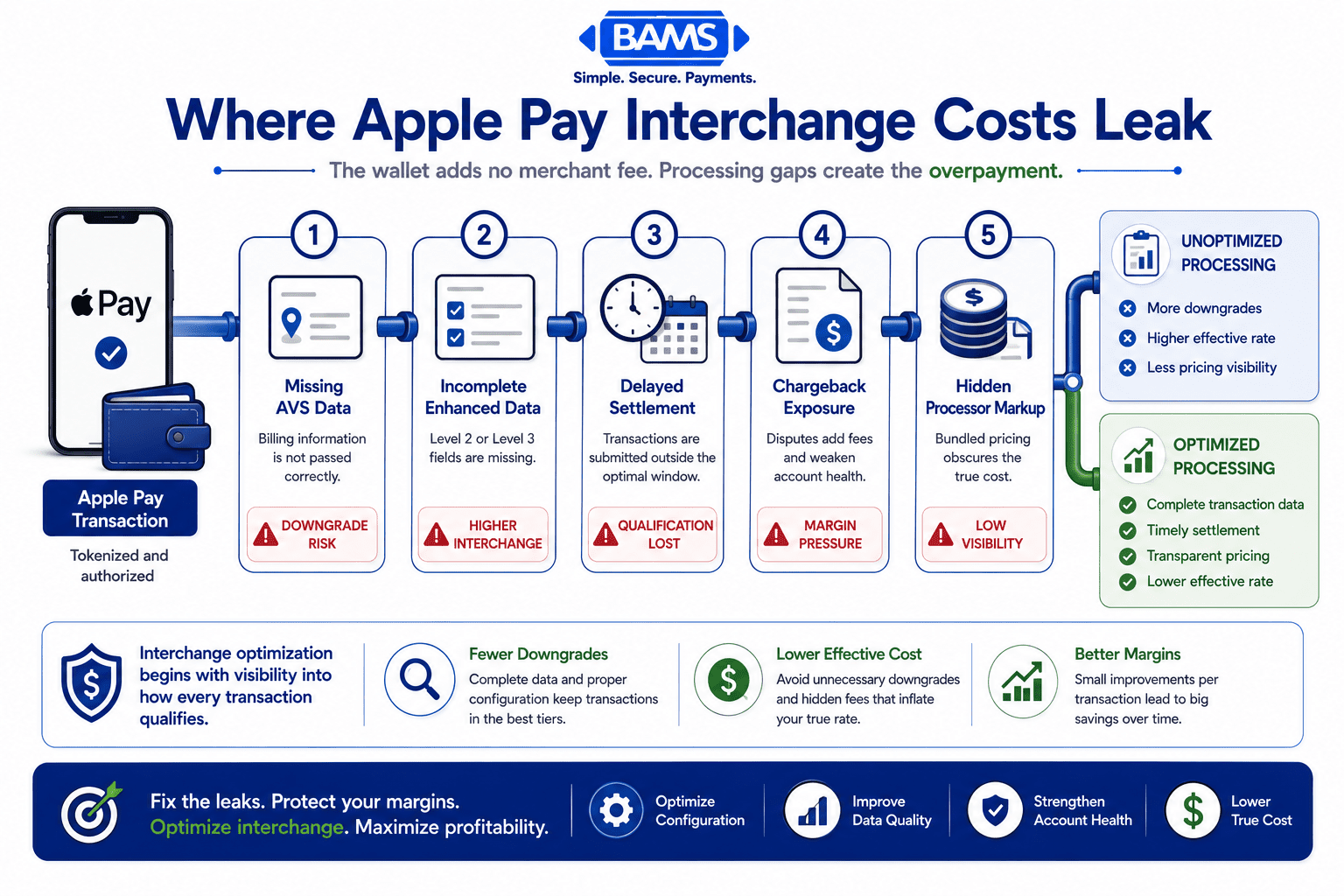
A “downgrade” happens when a transaction fails to meet the data requirements for its best available interchange tier and gets reassigned to a more expensive one. Common causes include missing AVS data, delayed settlement, or incomplete transaction records. Downgrades are the primary mechanism through which Apple Pay transactions cost more than they should. They aren’t a penalty. They’re the default when your system doesn’t submit the right information.
Tokenization vs. Data Completeness
Apple Pay uses tokenization to replace card numbers with device-specific tokens (called MPANs, or Merchant Payment Account Numbers). This is excellent for security and reducing fraud-related chargebacks. But tokenization can also strip out data fields your gateway needs to submit for optimal interchange qualification. The security benefit and the cost optimization challenge are two sides of the same coin.
The Framework: Where Your Real Savings Come From

Apple Pay does not add a separate merchant fee, but incomplete data and processing downgrades can quietly increase the cost of each transaction.
Cost optimization on Apple Pay transactions follows a four-stage process. Each stage targets a different layer of the fee stack, and they build on each other sequentially.
- Stage 1: Visibility — Get interchange-plus pricing so you can see what you’re actually paying at each layer, instead of a blended rate that hides downgrades.
- Stage 2: Data Integrity — Ensure your gateway and payment integration submit complete transaction data (AVS, Level 2/3 fields, settlement timing) so transactions qualify for the best available tier.
- Stage 3: Chargeback Reduction — Lower your dispute ratio to protect your merchant account standing, avoid penalty rate tiers, and recover revenue that would otherwise be lost.
- Stage 4: Ongoing Monitoring — Audit your processing statements monthly to catch new downgrades, rate changes, or processor markup creep before they accumulate.
These stages aren’t a one-time project. They form a continuous cycle. The businesses that save the most treat interchange optimization as an operational discipline, not a setup task.
Step-by-Step: Turning Fewer Chargebacks and Better Data Into Real Savings
Step 1: Switch to Interchange-Plus Pricing (or Verify You’re Already On It)
Objective: See the actual interchange rate, network assessment, and processor markup on every transaction, separated into distinct line items.
Flat-rate and tiered pricing models bundle all three fee layers into a single percentage. This makes your statement simpler, but it also makes optimization impossible. You can’t fix what you can’t see. If your processor charges you a flat 2.9% + $0.30 on every Apple Pay transaction, you have no way to know whether the interchange component was 1.5% or 2.3%, and no way to act on the difference.
Interchange-plus pricing separates the interchange rate (set by the card network, non-negotiable) from your processor’s markup (negotiable). This transparency is the foundation of every other step in this guide. Ask your processor for a sample interchange-plus statement. If they resist or claim their tiered model is “simpler and cheaper,” that’s a signal worth investigating.
Anti-patterns: Accepting a processor’s assurance that your blended rate is “competitive” without seeing the underlying interchange data. Comparing your flat rate to another processor’s flat rate without understanding the interchange mix underneath each one.
Success indicators: You can identify the specific interchange category (e.g., Visa CPS/eCommerce Preferred) applied to each Apple Pay transaction on your monthly statement. You can see your processor’s markup as a separate, identifiable line item.
Step 2: Audit Your Gateway for Data Stripping on Tokenized Transactions
Objective: Confirm that your payment gateway passes complete AVS data, transaction descriptors, and required fields on Apple Pay transactions, even though the card number itself is tokenized.
This is where most eCommerce businesses lose money without realizing it. Apple Pay replaces the customer’s actual card number with a device-specific token (MPAN). This tokenization is great for security, but some gateway configurations strip out AVS data or fail to pass billing address information when processing tokenized transactions. Without that data, the transaction gets downgraded to a more expensive interchange tier.
Proper gateway configuration to prevent AVS data stripping in tokenized Apple Pay transactions can save 0.2% to 0.5% per transaction. On $80,000 in monthly Apple Pay volume, that’s $160 to $400 per month recovered, just from a configuration fix. One eCommerce retailer discovered that 40% of their Apple Pay orders downgraded to a higher interchange tier due to missing AVS data, costing an extra 0.4% per transaction ($320/month).
Contact your gateway provider and ask specifically: “When a customer pays with Apple Pay, does the transaction submission include AVS response codes, billing zip code, and full address data?” If they can’t confirm, request a test transaction and review the authorization response.
Anti-patterns: Assuming tokenization automatically handles data completeness. Testing only traditional card transactions and assuming Apple Pay behaves identically through your gateway.
Success indicators: AVS match codes appear on Apple Pay transaction records in your gateway dashboard. Your interchange qualification report shows Apple Pay transactions landing in the same tier as equivalent non-tokenized card-not-present transactions.
Step 3: Submit Level 2 and Level 3 Data Where Applicable
Objective: Qualify for lower interchange rates on B2B and high-value transactions by submitting enhanced transaction data beyond the standard fields.
Level 2 data includes tax amount, customer code, and merchant postal code. Level 3 data adds line-item detail: product descriptions, quantities, unit costs, and commodity codes. Visa and Mastercard offer significantly lower interchange rates for transactions that include this data, particularly on commercial, corporate, and purchasing cards.
If your eCommerce business sells to other businesses (even occasionally), you’re likely processing commercial cards without submitting the data required to qualify for the best rate. The difference between a standard commercial card rate and a Level 3 qualified rate can be 0.5% to 1.0% per transaction. For a deeper look at how to identify Level 2/3 qualification gaps on your processing statement, review your statement for transactions categorized as “EIRF” (Electronic Interchange Reimbursement Fee) or “Standard,” which typically indicate missing data.
Not every gateway supports Level 3 data submission natively. Some require middleware or API-level integration. Before investing in a technical solution, quantify the opportunity: pull three months of statements, identify the volume of commercial card transactions, and calculate the potential savings at the improved rate.
Anti-patterns: Submitting Level 2/3 data on consumer card transactions where it doesn’t affect interchange qualification (wasted effort, no savings). Implementing Level 3 data submission without first confirming your processor can pass it through to the card networks.
Success indicators: Commercial card transactions on your statement show Level 2 or Level 3 interchange categories instead of Standard or EIRF. Your effective rate on B2B transactions drops measurably within one billing cycle.
Step 4: Reduce Chargebacks to Protect Your Rate Tier and Recover Revenue
Objective: Keep your dispute ratio below card network thresholds and eliminate the direct and indirect costs chargebacks impose on your business.
Chargebacks cost you in three ways. First, the direct chargeback fee ($20 to $100 per dispute, depending on your processor). Second, the lost revenue from the disputed transaction itself. Third, and least visible, a high dispute ratio can push your merchant account into monitoring programs with higher per-transaction fees and reserve requirements. Visa’s Dispute Monitoring Program triggers at a 0.9% dispute ratio. Mastercard’s Excessive Chargeback Program triggers at 1.5%. Once you’re in these programs, your processing costs increase across all transactions, not just the disputed ones.
Apple Pay’s built-in tokenization and biometric authentication (Face ID, Touch ID) already reduce fraud-related chargebacks significantly compared to manual card entry. But “friendly fraud” (customers disputing legitimate purchases) and service-related disputes still occur. Proactive defense includes clear billing descriptors so customers recognize charges, automated delivery confirmation sharing, and rapid response to dispute alerts before they escalate to formal chargebacks.
Tools like BAMS’ proactive chargeback defense can help you respond to disputes faster and with better documentation, reducing the number that result in losses. The goal isn’t zero chargebacks (that’s unrealistic). It’s keeping your ratio low enough that it never triggers monitoring programs or inflates your effective rate.
Anti-patterns: Ignoring chargeback notifications because the individual amounts seem small. Treating chargebacks as a customer service problem rather than a cost-of-processing problem. Failing to track your dispute ratio as a percentage of total transactions.
Success indicators: Your dispute ratio stays below 0.65% (well under Visa’s 0.9% threshold). Your chargeback fees as a line item on your processing statement trend downward over three consecutive months. You can document the revenue recovered through successful dispute responses.
Step 5: Settle Transactions Within 24 Hours
Objective: Avoid interchange downgrades caused by delayed batch settlement and accelerate cash flow simultaneously.
Card networks require transactions to be settled (batched and submitted for funding) within specific timeframes to qualify for the best interchange rates. Visa, for example, requires settlement within 24 hours for most eCommerce interchange categories. If your system batches transactions once daily but the batch runs at an inconsistent time, or if weekend transactions sit unsettled until Monday, those transactions can downgrade.
Configure your payment gateway to auto-settle batches every 24 hours, ideally at a consistent time each day. Verify that Apple Pay transactions are included in your standard batch process and aren’t queued separately or delayed by tokenization processing. Some gateways treat tokenized transactions differently in their batch logic.
Faster settlement also means faster funding. If your processor supports next-day funding, settling within 24 hours means you see that cash in your account the following business day instead of waiting two to three days. This directly improves your working capital position, especially during high-volume periods.
Anti-patterns: Manual batch settlement that depends on someone remembering to close the batch. Assuming your gateway auto-settles when it’s actually configured for manual mode. Ignoring weekend and holiday settlement gaps.
Success indicators: Your gateway logs show consistent daily batch settlements with no gaps exceeding 24 hours. Interchange qualification reports show zero downgrades attributed to late settlement. Your bank account reflects next-day deposits consistently.
Step 6: Monitor Your Processing Statements Monthly for Rate Creep
A monthly statement audit helps merchants identify interchange downgrades, unexplained fees, and data gaps before they accumulate into significant processing costs.
Objective: Catch new interchange downgrades, processor markup increases, and emerging cost patterns before they accumulate into significant losses.
Interchange rates aren’t static. Visa and Mastercard update their interchange schedules twice per year (typically April and October). Your processor can also adjust their markup with notice. If you optimize your setup once and never revisit it, you’ll gradually drift back toward overpaying as rates shift and transaction patterns change.
Build a simple monthly review process. Pull your interchange qualification summary (your processor should provide this, or you can request it). Look for three things: transactions categorized as “Downgrade” or “Standard” (indicating missing data), any new fee line items you don’t recognize, and changes to your processor’s per-transaction markup. Compare your effective rate (total fees divided by total volume) month over month. A jump of even 0.05% on significant volume warrants investigation.
If your processor doesn’t provide an interchange qualification summary, that itself is a problem. Transparent processors make this data accessible. BAMS, for instance, provides interchange-plus pricing with clear statement breakdowns that let you identify exactly where each transaction qualified, making this monthly review straightforward rather than forensic.
Anti-patterns: Only reviewing the total fee amount on your statement without examining the breakdown. Waiting until annual contract renewal to question rate changes. Delegating statement review to someone without context on interchange categories.
Success indicators: You maintain a simple tracking spreadsheet or dashboard showing your monthly effective rate, downgrade percentage, and chargeback ratio. You can identify and explain any month-over-month cost increase within 15 minutes of reviewing your statement.
Practical Examples: What This Looks Like in Real eCommerce Operations
Scenario A: The “Everything Looks Fine” Store
An online retailer processing $120,000/month accepts Apple Pay on 30% of orders ($36,000/month). Their flat-rate processor charges 2.9% + $0.30 per transaction. Monthly Apple Pay processing fees: approximately $1,044 plus per-transaction flat fees. The store owner assumes this is normal because “Apple Pay doesn’t charge extra.”
After switching to interchange-plus pricing, they discover that 35% of their Apple Pay transactions are downgrading due to missing AVS data. The downgraded transactions carry an interchange rate of 2.30% instead of the 1.80% they’d qualify for with complete data. That 0.50% difference on 35% of $36,000 ($12,600) equals $63/month in unnecessary interchange costs, plus the processor markup difference. After fixing the gateway configuration, their effective rate on Apple Pay transactions drops by 0.22% overall, saving $950/year on Apple Pay alone.
Scenario B: The B2B eCommerce Seller
A business selling industrial supplies online processes $200,000/month, with 15% coming from corporate purchasing cards. Without Level 3 data submission, those corporate card transactions ($30,000/month) process at standard commercial interchange rates of approximately 2.65%. With Level 3 data, they’d qualify at approximately 1.90%. The 0.75% difference on $30,000 equals $225/month, or $2,700/year, recovered through a data submission change that requires no change to the customer experience.
Common Mistakes and Pitfalls
The most common mistake is treating Apple Pay cost optimization as a one-time setup task. Interchange rates change, transaction patterns shift, and gateway updates can silently alter data submission behavior. Businesses that optimize once and walk away typically see their savings erode within six to twelve months.
Another frequent error is focusing exclusively on the processor markup while ignoring interchange qualification. Your processor’s markup might be a lean 0.15%, but if your transactions are consistently downgrading, you’re overpaying on the much larger interchange component. The leverage is in the data you submit, not just the rate you negotiate.
Finally, many eCommerce managers underestimate the cost connection between chargebacks and interchange. A rising dispute ratio doesn’t just cost you chargeback fees. It can push your entire account into more expensive processing tiers, inflating the cost of every transaction, including the ones that were never disputed. Treating chargeback reduction as an interchange optimization strategy, not just a customer service issue, is a mindset shift that pays for itself.
What to Do Next
Start with one action: pull your most recent processing statement and identify whether you’re on interchange-plus pricing. If you are, look for transactions labeled “Downgrade,” “Standard,” or “EIRF.” If you’re on flat-rate or tiered pricing, you won’t be able to see this data, and that’s your first problem to solve.
You don’t need to overhaul your entire payment stack at once. Fix the visibility problem first. Then audit your gateway’s data submission on Apple Pay transactions. Then address chargebacks. Each step builds on the last, and even completing just the first two can recover meaningful margin within a single billing cycle.
Revisit this guide quarterly, especially after Visa and Mastercard’s semi-annual interchange updates. Use it as a reference for your monthly statement review, not a checklist to complete and forget. The businesses that save the most on payment processing are the ones that treat it as an ongoing operational discipline rather than a vendor decision they made once.
Frequently Asked Questions
What fees do merchants actually pay when accepting Apple Pay?
Apple does not charge merchants directly. However, you still pay the same three-layer fee stack as any card transaction: interchange (0.5% to 2.5%, set by the card network), network assessment fees (0.13% to 0.15%), and your processor’s markup (0.2% to 1.0%). The total typically mirrors standard credit card processing costs of around 2.9% + $0.30, but the interchange component varies based on card type and the data your system submits.
How can merchants optimize costs specifically on Apple Pay transactions?
The primary lever is interchange qualification. Ensure your payment gateway passes complete AVS data on tokenized Apple Pay transactions, settle batches within 24 hours, and submit Level 2/3 data on commercial card transactions. These steps prevent interchange downgrades, which are the main reason Apple Pay transactions cost more than they should. Switching to interchange-plus pricing is the prerequisite, because you need visibility into which transactions are downgrading before you can fix them.
Why does Apple Pay help reduce fraud and chargeback costs?
Apple Pay uses device-specific tokenization (replacing the real card number with an MPAN) and biometric authentication (Face ID or Touch ID) for every transaction. This makes it significantly harder for fraudsters to use stolen card data. Fewer fraudulent transactions mean fewer chargebacks, which protects your dispute ratio and prevents your account from being pushed into more expensive monitoring programs with higher per-transaction fees.
How does Apple Pay compare to traditional credit card processing fees?
The total processing cost is typically identical. Apple Pay transactions go through the same card networks (Visa, Mastercard, Amex) and carry the same interchange rates as traditional card-not-present transactions. The difference is that tokenization can sometimes strip data fields your gateway needs for optimal interchange qualification, potentially causing downgrades that make Apple Pay transactions slightly more expensive if your system isn’t configured correctly.
What is an interchange downgrade and how do I spot one?
A downgrade occurs when a transaction fails to meet the data or timing requirements for its best available interchange rate and gets reassigned to a more expensive tier. On an interchange-plus statement, look for transactions categorized as “Standard,” “EIRF,” or explicitly labeled “Downgrade.” Common causes include missing AVS data, late batch settlement (beyond 24 hours), and incomplete transaction descriptors.
When should businesses actively promote Apple Pay to customers?
Promote Apple Pay when you’ve confirmed your gateway passes complete data on tokenized transactions and your interchange qualification is optimized. At that point, Apple Pay offers a faster checkout experience (higher conversion rates), stronger fraud protection (lower chargeback costs), and no additional merchant fees. Promoting it before your backend is configured correctly means you’re driving more volume through a potentially cost-inflated channel.


