

Cash Flow Planning: Build a Weekly Calendar
Map every payroll, ad spend, and supplier payment against your daily deposit timeline to eliminate cash gaps
Learn how to build a weekly cash flow calendar that aligns recurring financial obligations with your exact deposit dates. This step-by-step tutorial turns next-day funding into a scheduling input and adds a chargeback buffer so your outflows never outpace your inflows.
TL;DR
- Build a weekly cash flow calendar – Map every deposit and every obligation to the exact day of the week it hits your bank account. This closes the gap between tracking revenue and tracking spendable cash.
- Account for chargeback deductions explicitly – Chargebacks silently reduce your deposits. Add both an average and a peak chargeback row to stress-test whether your calendar survives a bad week.
- Compress your settlement lag – Switching from 3 to 5 day settlement to next-day funding can eliminate most daily deficit windows by shifting deposits earlier in the week, freeing up $20K to $40K in working capital for a $10K/day business.
- Optimize batch close timing – Closing your batch earlier in the evening gets transactions into the ACH processing window sooner, which can accelerate settlement by up to a full business day.
- Validate for two weeks before relying on it – Compare predicted deposits against actual bank deposits daily. Your calendar is accurate when predictions land within 10% of reality on at least 8 out of 10 business days.
What You Will Build: A Weekly Cash Flow Calendar That Absorbs Chargeback Disruptions

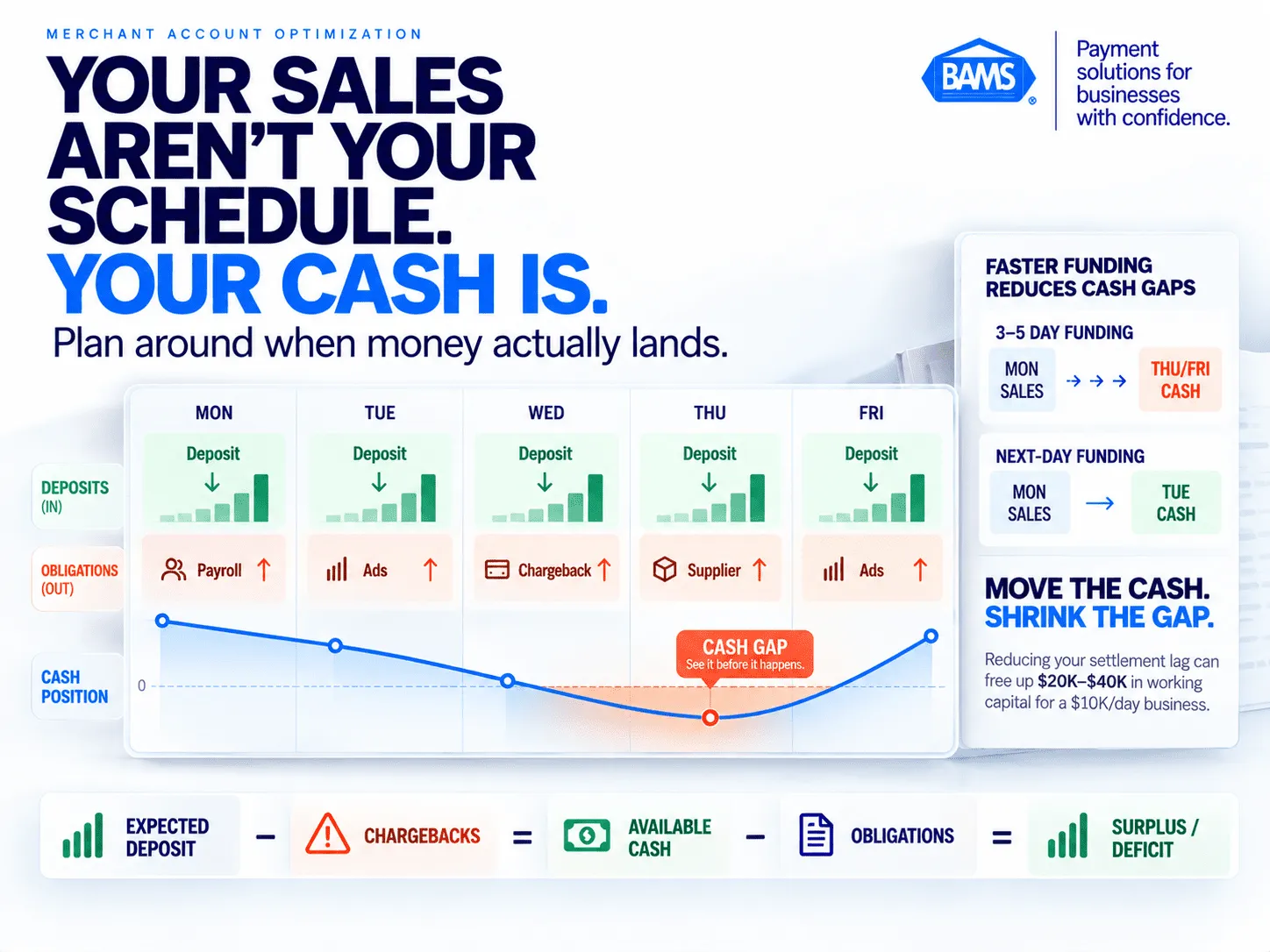
Revenue alone does not tell you whether cash will be available when an obligation comes due. A weekly cash flow calendar puts deposits, chargebacks and scheduled payments onto the same timeline.
By the end of this tutorial, you will have a working weekly cash flow calendar that maps every recurring financial obligation against the exact day funds hit your bank account. This calendar treats deposit timing as a scheduling input, not an abstract benefit, so you can slot payroll, ad spend, and supplier payments against a daily deposit timeline.
Cash flow pressure is often a timing problem rather than a revenue problem. The Federal Reserve has noted that many small businesses face working-capital constraints and that faster access to customer payments can reduce the need for short-term financing when capital is tied up in inventory and other operating needs. Chargebacks and other settlement deductions can make that timing mismatch harder to manage when they reduce expected deposits.
Your success criteria: a single spreadsheet (or tool) where you can see, for any given week, whether your confirmed deposits cover your confirmed obligations, with a buffer column that accounts for potential chargeback deductions. If the buffer column stays positive, your cash flow planning is working.
Prerequisites and Setup
Before you start, confirm you have the following in place. Missing any one of these will stall your progress.
- Spreadsheet tool: Google Sheets, Excel, or Airtable. Any will work. This tutorial uses Google Sheets syntax for formulas.
- Your payment processor dashboard login: You need access to daily batch reports, settlement dates, and chargeback records from the last 90 days.
- A list of recurring financial obligations: Payroll dates, supplier payment terms, ad platform billing cycles, SaaS subscriptions, tax remittance deadlines, and loan or credit line payments.
- Your average daily sales volume: Pull this from your ecommerce platform (Shopify, WooCommerce, BigCommerce) for the last 30 days.
- Your current settlement speed: Know whether your processor deposits in 1, 2, 3, or 5 business days.
- Historical chargeback data: Ideally 90 days of chargeback counts and dollar amounts, broken down weekly.
Time estimate: 90 to 120 minutes for initial setup. 15 minutes per week to maintain. The biggest potential blocker is incomplete chargeback records. If your processor does not provide granular chargeback reporting, request it before starting.
Why a Weekly Cash Flow Calendar Beats Monthly Forecasting
Monthly P&L statements tell you whether you made money. They do not tell you whether you can make payroll on Thursday. Revenue growth and cash availability are separate problems. The Federal Reserve has emphasized that faster access to customer payments can help small businesses manage cash flow when working capital is tied up in materials or inventory. A weekly calendar turns that timing problem into something you can see and plan around.
A weekly calendar solves this by compressing your view to the seven days where obligations actually come due. Chargebacks compound the problem because they are deducted from future deposits, not billed separately. One bad week of disputes can silently reduce your Wednesday deposit by 8 to 15%, and if Wednesday is when your supplier payment auto-debits, you have a shortfall you did not see coming.
This tutorial walks you through building that visibility layer. The difficulty level is intermediate: you need comfort with basic spreadsheet formulas and an understanding of your payment processing workflow. No coding required.
Step-by-Step: Building Your Cash Flow Calendar With Chargeback Buffers
A weekly cash flow calendar turns deposit timing into something operators can plan around. Map what arrives, subtract chargeback exposure, schedule obligations and track the cumulative position throughout the week.
Step 1: Create Your Weekly Calendar Template
Open a new Google Sheet. In Row 1, create column headers for each day of the business week: Monday, Tuesday, Wednesday, Thursday, Friday. Add a “Weekend” column if you process weekend transactions that settle on Monday.
In Column A, create the following row labels:
Row 2: Expected Deposits
Row 3: Chargeback Deduction Estimate
Row 4: Net Available Funds
Row 5: Payroll
Row 6: Supplier Payments
Row 7: Ad Spend (Auto-billed)
Row 8: SaaS / Subscriptions
Row 9: Tax Remittance
Row 10: Loan / Credit Payments
Row 11: Total Obligations
Row 12: Daily Surplus / Deficit
Row 13: Cumulative Weekly Position
Expected result: A clean grid with 13 rows and 5 to 6 columns. Checkpoint: Every obligation category your business has should appear in Rows 5 through 10. Add rows if you have additional recurring costs (warehouse fees, shipping invoices, etc.).
Common failure: Lumping all obligations into one row. This hides which specific payment causes a deficit on which specific day. Keep them separated.
Step 2: Map Your Deposit Timeline to Specific Days
Log into your payment processor dashboard. Pull your last 30 days of batch settlement data. For each batch, note: (a) the date transactions were processed, and (b) the date funds actually appeared in your bank account.
Calculate your effective settlement lag. If you batch at 10 PM on Monday and funds arrive Wednesday morning, your lag is 2 business days. Record this number. It determines which column your Monday sales revenue lands in.
Now fill in Row 2 (Expected Deposits) using your average daily sales volume, shifted by your settlement lag. If your average daily volume is $8,000 and your lag is 2 days, Monday’s sales appear in Wednesday’s deposit column.
Checkpoint: Your Row 2 totals for the week should roughly match your weekly revenue. If the number looks low, you may have missed weekend batches that settle midweek.Common failure: Assuming deposits arrive the same day as sales. The OCC explains that the timing of payments to merchants is specified in the agreement between the acquiring bank and the merchant and that acquiring banks commonly pay merchants through ACH credits. Use your actual settlement history and merchant agreement to determine the lag that belongs in your calendar.
Step 3: Calculate Your Weekly Chargeback Deduction Estimate
Pull your chargeback data from the last 90 days. Calculate two numbers:
- Average weekly chargeback dollar amount: Total chargebacks over 90 days divided by ~13 weeks.
- Peak weekly chargeback dollar amount: The single worst week in that 90-day window.
In Row 3 (Chargeback Deduction Estimate), distribute your average weekly chargeback amount across the days when your processor typically deducts disputes. Most processors deduct chargebacks from the next available settlement batch. Check your processor’s documentation or call support to confirm which day deductions post.
For your buffer calculation later, you will use the peak number. For now, enter the average.
Checkpoint: Row 3 values should be negative numbers. If your average weekly chargebacks are $1,200 and they typically post on Tuesdays and Thursdays, enter -$600 in each of those columns.
Common failure: Ignoring chargebacks entirely because “they are small.” Even a 1% chargeback rate on $10,000 daily volume is $700 per week disappearing from your deposits. Over a month, that is $2,800 you planned to spend but did not have. For a deeper look at how chargebacks create hidden borrowing exposure, see 7 Chargeback Triggers That Force Unnecessary Borrowing.
Step 4: Compute Net Available Funds Per Day
In Row 4, enter a simple formula for each day column:
=Expected Deposits + Chargeback Deduction Estimate
In Google Sheets, if Monday’s Expected Deposits are in B2 and Chargeback Deduction is in B3, your formula in B4 is:
=B2+B3
(Since B3 is negative, this effectively subtracts the chargeback amount.)
Expected result: Row 4 shows the actual cash you can count on each day. This is your real number, not your gross sales number.
Checkpoint: Row 4 values should always be lower than Row 2. If they are equal, you either have zero chargebacks (unlikely) or forgot to enter Row 3 data.
Step 5: Slot Every Financial Obligation to Its Exact Due Date
This is the most important step. Open your accounts payable records, payroll schedule, ad platform billing settings, and subscription invoices. For each obligation, determine the exact day of the week it debits your account or must be paid.
Enter each obligation amount as a negative number in the appropriate day column and category row (Rows 5 through 10). Be precise:
- Payroll: If you run biweekly payroll on Fridays, enter the full amount in Friday’s column on payroll weeks. Enter $0 on off weeks.
- Supplier payments: If your supplier terms are Net 15 and the invoice date was the 1st, payment is due the 16th. Find which day of the week that falls on.
- Ad spend: Google Ads and Meta typically auto-bill when you hit a threshold or on a monthly cycle. Check your billing settings for the exact trigger.
- SaaS subscriptions: These usually bill on a fixed calendar date. Map it to the corresponding weekday.
Checkpoint: Row 11 (Total Obligations) should sum Rows 5 through 10 for each day. The week’s total obligations should match your typical weekly outflow within 5%.
Common failure: Forgetting variable obligations like ad spend thresholds. If Meta bills you $2,000 when you hit your spend cap on a random Tuesday, and you did not account for it, Tuesday shows a surprise deficit. Review your financial obligations holistically rather than only tracking the obvious ones.
Step 6: Calculate Daily Surplus or Deficit
In Row 12, for each day column, enter:
=Net Available Funds + Total Obligations
Since obligations are negative, a positive result means you have more cash arriving than leaving. A negative result means you are short that day.
Expected result: Some days will be positive, others negative. That is normal. The goal is not to be positive every single day. It is to see the pattern and plan around it.
Checkpoint: If every single day shows a deficit, either your business is spending more than it earns (a bigger problem) or you have a data entry error. Double-check Row 2 deposits and Row 11 obligations.
Step 7: Build the Cumulative Weekly Position Row
Row 13 is your running total. Monday’s value equals Monday’s surplus/deficit. Tuesday’s value equals Monday’s cumulative position plus Tuesday’s surplus/deficit. The formula for Tuesday (Column C) looks like this:
=B13+C12
Drag this formula across through Friday. The final number in Row 13 tells you whether the week ends with cash in hand or a shortfall.
Expected result: A line that dips and rises through the week. The critical insight is where it dips below zero. That is your vulnerability window.
Common failure: Not starting Monday’s cumulative position with your actual opening bank balance. Add a “Starting Balance” cell above the calendar and include it in Monday’s cumulative formula: =StartingBalance+B12. Without this, the cumulative row is relative, not absolute.
Step 8: Add a Chargeback Stress-Test Row
Duplicate Row 3 and relabel it “Peak Chargeback Scenario.” Replace the average chargeback amounts with your peak weekly chargeback amounts from Step 3. Then create a parallel Row 4 (“Stressed Net Funds”) and parallel Rows 12 and 13 that use the peak numbers instead of averages.
This gives you two views of every week: the expected case and the worst recent case. If your cumulative position stays positive even under the peak chargeback scenario, your calendar is resilient. If it goes negative, you know exactly which day breaks and which obligation causes the breach.
Checkpoint: The gap between your expected and stressed cumulative positions reveals your chargeback exposure in dollar terms. Write this number down. It is the amount of buffer you need.
Step 9: Compress Your Settlement Lag to Shrink Vulnerability Windows
Look at your calendar. Every deficit day exists because obligations hit before deposits arrive. One direct way to fix this: reduce your settlement lag. If you are currently on 3 to 5 day settlement, switching to next-day funding shifts every deposit column 2 to 4 days earlier.
For a brand doing $10K per day, next-day funding can create $20K to $40K in additional working capital without borrowing. In your calendar, this means Monday’s sales land in Tuesday’s deposit column instead of Thursday’s. Obligations that used to cause Wednesday deficits now have Tuesday deposits backing them.
If your current processor does not offer next-day funding, BAMS provides next-day funding alongside proactive chargeback defense, which addresses both the deposit timing and the chargeback deduction variables in your calendar simultaneously.
Checkpoint: Re-run your calendar with a 1-day settlement lag. Count how many deficit days disappear. If the answer is “most of them,” your cash flow problem is primarily a timing problem, not a revenue problem.
Step 10: Optimize Batch Timing on Your Ecommerce Platform
Your batch close time affects when transactions enter the settlement queue. Most ecommerce platforms default to a batch close time set by the processor, but you can often adjust it.
- Shopify: Batch timing is managed by Shopify Payments or your third-party gateway. If using a third-party gateway, check your gateway dashboard for batch auto-close settings.
- WooCommerce: Batch timing depends on your payment gateway plugin. Look for “settlement” or “batch” settings in the plugin configuration.
- BigCommerce: Similar to WooCommerce. Check your gateway provider’s dashboard.
The rule: Close your batch as early in the evening as possible. A batch that closes at 7 PM Eastern typically settles one business day faster than one that closes at 11 PM Eastern, because it enters the ACH network’s processing window earlier.
Common failure: Closing batches too early and missing late-evening orders, which then roll into the next day’s batch. Find the sweet spot: late enough to capture peak evening orders, early enough to hit the settlement cutoff.
Configuration and Customization
Key Variables to Adjust for Your Business
Your calendar is only as accurate as your inputs. Here are the variables most likely to need adjustment after initial setup:
- Seasonal sales variation: If your daily volume swings by more than 20% between peak and off-peak periods, create separate calendar templates for each season. Use the lower volume for conservative planning.
- Chargeback deduction timing: Some processors batch chargeback deductions weekly rather than daily. Confirm with your processor and adjust Row 3 accordingly.
- Ad spend thresholds: If you scale ad spend during promotions, manually update the ad spend row for those weeks. Auto-billing thresholds can create surprise debits.
- Supplier payment terms: If you negotiate early-payment discounts (e.g., 2/10 Net 30), you will want to move supplier payments earlier in the calendar to capture the discount. This is where predictable deposits become a profit lever, not just a convenience.
Safe defaults: Use your 30-day average daily volume for deposits and your 90-day average for chargebacks. Must-change settings: Your actual payroll dates, actual supplier due dates, and actual batch close time. Never estimate these. Get the exact dates from your payroll provider and AP records.
Verification and Testing
How to Confirm Your Calendar Is Accurate
Run your calendar alongside reality for two full weeks before relying on it for decisions. Each morning, compare yesterday’s actual deposit (from your bank statement) against your calendar’s predicted deposit. Track the variance.
Success definition: Your predicted deposits should be within 10% of actual deposits on at least 8 out of 10 business days. If variance exceeds 10% consistently, your batch timing or volume assumptions need recalibration.
Edge cases to verify:
- Holiday weeks: Account for banking-day settlement when forecasting deposits. Nacha states that ACH payments are not currently settled on weekends or federal holidays. Adjust your expected deposit dates around those non-settlement days based on your processor’s funding schedule.
- High-chargeback weeks: If you run a flash sale or promotion that historically triggers more disputes, manually increase Row 3 for that week.
- Refund-heavy periods: Refunds reduce your net batch amount. If you process significant refunds (post-holiday returns, for example), subtract estimated refunds from Row 2 as well.
Common Errors and Fixes
Troubleshooting Your Cash Flow Calendar
Symptom: Deposits are consistently lower than predicted by 15% or more. Cause: You are not accounting for processing fees deducted from batches, or chargebacks and refunds are higher than your 90-day average. Fix: Add a “Processing Fees” row below Row 2 and subtract your effective rate (as a percentage of daily volume) from each day’s deposit. Recalculate Row 4.
Symptom: The calendar shows a surplus every day, but your bank account still runs tight. Cause: You missed one or more obligation categories. Common culprits: merchant cash advance repayments (deducted from deposits automatically), warehouse/3PL invoices, or state sales tax remittance. Fix: Audit your bank statement for the last 30 days. Flag every outgoing transaction and confirm it has a row in the calendar.
Symptom: Chargeback deductions appear on unexpected days. Cause: Your processor’s chargeback deduction schedule does not match your assumption. Some processors deduct when the chargeback is received; others deduct when the dispute window closes. Fix: Contact your processor’s support team and ask for documentation on their chargeback deduction timing. Update Row 3 to match. If your processor lacks transparency here, that is a signal to evaluate alternatives. Providers like BAMS offer dedicated account management that can clarify these timelines directly.
Symptom: Your cumulative position crashes on payroll weeks. Cause: Payroll is your largest single obligation, and it lands on a day when deposits are low (often Friday, when Thursday’s batch has not settled yet). Fix: If possible, shift payroll to the day after your highest-deposit day. Alternatively, reduce your settlement lag so more deposits arrive before payroll runs. For a deeper diagnostic, review the connection between next-day funding and obligation scheduling.
Symptom: Rolling reserves are eating into your available deposits and you did not account for them. Cause: High chargeback ratios trigger rolling reserves, where your processor withholds a percentage of each batch as collateral. Fix: Add a “Rolling Reserve Withholding” row below Row 3. Enter the reserve percentage multiplied by each day’s expected deposit as a negative number. This reduces Row 4 further. Reducing your chargeback rate is the long-term fix. See how chargebacks trigger rolling reserve increases for specific prevention strategies.
Next Steps and Extensions
Where to Go From Here
Your weekly cash flow calendar is a foundation. Here are three ways to extend it:
- Build a 4-week rolling view: Duplicate your weekly template across four tabs. Link the ending cumulative position of Week 1 to the starting balance of Week 2. This gives you a monthly runway projection that updates weekly.
- Tie inventory reorder triggers to deposit days: Instead of reordering inventory on a fixed schedule, trigger reorders on the day after your highest-deposit day. This ensures you are buying with confirmed cash, not projected cash.
- Negotiate supplier terms around your deposit calendar: If your biggest deposit day is Wednesday, ask suppliers to accept Wednesday payments in exchange for early-payment discounts. You are offering reliability (same day every week), which many suppliers value more than speed.
Your weekly cash flow calendar is the monitor that shows whether available cash is keeping pace with your obligations. Update it weekly, stress-test it monthly and adjust it whenever your deposit timing, obligation schedule or chargeback activity changes.
Frequently Asked Questions
What is next-day funding in merchant services?
Next-day funding means your payment processor deposits the previous day’s credit card transactions into your bank account the following business day. Instead of waiting 3 to 5 days for settlement, you receive funds within roughly 24 hours of batching. This compresses the gap between earning revenue and having spendable cash, which directly affects your ability to cover daily financial obligations.
How does next-day funding improve cash flow planning for online retailers?
With next-day funding, you can predict almost exactly which day each dollar of revenue will be available. This lets you schedule payroll, supplier payments, and ad spend against confirmed deposits rather than estimates. Switching from 3 to 5 day settlement to next-day funding can free up 2 to 4 days of revenue at any given time, giving you a larger cash buffer without borrowing.
How do chargebacks disrupt predictable cash flow?
Chargebacks are deducted directly from your future deposit batches. When a customer disputes a charge, your processor pulls that amount from an upcoming settlement. If you have not accounted for this deduction in your cash flow calendar, you receive less cash than expected on a day when obligations may already be scheduled. High chargeback rates can also trigger rolling reserves, where your processor withholds a percentage of every batch as collateral.
How can I optimize my batch timing for faster funding?
Close your daily batch as early in the evening as possible while still capturing peak-hour orders. Batches that close earlier enter the ACH processing window sooner, which can shave hours off your settlement time. Check your payment gateway dashboard for batch auto-close settings. The sweet spot is typically between 7 PM and 9 PM Eastern for U.S.-based ecommerce businesses.
When should a business consider switching to next-day funding?
Consider switching if you regularly experience cash shortfalls between deposit days and obligation due dates, if you draw on a credit line to cover timing gaps or if settlement delays create recurring working-capital pressure. The Federal Reserve has noted that immediate access to customer payments can reduce a small business’s need for short-term financing to cover inventory and operating costs. Faster funding may therefore be worth evaluating when deposit timing itself is creating the borrowing need.
What factors influence the speed of funding in merchant services?
Several factors affect how quickly funds reach your bank account: your processor’s settlement schedule, your batch close time, the acquiring bank’s processing speed, weekends and bank holidays, and whether your account has rolling reserves or holds due to chargeback activity. The factor you have the most control over is choosing a processor with next-day funding and optimizing your batch close time.


