Mobile Payment Solutions: Align Every Channel Checkout
A step-by-step audit to unify in-store, Shopify, and marketplace payments so friction never decides where shoppers drop off
Learn how to audit every payment touchpoint across in-store, Shopify, and marketplace channels, map friction points causing cart abandonment, and align checkout experiences using one coordinated system—no dedicated staff required.
TL;DR
- Treat payments as one system, not separate channels – Map every place you accept payments (Shopify, POS, marketplaces) and audit them together for gaps in payment methods, deposit speed, and pricing.
- Test everything on mobile first – Mobile sessions have the highest abandonment rates. Run secret shopper tests on your phone to find the worst friction before your customers do.
- Standardize digital wallets everywhere – Enable Apple Pay, Google Pay, and contactless payments across all channels. Customers convert faster when their preferred payment method is available.
- Optimize batch timing for faster deposits – Set your POS batch to auto-close 15 to 30 minutes after your last daily sale. This single change can move you from 2 to 3 day deposits to next-day funding.
- Fix billing descriptors to prevent chargebacks – Update your descriptor to match your customer-facing brand name. “Unrecognized transaction” chargebacks are preventable and they eat into revenue.
What You’ll Achieve: A Unified Checkout That Turns Faster Deposits into Growth
By the end of this tutorial, you will have audited every payment touchpoint your business operates (in-store tap-to-pay, Shopify checkout, and marketplace listings), identified where friction causes shoppers to drop off, and aligned all channels so deposits land faster and more predictably. This is a checkout process optimization project disguised as a payment audit, and it works because it treats your entire sales surface as one coordinated system rather than three separate problems.
Your success criteria are concrete: a documented channel-by-channel friction map, consistent payment method availability across all touchpoints, optimized batch submission timing for faster funding, and a measurable reduction in cart abandonment. You’ll be able to verify each win as you go.
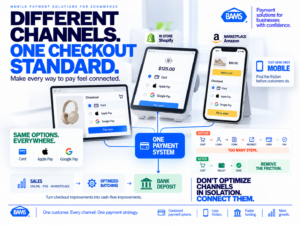
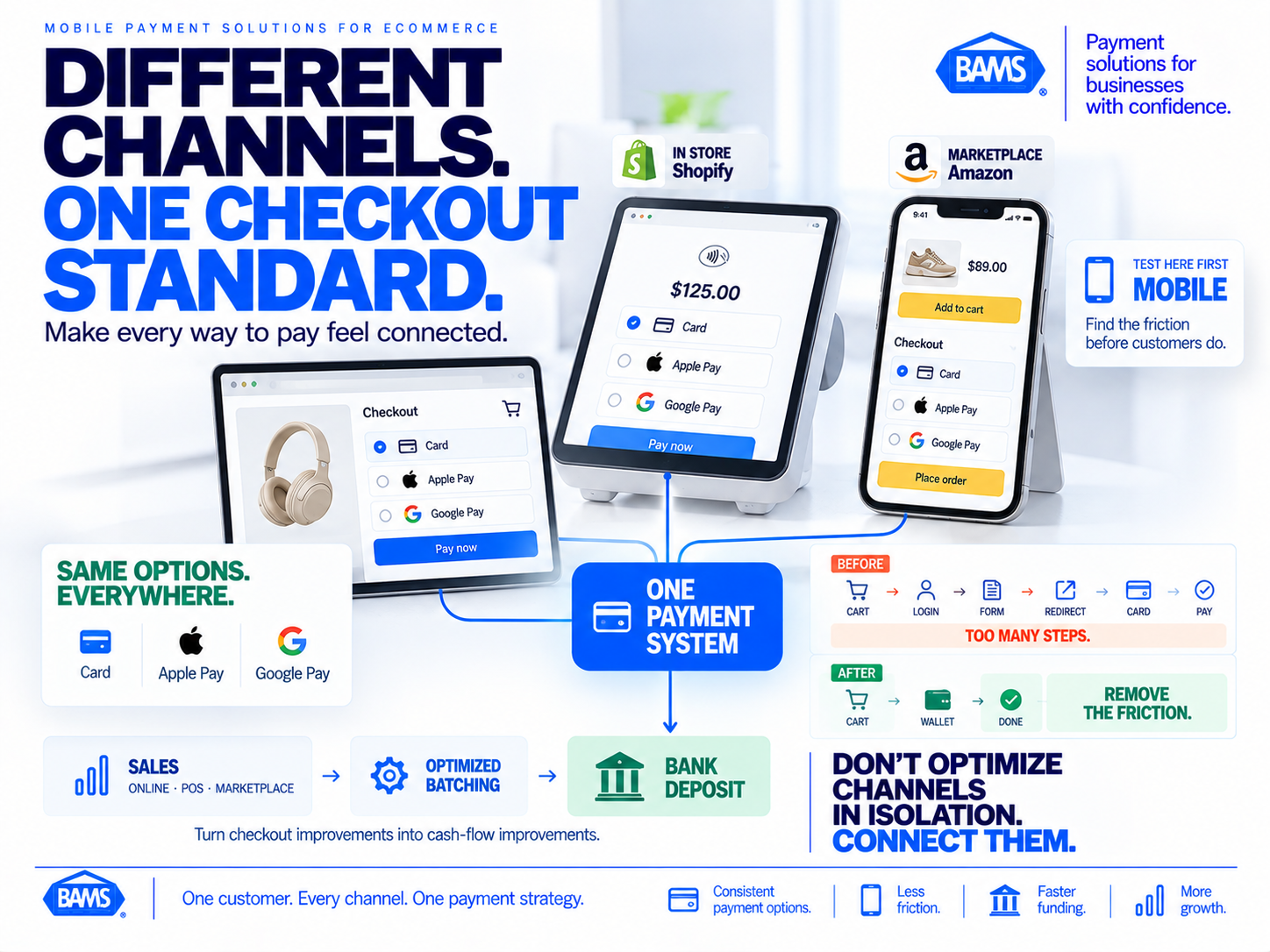
Modern BAMS featured graphic illustrating how eCommerce businesses can align mobile, online, marketplace and in-store payment experiences into one coordinated checkout system.
Prerequisites and Setup Checklist
Before you start, gather the following. Missing any one of these will slow you down mid-audit.
- Admin access to your Shopify dashboard (or equivalent eCommerce platform)
- Login credentials for every marketplace you sell on (Amazon Seller Central, Walmart Marketplace, Etsy, etc.)
- Your POS terminal settings for in-store tap-to-pay configuration
- A recent 90-day transaction report from your payment processor, broken down by channel
- Your current processing agreement so you can check pricing structure and funding timelines
- A spreadsheet or note-taking tool to log findings per channel
Time estimate: 3 to 5 hours spread across two sessions. The first session covers the audit (Steps 1 through 5). The second covers implementation and verification (Steps 6 through 10). The biggest potential blocker is not having admin access to all platforms, so confirm that before you begin.
Why This Multi-Channel Approach Works
Most guides on mobile payment solutions and checkout optimization focus on a single channel. They’ll tell you to add Apple Pay to your online store or tweak your cart page layout. That’s useful but incomplete. If your Shopify store accepts six payment methods but your in-store POS only takes cards and cash, you’ve created an inconsistent brand experience that erodes customer trust.
Apple recommends making payment options easy to access throughout the shopping journey and notes that well-implemented Apple Pay experiences can reduce checkout time and improve conversion. We’re extending that same principle across every place you sell. The difficulty level is moderate. You don’t need a developer or a dedicated payments team. You need patience, your login credentials, and a willingness to look at your own checkout the way a first-time customer would.
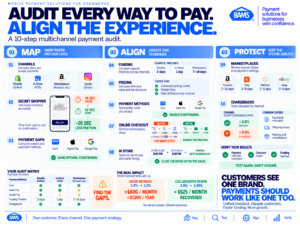
Audit every place customers pay rather than optimizing each channel independently. The goal is consistent payment options, less checkout friction, predictable funding and clearer payment operations.
Step-by-Step: Audit and Align Every Checkout Touchpoint
Step 1: Map Every Active Sales Channel
Open your spreadsheet and create one row for each place you accept payments. Include your Shopify storefront, any marketplace listings, your physical POS terminal, social commerce checkouts (Instagram, TikTok Shop), and invoice or manual payment links. For each row, note the payment methods currently accepted, the processor handling that channel, and the typical deposit timeline.
Expected result: A complete inventory, usually 3 to 7 channels for a business your size. If you discover a channel you forgot about (an old Etsy shop, a dormant Amazon listing), flag it. Abandoned channels with outdated payment settings are a liability.
Common failure: Overlooking social commerce or B2B invoice payments. These count as checkout experiences even if they feel informal.
Step 2: Run a Secret Shopper Test on Each Channel
Place a small test order through every channel yourself, using a mobile device. Mobile sessions generate the most traffic while also producing the highest abandonment rates, so testing on a phone reveals the worst friction first. Time each checkout from “add to cart” to “order confirmed.” Note every extra tap, redirect, or moment of confusion.
Expected result: A per-channel time-to-complete metric and a list of friction points. Common ones include being redirected to a third-party payment page, missing digital wallet options, or confusing shipping-versus-billing address forms.
Common failure: Testing only on desktop. Your mobile checkout is almost certainly worse, and that’s where most of your customers are shopping.
Step 3: Identify Payment Method Gaps Across Channels
Compare the “accepted payment methods” column across all channels in your spreadsheet. Highlight any method available in one channel but missing in another. Pay special attention to digital wallets (Apple Pay, Google Pay) and buy-now-pay-later options. If a customer can tap to pay in your physical store but your Shopify checkout doesn’t offer Apple Pay, that’s a gap worth closing.
For guidance on adding Apple Pay across platforms, see this walkthrough on accepting Apple Pay in your eCommerce store. If you’re running BigCommerce specifically, this guide on Apple Pay and BigCommerce covers the platform-specific steps.
Expected result: A clear list of gaps. Most businesses find 2 to 4 missing payment methods across their channels.
Step 4: Audit Your Deposit and Funding Timelines
Pull your 90-day transaction report and calculate the average time between a completed sale and the deposit hitting your bank account, per channel. Separate weekday transactions from weekend ones. Note any channel where deposits consistently take more than two business days.
Expected result: A clear picture of where cash flow gets stuck. Marketplace channels often hold funds for 7 to 14 days. Your direct Shopify sales may settle in 2 to 3 days depending on your processor. In-store POS deposits depend on your batch submission schedule.
Common failure: Ignoring batch submission timing. If your POS batches close at midnight but your last sale is at 6 PM, you’re adding unnecessary delay. Adjusting your batch close time to shortly after business hours can shave a full day off your deposit timeline.
The OCC notes that the timing of merchant payments is specified in the agreement between the merchant and acquiring bank and that acquiring banks commonly fund merchants through ACH credits. Use your actual agreement and settlement history when comparing funding timelines across channels.
Step 5: Review Your Pricing Structure for Hidden Costs
Open your processing agreement and identify whether you’re on interchange-plus pricing, tiered pricing, or flat-rate pricing. For each channel, note the effective rate (total fees divided by total volume). If any channel’s effective rate exceeds your others by more than 0.3%, investigate why. Common culprits include non-qualified transaction surcharges, gateway fees stacked on top of processing fees, or marketplace-specific payment handling charges.
Expected result: A per-channel cost comparison. Transparent pricing structures like interchange-plus make this analysis straightforward. If your current processor uses tiered pricing and you can’t clearly see what you’re paying per transaction, that’s a finding worth acting on.
For a deeper comparison of pricing models and funding speeds, this payment gateway solutions comparison breaks down traditional versus modern approaches.
Step 6: Standardize Payment Methods Across All Channels
Using the gap list from Step 3, enable the missing payment methods on each channel. Prioritize digital wallets first. Contactless payments are already widely used. Mastercard reports that 70% of in-person Mastercard transactions are contactless globally and that contactless payments can be up to 10 times faster than other face-to-face transaction methods. Customers increasingly expect fast, convenient payment options wherever they shop.
In Shopify, navigate to Settings → Payments → Add payment methods and enable Apple Pay, Google Pay, and Shop Pay if they aren’t already active. For your POS terminal, contact your processor to confirm NFC (near-field communication) is enabled. For marketplace channels, review each platform’s payment settings to ensure you’re not blocking any available options.
Checkpoint: Run another test purchase on each channel. Every channel should now accept at least cards, Apple Pay, and Google Pay.
Step 7: Optimize Your Shopify Checkout Flow
In your Shopify admin, go to Settings → Checkout and review each section. Enable Shop Pay accelerated checkout. Turn on auto-complete for address fields. If you’re requiring account creation before purchase, switch to “Accounts are optional” immediately. Forced account creation is one of the most common cart abandonment solutions you can implement because removing it eliminates a major drop-off point.
Next, review your shipping options. Presenting too many choices at checkout creates decision fatigue. If you offer more than three shipping speeds, consolidate. Label them clearly: “Standard (5-7 days),” “Express (2-3 days),” “Next Day.”
Expected result: A checkout that takes under 60 seconds on mobile with no unnecessary steps.
Step 8: Tighten Your In-Store Tap-to-Pay Experience
Confirm your POS terminal firmware is current and NFC is active. Place signage near the terminal showing accepted contactless methods (Apple Pay, Google Pay, contactless cards). Train staff to prompt customers: “You can tap your phone or card here.” This simple verbal cue increases contactless adoption significantly.
Adjust your batch settlement time. If your store closes at 8 PM, set batch auto-close to 8:30 PM. This ensures every day’s transactions are submitted to your processor the same evening, which is the single biggest lever for getting next-day funding.
For a primer on how Apple Pay works for merchants, including in-store setup, this overview covers the essentials.
Step 9: Address Marketplace Deposit Delays
Log into each marketplace seller account and review your payout schedule. Most marketplaces (Amazon, Walmart) default to 14-day rolling reserves for newer sellers. Check whether you qualify for accelerated payouts based on your account health metrics. On Amazon, navigate to Settings → Account Info → Deposit Methods and confirm your bank details are current. Outdated banking info is a surprisingly common cause of delayed marketplace deposits.
Since marketplace funds are often the slowest to arrive, this is where having faster deposits on your direct channels matters most. If your Shopify and in-store sales settle next-day, you build a cash flow buffer that absorbs marketplace delays without creating operational stress. A processor like BAMS offers next-day funding on direct channel transactions, which gives you that buffer without requiring you to chase marketplace payout schedules.
Step 10: Set Up Chargeback Monitoring Per Channel
Review your chargeback rate for each channel over the past 90 days. If any channel exceeds a 0.5% chargeback ratio, flag it for immediate attention. Common causes include unclear billing descriptors (the customer doesn’t recognize your business name on their statement), delayed shipping without tracking updates, or missing return policies on marketplace listings.
Fix billing descriptors first. In your processor dashboard, update your descriptor to match the name customers see on your website or storefront. Then ensure every channel sends order confirmation and shipping notification emails. These two changes alone resolve a large percentage of “friendly fraud” chargebacks where the customer simply forgot they made the purchase.
For businesses handling higher volumes, BAMS provides proactive chargeback defense with a dedicated account manager who flags disputes before they escalate. This is especially useful if you don’t have a staff member dedicated to payment operations.
Configuration and Customization
Every business has different channel priorities. Here are the key variables to adjust based on your situation.
- Batch settlement time: Set this to 15 to 30 minutes after your last daily transaction. This is a must-change setting if you want next-day deposits.
- Checkout fields: Only require name, email, shipping address, and payment. Every additional field (phone number, company name, birthday) increases abandonment. Remove optional fields unless you have a documented business reason to keep them.
- Digital wallet priority: On Shopify, you can reorder payment methods. Place Apple Pay and Google Pay above manual card entry. Customers who see their preferred wallet first convert faster.
- Fraud filters: Start with your processor’s default fraud settings. Overly aggressive filters decline legitimate customers (false declines), which damages revenue and customer relationships. Tighten filters only after you see specific fraud patterns in your data.
Safe defaults to keep: address verification (AVS), CVV matching, and 3D Secure for international transactions. These add minimal friction while blocking the most common fraud vectors.
Verification and Testing
Run a second round of secret shopper tests after implementing all changes. Place a test order on each channel using a mobile device. Time the checkout again and compare to your Step 2 baseline. You should see a measurable reduction in time-to-complete, ideally 15 to 30 seconds faster per channel.
Verify deposit timing by tracking the next 10 transactions on each direct channel. Confirm that batches submitted in the evening result in deposits the following business day. If any deposit takes longer than expected, contact your processor with the specific transaction IDs.
Edge cases to check: Test a transaction with an international card, a transaction using a digital wallet, and a transaction that requires shipping to a different address than billing. These three scenarios catch most configuration issues.
Common Errors and Fixes
“Apple Pay option doesn’t appear at checkout”
Symptom: Customers on Safari or iOS don’t see Apple Pay as a payment option. Cause: Your payment gateway doesn’t have Apple Pay enabled, or your Shopify Payments account hasn’t completed Apple Pay domain verification. Fix: In Shopify, go to Settings → Payments → Manage, and ensure Apple Pay is toggled on. Complete domain verification if prompted.
“Deposits are still taking 3+ business days”
Symptom: You adjusted batch timing but deposits haven’t sped up. Cause: Your processor’s funding schedule may be set to a fixed cycle regardless of batch time, or your bank requires an extra day for ACH processing. Fix: Contact your processor and explicitly ask about next-day funding eligibility. Some processors require you to opt in or meet a volume threshold.
“High decline rate on one channel but not others”
Symptom: Transaction approval rates are 10%+ lower on one specific channel. Cause: Fraud filters on that channel are set too aggressively, or the payment gateway is routing through a different acquiring bank with stricter rules. Fix: Review fraud filter settings on the affected channel. Loosen velocity checks (number of transactions per hour) if they’re set below your normal sales volume.
“Customers complain they don’t recognize the charge”
Symptom: Increased chargebacks with reason code “unrecognized transaction.” Cause: Your billing descriptor shows your legal entity name or processor name instead of your store name. Fix: Update your billing descriptor in your processor dashboard to match your customer-facing brand name. Include a phone number or URL if your processor supports dynamic descriptors.
Next Steps and Extensions
You now have a unified view of your payment operations and a tighter checkout across every channel. Here’s where to go next.
- Automate monthly audits. Set a recurring calendar reminder to repeat Steps 2 and 4 every 30 days. Payment configurations drift over time as platforms push updates.
- Add a post-purchase upsell. Now that your checkout is streamlined, test a one-click upsell on your Shopify thank-you page. Faster checkouts give customers confidence to add more.
- Negotiate processing rates. With your per-channel cost data from Step 5, you have leverage to negotiate better rates or switch to interchange-plus pricing if you’re still on a tiered model.
Faster deposits aren’t just a cash flow improvement. They’re a growth lever. When money arrives predictably, you restock faster, run ads with confidence, and stop making decisions based on when funds might show up. That’s the real payoff of treating payments as a coordinated system.
Frequently Asked Questions
What are the common payment challenges faced by eCommerce merchants selling across multiple channels?
The biggest challenges are inconsistent payment method availability (offering Apple Pay online but not in-store), unpredictable deposit timelines that vary by channel, fragmented chargeback tracking, and hidden processing fees that differ across platforms. These issues compound when you don’t have dedicated staff managing payments, which is the reality for most businesses with 10 to 50 employees.
How can I optimize my checkout process to reduce cart abandonment?
Start by removing forced account creation, enabling digital wallets (Apple Pay, Google Pay, Shop Pay), and reducing checkout fields to only what’s essential. Test your checkout on a mobile device and time it. If it takes more than 60 seconds, look for unnecessary steps like redundant address forms, excessive shipping options, or third-party redirects that break the flow.
When should merchants conduct a payment processing audit?
Conduct a full audit at least once per quarter, and run a quick check (test purchases and deposit timing review) monthly. You should also audit immediately after adding a new sales channel, changing your payment processor, or noticing a spike in chargebacks or declined transactions.
Which factors affect the speed of payment deposits?
Three main factors determine deposit speed: your batch submission timing (when your terminal or platform sends the day’s transactions to your processor), your processor’s funding schedule (next-day versus 2-day versus weekly), and your bank’s ACH processing time. Of these, batch timing is the one you control most directly.
How do false declines impact customer relationships?
A false decline happens when a legitimate transaction is blocked by overly aggressive fraud filters. The customer sees a “payment declined” message, assumes something is wrong with their card, and often leaves without trying again. This damages trust and costs you the sale plus any future purchases that customer would have made. Review your fraud filter settings regularly and loosen them if your decline rate exceeds your industry average.
Why is payment optimization important for eCommerce businesses with physical stores?
Customers who shop both online and in-store expect the same payment experience in both places. If they can tap their phone to pay in your store but have to manually type a card number on your website, you’ve created unnecessary friction. Aligning payment methods, deposit timelines, and billing descriptors across all channels builds trust and keeps cash flow predictable.