
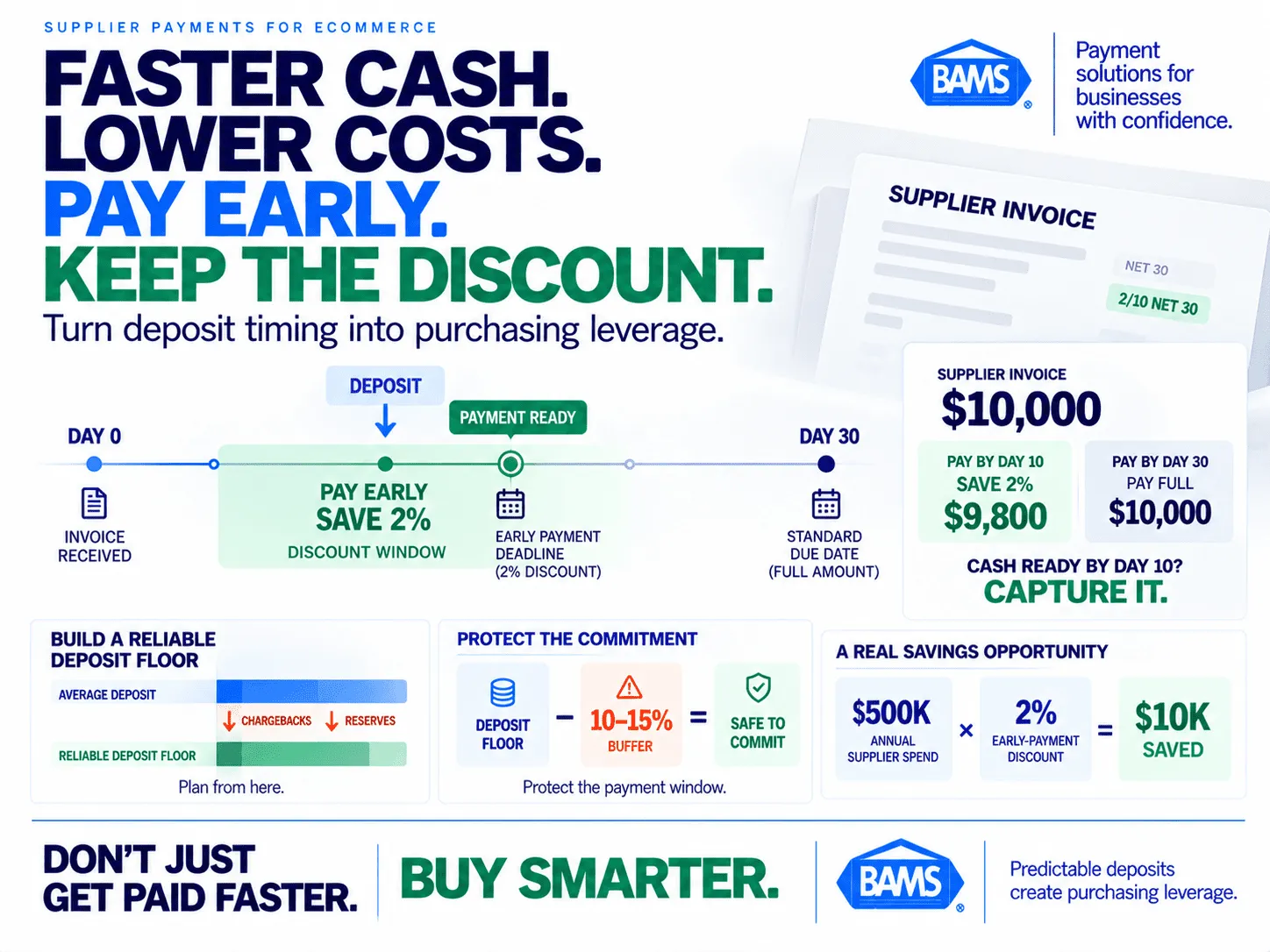
Supplier Payments: Turn Faster Deposits Into Discounts
Map your deposit schedule to supplier payment windows and capture early-payment discounts competitors miss
Learn how to build a deposit-to-payment calendar that aligns predictable daily funding with supplier invoice deadlines. This tutorial walks you through negotiating early-payment terms and protecting your timing from chargeback disruptions.
TL;DR
- Predictable deposits create procurement leverage – When you know exactly when cash arrives daily, you can commit to early-payment supplier discounts (typically 1-2%) that brands with unpredictable deposit timing can’t capture.
- Chargebacks are the biggest threat to deposit predictability – Direct deductions and rolling reserve increases can reduce your actual daily deposit well below what you expected, breaking supplier payment commitments.
- Build a deposit floor, not an average – Calculate the minimum daily deposit you receive after chargeback and reserve impacts. Plan supplier payments against this floor, not your best-case or average deposit.
- A chargeback buffer protects the entire system – Set aside 10-15% of your weekly deposit floor as uncommitted cash to absorb dispute spikes without missing discount deadlines.
- Start small and verify before committing – Run a 2-week pilot tracking actual deposits against projections before negotiating early-payment terms with suppliers. Expand only after the model proves reliable.
What You’ll Achieve: Predictable Deposits That Unlock Supplier Discounts

Faster deposits become more valuable when they change what a business can do with its cash. Predictable funding can make supplier early-payment windows easier to reach consistently.
By the end of this tutorial, you will have a working system that maps your daily deposit schedule to your supplier payment windows so you can consistently capture early-payment discounts. Most eCommerce brands miss these discounts because their cash flow planning depends on deposit timing they can’t predict. Chargebacks make it worse by pulling funds out of batches without warning.
You’ll build a deposit-to-payment calendar, identify which suppliers offer (or will negotiate) prompt-payment terms, and put guardrails in place so chargeback disruptions don’t blow up your timing. The concrete success criteria: you capture at least one 2% early-payment discount cycle within 30 days, and you have a repeatable process for every supplier invoice going forward.
Prerequisites and Setup Checklist
Before you start, confirm you have the following in place. Missing any one of these will create a bottleneck partway through.
- Merchant account with next-day funding (or the ability to switch). If your processor holds deposits for 2-5 business days, this entire framework becomes unreliable.
- Access to your payment processor dashboard with batch settlement reports and chargeback activity logs.
- A list of your top 10 suppliers by spend, including current payment terms (e.g., Net 30, Net 45).
- A spreadsheet tool (Google Sheets, Excel, or Airtable) for building your deposit-to-payment calendar.
- eCommerce platform admin access (Shopify, WooCommerce, BigCommerce) to verify batch cutoff times.
- Chargeback tracking data from the last 90 days, including dispute amounts and resolution timelines.
Time estimate: 3-4 hours for initial setup, then 15 minutes per week to maintain. The biggest potential blocker is discovering your current processor doesn’t support next-day funding, which adds a migration step.
Why This Approach Works (and Why Most Brands Miss It)
The standard advice around deposit speed treats it as a treasury convenience: “Get your money faster, feel better.” That framing misses the real opportunity. Predictable daily deposits turn your accounts receivable into a procurement tool. When you know exactly when cash lands, you can commit to early-payment terms with suppliers and lock in discounts your competitors can’t touch because their deposit timing is a guess.
Prompt-payment discounts reduce an invoice when payment is made before the normal due date. Federal Acquisition Regulation guidance defines a discount for prompt payment as an invoice reduction offered for payment prior to the due date. One common example is 2/10 Net 30: a 2% discount for payment within 10 days with the full invoice otherwise due in 30 days. On $500,000 in eligible annual supplier spend, capturing a 2% discount would equal $10,000 in savings. The operational challenge is having enough predictable cash available inside the discount window.
Step 1: Audit Your Current Deposit Timeline
Open your payment processor dashboard and pull settlement reports for the last 30 days. For each business day, record: the batch submission time, the deposit arrival time, and the deposited amount. You’re looking for two things: the average delay between batch close and deposit, and the variance (how much that delay fluctuates).
If your average delay is 1 business day with minimal variance, you have a workable foundation. If it’s 2-5 days or swings unpredictably, your delayed funding is actively hurting your cash flow and you’ll need to address that before proceeding to Step 3.
Expected result: A 30-row table showing date, batch time, deposit time, and amount. Common failure: Some processors lump weekend batches into Monday deposits. Note these separately so they don’t skew your weekday averages.
Step 2: Map Your Chargeback Exposure to Deposit Disruptions
Now pull your chargeback data for the same 30-day window. For each dispute, record: the date the chargeback hit, the amount deducted, and whether your processor applied a reserve hold or delayed that day’s batch.
Cross-reference this against your deposit timeline from Step 1. Flag every day where a chargeback reduced your expected deposit by more than 5%. These are your “disruption days.” Count them. If you have more than 3-4 per month, chargebacks are actively undermining your ability to time supplier payments reliably.
Expected result: A disruption frequency number (e.g., “6 out of 22 business days had chargeback-driven deposit shortfalls”).
Common failure: Overlooking reserve holds. Some processors don’t deduct chargebacks immediately but instead increase your rolling reserve, which quietly reduces available cash. Check your reserve balance history, not just direct deductions.
Reserve activity can affect available cash as well. The OCC explains that acquiring banks may establish merchant reserve or holdback accounts to manage chargeback and credit exposure and may fund those reserves by withholding part of a merchant’s daily proceeds. Use the reserve terms and actual withholding shown on your own account when calculating available cash.
Step 3: Calculate Your Reliable Daily Deposit Floor
Using your 30-day data, calculate the minimum daily deposit you received after chargeback deductions and reserve adjustments. This is your “deposit floor.” It represents the cash you can count on with near certainty every business day.
Formula:
Deposit Floor = Average Daily Deposit – (Average Chargeback Deduction + Average Reserve Withholding)
For example, if your average daily deposit is $4,200, your average daily chargeback deduction is $180, and your average reserve withholding is $120, your deposit floor is $3,900. This is the number you’ll use to plan supplier payments. Do not plan against your average or your best day. Plan against your floor.
Checkpoint: Your deposit floor should be a positive number that covers at least a portion of your weekly supplier obligations. If it doesn’t, you have a revenue or chargeback problem to solve first.
Step 4: Inventory Your Supplier Payment Terms and Discount Windows
Open your supplier list from the prerequisites. For each of your top 10 suppliers, document:
- Current payment terms (Net 30, Net 45, etc.)
- Whether they currently offer an early-payment discount (and the specific terms)
- Your average monthly spend with that supplier
- Their invoice date pattern (e.g., invoiced on the 1st and 15th)
Not every supplier advertises early-payment terms, so it can be worth asking whether a discount is available for consistent prompt payment. The Federal Reserve has noted that faster access to customer payments can help small businesses manage working capital tied up in inventory and reduce their reliance on short-term financing. Turning faster merchant deposits into predictable supplier-payment capacity is one practical way to use that working-capital advantage.
Expected result: A ranked list of suppliers by monthly spend, with discount availability noted. Common failure: Assuming your supplier’s published terms are final. Reach out to their accounts receivable team directly. Discount terms are almost always negotiable for reliable payers.
Step 5: Build Your Deposit-to-Payment Calendar
Supplier discounts become easier to capture when payment commitments are based on a reliable deposit floor rather than optimistic revenue projections.
This is the core deliverable. Create a spreadsheet with the following columns:
- Date (each business day of the month)
- Expected Deposit Floor (from Step 3)
- Cumulative Available Cash (rolling total of deposit floors minus payments already committed)
- Supplier Invoice Due (supplier name, amount, and discount deadline)
- Payment Action (pay early for discount, pay on standard terms, or hold)
Map each supplier’s discount deadline against your cumulative available cash. The goal is to identify the specific days where your available cash gives you enough room to pay an invoice within its discount window. Nacha notes that Same Day ACH can be used for time-sensitive supplier payments, allowing funds to reach the supplier on the same business day. Once the cash is available, the payment rail itself does not necessarily need to add another multi-day delay.
Checkpoint: You should be able to see, at a glance, which supplier discounts you can capture this month and which ones require more cash accumulation than your deposit floor supports.
Step 6: Optimize Batch Timing on Your eCommerce Platform
Your deposit floor is only reliable if your batches close consistently. Log into your eCommerce platform and verify your batch cutoff time. On Shopify, batches typically auto-close, but if you’re using a standalone gateway, you may need to set this manually.
Key action: Set your batch cutoff to the earliest time that captures the majority of your daily transactions. For most eCommerce brands, this is between 9:00 PM and 11:00 PM in your processor’s time zone. Batches that close after midnight often get pushed to the next business day’s settlement cycle, adding a full day of delay.
If you use BAMS as your merchant services provider, next-day funding is built into the standard setup, which means your batch timing directly controls when cash arrives the following business day. This predictability is what makes the entire deposit-to-payment calendar viable.
Common failure: Running on your platform’s default batch time without checking whether it aligns with your processor’s settlement window. A 30-minute mismatch can cost you a full business day of deposit timing.
Step 7: Create a Chargeback Buffer in Your Calendar
Your deposit floor already accounts for average chargeback impact, but chargebacks cluster. A single fraud ring or a product quality issue can spike disputes for a week. You need a buffer.
Add a “chargeback reserve” row to your calendar. Set it at 10-15% of your weekly deposit floor total. This cash stays uncommitted and acts as a shock absorber. If chargebacks spike and your actual deposit drops below the floor on a given day, the buffer covers the gap so your supplier payment timing stays intact.
For brands with elevated chargeback rates, proactive chargeback defense (alerts, rapid-response evidence submission, real-time monitoring) reduces the frequency and severity of these spikes. BAMS offers proactive chargeback defense as part of its merchant services, which directly protects the deposit predictability this entire system depends on.
Checkpoint: Your buffer should be funded from the first week’s deposits before you commit to any early-payment schedules.
Step 8: Negotiate Early-Payment Terms With Your Top 3 Suppliers
Armed with your deposit-to-payment calendar, you now know exactly which suppliers you can pay early and on which dates. Start with your top 3 suppliers by spend. Contact their accounts receivable department and propose a structured early-payment arrangement.
Use this template as a starting point:
“We’d like to discuss early-payment terms on our invoices. We can
consistently pay within [X] days of invoice date. Would you offer a
[1-2]% discount for payments received within that window? We’re
prepared to commit to this schedule for the next [6/12] months.”
The key word is “consistently.” Your proposal should offer the supplier a predictable payment schedule rather than simply asking for a lower invoice amount. Nacha highlights faster supplier payments as a way to improve cash flow control and strengthen supplier relationships when timing matters. Frame the discount discussion as an exchange: earlier, more predictable payment in return for agreed savings.
Expected result: At least one supplier agrees to a discount structure. Common failure: Asking for terms you can’t reliably meet. Only propose payment windows your deposit floor and buffer can support every month.
Step 9: Automate Payment Triggers and Monitor Weekly
Set up payment reminders or automated payments in your accounting software (QuickBooks, Xero, or similar) that align with the dates in your deposit-to-payment calendar. The trigger should fire only when your cumulative available cash (minus the chargeback buffer) exceeds the invoice amount.
Every Friday, spend 15 minutes reviewing:
- Actual deposits vs. projected deposit floor (were there shortfalls?)
- Chargeback activity (is the buffer holding, or does it need adjustment?)
- Upcoming supplier discount deadlines for the next 2 weeks
- Any new invoices that could be added to the early-payment schedule
Expected result: A self-sustaining weekly rhythm where deposit predictability drives procurement savings. Common failure: Setting it and forgetting it. Chargeback patterns shift, seasonal sales volumes change deposit floors, and suppliers occasionally adjust terms. The 15-minute weekly review catches these changes before they break your timing.
Configuration and Customization
Variables You Should Adjust for Your Business
- Deposit floor calculation period: 30 days is the default. If your business is highly seasonal, use 90 days and segment by season. Your December deposit floor will look very different from your February floor.
- Chargeback buffer percentage: 10-15% is a safe starting range. If your chargeback rate is below 0.5%, you can drop to 8%. If it’s above 1%, increase to 20% and prioritize chargeback prevention before scaling this system.
- Supplier discount threshold: Only pursue discounts where the annual savings exceed $500. Smaller amounts aren’t worth the negotiation and tracking overhead.
- Batch cutoff time: Test moving your cutoff 30 minutes earlier for one week. If it doesn’t meaningfully reduce same-day transaction capture, keep the earlier time for faster settlement.
Must-change setting: Your deposit floor number. Never use someone else’s benchmark. It must come from your actual processor data.
Verification and Testing
Run a 2-week pilot before committing to any supplier discount agreements. During the pilot:
- Track your actual daily deposits against your projected deposit floor every day.
- Simulate a supplier payment on the calendar date you would have paid. Don’t actually pay early yet. Just verify the cash was available.
- Record any chargeback disruptions and check whether your buffer would have absorbed them.
Success definition: On at least 9 out of 10 business days, your actual deposit met or exceeded your deposit floor, and your simulated supplier payment would have been funded on time. If you hit this threshold, you’re ready to go live with supplier negotiations.
Edge case to verify: Holiday weekends and bank holidays. Deposits don’t arrive on non-business days, so your Monday deposit often includes Friday and Saturday batches. Make sure your calendar accounts for this lump pattern.
Common Errors and Fixes for Cash Flow Planning
Error: Deposit arrives a day later than expected
Symptom: Cash isn’t in your account when your calendar says it should be. Cause: Your batch closed after your processor’s cutoff window, pushing settlement to the next cycle. Fix: Verify your batch cutoff time against your processor’s published settlement schedule. Move your cutoff earlier by at least 30 minutes as a safety margin.
Error: Chargeback spike wipes out your buffer
Symptom: Multiple chargebacks hit in the same week, and your buffer can’t cover the shortfall. Cause: A product issue, fraud cluster, or rolling reserve increase triggered by elevated dispute rates. Fix: Increase your buffer to 20-25% temporarily. Investigate the root cause of the chargeback cluster. If disputes are trending upward, pause new early-payment commitments until you stabilize.
Error: Supplier rejects your discount proposal
Symptom: Your top supplier says they don’t offer early-payment discounts. Cause: Their margins may be too thin, or they’ve never been asked. Fix: Reframe the ask. Instead of requesting a percentage discount, propose a flat dollar reduction per invoice or ask for priority fulfillment in exchange for early payment. Some suppliers value cash certainty more than discount structures.
Error: Calendar shows negative cumulative cash on certain days
Symptom: Your spreadsheet shows you’d run out of available cash mid-month. Cause: Too many supplier payments clustered in the same week. Fix: Stagger your early-payment commitments. Negotiate different discount windows with different suppliers so obligations spread across the month.
Error: Weekend batch lumping distorts Monday projections
Symptom: Monday deposits are 2-3x your normal daily amount, but Tuesday through Friday are lower than expected. Cause: Weekend transactions batch together. Fix: Adjust your calendar to treat Monday as a double or triple deposit day and reduce Tuesday-Friday projections accordingly. Don’t average across the week.
Next Steps and Extensions
Once your deposit-to-payment calendar is running reliably, you can extend this system in several directions:
- Expand to all suppliers: After proving the model with your top 3, roll it out to suppliers 4-10. The incremental effort is small because the calendar infrastructure already exists.
- Eliminate short-term credit lines: If you’ve been drawing on a line of credit to cover deposit timing gaps, your deposit floor calculation gives you the data to determine whether that line is still necessary. Many brands find they can reduce or close it entirely.
- Time inventory purchases to deposit cycles: Use the same calendar logic to place restock orders on days when cumulative available cash peaks, avoiding the cost of delayed deposits forcing you into rush orders at premium prices.
The underlying principle stays the same: when you control deposit timing, you control procurement timing. That turns your payment processing setup from a back-office utility into a competitive advantage.
Frequently Asked Questions
What is next-day funding in merchant services?
Next-day funding means your payment processor deposits your batch settlement into your bank account on the next business day after transactions are processed. Instead of waiting 2-5 business days for your money, you receive it within roughly 24 hours. This predictable timing is what makes it possible to plan supplier payments around your actual cash position rather than estimates.
How does next-day funding improve cash flow planning for online retailers?
When deposits arrive on a consistent, predictable schedule, you can calculate a reliable daily deposit floor. That floor becomes the foundation for committing to early-payment supplier terms, timing inventory purchases, and reducing reliance on credit lines. Without predictable deposits, every payment decision involves guesswork about when cash will actually be available.
How do chargebacks affect deposit timing and supplier payment schedules?
Chargebacks reduce your available deposit in two ways: direct deductions from your batch settlement, and increased rolling reserve holds that your processor may impose when dispute rates rise. Both reduce the cash that arrives in your account on any given day. If you’ve committed to paying a supplier within a 10-day discount window, a chargeback spike can make that commitment impossible to meet.
What is a 2/10 Net 30 early-payment discount?
It means the supplier offers a 2% discount if you pay the invoice within 10 days, with the full amount due at 30 days. On a $10,000 invoice, paying within 10 days saves you $200. Annualized across multiple invoices and suppliers, these savings can add up to thousands of dollars in recovered margin.
How can I optimize my batch timing for faster funding?
Check your eCommerce platform’s batch cutoff time and compare it to your payment processor’s settlement window. If your batch closes after the processor’s cutoff, your deposit gets pushed to the next business day. Move your batch cutoff earlier (typically between 9:00 PM and 11:00 PM in your processor’s time zone) to ensure same-cycle processing. Even a 30-minute adjustment can recover a full day of deposit speed.
When should a business consider switching to next-day funding?
If your deposits currently take 2 or more business days, and you’re either borrowing short-term to cover cash gaps, missing supplier discount windows, or unable to predict your daily available cash within a reasonable margin, switching to next-day funding addresses all three problems. The switch is especially valuable if you have negotiable supplier terms and enough transaction volume to make early-payment discounts meaningful.


