Customer Payment Recovery System for eCommerce
Last Updated on June 15, 2026 by Dimitri Akhrin
Configure automated retries, dunning sequences, and dashboards to recover 45-85% of failed payments
Learn to capture failed transactions before they become lost revenue. This tutorial walks you through retry logic, email sequences, and real-time monitoring to reduce involuntary churn.
TL;DR
- Failed payments are recoverable revenue – Optimized retry strategies recover 45-70% of initially failed transactions, and best-in-class businesses achieve 70-85% recovery rates
- Timing drives recovery success – Configure automated retries at 4 hours, 24 hours, 72 hours, and 7 days after initial failure to catch temporary declines when funds become available
- Dunning emails must be strategic – Build a 4-email sequence over 10 days with clear calls-to-action and direct payment update links; avoid aggressive language that triggers chargebacks
- Prevention beats recovery – Enable Account Updater services and send pre-failure notifications for expiring cards to stop failures before they happen
- Track and iterate weekly – Monitor recovery rates, average days to recovery, and chargeback rates on recovered transactions to continuously improve your system
What You Will Achieve: A Complete Customer Payment Recovery System
By the end of this tutorial, you will have a fully operational customer payment recovery system that captures failed transactions before they become lost revenue. You will configure automated retry logic, build a dunning communication sequence, and establish monitoring dashboards that track recovery rates in real time.
Your success criteria: recover at least 45% of initially failed payments within 14 days of implementation. According to Visa, payment optimization strategies like intelligent retries significantly improve authorization and recovery rates.
You will also reduce involuntary churn, which currently costs subscription-focused businesses 10-20% of annual recurring revenue. The framework applies whether you process 500 or 50,000 transactions monthly.
Prerequisites and Setup Checklist
Before starting, confirm you have access to these tools and accounts. Missing any item will block your progress at specific steps.
- Payment gateway admin access with permissions to modify retry settings and view transaction logs
- Email service provider (Klaviyo, Mailchimp, or similar) with automation capabilities
- Spreadsheet software for tracking and analysis (Google Sheets or Excel)
- Customer database access to segment by payment status and history
- 30-60 minutes for initial configuration, plus 15 minutes daily for the first week of monitoring
Potential blockers: Some payment gateways restrict retry customization on basic plans. Check your plan tier before Step 3. If your gateway lacks native retry controls, you will need a third-party recovery tool or processor upgrade.
Why Proactive Recovery Beats Reactive Measures
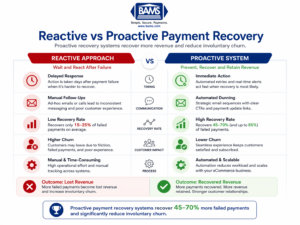
Why proactive payment recovery significantly outperforms reactive approaches
Traditional eCommerce businesses wait for payments to fail, then scramble to contact customers manually. This reactive approach recovers only 15-25% of failed transactions because timing matters enormously in payment recovery.
The proactive method you will implement intercepts failures at multiple points. According to Modern Treasury, dynamic retry logic improves payment success rates by adapting to real-time transaction conditions.
This tutorial prioritizes automation over manual intervention, reducing your team’s workload while improving outcomes.
Ensure your system integrates seamlessly with your payment infrastructure. Using a robust payment gateway helps automate retries, manage transaction data, and improve recovery performance.
Step 1: Audit Your Current Payment Failure Data
Action: Export your last 90 days of failed transactions from your payment gateway.
Navigate to your gateway’s reporting section. Look for “Declined Transactions” or “Failed Payments” reports. Export as CSV with these fields: transaction date, decline code, amount, customer email, and payment method type.
Expected result: A spreadsheet containing 50-500+ rows depending on your volume. If you see fewer than expected, check that you are including soft declines (temporary failures) alongside hard declines (permanent failures).
Checkpoint: Create a pivot table grouping failures by decline code. The top 3-5 codes represent your biggest recovery opportunities.
Common failure: Export shows zero results. Fix: Adjust date range or check filter settings. Some gateways separate “declined” from “failed” transactions.
Step 2: Categorize Decline Codes by Recovery Potential
Action: Sort your decline codes into three categories: high recovery potential, medium recovery potential, and unrecoverable.
Create three columns in your spreadsheet. High recovery potential includes codes like “insufficient funds,” “card expired,” and “do not honor” (often temporary bank holds). Medium recovery potential includes “invalid card number” and “CVV mismatch” (requires customer action). Unrecoverable includes “stolen card,” “pickup card,” and “fraud suspected.”
Expected result: 60-75% of your failures should fall into high or medium recovery categories.
Checkpoint: Calculate the dollar value in each category. This quantifies your recovery opportunity and justifies time investment.
Common failure: Unfamiliar decline codes. Fix: Search your gateway’s documentation for their specific code definitions, as these vary between processors.
Step 3: Configure Intelligent Retry Logic
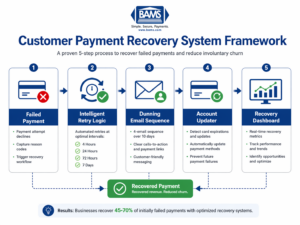
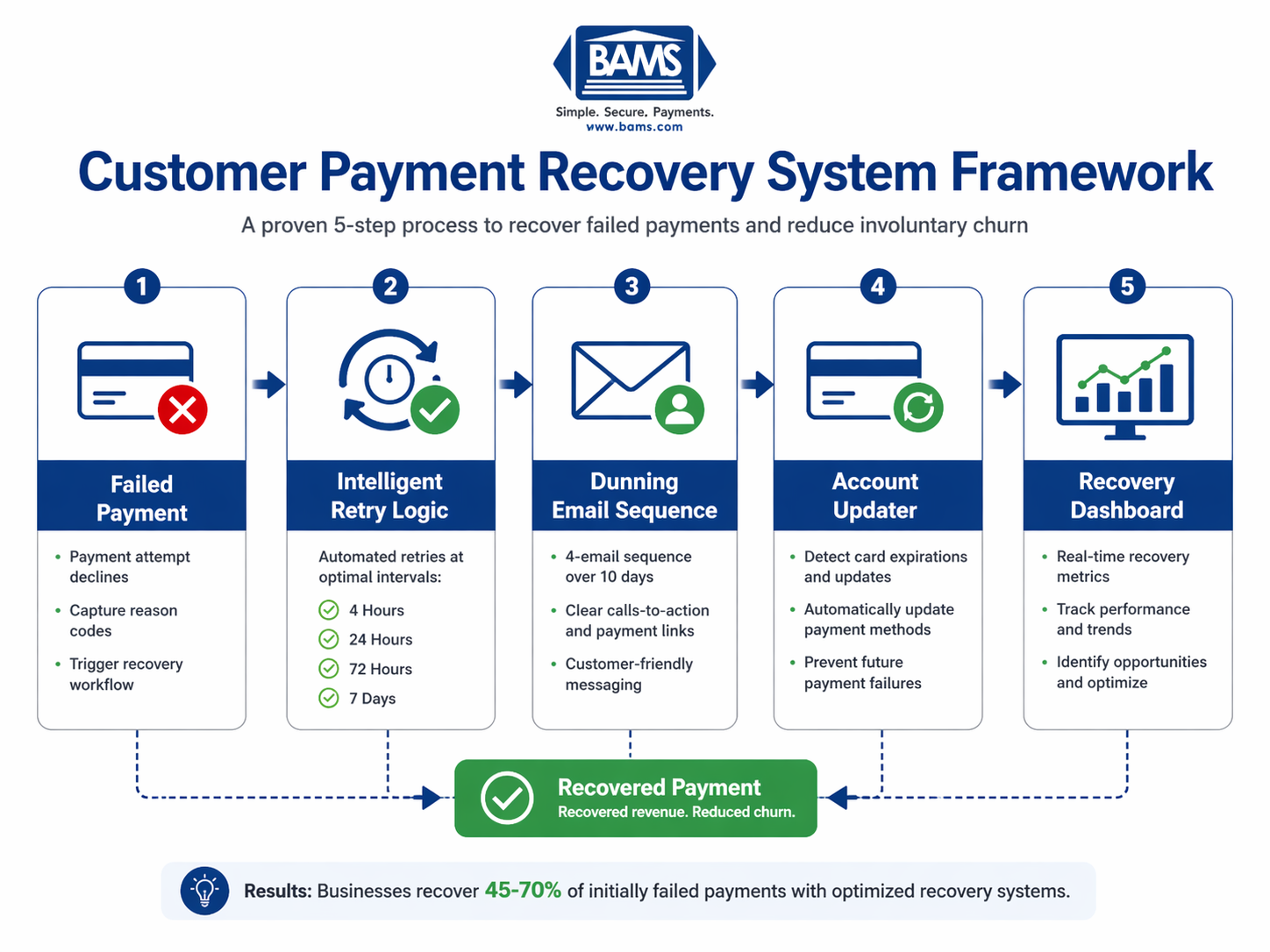
A structured payment recovery system combining retries, communication, and monitoring
Action: Set up automated retry attempts with strategic timing intervals in your payment gateway.
Access your gateway’s retry settings (often under “Subscriptions” or “Recurring Billing” configuration). Configure the following schedule for soft declines:
- First retry: 4 hours after initial failure (catches temporary holds)
- Second retry: 24 hours after first retry (new day, potentially new authorization)
- Third retry: 72 hours after second retry (allows time for customer to add funds)
- Fourth retry: 7 days after third retry (final automated attempt)
Expected result: Your gateway confirms the retry schedule is active. Test with a small transaction if your gateway offers sandbox mode.
Checkpoint: Verify retries trigger only for soft decline codes. Hard declines (fraud, closed account) should not retry automatically.
Common failure: “Retry settings unavailable” message. Fix: This feature may require a plan upgrade or contacting your processor. Merchant services partners like BAMS include intelligent retry capabilities with proactive chargeback defense as part of their standard offering.
Step 4: Build Your Dunning Email Sequence
Action: Create a 4-email automated sequence triggered by payment failures.
In your email service provider, create a new automation with “payment failed” as the trigger (requires integration with your payment gateway or eCommerce platform). Build these four emails:
Email 1 (immediate): Subject: “Quick action needed: payment issue with your order.” Tone is helpful, not alarming. Include a direct link to update payment method. Keep under 100 words.
Email 2 (48 hours): Subject: “Your order is waiting.” Remind them what they are missing. Include product image if applicable. Offer alternative payment methods.
Email 3 (5 days): Subject: “Last chance to complete your purchase.” Create urgency without pressure. Mention the order will be canceled if unresolved.
Email 4 (10 days): Subject: “We have canceled your order.” Confirm cancellation but leave door open. Include easy reorder link.
Expected result: Automation shows as “active” with all four emails in sequence. Send test emails to yourself to verify links work.
Checkpoint: Each email should have a single, clear call-to-action button. Multiple options reduce conversion.
Common failure: Trigger not firing. Fix: Check that your payment gateway webhook is properly connected to your email platform. Most platforms have specific integration guides.
Step 5: Implement Account Updater Services
Action: Enable automatic card credential updates through your payment processor.
Contact your payment processor or access your merchant account settings to enable Account Updater (also called Card Account Updater or Automatic Billing Updater). This service automatically receives updated card numbers and expiration dates from card networks when customers receive new cards.
Expected result: Confirmation that Account Updater is active on your merchant account. Some processors charge $0.02-0.05 per update, others include it free.
Checkpoint: After 30 days, check how many cards were automatically updated. This prevents failures before they happen.
Common failure: Processor says feature is unavailable. Fix: Not all processors support this. If yours does not, this becomes a reason to evaluate alternatives that offer proactive recurring payments support.
Step 6: Create Your Recovery Tracking Dashboard
Action: Build a simple dashboard to monitor recovery performance weekly.
In Google Sheets or Excel, create a tracking sheet with these columns: Week, Total Failed Transactions, Total Failed Amount, Recovered Transactions, Recovered Amount, Recovery Rate (%), and Average Days to Recovery.
Pull data weekly from your payment gateway reports. Calculate Recovery Rate as: (Recovered Amount / Total Failed Amount) x 100.
Expected result: A living document that shows trends over time. Your baseline week establishes the “before” metrics.
Checkpoint: After 4 weeks, you should see recovery rates climbing toward the 45-70% range. If not, review which step needs adjustment.
Common failure: Inconsistent data definitions between weeks. Fix: Document exactly which report you pull and which filters you apply. Consistency matters more than perfection.
Step 7: Set Up Proactive Customer Communication
Action: Create pre-failure notifications for cards expiring within 30 days.
Configure an automated email (or SMS if you have phone numbers) that triggers when a stored card’s expiration date is within 30 days of the next scheduled payment. Most eCommerce platforms and subscription tools offer this as a standard feature.
Email content should be brief: “Your card ending in [last 4 digits] expires soon. Update your payment method to avoid interruption.” Include a direct link to their account payment settings.
Expected result: Customers update cards before failure occurs, eliminating the recovery process entirely for these transactions.
Checkpoint: Track how many customers update after receiving this notification versus how many still fail. Target 40%+ proactive update rate.
Common failure: Email marked as spam. Fix: Use a recognizable sender name (your brand, not “noreply”) and avoid spam trigger words in subject lines.
Step 8: Integrate Chargeback Prevention Into Your Recovery Flow
Action: Add chargeback prevention strategies to protect recovered revenue from disputes.
Recovered payments face higher chargeback risk because the customer may have forgotten the original purchase or feel frustrated by the process. Visa explains that chargebacks occur when customers dispute transactions through issuing banks, making proactive communication essential.
Implement these safeguards:
- Send immediate confirmation when a recovered payment processes successfully
- Use clear billing descriptors that match your brand name
- Include order details in confirmation so customers recognize the charge
- Offer easy refund requests as an alternative to chargebacks
Expected result: Chargeback rate on recovered transactions stays below your overall average. Understanding how chargebacks work helps you design communications that prevent disputes.
Checkpoint: Monitor chargeback rates specifically on recovered transactions for 60 days after implementation.
Common failure: Chargebacks spike after recovery campaigns. Fix: Review your dunning email tone. Aggressive language can trigger defensive customer reactions.
Configuration Settings to Customize
Your recovery system should adapt to your specific business model. Here are the key variables to adjust:
Retry timing: The 4-hour, 24-hour, 72-hour, 7-day schedule works for most businesses. Adjust based on your customer payment patterns. If your customers are paid bi-weekly, extend the third retry to 5 days to align with paycheck cycles.
Email frequency: Four emails over 10 days is standard. High-value orders may warrant an additional touchpoint. Low-value orders might need only two emails to avoid annoying customers over small amounts.
Recovery window: Most businesses close recovery attempts after 14-21 days. Longer windows rarely yield additional recoveries and can create accounting complications.
Safe defaults: Start with the settings in this tutorial. Do not change multiple variables simultaneously, or you will not know what improved (or hurt) performance.
Verification and Testing Procedures
Test your complete system before relying on it for real transactions.
Create a test transaction using a card that will decline (most gateways provide test card numbers for this purpose). Verify that:
- The retry schedule triggers at correct intervals
- Dunning emails send with correct personalization
- Update payment links direct to the right page
- Successful recovery triggers confirmation email
- Dashboard captures the test data accurately
Success definition: A test failure moves through your entire recovery flow without manual intervention, and all data appears correctly in your tracking dashboard.
Edge cases to verify: Test what happens when a customer has multiple failed orders simultaneously. Test behavior when a customer updates their card mid-sequence. Confirm that successful retries stop the dunning sequence.
Common Errors and How to Fix Them
Error: “Duplicate transaction” when retry attempts process
Cause: Your gateway is flagging retries as potential duplicate charges. Fix: Ensure retry attempts use unique transaction IDs. Check your gateway’s retry configuration for a “new transaction” versus “retry” flag.
Error: Dunning emails sending to customers whose payments already recovered
Cause: Email automation is not syncing with payment status updates. Fix: Add a condition to your automation that checks payment status before each email sends. Most platforms support “if/then” logic for this.
Error: Recovery rate below 30% after 4 weeks
Cause: Usually indicates retry timing misalignment or weak dunning copy. Fix: Analyze which decline codes are not recovering. If “insufficient funds” stays low, adjust retry timing. If customers are not clicking email links, A/B test subject lines and calls-to-action.
Error: Customers complaining about too many emails
Cause: Dunning sequence may overlap with other marketing emails. Fix: Suppress failed-payment customers from promotional emails during the recovery window. One focused message stream performs better than competing communications.
Error: Account Updater not preventing expected failures
Cause: Not all card issuers participate in updater programs. Fix: This is a limitation of the service, not your configuration. Continue with dunning for cards that cannot be auto-updated. Consider this when evaluating processor capabilities, as some have better issuer participation rates.
Next Steps: Extending Your Recovery System
Once your basic system runs smoothly for 30 days, consider these enhancements:
Add SMS to your dunning sequence. Text messages have 98% open rates compared to 20% for email. Send a single SMS between emails 2 and 3 for high-value orders.
Implement machine learning retry optimization. Some payment platforms analyze your historical data to predict optimal retry times for each customer. This can push recovery rates above 70%.
Expand payment method options. Offer digital wallets (Apple Pay, Google Pay) as alternatives during recovery. Customers may have funds available in these accounts when their primary card fails. Digital wallets also offer enhanced security through tokenization and biometric verification.
For businesses processing significant volume, working with a merchant services partner that offers next-day funding and dedicated support can further improve cash flow predictability while your recovery system matures.
Frequently Asked Questions
What are faster deposit strategies in merchant services?
Faster deposit strategies include next-day funding (receiving deposits within one business day instead of the standard 2-3 days), same-day ACH processing, and optimized batch settlement timing. Choosing a processor that offers next-day funding as standard, rather than as a premium add-on, immediately improves cash flow without requiring system changes on your end.
How can I improve my payment authorization rates?
Authorization rate improvement starts with accurate customer data collection at checkout. Use address verification (AVS) and require CVV codes to reduce false declines. Enable Account Updater services to keep card credentials current automatically. Review your decline codes monthly to identify patterns, and work with your processor to whitelist legitimate transactions that trigger fraud filters incorrectly.
Why is payment optimization important for eCommerce businesses?
Payment optimization directly impacts revenue and customer retention. Every percentage point improvement in authorization and recovery rates translates to measurable revenue gains without acquiring new customers. It also reduces the operational burden of manual follow-up and dispute management.
What role does fraud protection play in payment optimization?
Fraud protection and payment optimization work together. Overly aggressive fraud filters decline legitimate transactions, hurting authorization rates. Too little protection leads to chargebacks that cost 2-3 times the original transaction value. The goal is balanced protection that blocks actual fraud while approving good customers. AI-powered identity verification helps achieve this balance by analyzing multiple risk signals rather than relying on simple rules.
When should I consider expanding my payment options?
Expand payment options when you see patterns of cart abandonment at checkout, when your customer base includes international buyers, or when your recovery data shows customers struggling to update failed payment methods. Digital wallets, buy-now-pay-later options, and ACH payments each serve different customer preferences. Start with the option most requested by your existing customers.
Which payment processing fees can I reduce to optimize costs?
Focus on interchange optimization first, as interchange fees represent 70-80% of processing costs. Qualify for lower interchange rates by submitting complete transaction data (Level 2 and Level 3 processing for B2B). Review your pricing model: cost-plus pricing offers more transparency than tiered pricing. Finally, reduce chargebacks, as each dispute carries fees of $20-100 regardless of outcome.
Sources