

Daily Reconciliation: A Step-by-Step Guide
Last Updated on August 10, 2026 by Dimitri Akhrin
Turn bank deposit matching from an accounting chore into a cash flow planning habit you rely on
Learn how to diagnose the six common sources of timing variance between your payment dashboard and bank deposits. Build a repeatable daily reconciliation workflow that transforms deposit uncertainty into a predictable reinvestment schedule.
TL;DR
- Your dashboard and bank will almost never match — Your dashboard shows gross sales; your bank gets net deposits after fees, refunds, chargebacks, and reserves are deducted. That gap is expected, not an error.
- Most “missing money” is a timing variance, not a loss — Settlement timing (batch cutoffs, weekends, holidays) means today’s deposit reflects a previous day’s sales. Build a settlement calendar to eliminate the guesswork.
- Daily reconciliation takes 15 minutes once you build the framework — Document your processor’s batch cutoff, create a deduction map of all possible fee categories, and maintain a settlement calendar. These three tools resolve 90%+ of discrepancies instantly.
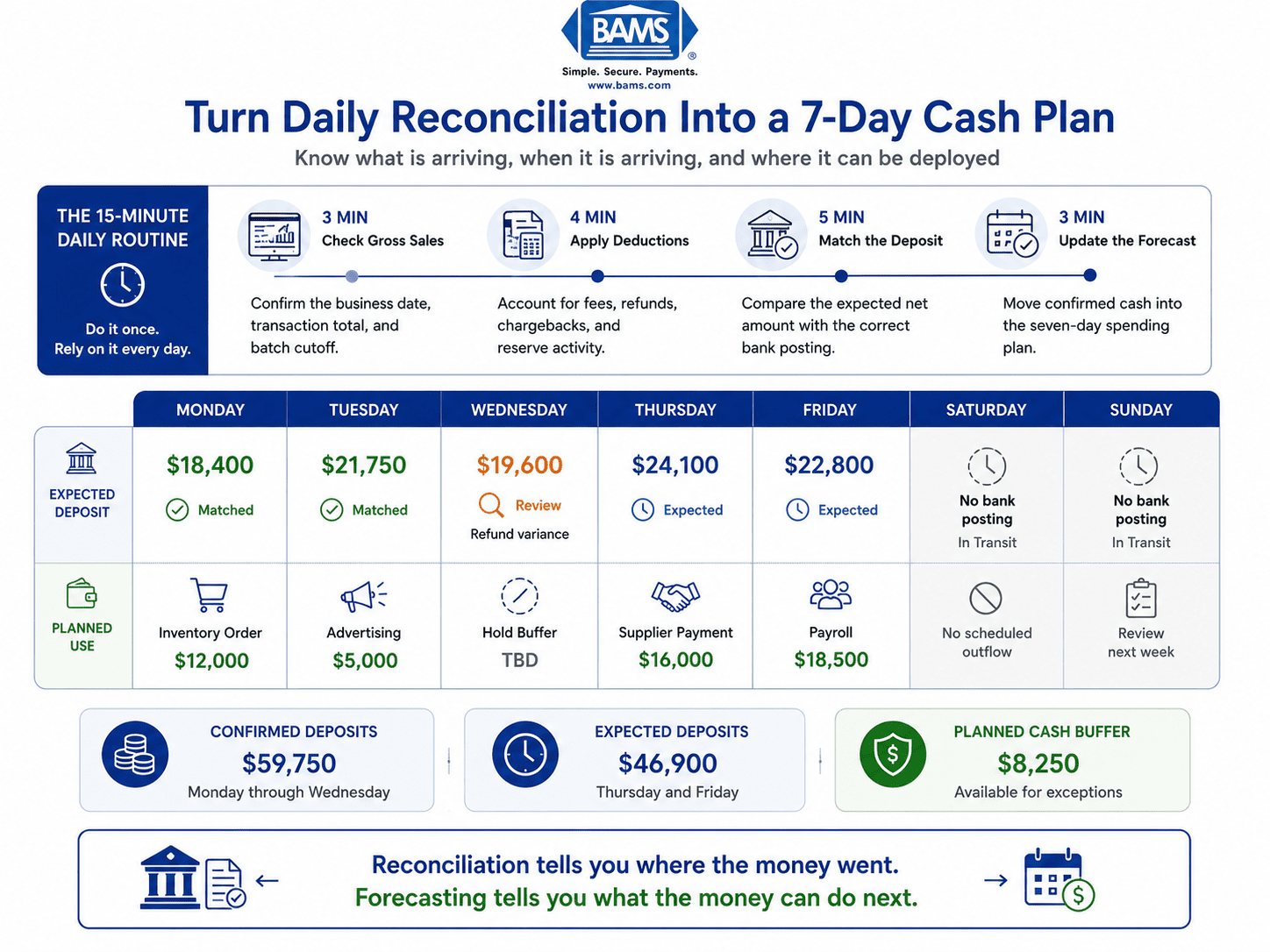
- Reconciliation is a cash flow planning tool, not just a compliance task — Once deposits are predictable, you can build a rolling 7-day forecast and time inventory purchases, ad spend, and supplier payments around actual inflows instead of guessing.
- Faster settlement compresses the problem — Next-day funding shortens the window where money is “in transit,” making your reconciliation simpler and your cash more accessible for reinvestment.
Guide Orientation: What This Guide Covers and Who It’s For
This guide walks you through the specific reasons your bank balance doesn’t match your payment dashboard, and gives you a repeatable method to diagnose and eliminate each mismatch. Daily reconciliation is the core skill, but we treat it as a cash flow planning habit, not just an accounting chore.
This is for eCommerce managers at established online businesses (roughly 10 to 50 employees) who process card transactions daily and need to know exactly when money lands in their bank account. If you’ve ever stared at a deposit amount that doesn’t match yesterday’s sales total and felt a low-grade panic, this guide is built for you.
By the end, you’ll be able to identify the six most common sources of timing variance between your dashboard and your bank, build a structured daily reconciliation workflow, and convert deposit predictability into a reinvestment schedule you can actually plan around. We won’t cover enterprise ERP integrations or multi-currency treasury operations. We stay focused on the practical, daily reality of getting paid and knowing where your money is.
Why Daily Reconciliation and Bank Deposit Matching Matter Now
eCommerce revenue doesn’t arrive in one clean lump. It passes through a payment gateway, a card processor, a settlement network, and finally your bank. Each handoff introduces a potential delay, fee deduction, or exception. The result: your dashboard says one thing, your bank says another, and you’re left guessing how much cash you actually have to work with today.
That guessing has a real cost. When you can’t predict when deposits land, you delay inventory purchases, miss early-payment discounts from suppliers, and pull back on ad spend during the exact windows when reinvestment would compound. As settlement delays quietly erode your margins, the damage isn’t dramatic. It’s incremental and invisible, which makes it worse.
The shift happening now is that more processors offer next-day or even same-day funding, which means the gap between “sale recorded” and “cash available” is shrinking for merchants who understand it. But faster funding only helps if you can match deposits accurately. Otherwise, you’re still reacting to your balance instead of planning around it. High-volume businesses often need daily reconciliation to catch errors early, and eCommerce operators running lean teams can’t afford to discover a $3,000 discrepancy at month-end when it should have been flagged on Tuesday.
The businesses that treat reconciliation as a daily planning input, not a monthly compliance task, are the ones that turn deposit timing into a competitive advantage. They know what’s coming, when it’s coming, and what to do with it the moment it arrives.
Core Concepts: The Language of Timing Variance
Before you can diagnose mismatches, you need to understand the specific terms and distinctions that separate a real error from an expected delay. Conflating the two is the single most common mistake in eCommerce reconciliation.

Your dashboard tracks gross sales, while your bank receives the net amount after deductions and settlement timing adjustments.
Timing Variance vs. True Error
Timing variance is a temporary mismatch caused by the normal lag between when a transaction is recorded and when the corresponding deposit hits your bank. It resolves itself within a predictable window (usually one to three business days). A true error is a discrepancy that won’t self-correct: a missing transaction, an incorrect fee deduction, or a deposit that never arrives.
Merchants should also review settlement reporting and transaction documentation provided by Visa to better understand how card transactions move from authorization through settlement.
As one reconciliation best-practices guide puts it, “Batches that close in the last days of one month but fund in the first days of the next get carried as a timing variance, not chased as an error.” This distinction saves you hours of unnecessary investigation.
Gross Sales vs. Net Deposit
Your dashboard typically shows gross sales: the total dollar amount of transactions before any deductions. Your bank receives the net deposit: gross sales minus processing fees, chargebacks, refunds, and any reserves your processor holds. These two numbers will almost never match, and they aren’t supposed to.
Batch Settlement
Card processors typically batch settle, usually next business day, meaning your individual transactions are grouped into a single deposit. Understanding your processor’s batch cutoff time (often a specific hour like 9 PM or midnight ET) is essential because a sale at 11:58 PM might land in a different batch than a sale at 12:02 AM.
The Exception Set
Common reconciliation exceptions include fees, chargebacks, refunds, rolling reserve releases, and automatic payments. These are the line items that create the gap between what you expect and what you receive. Knowing your exception set in advance turns surprises into expected adjustments.
The Framework: From Reactive Balance-Checking to Predictable Cash Planning
The method in this guide follows a five-stage diagnostic cycle you can run daily in 15 to 20 minutes. Each stage builds on the previous one, and together they transform reconciliation from a backward-looking audit into a forward-looking planning tool.
- Stage 1: Anchor Your Gross Sales Baseline — Establish what your dashboard actually reports.
- Stage 2: Map Your Deduction Layer — Identify every fee, refund, and holdback between gross and net.
- Stage 3: Align Settlement Timing — Match your processor’s batch schedule to your bank’s posting calendar.
- Stage 4: Isolate Exceptions — Separate true errors from expected timing variances.
- Stage 5: Convert to a Reinvestment Schedule — Use predictable deposit data to plan spending with confidence.
These stages are sequential for your first pass, then become a rapid daily check once you’ve established your baseline. The goal is to make deposit matching automatic enough that you spend most of your time on Stage 5: deciding what to do with the money, not hunting for it.
Step-by-Step Breakdown: Diagnosing and Fixing the Mismatch
Step 1: Anchor Your Gross Sales Baseline
Objective: Know exactly what number your payment dashboard is reporting, what it includes, and what it excludes.
Start by pulling your daily sales total from your payment gateway or processor dashboard. This number should represent all authorized and captured transactions for a defined 24-hour period. Verify what’s included: does it count pending authorizations that haven’t been captured? Does it include marketplace payouts or only direct card transactions? Does it reflect sales tax collected?
Daily sales reconciliation verifies that recorded sales match cash, card, third-party delivery receipts, taxes, tips, gift card activity, and deposits for a specific business day. If your dashboard lumps multiple payment methods together, break them apart. Card transactions settle differently than PayPal, ACH, or buy-now-pay-later platforms, and each has its own timing profile.
Anti-patterns: Don’t assume your dashboard’s “today” matches your bank’s “today.” Dashboard timestamps may use UTC while your bank posts in your local time zone. Don’t skip this step because the number “looks right.” A baseline that’s off by even 1% compounds into a significant discrepancy over a month.
Success indicators: You can state your gross sales figure for any given day, identify exactly which transaction types it includes, and confirm the time zone and cutoff time your dashboard uses. Write this down. It becomes your reference point for every subsequent step.
Step 2: Map Your Deduction Layer
Objective: Account for every dollar deducted between your gross sales number and the net deposit your bank receives.
Your processor doesn’t send you your gross sales. It sends gross minus a stack of deductions. The most common ones are interchange fees, assessment fees, processor markup, chargebacks, chargeback fees, refunds, and rolling reserves. Some processors deduct fees from each batch settlement (net settlement), while others charge fees in a separate monthly statement (gross settlement with separate billing). Know which model your processor uses, because it fundamentally changes what your daily deposit should look like.
Build a simple reference sheet listing every possible deduction category your processor applies. For each category, note whether it’s deducted per-batch, monthly, or on an event basis (like chargebacks). This sheet becomes your decoder ring. When a deposit is $247 less than expected, you check the sheet before you panic. Often, you’ll find a refund you issued yesterday or a chargeback fee you forgot to account for.
Anti-patterns: Don’t ignore small, recurring deductions like PCI compliance fees or statement fees. They’re easy to overlook individually but add up. Don’t assume your fee structure hasn’t changed. Processors sometimes adjust rates, and the first sign is often a reconciliation mismatch. Review your payment gateway reporting to verify fee transparency.
Success indicators: You can calculate your expected net deposit from your gross sales figure within a $10 margin on a typical day. You have a documented list of all deduction categories and their billing cadence.
Step 3: Align Settlement Timing
Objective: Predict exactly which day each batch of sales will appear as a deposit in your bank account.
This is where most of the “my balance doesn’t match” frustration lives. Your dashboard shows sales in real time. Your bank shows deposits on a delay. The gap between them is settlement timing, and it follows predictable rules once you map them. For additional information on payment settlement infrastructure and payment system operations, refer to the Federal Reserve Payments System.
Identify your processor’s batch cutoff time and settlement speed. If your processor settles next business day with a 9 PM cutoff, a sale at 8:55 PM Monday settles Tuesday, but a sale at 9:05 PM Monday goes into Tuesday’s batch and settles Wednesday. Weekends and bank holidays add further delays: Friday evening sales might not deposit until Tuesday (or Wednesday if Monday is a holiday).
Create a simple settlement calendar. For each day of the week, note when that day’s batch will deposit. Mark upcoming bank holidays. This calendar eliminates the most common source of reconciliation anxiety. When you check your bank on Monday morning and see no weekend deposits, the calendar confirms that’s expected, not alarming. For businesses looking to shrink this gap, BAMS offers next-day funding that compresses the settlement window and makes your calendar simpler by reducing the number of days deposits are “in transit.”
Anti-patterns: Don’t assume all processors settle on the same schedule. If you use multiple payment methods (Stripe for cards, PayPal for marketplace, a separate gateway for international), each has its own timing. Don’t forget that your bank also has a posting schedule. A deposit that arrives at 4 PM might not post until the next business day depending on your bank’s cutoff.
Businesses accepting ACH payments should also review settlement guidance published by NACHA, since ACH processing follows different settlement timelines than card transactions.
Success indicators: You can look at any day’s sales and predict the exact deposit date within your bank. Weekend and holiday deposits no longer surprise you. You’ve documented the settlement timing for each payment method you accept.
Step 4: Isolate Exceptions from Timing Variances
Objective: Quickly separate discrepancies that will self-resolve from those that require investigation or action.
Once you have your baseline (Step 1), your deduction map (Step 2), and your settlement calendar (Step 3), you can run a daily match. Pull your bank deposit for the day. Compare it against the expected net deposit for the corresponding batch (remember, today’s deposit reflects a previous day’s sales). If they match within your expected tolerance, you’re done. If they don’t, you enter exception isolation.
Start with the most common explanations: a refund processed that day, a chargeback deducted, a fee you didn’t account for, or a timing shift from a weekend or holiday. The most common timing differences between ledger and bank statement are deposits in transit and outstanding checks. Check your processor’s transaction detail report for the specific batch that funded. Compare line by line if needed.
If you find a discrepancy that doesn’t resolve with your deduction map or settlement calendar, flag it immediately. Contact your processor the same day. Waiting turns a simple inquiry into a complicated dispute.
Anti-patterns: Don’t chase every $2 variance. Set a materiality threshold (for example, $25 or 0.5% of the batch, whichever is greater) and investigate only discrepancies above it. Don’t let unresolved exceptions accumulate. A backlog of “I’ll look at it later” items is how month-end reconciliation becomes a nightmare.
Success indicators: You resolve 90%+ of daily discrepancies within five minutes using your deduction map and settlement calendar. True exceptions are flagged and escalated within 24 hours. You maintain a running log of resolved and unresolved exceptions.
Step 5: Build Your Reinvestment Schedule
Daily reconciliation becomes most valuable when confirmed deposits are converted into a forward-looking reinvestment schedule.
Objective: Convert predictable deposit data into a forward-looking spending plan that lets you reinvest with confidence.
This is the stage most reconciliation guides skip entirely, and it’s where the real value lives. Once you can predict your deposits accurately (Steps 1 through 4), you can plan your outflows around your inflows instead of guessing.
Start by building a rolling 7-day deposit forecast. Using your settlement calendar and your average daily sales data, project what deposits you expect each day for the next week. Layer your planned expenses on top: inventory purchases, ad spend, payroll, subscription renewals. Identify the days where your projected cash balance is tightest and the days where you have surplus.
This forecast transforms your relationship with cash. Instead of checking your bank balance reactively and making gut-feel decisions about whether you can afford to reorder inventory, you’re working from a schedule. You know that Thursday’s deposit will cover Friday’s supplier payment, and you know that weekend sales will fund Monday’s ad budget increase. You stop hoarding cash “just in case” and start deploying it strategically.
For eCommerce operators running on tight margins, even a one-day improvement in deposit timing can mean the difference between catching a restock window and missing it. This is where daily reconciliation stops being about compliance and starts being about growth.
Anti-patterns: Don’t build a forecast and then ignore it. Review it each morning as part of your reconciliation routine. Don’t over-optimize. Your forecast is a planning tool, not a binding contract. Leave a cash buffer for unexpected chargebacks or delayed deposits.
Success indicators: You have a documented 7-day rolling forecast that updates daily. You can identify your tightest and loosest cash days at a glance. Inventory and ad spend decisions reference the forecast, not just the current bank balance.
Practical Examples: Seeing the Diagnosis in Action
Scenario 1: The Monday Morning Panic
An eCommerce manager checks her bank balance Monday morning and sees no deposits from Saturday or Sunday. Her dashboard shows $14,200 in weekend sales. She’s about to call her processor when she checks her settlement calendar: her processor doesn’t settle on weekends, and Monday’s deposit will include Friday’s batch only. Saturday and Sunday batches will deposit Tuesday and Wednesday respectively. No error. No missing money. Just timing variance, resolved in 30 seconds because the calendar was already built.
Scenario 2: The Mysterious $312 Shortfall
A store’s Tuesday deposit is $312 less than the expected net for Monday’s batch. The manager checks the deduction map: no chargebacks pending, no refunds issued. He pulls the processor’s batch detail report and finds a $312 refund that was initiated by a customer service rep on Monday afternoon. The refund was deducted from the batch before settlement, but the internal system hadn’t synced to the dashboard yet. The fix: add a step to the daily routine where the CS team logs refunds in a shared sheet so the manager can account for them before checking the bank.
Scenario 3: The Month-End Crossover
At month-end, the books show $4,800 in “missing” revenue. Investigation reveals that three days of late-month sales (Thursday through Saturday) settled in the first two business days of the following month. This isn’t a loss. It’s a textbook timing variance. The manager creates a “deposits in transit” line item in the monthly close process and documents the expected settlement dates. Next month, the close takes 20 minutes instead of three hours.
Common Mistakes and Pitfalls
The most predictable failure is treating every mismatch as an emergency. When you don’t have a deduction map or settlement calendar, every discrepancy feels like lost money. This leads to frantic calls to your processor, wasted time, and eroded trust in your own numbers. Build the diagnostic framework first, then investigate only what falls outside it.
Another common trap is reconciling monthly when your business needs daily attention. High-volume companies may need to reconcile weekly or daily, and most eCommerce businesses processing more than a few hundred transactions per week qualify. Monthly reconciliation buries errors under 30 days of accumulated noise.
Finally, many operators conflate their dashboard balance with their bank balance and make spending decisions based on whichever number looks better. These are two different views of the same money at different stages of settlement. Trusting one without cross-referencing the other is how cash flow surprises happen. Use both, and let your reconciliation process be the bridge between them.
What to Do Next
Start with one step today: document your processor’s batch cutoff time and settlement speed. Write it down somewhere your team can reference. That single data point eliminates the most common source of reconciliation confusion.
Tomorrow, build your deduction map. The day after, create your settlement calendar. Within a week, you’ll have the infrastructure to run a daily reconciliation check in under 15 minutes. Within a month, you’ll have enough data to build a reliable deposit forecast.
This isn’t a one-time project. It’s a habit. Revisit your deduction map when your processor updates fees. Update your settlement calendar around holidays. Refine your forecast as you learn your business’s deposit patterns. The goal isn’t perfection on day one. It’s building a system that gets more accurate and more useful every week, until the question “where is my money?” is one you never have to ask again.
Frequently Asked Questions
What is deposit reconciliation in merchant services?
Deposit reconciliation is the process of matching the sales your payment processor reports against the actual deposits that appear in your bank account. It accounts for the deductions (fees, chargebacks, refunds, reserves) and timing delays (batch settlement, weekends, holidays) that create differences between your dashboard total and your bank balance. The goal is to confirm every dollar is accounted for and identify any true errors quickly.
Why does my bank deposit never match my dashboard sales total?
Your dashboard typically shows gross sales (total transaction volume), while your bank receives net deposits (gross minus processing fees, refunds, chargebacks, and reserves). On top of that, settlement timing means today’s bank deposit reflects a previous day’s sales batch, not today’s. These two factors, deductions and timing, explain the vast majority of mismatches. They’re expected, not errors.
When should I perform deposit reconciliation for my merchant account?
For eCommerce businesses processing more than a few hundred transactions per week, daily reconciliation is the most effective cadence. It lets you catch errors within 24 hours, maintain accurate cash flow visibility, and avoid the month-end scramble of sorting through 30 days of accumulated discrepancies. Even a 15-minute daily check is more effective than a thorough monthly review.
Which factors can affect the timing of merchant service deposits?
The main factors are your processor’s batch cutoff time, settlement speed (next-day vs. two-day vs. three-day), weekends and bank holidays (banks don’t process deposits on non-business days), your bank’s own posting schedule, and the payment method used (credit cards, debit cards, ACH, and third-party platforms all settle on different timelines). Using multiple payment processors adds additional complexity.
What’s the difference between a timing variance and a true reconciliation error?
A timing variance is a temporary mismatch that resolves on its own within your processor’s normal settlement window. For example, Friday sales that don’t deposit until Monday. A true error is a discrepancy that won’t self-correct: a transaction that was captured but never settled, an incorrect fee deduction, or a deposit that simply never arrives. Your settlement calendar and deduction map help you distinguish between the two in seconds.
How can I use reconciliation to improve cash flow planning?
Once your daily reconciliation is consistent, you can build a rolling 7-day deposit forecast that predicts how much cash will land in your account each day. Layering your planned expenses (inventory, ads, payroll) on top of this forecast lets you make spending decisions based on projected cash availability rather than your current balance. This turns reconciliation from a backward-looking audit into a forward-looking planning tool.
Sources


