Level 3 Data: A Guide to Interchange Savings
Last Updated on July 31, 2026 by Dimitri Akhrin
How automated data capture quietly recovers money your processor may be letting slip away
Learn what Level 3 data is, how to spot missed interchange savings on commercial card orders, and how automated data capture through your processor can recover those savings without overhauling your tech stack.
TL;DR
- Your processing statement hides interchange downgrades — Standard statements don’t show whether your commercial card transactions are qualifying for the lowest available rates or silently overpaying due to missing data.
- Level 3 data saves 0.5% to 1.5% on commercial card transactions — By submitting line-item detail (product descriptions, quantities, unit costs, tax) with each transaction, you qualify for significantly lower interchange rates on corporate and purchasing card orders.
- Your eCommerce platform already generates most of the data — The required Level 3 fields exist in your checkout system. The gap is whether your processor captures and transmits them to the card networks in the right format.
- Automated data capture is a processor feature, not a tech project — The right processor handles Level 3 data submission automatically through gateway configuration, not through ERP integrations or manual entry.
- Start by asking one question — Request a card-type breakdown from your processor. If 10% or more of your volume comes from commercial cards, you likely have a meaningful savings opportunity waiting to be activated.
Guide Orientation: What This Covers and Who It’s For
Your processing statement shows you totals: volume processed, fees deducted, net deposits. What it doesn’t show is whether your processor is capturing the right data to qualify your transactions for the lowest possible interchange rates. This guide explains why your processing statement doesn’t tell the whole story, specifically when it comes to Level 3 data and the interchange savings you may be leaving on the table without realizing it.
This is written for eCommerce managers at established online businesses (roughly 10 to 50 employees) who process a mix of consumer and commercial card transactions. If you sell to other businesses, government agencies, or organizations that pay with corporate purchasing cards, this applies to you.
By the end, you’ll understand what Level 3 data actually is, how to identify whether you’re already losing money on commercial card orders, and how automated data capture through your processor can recover those savings without requiring you to overhaul your tech stack. We won’t cover ERP integration or enterprise-scale implementations. This is ground-level, practical guidance for online merchants.
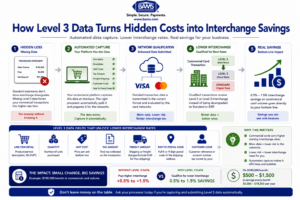
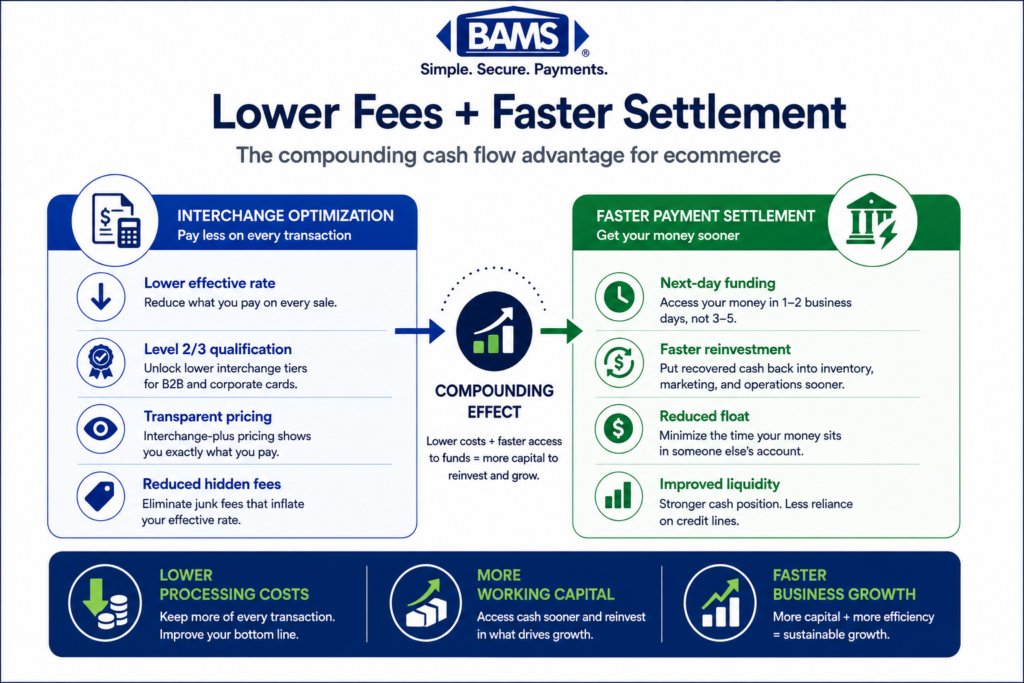
Most eCommerce platforms already collect the information needed for Level 3 qualification. The real opportunity is ensuring your payment processor automatically captures and transmits that data to unlock lower interchange rates.
Why Interchange Savings from Level 3 Data Matter Now
Interchange fees are the single largest component of your processing costs. They’re set by the card networks (Visa, Mastercard) and vary based on dozens of factors: card type, merchant category, transaction method, and critically, how much data you send with each transaction. The more detailed and structured the data, the lower the risk profile the networks assign, and the lower the interchange rate you pay.
Here’s the problem: most eCommerce merchants don’t know that commercial card transactions (corporate cards, purchasing cards, government cards) are evaluated differently than consumer transactions. These cards have tiered interchange rates that reward merchants who submit enhanced transaction data. If your processor isn’t capturing and transmitting that data, your commercial card transactions silently downgrade to higher interchange tiers, and you pay more without ever seeing a line item that explains why.
The cost of inaction is real. Commercial card transactions may qualify for more favorable interchange categories when the required enhanced transaction data is submitted correctly. The Visa Commercial Enhanced Data Program (CEDP) explains how enhanced transaction data supports qualification for eligible commercial card transactions.
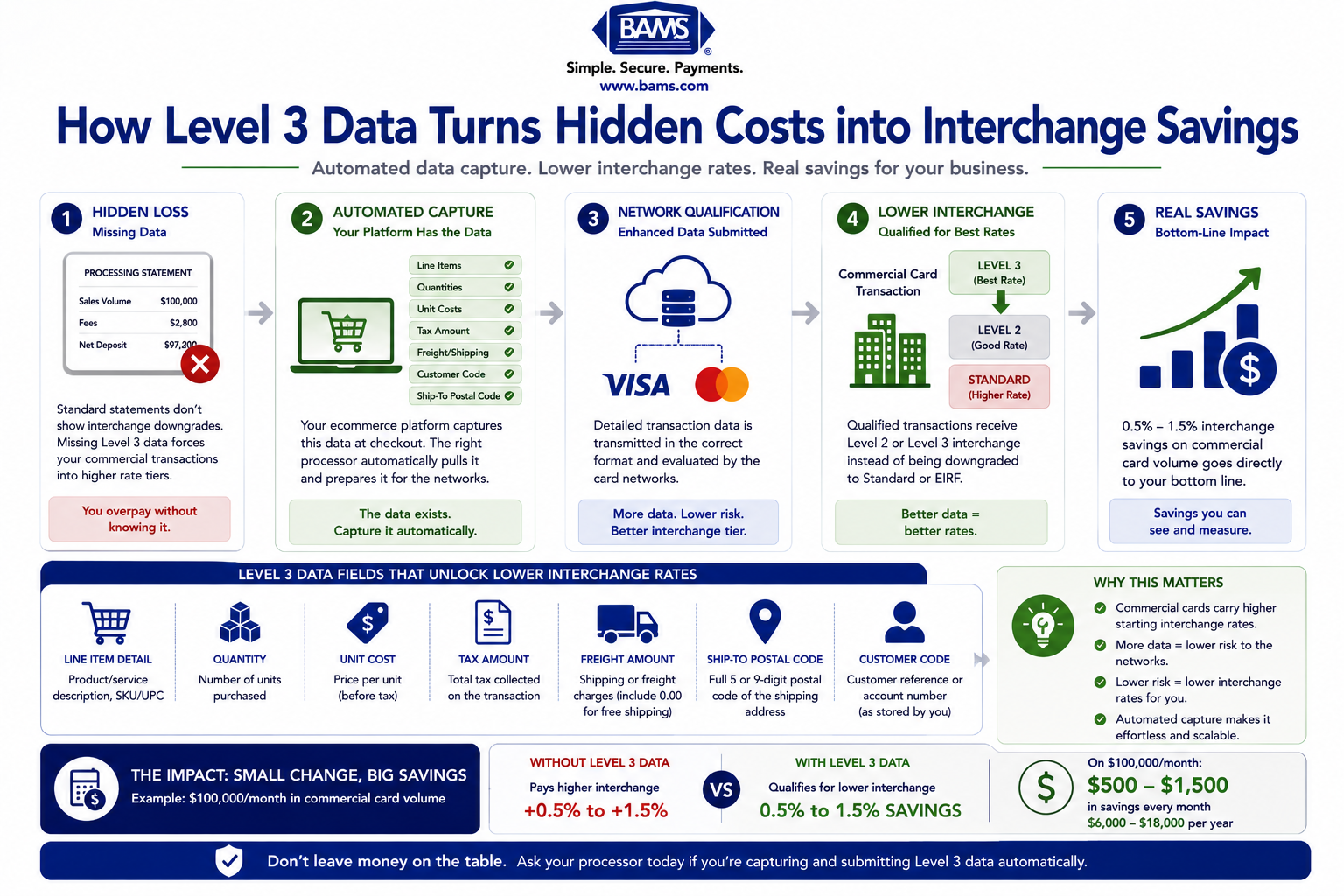
For a business processing $100,000 per month in commercial card volume, that’s $500 to $1,500 in monthly savings that simply vanishes if your processor doesn’t handle this correctly. Visa has transitioned its commercial card optimization framework under the Commercial Enhanced Data Program (CEDP), placing greater emphasis on enhanced transaction data for eligible commercial card transactions. The window for half-measures has closed.
Core Concepts: Understanding the Data Levels
What the Three Data Levels Actually Mean
Every credit card transaction transmits data to the card networks. The depth of that data determines which “level” the transaction qualifies for, and each level unlocks progressively lower interchange rates.
- Level 1 — Basic authorization data: merchant name, transaction amount, date. This is what every consumer swipe or online checkout sends. It qualifies for standard interchange rates.
- Level 2 — Adds tax amount, customer code (like a PO number), and merchant postal code. This is sometimes called “summary data” and historically earned a modest discount on commercial cards.
- Level 3 — Adds line-item detail for every product in the transaction: item description, quantity, unit of measure, commodity code, unit cost, and more.Level 3 transactions include detailed line-item information that supports commercial card processing, reconciliation, and qualification requirements for eligible business transactions. Mastercard Developers provides technical documentation covering commercial payment integrations and transaction data requirements.
The Key Distinction Most Merchants Miss
Level 3 data is not an “enterprise concept.” It’s a data qualification standard. If your online store processes orders from businesses that pay with corporate or purchasing cards, those transactions are already eligible for Level 3 rates. The question isn’t whether you qualify. It’s whether your processor is capturing and submitting the data that earns the discount.
A common misconception is that Level 3 processing requires special software or manual data entry. In reality, your eCommerce platform already generates most of the required fields (product descriptions, quantities, unit prices, tax amounts). The gap is usually at the processor level: whether your payment gateway and processor are configured to collect, format, and transmit that data to the card networks in the structure they require.
Why Your Statement Hides This
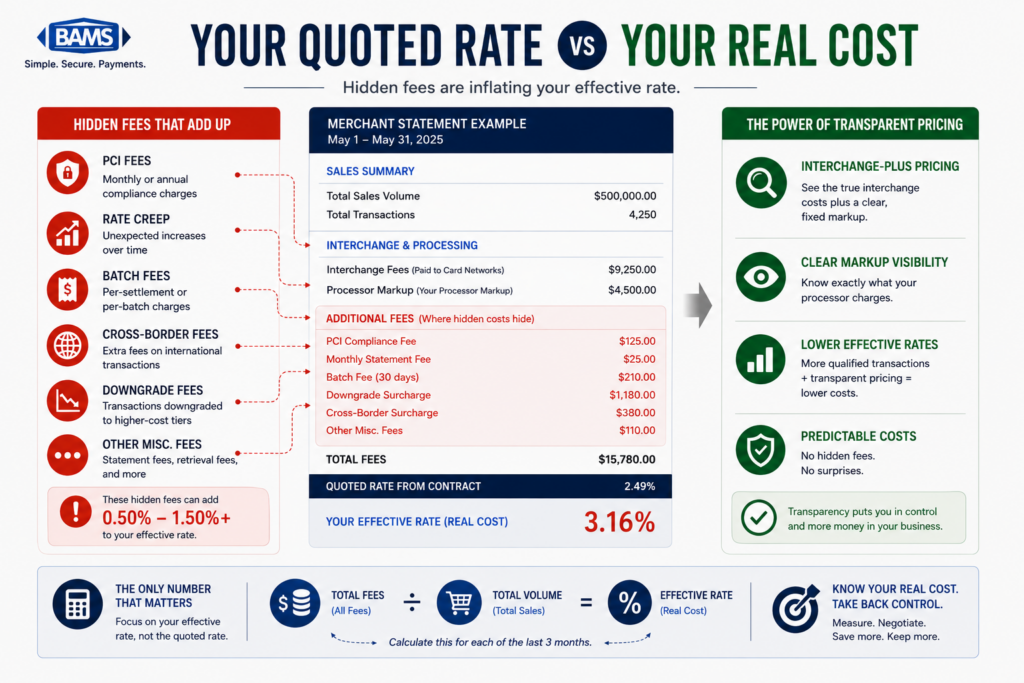
Standard processing statements report aggregate fees. They don’t break out which transactions qualified at Level 1, Level 2, or Level 3, and they don’t flag downgrades. They don’t show you the interchange rate applied to individual transactions. This is why transaction-level payment analytics matter: without them, you’re flying blind on one of the most controllable cost variables in your business.
The Framework: From Invisible Loss to Automated Recovery
Recovering interchange savings from Level 3 data follows a four-stage process. Each stage builds on the previous one, and the entire sequence can typically be completed without changing your eCommerce platform or adding new software.
- Stage 1: Identify — Determine what percentage of your transactions come from commercial cards and whether they’re currently downgrading.
- Stage 2: Audit — Examine your processing statement and transaction data to quantify the gap between what you’re paying and what you could be paying.
- Stage 3: Enable — Work with your processor to activate automated data capture so Level 3 fields are transmitted without manual intervention.
- Stage 4: Verify — Confirm that transactions are qualifying at the correct interchange tier on an ongoing basis.
Let’s break each stage down.
Step-by-Step: How to Identify and Capture Level 3 Savings
Step 1: Identify Your Commercial Card Exposure
Objective: Determine what portion of your transaction volume comes from commercial, corporate, or purchasing cards, and whether those transactions represent a meaningful savings opportunity.
Most eCommerce merchants assume their customers pay with personal consumer cards. But if you sell to other businesses, schools, nonprofits, or government agencies, a portion of your orders are likely paid with commercial cards. These cards carry different interchange categories, and they’re the ones eligible for Level 3 discounts.
Start by asking your processor for a card-type breakdown of your last three months of transactions. You’re looking for cards classified as “commercial,” “corporate,” “purchasing,” “business,” or “government.” Some processors can provide this data on request; others require you to access a reporting dashboard. If your processor can’t tell you what types of cards your customers are using, that’s a red flag about the transparency of your relationship.
What to avoid: Don’t assume that because you’re “B2C” you have no commercial card volume. Many businesses, schools, and organizations use purchasing cards for online orders that look identical to consumer transactions at checkout. You won’t know until you look at the data.
Success indicator: You have a clear percentage of monthly volume attributable to commercial card types. Even 10 to 15% commercial card volume on a six-figure monthly processing total can represent significant savings.
Step 2: Audit Your Current Interchange Qualification
Objective: Quantify how much you’re currently overpaying due to transactions that downgrade from optimal interchange tiers.
Once you know your commercial card mix, the next step is understanding what interchange rates those transactions are actually hitting. This requires looking beyond the summary totals on your statement and examining interchange qualification at the transaction level.
On an interchange-plus pricing model, you can see the base interchange rate applied to each transaction (or at least to each category of transactions). Look for terms like “EIRF” (Electronic Interchange Reimbursement Fee), “standard,” or “non-qualified” next to commercial card transactions. These indicate that the transaction downgraded because insufficient data was submitted. Merchants accepting Level 3 transactions could see interchange reductions roughly double the discount for Level 2 transactions, so the gap between downgraded and optimized rates is substantial.
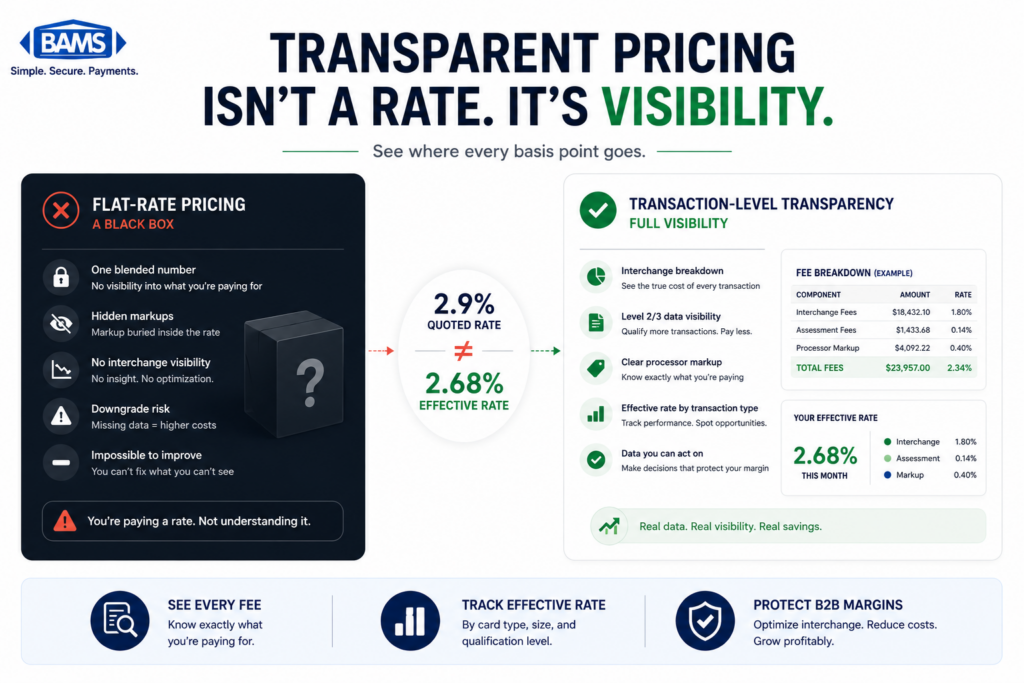
If you’re on a flat-rate or tiered pricing model, this analysis is harder because the processor bundles interchange into opaque categories. In that case, request a detailed interchange report or ask your processor to show you the underlying interchange categories your transactions are hitting.
What to avoid: Don’t rely solely on your effective rate (total fees divided by total volume) to assess this. Your effective rate blends consumer and commercial transactions together, masking the specific overpayment on commercial cards. You need to isolate commercial card costs.
Success indicator: You can identify specific transactions or transaction categories that are downgrading, and you can estimate the dollar amount of the gap. Businesses processing commercial card transactions can often reduce payment acceptance costs by improving interchange qualification for eligible transactions.
Step 3: Evaluate Your Processor’s Data Capture Capabilities
Objective: Determine whether your current processor supports automated Level 3 data capture and transmission, or whether you need to switch.
This is the step where most existing guides send you down a rabbit hole of ERP integrations and custom API development. For most eCommerce merchants, that’s the wrong path. The right question is simpler: does your processor automatically capture and submit Level 3 data fields from your existing checkout and order management system?
Modern payment gateways can be configured to pull line-item details (product descriptions, quantities, unit costs, tax amounts, commodity codes) directly from the shopping cart data your platform already generates. The processor’s gateway formats this data according to Visa and Mastercard specifications and includes it in the authorization and settlement messages. No manual entry required. No new software to install.
Ask your processor these specific questions: Do you support Level 3 data submission? Is it automatic or does it require manual input? Which eCommerce platforms does your gateway integrate with for line-item data capture? What percentage of my eligible transactions are currently qualifying at Level 3? A processor that can’t answer these questions clearly is costing you money through inaction.
This is where your choice of merchant services partner makes a measurable difference.
BAMS, for example, provides dedicated account management that includes evaluating your interchange qualification and ensuring your transactions capture the data needed to hit the lowest available rates. Rather than leaving savings on the table by default, a proactive processor treats data optimization as part of the service.
What to avoid: Don’t assume that because your processor is “big” or “well-known” they’re automatically handling this. Many large processors default to Level 1 data submission because it’s simpler for them operationally, even though it costs you more. The processor’s incentive structure doesn’t always align with your savings.
Success indicator: You have a clear, documented answer from your processor about their Level 3 capabilities, including which fields they capture automatically and which (if any) require configuration on your end.
Step 4: Enable Automated Data Capture
Objective: Activate Level 3 data transmission for eligible transactions without disrupting your existing checkout flow or operations.
If your processor supports automated data capture, enabling it is typically a configuration change, not a development project. Your processor or their integration team will map the required Level 3 fields to the data your eCommerce platform already collects at checkout.
The required fields for Level 3 qualification include: line-item product description, product or commodity code, quantity, unit of measure, unit cost, extended amount (quantity times unit cost), discount amount (if applicable), tax amount per line item, and freight/shipping amount. Most of these fields exist natively in platforms like Shopify, WooCommerce, BigCommerce, and Magento. The commodity code is the field most likely to need configuration, as it maps products to standardized classification systems used by the card networks.
Work with your processor to establish a timeline for activation and a testing protocol.
Ideally, you’ll run a small batch of transactions through the new configuration and verify they qualify at Level 3 before rolling it out across all transactions.
What to avoid: Don’t try to manually enter Level 3 data for each transaction. This approach doesn’t scale, introduces errors, and defeats the purpose of automated data capture. If your processor requires manual input for Level 3 fields, that’s a sign their technology isn’t equipped for eCommerce merchants.
Success indicator: Test transactions are processed with full Level 3 data and qualify at the reduced interchange tier. Your checkout experience is unchanged for customers.
Step 5: Verify Ongoing Qualification and Monitor Savings
Objective: Confirm that Level 3 data capture is working consistently and that your interchange savings materialize on your statements month over month.
Enabling Level 3 data capture is not a set-it-and-forget-it action. Product catalogs change, new SKUs get added without commodity codes, platform updates can alter data field mappings, and card network rules evolve. You need a verification process.
Review your interchange qualification monthly for the first quarter after activation. Look at the interchange categories your commercial card transactions are hitting. You should see a shift from “standard” or “non-qualified” categories to “commercial Level 3” or equivalent tiers. Transactions that consistently meet commercial card data requirements are more likely to qualify for preferred interchange categories instead of higher default commercial rates. If transactions are still downgrading, investigate which data fields are missing or malformed.
Build a simple tracking sheet: month, total commercial card volume, percentage qualifying at Level 3, estimated savings versus previous baseline. This gives you a clear, ongoing picture of the return on this effort. If you’re seeing signals that transactions are still overpaying, escalate with your processor immediately.
What to avoid: Don’t wait six months to check whether it’s working. Interchange downgrades compound quickly, and a misconfiguration that goes undetected for months can erase the savings you expected.
Success indicator: 80% or more of your eligible commercial card transactions consistently qualify at Level 3 interchange rates, and your monthly savings tracking confirms the expected cost reduction.
Practical Examples: What This Looks Like in the Real World
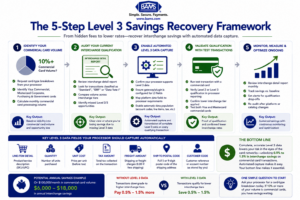
Recovering Level 3 interchange savings doesn’t require rebuilding your technology stack. It starts with visibility, continues with processor configuration, and ends with ongoing monitoring.
Scenario A: The Office Supply eCommerce Store
An online office supply retailer processes $200,000 per month in total card volume. After requesting a card-type breakdown, they discover that 25% of their volume ($50,000) comes from corporate purchasing cards used by businesses and school districts. All of those transactions have been processing at Level 1, hitting a non-qualified interchange rate of approximately 2.95%.
After enabling automated Level 3 data capture through their processor, those same transactions qualify at 1.90% plus $0.10. On $50,000 in monthly commercial card volume, the interchange cost drops from roughly $1,475 to $1,000. That’s $475 per month in savings, or $5,700 per year, with no change to the customer experience and no new software.
Scenario B: The Specialty Equipment Distributor
A mid-size eCommerce business selling industrial equipment processes $150,000 per month. Nearly 40% of their orders come from businesses paying with commercial cards. Their processor, a large national provider, has never mentioned Level 3 data. The merchant’s effective rate on commercial cards is 3.1%.
After auditing their statement and switching to a processor that supports automated Level 3 data capture (including BAMS-style proactive account management), their commercial card interchange drops to approximately 2.0%. On $60,000 in monthly commercial volume, they save roughly $660 per month, or nearly $8,000 per year. The key insight: their previous processor had no financial incentive to optimize their interchange qualification, and the merchant had no visibility into the problem.
The Contrast That Matters
In both scenarios, the data needed for Level 3 qualification already existed in the merchants’ eCommerce platforms. The product descriptions, quantities, unit prices, and tax amounts were all captured at checkout. The gap was entirely at the processor level: whether the payment gateway was configured to transmit that data in the format the card networks require. The merchants weren’t doing anything wrong. Their processors simply weren’t doing enough.
Common Mistakes and Pitfalls
Assuming this doesn’t apply to you. The most expensive mistake is dismissing Level 3 data as irrelevant because you think of yourself as a B2C business. If even a fraction of your customers pay with commercial cards, you have an optimization opportunity.
Focusing on the wrong metric. Your overall effective rate can look reasonable while commercial card transactions quietly bleed margin. Isolate commercial card costs to see the real picture.
Expecting your processor to proactively optimize. Many processors default to minimal data submission. Unless you ask specifically about Level 3 capabilities, they may never bring it up. The incentive to reduce your interchange fees doesn’t always align with their revenue model.
Over-engineering the solution. You don’t need an ERP integration or a custom API build. For most eCommerce merchants, this is a processor-side configuration, not a technology project. If someone is selling you a complex implementation, question whether simpler options exist.
Checking once and walking away. Data qualification can drift as your product catalog evolves. Build a monthly review into your operations, at least for the first six months.
What to Do Next
Start with one action: ask your processor for a card-type breakdown of your last 90 days of transactions. Find out what percentage of your volume comes from commercial, corporate, or purchasing cards. That single data point tells you whether this optimization is worth pursuing for your business.
If the number is meaningful (even 10% of a healthy monthly volume adds up), ask the follow-up questions outlined in Step 3. Your processor’s answers will tell you whether they’re equipped to help or whether it’s time to evaluate alternatives.
This isn’t something you need to solve in a week. But it is something you should understand now, because every month you process commercial card transactions without Level 3 data capture is a month of savings that quietly disappears from your bottom line. Revisit this guide as your volume grows or your processor relationship changes. The math only gets more compelling at scale.
Frequently Asked Questions
What is Level 3 data in merchant services?
Level 3 data is the most detailed tier of transaction information sent to card networks during payment processing. It includes line-item details like product descriptions, quantities, unit costs, commodity codes, tax amounts, and shipping costs. When this data is submitted with a commercial card transaction, the card networks assign a lower interchange rate because the additional detail reduces fraud risk and supports audit trails. Think of it as turning a basic credit card charge into a digital invoice.
How can Level 3 data optimize interchange rates for B2B transactions?
Card networks like Visa and Mastercard offer tiered interchange rates for commercial card transactions. The more data you submit, the lower the rate. Level 3 data qualifies transactions for the lowest available tier, which can be up to 1.05% lower than non-qualified rates. On a business processing $50,000 or more per month in commercial cards, that translates to hundreds or thousands of dollars in monthly savings.
What specific data fields are required for Level 3 processing?
Level 3 requires line-item detail for each product in a transaction. Required fields typically include: item description, product/commodity code, quantity, unit of measure, unit cost, extended amount, discount amount, line-item tax amount, and freight/shipping amount. Most eCommerce platforms already capture the majority of these fields at checkout. The commodity code is the field most likely to require additional configuration.
Do I need special software or an ERP integration to submit Level 3 data?
In most cases, no. If your processor’s payment gateway supports automated Level 3 data capture, it can pull the required fields directly from your eCommerce platform’s checkout and order data. The configuration happens at the processor/gateway level, not in your store’s code. You should only need custom development if your processor lacks native support for Level 3 or if your product catalog has unusual data requirements.
How do I know if my customers are paying with commercial cards?
Ask your processor for a card-type breakdown of your recent transactions. They can identify which cards are classified as commercial, corporate, purchasing, business, or government. This data isn’t visible on your standard processing statement, which is one reason many merchants don’t realize they have commercial card volume at all.
When did Visa eliminate Level 2 data submissions?
As of January 2026, Visa retired its Level 2 program and consolidated interchange optimization under its Commercial and Enhanced Data Program (CEDP), where Level 3 data (now called Product 3) is the primary path to reduced rates. Mastercard still maintains both Level 2 and Level 3 tiers, but the savings difference between them makes Level 3 the clear target for merchants seeking meaningful cost reduction.