
Hidden Fees in Merchant Services: A Line-by-Line Audit
Last Updated on October 7, 2026 by Dimitri Akhrin
Calculate your real B2B processing cost in under an hour using only your existing statements
Learn to audit your merchant statements line by line, calculate your true effective processing rate, and identify every buried markup inflating your B2B costs. No new software or contracts required — just your last three statements and 60 minutes.
TL;DR
- Calculate your effective rate first – Divide total fees by total sales volume on your last 3 statements. A healthy rate for mid-market eCommerce is 2.1% to 2.8%. Anything above 3.0% signals hidden markups.
- Identify your pricing model – Interchange-plus shows you the real cost breakdown. Tiered and bundled models hide markups in “qualified” and “non-qualified” buckets. If you can’t see individual interchange categories, you’re likely overpaying.
- Log and flag every fee – Build a spreadsheet of every line item, then compare against your original contract. Common hidden fees include inflated PCI charges, batch fees, rate creep, and cross-border surcharges.
- Check Level 2/3 qualification on B2B orders – If your commercial card transactions aren’t qualifying at Level 2/3 interchange rates, you’re leaving 0.50% to 1.00% per transaction on the table.
- Use your audit to negotiate or switch – 65% of merchants who negotiate with documented data successfully lower fees. Your one-page summary of effective rate, hidden fees, and benchmark costs is your leverage.
What You’ll Achieve: Your Real B2B Processing Cost, Calculated in Under an Hour
If you run an established eCommerce business, there’s a good chance hidden fees in merchant services are inflating your B2B processing costs by hundreds or even thousands of dollars every month. This tutorial walks you through a line-by-line audit of your existing merchant statements so you can calculate your true effective processing rate, identify every buried markup, and build a clear picture of what you actually pay versus what you should pay.
By the end, you’ll have a documented spreadsheet showing your real cost per transaction, a list of every hidden fee you’re currently absorbing, and the data you need to negotiate or make an informed switch. No new software. No contracts to sign. Just your last three statements and about 45 to 60 minutes.
Success criteria: You can state your effective processing rate to two decimal places and identify at least three fee line items that don’t appear in your original sales agreement.
Prerequisites and Setup Checklist
Before you start, gather the following. Missing even one item will slow you down.
- Your last 3 monthly merchant processing statements (PDF or paper). Three months smooths out seasonal variation.
- Your original merchant services agreement (the contract you signed, including the fee schedule addendum).
- A spreadsheet tool (Google Sheets, Excel, or similar). You’ll build a simple tracking sheet.
- A calculator (your phone works fine).
- 60 minutes of uninterrupted time.
Potential blockers: Some processors make it deliberately difficult to access statements online. If you can’t find yours, call your processor’s support line and request the last three months by email. They’re legally required to provide them.
Time estimate: 45 to 60 minutes for the full audit. Faster if your statements are already digital and searchable.
Why This Audit-First Approach Works

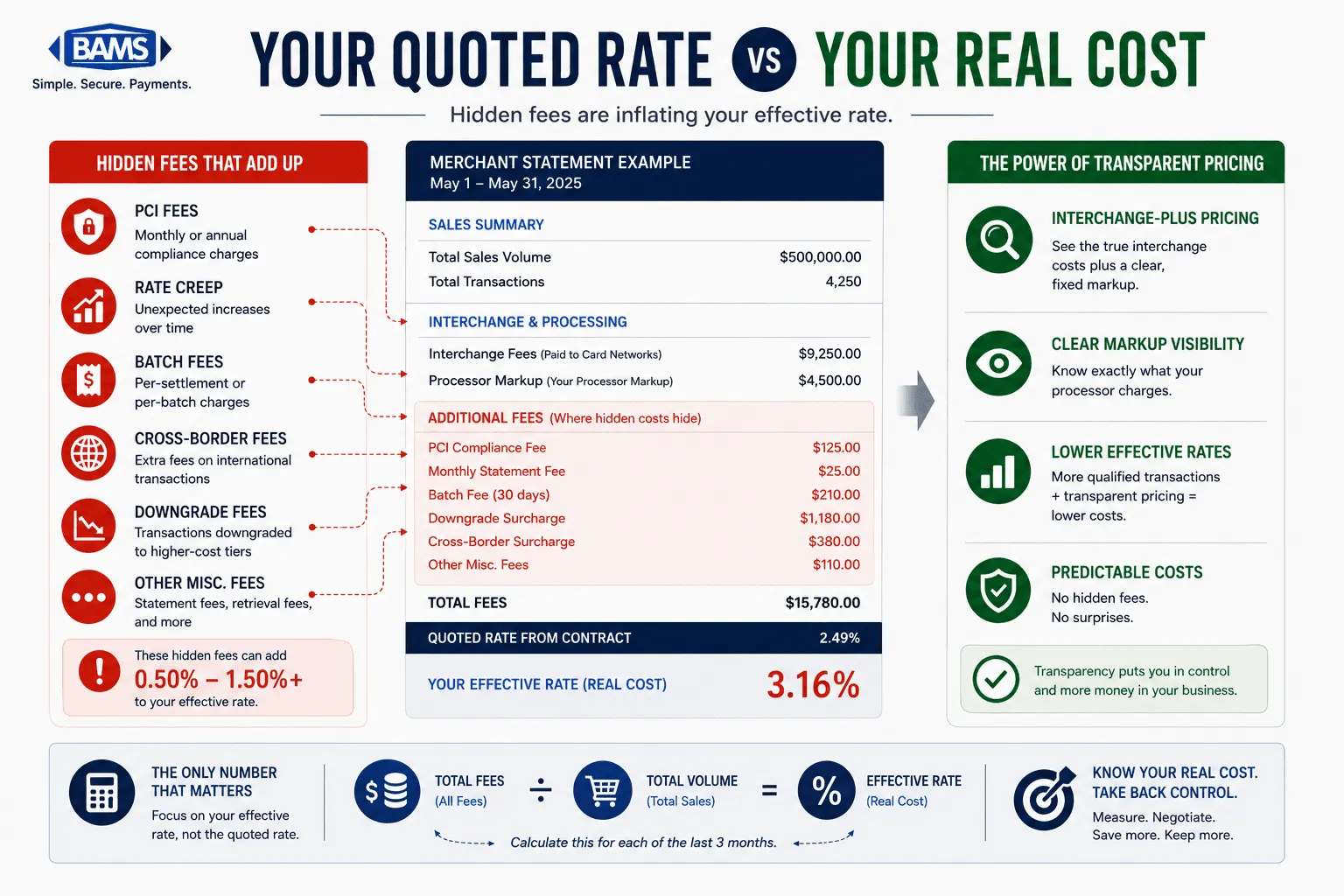
A line-by-line merchant statement audit revealing how hidden fees inflate your real processing costs beyond the quoted rate.
Most guides on reducing merchant service charges jump straight to “switch providers.” That’s backwards. Without knowing your actual costs, you can’t evaluate whether a new offer is better or just differently packaged. Research shows most merchants overpay due to complex pricing models, and the average small business loses about $2,400 annually to hidden processing fees alone.
This tutorial treats cost measurement as the first and most important step. You’ll learn to read your statements the way your processor hopes you never will. The method works regardless of your current pricing model (bundled, tiered, or interchange-plus), and it requires zero changes to your tech stack.
Expect moderate difficulty. The math is simple. The hard part is decoding statement terminology that varies by processor.
Step 1: Calculate Your Current Effective Processing Rate
Action: Open your most recent statement. Find two numbers: total processing fees charged and total sales volume processed.
Divide total fees by total volume, then multiply by 100. This is your effective rate.
Effective Rate = (Total Fees / Total Sales Volume) × 100
Example: If you processed $150,000 in sales and paid $4,200 in total fees, your effective rate is 2.80%.
Checkpoint: Repeat this for all three months. If your effective rate swings more than 0.3% between months (without a major change in card mix), that’s a red flag for inconsistent or manipulated fee application. Card payment costs include interchange fees, network assessments, and processor markups, which together determine the true effective rate merchants ultimately pay as outlined by the Federal Reserve.
Common failure: Some statements split fees across multiple pages or sections (“processing fees,” “assessments,” “other charges”). Make sure you’re adding every fee section, not just the first summary line. Missing a section will understate your real cost.
Step 2: Identify Your Pricing Model
Action: Look at how individual transactions are listed on your statement. You need to determine whether you’re on interchange-plus pricing, tiered/bundled pricing, or a flat-rate model.
How to tell the difference:
- Interchange-plus: You’ll see individual interchange categories (like “Visa CPS Retail” or “MC Merit III”) with the interchange rate listed separately from the processor’s markup. This is the most transparent pricing model.
- Tiered/Bundled: Transactions are grouped into buckets labeled “Qualified,” “Mid-Qualified,” and “Non-Qualified” with a single rate per bucket. This obscures what interchange category each transaction actually fell into.
- Flat-rate: Every transaction shows the same percentage (e.g., 2.9% + $0.30). Simple but almost always more expensive at volume.
Checkpoint: Write down your pricing model. If you’re on tiered or flat-rate pricing, expect to find the largest hidden markups in Steps 3 and 4.
Common failure: Some processors label tiered pricing with interchange-sounding names. If you see categories but every transaction in a category has the exact same rate regardless of card type, you’re on tiered pricing disguised as interchange-plus.
Step 3: Build Your Fee Extraction Spreadsheet
Action: Create a spreadsheet with these columns: Fee Name, Amount Charged (Month 1, 2, 3), Listed in Original Contract (Yes/No), Notes.
Now go through every line item on each statement and log every fee. Don’t skip anything, even if it looks small. Common line items include:
- Interchange fees (the base cost set by card networks)
- Processor markup (the margin your processor charges above interchange)
- Assessment fees (card brand fees from Visa, Mastercard, etc.)
- Monthly/annual account fees
- PCI compliance or non-compliance fees
- Batch processing fees
- Statement fees
- Gateway fees
- Cross-border or international transaction fees
- Chargeback fees
- Minimum monthly processing fees
Checkpoint: Your spreadsheet should have 10 to 25 distinct fee line items. If you have fewer than 8, you’re likely missing fees that are bundled into a single opaque line.
Step 4: Flag the Hidden Fees
Action: With your original contract in hand, compare each fee in your spreadsheet against the fee schedule you signed. Mark any fee that does not appear in your contract or that charges a different amount than what was agreed.
These are the most common hidden fees in merchant services that eCommerce businesses encounter:
- PCI non-compliance fee: Charged monthly if your PCI questionnaire isn’t filed. Often $19.95 to $99/month. Legitimate PCI compliance fees should run $70 to $120 per year, not per month.
- Rate creep: Your processor raised your markup by a fraction of a percent, buried in a statement notice you never saw.
- Downgrades: Transactions that “failed” to qualify at the lowest interchange tier and were charged a higher rate. On tiered pricing, this is where the biggest markups hide.
- Batch fees: A small per-batch fee ($0.10 to $0.25) that adds up if you batch-settle daily.
- Cross-border surcharges: Up to 1.5% extra on international cards, which can push effective rates to 3% to 6%.
Checkpoint: Highlight every flagged fee in red. Total them up. This is the amount you’re overpaying each month beyond what you agreed to. Maintaining PCI compliance is a core operational requirement for businesses that store, process, or transmit cardholder data, according to the PCI Security Standards Council.
Step 5: Check for Level 2/3 Data Qualification (B2B Transactions)
Level 2 and Level 3 qualification can significantly reduce interchange costs on commercial and purchasing card transactions.
Action: If you process B2B or high-ticket orders, this step can reveal the single largest source of overpayment. Look at your statement for interchange categories on commercial, corporate, or purchasing card transactions.
Card networks like Visa and Mastercard offer lower interchange rates when merchants submit enhanced transaction data (Level 2 includes tax amount and customer code; Level 3 adds line-item detail). The savings can be 0.50% to 1.00% per transaction compared to standard rates.
What to look for:
- If your B2B transactions show interchange categories with “Commercial” or “Purchasing” in the name but at standard (not reduced) rates, your transactions are not qualifying at Level 2/3.
- If your processor claims Level 2/3 optimization but your statement shows no difference in interchange rates between consumer and commercial cards, you’re not actually getting the benefit.
Checkpoint: Calculate the dollar difference between the rate you’re paying on commercial card transactions and the Level 3 rate published on Visa’s interchange tables. Multiply by your monthly commercial card volume. That’s your Level 2/3 savings opportunity.
Common failure: Many processors advertise Level 2/3 support but don’t actually pass the required data fields. The only way to verify is to check the interchange categories on your statement, not your processor’s marketing page.
Step 6: Benchmark Against Interchange-Plus Pricing
Action: Regardless of your current pricing model, calculate what your costs would be on a clean interchange-plus pricing structure. This gives you a benchmark for evaluating any offer or negotiation.
Use this formula for each card brand’s transactions on your statement:
Benchmark Cost = (Card Brand Interchange Rate + Assessment Fee + Reasonable Markup)
Reasonable markup range for $100K-$1M annual volume:
– Percentage: 0.15% to 0.30% above interchange
– Per-transaction: $0.05 to $0.15
For reference, typical interchange fees range from 1.30% to 3.25% depending on card brand and type. Assessment fees add roughly 0.13% to 0.15%.
Checkpoint: Compare your benchmark total to your actual total fees. The difference is your overpayment. For a business processing $500,000 annually, this gap is commonly $6,000 to $12,000 per year.
If you’re already on interchange-plus, verify the markup is within the reasonable range above. If your processor charges 0.40% or more above interchange, you’re overpaying on the markup alone.
Step 7: Document Your Findings and Build Your Negotiation Brief
Action: Compile your spreadsheet into a one-page summary with these four numbers:
- Your effective rate (from Step 1)
- Total hidden/undisclosed fees per month (from Step 4)
- Level 2/3 savings opportunity per month (from Step 5)
- Benchmark interchange-plus cost vs. actual cost (from Step 6)
This document is your leverage. Merchants negotiating with documented statement data are typically in a much stronger position to reduce unnecessary fees.Your summary gives you specific, documented line items to negotiate on rather than vague complaints about cost.
For processors that use opaque billing practices and unexpected fee markups, this document also serves as evidence if you decide to dispute charges or file a complaint.
Configuration and Customization: Adjusting for Your Business
Your audit results will vary based on several factors. Here’s how to adjust your analysis.
- Card mix: If more than 30% of your transactions are Amex, your effective rate will naturally be higher (Amex interchange runs 1.80% to 3.25%). Separate Amex from Visa/MC in your spreadsheet for a cleaner comparison.
- Average ticket size: Higher average tickets reduce the impact of per-transaction fixed fees. If your average order is above $200, focus your attention on percentage-based markups rather than per-swipe fees.
- B2B percentage: If more than 20% of your volume comes from commercial or purchasing cards, Level 2/3 optimization should be your top priority. The savings per transaction are significantly larger than on consumer cards.
- International sales: If you sell cross-border, create a separate column for international transaction fees. These surcharges are often the most inflated line item on a statement.
Safe defaults: A healthy effective rate for mid-market eCommerce ($250K to $1M annually) on interchange-plus should land between 2.1% and 2.8%. If yours is above 3.0%, there’s almost certainly room to cut.
Verification and Testing: Confirm Your Numbers
Action: Run one final check to make sure your audit is accurate.
- Cross-reference your gateway reports with your processor statements. Transaction counts should match. If your gateway shows 2,400 transactions but your statement shows 2,450, you may be getting charged for phantom or duplicate transactions.
- Verify assessment fees against published card network rates. Visa and Mastercard publish their assessment schedules. If your statement charges more than the published rate, the difference is a hidden markup.
- Test one month manually: Pick 5 to 10 individual transactions from your statement. Multiply each by the interchange rate for that card type plus your processor’s stated markup. If the result doesn’t match what you were charged, you’ve found a discrepancy.
Success definition: Your spreadsheet totals match your statement totals within $5, and you can explain every fee on the statement by name and source. Settlement timing depends on how transactions move between gateways, processors, card networks, and issuing banks, with batching schedules and processor infrastructure directly affecting funding speed as outlined by Visa.
Common Errors and Fixes When Auditing Merchant Service Charges
“My statement doesn’t show interchange categories at all.”
Cause: You’re on bundled or tiered pricing. The processor is deliberately hiding interchange detail. Fix: Request an interchange detail report. Most processors can generate one even if it’s not on your standard statement. If they refuse, that’s a significant red flag. Consider whether choosing a provider based on transparency rather than headline price would serve you better.
“My effective rate changes drastically month to month.”
Cause: Likely caused by interchange downgrades (transactions not meeting qualification criteria) or seasonal shifts in card mix. Fix: Isolate the transactions that downgraded. Common causes include missing AVS data, late batch settlement, or keyed-in transactions on a card-present account. Fixing these operational issues can save 0.5% to 1.0% per downgraded transaction.
“I found a fee I never agreed to, but my processor says it was in a rate increase notice.”
Cause: Most merchant agreements allow processors to raise rates with 30 days’ written notice, often buried in a statement insert. Fix: Document the fee, note when it appeared, and use it in your negotiation. If the increase was never properly disclosed, you may have grounds to dispute it.
“My PCI compliance fee is over $30/month.”
Cause: Inflated PCI fees are one of the most common hidden markups. Some processors charge $30 to $99 monthly. Fix: Legitimate annual PCI compliance costs $70 to $120 per year. If you’re paying more, this is pure margin for your processor. Negotiate it down or flag it as a reason to switch.
“I can’t tell if my B2B transactions are qualifying at Level 2/3.”
Cause: Your processor may not be passing enhanced data even if your gateway supports it. Fix: Look for interchange categories containing “Commercial Level II” or “Level III.” If all commercial card transactions show standard interchange rates, the data isn’t being passed. Providers like BAMS offer dedicated account management that can help identify whether your transactions qualify and what data fields need to be submitted to capture lower rates.
Next Steps: What to Do With Your Audit Results
You now have something most eCommerce businesses never build: a clear, documented picture of your real processing costs. Here’s where to go next.
- Negotiate with your current processor. Present your one-page summary and request specific line-item reductions. Start with the hidden fees you identified in Step 4.
- Evaluate interchange-plus offers. Use your benchmark from Step 6 to compare any new proposal on an apples-to-apples basis. Don’t accept a quote that doesn’t break out interchange, assessments, and markup separately.
- Pursue Level 2/3 optimization. If your B2B volume is significant, this is likely your highest-ROI next step. Work with your gateway or processor to ensure the required data fields are being transmitted.
- Schedule quarterly re-audits. Repeat Steps 1 and 4 every quarter. Rate creep is real, and the only defense is consistent monitoring.
Processing fees don’t have to be a black box. With the data you’ve gathered, every conversation with a processor starts from a position of knowledge rather than guesswork.
Frequently Asked Questions
What is interchange-plus pricing and how does it work?
Interchange-plus pricing separates your processing cost into three transparent components: the interchange rate set by the card network (Visa, Mastercard, etc.), the assessment fee charged by the card brand, and your processor’s markup. For example, a transaction might cost 1.65% interchange + 0.13% assessment + 0.20% processor markup + $0.10 per transaction. This model lets you see exactly what goes to the card network and what goes to your processor, making it much easier to spot overcharges and negotiate effectively.
What are the most common hidden fees in merchant services?
The most frequent hidden fees include PCI non-compliance fees (often $20 to $99/month), batch processing fees, statement fees, rate increases applied without clear notice, interchange downgrade surcharges, cross-border transaction fees (up to 1.5% extra), and minimum monthly processing fees. Many of these don’t appear in the original sales pitch but show up on your monthly statement as small, easy-to-overlook line items that add up significantly over a year.
Why should businesses consider Level 2/3 optimization for B2B transactions?
Card networks offer lower interchange rates when merchants submit enhanced transaction data with B2B and commercial card purchases. Level 2 data includes tax amount and customer code. Level 3 adds line-item detail like product descriptions and quantities. Qualifying at Level 3 can reduce interchange costs by 0.50% to 1.00% per transaction compared to standard rates. For a business processing $200,000 in annual B2B card volume, that’s $1,000 to $2,000 in savings without changing anything about how you sell.
How can I tell if my processor is actually qualifying my transactions at Level 2/3?
Check your monthly statement for interchange category names. Transactions qualifying at Level 2 or 3 will show categories containing terms like “Commercial Level II,” “Level III,” or “Purchasing Enhanced.” If all your commercial card transactions show standard interchange categories at the same rate as consumer cards, your processor is not passing the required data fields, regardless of what their marketing materials claim.
When is the best time to negotiate processing fees with your provider?
The best time is immediately after completing an audit like the one in this tutorial, when you have documented evidence of specific overcharges. Beyond that, negotiate when your processing volume has increased (giving you more leverage), when your contract is approaching renewal, or when you’ve received a competing offer. Research shows 65% of merchants who negotiate successfully lower at least one fee, so the odds are in your favor if you come prepared with data.
Which payment processing model is more cost-effective for high-volume transactions?
For established eCommerce businesses processing $250,000 or more annually, interchange-plus pricing is almost always the most cost-effective model. Flat-rate pricing (like 2.9% + $0.30) is simpler but charges the same rate on low-cost debit transactions as on premium rewards cards, which means you overpay on the majority of transactions. Tiered pricing bundles transactions into opaque qualification tiers that allow processors to route more transactions into higher-cost buckets. Interchange-plus eliminates both of these problems by passing through the actual card network cost with a fixed, visible markup.


