Payment Analytics: What Your Statement Hides
Last Updated on June 22, 2026 by Dimitri Akhrin
Your processor’s monthly statement is a billing document masquerading as a transparency tool — and that silence is by design
Discover why your processing statement is built to satisfy, not inform. Learn what real payment analytics reveal about transaction downgrades, hidden fees, and the data your processor has no incentive to share.
TL;DR
- Your statement is a receipt, not a report – Processing statements show what you owe but don’t flag when transactions downgrade to higher interchange rates, costing you more.
- Downgrades are invisible by default – When your gateway doesn’t pass enough data (Level 2 or Level 3 fields), commercial card transactions quietly reclassify at more expensive rates, and your processor has no incentive to tell you.
- Data quality verification is a trust issue – The gap between what you paid and what you could have paid is the real cost, and making that gap visible is the highest-leverage move before renegotiating any rate.
- You likely already have the data – Fields like sales tax and postal code are often in your system but not transmitted. Fixing the pass-through can reduce costs without changing processors or overhauling your tech stack.
The Statement You Trust Is Designed to Keep You Quiet
Every month, your processing statement arrives. It looks detailed. It has columns, percentages, totals. And you do what most eCommerce managers do: you check the bottom line, compare it to last month, and move on. But here’s the problem with that ritual. Your statement isn’t built to inform you. It’s built to satisfy you just enough that you don’t ask questions. Real payment analytics would show you something very different from what that PDF delivers.
The Myth of the Transparent Statement
The payments industry has trained merchants to believe their monthly statement is an accountability document. It shows what you were charged, so it must be telling you the full story. This belief is reinforced by the sheer density of the data: dozens of line items, rate categories, batch summaries, and fee breakdowns that feel comprehensive.
And to be fair, this model worked well enough when most transactions fell into a handful of card types and the pricing was straightforward. But eCommerce has changed. You’re processing digital wallets, corporate purchasing cards, international cards, and recurring billing transactions all in the same batch. The statement format hasn’t kept up. Worse, it was never designed to flag what’s going wrong. It was designed to report what you owe.
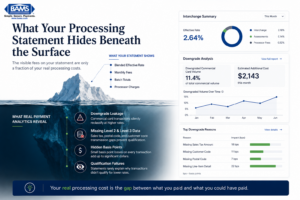
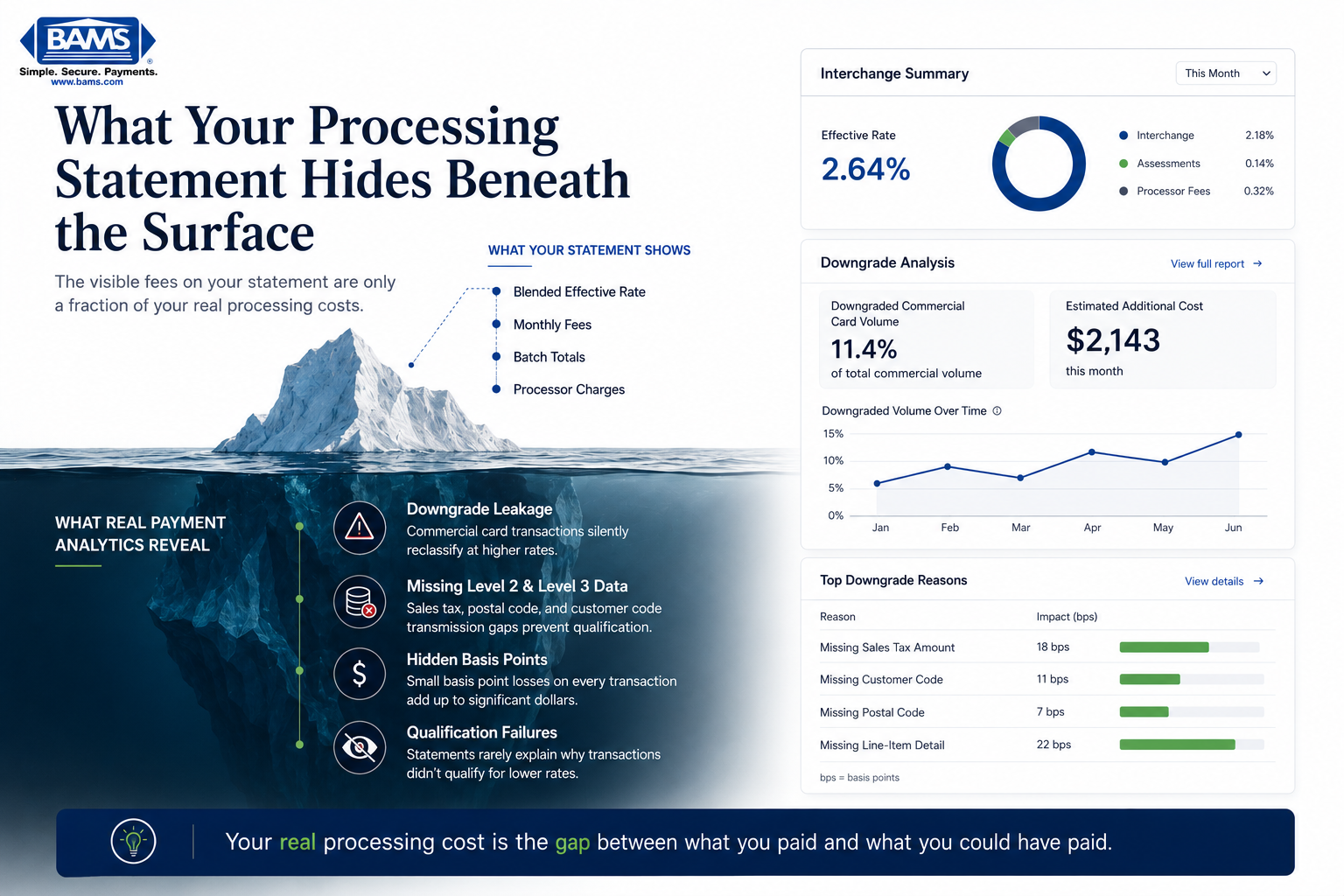
Most ecommerce merchants only see the visible portion of their processing costs. The hidden interchange leakage sits below the surface.
What Your Processor Isn’t Volunteering
Here’s what we actually believe: your processing statement is a billing document masquerading as a transparency tool, and the silence around transaction downgrades is a feature, not a bug.
When a transaction downgrades (meaning it fails to qualify for the lowest possible interchange rate and gets reclassified at a higher one) your processor collects more. There is no alarm. No highlighted row. No email. The downgrade just quietly inflates your effective rate, and the statement buries it in a category you’d need a payments consultant to decode.
Federal Reserve interchange fee data continues to demonstrate how qualification differences materially affect merchant processing costs over time.
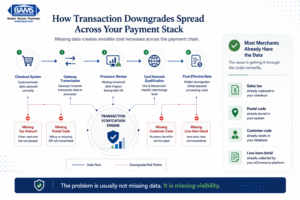
Downgrades do not happen in one place. They happen across the entire payment data chain.
The Downgrade Problem Nobody Explains to eCommerce Merchants
Most content about interchange optimization targets enterprise-level B2B companies running millions in corporate card volume through ERP systems. That framing has left a massive blind spot for eCommerce businesses in the 10-to-50-employee range. And it’s costing them real money.
Consider this scenario. You run an established online store. Most of your orders are consumer credit and debit. But a meaningful slice of your volume comes from corporate purchasing cards, government cards, or business accounts placing bulk orders. You may not even realize how many of these transactions you process each month, because your gateway doesn’t distinguish them and your statement doesn’t break them out.
Each of those commercial card transactions is evaluated at the transaction level by Visa and Mastercard. If the transaction doesn’t include enough data (things like tax amount, customer code, or line-item detail) it gets downgraded from the best possible rate to a more expensive one. The card networks call this “Level 2” and “Level 3” data. When you submit a transaction with only basic Level 1 data (card number, amount, date) you’re leaving the interchange savings on the table.
According to Merchant Payments Coalition resources, interchange and swipe fee pressure continues to increase for merchants processing growing transaction volume. Even small inefficiencies at the transaction level create meaningful cost impact for eCommerce businesses operating on tight margins. A 30 to 50 basis point difference on commercial card transactions adds up fast when you’re watching every dollar of cash flow.
Modern Treasury payment operations resources continue to emphasize how limited reconciliation visibility and fragmented payment workflows prevent merchants from identifying transaction-level inefficiencies before they become recurring cost problems. That means most merchants aren’t catching these downgrades because they don’t have the systems, or the visibility, to see them happening. Your processor knows. Your statement doesn’t say.
This is where data quality verification becomes more than a technical exercise.
It’s a trust question. When you can’t see which transactions downgraded, why they downgraded, and what data was missing, you’re relying entirely on your processor’s goodwill. And your processor profits from that silence.
We’ve seen merchants discover that 10 to 15 percent of their monthly volume was quietly downgrading, simply because their gateway wasn’t passing Level 2 fields like sales tax or merchant postal code. These aren’t exotic data points. They’re fields your system likely already has. The gap isn’t in your data. It’s in what gets transmitted and what gets reported back to you.
What Changes When You Control the Visibility
If this framing is right, the implications are significant. It means the effective rate on your statement isn’t a fixed cost of doing business. It’s a variable that moves based on data quality you can influence. It means the difference between a “good” processor and a “great” one isn’t the rate they quote you. It’s whether they show you what’s happening at the transaction level and help you fix it.
For eCommerce managers measured on reducing processing costs and accelerating cash flow, this reframes the entire conversation. You’re not just shopping for a lower rate. You’re asking: does my processor give me the transaction verification and data quality tools to know when I’m overpaying? Or are they counting on me not to look?
Partners like BAMS approach this differently, offering dedicated account management and transparent reporting that surfaces downgrade patterns instead of hiding them. That kind of proactive visibility turns your processing relationship from a black box into something you can actually manage.
A Better Way to Think About Your Processing Costs
Stop thinking of your processing statement as a report card. Start thinking of it as a receipt. A report card tells you what went well and what didn’t. A receipt just tells you what you paid.
The mental model shift is this: your real processing cost is not what your statement says. It’s the gap between what you paid and what you could have paid if every transaction qualified at its best rate. That gap is invisible on most statements by design. Making it visible is the single highest-leverage move an eCommerce manager can make before ever renegotiating a rate.
You can start by pulling your transaction data (if you’re on Stripe, here’s how to export it) and looking for rate categories you don’t recognize. Those unfamiliar line items are often where downgrades hide.
The Silence Is the Strategy
Your processor didn’t forget to tell you about downgrades. They built a system where you’d never think to ask. The merchants who pay the least aren’t the ones with the best negotiated rates. They’re the ones who see every transaction clearly and refuse to accept silence as transparency.
Your statement tells you what you owe. It’s your job to find out what you’re owed.
Frequently Asked Questions
What is Level 3 data in merchant services?
Level 3 data refers to detailed, invoice-quality transaction information (line items, tax amounts, customer codes) submitted to card networks during processing. When included, it qualifies commercial card transactions for the lowest interchange rates, reducing your effective cost per transaction.
Which types of transactions are eligible for Level 3 interchange rates?
Corporate purchasing cards, government cards, and business credit cards are the primary transaction types eligible for Level 3 rates. Most consumer credit and debit transactions don’t benefit from Level 3 data, but many eCommerce merchants process more commercial cards than they realize.
How can I tell if my transactions are downgrading?
Look for unfamiliar rate categories on your statement, especially labels like “EIRF,” “standard,” or “non-qualified.” These typically indicate transactions that failed to meet data requirements and were reclassified at a higher interchange tier.