Online Payment Gateway Setup: Align It to How You Sell
Last Updated on May 18, 2026 by Dimitri Akhrin
Eliminate hidden merchant processing fees by matching your gateway configuration to your actual transaction patterns
Learn how to audit your payment gateway defaults, spot mismatches between your configuration and real transaction patterns, and reconfigure the settings silently inflating every batch. Built for eCommerce managers at established stores who know fees are too high but can’t find where.
TL;DR
- Your day-one gateway defaults are probably costing you money – Processor configurations set during onboarding reflect assumptions about your business that likely no longer match your actual transaction patterns, card mix, or sales timing.
- Calculate your effective rate, not your quoted rate – Divide total monthly processing costs by total monthly volume. The gap between this number and your quoted rate reveals exactly how much hidden fees are costing you.
- Interchange downgrades are the biggest hidden fee source – Missing data fields (AVS, tax amount, customer codes) and late settlement silently push your transactions into higher-cost interchange categories. Fix your authorization settings and batch timing first.
- Fraud filters set too aggressively cost you revenue – Default risk thresholds often block legitimate customers. Recalibrate based on your actual chargeback data, not generic risk profiles.
- Audit quarterly, not once – Your transaction patterns evolve continuously. A quarterly review of your effective rate, downgrade report, and batch configuration keeps your processing costs aligned with how your business actually sells.
Guide Orientation: What This Covers and Who It’s For
This guide walks you through eliminating hidden fees buried in your online payment gateway setup by aligning your processor configuration with how your store actually sells today. If your gateway was configured months or years ago, the defaults baked into your account likely reflect a transaction pattern that no longer matches your real sales volume, average ticket size, or batch timing.
This is written for eCommerce managers at established online businesses (roughly 10 to 50 employees) who suspect their merchant processing fees are higher than they should be but aren’t sure where the overcharges hide. By the end, you’ll be able to audit your current processor defaults, identify specific mismatches between your configuration and your actual transaction patterns, and reconfigure or renegotiate the settings that cost you the most on every batch.
This guide does not cover initial processor selection or POS hardware setup. It assumes you already have a working gateway and focuses entirely on what to fix inside it.
Why Transaction-Pattern Alignment Matters for Merchant Processing Fees
Most eCommerce businesses configure their payment gateway once during setup and never revisit it. The problem is that your business at launch looks nothing like your business 12 or 24 months later. Your average order value shifts. Your peak selling hours change. Your mix of card types (credit vs. debit, domestic vs. international) evolves. But your processor settings stay frozen at day-one defaults.
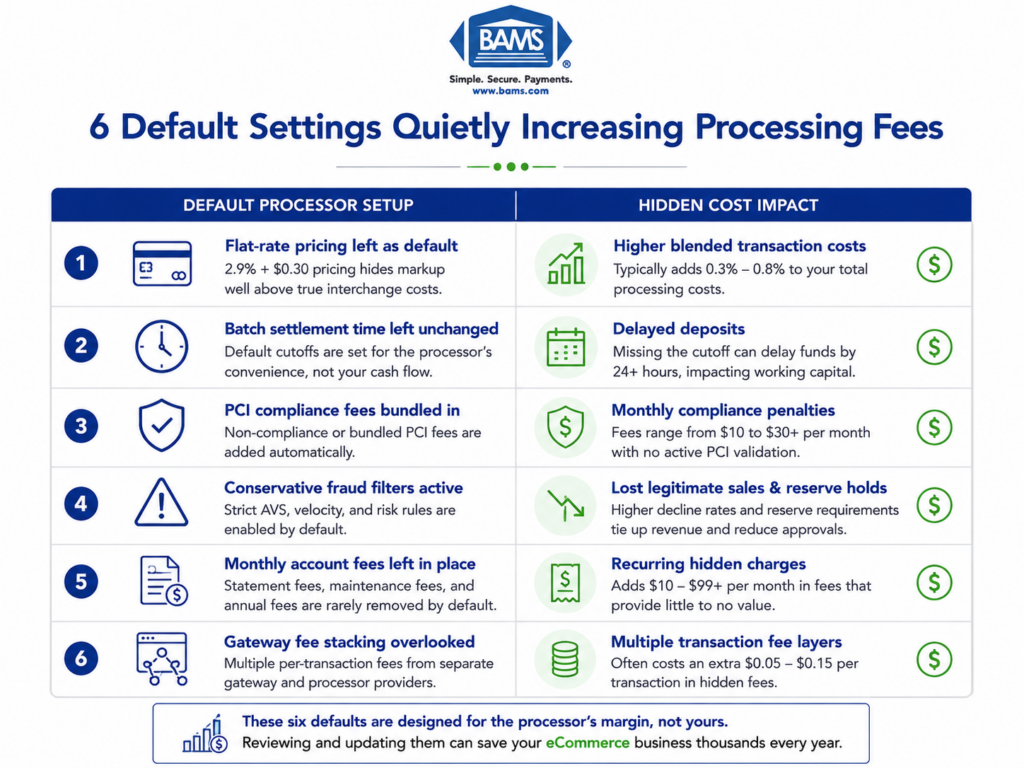
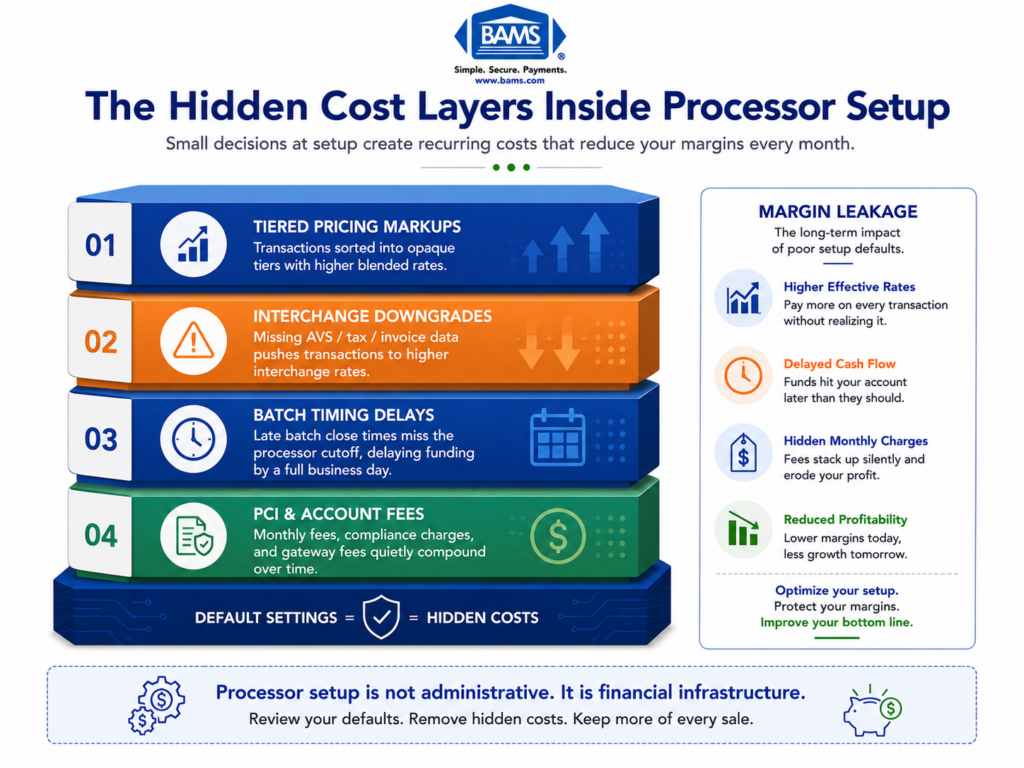
That mismatch creates a slow, invisible bleed. You pay batch fees timed to a schedule that no longer fits your settlement needs. You absorb interchange downgrades because your authorization settings don’t capture the data fields required for lower rates. You carry fraud-screening thresholds calibrated for a risk profile you’ve outgrown.
The cost isn’t trivial. Standard online credit card processing starts at 2.9% + $0.30 per transaction at major gateways, but the effective rate most merchants actually pay runs significantly higher once downgrades, batch fees, and miscellaneous surcharges stack up. The gap between your quoted rate and your effective rate is where hidden fees live. Payment settlement timing depends on how transactions move between gateways, processors, card networks, and issuing banks, with batching schedules and processing infrastructure directly affecting funding speed as outlined by Visa.
Worse, these fees compound. Every month you delay an audit, you normalize an inflated cost basis. Competitors who’ve tuned their configurations gain a margin advantage that widens over time. The cost of inaction isn’t dramatic. It’s gradual, persistent, and entirely avoidable.
Core Concepts: Understanding Where Hidden Fees Actually Live
Quoted Rate vs. Effective Rate
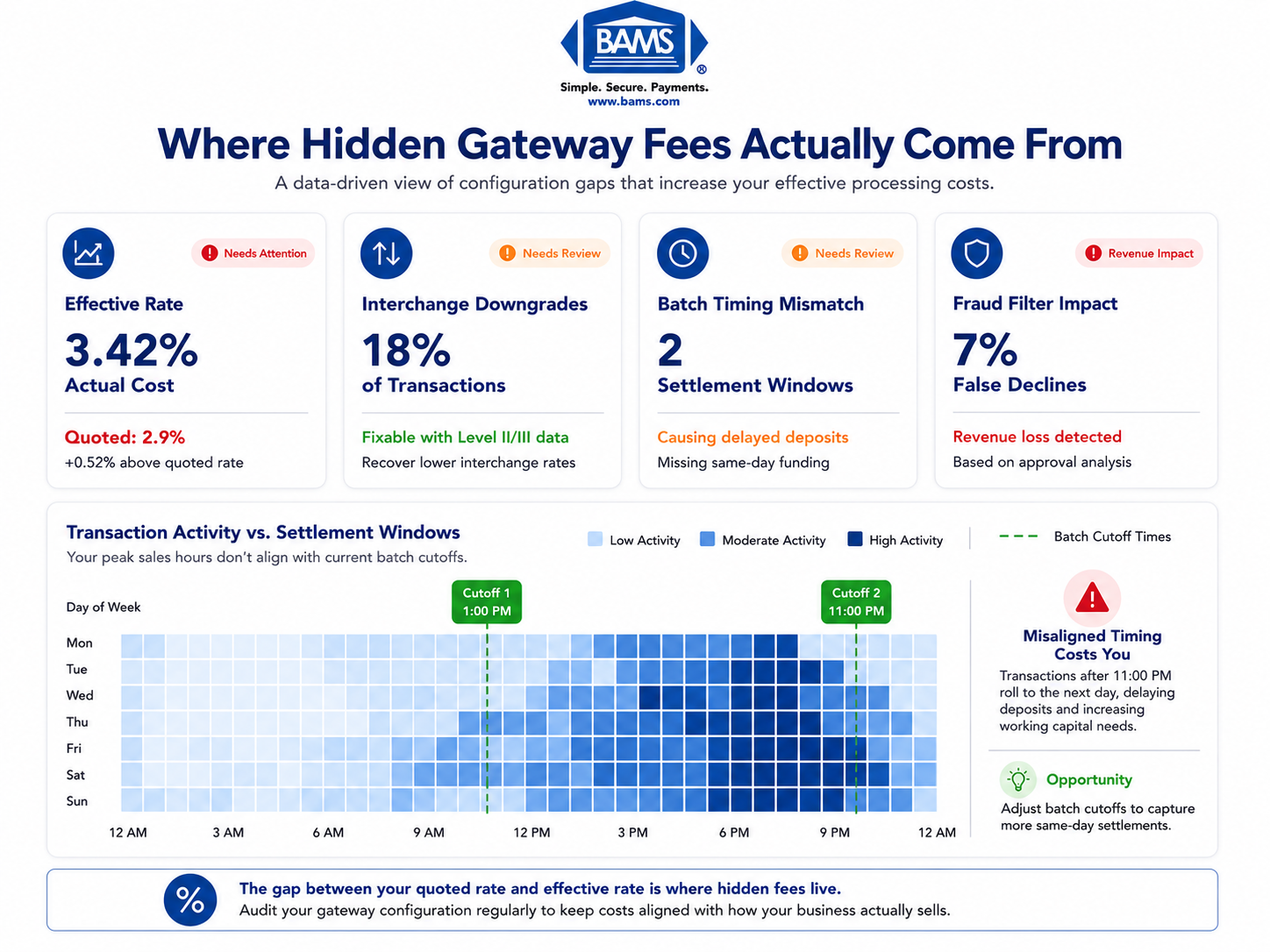
Your quoted rate is the number your processor advertised when you signed up. Your effective rate is what you actually pay after every fee, surcharge, and downgrade is factored in. Divide your total monthly processing costs by your total monthly sales volume. If the result is meaningfully higher than your quoted rate, hidden fees are at work.
Card payment costs include interchange fees, network assessments, and processor charges, which together determine the true effective rate merchants ultimately pay as outlined by the Federal Reserve.
Interchange Downgrades
Interchange rates (set by card networks like Visa and Mastercard) vary based on how a transaction is processed. When your gateway doesn’t capture required data fields (like Level II or Level III data for commercial cards), your transactions get “downgraded” to a higher interchange category. You pay more per transaction without any visible line item explaining why.
Batch Timing and Settlement Fees
Every time your gateway closes a batch and sends transactions for settlement, fees apply. If your batch window doesn’t align with your actual selling patterns, you may be running extra batches (paying duplicate batch fees) or settling too late (triggering next-day penalties or delayed funding).
Risk and Fraud Thresholds
Fraud screening tools built into your gateway often come with default sensitivity levels. Set too aggressively, they decline legitimate transactions (lost revenue). Set too loosely, they let through chargebacks (direct costs plus penalty fees). The defaults rarely match your actual fraud profile.
The Mismatch Problem
These four areas share a common root cause: your configuration was built around assumptions about how you’d sell, not evidence of how you actually sell. The framework in this guide treats fee elimination as a pattern-alignment exercise, not a generic cost-cutting checklist.
The Framework: Four-Phase Configuration Audit
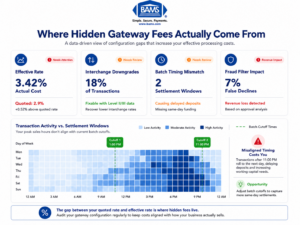
Most hidden merchant processing fees come from mismatches between gateway defaults and actual transaction behavior.
Eliminating hidden fees follows a four-phase process. Each phase builds on the previous one, and skipping ahead tends to produce incomplete fixes that resurface as new problems later.
- Phase 1: Extract your actual transaction data to establish your real selling pattern (volume, timing, card mix, average ticket).
- Phase 2: Map your current processor defaults against that data to identify specific mismatches.
- Phase 3: Reconfigure the settings that create the largest cost gaps, prioritizing changes by dollar impact.
- Phase 4: Verify that changes produce the expected results by monitoring your effective rate over two to three billing cycles.
These phases are sequential but cyclical. Your transaction patterns will continue to evolve, so this audit should repeat at least quarterly. The goal is to build an ongoing alignment practice, not a one-time fix.
Step-by-Step: Eliminating Hidden Fees in Your Online Payment Gateway Setup
Step 1: Pull Your Transaction Data and Calculate Your True Effective Rate
Objective: Establish a factual baseline of what you’re actually paying, broken down by fee category, so every subsequent decision is grounded in real numbers rather than assumptions.
Start by downloading at least three months of processor statements. Don’t rely on the summary page. Open the line-item detail that shows interchange categories, assessment fees, batch fees, and any miscellaneous charges. Calculate your effective rate: total fees divided by total processed volume. Compare this to your quoted rate.
Next, pull your transaction-level data from your gateway dashboard. You need average ticket size, transaction count by day and hour, card type distribution (Visa vs. Mastercard vs. Amex, credit vs. debit, domestic vs. international), and refund/chargeback frequency. This data reveals your actual transaction pattern.
Anti-patterns: Don’t average everything into a single monthly number. The hidden fees live in the variance. A merchant processing 500 transactions at $40 has a completely different cost structure than one processing 50 transactions at $400, even if monthly volume is identical. Also avoid relying on your processor’s own summary reports, which often obscure downgrade detail.
Success indicators: You can state your effective rate to two decimal places. You can identify your top three interchange categories by volume. You know your average batch size and settlement timing. If you can’t answer these questions, you haven’t extracted enough data yet.
Step 2: Audit Your Batch Timing and Settlement Configuration
Objective: Ensure your batch window aligns with your actual peak selling hours to minimize unnecessary batch fees and maximize funding speed.
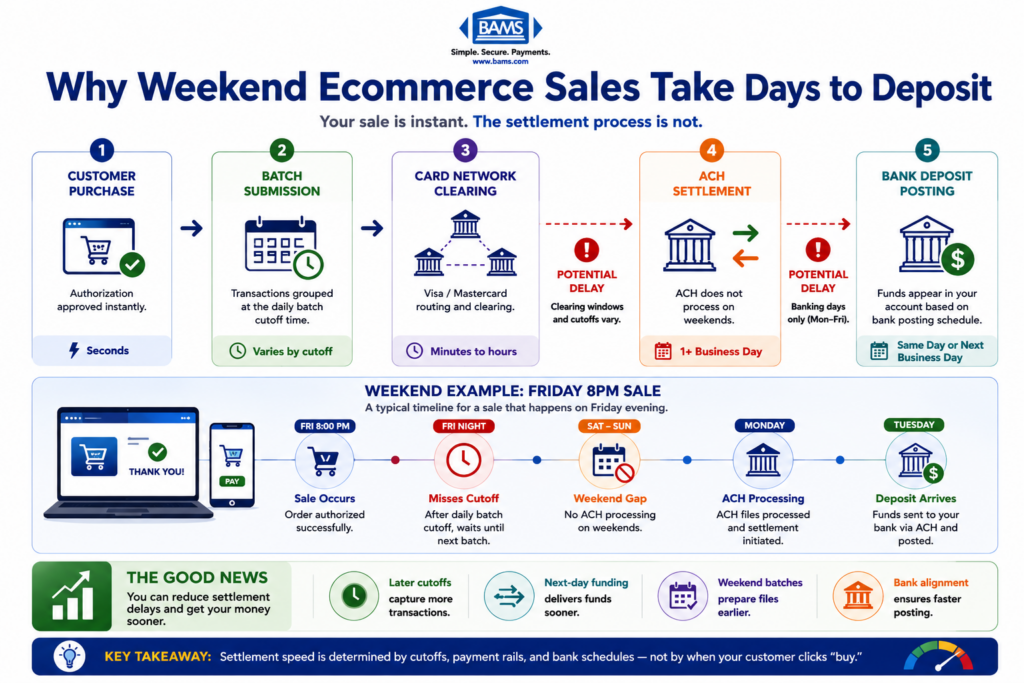
Most gateways default to a batch cutoff time set during initial setup, often midnight or end-of-business in a time zone that may not match your customer base. If your peak sales happen between 7 PM and 11 PM but your batch closes at midnight, you’re splitting evening transactions across two settlement windows. That can mean extra batch fees and delayed deposits.
Check your gateway’s batch settings and compare the cutoff time against your hourly transaction data from Step 1. The ideal batch window closes after your last significant sales cluster of the day, capturing the maximum number of transactions in a single settlement. For eCommerce businesses selling nationally, this often means a cutoff between 1 AM and 3 AM Eastern.
Funding speed matters here too. Understanding how your gateway and processor interact during settlement is critical, because a misconfigured batch window can delay deposits by a full business day even when your processor offers next-day funding.
Anti-patterns: Don’t set multiple batch windows unless your business model genuinely requires it (e.g., you run both a subscription service and a storefront with radically different settlement needs). Each additional batch incurs its own fee. Also avoid changing batch timing without first confirming the change with your processor, as some contracts penalize off-schedule settlements.
Success indicators: Your batch closes after your last daily sales peak. You’re running one batch per day (unless a legitimate business reason requires more). Your deposits arrive on the timeline your processor promised.
Step 3: Fix Interchange Downgrades by Updating Authorization Settings
Objective: Ensure your gateway captures the data fields required for the lowest applicable interchange rate on every transaction, eliminating downgrades caused by missing information.
Interchange downgrades are the single largest source of hidden fees for most eCommerce merchants. They happen silently. Your gateway processes the transaction successfully, but because it didn’t transmit a required data field (like AVS response, order number, or tax amount), the card network assigns the transaction to a higher-cost interchange category.
Common downgrade triggers include: missing Address Verification Service (AVS) data, transactions settled more than 24 hours after authorization, missing customer code or tax fields on commercial/corporate cards (Level II data), and authorizations that don’t match the final settlement amount (common with tipping or partial shipments).
Review your gateway’s authorization settings and ensure AVS is enabled and required. Confirm that your platform passes order-level data (invoice number, tax amount, shipping address) through to the gateway. If you process a significant volume of corporate or purchasing cards, ask your processor whether your gateway supports Level II and Level III data transmission. Gateways vary widely in their data-capture capabilities, and some require manual configuration to pass enhanced data fields.
Anti-patterns: Don’t assume your eCommerce platform handles this automatically. Many platforms pass minimal data to the gateway by default, and the gateway passes minimal data to the processor. Each handoff is an opportunity for data loss that triggers downgrades. Also don’t ignore the settlement timing requirement. Authorizing a transaction on Friday and settling it on Monday will downgrade it at most processors.
Success indicators: Your interchange downgrade volume drops measurably within one billing cycle. Your effective rate moves closer to your quoted rate. You can see specific interchange categories shifting from “standard” or “non-qualified” to “preferred” or “qualified” on your statement.
Step 4: Recalibrate Fraud Screening and Risk Thresholds
Objective: Adjust your gateway’s fraud filters to match your actual risk profile, reducing both false declines (lost revenue) and chargebacks (direct costs).
Default fraud settings are calibrated for a generic merchant profile. If your business has matured and you have reliable data on your actual chargeback rate, fraud patterns, and customer demographics, those defaults are almost certainly wrong. They’re either too aggressive (blocking legitimate orders) or too permissive (letting fraudulent transactions through).
Start by reviewing your chargeback ratio over the past six months. If it’s well below 1%, your fraud filters may be too tight, meaning you’re losing good sales to false declines. If it’s approaching 1%, you need tighter controls. PCI DSS compliance requires regular vulnerability scanning and security updates, but compliance alone doesn’t optimize your fraud thresholds for cost efficiency.
Most gateways let you configure velocity filters (maximum transactions per card per hour), geographic restrictions, AVS mismatch rules, and CVV requirements. Review each filter against your actual customer behavior. If you sell internationally, a blanket block on non-domestic cards costs you legitimate revenue. If your average customer buys twice per month, a velocity filter set at one transaction per day creates friction.
Anti-patterns: Don’t disable fraud screening entirely to reduce false declines. The chargeback costs and processor penalties far outweigh the recovered revenue. Also avoid setting rules based on anecdotal fraud cases rather than statistical patterns. One fraudulent order from a specific country doesn’t justify blocking all orders from that region.
Success indicators: Your false decline rate drops while your chargeback ratio stays stable or improves. You can document the specific filters you changed and the business logic behind each change. Your authorization approval rate increases without a corresponding spike in disputes.
Step 5: Review and Renegotiate Miscellaneous Account-Level Fees
Objective: Identify and eliminate (or reduce) account-level fees that were set during onboarding and no longer reflect your business’s volume or risk profile.
Beyond interchange and batch fees, most processor accounts carry a layer of miscellaneous charges: monthly minimum fees, statement fees, PCI compliance fees, gateway access fees, and annual account fees. These were set based on your projected volume at signup. If your actual volume has grown significantly, you have leverage to renegotiate.
Pull your last three statements and list every fee that isn’t directly tied to a transaction. Common culprits include monthly gateway fees (some processors charge $25/month or more for gateway access that other providers bundle for free), PCI non-compliance fees charged when annual self-assessment questionnaires aren’t filed on time, and monthly minimum fees that penalize you for processing below a threshold you now easily exceed.
Contact your processor and request a fee review based on your current volume. Many of these charges are negotiable, especially if you can demonstrate consistent processing history and low chargeback rates. If your processor won’t budge on fees that are clearly misaligned with your account profile, that’s a signal worth paying attention to.
For merchants processing significant monthly volume, a partner like BAMS can conduct a detailed cost comparison against your current statements, identifying specific line items where you’re overpaying relative to your transaction pattern. Their transparency-first approach means you see exactly where every dollar goes.
Anti-patterns: Don’t accept “that’s standard” as an answer for any fee you can’t trace to a specific service. Also don’t renegotiate fees in isolation without first fixing the configuration issues in Steps 2 through 4. Reducing a $10 monthly fee while ignoring $500 in monthly interchange downgrades is a misallocation of effort.
Success indicators: You can account for every line item on your statement. Any fee that isn’t transaction-linked has been either eliminated, reduced, or confirmed as genuinely necessary. Your total non-transactional fees have decreased.
Step 6: Verify Changes Over Two to Three Billing Cycles
Objective: Confirm that your configuration changes produce measurable cost reductions and that no new issues have been introduced.
After implementing changes from Steps 2 through 5, resist the urge to declare victory immediately. Processor billing cycles have lag, and some changes (particularly interchange category shifts) take one to two full cycles to appear on statements. Set a calendar reminder to pull statements and recalculate your effective rate at 30, 60, and 90 days post-change.
Compare your new effective rate against the baseline from Step 1. Break the comparison down by category: interchange costs, batch fees, miscellaneous fees, and chargeback-related costs. If your effective rate hasn’t moved meaningfully, revisit your downgrade report to check whether authorization settings are actually transmitting the data you configured.
Also verify funding speed. If you adjusted batch timing to improve settlement, confirm that deposits are actually arriving on the expected schedule. Log the deposit date for each batch over a two-week period and compare it against your batch close time. Discrepancies here often point to a processor-side configuration that didn’t update when your gateway settings changed.
Anti-patterns: Don’t check once and move on. Processing costs fluctuate with card mix, seasonal volume, and network rate changes. A single month’s data isn’t conclusive. Also don’t make additional changes during the verification period. You need a clean comparison window to attribute results accurately.
Success indicators: Your effective rate has decreased by a measurable amount (even 0.1% to 0.3% on significant volume represents substantial annual savings). Your funding timeline matches expectations. No new fee categories have appeared. You have a documented baseline for the next quarterly audit. Modern payment infrastructure improves transaction visibility and operational control, enabling eCommerce businesses to identify settlement delays and processing inefficiencies earlier according to Modern Treasury.
Practical Examples: What Misalignment Looks Like in Real Scenarios
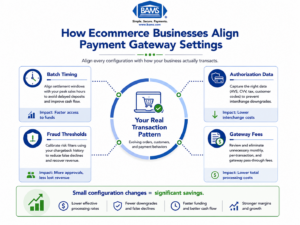
Quarterly gateway audits help reduce interchange downgrades, false declines, and delayed funding.
Scenario A: The Evening-Heavy eCommerce Store
An online retailer generates 70% of daily sales between 6 PM and 11 PM Eastern. Their gateway batch closes at 5 PM Eastern (a default set during onboarding when the founder assumed business-hours selling). Result: every evening’s transactions settle a full day later than necessary. Over 12 months, this means roughly 250 extra days of float on their highest-volume transactions, delaying cash availability and sometimes triggering a second daily batch (with its own fee) when a team member manually forces settlement.
Fix: Moving the batch cutoff to 2 AM Eastern captures all evening sales in a single batch, eliminates the duplicate batch fee, and accelerates funding by one business day on the majority of transactions.
Scenario B: The B2B Seller Ignoring Level II Data
A mid-size eCommerce brand sells office supplies to small businesses. About 35% of their transactions use corporate purchasing cards. Their gateway doesn’t pass tax amount or customer code fields because the default integration with their eCommerce platform doesn’t include those data points. Every corporate card transaction downgrades to a “standard” interchange tier instead of qualifying for the lower “commercial” tier.
Fix: Configuring the gateway to capture and transmit Level II data fields (tax amount, customer PO number) shifts those transactions to the correct interchange category. On a $200 average ticket at 35% corporate card volume, the savings compound quickly.
Scenario C: The Over-Filtered International Seller
An apparel brand with growing international demand has default fraud filters that flag all non-U.S. billing addresses for manual review. The review queue backs up, orders expire, and roughly 15% of international customers abandon the purchase. Meanwhile, actual fraud from international orders is under 0.5%.
Fix: Replacing the blanket geographic filter with a targeted rule set (velocity limits per card, AVS matching for specific high-risk regions, CVV required on all international orders) reduces false declines by over 60% while keeping fraud exposure stable.
Common Mistakes and Pitfalls
Treating all fees as fixed costs. Many eCommerce managers assume processor fees are non-negotiable because they appear as standardized line items. In reality, most account-level fees were set during onboarding and can be renegotiated as your volume and risk profile change.
Optimizing for rate instead of effective cost. Switching processors to save 0.1% on your quoted rate means nothing if the new setup introduces downgrades, slower settlement, or fees your old processor didn’t charge. The lowest advertised price rarely equals the lowest total cost.
Making changes without a baseline. If you skip Step 1, you can’t measure whether your changes actually worked. Gut feelings about “lower fees” aren’t a substitute for comparing effective rates across billing cycles.
Auditing once and forgetting. Your transaction patterns shift with seasons, product launches, and market changes. A configuration that’s optimal today will drift out of alignment within six to twelve months. Build the quarterly audit into your operations calendar.
Ignoring the platform-to-gateway handoff. Your eCommerce platform, your gateway, and your processor are three separate systems. Data that exists in your platform doesn’t automatically flow through to your processor. Verify each handoff point independently.
For merchants processing significant monthly volume, implementing guaranteed next day funding helps reduce settlement delays caused by misaligned batch configurations and processor cutoffs.
What to Do Next
Start with Step 1. Pull your last three processor statements, calculate your effective rate, and compare it to your quoted rate. That single number tells you whether this guide is worth an afternoon of your time or a week of it. If the gap is more than 0.2%, you almost certainly have configuration-level issues worth fixing.
Don’t try to change everything at once. Prioritize by dollar impact: interchange downgrades typically cost more than batch timing issues, which typically cost more than miscellaneous account fees. Fix the biggest gap first, verify the result, then move to the next one.
Bookmark this guide and revisit it quarterly. Your business will keep evolving, and your processor configuration should evolve with it. The goal isn’t a perfect one-time setup. It’s an ongoing practice of keeping your payment infrastructure aligned with how you actually sell.
Frequently Asked Questions
What documents do I need to gather before switching merchant service providers?
At minimum, collect your last three to six months of processor statements (full line-item detail, not summaries), your current processing agreement (including the fee schedule and early termination clause), your gateway login credentials, and your chargeback history. You’ll also want your business’s average ticket size, monthly volume, and card type breakdown ready so any new provider can give you an accurate comparison rather than a generic quote.
Why should I keep my old merchant account open during a transition?
Open chargebacks and pending refunds are tied to your existing merchant account. If you close it before those are resolved, you lose the ability to respond to disputes and may forfeit funds held in reserve. Keep the old account active for at least 90 to 120 days after your last transaction processes through it, or until all pending disputes and refunds have cleared.
How can I tell if my gateway is causing interchange downgrades?
Request a “downgrade report” or “interchange qualification report” from your processor. This shows which transactions qualified at the best rate and which were downgraded, along with the reason code. Common reasons include missing AVS data, late settlement (more than 24 hours after authorization), and missing Level II fields on commercial cards. If your processor can’t provide this report, that itself is a red flag.
Which pricing model is best for my business when setting up merchant services?
It depends on your card mix and volume. Interchange-plus pricing gives you the most transparency because you see the actual interchange cost plus a fixed markup. Flat-rate pricing (like 2.9% + $0.30) is simpler but often more expensive at scale. Tiered pricing is the least transparent and most likely to hide fees through downgrade surcharges. For established eCommerce businesses processing consistent volume, interchange-plus almost always results in the lowest effective rate.
How often should I audit my payment gateway configuration?
At least quarterly. Your transaction patterns shift with seasonal demand, product mix changes, and customer base evolution. A quarterly review of your effective rate, batch timing, downgrade report, and fraud filter performance catches misalignments before they compound into significant costs. Major business changes (new product lines, international expansion, platform migration) should trigger an immediate review.
What’s the difference between a payment processor and a payment gateway, and do I need both?
A payment gateway encrypts and transmits card data from your website to the processor. A payment processor moves money between the customer’s bank and yours. For eCommerce, you need both. Some providers bundle them together, while others require you to use separate services. The key is ensuring both are configured to work together seamlessly, because misalignment between the two is a common source of settlement delays and data-transmission gaps that trigger interchange downgrades.
Sources