6 Default Settings Quietly Inflating Merchant Processing Fees
The onboarding configurations your processor set for their margin — and the exact cost each one adds to your statement
Learn which six default merchant account settings silently inflate your processing costs and the specific dollar signals each leaves on your monthly statement. Built for eCommerce teams ready to audit configurations they accepted without a second look.
TL;DR
- Flat-rate pricing hides processor markup – Switch to interchange-plus to see what you’re actually paying. Most eCommerce businesses save 0.3% to 0.8% on total volume.
- Default batch times delay your deposits – Align your batch settlement window to at least 30 minutes before your processor’s cutoff to avoid losing a full business day on funding.
- PCI and account fees stack up silently – Complete your PCI SAQ to eliminate non-compliance penalties, then negotiate or remove statement fees, maintenance fees, and annual fees. 65% of merchants who ask get at least one fee reduced.
- Conservative fraud defaults cost you twice – Overly strict risk thresholds decline legitimate sales and trigger reserve holds. Review your decline rate and adjust AVS and velocity filters to match your actual risk profile.
- Gateway fee stacking fragments your visibility – Map every per-transaction charge from cart to deposit. Consolidating gateway and processing under one provider can save $0.05 to $0.15 per transaction.
The Defaults You Didn’t Know You Accepted
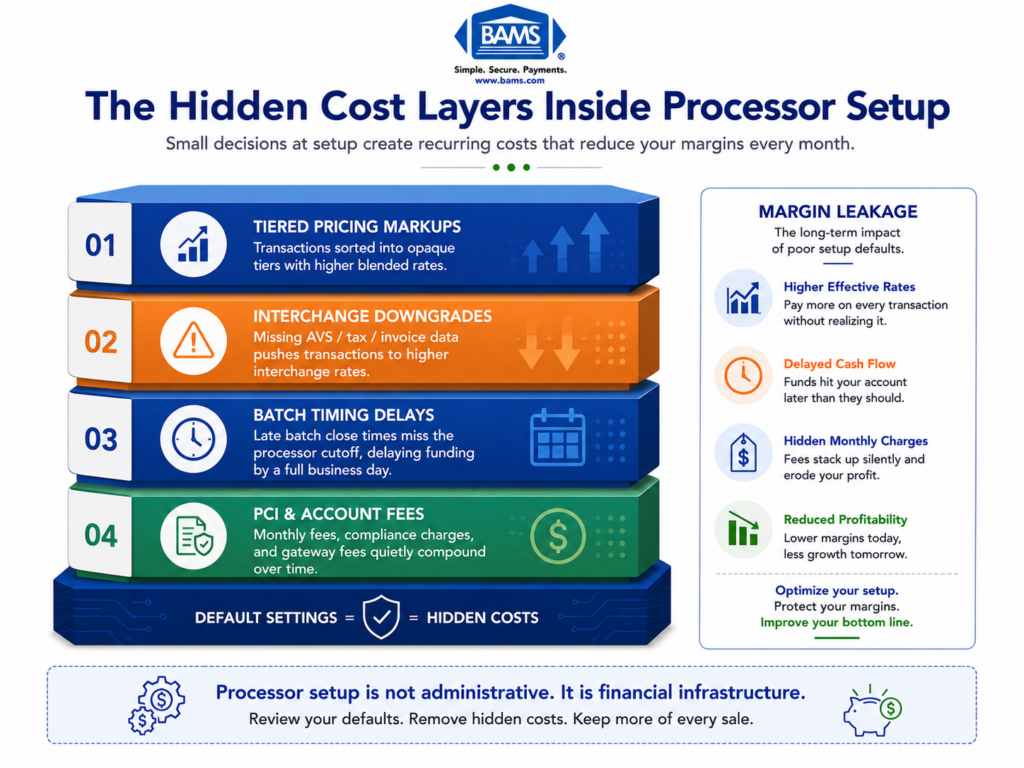
Most eCommerce merchants spend weeks choosing a payment processor, then accept every default setting during onboarding without a second look. That single decision (or non-decision) quietly inflates merchant processing fees month after month. An estimated 90% of merchants overpay on processing due to complex or opaque pricing models, and the root cause often traces back to configurations locked in during the first 48 hours of account setup.
Card payment costs include interchange fees, network assessments, and processor charges, which together determine the true cost structure behind merchant processing fees as outlined by the Federal Reserve.
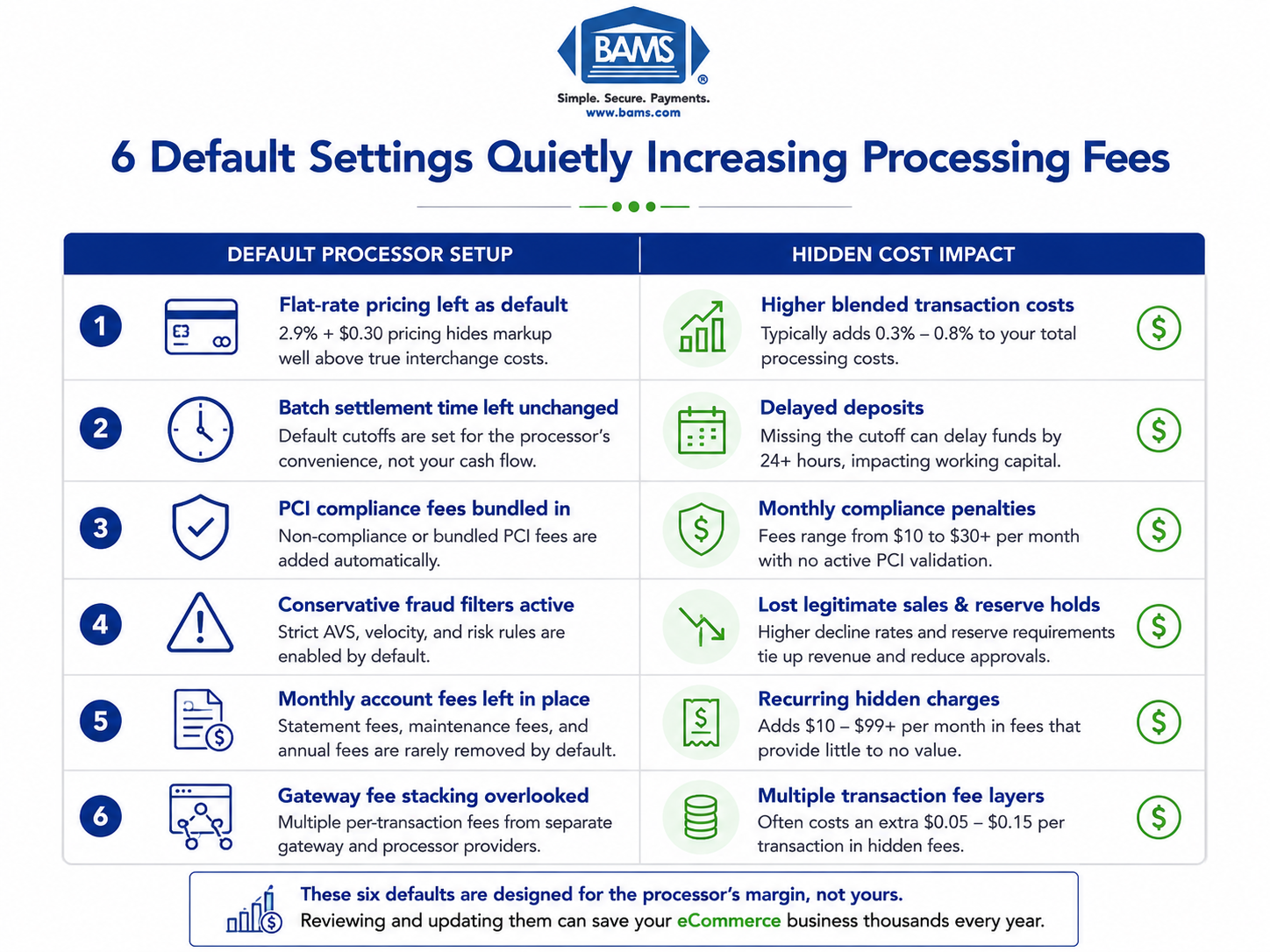
The problem isn’t that processors are hiding a line item in fine print. It’s subtler: the preset options that ship with your merchant account are tuned for the processor’s margin, not your margin. Flat-rate pricing, default batch times, bundled PCI compliance fees, and risk thresholds you never adjusted all compound into thousands of dollars in unnecessary cost per year. This piece identifies the six specific defaults responsible and the exact cost signals each one leaves on your monthly statement.
Who This Is For (and What It Doesn’t Cover)
This guide is for ecommerce managers at established online businesses processing enough volume that a fraction of a percent matters. If your team has 10 to 50 employees and you’ve been on the same processor for more than six months without auditing your setup, at least three of these defaults are likely active on your account right now.
We’re not covering interchange rate tables, card brand fee schedules, or general “tips to save on processing.” Those are inputs you can’t change. Instead, we’re focused on the configuration decisions within your control that silently mark up what you pay above interchange.
How We Selected These Six Defaults
Each default met three criteria: it’s activated automatically during standard merchant account setup, it adds a measurable cost visible on a monthly statement, and it can be changed without switching processors. We prioritized defaults that affect ecommerce transaction patterns specifically (card-not-present, recurring billing, high average ticket) over those that primarily impact brick-and-mortar retail.
6 Processor Setup Defaults That Silently Inflate Your Merchant Processing Fees
Many ecommerce businesses unknowingly overpay due to default processor settings configured during onboarding.
1. Flat-Rate Pricing Left as the Default Model
Why it matters: Flat-rate pricing (e.g., 2.9% + $0.30) is the most common default for eCommerce onboarding because it’s simple to explain and fast to activate. But simplicity comes at a cost.
What it looks like today: Your statement shows a single blended rate with no breakdown between interchange, assessments, and processor markup. If your effective rate exceeds 2.5% for retail or 3% for eCommerce, you’re likely subsidizing the processor’s margin on every debit card and low-risk transaction you run.
How to apply it: Request an interchange-plus pricing breakdown from your processor. Compare your current effective rate (total fees divided by total volume) against what interchange-plus would yield. For most eCommerce businesses processing over $20,000 per month, the switch saves 0.3% to 0.8% on overall volume. If your processor won’t offer interchange-plus, that’s a diagnostic signal worth acting on.
2. Default Batch Settlement Time
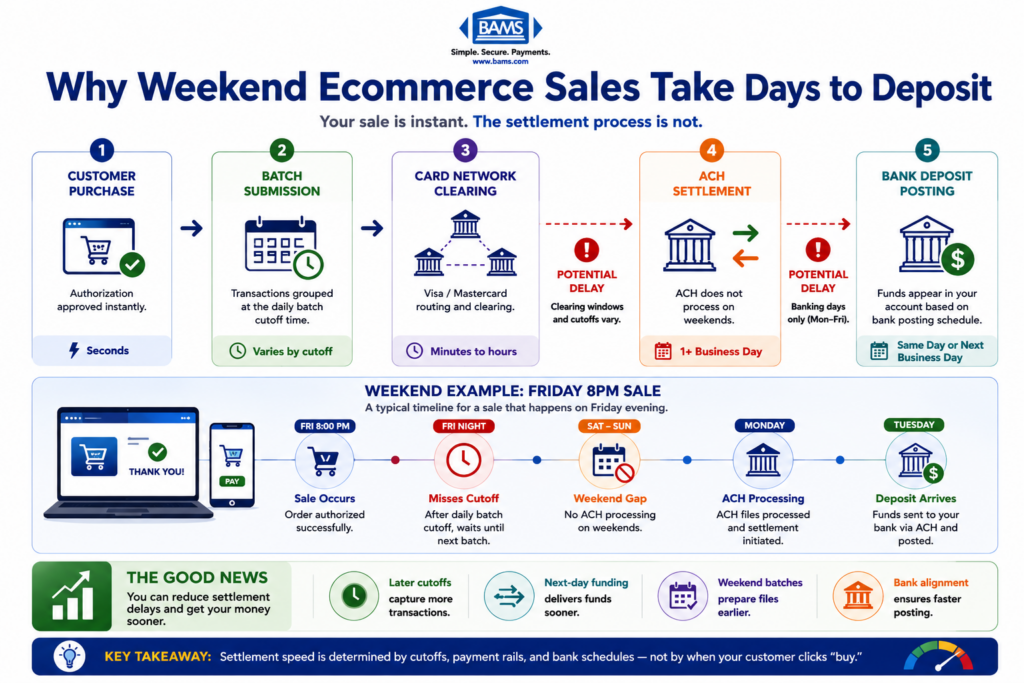
Why it matters: Most processors set batch settlement to a default window (often 9:00 or 10:00 PM local time, or worse, a timezone that doesn’t match your operations). If your batch closes after your processor’s cutoff, your deposits shift by a full business day. Over a month, this creates a cash flow gap that compounds, especially during high-volume periods. Payment settlement timing depends on how transactions move between processors, card networks, and issuing banks, with batching schedules and processing infrastructure directly affecting deposit speed as outlined by Visa.
What it looks like today: You see inconsistent deposit timing. Some days funds arrive next-day; other days they take two or three. The culprit is usually a batch time that straddles the processor’s settlement cutoff. Many merchants never realize this is configurable.
How to apply it: Log into your gateway or processor dashboard and check your batch auto-close time. Align it to at least 30 minutes before your processor’s daily cutoff. For eCommerce businesses with transactions running around the clock, setting batch close to early evening (Eastern) typically captures the current day’s settlement window. Verify by tracking deposit arrival times for two weeks after adjusting. Partners like BAMS offer guaranteed next day funding as a standard feature, which eliminates the batch-timing guesswork entirely.
3. Bundled PCI Compliance Fees
Why it matters: PCI compliance is non-negotiable, but the fees attached to it are highly negotiable. Many processors auto-enroll merchants in a monthly “PCI compliance fee” ($9.95 to $14.95/month) plus a “PCI non-compliance fee” ($19.95 to $34.95/month) if you haven’t completed your Self-Assessment Questionnaire. The default is to charge both until you take action. The average small business loses $2,400 per year to hidden processing fees like these.
What it looks like today: Check your statement for line items labeled “PCI Fee,” “PCI Non-Compliance,” “Regulatory Fee,” or “Security Fee.” Some processors bundle these under vague names. If you see both a compliance and non-compliance fee in the same month, you’re paying for the service and a penalty simultaneously.
How to apply it: Complete your PCI SAQ immediately to eliminate non-compliance penalties. Then ask your processor whether the remaining PCI compliance fee can be waived or reduced. Many processors will remove it if you’re using a PCI-compliant gateway. For a deeper look at how these hidden payment processing costs stack up, audit each line item against your processor’s original agreement.
4. Default Risk and Fraud Threshold Settings
Why it matters: Processors configure fraud filters and risk thresholds conservatively at onboarding. For eCommerce, this means AVS (Address Verification Service) mismatches, CVV failures, and velocity filters may be set to decline transactions that are actually legitimate. Each false decline is lost revenue. But the hidden fee angle is different: overly aggressive fraud settings push more transactions into “review” or “held” status, which can trigger reserve holds or delayed settlements.
What it looks like today: You notice a higher-than-expected decline rate (above 5% to 8% for a typical ecommerce store) or see funds held in a rolling reserve. Your processor’s default risk profile may be calibrated for a higher-risk merchant category than your actual business warrants.
How to apply it: Request your current fraud filter settings and decline reason codes from your gateway provider. Adjust AVS settings to allow partial matches (e.g., ZIP match but address mismatch) if your chargeback rate is below 0.5%. Ask your processor to review your MCC (Merchant Category Code) assignment, as an incorrect code can trigger stricter default thresholds and higher interchange categories. Lowering your risk profile can reduce or eliminate reserve requirements.
5. Auto-Enrolled Monthly and Annual Account Fees
Why it matters: During onboarding, many processors activate recurring account fees that don’t appear prominently in the initial rate quote: statement fees ($5 to $15/month), account maintenance fees ($10 to $25/month), annual fees ($79 to $199/year), and IRS reporting fees ($25 to $50/year). These are pure margin for the processor and are often set as defaults that require opt-out, not opt-in.
What it looks like today: Processor rate hikes have ranged from 0.25% to 1.5% in recent years, outpacing interchange increases. One non-profit saw processing costs rise by $300,000 annually after five processor rate increases over two years, driven by exactly these types of processor-side fees rather than card brand costs.
How to apply it: Pull your last three monthly statements and highlight every fee that isn’t interchange or assessment. Total them. Then call your processor and ask which fees can be waived or reduced. 65% of merchants who negotiate processing fees successfully lower at least one. If your processor won’t negotiate on fixed account fees, it’s one of the clearest signs you need a new payment processor.
6. Default Gateway and Integration Fee Stacking
Why it matters: When you onboard, the processor often provisions a gateway (or connects to a third-party gateway) with its own per-transaction fee layered on top of processing. For ecommerce merchants, this means you’re paying two per-transaction charges: one to the processor and one to the gateway. If you also use a shopping cart plugin or subscription billing tool, a third fee layer may be active. These stack silently because each appears on a different invoice or dashboard.
What it looks like today: You pay $0.10 per transaction to the gateway, $0.05 to $0.15 per transaction to the processor, and potentially another $0.05 to $0.20 per transaction to a billing middleware. On 5,000 monthly transactions, that’s $1,000 to $2,250 per month in per-transaction fees alone, before any percentage-based charges. Modern payment infrastructure improves transaction visibility and operational control, helping ecommerce businesses identify unnecessary costs and settlement delays earlier according to Modern Treasury.
How to apply it: Map every system that touches a transaction from cart to deposit. Identify each per-transaction fee. Ask your processor whether they offer an integrated gateway that eliminates the third-party gateway charge. Consolidating to a single provider for processing and gateway can remove $0.05 to $0.15 per transaction. For a full breakdown of how these layers add up, review this guide on credit card processing fees explained for ecommerce.
The Pattern Across All Six Defaults
Every default on this list shares the same structural trait: it’s a configuration that benefits the processor’s revenue model when left untouched. Flat-rate pricing hides margin. Late batch times delay your cash. Bundled compliance fees charge for inaction. Conservative fraud thresholds hold your money. Recurring account fees compound quietly. Stacked gateway fees fragment your visibility.
The second-order effect is that these defaults interact. A late batch time combined with a conservative risk threshold doesn’t just delay one deposit; it creates a pattern of unpredictable cash flow that makes it harder to spot when a new fee appears on your statement. The merchants who pay the least aren’t necessarily on the cheapest plan. They’re the ones who audited every default within the first 30 days and revisit their configuration quarterly.
Where to Start: Constraints and Prioritization
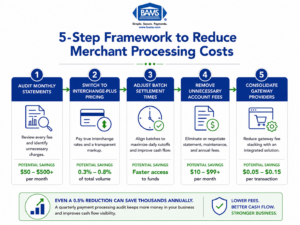
A quarterly payment processing audit can uncover unnecessary fees and improve cash flow visibility.
You don’t need to fix all six at once. Start with the two that have the highest dollar impact on your specific volume: for most eCommerce businesses processing over $30,000/month, that’s switching from flat-rate to interchange-plus pricing (item 1) and consolidating gateway fees (item 6). Together, these two changes typically recover 0.4% to 1.0% of total processing volume.
If cash flow timing matters more than rate savings, prioritize batch settlement time (item 2) and fraud threshold review (item 4) first. The remaining items (PCI fees and account fees) are quick wins that take one phone call each. Block 90 minutes on your calendar, pull your last three statements, and work through the list. The fees won’t eliminate themselves.
Frequently Asked Questions
What documents do I need to gather before switching merchant service providers?
Prepare your last three monthly processing statements, your current contract (including the fee schedule and early termination clause), your PCI compliance certification, and your gateway login credentials. Having your average ticket size, monthly volume, and chargeback rate ready will help a new provider quote accurate interchange-plus pricing from the start.
Why should I keep my old merchant account open during a processor transition?
Chargebacks and refunds on previously processed transactions still route through your original processor. If you close that account immediately, you lose the ability to respond to disputes or issue refunds on past orders. Keep it active for at least 120 days (the typical chargeback window) after your last transaction on that account.
How can I tell if my processor is using flat-rate or interchange-plus pricing?
Check your monthly statement. If every transaction shows the same percentage rate regardless of card type (debit, credit, rewards, corporate), you’re on flat-rate pricing. Interchange-plus statements break each transaction into the base interchange cost plus a fixed markup. If your statement doesn’t show interchange line items, ask your processor directly.
Which pricing model works for eCommerce businesses with high average order values?
Interchange-plus is almost always more cost-effective for ecommerce merchants with average tickets above $50. Flat-rate pricing overcharges on debit and standard credit transactions, and the gap widens as transaction size increases. B2B ecommerce merchants with large invoices see the biggest savings because flat-rate models embed the most margin on high-value transactions.
How often should I audit my payment processing setup?
Review your processing statements and configuration settings quarterly. Processors can adjust rates, add fees, or change terms with 30 days’ written notice, and these changes are easy to miss. A quarterly audit catches new line items early and gives you leverage to negotiate or switch before costs compound over multiple billing cycles.
What is a PCI non-compliance fee, and how do I stop paying it?
A PCI non-compliance fee (typically $19.95 to $34.95/month) is charged when you haven’t completed your annual PCI Self-Assessment Questionnaire (SAQ). Complete the SAQ through your processor’s compliance portal or through a qualified security assessor. Once validated, the non-compliance fee should be removed from your next statement. If it persists, contact your processor to confirm your compliance status is updated in their system.
Sources