Payment Gateway Pricing: Apple Pay Cost Comparison
Last Updated on September 3, 2026 by Dimitri Akhrin
How interchange-plus and flat-rate gateway models quietly determine what you actually pay per Apple Pay sale
Learn how your payment gateway pricing model affects the true cost of every Apple Pay checkout. This comparison breaks down interchange-plus vs. flat/tiered structures, revealing which saves established eCommerce operations thousands annually.
TL;DR
- Interchange-plus pricing beats flat-rate for Apple Pay – You see every fee component and capture savings when Apple Pay transactions qualify for lower interchange tiers (often 20–40 basis points less than standard eCommerce rates).
- Flat-rate pricing hides your savings – When Apple Pay’s tokenization qualifies your transactions for lower interchange, the processor keeps the difference. You pay the same rate regardless.
- Deposit delays are a provider problem, not an Apple Pay problem – Switching to a dedicated merchant account with next-day funding (like BAMS offers) eliminates the 2–3 day settlement gap that constrains cash flow.
- Gateway configuration matters as much as pricing model – If your gateway doesn’t pass through Apple Pay token data correctly, transactions get downgraded to higher interchange categories no matter what pricing model you’re on.
- The switch pays for itself fast – For businesses processing $50K+ monthly, even a 25-basis-point improvement on Apple Pay transactions saves $1,500+ per year, typically recouped within the first month after switching.
The Real Decision: How Your Payment Gateway Shapes Apple Pay Costs and Deposit Speed
Your payment gateway does more than connect your checkout to a bank. It determines how much you actually pay per Apple Pay transaction, how quickly funds land in your account, and whether your mobile payment solutions work for your cash flow or against it. Most eCommerce managers compare gateways on advertised rates alone, missing the structural differences that quietly add thousands in annual costs.
This comparison breaks down two fundamentally different gateway pricing models: interchange-plus (passthrough) and flat/tiered (bundled). We examine how each affects your total cost on every Apple Pay checkout, your settlement timeline, and your ability to eliminate deposit delays on mobile wallet sales. If you run an established online store processing meaningful volume, this is the comparison that matters most.
Quick Verdict: Interchange-Plus vs. Flat/Tiered Pricing for Apple Pay
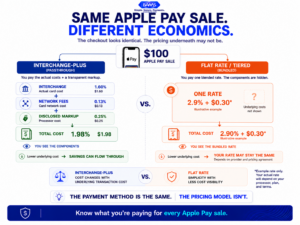
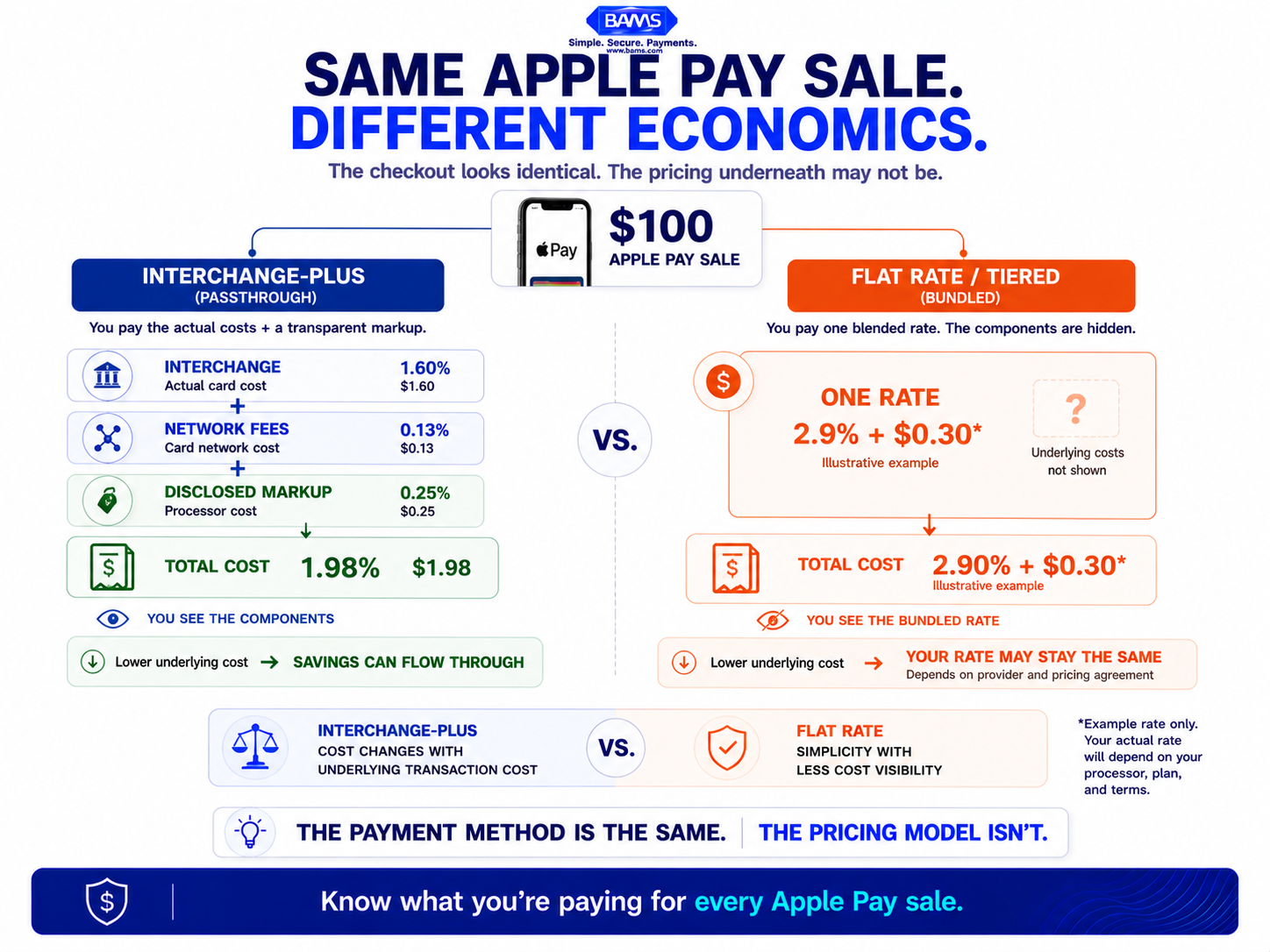
The Apple Pay checkout can be identical while the economics behind it are completely different. Your payment processor’s pricing model determines whether lower underlying costs reach your business.
Choose interchange-plus if you want the lowest possible cost per Apple Pay transaction, full visibility into what you’re paying and why, and the ability to qualify for reduced interchange rates through proper token routing. Choose flat/tiered if you value simplicity above savings, process low volume, or lack the bandwidth to review monthly statements. For most established eCommerce operations doing $50K+ per month, interchange-plus wins on both cost and transparency.
|
Criterion |
Interchange-Plus (Passthrough) |
Flat/Tiered (Bundled) |
Winner |
|---|---|---|---|
|
Total Apple Pay Cost |
Interchange + assessment + small fixed markup |
Single blended rate (often 2.6%–2.9% + per-txn fee) |
Interchange-Plus |
|
Pricing Transparency |
Full line-item breakdown on every transaction |
One rate; no visibility into interchange tier |
Interchange-Plus |
|
Interchange Optimization |
Can qualify for lower card-present or enhanced data rates |
No benefit; savings absorbed by processor |
Interchange-Plus |
|
Settlement Speed |
Varies; some offer next-day funding |
Varies; often 2–3 business days standard |
Depends on provider |
|
Simplicity |
Requires reading itemized statements |
One predictable rate per transaction |
Flat/Tiered |
|
Scalability |
Costs drop as volume grows |
Rate stays fixed regardless of volume |
Interchange-Plus |
|
Hidden Fees Risk |
Low (markup is disclosed) |
High (downgrades and surcharges buried in spread) |
Interchange-Plus |
Why the Evaluation Criteria Matter for Mobile Wallet Sales
Apple Pay transactions still rely on the underlying payment card and card network infrastructure. Apple states that it does not charge fees when you use Apple Pay. For merchants, payment acceptance costs instead depend on factors such as the underlying card, applicable interchange and network fees and the processor’s pricing structure. That makes your gateway and processor pricing model an important cost consideration.
We evaluate on seven dimensions because each one affects either your per-transaction cost or your cash flow timing. Total cost and interchange optimization carry the most weight for mid-size eCommerce operators. Settlement speed ranks next because deposit delays directly constrain working capital. Simplicity matters, but it should never be purchased at the expense of 30+ basis points per sale.
Hidden fees deserve special attention. On Apple Pay transactions, a gateway that bundles pricing can quietly pocket the difference between the actual interchange rate (which may be lower for tokenized, authenticated transactions) and the flat rate you’re charged. You’d never know.
Head-to-Head: Interchange-Plus vs. Flat/Tiered on Apple Pay Checkout
Total Cost Per Apple Pay Transaction
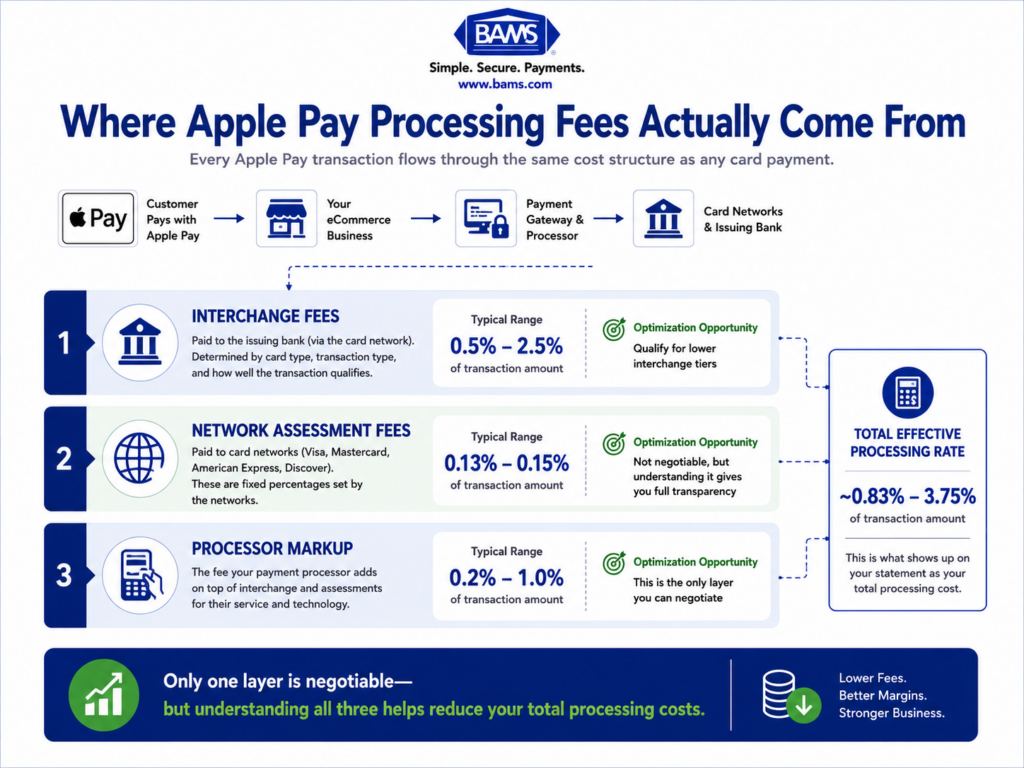
Apple Pay transaction costs break into three layers: interchange (0.5%–2.5%), network assessment (0.13%–0.15%), and processor markup (0.2%–1.0%). With interchange-plus, you see each layer separately. Your processor adds a fixed, disclosed markup on top of the actual interchange rate for that specific card and transaction type.
With flat or tiered pricing, the processor quotes a single rate, often around 2.6% + 10¢ for in-person or 2.9% + 30¢ online. That rate doesn’t change when the underlying interchange is lower. If an Apple Pay transaction qualifies at 1.65% interchange and you’re paying a flat 2.9%, the processor keeps the difference. On interchange-plus with a 0.25% markup, you’d pay roughly 2.03% total for that same transaction.
Interchange is an underlying component of card acceptance costs and varies according to the applicable network and transaction category. The Federal Reserve publishes data on average debit card interchange fees, providing additional context for how interchange contributes to merchant payment acceptance costs. Your processor’s pricing model then determines how transparently those underlying costs appear on your statement.
Verdict: Interchange-plus saves money on nearly every Apple Pay sale. The gap widens as your volume grows.
Pricing Transparency
Interchange-plus statements show the interchange category, the network assessment, and the processor’s markup for each transaction. You can audit every line. Flat-rate statements show one number. You can’t tell whether your Apple Pay transactions are routing efficiently or being downgraded to higher-cost categories.
This matters because interchange is not a single universal rate. Visa’s published U.S. interchange reimbursement fee schedule shows that rates vary across transaction and card categories. With interchange-plus pricing, merchants have greater visibility into the underlying interchange costs being passed through. With flat-rate pricing, those differences are generally absorbed into the processor’s bundled rate, making the underlying cost harder to evaluate.
Verdict: Interchange-plus gives you the data to identify and fix routing problems. Flat-rate pricing hides them.
Interchange Optimization Potential
This is where the comparison gets decisive. Properly configured Apple Pay transactions can qualify for interchange rates 20 to 40 basis points lower than standard eCommerce card-not-present rates. The key is token passthrough and enhanced transaction data. When your gateway sends the right signals, the card networks recognize the transaction as authenticated and lower-risk.
On interchange-plus, those savings flow directly to you. On flat or tiered pricing, the processor captures the benefit. Your rate stays the same whether the transaction qualifies at the lowest tier or the highest. This is the single largest hidden cost of bundled pricing for businesses that accept Apple Pay at scale.
Verdict: Interchange-plus is the only model that lets you benefit from Apple Pay’s inherent cost advantages.
Settlement Speed and Deposit Delays
Settlement speed depends more on the provider than the pricing model, but there’s a pattern. Many flat-rate processors (especially aggregators) batch settlements on a 2–3 business day cycle. Some hold funds longer for newer accounts or flagged transactions. Interchange-plus providers, particularly dedicated merchant account providers, more commonly offer next-day or even same-day funding.
For ecommerce managers dealing with deposit delays on mobile wallet sales, the funding timeline is a cash flow issue. If Apple Pay drives 30% of your sales and those funds take three days to settle, you’re financing inventory and operations out of pocket for that gap. A gateway that offers next-day funding on Apple Pay transactions eliminates that drag.
Verdict: Settlement speed varies by provider, but interchange-plus providers with dedicated merchant accounts more frequently offer faster funding options.
Simplicity and Ease of Management
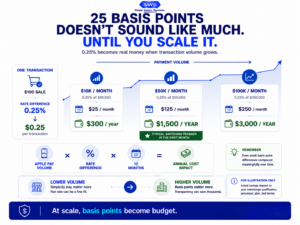
A fraction of a percentage point can look insignificant on one transaction. Across a year of payment volume, the economics change quickly.
Flat-rate pricing is genuinely simpler. One rate, one fee, minimal statement review. For a business processing under $10K per month, the time saved on accounting may offset the higher per-transaction cost. The math changes at higher volumes.
Interchange-plus requires you (or your processor) to review statements and watch for downgrades. It’s more involved, but the involvement pays for itself. A 30-basis-point savings on $100K in monthly Apple Pay volume is $300 per month, or $3,600 per year.
Verdict: Flat-rate wins on simplicity. But for established eCommerce operations, the simplicity premium is expensive.
Scalability
As your Apple Pay volume grows, interchange-plus costs stay proportional. Your markup is fixed. Volume increases may even give you leverage to negotiate a lower markup. Flat-rate pricing doesn’t reward growth. Your rate at $500K per month is the same as it was at $10K.
Verdict: Interchange-plus scales with your business. Flat-rate pricing penalizes growth.
Hidden Fees and Surcharge Risk
Tiered pricing models (qualified, mid-qualified, non-qualified) are the worst offenders here. Transactions that don’t meet “qualified” criteria get bumped to higher tiers, sometimes adding 1% or more. Apple Pay transactions can land in mid-qualified or non-qualified buckets if the gateway doesn’t handle tokenized data properly. You pay the surcharge without knowing why.
Interchange-plus eliminates tier-based surcharges entirely. You pay the actual interchange rate plus a disclosed markup. If a transaction costs more, you can see exactly which interchange category it landed in and why.
Verdict: Interchange-plus virtually eliminates hidden fee risk. Tiered pricing is built on it.
Use Case Mapping: Which Model Fits Your Situation
If you process $50K+ monthly with significant Apple Pay volume, choose interchange-plus. The savings from proper interchange qualification alone can cover your processing markup and then some.
If you’re a newer eCommerce store under $10K monthly, flat-rate pricing may make sense temporarily. The simplicity lets you focus on growth. Plan to switch as volume increases.
If deposit speed is your primary pain point, prioritize the provider over the pricing model. Look for next-day funding guarantees. BAMS, for example, pairs interchange-plus pricing with next-day funding and dedicated account management, directly addressing both cost and cash flow for mid-size eCommerce brands.
If you sell high-ticket items ($200+ average order), interchange-plus is essential. The percentage-based savings on each transaction compound significantly at higher order values.
If you operate across multiple countries, do not assume the same pricing economics apply in every market. Interchange structures, network fees and payment regulations can differ by region, so compare your gateway’s pricing separately for each market rather than relying on a single blended cost assumption.
What Both Models Get Wrong
Neither pricing model automatically solves gateway misconfiguration. If your Apple Pay integration doesn’t pass through tokenization data correctly, you’ll overpay on interchange regardless of your pricing structure. The difference is that interchange-plus lets you see the problem. Flat-rate hides it.
Neither model addresses Apple’s own 15-basis-point fee charged to issuing banks on credit card transactions. That cost is baked into interchange and passed to merchants indirectly. No gateway configuration eliminates it.
Migration and Switching Costs
Switching from flat-rate to interchange-plus typically involves setting up a dedicated merchant account, which takes 1–3 business days. Data portability is straightforward because transaction history stays with your eCommerce platform, not the processor. Recurring billing tokens may need to be migrated, which your new processor should handle.
The real switching cost is inertia. Many eCommerce managers stick with flat-rate pricing because it’s familiar, not because it’s optimal. If you’re processing $50K+ monthly, even a conservative 25-basis-point savings on Apple Pay transactions translates to $1,500+ annually. The switch pays for itself within the first month.
Watch for early termination fees on your current contract. Some processors charge $200–$500 to leave. Factor that into your timeline, but don’t let it justify staying on a more expensive model indefinitely.
Final Recommendation: The Payment Gateway Model That Eliminates Deposit Delays and Cuts Apple Pay Costs
For established ecommerce operations, interchange-plus pricing is the clear winner for Apple Pay transactions. It delivers lower total costs, full transparency, and the ability to capture interchange savings that Apple Pay’s tokenized authentication makes possible. Pair that pricing model with a provider that offers next-day funding, and you solve both the cost problem and the deposit delay problem simultaneously.
Flat-rate pricing has a place for very small or very new businesses. But if you’re reading this comparison, you’ve likely outgrown it. The money you save by switching funds growth. The faster deposits fund operations. Stop subsidizing your processor’s margin on every mobile wallet sale.
Frequently Asked Questions
What is Apple Pay and how does it work for merchants?
Apple Pay is a digital wallet that lets customers pay using their iPhone, Apple Watch, iPad, or Mac. For merchants, it works like any card transaction. The customer authenticates with Face ID or Touch ID, and the payment routes through your payment gateway to the card networks. Apple uses tokenization to replace the actual card number, which adds a layer of security. Your cost comes from interchange, network assessments, and your processor’s markup. Apple itself charges merchants nothing directly for accepting Apple Pay.
Why are my Apple Pay deposits delayed compared to other payment methods?
Deposit delays on Apple Pay transactions usually stem from your processor’s settlement cycle, not from Apple. Many aggregator-style processors batch settlements every 2–3 business days. Some hold funds longer for flagged or high-value transactions. Switching to a provider with next-day funding on a dedicated merchant account typically eliminates these delays regardless of payment method.
Does Apple Pay cost more than regular credit card processing?
No. Apple Pay transactions flow through the same interchange and network fee structure as standard card payments. In fact, properly configured Apple Pay transactions can qualify for lower interchange rates (20–40 basis points less) because tokenization and biometric authentication reduce fraud risk. The key is whether your gateway passes through token data correctly and whether your pricing model lets you capture those savings.
Does Apple Pay cost more than regular credit card processing?
Apple Pay does not create a separate merchant fee charged directly by Apple for accepting the payment. The transaction still involves the underlying payment card, card network and processor pricing structure. Interchange rates can vary based on the card and transaction category, so the exact processing cost depends on your merchant agreement and pricing model. Interchange-plus pricing provides greater visibility into those underlying costs than a single flat rate.
How do I know if my gateway is routing Apple Pay transactions efficiently?
Check your processing statements for interchange category codes on Apple Pay transactions. If you’re on interchange-plus pricing, you’ll see whether transactions land in lower-cost authenticated categories or get downgraded to standard card-not-present rates. If you’re on flat-rate pricing, you can’t tell because the rate doesn’t change regardless of the underlying interchange tier.
Can I switch payment processors without disrupting my Apple Pay checkout?
Yes. Apple Pay integration lives at the platform level (Shopify, WooCommerce, BigCommerce). When you switch processors, you update the gateway connection in your platform settings. Your Apple Pay button and customer experience stay the same. Recurring billing tokens may need migration, but most reputable processors handle that during onboarding.
Which payment processors support Apple Pay integration?
Most major payment gateways support Apple Pay, including Stripe, Braintree, Adyen, Authorize.net, and dedicated merchant account providers like BAMS. The difference isn’t whether they support Apple Pay but how they price it and how they handle token routing. A processor that supports Apple Pay but bundles fees into flat-rate pricing won’t deliver the same cost savings as one offering interchange-plus with proper token passthrough.