PCI Compliant Payment Gateway Comparison for Merchants
How compliance status affects your deposits, fees, and fraud liability—and what to look for
Learn why PCI compliance should be your primary filter when comparing payment gateways. This guide shows how compliance impacts deposit timing, fee structures, and fraud exposure for eCommerce businesses.
TL;DR
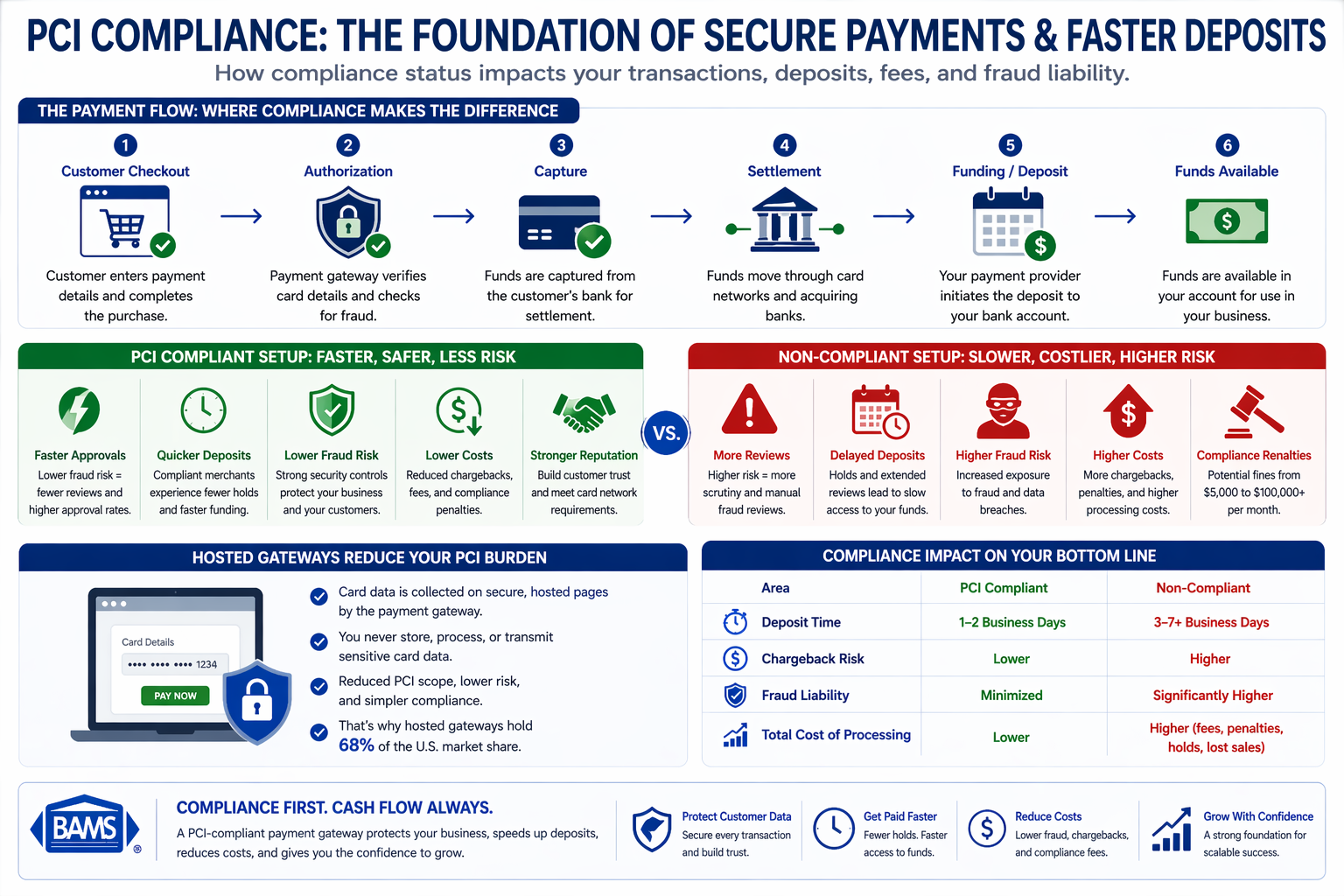
- PCI compliance determines deposit speed – Non-compliant setups trigger more fraud reviews and transaction holds, directly delaying when you receive your funds.
- Only 14.3% of companies achieved full PCI compliance in 2023 – This creates a two-tier system where compliant merchants enjoy faster processing and lower risk exposure.
- Hosted gateways reduce your compliance burden – They handle card data on secure third-party pages, which is why they hold 68% of the U.S. market share.
- Calculate total cost, not just the advertised rate – Include monthly fees, PCI fees, chargeback fees, and non-compliance penalties to find your true processing cost.
- Follow the compliance-first framework – Verify PCI status, analyze complete fee structure, assess integration and deposit timing, evaluate support quality, then review contract terms.
What This Guide Covers and Who It’s For
This guide explains why PCI compliance should be your primary filter when conducting any payment gateway comparison for your eCommerce business. You’ll learn how compliance status directly affects deposit timing, fee structures, and your exposure to fraud liability.
If you manage payments for an established online business and struggle with delayed deposits or unpredictable processing costs, this guide is for you. By the end, you’ll understand exactly how to evaluate a PCI-compliant payment gateway and recognize the hidden costs of non-compliant alternatives.
We focus specifically on eCommerce applications, transaction fee implications, and practical selection criteria. We won’t cover in-store POS systems or detailed technical implementation steps.
Why PCI Compliance Determines Your Cash Flow
PCI compliance directly affects payment speed, fraud risk, and deposit timing, making it the foundation of a reliable payment gateway.
The connection between PCI compliance and delayed deposits isn’t obvious until you experience it firsthand. Non-compliant payment processing creates friction at every stage, from transaction authorization to fund settlement.
The PCI Security Standards Council emphasizes that maintaining strong compliance standards is essential to protect cardholder data and ensure secure, uninterrupted payment processing. This compliance gap creates a two-tier system where compliant merchants enjoy faster processing while others face holds, reviews, and delays.
According to Visa, modern payment systems are designed to process transactions securely while maintaining efficiency and reducing fraud exposure.
Payment processors respond by scrutinizing transactions from non-compliant merchants more heavily, adding days to your deposit timeline.
The cost of inaction extends beyond delayed cash flow. Non-compliance with PCI DSS can result in fines ranging from $5,000 to $100,000 per month, depending on your provider and risk level. These penalties compound the already-significant impact of slow deposits on your working capital.
Core Concepts: Understanding PCI Compliance and Payment Gateways
What PCI DSS Actually Means
PCI DSS (Payment Card Industry Data Security Standard) is a set of security requirements governing how businesses handle cardholder data. Compliance isn’t optional; it’s mandated by card networks for any business accepting credit cards.
A common misconception: many eCommerce managers believe PCI compliance is only the gateway provider’s responsibility. In reality, your compliance obligations depend on how your gateway handles card data. This distinction directly affects your transaction fee structure and operational burden.
Hosted vs. Non-Hosted Gateways
Understanding how payment gateways work is essential for making the right choice. Hosted gateways redirect customers to a secure third-party page for payment entry. Non-hosted (or API-integrated) gateways keep customers on your site but require you to handle card data directly.
When the gateway handles card data, your compliance scope shrinks dramatically.
The Compliance-to-Deposit Connection
Your gateway’s compliance status affects how acquiring banks view your transactions. Compliant setups trigger fewer fraud reviews, faster authorizations, and quicker fund releases. Non-compliant configurations create risk flags that slow everything down.
The PCI-First Gateway Selection Framework
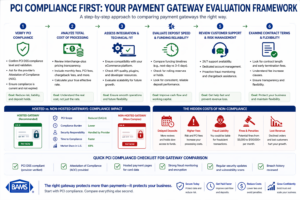
A PCI-first evaluation framework ensures you prioritize security, cost transparency, and deposit speed when comparing payment gateways.
Effective payment gateway comparison follows a specific sequence. Starting with features or price leads to costly mistakes. Starting with compliance status protects your business and simplifies every subsequent decision.
This framework has four stages: Compliance Verification, Fee Structure Analysis, Integration Assessment, and Support Evaluation. Each stage builds on the previous one, creating a clear path from initial research to final selection.
The stages interconnect because compliance affects fees (non-compliant gateways often charge “compliance fees” or higher rates), fees affect integration priorities (cheaper options may lack critical features), and integration complexity affects your support needs.
According to the Federal Reserve, interchange fees play a major role in total processing costs, reinforcing the importance of transparent pricing when comparing gateways.
Step 1: Verify PCI Compliance Status and Scope
Objective
Confirm that your prospective gateway maintains current PCI DSS certification and understand exactly what compliance responsibilities transfer to you.
Execution Guidance
Request the gateway’s Attestation of Compliance (AOC) document. This official certification proves their compliance status and specifies their service type. Look for “Service Provider” designation with Level 1 certification (the highest level).
Ask specifically: “What PCI requirements remain my responsibility when using your gateway?” The answer determines your ongoing compliance workload.
Review their security documentation for tokenization capabilities. Tokenization replaces card numbers with non-sensitive equivalents, further reducing your compliance scope and protecting customer data.
Anti-Patterns to Avoid
- Don’t accept verbal assurances of compliance.
- Don’t assume that because a gateway is “popular” it’s fully compliant.
- Don’t skip this step because you’re eager to compare prices.
Success Indicators
- You have a current AOC document.
- You can clearly articulate your remaining compliance responsibilities.
- You understand the gateway’s tokenization and data handling approach.
Step 2: Analyze the Complete Transaction Fee Structure
Objective
Understand every fee component, not just the advertised rate, and calculate your true processing cost across your typical transaction mix.
Execution Guidance
Request a complete fee schedule that includes: per-transaction fees, percentage rates, monthly fees, PCI compliance fees, non-compliance fees, chargeback fees, and any volume thresholds that affect pricing.
Understanding the difference between tiered pricing and interchange-plus pricing is critical here. Tiered pricing bundles transactions into categories that often favor the processor. Interchange-plus passes actual card network rates to you, providing transparency and typically lower costs.
Calculate your effective rate using last month’s actual transactions. Apply the prospective gateway’s fee structure to your real data, not hypothetical scenarios. This reveals the true cost difference between options.
Choosing merchant services based solely on the lowest advertised price often backfires. Hidden fees and unfavorable contract terms can make a “cheap” gateway more expensive than transparent alternatives.
Anti-Patterns to Avoid
- Don’t compare only the headline rate.
- Don’t ignore PCI non-compliance fees (which can add $20 to $100 monthly if you fail to complete compliance questionnaires).
- Don’t overlook chargeback fees, which vary significantly between providers.
Success Indicators
You have a complete fee schedule with no “contact us for pricing” gaps. You’ve calculated your projected monthly cost using real transaction data. You understand which pricing model the gateway uses and why it matters for your business.
Step 3: Assess Integration Requirements and Deposit Timing
Objective
Confirm the gateway integrates with your eCommerce platform and understand exactly when funds will reach your account.
Execution Guidance
Verify native integration with your platform (Shopify, WooCommerce, or custom). Native integrations reduce development costs and ongoing maintenance. Ask about the integration process timeline and any technical requirements.
Ask specifically about deposit timing: “What is your standard settlement period, and do you offer next-day funding?” Standard settlement is typically 2 to 3 business days. Next-day funding significantly improves cash flow but may require specific account configurations or additional verification.
Review the gateway’s approach to transaction holds. Some providers hold funds for new merchants or flag transactions based on amount thresholds. Understand these policies before committing.
For businesses processing recurring payments, confirm the gateway supports subscription billing and stored payment methods. These features require specific PCI compliance configurations that not all providers offer.
Anti-Patterns to Avoid
- Don’t assume “fast deposits” means next-day.
- Don’t overlook weekend and holiday processing policies. Don’t ignore the difference between authorization and settlement timing.
Success Indicators
You have written confirmation of deposit timing for your specific business type. You understand the integration timeline and technical requirements. You’ve confirmed support for your payment types (recurring, international, digital wallets).
Step 4: Evaluate Support Quality and Chargeback Defense
Objective
Ensure you’ll have access to responsive support and proactive protection against chargebacks, which directly impact your deposit timing and fee structure.
Execution Guidance
Test support responsiveness before signing. Call or email with a specific question and measure response time and quality. Ask about dedicated account management versus general support queues.
Review their chargeback defense capabilities. Effective chargeback management prevents disputes from escalating, protects your merchant account standing, and preserves your access to favorable processing rates.
Ask about their dispute notification timing. Early notification gives you more time to respond with evidence. Some providers offer automated evidence submission for common dispute types.
Inquire about their approach to account reviews and holds. Transparent providers explain their risk thresholds and give you advance notice before implementing holds that could delay your deposits.
Anti-Patterns to Avoid
- Don’t assume all support is equivalent.
- Don’t overlook chargeback fees and thresholds in your cost analysis.
- Don’t sign with a provider that can’t explain their hold policies clearly.
Success Indicators
You’ve received prompt, knowledgeable responses to pre-sale questions. You understand the chargeback defense process and associated fees. You have clear documentation of hold policies and dispute procedures.
Step 5: Review Contract Terms and Exit Provisions
Objective
Understand your commitment period, fee change provisions, and exit options before signing.
Execution Guidance
Read the contract for term length and auto-renewal clauses. Month-to-month agreements provide flexibility. Long-term contracts may offer better rates but limit your options if service quality declines.
Look for fee change notification requirements. Reputable providers give 30 to 60 days notice before rate increases. Some contracts allow unilateral fee changes with minimal notice.
Understand early termination fees and conditions. Calculate the potential cost of exiting early if the relationship doesn’t work out. Some providers waive termination fees under specific circumstances.
Review data portability provisions. If you switch providers, can you export transaction history and customer payment tokens? Data lock-in creates hidden switching costs that extend beyond direct fees.
Anti-Patterns to Avoid
- Don’t sign multi-year contracts without understanding exit costs.
- Don’t overlook auto-renewal terms that extend your commitment automatically.
- Don’t assume you can negotiate terms after signing.
Success Indicators
You understand your commitment period and renewal terms. You know the exact cost of early termination. You’ve confirmed data portability options for potential future transitions.
Lessons from PSD2: When Compliance Gaps Create Real Costs
Europe’s Payment Services Directive 2 (PSD2) rollout offers a clear example of compliance impact. When Strong Customer Authentication (SCA) requirements took effect, many payment gateways struggled to adapt.
Non-compliant providers saw checkout abandonment spike as transactions failed authentication. Merchants using these gateways lost sales and faced customer complaints while waiting for their providers to implement proper SCA flows.
Compliant gateways had already invested in the necessary infrastructure. Their merchants experienced minimal disruption and maintained normal transaction approval rates throughout the transition.
The lesson: compliance isn’t just about avoiding fines. It’s about operational continuity.
Common Mistakes That Delay Your Deposits
Treating compliance as a checkbox. Completing your annual Self-Assessment Questionnaire isn’t enough. Ongoing compliance requires monitoring, updates, and proper gateway configuration. Gaps create risk flags that slow your deposits.
Choosing based on advertised rates alone. The gateway advertising 2.4% may cost more than the one advertising 2.9% once you factor in monthly fees, PCI fees, and chargeback costs. Calculate your total cost, not just the percentage.
Ignoring settlement timing until it’s a problem. Many eCommerce managers don’t realize their deposits are delayed until cash flow becomes tight. Ask about settlement timing during evaluation, not after you’ve signed.
Assuming all “PCI-compliant” claims are equal. Some providers maintain compliance for their infrastructure but pass significant obligations to you. Understand exactly what “compliant” means for your specific integration.
Overlooking chargeback impact. High chargeback rates trigger account reviews, holds, and potentially account termination. A gateway with strong chargeback defense protects your deposit timing and account standing.
What to Do Next
Start by auditing your current gateway’s compliance documentation. Request their current AOC and review what compliance responsibilities fall to you. This baseline helps you evaluate alternatives accurately.
Calculate your true processing cost from last month’s statement. Include every fee, not just the percentage rate. This number becomes your benchmark for any payment gateway comparison.
If your current deposits take longer than one business day, ask your provider specifically why. The answer reveals whether the delay stems from compliance issues, risk flags, or simply their standard settlement period.
Use this guide as a reference when evaluating alternatives. The framework applies whether you’re comparing two options or ten. Compliance first, then fees, then integration, then support.
Progress happens incrementally. Even small improvements in deposit timing or fee structure compound over months and years. A PCI-compliant payment gateway with transparent interchange plus pricing and next-day funding transforms payments from a constant headache into a predictable part of your operations.
Frequently Asked Questions
What is a payment gateway and why is it important for eCommerce?
A payment gateway is the technology that securely transmits payment information between your online store and the payment processor. It authorizes transactions, encrypts sensitive card data, and communicates approval or decline messages back to your checkout. Without a reliable gateway, you can’t accept online payments, and without a compliant gateway, you face security risks, potential fines, and delayed deposits.
How do I choose the best payment gateway for my business?
Start with PCI compliance verification, then analyze the complete fee structure using your actual transaction data. Confirm integration compatibility with your eCommerce platform and verify deposit timing. Finally, evaluate support quality and contract terms. This sequence prevents costly mistakes that occur when businesses prioritize price or features over compliance.
What are the benefits of using a PCI-compliant payment gateway?
A PCI-compliant gateway reduces your own compliance burden, minimizes fraud risk, and typically results in faster deposit timing. Compliant gateways trigger fewer transaction reviews from acquiring banks, which means your funds reach your account more quickly. You also avoid monthly non-compliance fees that can range from $20 to $100.
When should I consider switching my payment gateway?
Consider switching if your deposits consistently take more than one to two business days, if your effective processing rate exceeds industry norms after accounting for all fees, if you’re paying PCI non-compliance fees, or if support responsiveness has declined. Also evaluate switching if your current provider can’t support your growth needs, such as international transactions or recurring billing.
Which payment gateways support international transactions?
Most major payment gateways support international transactions, but capabilities vary significantly. Look for multi-currency processing, which allows customers to pay in their local currency. Verify which countries and card types are supported. International transactions often carry higher fees, so factor these into your cost analysis when comparing options.
How does PCI compliance affect my transaction fees?
PCI compliance affects fees in several ways. Non-compliant merchants often pay monthly non-compliance fees. Compliant merchants may qualify for better rates from processors who view them as lower risk. Additionally, gateways that handle more of the compliance burden for you (like hosted gateways) may charge slightly higher transaction fees, but this is often offset by reduced compliance costs and faster deposits.
Sources