How to Prevent Chargebacks and Unlock Faster Deposits
Last Updated on May 28, 2026 by Dimitri Akhrin
Build a multi-layer defense system that cuts disputes by 40-60% and qualifies you for accelerated funding
Learn to implement a complete chargeback prevention system that reduces disputes and speeds up your deposit timeline. This step-by-step tutorial covers transaction verification, customer communication, and dispute response automation.
TL;DR
- Chargebacks directly delay your deposits – Processors use your dispute ratio to assess risk. High chargebacks trigger reserve holds and slower settlement. Keep your ratio below 0.5% to qualify for faster funding.
- Layer your fraud prevention – Combine AVS verification, CVV requirements, and velocity filters to block fraudulent transactions before they process. Each layer catches what others miss.
- Fix your billing descriptor – 15-20% of chargebacks come from customers not recognizing charges. Update your descriptor to show your recognizable business name and contact info.
- Automate documentation collection – Store delivery confirmation, customer communications, and verification data automatically. Complete evidence packages improve dispute win rates from 20% to 50%+.
- Implement pre-dispute alerts – Services like Verifi and Ethoca notify you before chargebacks are filed, giving you a chance to resolve issues and prevent the dispute entirely.
What You Will Achieve: Faster Deposits Through Chargeback Prevention
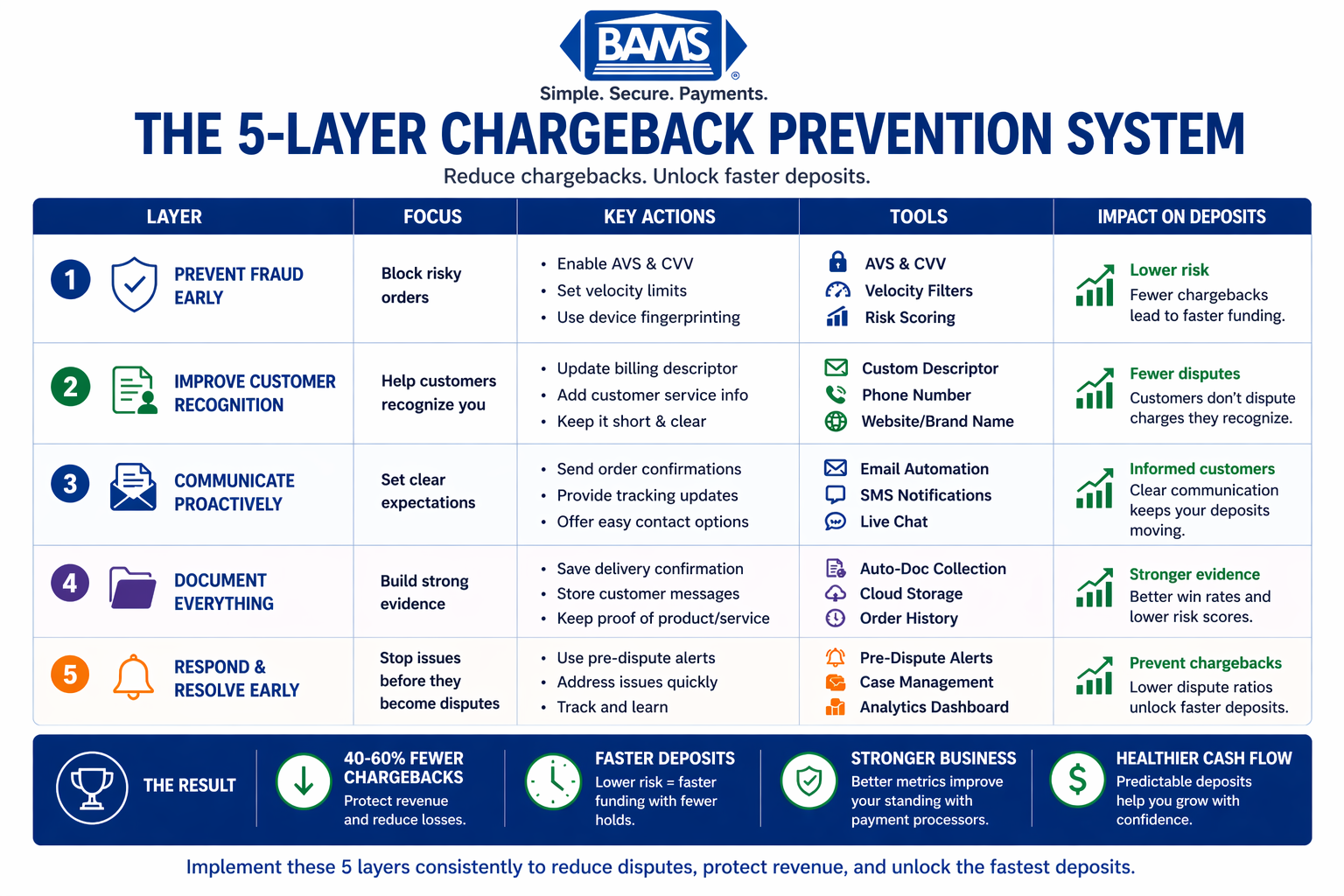
A 5-layer system that reduces chargebacks, improves approval rates, and unlocks faster deposits through proactive fraud prevention.
By the end of this tutorial, you will have implemented a complete chargeback prevention system that directly accelerates your deposit timeline. Your success criteria: reduce chargebacks by 40-60%, maintain a dispute ratio below 0.5%, and qualify for faster funding from your payment processor.
The connection is straightforward. Payment processors assess risk when determining how quickly to release your funds. High chargeback rates signal risk, triggering reserve holds and delayed deposits. Effective chargeback prevention strategies demonstrate operational stability, which unlocks faster deposit strategies and improves your cash flow predictability.
You will build a multi-layer defense system covering transaction verification, customer communication, and dispute response automation. Each layer compounds your protection and speeds up your access to revenue.
Prerequisites and Setup Checklist
Before starting, confirm you have the following in place. Missing items will create gaps in your prevention system.
- Admin access to your payment gateway dashboard (Stripe, Authorize.net, or equivalent)
- Access to your eCommerce platform backend (Shopify, WooCommerce, Magento)
- Current chargeback data from the last 6 months (dispute rates, reason codes, dollar amounts)
- Customer service email templates and response protocols documented
- Shipping carrier account with tracking API access
- 30-45 minutes for initial configuration; ongoing monitoring requires 15 minutes daily
Potential blockers: If your current chargeback ratio exceeds 1.5%, your processor may have already placed restrictions on your account. Contact your merchant services provider before implementing changes to understand any existing limitations.
Why This Approach Works: The Deposit-Chargeback Connection
Payment processors use chargeback ratios as a primary risk indicator. Payment fraud continues to grow alongside digital transactions, requiring stronger prevention systems and smarter authorization strategies as outlined by Visa.
When your chargeback ratio stays below 0.5%, processors classify your account as low-risk. This classification triggers several benefits: reduced reserve requirements, faster settlement windows, and eligibility for next-day funding programs. The fraud protection measures you implement serve double duty, protecting revenue while signaling trustworthiness to your processor.
Alternative approaches (fighting every chargeback reactively, accepting losses as cost of business) fail because they address symptoms rather than causes. Prevention at the transaction level costs less and delivers compounding returns.
Step 1: Audit Your Current Chargeback Landscape
Action: Export your chargeback data from the past 6 months and categorize disputes by reason code.
Log into your payment gateway. Navigate to Disputes or Chargebacks section. Export all disputes to CSV format. Create columns for: transaction date, dispute date, reason code, amount, and outcome.
Expected result: A spreadsheet showing your top 3 reason codes by frequency and dollar amount. Most eCommerce merchants see concentrations in “Product Not Received,” “Product Not as Described,” or “Fraudulent Transaction” categories.
Checkpoint: Calculate your current chargeback ratio (total chargebacks divided by total transactions). If above 0.9%, prioritize fraud prevention. If between 0.5-0.9%, focus on customer experience improvements.
Common failure: Incomplete data export missing reason codes. Fix: Contact your processor’s support to request a complete dispute report with all fields populated.
Step 2: Configure Address Verification Service (AVS) Rules
Action: Set your integrated payment gateway to decline transactions with AVS mismatches.
In your gateway dashboard, locate Fraud Settings or Risk Rules. Find AVS Configuration. Enable the following rules:
- Decline if street address does not match
- Decline if ZIP code does not match
- Flag (do not auto-decline) international transactions for manual review
Expected result: Transactions with billing address mismatches will be automatically declined before processing, preventing fraudulent orders from entering your system.
Checkpoint: Process a test transaction using an intentionally incorrect billing address. The system should decline the transaction with an AVS mismatch error.
Common failure: Overly strict rules declining legitimate customers using P.O. boxes or apartment numbers. Fix: Set apartment/suite mismatches to “flag for review” rather than “decline.”
Step 3: Implement CVV Verification Requirements
Action: Require CVV for all transactions and decline CVV mismatches.
In your payment gateway’s fraud settings, enable CVV Required for all card-present and card-not-present transactions. Set the rule to decline transactions where CVV does not match.
Expected result: Every transaction will require the 3 or 4 digit security code from the physical card, blocking stolen card number fraud where the thief lacks the physical card.
Checkpoint: Attempt a test purchase entering an incorrect CVV. The transaction should fail with a security code mismatch message.
Common failure: Saved payment methods bypassing CVV requirements. Fix: For recurring payments support, implement tokenization so cards are verified once, then stored securely without requiring CVV on subsequent charges.
Step 4: Set Up Velocity Filters
Action: Create rules that flag or block rapid successive transactions from the same source.
Navigate to your gateway’s velocity or rate limiting settings. Configure the following thresholds:
- Maximum 3 transactions per card number per hour
- Maximum 5 transactions per IP address per hour
- Maximum 3 declined transactions per card before 24-hour block
Expected result: Fraudsters testing stolen cards will be blocked after initial attempts. Legitimate customers rarely trigger these limits.
Checkpoint: Review your transaction logs after 48 hours. You should see flagged transactions that match velocity rules, confirming the filters are active.
Common failure: B2B customers placing large orders with multiple items triggering limits. Fix: Create a whitelist for verified business accounts or increase thresholds for authenticated/logged-in customers.
Step 5: Optimize Your Billing Descriptor
Action: Update your payment descriptor to match what customers expect to see on their statements.
Contact your payment processor to update your billing descriptor. The descriptor should include: your recognizable business name (not a parent company or DBA customers don’t know), a phone number or URL, and be limited to 22 characters for optimal display.
Example transformation:
- Before: “ACME HOLDINGS LLC” (customers don’t recognize this)
- After: “YOURSTORE.COM 8005551234” (customers can identify and contact you)
Expected result: Reduction in “I don’t recognize this charge” disputes, which account for 15-20% of friendly fraud chargebacks.
Checkpoint: Make a small test purchase on your own card. Verify the descriptor appears correctly on your statement within 2-3 business days.
Common failure: Descriptor truncated on mobile banking apps. Fix: Front-load the most recognizable part of your business name in the first 12 characters.
Step 6: Implement Order Confirmation and Shipping Notification Automation
Action: Configure automated emails at three critical touchpoints: order confirmation, shipping notification with tracking, and delivery confirmation.
In your eCommerce platform, navigate to Settings then Notifications. Enable and customize:
- Order confirmation: Include order number, itemized list, billing descriptor preview, and customer service contact
- Shipping notification: Include carrier name, tracking number (linked), and estimated delivery date
- Delivery confirmation: Request feedback, provide return instructions, remind of support availability
Expected result: Customers have documentation at every stage, reducing “product not received” disputes and providing you with evidence for dispute responses.
Checkpoint: Place a test order through your complete fulfillment cycle. Verify all three emails arrive with correct, clickable tracking links.
Common failure: Emails landing in spam folders. Fix: Implement SPF, DKIM, and DMARC email authentication. Use a reputable email service provider with high deliverability rates.
Step 7: Enable Delivery Confirmation and Signature Requirements
Action: Configure shipping rules that require delivery confirmation for all orders and signatures for orders above your average order value.
In your shipping settings, set the following rules:
- All orders: Delivery confirmation required
- Orders over $100 (adjust to your AOV): Signature required
- Orders over $500: Adult signature required
Connect your shipping carrier API to automatically capture and store proof of delivery in your order management system.
Expected result: Documented proof of delivery for every order, providing compelling evidence against “item not received” disputes. This is essential for preventing fraud-related chargebacks.
Checkpoint: Verify that delivery confirmation data appears in your order details within 24 hours of carrier delivery scan.
Common failure: Signature requirements causing delivery failures when customers aren’t home. Fix: Offer signature release authorization at checkout for customers who prefer convenience over security.
Step 8: Create a Pre-Dispute Resolution System
Action: Implement alerts that notify you when customers contact their bank, before the chargeback is filed.
Sign up for Verifi CDRN (Cardholder Dispute Resolution Network) or Ethoca alerts through your payment processor. These services notify you when a cardholder initiates a dispute inquiry with their bank.
Configure your response protocol:
- Alert received: Customer service contacts customer within 2 hours
- Offer resolution: Refund, replacement, or store credit
- Document outcome: Log all communications in your CRM
Expected result: 30-40% of potential chargebacks resolved before they become formal disputes, keeping your chargeback ratio low and protecting your faster deposit eligibility.
Checkpoint: Confirm alert integration by reviewing your alert dashboard. You should see test notifications within 24 hours of activation.
Common failure: Alerts not reaching the right team member. Fix: Create a dedicated email alias (disputes@yourcompany.com) that routes to your customer service lead with mobile notifications enabled.
Step 9: Build Your Dispute Response Documentation System
Action: Create a centralized repository of evidence that auto-populates when you need to respond to disputes.
For each order, your system should automatically store:
- Customer IP address and device fingerprint at checkout
- AVS and CVV verification results
- Order confirmation email (with timestamp)
- Shipping confirmation with tracking
- Delivery confirmation or signature image
- Any customer service communications
- Product photos from your listing
When a dispute arrives, export this evidence package in under 5 minutes. Effective chargeback prevention strategies include rapid, well-documented responses that increase your win rate.
Expected result: Dispute response time reduced from hours to minutes, with comprehensive evidence improving win rates from 20% to 50% or higher.
Checkpoint: Pull a test evidence package for a recent order. All documentation should be accessible within your order management system.
Common failure: Customer service communications stored in separate email threads. Fix: Integrate your helpdesk (Zendesk, Gorgias, Freshdesk) with your order management system so all communications attach to the order record.
Step 10: Configure Automated Chargeback Response
Action: Set up automated dispute responses for common reason codes using your documentation system.
Work with your payment processor to enable automated dispute response. For each reason code, create a response template:
- Reason Code 13.1 (Merchandise Not Received): Auto-attach delivery confirmation, tracking history, shipping notification email
- Reason Code 13.3 (Not as Described): Auto-attach product listing, photos, return policy, customer communications
- Reason Code 10.4 (Fraud): Auto-attach AVS/CVV match confirmation, IP geolocation, device fingerprint, delivery signature
Expected result: Disputes receive responses within 24 hours with relevant evidence, maximizing win rates and demonstrating to processors that you actively manage disputes.
Checkpoint: Review your first 5 automated responses manually to confirm correct evidence attachment. Adjust templates based on any gaps.
Common failure: Generic responses that don’t address the specific reason code. Fix: Create distinct templates for each reason code category, with evidence prioritized by relevance to that dispute type.
Step 11: Establish Monitoring and Threshold Alerts
Action: Create a dashboard that tracks your chargeback ratio in real-time with alerts at critical thresholds.
Configure alerts at these levels:
- 0.5% ratio: Warning, review recent disputes for patterns
- 0.75% ratio: Escalation, pause high-risk traffic sources
- 0.9% ratio: Critical, implement emergency fraud controls
Set up weekly reporting that includes: total transactions, total disputes, dispute ratio, win/loss rate, and top reason codes.
Expected result: Early warning of chargeback ratio increases, allowing intervention before processor thresholds are breached. As digital payments scale, businesses must proactively manage disputes and transaction risk to maintain efficient settlement and cash flow, according to Modern Treasury.
Checkpoint: Verify alerts trigger correctly by reviewing your current ratio against threshold settings. You should receive your first weekly report within 7 days of configuration.
Common failure: Alerts sent to unmonitored channels. Fix: Route critical alerts (0.75% and above) to SMS in addition to email, with escalation to management if not acknowledged within 2 hours.
Configuration and Customization Options
Your specific business model may require adjustments to the default settings above. Here are the key variables to consider:
High-ticket merchants ($500+ average order): Increase signature requirements, add manual review for first-time customers, consider phone verification for orders above $1,000.
Subscription businesses: Implement clear cancellation flows, send renewal reminders 7 days before charge, and make cancellation as easy as signup to reduce “unauthorized transaction” disputes.
International sellers: Relax AVS rules for countries with different address formats, but increase reliance on 3D Secure authentication and device fingerprinting.
Safe defaults that work for most merchants: AVS street and ZIP match required, CVV required, velocity limit of 3 transactions per card per hour, delivery confirmation on all orders.
Settings you must customize: Billing descriptor (unique to your business), signature threshold (based on your AOV), alert email recipients (your team structure).
Verification and Testing Protocol
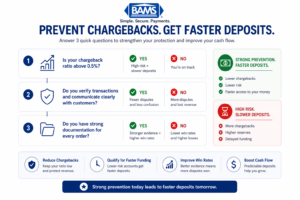
A simplified checklist to help businesses reduce chargebacks and qualify for faster deposit timelines.
After implementing all steps, verify your system works end-to-end with this testing procedure:
Test 1: Fraud filter verification. Attempt purchases with mismatched AVS, incorrect CVV, and rapid succession. All should be declined or flagged.
Test 2: Communication flow. Complete a purchase through delivery. Verify all automated emails arrive with correct information and working links.
Test 3: Evidence collection. For your test order, pull the complete evidence package. All documentation should be present and exportable.
Test 4: Alert verification. Confirm your monitoring dashboard shows accurate transaction and dispute counts. Manually trigger a threshold alert to verify notification delivery.
Success definition: All four tests pass, your chargeback ratio is accurately tracked, and you can generate a complete dispute response package in under 5 minutes.
Edge cases to verify: Guest checkout (no account) orders still capture device fingerprint, international orders process with adjusted rules, subscription renewals include proper notification sequence.
Common Errors and Fixes
Error: “AVS Mismatch” declining legitimate customers
Symptom: Customers report orders being declined despite correct billing information. Cause: Strict AVS rules conflicting with bank records that abbreviate or format addresses differently. Fix: Change AVS rule from “exact match required” to “ZIP match required, street match preferred.” This catches most fraud while accommodating address format variations.
Error: Chargeback ratio spiking after implementation
Symptom: Dispute ratio increases in the first 30 days. Cause: Backlog of disputes from before implementation still being processed. Fix: This is normal. Track “dispute date” versus “transaction date” separately. New transaction disputes should decrease while legacy disputes clear.
Error: Pre-dispute alerts not arriving
Symptom: Chargebacks appear without prior alert notification. Cause: Not all card networks participate in alert programs, or your processor hasn’t fully integrated the service. Fix: Confirm with your processor that alerts are active for Visa and Mastercard. Note that some issuers skip the alert phase for certain dispute types.
Error: Automated responses rejected by processor
Symptom: Dispute responses marked as “insufficient evidence.” Cause: File format or size issues, or missing required fields for specific reason codes. Fix: Review processor requirements for evidence submission. Most require PDF format under 10MB with specific naming conventions.
Error: Delivery confirmation not syncing
Symptom: Orders show “shipped” but no delivery data appears. Cause: Carrier API connection timeout or incorrect tracking number format. Fix: Verify API credentials, check tracking number format matches carrier requirements (USPS, UPS, FedEx each have different formats).
Next Steps: Extending Your Prevention System
With your core fraud protection measures in place, consider these extensions to further accelerate deposits and reduce costs:
Apply for enhanced funding terms. After 90 days of maintained low chargeback ratios, contact your processor to request faster settlement. Many processors offer next-day funding for merchants demonstrating strong dispute management. Maintaining low dispute ratios is critical for payment security and compliance, as emphasized by the PCI Security Standards Council.
Implement 3D Secure 2.0. Add an additional authentication layer that shifts fraud liability to the card issuer, further protecting your chargeback ratio while adding minimal checkout friction.
Explore chargeback management automation. Dedicated dispute management services can handle response preparation, evidence compilation, and processor communication, freeing your team while improving win rates.
Your prevention system creates a foundation for cost-effective payment processing and predictable cash flow. Each improvement compounds, moving you from reactive dispute management to proactive revenue protection.
Frequently Asked Questions
What are faster deposit strategies in merchant services?
Faster deposit strategies include maintaining low chargeback ratios (below 0.5%), demonstrating consistent transaction volume, and implementing strong fraud prevention. Processors assess risk when determining settlement speed. Merchants with proven low-risk profiles qualify for guaranteed next-day or same-day funding instead of standard 2-3 day settlement windows.
How long does it take to see results from chargeback prevention strategies?
Expect to see measurable changes within 30-60 days. Fraud prevention tools (AVS, CVV, velocity filters) show immediate impact on fraudulent transaction attempts. Customer communication improvements reduce disputes over 60-90 days as orders with better documentation complete their dispute window. Processor recognition of your improved metrics typically takes 90 days of sustained performance.
What role does fraud protection play in payment optimization?
Fraud protection directly impacts three areas of payment optimization: it reduces chargebacks (protecting revenue), lowers your risk profile (qualifying you for better rates and faster funding), and decreases manual review time (improving operational efficiency). Strong fraud protection measures signal to processors that your business is low-risk, unlocking preferential treatment.
Which payment processing fees can I reduce through better chargeback management?
Effective chargeback prevention can reduce several fee categories: chargeback fees ($15-100 per dispute), reserve requirements (funds held by processor as risk protection), and potentially your overall processing rate. Some processors offer lower interchange rates to merchants with proven low dispute ratios. You also avoid the indirect cost of lost merchandise in fraud cases.
How do I know if my chargeback ratio is affecting my deposit speed?
Check with your processor for your current risk classification. If your chargeback ratio exceeds 0.9%, you likely have restrictions affecting your funding timeline. Signs include: funds held in reserve, settlement delays beyond stated terms, or requests for additional documentation. Request a formal account review to understand exactly how your dispute rate impacts your funding schedule.
Can I implement these strategies without changing payment processors?
Yes, most strategies work with any processor. AVS/CVV rules, velocity filters, and communication improvements are configured in your existing gateway and eCommerce platform. Pre-dispute alert services (Verifi, Ethoca) require processor participation, so confirm availability with your current provider. If your processor lacks these integrations, that may indicate it’s time to evaluate alternatives with more robust fraud prevention tools.
Sources