How to Reduce Payment Processing Costs on Commercial Cards
The interchange savings your processor should be handling for you — no platform changes required
Learn why commercial card transactions quietly inflate your processing costs and how Level 2 and Level 3 data can lower your interchange rates. This guide shows eCommerce managers how to evaluate whether their processor is doing the work to keep rates low.
TL;DR
- Your processing statement hides commercial card overpayment – Blended effective rates mask the fact that commercial card transactions (corporate, purchasing, government cards) often clear at the highest possible interchange rates because enhanced data isn’t being submitted.
- Level 2 and Level 3 data unlock lower interchange rates – Card networks offer tiered pricing based on how much transaction data is submitted. Providing tax amounts, line-item detail, and customer codes on commercial card transactions can reduce interchange by 0.50% to 1.00% per transaction.
- This is your processor’s job, not a platform project – Enhanced data submission happens between your processor and the card networks. You don’t need to change your eCommerce platform, gateway, or checkout flow. You need a processor who actively manages this on your behalf.
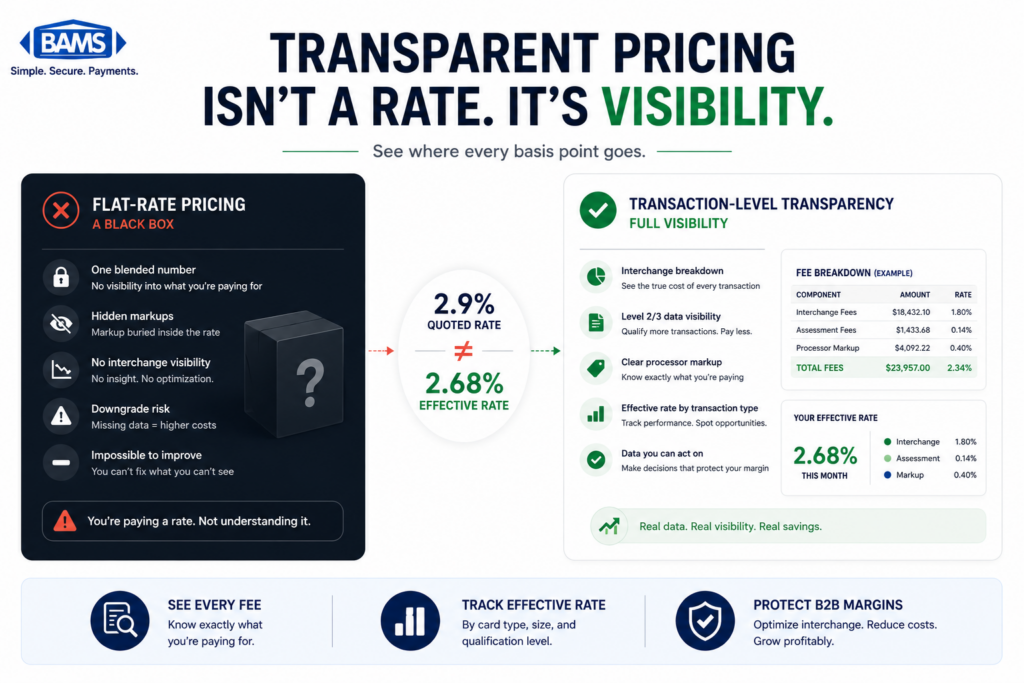
- Interchange-plus pricing is required to see the savings – If you’re on flat-rate pricing, your processor captures interchange savings without passing them to you. Interchange-plus pricing ensures lower interchange rates translate directly to lower costs on your statement.
- Start by requesting a card-type segmentation report – Ask your processor to identify your commercial card volume and provide a downgrade report. These two documents reveal whether you’re overpaying and by how much, giving you the leverage to demand better optimization or find a processor who will deliver it.
Guide Orientation: What This Guide Covers and Who It’s For
Your processing statement shows totals, rates, and fees. What it doesn’t show is whether you’re overpaying on specific transaction types, particularly commercial card orders. This guide explains why payment processing costs on commercial cards are often higher than they need to be, how the gap between what you pay and what you could pay stays hidden, and what you can do about it without changing your platform, gateway, or checkout flow.
This is written for eCommerce managers at established online businesses (roughly 10 to 50 employees) who process a mix of consumer and commercial card transactions. If you’ve ever looked at your monthly statement and felt like the numbers were correct but incomplete, this guide is for you.
By the end, you’ll understand how commercial card transactions quietly inflate your costs, what Level 2 and Level 3 data actually mean for your interchange rates, and how to evaluate whether your processor is doing the work to keep those rates low on your behalf. You won’t need to become a payments engineer. You will need to ask better questions.
Why Payment Processing Costs Deserve a Closer Look Right Now
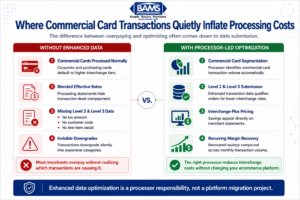
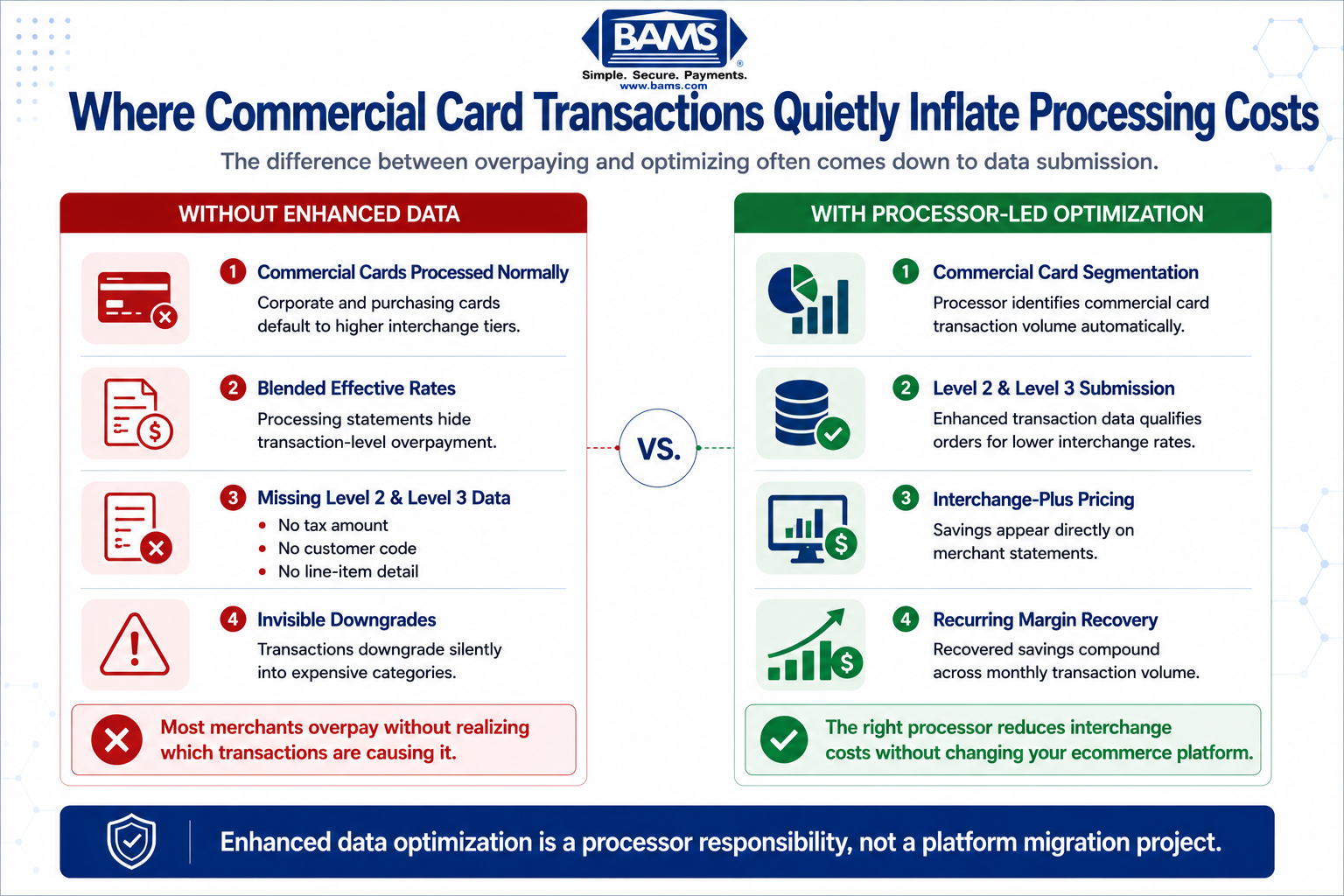
Commercial card transactions often clear at the highest interchange tiers simply because enhanced data is never submitted.
Processing costs continue to rise for merchants across the United States. Merchant Payments Coalition resources continue to highlight the growing financial pressure interchange and swipe fees place on businesses operating at scale. For most online businesses, the average cost of processing payments falls between 2.87% and 4.35% per transaction. Those numbers are large, but they’re also averages, which means they obscure the real story.
The real story is that not all transactions cost the same to process. A consumer debit card purchase might clear at 1.5%. A corporate purchasing card from a large company placing a bulk order might clear at 2.6% or higher. The difference between those rates on a $5,000 order is over $50, on a single transaction. Multiply that across dozens or hundreds of commercial orders per month, and the cost adds up fast.
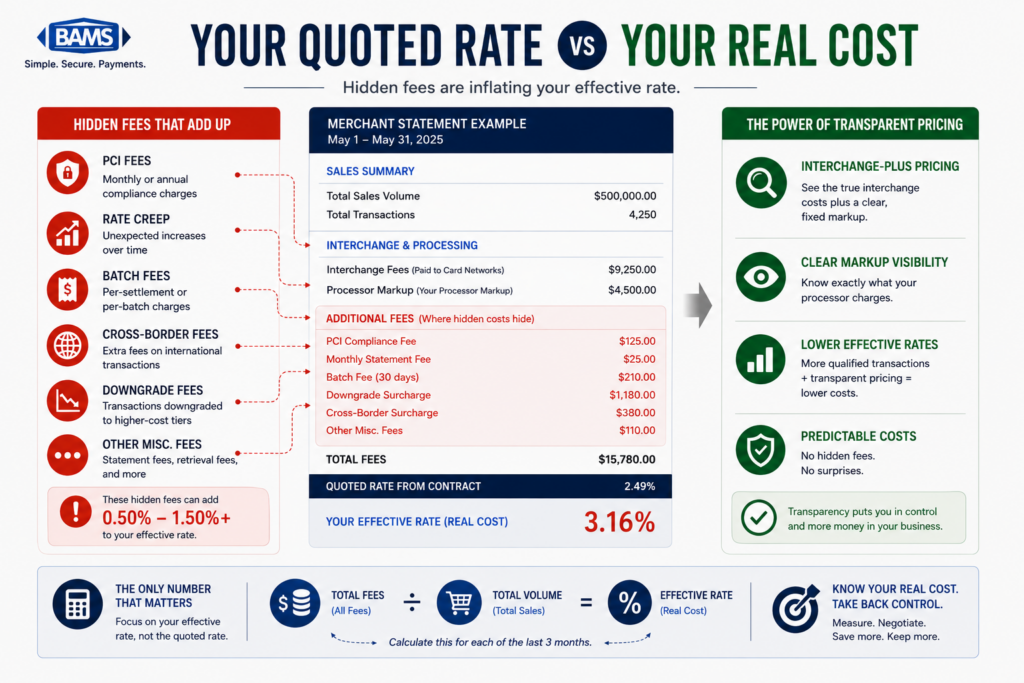
Most eCommerce businesses don’t segment their transaction volume by card type. They see a blended effective rate on their statement and assume that’s the whole picture. But transparent interchange plus pricing vary dramatically depending on how much data accompanies each transaction. If your processor isn’t enriching commercial card transactions with the right data, you’re paying the highest possible interchange rate by default. And you’d never know it from your statement.
This isn’t a theoretical problem. It’s a structural one. And the fix doesn’t require you to overhaul your tech stack. It requires your processor to do their job properly.
Core Concepts: What Your Statement Doesn’t Explain
The Three Levels of Transaction Data
Every card transaction carries data. The card networks (Visa, Mastercard, and others) classify this data into three levels, and the level of data submitted directly affects the interchange rate you pay.
- Level 1: Basic transaction data. Merchant name, transaction amount, date. This is the minimum required for any card-present or card-not-present transaction. Most consumer purchases clear at this level.
- Level 2: Adds tax amount, customer code (like a purchase order number), and merchant postal code. This level is relevant for corporate and purchasing cards and qualifies transactions for lower interchange rates.
- Level 3: Adds invoice-quality line-item detail: item descriptions, quantities, unit costs, commodity codes, freight amounts, and more. This level unlocks the lowest possible interchange rates on commercial card transactions.
Why This Matters for eCommerce
Here’s the misconception: most content about Level 2 and Level 3 data frames it as a concern for large B2B enterprises with ERP integrations and dedicated procurement teams. That framing is incomplete. If your online store sells to other businesses, government agencies, schools, or any organization that uses corporate purchasing cards, you’re already processing commercial card transactions. You just might not know which ones they are. Federal Reserve interchange fee data continues to demonstrate how qualification differences materially affect merchant processing costs over time.
The distinction between a consumer Visa and a commercial Visa is invisible at checkout. Both work the same way. But behind the scenes, the interchange rates diverge significantly. Interchange rates on commercial cards can range from 1.30% to 2.90% or higher depending on card brand and data level. The gap between the highest and lowest rate on the same card type can be 0.50% to 1.00% or more, determined entirely by whether enhanced data was submitted.
What “Downgrades” Actually Mean
When a transaction doesn’t meet the data requirements for its best possible interchange rate, it “downgrades” to a more expensive category. Your statement might show this as a higher rate on certain transactions, or it might not show it at all. Many statements simply lump everything into a blended rate, making downgrades invisible. This is the core problem: you can’t fix what you can’t see.
The Framework: Interchange Rate Reduction as a Processor Responsibility
Most guides on interchange rate reduction frame the process as a merchant-side infrastructure project. They tell you to integrate new software, map data fields, upgrade your gateway, and build custom workflows. That framing puts the burden on you.
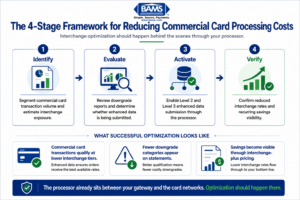
Reducing commercial card processing costs starts with visibility into how transactions are qualifying behind the scenes.
This guide uses a different framework. The process of submitting enhanced data (Level 2 and Level 3) to qualify for lower interchange rates is a processor-side responsibility. Your processor already sits between your gateway and the card networks. They already handle data transmission. The question is whether they’re transmitting the right data, and whether they’re doing it automatically.
The framework has four stages:
- Stage 1: Identify your commercial card volume and current interchange exposure.
- Stage 2: Evaluate what your processor is (and isn’t) doing with your transaction data.
- Stage 3: Activate enhanced data submission through your processor, not through platform changes.
- Stage 4: Verify that savings are real, recurring, and visible on your statements.
Each stage is something you initiate but your processor executes. Let’s break them down.
Step-by-Step: How to Uncover and Fix Hidden Commercial Card Costs
Step 1: Identify Your Commercial Card Volume
Objective: Determine what percentage of your transactions come from commercial, corporate, or purchasing cards, and estimate the cost impact.
Start by requesting a transaction-level report from your processor that includes card type classification. You’re looking for transactions flagged as commercial, corporate, business, or purchasing card types. Many processors can generate this report but don’t provide it by default. You may need to ask specifically.
If your processor can’t or won’t provide card-type segmentation, that’s a red flag worth noting. Any processor with access to BIN (Bank Identification Number) data can identify whether a card is consumer or commercial. The data exists. The question is whether anyone is looking at it on your behalf.
For context, if you sell products that businesses, schools, or government offices purchase (office supplies, equipment, bulk goods, software licenses, uniforms, maintenance supplies), you likely have more commercial card volume than you think. Even 5% to 15% of total volume in commercial cards can represent meaningful savings opportunities.
Anti-pattern: Don’t rely on your blended effective rate to assess this. A blended rate of 2.9% might look normal, but it could be masking a subset of transactions clearing at 3.2% or higher. The average hides the outliers.
Success indicator: You have a clear number (or reasonable estimate) of monthly commercial card transactions and their dollar volume.
Step 2: Evaluate What Your Processor Is Doing With Your Data
Objective: Determine whether your processor currently submits Level 2 or Level 3 data on your commercial card transactions, or whether those transactions are downgrading to the most expensive interchange categories.
Ask your processor these specific questions:
- Are you currently submitting Level 2 data (tax amount, customer code) on my commercial card transactions?
- Are you submitting Level 3 line-item data on any of my transactions?
- What percentage of my transactions are downgrading, and to which interchange categories?
- Can you provide a downgrade report for the last three months?
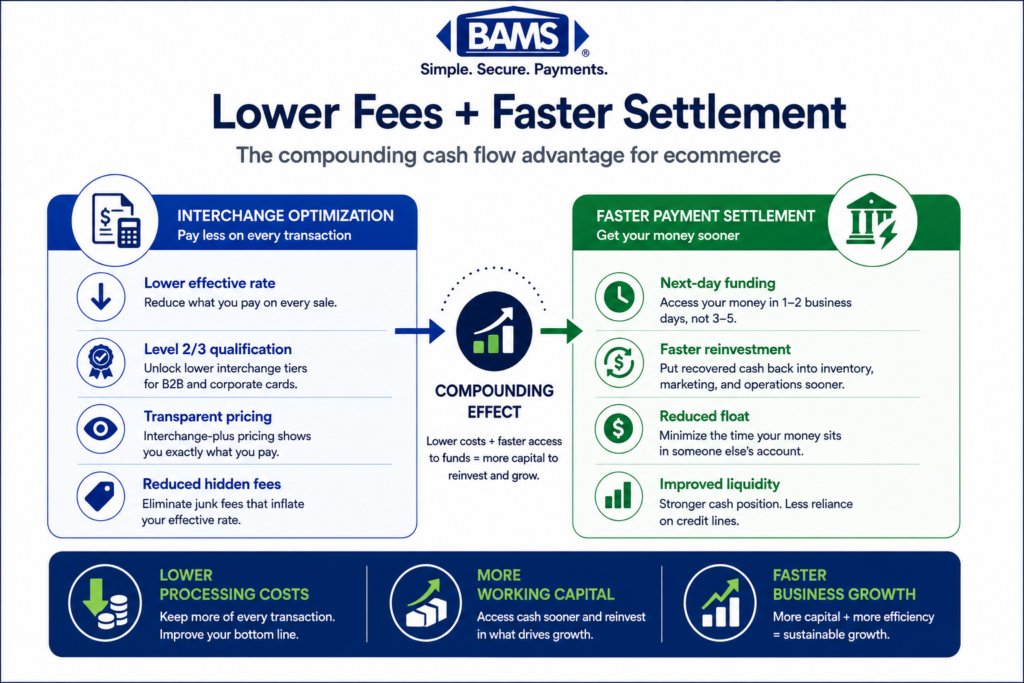
The answers will tell you a lot. If your processor can’t answer these questions clearly, they’re likely not managing your interchange exposure at all. Many processors, especially flat-rate and aggregated models, have no incentive to optimize your interchange because they charge a fixed markup regardless of the underlying rate. Under interchange-plus pricing, the processor’s margin is fixed and the interchange rate passes through to you, which means interchange optimization directly reduces your cost.
Anti-pattern: Don’t accept “we handle that automatically” without evidence. Ask for the downgrade report. If the data shows commercial transactions clearing at standard or non-qualified rates, the optimization isn’t happening.
Success indicator: You have a downgrade report (or confirmation that one can’t be produced) and a clear understanding of whether enhanced data is being submitted.
Step 3: Activate Enhanced Data Submission Through Your Processor
Objective: Get your processor to submit Level 2 and (where possible) Level 3 data on your commercial card transactions without requiring changes to your eCommerce platform or checkout flow.
This is the step where the framing matters most. You do not need to build a Level 3 data integration yourself. Your processor’s platform already captures or can capture the data fields required for Level 2 qualification (tax amount, merchant zip code, customer code). For Level 3, additional fields like line-item detail, quantities, and commodity codes may be needed, but many modern processing platforms can populate these from existing order data.
The key question to ask: “Can your platform automatically enrich my commercial card transactions with Level 2 and Level 3 data using the order information already available?” Some processors have built-in enhanced data programs that do this. Others require manual configuration. A few simply can’t do it.
This is where choosing the right merchant services partner matters. BAMS, for example, works with merchants to identify commercial card volume and activate enhanced data submission as part of their account management, treating interchange optimization as an ongoing service rather than a one-time integration project.
Anti-pattern: Don’t let a processor tell you that Level 3 data is “only for enterprise.” The data fields are standardized by the card networks. Any processor with the right platform can submit them. The limitation is usually willingness, not capability.
Success indicator: Your processor has confirmed a plan (with a timeline) to begin submitting enhanced data on your commercial card transactions, or you’ve identified that you need a processor who will.
Step 4: Understand Which Transactions Are Eligible
Objective: Set realistic expectations about which transactions will benefit from enhanced data submission and which won’t.
Not every transaction qualifies for Level 2 or Level 3 interchange rates. The lower rates apply specifically to commercial card transactions: corporate cards, purchasing cards (P-cards), business cards, and government cards. Consumer credit and debit cards have their own interchange schedules and are not affected by Level 2/Level 3 data submission.
Within commercial cards, the savings vary by card brand. Visa and Mastercard collectively account for more than 80% of total processing fees in the U.S. market, and both offer distinct interchange tiers for Level 2 and Level 3 qualified transactions. American Express and Discover have their own programs with different qualification criteria.
Also consider transaction size. The savings from enhanced data submission are proportional to transaction value. A $50 consumer purchase won’t move the needle. A $2,000 commercial card order that drops from 2.65% to 1.90% saves $15 on that single transaction. At scale, these savings compound significantly.
Anti-pattern: Don’t expect every transaction to qualify. The goal isn’t 100% optimization. It’s ensuring that the transactions eligible for lower rates actually receive them. Even partial coverage can produce meaningful monthly savings.
Success indicator: You can identify which card types and transaction sizes in your mix are most likely to benefit, and you’ve set a baseline to measure against.
Step 5: Verify Savings on Your Statements
Objective: Confirm that enhanced data submission is actually reducing your interchange costs, and build a recurring review process.
After your processor activates enhanced data submission, wait one to two full billing cycles, then request an updated downgrade report and compare it to your baseline. You’re looking for a reduction in transactions clearing at non-qualified or standard commercial rates and an increase in transactions clearing at Level 2 or Level 3 rates.
Your merchant account statement should reflect these changes, but only if your pricing model passes through interchange. If you’re on a flat-rate model, the processor captures the savings and you see nothing. This is another reason interchange-plus pricing is critical for businesses that want transparency into their actual costs.
Build a quarterly review cadence. Interchange rates change (Visa and Mastercard update their schedules twice per year), your transaction mix shifts seasonally, and new commercial accounts may start purchasing from your store. A one-time optimization degrades over time without ongoing attention.
Anti-pattern: Don’t treat this as a “set and forget” project. Interchange optimization is a process, not an event. If your processor isn’t reviewing your account regularly, the savings will erode.
Success indicator: You have a before-and-after comparison showing reduced interchange costs on commercial card transactions, and a schedule for ongoing review.
Step 6: Consider Complementary Cost Reduction Strategies
Objective: Identify additional ways to reduce processing costs on high-value transactions without changing your checkout experience.
Enhanced data submission is the highest-leverage fix for commercial card costs, but it’s not the only option. For businesses processing large invoices or recurring B2B orders, consider whether some payments could move from card rails to ACH. NACHA ACH Network resources continue to highlight the scale and efficiency of ACH processing for recurring and high-ticket business payments. ACH fees are typically flat, which makes them dramatically cheaper than percentage-based card processing on large orders.
This doesn’t mean replacing card acceptance. It means offering ACH as an option for repeat commercial buyers who are already placing large orders. Many eCommerce platforms support ACH alongside card payments. The key is identifying which customers and order types would benefit most.
Additionally, review your surcharging and cash discount options. Depending on your state and industry, you may be able to pass some processing costs to commercial buyers, particularly on large orders where the fee is a known line item in procurement budgets.
Anti-pattern: Don’t add friction to your checkout for all customers in pursuit of savings on a subset of transactions. Any complementary strategy should be targeted, not universal.
Success indicator: You’ve evaluated at least one alternative payment rail or cost-offset strategy for your highest-cost transaction segment.
Practical Examples: What This Looks Like in the Real World
Scenario A: The Office Supply eCommerce Store
An online retailer selling office supplies processes $250,000 per month. About 12% of their volume ($30,000) comes from corporate purchasing cards used by schools and small businesses. Those transactions clear at an average interchange rate of 2.65% because no enhanced data is submitted. That’s $795 per month in interchange on commercial cards alone.
After their processor activates Level 2 and Level 3 data submission, the average interchange rate on those same transactions drops to 1.95%. The new monthly interchange cost is $585. That’s $210 per month in savings, or $2,520 per year, with zero changes to the store’s platform, gateway, or checkout flow. The processor did the work.
Scenario B: The Industrial Parts Distributor
A mid-size eCommerce distributor processes $800,000 per month, with 25% of volume ($200,000) from commercial and government purchasing cards. Their average commercial card interchange rate is 2.50%. After switching to a processor (like BAMS) that proactively manages enhanced data submission and provides dedicated account management, their commercial card interchange drops to 1.80%. Monthly savings: $1,400. Annual savings: $16,800. Again, no platform migration required.
The Contrast: What Inaction Looks Like
Both businesses could have continued operating without investigating their commercial card costs. Their statements would have looked “normal.” Their blended effective rates would have seemed competitive. But beneath the surface, they were paying the highest possible interchange rate on a meaningful chunk of their volume, simply because nobody was submitting the data the card networks require for lower rates.
Common Mistakes and Pitfalls
Trusting the blended rate. Your effective rate is an average. It can look perfectly reasonable while hiding significant overpayment on specific transaction types. Always ask for transaction-level detail.
Assuming this is only for large enterprises. Level 2 and Level 3 data programs are defined by the card networks, not by business size. If you process commercial cards, you’re eligible. Period.
Confusing your platform’s capabilities with your processor’s. Your eCommerce platform handles the checkout. Your processor handles data transmission to the card networks. Enhanced data submission is a processor function. Don’t let your processor deflect responsibility to your platform.
Ignoring pricing model compatibility. If you’re on flat-rate pricing, interchange optimization benefits your processor, not you. You need interchange-plus pricing to see the savings on your statement.
Treating optimization as a one-time event. Card networks update interchange schedules, your transaction mix evolves, and new commercial buyers appear. Quarterly reviews keep savings on track.
What to Do Next
Start with one action: request a card-type segmentation report from your current processor. Ask them to identify what percentage of your monthly volume comes from commercial, corporate, or purchasing cards. If they can provide it, you’ll have a baseline. If they can’t, that tells you something important about how much visibility they have into your costs.
From there, ask the four evaluation questions from Step 2. The answers will clarify whether your processor is actively working to reduce your interchange costs or simply passing them through without optimization.
You don’t need to overhaul anything. You need to know what’s happening beneath the surface of your statement, and you need a processor who treats that transparency as their responsibility, not yours. Use this guide as a reference point each quarter when you review your processing costs. The numbers will tell you whether your processor is earning their keep.
Frequently Asked Questions
What is Level 3 data in merchant services?
Level 3 data is the most detailed tier of transaction information submitted to card networks during payment processing. It includes invoice-quality line-item detail such as item descriptions, quantities, unit costs, commodity codes, and freight amounts. When this data is submitted on commercial card transactions, it qualifies those transactions for the lowest available interchange rates. Level 1 covers basic transaction info, Level 2 adds tax and customer codes, and Level 3 adds the full order detail.
How can Level 3 data reduce interchange rates on commercial card transactions?
Card networks like Visa and Mastercard offer tiered interchange pricing. Transactions that include more detailed data qualify for lower tiers. When Level 3 data is submitted on a commercial card transaction, the interchange rate can drop by 0.50% to 1.00% compared to a transaction submitted with only Level 1 data. On a $3,000 order, that difference could mean $15 to $30 in savings on a single transaction.
Do I need to change my eCommerce platform to submit Level 2 or Level 3 data?
In most cases, no. Enhanced data submission is handled by your payment processor, not your eCommerce platform. Your processor sits between your gateway and the card networks and controls what data is transmitted. The right processor can enrich commercial card transactions with Level 2 and Level 3 data using order information already available, without requiring changes to your checkout flow or platform configuration.
How do I know if I’m processing commercial card transactions?
Commercial cards (corporate cards, purchasing cards, business cards, government cards) look identical to consumer cards at checkout. The only way to identify them is through BIN data, which your processor has access to. Request a card-type segmentation report from your processor to see what percentage of your volume comes from commercial cards. If you sell to businesses, schools, or government agencies, you almost certainly process some commercial card volume.
Which types of transactions are eligible for Level 3 interchange rates?
Level 3 interchange rates apply specifically to commercial card transactions: corporate cards, purchasing cards (P-cards), business cards, and government procurement cards. Consumer credit and debit card transactions are not eligible for Level 3 rates regardless of how much data is submitted. The savings are most significant on higher-dollar transactions where the percentage-based interchange reduction translates to meaningful dollar amounts.
Why doesn’t my processing statement show interchange downgrades?
Many processing statements display a blended effective rate rather than breaking out interchange by transaction type or qualification level. If you’re on flat-rate pricing, downgrades are completely invisible because you pay the same rate regardless. Even on interchange-plus pricing, some statements group interchange categories in ways that obscure downgrades. You typically need to request a specific downgrade report from your processor to see which transactions qualified at which tier.