
Legal Compliance: How to Audit Your Surcharge Setup
TL;DR
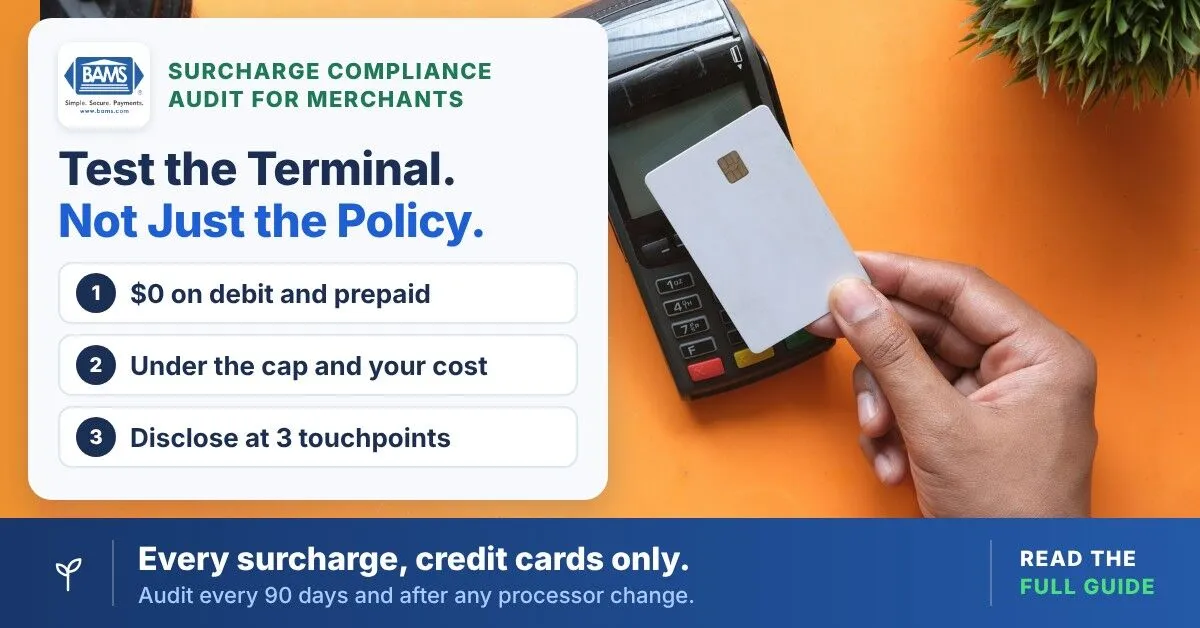
- Debit and prepaid cards cannot be surcharged – Visa and Mastercard prohibit it and violations can lead to card-brand fines, refunds and customer complaints. Test your terminal with a debit card to confirm it is properly excluded.
- State laws vary and change – Visa’s merchant guidance (current as of February 2024) lists Connecticut, Maine, Massachusetts, Oklahoma and Puerto Rico as prohibiting surcharges and Colorado, Minnesota, New Jersey and New York as having their own rules. Online merchants must suppress surcharges for customers in restricted states.
- Advance notice to the card brands is mandatory – Visa requires 30 days’ notice to your acquirer and Mastercard requires 30 days’ notice to both Mastercard and your acquirer. Without that notice, your program isn’t authorized, even if your terminal is configured correctly.
- Build a compliance documentation file – Keep notice confirmations, state eligibility memos, surcharge calculations, signage photos, terminal screenshots and receipt samples in one folder. This file is your defense in any audit or complaint.
- Audit every 90 days – Terminal updates, processor changes and evolving regulations can silently break a compliant setup. Recurring audits catch problems before customers or regulators do.
What You Will Achieve: A Surcharge Setup That Survives Audits
By the end of this tutorial, you will have audited your current surcharge configuration, confirmed that debit and prepaid cards are properly excluded, verified your state-level surcharge compliance and organized the legal documentation required to withstand a card-brand audit or consumer complaint. Your success criteria are simple: every surcharge on every receipt applies only to credit card transactions, every customer sees clear disclosure before they tap or swipe and your records include proof of card-brand notice, state eligibility and terminal configuration.
In short, this matters now more than ever. About 20% of merchants surveyed by CMSPI said they assess surcharges, according to The Financial Brand. Any of those programs can have configuration gaps that expose the business to card-brand fines, forced refunds or customer complaints. This tutorial closes that gap.
Prerequisites and Setup Checklist
Before you begin, gather the following. Missing even one item will stall your audit partway through.
- Payment terminal access (physical POS and/or virtual gateway admin panel)
- Processor account login with permission to view MID details and surcharge notice status
- Current merchant processing agreement (PDF or paper copy)
- Surcharge notice confirmations sent to your acquirer and Mastercard (if previously submitted; your acquirer can resend them)
- Your acquirer’s compliance contact for card-brand questions
- State business license confirming your operating state(s)
- Receipt samples from the last 30 days (at least five credit and five debit transactions)
- Signage photos from your point of sale, entrance and online checkout page
Time estimate: 2 to 4 hours for a single-location merchant. However, multi-location or omnichannel businesses should budget a full business day. The most common blocker is not having admin-level access to your gateway; confirm this before you start.
Why a Configuration Audit Beats a Policy Review
Most surcharge compliance guides stop at explaining the rules. That is not enough. The gap between knowing that debit cards cannot be surcharged and proving your terminal actually exempts them is where violations live. In a 2023 LendingTree survey reported by The Financial Brand, 69% of cardholders said they had been surcharged and nearly a third said the merchant didn’t warn them first. Missing warnings become complaints and complaints can become investigations.
This tutorial takes a configuration-first approach to surcharge compliance. You will test what your terminal actually does, not what your policy says it should do. As a result, expect to find at least one discrepancy. Still, that is normal and fixable.
Step 1: Confirm Your State Eligibility for Surcharging
Surcharge compliance starts with where you sell. Action: Open your state’s attorney general website and search for “credit card surcharge.” Cross-reference with the list below.
Visa’s merchant guidance (current as of February 2024) lists Connecticut, Maine, Massachusetts, Oklahoma and Puerto Rico as prohibiting surcharges. It lists Colorado, Minnesota, New Jersey and New York as having their own surcharge requirements. Colorado’s statute, for example, limits surcharges to 2% or the merchant discount fee you actually pay and it requires specific sign wording and a separate receipt line. Some other states have older surcharge statutes that courts have limited, which creates enforcement ambiguity. Treat this list as a starting point and confirm current law with counsel.
Checkpoint: You should have a clear yes or no for each state in which you operate. If you sell online and ship to restricted states, you must suppress the surcharge for customers in those jurisdictions at checkout.
Common failure: A merchant operating in a permitted state ships to Connecticut but applies the surcharge to all orders. Fix: configure your eCommerce platform to exempt billing or shipping addresses in restricted states.
Step 2: Verify Card-Brand Notice Status
Action: Contact your payment processor or acquirer and ask for written confirmation that the required surcharge notices were submitted. Visa requires you to notify your acquirer at least 30 days before you begin surcharging. Mastercard’s surcharge rules require at least 30 days’ notice to both Mastercard and your acquirer.
Expected result: You receive a dated confirmation email or letter from your acquirer showing when each notice was submitted. If you cannot produce this document, treat the program as unconfirmed until your acquirer verifies it.
Common failure: The merchant switched processors but never notified the new acquirer. Fix: submit the notices through your current processor and suspend surcharging until the 30-day notice period has passed.
Step 3: Audit Your Terminal’s Card-Type Routing
Action: Run a test transaction with a debit card (Visa Debit, Debit Mastercard, or prepaid card). Next, check the receipt. Does a surcharge line item appear?
Both Visa and Mastercard prohibit surcharges on debit and prepaid cards. This is not optional. Regulators also watch fees on these cards: a 2024 CFPB report found large retail chains charging cash-back fees to customers using debit and prepaid cards. An improperly configured surcharge can escalate from a checkout dispute to a formal complaint.
Checkpoint: The debit test receipt must show $0.00 on the surcharge line or no surcharge line at all. If it shows any surcharge amount, your terminal is misconfigured.
Common failure: The terminal applies a flat surcharge to all card types because the BIN (Bank Identification Number) lookup is disabled or outdated. Fix: contact your processor’s tech support and request that BIN-level card-type detection be enabled and updated. Then confirm that the logic routes debit and prepaid BINs to a no-surcharge path.
Step 4: Validate the Surcharge Percentage
Action: Check your terminal or gateway settings for the surcharge percentage. Then pull your most recent processing statement and identify your effective credit card processing rate.
Visa caps surcharges at the lower of your merchant discount rate or 3%. Mastercard caps them at the lower of your average effective merchant discount rate or 4%. In practice, your surcharge must not exceed the lower of the card-brand cap or your actual cost of acceptance for credit cards and state law may set a lower limit. For example, if your effective rate is 2.4%, you cannot surcharge 3%.
Checkpoint: Your configured surcharge percentage is at or below both the network cap and your actual processing cost. Finally, document both numbers side by side.
Common failure: The merchant set the surcharge at 3.5% when the program launched and never adjusted it. Fix: reduce the percentage to the lower of the applicable cap or your cost and update signage and receipt templates to reflect the new rate.
Step 5: Inspect Point-of-Sale and Online Disclosure
Action: Photograph your entrance signage, register-area signage and (if applicable) screenshot your online checkout page. Compare each against these requirements:
- Disclosure at the store entrance or website landing page that a surcharge applies to credit card transactions
- Disclosure at the point of sale (register, terminal screen, or checkout page) before the customer confirms payment
- The surcharge printed as a separate line item on the receipt (Mastercard requires both the percentage and the dollar amount)
- Clear language that the surcharge applies only to credit cards, not debit or prepaid
Checkpoint: You should have three layers of disclosure: entry, point of sale and receipt. If any layer is missing, you have a violation.
Common failure: The merchant has a sign at the register but nothing at the entrance and nothing on the website. Fix: order compliant signage (your processor may provide templates) and add a banner or modal to your online checkout. For deeper guidance on how surcharge vs convenience fee rules affect disclosure requirements in eCommerce, review the differences before configuring your online checkout language.
Step 6: Pull and Review 30 Days of Receipts
Action: Export or collect at least 50 transaction receipts from the past 30 days. Then sort them into two groups: credit card transactions and debit/prepaid transactions. For each group, check whether the surcharge was applied correctly.
Expected result: 100% of credit card receipts show the surcharge as a separate line item with the correct percentage. 100% of debit and prepaid receipts show zero surcharge. Any deviation is a configuration error that needs immediate correction.
Common failure: A small number of debit transactions processed as “credit” (signature debit) received a surcharge because the terminal routed them over the credit network. Fix: enable PIN-priority routing or ensure your BIN table correctly identifies signature debit cards. Under card-brand rules, a signature debit card is still a debit card and can’t be surcharged. Regulation II, which governs debit interchange fees and routing, also treats these as debit transactions.
Step 7: Build Your Legal Documentation File
Action: Create a dedicated folder (physical or digital) labeled “Surcharge Compliance” and organize the following documents inside it:
- Card-brand notice confirmation (Visa notice to your acquirer, Mastercard notice to Mastercard and your acquirer)
- State eligibility memo listing each state you operate in and the applicable statute or confirmation of no restriction
- Surcharge percentage calculation showing your effective credit card rate and the percentage you charge
- Signage photos dated and labeled by location
- Terminal configuration screenshots showing BIN-level exemption for debit and prepaid
- Receipt samples (at least five credit, five debit) from the current month
- Processor agreement excerpt referencing surcharge authorization
This file is your defense in a card-brand audit, a state attorney general inquiry or a customer complaint. Otherwise, you are relying on memory and verbal assurances. Legal documentation is what separates a compliant program from a vulnerable one.
If managing this documentation across multiple locations or payment channels feels overwhelming, ask your processor for help. BAMS clients can work with a dedicated account representative to confirm terminal settings and pull the statements this file needs. If you’re still deciding whether to surcharge at all, see our guide to credit card fee transparency.
Step 8: Schedule Recurring Audits
Action: Set a calendar reminder to repeat Steps 3 through 6 every 90 days. Card-brand rules change, state laws evolve and terminal software updates can reset configurations. Recurring checks keep your surcharge compliance current.
Additionally, re-audit immediately whenever you: switch payment processors, add a new payment channel (online, mobile, in-app), expand to a new state, or receive a terminal software update.
Checkpoint: Your calendar contains four audit dates for the next 12 months and each date includes a checklist link to this tutorial.
Configuration and Customization Notes
Key Variables You May Need to Adjust
- Surcharge percentage: Must be recalculated whenever your effective processing rate changes (e.g., after a rate negotiation or processor switch). Safe default: use your actual cost, rounded down to the nearest quarter percent.
- State exemption list: If you sell online, your eCommerce platform must maintain a current list of restricted states. This list should be reviewed quarterly.
- BIN table version: Your terminal’s ability to distinguish debit from credit depends on an up-to-date BIN table. For that reason, ask your processor when it was last updated. If they cannot answer, escalate instead.
- Receipt template language: The surcharge line should read “Credit Card Surcharge” or similar. In contrast, avoid vague labels like “Service Fee” or “Processing Fee” that obscure the nature of the charge. Understanding the distinction between a convenience fee vs surcharge helps you choose the correct label for your receipts.
Settings You Must Change (Not Optional)
If your terminal does not have BIN-level card-type detection enabled, this is a must-fix, not a preference. A surcharge percentage above your actual cost or the network cap must be lowered before your next transaction. If you operate in a prohibited state without an exemption, surcharging must be disabled immediately.

Run each test with a $10.00 transaction. All five must pass before live sales
Verification and Testing Procedure
Run this surcharge compliance test sequence after completing your audit:
- Process a $10.00 test credit card transaction. Verify the surcharge appears as a separate line item at the correct percentage.
- Process a $10.00 test debit card transaction. Verify zero surcharge appears.
- Process a $10.00 test prepaid card transaction. Verify zero surcharge appears.
- If you sell online, place a test order with a billing address in a restricted state (e.g., Connecticut). Verify the surcharge is suppressed.
- Place a test order with a billing address in a permitted state. Verify the surcharge applies and disclosure appears before payment confirmation.
Success definition: All five tests produce the correct result. If any test fails, return to the relevant step and reconfigure before processing live transactions.
Common Errors and How to Fix Them
Error: “Surcharge applied to debit card”
Symptom: Customer receipt shows a surcharge on a Visa Debit or Debit Mastercard transaction. Cause: BIN table is outdated or card-type detection is disabled. Fix: Contact your processor to update the BIN table and enable card-type routing logic. In addition, refund the surcharge to the affected customer immediately.
Error: “No surcharge notice on file”
Symptom: Your acquirer cannot confirm the notices were submitted. Cause: The notices were never submitted, or they were lost during a processor migration. Fix: Submit the required notices to your acquirer and to Mastercard. Suspend surcharging until the 30-day notice period has passed.
Error: “Surcharge exceeds network cap”
Symptom: Surcharge percentage is higher than your card-brand cap or your cost. Cause: The merchant configured the rate based on outdated rules or rounded up. Fix: Reduce to the lower of the applicable cap (the lower of your merchant discount rate or 3% for Visa, or 4% for Mastercard) or your actual cost. After that, update all signage and receipt templates.
Error: “Customer filed a complaint”
Symptom: You receive a complaint about an undisclosed fee or a surcharge on a debit card, through your acquirer, a card dispute or a state attorney general’s office. Cause: Missing pre-transaction disclosure or surcharge applied to a debit/prepaid card. Fix: Respond with your compliance documentation file (Step 7). If the complaint is valid, refund the customer, correct the configuration and document the remediation.
Error: “Surcharge active in prohibited state”
Symptom: A customer in Connecticut, Massachusetts, or another restricted jurisdiction was surcharged. Cause: eCommerce platform does not filter by billing/shipping state. Fix: Add state-level surcharge suppression rules to your checkout flow. Also issue refunds for affected transactions and document the correction.
Next Steps and Extensions
Now that your surcharge program is audit-ready, consider these follow-on actions to protect your brand and optimize your cost-recovery strategy:
- Negotiate your processing rate. A lower effective rate means your surcharge percentage drops, which improves customer experience. A mid-2023 Ipsos Channel Management study cited by The Financial Brand found that merchants that surcharge see roughly a 10% fall in same-store card sales, so minimizing the visible surcharge amount can reduce that impact.
- Evaluate dual pricing as an alternative. Some merchants find that displaying a cash price and a card price (rather than a surcharge line item) produces fewer customer complaints while achieving the same cost-recovery goal.
- Train front-line staff. Your cashiers and customer service team need to explain the surcharge clearly and handle objections without creating a negative experience. To start, build a one-page script using the disclosure language from your signage.
Frequently Asked Questions
Can I surcharge debit cards if the customer selects “credit” at the terminal?
No. Visa and Mastercard rules prohibit surcharges on debit and prepaid cards regardless of how the transaction is routed. Even if a debit card is processed over a credit network (signature debit), it remains a debit card by BIN classification. Therefore, your terminal must use BIN-level detection to identify and exempt these cards automatically.
Which states currently prohibit credit card surcharges?
Visa’s merchant guidance (current as of February 2024) lists Connecticut, Maine, Massachusetts, Oklahoma and Puerto Rico as prohibiting surcharges. Colorado, Minnesota, New Jersey and New York allow them with specific requirements. Colorado, for instance, limits surcharges to 2% or your merchant discount fee. Because state laws change, verify your specific state’s current statute through your attorney general’s office before enabling or modifying a surcharge program.
What happens if I surcharge without notifying Visa or Mastercard?
Surcharging without the required notice violates card-brand rules. Your acquirer can require you to stop and network fines or account action are possible under your merchant agreement. The notice is a prerequisite, not a formality.
How is a surcharge different from a convenience fee?
A surcharge is added to all credit card transactions at the point of sale and must be disclosed as a separate line item. A convenience fee is charged only when a customer uses an alternative payment channel (for example, paying a utility bill by phone instead of in person). The two have different card-brand rules, different state-law treatments and different disclosure requirements. As a result, mislabeling one as the other creates compliance risk.
Where can customers complain about a surcharge?
Customers have several options. They can dispute the charge with their card issuer, complain to your acquirer or their state attorney general, or file a complaint with the Consumer Financial Protection Bureau, which accepts complaints about financial products such as debit and prepaid cards. Each one creates a record your documentation file should be ready to answer.
How often should I re-audit my surcharge setup?
For ongoing surcharge compliance, re-audit at least every 90 days. You should also re-audit immediately after switching processors, adding a new sales channel, expanding to a new state, or receiving a terminal software update. Card-brand rules and state laws evolve and a configuration that was compliant six months ago may not be compliant today.
Sources
- Visa: U.S. Merchant Surcharge Q&A
- Mastercard: Merchant Surcharge Rules
- Colorado Revised Statutes § 5-2-212 (via Justia)
- Consumer Financial Protection Bureau: Report Finds Large Retail Chains Charging Cash-Back Fees to Customers Using Debit and Prepaid Cards
- Federal Reserve: Regulation II (Debit Card Interchange Fees and Routing)
- The Financial Brand: Credit Card Surcharges Cut Volume, but Love for Rewards Is Strong
