7 POS Setup Errors That Trigger Surcharge Violations
Last Updated on November 10, 2026 by Dimitri Akhrin
TL;DR
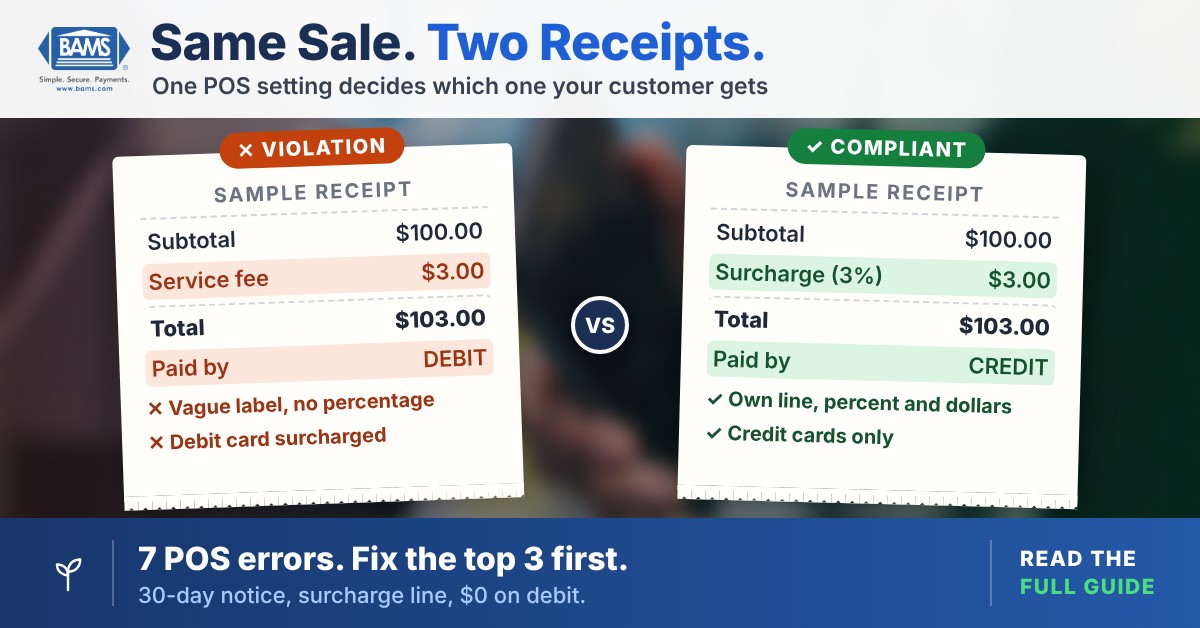
- Receipts must show the surcharge as its own line – Visa requires the surcharge to appear as a separate charge. Mastercard requires both the percentage and the dollar amount. Rolling it into the total creates a violation and vague labels like “service fee” invite disputes.
- Debit and prepaid cards cannot be surcharged – Your POS must identify card type before applying any surcharge. A blanket percentage on all cards is the fastest path to consumer complaints and audit triggers.
- Acquirer notification is a prerequisite, not a formality – Visa requires 30 days’ notice to your acquirer before you start surcharging. Mastercard requires 30 days’ notice to both Mastercard and your acquirer. Without that notice on file, your surcharge program is out of compliance.
- Disclosure language must be consistent across signage, terminal and receipt – Customers, mystery shoppers and acquirers can compare all three. If one says “service charge” and another says “surcharge,” the mismatch invites complaints and questions.
- Quarterly self-audits prevent drift – POS updates and staff changes can silently break compliant configurations. A 15-minute test each quarter catches problems before card brands or customers do.
The POS Audit Process Catches What Installation Checklists Miss
Most merchants treat POS setup as a one-time installation task: plug in the hardware, load the software, start processing. But when a surcharge or dual pricing program is involved, that approach creates silent compliance gaps that surface only when a card brand investigates.
Visa says it identifies improper surcharging through consumer complaints and yearly mystery shopping by outside auditors. Mastercard requires clear disclosure at the point of interaction and the surcharge as both a percentage and a dollar amount on every receipt. These are not abstract policy documents. They are the audit signals that determine whether your POS system compliance holds up under scrutiny or triggers fines, program suspension, or forced refunds.
The gap between “POS is working” and “POS is compliant” is where disputes, card-brand violations and acquirer penalties live. A regular POS audit process closes it. This guide closes that gap.
Who This Is For and What It Covers
This is for small to midsize business owners, managers and finance directors running surcharge or dual pricing programs (or planning to). If you are passing credit card processing costs to customers in any form, your POS configuration is a compliance artifact, not just a sales tool.
This guide does not cover general POS hardware selection, multi-store rollout logistics, or inventory management features. It focuses on the seven configuration decisions that create surcharge violations. It also covers the receipt, signage and disclosure gaps that card brand reviews are designed to catch.
How These Seven Violations Were Selected
Each item maps to a documented card brand requirement (Visa or Mastercard) that can carry enforcement consequences: fines, program termination or forced acquirer action. The selection prioritizes violations that stem from POS software configuration or receipt formatting choices. Those are the decisions merchants control directly.
Seven POS Setup Decisions That Trigger Surcharge Violations
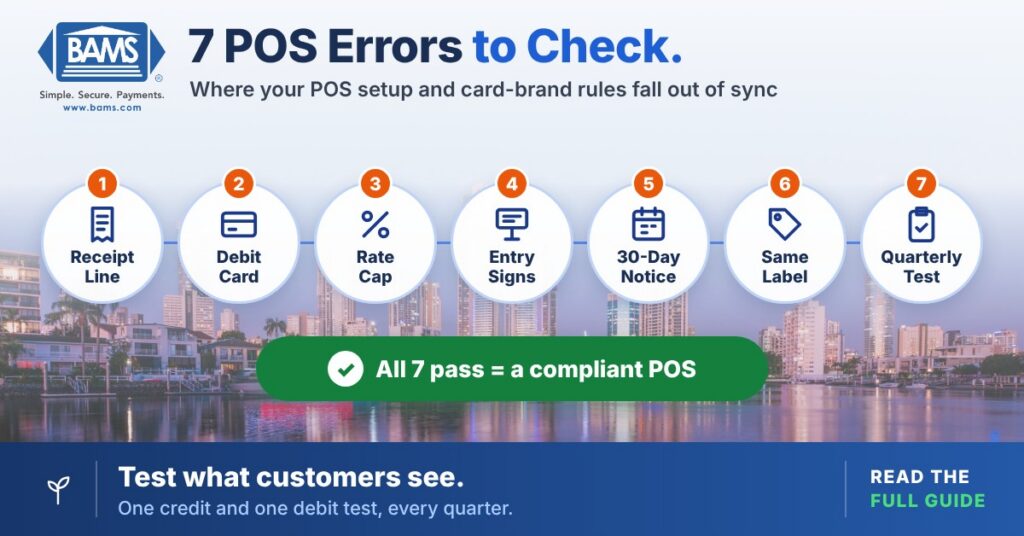
All seven pass means a compliant POS. Test what customers see every quarter.
1. Failing to Separate the Surcharge as a Distinct Line Item on the Receipt
Why it matters: Card brands treat the surcharge as a separate, identifiable charge, not as part of the item price. When your POS rolls the surcharge into the item price or buries it in the subtotal, the receipt fails the most basic audit test. Visa requires the surcharge amount to appear as a dedicated line. The amount must also be transmitted in a dedicated transaction-message data field (Field 28).
What it looks like today: Many POS systems default to adding surcharges as a generic “fee” or “service charge” line. Some older terminals embed the surcharge in the tax calculation. Burying it in tax doesn’t meet Visa’s separate-line requirement and a generic label makes the charge harder for customers to recognize. Mastercard also requires the receipt to show the surcharge percentage and dollar amount.
How to apply it: Open your POS receipt template editor. Confirm the surcharge prints as its own line, clearly labeled “surcharge,” with the percentage and the exact dollar amount. Run a test transaction and compare the printed receipt against Visa’s disclosure requirements. If your POS does not allow custom receipt line items, that is a configuration limitation you need to resolve before processing another surcharge transaction.
2. Applying the Surcharge to Debit and Prepaid Card Transactions
Why it matters: This is one of the most visible violations and consumer complaints are a primary way Visa finds improper surcharging. Visa’s U.S. rules state that debit and prepaid cards cannot be surcharged. Mastercard says the same for its debit and prepaid cards. The rule follows the card type, so a debit card run as “credit” at the terminal is still a debit card. A POS that applies a flat surcharge to every card transaction is non-compliant by default.
What it looks like today: Many POS surcharge modules apply a blanket percentage to all card-present transactions. The system does not distinguish between credit, debit and prepaid BINs (Bank Identification Numbers). This means every debit customer who receives a surcharge becomes a potential complainant to their card issuer.
How to apply it: Verify that your POS or payment gateway performs BIN-level card type identification before applying any surcharge logic. If your current system cannot differentiate card types at the point of sale, you need a processor or gateway that can. This is not optional. It is one of the configuration gaps most likely to generate complaints and enforcement action.
3. Setting the Surcharge Percentage Above the Permitted Cap
Why it matters: Visa caps surcharges at the merchant discount rate or 3%, whichever is lower. Mastercard caps them at the lower of your average effective merchant discount rate or 4%. State law can be stricter: Visa’s merchant guidance (current as of February 2024) lists Connecticut, Maine, Massachusetts, Oklahoma and Puerto Rico as prohibiting surcharges. A POS configured with a flat 4% surcharge violates Visa rules on every Visa transaction, even if it technically complies with Mastercard’s cap.
What it looks like today: POS systems typically allow merchants to enter a single surcharge percentage. The system then applies that percentage uniformly across all card brands. This creates a structural violation because each brand has a different cap and the cap itself depends on your specific processing rate.
How to apply it: Pull your most recent merchant processing statement. Identify your effective discount rate for Visa and Mastercard separately. Set your surcharge percentage to the lower of your discount rate or the brand-specific cap. If your POS cannot apply different surcharge rates by card brand, set the rate to the most restrictive cap (currently 3% for Visa) and document the rationale.
4. Missing Point-of-Entry Signage Disclosure
Why it matters: Visa requires surcharge disclosures at three locations: the point of entry (storefront or website landing page), the point of sale or transaction and on every receipt. Missing even one creates a violation. The point of entry is easy for a mystery shopper to check and easy for a merchant to forget.
What it looks like today: Merchants often place a small sign near the register but neglect the store entrance, the drive-through window, or the eCommerce checkout page. For online merchants, the disclosure must appear before the customer enters payment information, not on the confirmation page after the charge is processed.
How to apply it: Walk through your customer journey from the entrance to the receipt. At each of the three required disclosure points, confirm a clear, visible notice. It should state that a surcharge applies to credit card transactions, name the percentage and state that debit cards are not surcharged. For eCommerce, place the disclosure on the cart or checkout page before the payment form. Photograph your signage and screenshot your online disclosures. Keep these as audit documentation.
5. Skipping the 30-Day Acquirer Notification Before Surcharging
Why it matters: Visa requires merchants to notify their acquirer at least 30 days before beginning to surcharge. Mastercard requires 30 days’ notice to both Mastercard and your acquirer. This is not a courtesy. It is a prerequisite. If there is no record of notification when a complaint arrives, the program is already out of bounds. Visa says the acquirer of a merchant identified as surcharging improperly may be assessed an immediate $1,000 fine. That cost often flows downstream to the merchant.
What it looks like today: Many merchants assume their POS vendor or payment processor handles this notification. Often, they do not. Unless your processor confirms otherwise, plan on initiating the notices yourself and getting written confirmation that they were received.
How to apply it: Contact your acquirer or payment processor directly. Ask for written confirmation that your surcharge notifications are on file, with dates. If you cannot produce this documentation, pause your surcharge program until you can. This is the fastest path to a fine if left unresolved. For merchants evaluating their merchant account defaults and hidden fees, this notification status should be the first item on the audit list.
6. Inconsistent Disclosure Language Between Terminal, Receipt and Signage
Why it matters: Customers and mystery shoppers see your signage, your terminal prompt and your receipt in one visit. If one says “service fee,” another says “surcharge” and the receipt says “processing fee,” the program looks inconsistent. Labels also carry meaning: a “convenience fee” follows different card-brand rules than a surcharge, so the wrong word can describe the wrong program. Using “surcharge” consistently removes the ambiguity.
What it looks like today: POS systems often use default labels like “convenience fee,” “service charge,” or “card fee” in their surcharge modules. Merchants accept these defaults without realizing the terminology itself is a compliance risk. Meanwhile, their signage may use different phrasing chosen by a graphic designer or store manager unfamiliar with card brand rules.
How to apply it: Standardize every customer-facing reference to the word “surcharge.” Update your POS receipt template, terminal display prompts, physical signage and eCommerce checkout language to use identical phrasing. A simple template: “A surcharge of [X]% is applied to credit card transactions. This surcharge is not applied to debit card transactions.” Use this exact structure across all touchpoints. If you work with BAMS, your dedicated account representative can help you confirm how your terminal labels and prints the surcharge.
7. No Process for Periodic Self-Audit of Receipt Output and Terminal Behavior
Why it matters: POS software updates, terminal firmware changes and staff overrides can silently alter surcharge behavior. A system that was compliant at installation can drift. An update may reset the surcharge field, a new employee may disable the debit exemption, or a receipt template may revert to a default format. Card-brand reviews look at how your POS behaves today, not how it was set up.
What it looks like today: Few small or midsize merchants have a recurring internal POS audit process for surcharge compliance. The assumption is that “set it and forget it” works. It does not. Merchants who track payment setup signals that predict cash flow problems already understand the value of periodic configuration reviews. Surcharge compliance deserves the same discipline.
How to apply it: Make a quarterly self-audit part of your POS audit process. Run one test credit transaction and one test debit transaction. Print the receipts. Verify the surcharge line appears only on the credit receipt. Check that it uses the correct percentage, shows the dollar amount and uses the word “surcharge.” Walk the store entrance to confirm signage is posted and legible. Document the results. This 15-minute exercise is one of the most cost-effective ways to prevent disputes.
The Pattern Across All Seven Violations
Every violation on this list shares a common root: the POS was configured as a transaction tool, not as a compliance instrument. The surcharge was treated as a pricing decision rather than a regulated disclosure obligation with specific formatting, language and data transmission requirements.
The second pattern is that enforcement is complaint-driven and observation-based. Mystery shoppers and complaining customers don’t see your back-end settings. They see the signage, the terminal prompt and the receipt. This means the most dangerous compliance gaps are the most visible ones. A receipt missing the surcharge line item is a bigger risk than an internal database field mapped incorrectly. The receipt is what the customer photographs and attaches to a dispute.
Merchants who run a POS audit process as a diagnostic exercise (regularly testing outputs against documented requirements) catch these gaps before auditors or angry customers do.
Where to Start Without Overwhelming Your Team
You do not need to fix all seven items simultaneously. Start with three priorities. First, verify your acquirer notification is on file (item 5). Next, confirm your receipts show a separated surcharge line with the correct label and amount (item 1). Then validate that debit transactions are excluded from surcharging (item 2). These three items address the highest-probability audit triggers and the most common sources of consumer complaints.
Once those are resolved, standardize your disclosure language (item 6) and build the quarterly self-audit habit (item 7). The remaining items (cap verification and point-of-entry signage) can be addressed in parallel. For merchants opening new accounts or switching processors, a merchant services checklist focused on preventing frozen funds provides a complementary framework for getting the broader account configuration right from day one.
Frequently Asked Questions
What is a POS audit process and how does it work for surcharge compliance?
A POS audit process evaluates whether your point-of-sale system correctly implements card brand surcharge rules. Visa says it uses consumer complaints and mystery shopping by outside auditors to identify violations. A good self-audit checks the same three things: signage at the store entrance, disclosure at the point of sale and proper surcharge itemization on receipts. The audit evaluates current behavior, not your original setup intent.
Can I apply a surcharge to debit card transactions?
No. Visa and Mastercard rules don’t allow surcharges on debit or prepaid cards. Your POS must be able to identify card type at the point of sale (using BIN-level detection) and exempt debit and prepaid cards automatically. Applying a blanket surcharge to all card transactions is one of the most common violations and a frequent source of consumer complaints that trigger audits.
What is the maximum surcharge percentage I can charge?
Visa caps surcharges at your merchant discount rate or 3%, whichever is lower. Mastercard allows up to the lower of your average effective merchant discount rate or 4%. State law may be stricter. Because the caps differ by brand, your POS should ideally apply brand-specific rates. If it cannot, set the surcharge to the most restrictive cap (currently 3% for Visa) to avoid violating either brand’s rules.
What happens if my surcharge program is found non-compliant?
Visa states that the acquirer of a merchant identified as surcharging improperly may be assessed an immediate $1,000 fine. That cost is often passed to the merchant. Repeated violations can result in program termination, forced refunds to affected customers and increased chargeback exposure. The financial risk extends well beyond the initial fine.
Do I need to notify anyone before I start surcharging?
Yes. Visa requires merchants to notify their acquirer (payment processor) at least 30 days before beginning to surcharge. Mastercard requires 30 days’ notice to both Mastercard and your acquirer. Without these notices on file, your surcharge program is non-compliant, regardless of how well your receipts and signage are configured.
How often should I audit my POS surcharge configuration?
A quarterly self-audit is a practical minimum. Run one test credit transaction and one test debit transaction, then print the receipts. Verify the surcharge line item appears only on the credit receipt. Then walk the store to confirm signage is posted. Software updates and staff changes can silently alter surcharge behavior, so periodic verification is essential for ongoing POS system compliance.