12 Merchant Services Checklist Items That Prevent Frozen Funds
Last Updated on July 1, 2026 by Dimitri Akhrin
Every default setting your processor ships is optimized for their risk exposure, not your cash flow
Learn which gateway defaults, compliance shortcuts, and setup oversights trigger fund holds, delayed settlements, and surprise fees. This merchant services checklist reframes each item around the specific freeze risk it prevents.
TL;DR
- Processor defaults protect the processor, not you – Batch timing, fraud filters, reserves, and funding speed are all set conservatively by default, costing you money and delaying deposits from day one.
- Declare realistic peak volume on your application – Lowballing your monthly volume or average ticket size creates triggers that freeze funds the moment you have a strong sales month.
- PCI compliance is ongoing, not one-and-done – Missing quarterly scans or annual revalidation leads to non-compliance fees ($5,000 to $100,000/month) and can slow your funding.
- Verify funding speed with actual deposits, not contract language – Compare batch close timestamps to bank deposit timestamps during your first week to confirm you are actually receiving the funding speed you were promised.
- Start with three fixes – Align batch settlement timing, correct your volume declaration, and verify funding speed first. These three changes have the most immediate impact on when your money arrives.
Why Your Merchant Services Checklist Is Costing You Money Before You Process a Single Transaction
Most ecommerce managers treat processor setup as a series of forms to complete. Fill in the business details, upload a voided check, click “agree,” and wait for approval. The problem is that every field you skip, every default you accept, and every compliance shortcut you take creates a trigger that can freeze your funds days after you go live.
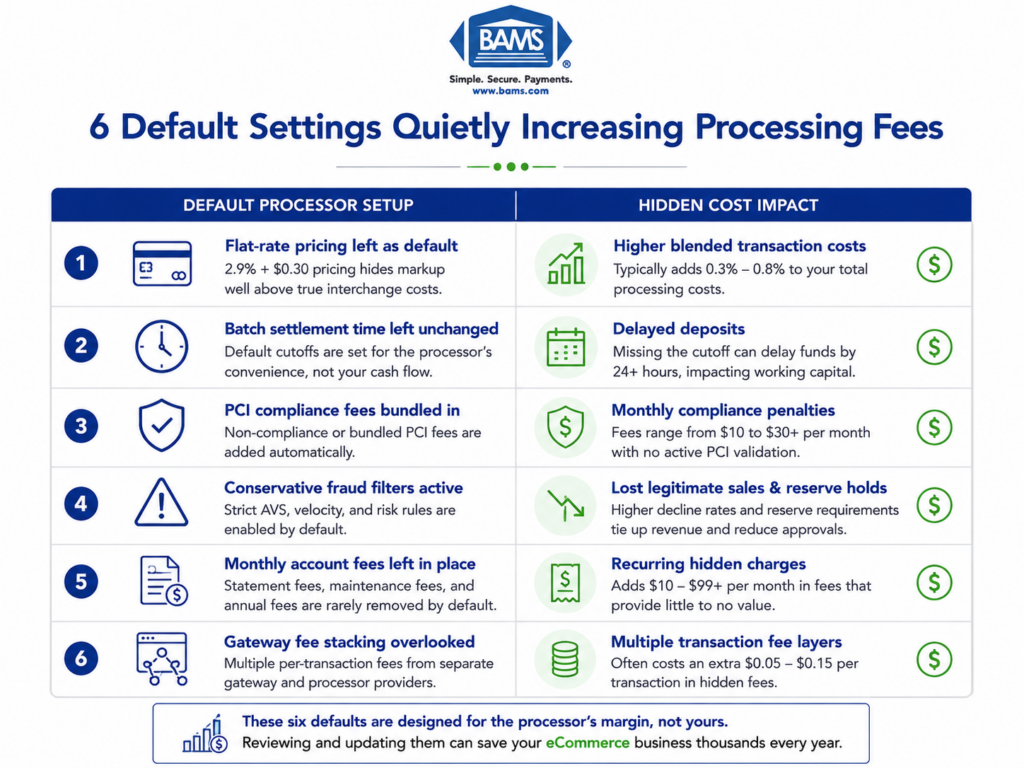
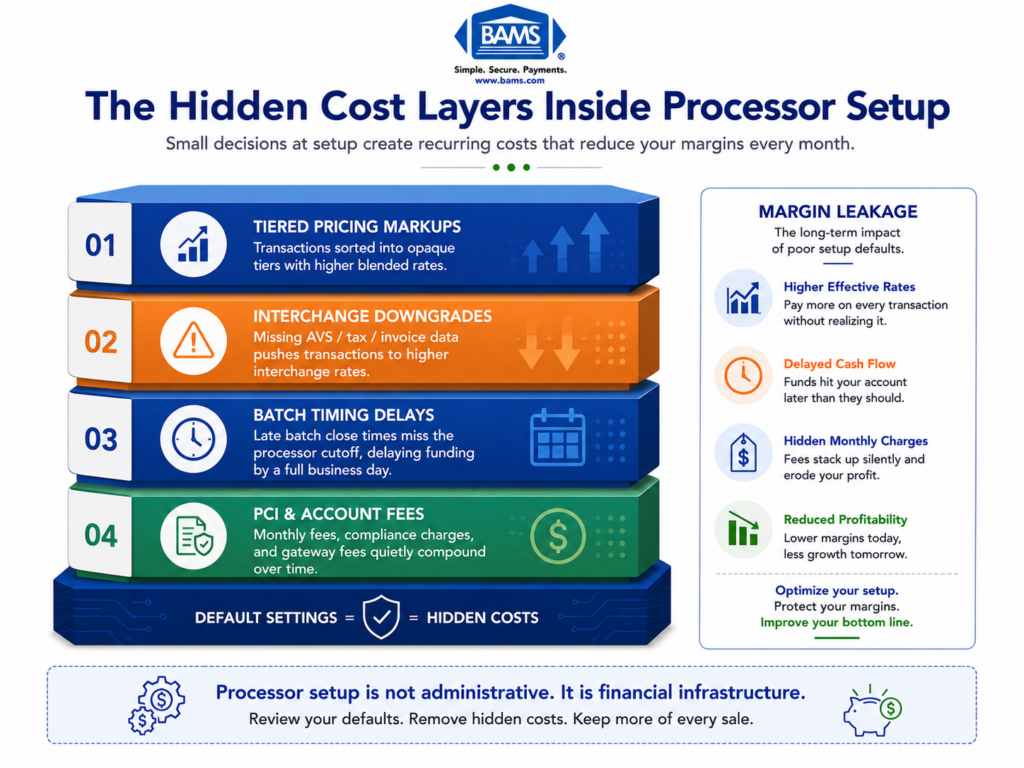
The defaults your processor ships with are not optimized for your business. They are optimized for the processor’s risk exposure. That means conservative hold periods, aggressive reserve thresholds, and batch timing that delays your deposits by a full business day or more. Federal Reserve Small Business Survey data continues to show that cash flow predictability remains one of the largest operational concerns for growing businesses, especially those dependent on daily settlement timing.
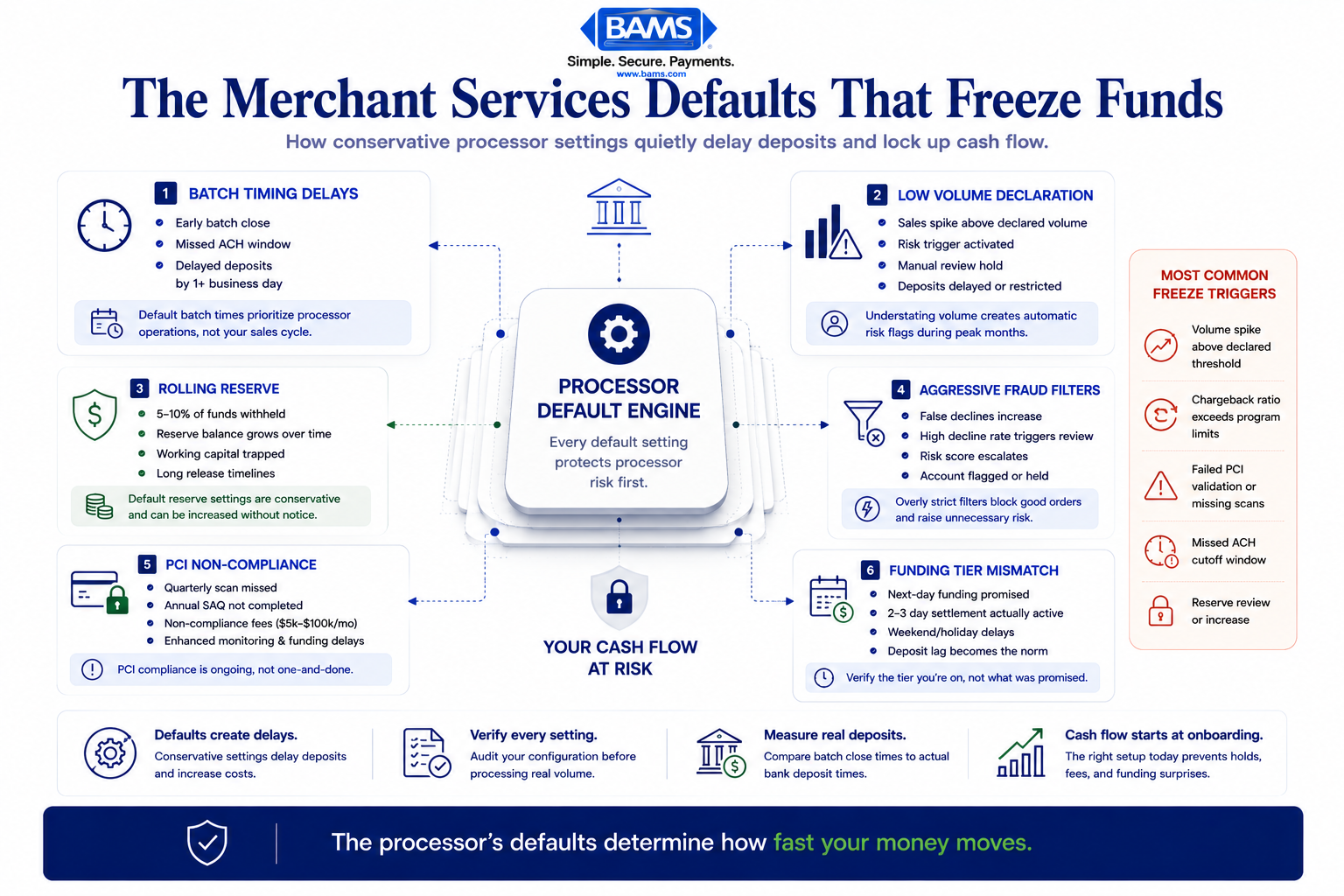
Most frozen-fund problems begin with defaults merchants never realized were active.
Who This Is For and What It Covers
This guide is for ecommerce managers at established businesses (roughly 10 to 50 employees) who are either switching processors or auditing their current setup. If you are processing real volume and care about when deposits actually land in your bank account, this is for you.
This is not a generic PCI compliance walkthrough or a POS configuration tutorial. Each item below targets a specific default setting or setup decision that creates fund holds, delayed settlements, or surprise fees. We excluded anything that does not have a direct line to your cash flow or account stability.
How We Selected These Items
Every item on this list was evaluated against one question: does getting this wrong result in frozen funds, delayed deposits, or unexpected charges within the first 90 days of a processor relationship? If the answer was no, it did not make the list. If the answer was yes, we mapped the specific default that causes the problem and the configuration change that prevents it.
9 Processor Defaults That Drain Your Revenue Before You Notice
1. Batch Settlement Timing Set to Processor Convenience, Not Your Cash Flow
Why it matters: Most processors default your batch close to a time that suits their operations, often late evening or early morning in their time zone. If your batch closes after your acquiring bank’s cutoff window, your deposits shift by a full business day. Over a month, that is 20+ hours of float you are donating to your processor.
What it looks like today: Your gateway admin panel has a batch auto-close setting, usually buried under “Settlement” or “Processing Options.” The default is rarely aligned with your bank’s ACH cutoff.
How to apply it: Ask your acquiring bank for their exact ACH cutoff time. Set your batch auto-close 60 to 90 minutes before that cutoff. Verify with a small test transaction that deposits arrive the next business day, not two days later.
2. Volume and Ticket Size Declared Too Low on the Application
Why it matters: The monthly volume and average ticket size you declare during onboarding become your risk profile. Process 20% above your stated volume in any given month, and your processor’s automated risk system can trigger a reserve or a manual review, both of which hold your funds.
What it looks like today: The application asks for “estimated monthly volume” and “average transaction amount.” Most merchants lowball these numbers to seem conservative. That conservatism backfires during your first strong sales month.
How to apply it: Declare your realistic peak volume, not your average. Use your last 12 months of processing statements to calculate your highest month and your highest single transaction. Pad both by 15 to 20%. It is easier to process under your declared ceiling than to explain a spike after the fact.
3. Rolling Reserve Defaults That Lock Up Your Working Capital
Why it matters: Some processors apply a rolling reserve (typically 5 to 10% of each transaction) by default for new accounts, especially in ecommerce. That reserve is held for 90 to 180 days. If you are processing $100,000 per month, a 10% reserve means $10,000 per month is inaccessible for up to six months.
What it looks like today: Reserve terms are buried in your merchant agreement, often in a section titled “Security” or “Risk Management.” Many merchants do not realize a reserve is active until they notice their deposit totals do not match their batch totals.
How to apply it: Before signing, ask explicitly: “Is there a reserve on this account, and what triggers its release?” If a reserve is required, negotiate the percentage and the hold period. Provide 6 months of clean processing history from your previous processor to argue for a lower reserve or none at all.
4. Fraud Filters Set to Maximum Sensitivity by Default
Why it matters: PCI compliance is not a form you fill out once. It is an ongoing obligation with quarterly scans and annual revalidation. PCI Security Standards Council merchant guidance continues to emphasize that ongoing validation, network security maintenance, and continuous compliance monitoring are critical to reducing merchant risk exposure and avoiding costly compliance failures.
What it looks like today: Your gateway dashboard shows fraud rules like “Decline if AVS street address does not match” or “Block more than 3 transactions from the same IP in 10 minutes.” These defaults do not account for your specific customer behavior.
How to apply it: Review each fraud filter against your actual transaction data. If you sell high-ticket items with repeat customers, a strict velocity limit will block your regulars. Adjust filters incrementally, loosening one at a time, and monitor decline rates weekly for 30 days. Keep CVV verification mandatory; loosen AVS rules based on your chargeback history.
5. PCI Compliance Treated as a One-Time Checkbox
Why it matters: PCI compliance is not a form you fill out once. It is an ongoing obligation with quarterly scans and annual revalidation. Miss a deadline, and your processor can charge non-compliance fees ranging from $5,000 to $100,000 per month. Worse, non-compliant accounts are flagged for enhanced monitoring, which can slow your funding. Organizations with high noncompliance spent an average of $262,000 more on breach-related costs than compliant peers.
What it looks like today: Your processor emails you a Self-Assessment Questionnaire (SAQ) link during onboarding. You complete it. Then nothing happens for 12 months until a “PCI non-compliance fee” appears on your statement. Understanding what PCI compliance fees should actually cost helps you spot when you are being overcharged.
How to apply it: Set calendar reminders for your SAQ renewal date and quarterly scan deadlines. Confirm with your processor exactly which SAQ type applies to your integration method (SAQ A for redirects, SAQ A-EP for JavaScript-based tokenization, SAQ D for direct handling). The wrong SAQ type can invalidate your compliance even if you complete it on time.
6. Chargeback Notification Routing That Skips Your Team
Why it matters: Processors send chargeback notifications to the email address on file during onboarding. If that email goes to a general inbox nobody monitors, you miss the response window (typically 7 to 10 days). Miss two or three disputes, and your chargeback ratio climbs. Cross the card network threshold (usually 1% of transactions), and your processor can place you in a monitoring program with higher fees and mandatory reserves.
What it looks like today: Chargeback alerts arrive as plain-text emails with subject lines that look like spam. They require manual action within a tight window. Most processors do not offer push notifications or dashboard alerts by default.
How to apply it: During setup, route chargeback notifications to a dedicated alias (disputes@yourdomain.com) monitored daily by someone with authority to respond. Ask your processor if they offer chargeback alert services that notify you before a dispute is formally filed. Services like BAMS include proactive chargeback defense as part of their account management, which gives you an earlier window to resolve issues before they hit your ratio.
7. Gateway Tokenization and 3D Secure Left Disabled
Why it matters: Tokenization replaces card data with a non-sensitive token, reducing your PCI scope and your liability in a breach. 3D Secure (3DS) shifts fraud liability from you to the card issuer for authenticated transactions. Both are available on most modern gateways. Both are typically disabled by default because they add friction to checkout. But leaving them off means you absorb 100% of fraud liability, and your processor sees you as higher risk.
What it looks like today: Your gateway settings include toggles for tokenization and 3DS under “Security” or “Authentication.” Enabling 3DS requires coordination with your checkout flow, but most platforms (Shopify, WooCommerce, Magento) support it natively.
How to apply it: Enable tokenization immediately; it has no customer-facing impact. For 3DS, enable it in “challenge” mode first (only triggers for suspicious transactions) rather than requiring authentication on every order. Monitor your authorization rate for 30 days. If it drops more than 2%, adjust your 3DS rules to target only transactions above a specific dollar threshold.
8. Interchange Qualification Defaults That Silently Upcharge You
Why it matters: Interchange rates vary based on how much transaction data you pass. A standard ecommerce transaction qualifies for one rate. The same transaction with Level 2 data (tax amount, customer code) qualifies for a lower rate. Most gateways do not pass Level 2 data by default, so every transaction you process costs more than it should. Over a year of processing, the difference compounds into thousands of dollars.
What it looks like today: Your monthly statement shows a mix of “qualified,” “mid-qualified,” and “non-qualified” rates, or if you are on interchange-plus pricing, you see varying interchange categories. The gateway is not sending the data fields that would push transactions into lower-cost categories.
How to apply it: Ask your processor which data fields are required for Level 2 interchange qualification. At minimum, this includes sales tax amount and customer PO or reference number. Configure your gateway or payment plugin to pass these fields automatically. If your processor uses tiered pricing instead of interchange-plus, this is also a signal to evaluate whether your pricing model is costing you money.
9. Funding Speed Left at the Processor’s Standard (Not What You Negotiated)
Why it matters: Many processors advertise next-day funding but default new accounts to 2-day or 3-day settlement. The faster funding tier may require a separate enrollment, a specific batch close time, or a minimum processing history. If you assumed you had next-day funding but never confirmed it, you are financing an extra day or two of float on every deposit.
What it looks like today: Your merchant agreement may reference “standard funding” without defining the timeline. The actual deposit speed depends on your batch close time, your bank’s ACH processing, and whether your account has been flagged for enhanced review.
How to apply it: After your first week of processing, compare your batch close timestamps to your actual bank deposit timestamps. If deposits consistently arrive more than one business day after batch close, call your processor and ask what funding tier you are on. Providers like BAMS offer next-day funding as a standard feature, but even then, verify your batch timing is aligned to actually receive it.
The Pattern Behind These Defaults
Every item on this list shares a common structure: the processor’s default protects the processor, not your business. Conservative fraud filters reduce the processor’s risk exposure. Slow batch timing gives the processor more float. Undeclared volume thresholds give the processor grounds to hold funds when you succeed.
The second pattern is that these defaults interact. A low declared volume combined with aggressive fraud filters and a rolling reserve creates a compounding cash flow problem. Fix any one of them in isolation and you still feel the squeeze. Fix all of them during setup and you build a funding pipeline that behaves predictably from day one.
90% of chief executives say they would switch payment providers over reliability and value gaps. The gaps usually start here, in the configuration layer nobody audits after onboarding.
Where to Start Without Overwhelming Your Team
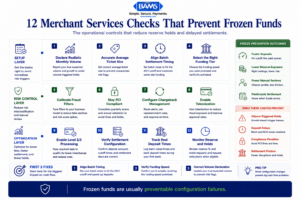
Frozen funds are usually configuration outcomes, not random processor behavior.
You do not need to address all nine items on day one. Start with three that have the most immediate cash flow impact: batch settlement timing (item 1), volume declaration (item 2), and funding speed verification (item 9). These three alone determine when and whether your money arrives on schedule.
Once deposits are predictable, move to the risk and compliance layer: fraud filters (item 4), PCI compliance cadence (item 5), and chargeback routing (item 6). These protect you from the holds and fees that erode margins over time. The remaining items (reserves, tokenization, interchange qualification) are optimizations that compound over months. Schedule them for your next quarterly review rather than trying to configure everything during a single onboarding sprint.
Merchant Payments Coalition resources continue to highlight how payment processing inefficiencies, interchange inflation, and operational funding delays increasingly affect merchant confidence in processor relationships.
Frequently Asked Questions
What documents do I need to gather before switching merchant service providers?
At minimum, prepare your business formation documents, six months of bank statements, your most recent processing statements (showing volume and chargeback history), your refund and cancellation policy, and your terms of service. Having clean processing history from your current provider gives your new processor evidence to approve you with fewer restrictions, lower reserves, and faster funding.
Why should I keep my old merchant account open during the transition?
Chargebacks and refund requests can arrive weeks or months after the original transaction. If your old account is closed, you lose the ability to respond to disputes on those transactions, which can result in automatic losses. Keep the old account open for at least 120 days after your last transaction processes through it.
How can I verify that my new processor is actually delivering next-day funding?
Run a small batch of test transactions during your first week. Record the exact time your batch closes and the exact time the deposit appears in your bank account. If the gap is consistently longer than one business day, contact your processor to confirm which funding tier your account is enrolled in and whether your batch close time aligns with their cutoff.
Which pricing model is best for ecommerce businesses setting up merchant services?
Interchange-plus pricing gives you the most transparency because you see the actual interchange cost plus a fixed markup. Tiered pricing bundles transactions into categories (qualified, mid-qualified, non-qualified) that obscure the real cost. For ecommerce businesses processing consistent volume, interchange-plus almost always results in lower total fees and makes it easier to identify optimization opportunities like Level 2 data qualification.
What triggers a processor to freeze or hold my funds after setup?
The most common triggers are processing volume that exceeds your declared monthly amount, a sudden spike in average ticket size, a chargeback ratio approaching 1%, failed PCI compliance validation, and transactions flagged by fraud filters. Most of these triggers are tied directly to how your account was configured during onboarding, which is why getting setup right prevents the majority of holds.
How often do I need to revalidate PCI compliance?
PCI compliance requires annual revalidation through a Self-Assessment Questionnaire (SAQ) and quarterly network vulnerability scans if your integration handles or transmits card data. Missing either deadline can result in monthly non-compliance fees and increased scrutiny on your account. Set calendar reminders for both deadlines immediately after onboarding.