7 Signs Your Funeral Home Payment Processing Costs Too Much
The Gap Between Assignment and Payment Is a Processing Problem
A family signs the insurance assignment. The policy is verified. Services are rendered. And then you wait. Thirty days, sixty days, sometimes longer before the insurance carrier pays out. In the meantime, your staff needs payroll, your suppliers need payment and the families walking through your door today expect the same seamless experience.
Most funeral home operators assume this cash flow gap is just the nature of the business. But a significant portion of the problem has nothing to do with insurance carriers. It lives inside your funeral home merchant account. Think declined authorizations on legitimate high-ticket charges, inflated payment processing costs from misconfigured terminals and settlement timelines that treat your $12,000 transaction like a $12 retail purchase.
Most online advice about improving transaction approval rates and cutting processing fees is built for eCommerce stores shipping T-shirts, not funeral homes processing five-figure payments from grieving families. This guide is different.
TL;DR
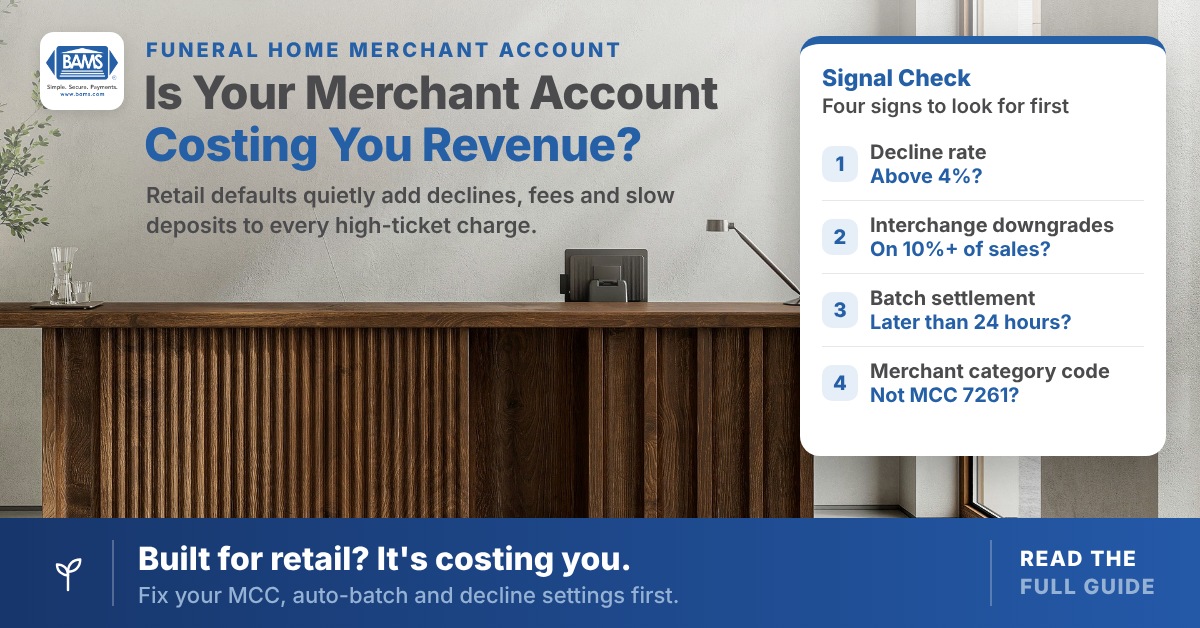
- False declines cost you more than fraud – Up to 70% of declined authorizations may be legitimate purchases. If your decline rate runs well above 4%, your risk settings may be calibrated for retail, not funeral services.
- Interchange downgrades are your biggest hidden fee – Missing data fields, delayed batch settlement and keyed-entry transactions push your charges into higher-cost interchange tiers. In one worked example, fixing a single configuration problem saved $3,360 a year.
- Your MCC classification matters more than your rate – If your merchant account isn’t coded as MCC 7261 (Funeral Services), your high-ticket transactions can look unusual to fraud systems.
- Settlement speed is a cash flow lever – Every day between processing a charge and receiving funds is float you’re financing. Next-day funding can meaningfully reduce the working capital gap created by insurance assignment delays.
- Start with three free fixes – Confirm your MCC, enable auto-batch settlement and pull your decline report. These require no new technology and will reveal whether your merchant account is structurally misaligned with your business.
What This Guide Covers (and What It Doesn’t)
This is for family-owned funeral service operators running one to ten locations who regularly process transactions above $5,000. If your average ticket is under $1,000 or you process hundreds of transactions daily, generic retail optimization guides will serve you better.
We’re diagnosing the specific signals that your merchant account is misconfigured for high-ticket, low-volume death-care transactions. You won’t find advice about checkout button colors or cart abandonment pop-ups here. Instead, you’ll get a framework for three questions. Why do legitimate payments get declined? Why is your effective rate higher than it should be? And where is your settlement timeline costing you working capital?
How We Selected These Signals
Each item below meets three criteria. First, it’s disproportionately common in funeral home merchant accounts compared to retail or eCommerce setups. Second, it has a measurable cost impact (either lost revenue from declines or excess fees from downgrades). Third, it can be diagnosed without specialized forensic tools, using your existing statements and processor dashboard.
7 Signals Your Merchant Account Is Costing You Revenue
1. Your Authorization Decline Rate Exceeds 4%
Why it matters: When a family’s card is declined during an at-need arrangement, the emotional and operational cost is enormous. You can’t casually say “try another card” the way a retail clerk might. Yet up to 70% of declined authorizations may be purchases by legitimate shoppers. Your fraud filters or processor settings may be rejecting valid revenue.
What it looks like today: In an Equifax report on quick-service restaurants, merchants using its fraud prevention tools averaged an authorization decline rate of about 4%. Restaurants aren’t funeral homes, but it’s a useful reference point. Funeral homes often run higher because their transaction profiles (infrequent, high-dollar, keyed-entry) trigger the same risk flags that catch actual fraud in high-volume retail.
How to apply it: Pull your decline report from the last six months. Calculate your decline rate by dividing declined transactions by total attempted transactions. If you’re well above 4%, ask your processor whether your account’s risk parameters are calibrated for high-ticket, low-frequency transactions or defaulting to retail thresholds.
2. More Than 10% of Transactions Downgrade to Non-Qualified Rates
Why it matters: Interchange is usually the largest part of your processing cost. When a transaction “downgrades” from qualified to mid-qualified or non-qualified, you pay a surcharge on an already expensive fee. On a $15,000 funeral service charge, even a 0.5% downgrade penalty costs you $75 per transaction.
What it looks like today: In a worked example from our transaction monitoring guide, a funeral home processes $2.4 million a year. It finds that 35% of its transactions downgrade because of a POS configuration problem. Fixing it saves about 0.4% on those transactions, or $3,360 a year. Common culprits include missing address verification data, delayed batch settlement and keyed entry. Level II data only helps when a business or corporate card pays.
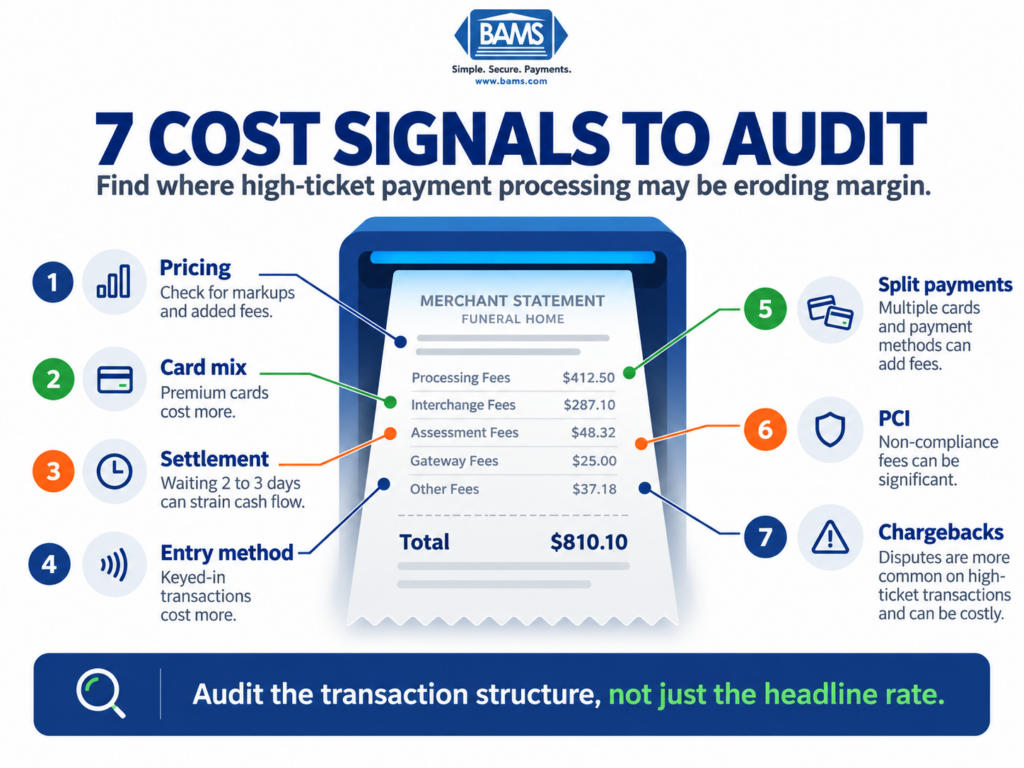
How to apply it: Review your monthly statement for line items labeled “non-qualified surcharge” or “EIRF” (Electronic Interchange Reimbursement Fee, a higher-cost interchange category). If these appear on more than 10% of transactions, your setup likely isn’t meeting the data and timing requirements card networks set for their lower interchange rates. For a deeper breakdown, see these seven cost signals funeral homes should audit.
3. You’re Settling Batches More Than 24 Hours After Authorization
Why it matters: Card networks expect batches to settle within a short window, often about a day after authorization, for the lowest interchange rates. Late settlement can push transactions into a higher-cost category. Funeral homes often delay settlement. Services span multiple days, deposits are taken before final billing, or staff forget to close the batch on weekends.
What it looks like today: Every day your batch sits unsettled past that window, those transactions risk downgrading. The cost is easy to miss on many processor dashboards. You only see the cost impact buried in your monthly statement as a surcharge line item.
How to apply it: Enable auto-batch settlement on your terminal at a fixed time each evening. If your workflow requires holding authorizations for multi-day service arrangements, ask your processor about incremental authorizations or split-settlement options designed for delayed-fulfillment merchants.
4. Your Merchant Account Uses a Retail MCC Instead of Funeral Services
Why it matters: Your Merchant Category Code (MCC) tells card networks what kind of business you operate. Funeral homes should be classified under MCC 7261 (Funeral Services and Crematories). If your processor set you up under a generic retail code, your transactions look anomalous to fraud systems. Why is a “retail store” running $18,000 charges twice a week?
What it looks like today: Misclassified MCCs are surprisingly common when funeral homes sign up through general-purpose payment providers. The wrong MCC can trigger higher fraud scrutiny and reduce authorization rates.
How to apply it: Check your merchant agreement or call your processor to confirm your MCC. If it’s anything other than 7261, request a correction. This single change can help reduce false declines on high-ticket charges.
5. You’re Keying In Cards Instead of Using EMV or Digital Wallets
Why it matters: Keyed transactions usually carry higher interchange rates than chip-read or tap transactions. The difference is often a few tenths of a percent. At 0.30% to 0.70%, a $10,000 charge costs $30 to $70 more. Funeral homes key in cards more often than most industries because arrangements happen in office settings, over the phone, or remotely with out-of-town family members.
What it looks like today: Modern payment terminals support EMV chip reads and contactless tap, including Apple Pay and Google Pay. Many also support QR-code payment links that families complete on their own phones. Chip and tap qualify for card-present rates. Payment links are still card-not-present, but they keep card numbers away from staff and capture the address and security-code data that helps avoid downgrades. For a comparison of processing costs across payment methods, this breakdown of fees by payment method is a useful reference.
How to apply it: Audit your last three months of transactions and calculate what percentage were keyed versus chip-read or tap. If keyed entry exceeds 30%, invest in a portable EMV terminal for your arrangement rooms and set up secure payment links for remote family members.
6. Your Settlement Timeline Doesn’t Match Your Cash Flow Needs
Why it matters: Most funeral homes operate on thin working capital margins. When you process a $15,000 charge on Friday and don’t see funds until Wednesday, that’s five days of float. Meanwhile you cover payroll and supplier invoices out of pocket. Multiply this across insurance assignment delays and you’re effectively financing your own business at a hidden cost.
What it looks like today: Standard settlement for many processors is two to three business days. Some processors offer next-day or even same-day funding, but funeral homes rarely negotiate for it because they don’t realize it’s available. A provider like BAMS offers next-day funding for qualifying merchants. That can shrink the gap between rendering services and receiving payment, especially when insurance assignments stretch your receivables cycle.
How to apply it: Calculate your average daily processing volume and multiply by your current settlement delay in days. That number represents the float you’re carrying. Then compare the cost of that float, meaning what you’d pay to borrow it on a line of credit. Weigh it against the cost of switching to a processor with faster settlement terms.
7. You Have No Structured Approach to Deposit and Installment Collection
Why it matters: Preneed contracts, partial insurance assignments and at-need families who need payment flexibility all require deposit and installment structuring. If you’re handling these manually (writing down card numbers, running charges on sticky-note reminders), you’re increasing your exposure to PCI violations and chargebacks. It also makes it harder to keep deposit workflows aligned with the FTC Funeral Rule and state requirements that apply to your business.
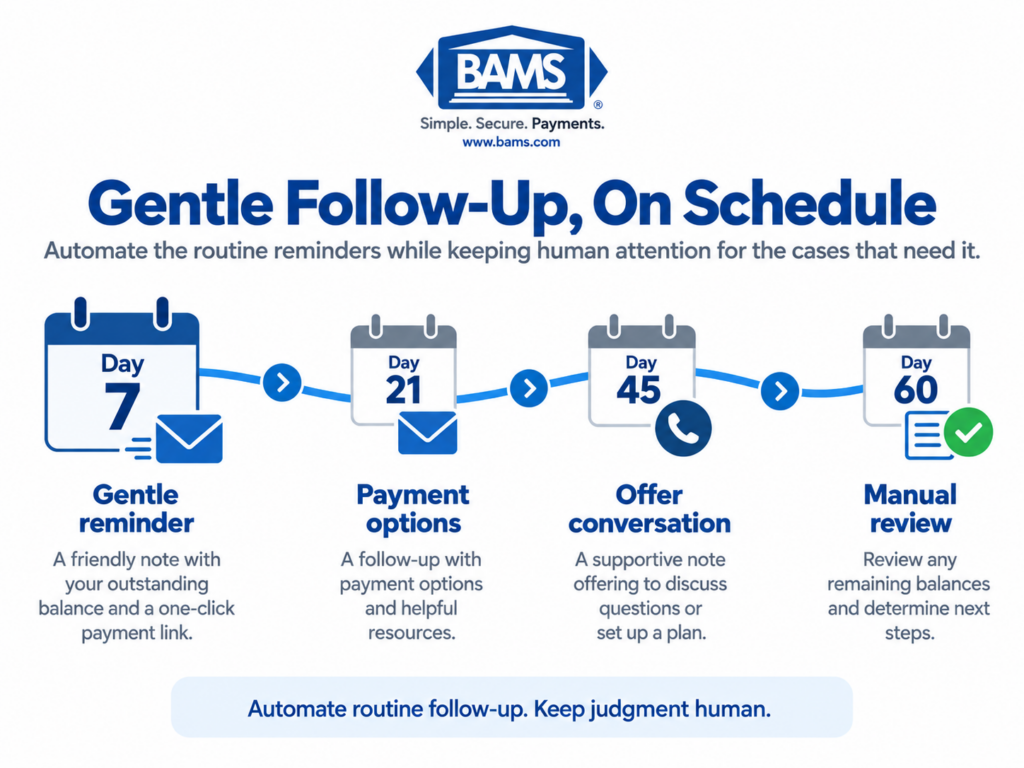
What it looks like today: Modern merchant accounts can support recurring billing, tokenized card storage (so you never handle raw card numbers) and automated payment reminders. These tools exist in most processor platforms but are rarely configured for funeral home workflows because the setup requires understanding your specific billing cadence.
How to apply it: Map your three most common payment scenarios (full at-need payment, preneed installment and insurance-assignment gap payment). For each, document when you collect, how you collect and where the manual steps are. Then ask your processor which of those steps can be automated with recurring billing or tokenized storage. If your current processor can’t support this, it’s a strong signal you’ve outgrown a retail-oriented funeral home merchant account.
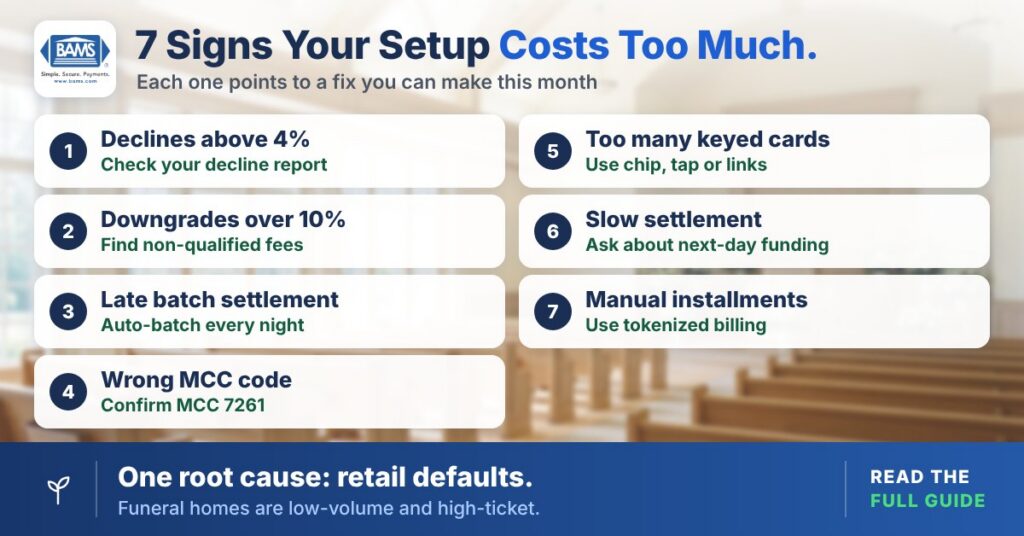
Each sign points to a fix you can make this month, and all seven share one root cause: retail defaults.
The Pattern Across All Seven Signals
Every signal above shares a common root cause: your funeral home merchant account was configured using default settings designed for high-volume, low-ticket retail transactions. Funeral homes are the opposite: low-volume, high-ticket, emotionally sensitive and operationally complex. When your processing setup doesn’t match your transaction profile, you pay the difference in three ways. You see lost revenue from false declines, excess fees from interchange downgrades and cash flow drag from slow settlement.
These costs compound. A 5% decline rate on $2 million in annual volume means $100,000 in transactions to re-run, invoice or write off. A 0.5% downgrade penalty across that same volume adds $10,000 in unnecessary fees. And a three-day settlement delay on $8,000 in daily volume means you’re perpetually carrying $24,000 in float. Together, they act like a structural tax that cost-cutting elsewhere struggles to offset.
Where to Start: Prioritizing Your Audit
You don’t need to fix all seven at once. Start with three actions that require no new technology and no processor switch. First, confirm your MCC is 7261. Second, enable auto-batch settlement. Third, pull your decline report and calculate your decline rate. These three steps take less than a day and will tell you whether your current setup is costing you hundreds or thousands per year.
If the numbers reveal significant leakage, ask whether your processor can reconfigure your funeral home merchant account for high-ticket, low-volume transactions. If it can’t, you may need a merchant services partner that understands this transaction profile from the start. The goal isn’t to chase the lowest rate. It’s to close the gap between the moment a family says yes and the moment cash arrives in your account.
Frequently Asked Questions
How can I improve my authorization rates for high-ticket funeral transactions?
Start by confirming your Merchant Category Code is set to 7261 (Funeral Services). Then review your processor’s fraud and risk thresholds to ensure they’re calibrated for infrequent, high-dollar charges rather than high-volume retail patterns. Shifting from keyed entry to EMV chip reads or contactless payments also reduces the risk flags that trigger false declines.
Why do my transactions keep downgrading to non-qualified rates?
Downgrades typically happen when required data is missing (like AVS information on card-not-present sales), when cards are keyed instead of read, or when batches settle late. Level II data only matters when a business or corporate card pays. Each can move your transaction into a higher-cost interchange category.
When should I negotiate better settlement terms with my payment processor?
If your current settlement timeline is two or more business days and you regularly carry working capital gaps due to insurance assignment delays, it’s worth negotiating now. Calculate the float you’re carrying (daily volume multiplied by settlement delay days) and compare that cost against processors offering next-day funding.
Which factors affect the settlement timeline in merchant services?
Key factors include your processor’s standard funding schedule, your batch settlement timing and your risk profile (high-ticket merchants sometimes face reserves or holds). Your bank’s deposit speed also matters, as does whether your account has any rolling reserves or delayed-funding clauses in the merchant agreement.
What strategies reduce transaction friction for funeral home families?
Offer multiple payment methods (EMV chip, contactless tap, secure payment links for remote family members). Use tokenized card storage for installment plans instead of asking families to provide card details repeatedly. Automate payment reminders for preneed contracts. Each of these reduces friction and chip or tap payments also lower interchange costs.
Is AI-driven fraud detection relevant for funeral home payment processing?
Yes, but not in the way it’s marketed to eCommerce merchants. For funeral homes, the priority is reducing false declines on legitimate high-ticket transactions rather than catching fraud at massive scale. Look for fraud tools that use contextual signals (billing history, authentication data, customer verification) rather than blunt transaction-amount thresholds.