Cost-Plus Pricing eCommerce: Reduce Fees Faster
How your payment processor’s pricing model affects deposits, cash flow, and hidden fees
Learn how cost-plus pricing impacts your deposit timing and processing costs. This guide covers payment gateway insights and level 3 processing strategies to reduce fees and accelerate cash flow.
TL;DR
- Cost-plus pricing reveals true costs – Unlike tiered pricing that hides fees, interchange-plus shows exactly what you pay and where your money goes, enabling 10% to 25% savings for established businesses.
- Level 3 processing cuts B2B costs – Capturing detailed transaction data qualifies corporate and government card transactions for lower interchange rates.
- Deposit timing depends on your processor – Next-day funding should be standard for businesses processing consistent volume. If you wait 3-5 days for deposits, you are leaving cash flow on the table.
- Payment gateway insights drive optimization – Use your transaction data to identify decline patterns, batch timing issues, and authorization rate problems that slow down processing.
- Start with your effective rate – Calculate total fees divided by total volume. If it exceeds 2.8% and you process over $10,000 monthly, you have room to optimize.
Guide Orientation: What This Guide Covers
This guide helps ecommerce managers at established online businesses understand how cost-plus pricing affects deposit timing and overall processing costs. You will learn exactly how pricing models connect to cash flow, why some payment structures create hidden delays, and what steps you can take to get funds faster.
By the end, you will be able to evaluate whether your current processor’s pricing model is costing you money and time. You will also understand how level 3 processing and strategic payment gateway insights can reduce fees while accelerating deposits.
This guide is for ecommerce operations processing consistent monthly volume. If you are just starting out or processing under $10,000 monthly, some strategies here may not apply yet.
Why Delayed Deposits and Pricing Transparency Matter Now
Interchange fees represent a major portion of payment processing costs and vary based on transaction type, risk level, and data quality, as outlined by the Federal Reserve. For eCommerce managers, this is not just a line item. It is cash that sits unavailable while you wait for deposits, pay vendors, and manage payroll.
Delayed deposits create a compounding problem. When funds take 3-5 days to reach your account, you lose flexibility. You cannot reinvest in inventory, respond to opportunities, or cover unexpected expenses without dipping into reserves or credit lines.
The pricing model your processor uses directly impacts both cost and timing. Opaque pricing structures often bundle fees in ways that obscure true costs and create processing bottlenecks.
Mobile commerce adds urgency. Higher mobile transaction volumes mean more fees, more deposit cycles, and more opportunities for delays to hurt your business.
Core Concepts: Understanding Pricing Models and Processing Levels
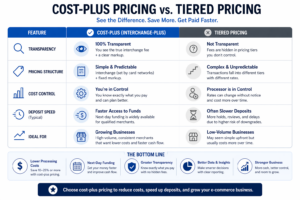
A side-by-side comparison showing how cost-plus pricing improves transparency, reduces fees, and enables faster deposits compared to tiered pricing.
Cost-Plus Pricing Explained
Cost-plus pricing (also called interchange-plus) separates the wholesale cost of processing from your processor’s markup. You see exactly what the card networks charge (interchange) and exactly what your processor adds on top.
This differs from tiered pricing, where transactions get sorted into “qualified,” “mid-qualified,” and “non-qualified” buckets with different rates. The problem with tiered pricing is that processors control which bucket your transactions land in, often to their advantage.
As payment experts at Swipesum note, “Avoid tiered pricing as it’s confusing on purpose for payment processors to increase revenues.” Cost-plus eliminates this manipulation by showing you the actual costs.
Level 3 Processing for Lower Interchange
Level 3 processing captures additional transaction data (line item details, tax amounts, shipping information) that qualifies certain transactions for lower interchange rates. This matters most for B2B ecommerce and transactions involving corporate or government cards.
When you provide level 3 data, card networks reward you with reduced fees because the detailed information reduces fraud risk and simplifies reconciliation for buyers.
Payment Gateway Insights and Deposit Timing
Your integrated payment gateway does more than authorize transactions. It determines how quickly transactions settle, how batches get processed, and what data gets captured. Payment gateway insights from your processor should show you exactly where delays occur and why.
The Framework: Connecting Pricing to Faster Deposits
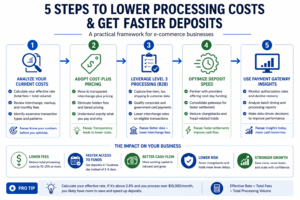
A step-by-step framework to lower processing costs, improve authorization rates, and accelerate cash flow through better pricing and payment optimization.
Optimizing deposit timing requires addressing three interconnected areas: pricing transparency, processing efficiency, and data optimization. Here is how they connect.
Pricing transparency (cost-plus) lets you identify which transaction types cost most and why. Processing efficiency ensures transactions clear quickly without unnecessary holds or batch delays. Data optimization (level 3 processing) reduces costs on eligible transactions while improving authorization rates.
Modern payment infrastructure enables faster settlement, improved reporting, and better cash flow visibility for businesses, according to Modern Treasury.
When all three work together, you pay less per transaction and receive funds faster. When any one breaks down, you either overpay, wait longer for deposits, or both.
Step 1: Audit Your Current Pricing Structure
Objective
Determine exactly what you pay per transaction and identify hidden fees or unfavorable rate structures.
Execution
Request a complete fee breakdown from your current processor. You need to see interchange costs, assessment fees, processor markup, and any additional charges (PCI compliance fees, batch fees, statement fees). Calculate your effective rate by dividing total fees by total processing volume for the past three months.
Processing costs vary depending on transaction mix, business model, and pricing structure, but businesses with consistent volume typically benefit from transparent pricing models that align costs directly with transaction data.
What to Avoid
Do not accept vague statements like “competitive rates” or “low fees.” If your processor cannot provide line-item breakdowns, that opacity is intentional. Also avoid comparing only headline rates. A processor advertising 2.4% may add fees that push your effective rate above 3%.
Success Indicators
You can state your exact effective rate, identify your three most expensive transaction types, and explain where your processor’s markup begins and ends.
Step 2: Evaluate Cost-Plus as Your Pricing Model
Objective
Determine whether cost-plus pricing will reduce your costs compared to your current structure.
Execution
Interchange-plus is most cost-effective for businesses processing over $10,000 monthly. If you meet this threshold, request cost-plus quotes from processors and compare them against your current effective rate.
Interchange-plus pricing saves established businesses 10% to 25% compared to flat-rate processors charging 2.6% to 2.9% plus $0.30. For a business processing $50,000 monthly, this translates to $1,500 to $3,750 in annual savings.
As Clearly Payments explains, cost-plus is “more transparent because it is much more difficult to have hidden fees. Processors take all the bank fees, card brand fees, pass them straight through to the merchant, then add a markup.”
What to Avoid
Do not assume cost-plus automatically means lower costs. A processor with high markups on interchange-plus can still overcharge you. If a processor quotes significantly higher, negotiate or look elsewhere.
Success Indicators
You have written quotes from at least two processors showing interchange-plus pricing. You can calculate projected monthly costs under each option.
Step 3: Implement Level 3 Processing for B2B Transactions
Objective
Qualify eligible transactions for lower interchange rates by capturing required data.
Execution
If you sell to businesses or government entities, level 3 processing can significantly reduce your interchange costs. Corporate and purchasing cards qualify for lower rates when you submit detailed transaction data including item descriptions, quantities, unit costs, and tax amounts.
Detailed transaction data improves authorization efficiency and qualifies certain transactions for better processing outcomes, as supported by Visa.
Work with your processor to enable level 3 data capture in your payment gateway. Most modern ecommerce platforms can pass this data automatically once configured. The setup requires technical coordination but typically takes days, not weeks.
What to Avoid
Do not assume all transactions qualify for level 3 rates. Consumer cards and most small business cards do not benefit from additional data. Focus level 3 implementation on transaction types that actually qualify, primarily corporate cards and government purchasing cards.
Success Indicators
Your processor confirms level 3 data is being captured and transmitted. You see reduced interchange rates on eligible transactions in your monthly statements.
Step 4: Optimize Batch Timing and Settlement
Objective
Minimize the time between transaction authorization and fund availability.
Execution
Review your batch settlement schedule. Many processors batch transactions once daily, but the timing matters. Batching at 11 PM versus 6 PM can mean a full extra day before funds settle.
Ask your processor about next-day funding options. Some processors offer next-day funding as a standard feature rather than a premium add-on. This alone can improve your cash flow by 2-4 days per transaction cycle.
Ensure your gateway settings do not hold transactions unnecessarily. Some fraud filters create delays by flagging legitimate transactions for review. Tune these settings to balance fraud protection with processing speed.
What to Avoid
Do not disable fraud protection entirely to speed up processing. The goal is optimization, not elimination of safeguards. Also avoid processors that charge premium fees for faster deposits. Next-day funding should be standard for established businesses with consistent volume.
Success Indicators
You know exactly when your batches close and when funds typically arrive. Your average deposit timing has improved by at least one business day.
Step 5: Use Payment Gateway Insights to Identify Bottlenecks
Objective
Leverage transaction data to find and fix processing inefficiencies.
Execution
Your payment gateway insights should reveal authorization rates, decline reasons, and processing times by transaction type. Request access to detailed reporting if you do not already have it.
Look for patterns in declined transactions. Low authorization rates mean lost sales and wasted processing attempts. Common causes include outdated card information, insufficient funds, and fraud flags. Address each cause systematically.
For subscription or recurring billing, implement card account updater services that automatically refresh expired card details. This improves authorization rates and reduces involuntary churn.
What to Avoid
Do not ignore decline data. Every declined transaction represents either a lost sale or an operational problem you can fix. Also avoid making changes without baseline measurements. Track authorization rates before and after any optimization to verify improvement.
Success Indicators
You can identify your top three decline reasons and have implemented fixes for each. Your authorization rate has improved measurably.
Step 6: Negotiate with Data
Objective
Use your processing history to secure better rates and terms.
Execution
Once you understand your true costs and have optimized your processing, you have leverage. Approach your current processor (or prospective processors) with specific data: your monthly volume, average transaction size, chargeback rate, and current effective rate.
Processors compete for established businesses with clean processing histories. If your chargeback rate is below 1% and your volume is consistent, you should expect competitive interchange-plus pricing with minimal markup.
Look for processors offering transparent interchange plus pricing combined with dedicated account management. A dedicated representative who understands your business can help you optimize continuously rather than just at contract renewal.
What to Avoid
Do not sign long-term contracts with early termination fees before testing the relationship. Also avoid processors who will not provide rate guarantees in writing. Verbal promises disappear when billing arrives.
Success Indicators
You have written rate commitments. Your processor provides regular account reviews to identify optimization opportunities.
Common Mistakes and Pitfalls
Focusing only on rates while ignoring deposit timing. A processor with slightly lower rates but 5-day deposits may cost you more in cash flow constraints than you save in fees.
Assuming all cost-plus pricing is equal. The markup portion varies significantly between processors. Always compare total effective rates, not just the pricing model name.
Neglecting level 3 processing for B2B sales. If even 20% of your transactions involve corporate cards, level 3 data capture can meaningfully reduce your costs.
Accepting opaque reporting. If you cannot see exactly what you pay and why, you cannot optimize. Transparency is not a nice-to-have. It is essential for cost control.
Optimizing once and forgetting. Payment processing costs and options change. Review your setup quarterly to catch new optimization opportunities.
What to Do Next
Start with step one. Pull your last three months of processing statements and calculate your effective rate. This single number tells you whether you have significant room to optimize or whether you are already close to optimal.
If your effective rate exceeds 2.8% and you process over $10,000 monthly, cost-plus pricing likely offers meaningful savings. If you sell to businesses, level 3 processing should be your next focus.
Use this guide as a reference as you work through each area. Sustainable improvement comes from systematic changes, not overnight overhauls. Address one bottleneck at a time, measure results, and build from there.
Frequently Asked Questions
What are faster deposit strategies in merchant services?
Faster deposit strategies include optimizing batch settlement timing, selecting processors that offer next-day funding as standard, and ensuring your fraud filters do not unnecessarily delay legitimate transactions. The combination of cost-plus pricing transparency and streamlined settlement processes typically delivers the fastest access to funds.
Why is payment optimization important for businesses?
Payment optimization directly impacts both costs and cash flow. U.S. merchants paid $148.5 billion in processing fees in 2024, and inefficient processing means you pay more while waiting longer for deposits. Optimized processing reduces fees by 10% to 25% and can accelerate fund availability by 2-4 days.
How can I improve my payment authorization rates?
Improve authorization rates by implementing card account updater services for recurring billing, analyzing decline reasons through your payment gateway insights, and tuning fraud filters to reduce false positives. Address the top three decline reasons in your data for the biggest impact.
Which payment processing fees can I reduce to optimize costs?
Focus on interchange fees first since they represent the largest portion of processing costs. Level 3 processing reduces interchange on corporate and government card transactions. Beyond interchange, eliminate unnecessary add-on fees like excessive PCI compliance charges, statement fees, and batch fees by switching to transparent cost-plus processors.
What role does fraud protection play in payment optimization?
Fraud protection balances security with processing speed. Overly aggressive fraud filters delay legitimate transactions and hurt authorization rates. Properly tuned fraud protection catches actual fraud while allowing good transactions to process quickly, supporting both faster deposits and lower chargeback costs.
When should I consider expanding my payment options?
Consider expanding payment options when you see significant cart abandonment at checkout or when customer feedback indicates missing preferred payment methods. Digital wallet payments and alternative payment methods can improve conversion rates, but add them strategically based on your customer data rather than offering every option available.
Sources