Daily Reconciliation: A 10-Minute Routine to Stop Cash Leaks
Last Updated on August 21, 2026 by Dimitri Akhrin
A step-by-step process for catching payment processing errors, fee discrepancies, and timing variances before they compound
Learn a repeatable 10-minute daily reconciliation routine built for small eCommerce teams. Match dashboard totals to bank deposits, isolate exceptions, and resolve discrepancies the same day they appear.
TL;DR
- Reconcile every morning in 10 minutes – Compare your processor dashboard’s net total against your actual bank deposit before you make any spending decisions for the day.
- Know your settlement timing – Understand whether your processor funds on T+1, T+2, or T+3 so you compare the right sales date to the right deposit. Next-day funding makes this step simplest.
- Classify every variance immediately – Label each discrepancy as a timing issue, fee deduction, chargeback, duplicate, or partial payment. Assign an owner and a resolution deadline.
- Close exceptions within 24 to 48 hours – Stale exceptions cost more to resolve and create compounding cash flow uncertainty. Log, route, and resolve the same week.
- Turn reconciliation into a growth lever – Predictable deposits let you reinvest confidently in inventory, ads, and operations instead of guessing when your money will arrive.
What You Will Achieve With This Daily Reconciliation Routine
By the end of this tutorial, you will have a repeatable 10-minute daily reconciliation process that catches payment processing errors, timing variances, and fee discrepancies before they compound into real cash flow problems. You will know exactly how to compare your dashboard totals against your bank deposits, isolate exceptions, and resolve them the same day.
Your success criteria are simple: every morning, your net sales minus processor fees minus refunds minus chargebacks should equal the deposit that hit your bank account. When it does not, you will know exactly where the break is, who owns the fix, and how long it should take to close.
Prerequisites and Setup
Before you start, make sure you have the following ready. This checklist takes about five minutes to prepare the first time and zero minutes every day after.
- Bank account online access with transaction-level detail (not just a running balance)
- Payment processor dashboard (Stripe, Square, Shopify Payments, or your gateway’s reporting portal)
- A spreadsheet or reconciliation template with columns for date, gross sales, refunds, chargebacks, processor fees, expected deposit, actual deposit, and variance
- Your merchant agreement (or a summary of your fee schedule and settlement timing, such as T+1 or T+2)
- 10 minutes each morning, ideally before you review ad spend or place inventory orders
Time estimate: 10 minutes daily once the routine is set. First-time setup may take 20 to 30 minutes as you locate your fee schedule and build your template.
Potential blocker: If your processor batches deposits weekly or holds funds for risk review, you will need to adjust Step 4 to match your specific settlement timing.
Why a Daily Check Beats Monthly Reconciliation
Ten focused minutes each morning can confirm whether yesterday’s revenue arrived and surface any discrepancy before spending decisions are made.
Most eCommerce teams treat reconciliation as a back-office accounting task, something the bookkeeper handles at month-end. The problem is that unresolved differences become harder to trace as more transactions, deposits, refunds, and adjustments accumulate.
Modern Treasury explains that reconciliation connects expected or completed payments to the transactions that actually post to a bank account, helping businesses understand how payment activity contributes to available cash. This tutorial treats daily reconciliation as an operational habit, not an accounting chore. Think of it as a 10-minute cash flow briefing that tells you whether yesterday’s revenue actually arrived.
The approach is straightforward: pull two numbers (what your dashboard says you earned and what your bank says you received), subtract known deductions, and investigate the gap. If the gap is zero, you are done. If it is not, you follow the exception management steps below.
Step-by-Step: Your 10-Minute Daily Reconciliation Routine
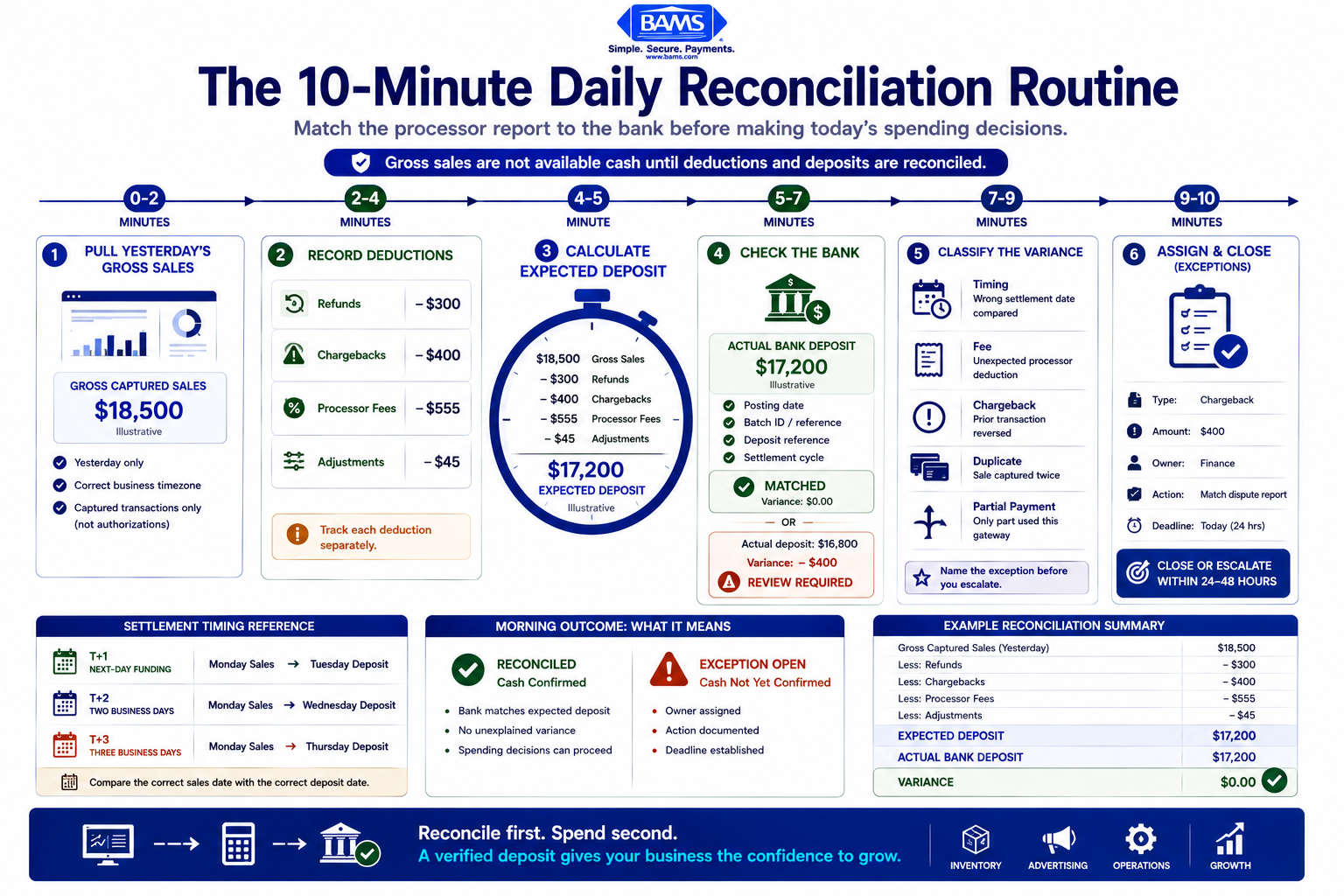
Step 1: Pull Yesterday’s Gross Sales From Your Dashboard
Open your payment processor dashboard and filter transactions to yesterday’s date range (midnight to midnight in your business time zone). Record the gross sales total, meaning the sum of all authorized and captured transactions before any deductions.
Expected result: A single dollar figure representing total captured revenue. If your dashboard shows “authorized” and “captured” separately, use only captured transactions, because authorizations that have not settled will not appear in your bank deposit.
Common failure: Your dashboard defaults to the current week or a rolling 7-day view. Fix this by manually setting the date filter to yesterday only. Some processors also display totals in UTC rather than your local time zone, which can shift transactions across date boundaries.
Captured transactions should be distinguished from transactions that have only been authorized. Visa explains that authorization and settlement are separate stages of digital payment processing, so an approved transaction may not yet be part of the funds available to the merchant.
Step 2: Record Refunds, Chargebacks, and Adjustments
In the same dashboard, filter for refunds processed yesterday and any chargebacks that were debited. Record each category separately in your spreadsheet.
Why separate columns matter: Refunds are voluntary (you issued them). Chargebacks are involuntary (the card network pulled the funds). Tracking them separately helps you spot patterns. If chargebacks spike, that is a fraud or fulfillment signal, not a reconciliation error.
Expected result: Two additional dollar figures: total refunds and total chargebacks. If your processor also applies adjustment credits or debits (for example, a monthly PCI compliance fee deducted mid-cycle), record those in a separate adjustments column.
Common failure: Chargebacks sometimes appear on a different date than the original transaction. Your processor dashboard should show the debit date, not the dispute-filed date. Use the debit date for reconciliation purposes.
The Office of the Comptroller of the Currency’s Merchant Processing Handbook provides additional context on merchant settlement, chargebacks, reserves, and the risk controls involved in merchant acquiring relationships.\
Step 3: Calculate Expected Processor Fees
Multiply yesterday’s gross sales by your effective processing rate. If your merchant agreement specifies interchange-plus pricing, you may need to estimate blended rates unless your dashboard breaks out fees per transaction.
Your formula is:
Expected Deposit = Gross Sales – Refunds – Chargebacks – Processor Fees – Adjustments
Expected result: A calculated “expected deposit” figure you can compare against your bank. Write this number in your spreadsheet before you open your bank portal. This prevents anchoring bias, where you unconsciously adjust your math to match what the bank shows.
Common failure: Your effective rate varies by card type (debit vs. credit vs. international). If your variance is consistently 0.1% to 0.3% of gross sales, your fee estimate is probably off. Ask your processor for a daily fee breakdown report or check whether your payment gateway reporting offers transaction-level fee detail.
Step 4: Check Your Bank for the Actual Deposit
Log in to your bank account and locate the deposit from your payment processor. Note the deposit amount and the date it posted.
This is where settlement timing matters. If your processor operates on a T+2 schedule (transaction day plus two business days), yesterday’s sales will not appear in your bank until tomorrow. Weekends and bank holidays add further delays. Map your processor’s specific funding cadence so you know which sales date each deposit represents.
Expected result: A deposit that corresponds to a specific batch of transactions. Some processors label deposits with a batch ID or reference number; match that to your dashboard’s batch report.
Common failure: You see a deposit but cannot tell which day’s sales it covers. This is especially common with processors that fund on a T+2 or T+3 cycle. The fix is to maintain a simple calendar that maps “sales date → expected deposit date” so you are always comparing the right numbers. Providers that offer next-day funding simplify this step significantly because yesterday’s sales arrive today, every business day.
Step 5: Calculate the Variance
Subtract your actual bank deposit from your expected deposit. Record the result in your variance column.\
Variance = Expected Deposit – Actual Deposit
If variance is $0.00: You are done. Move on with your day. Your cash flow is confirmed.
If variance is positive (you expected more than you received): Your bank deposit is short. Possible causes include an unrecorded chargeback, a fee you did not account for, or a deposit that was split across two batches.
If variance is negative (you received more than expected): Your bank deposit is higher than calculated. This can happen when a previously held deposit releases, a chargeback reversal posts, or you underestimated a refund credit.
Step 6: Isolate the Exception
When the variance is not zero, your job is to classify it. A reconciliation exception is any record that does not match according to expected rules, and exception management is the structured process of isolating, analyzing, routing, and resolving the break.
Open your processor’s transaction detail for the batch in question and compare it line-by-line against the deposit. Look for these common break types:
- Timing variance: The transaction is legitimate but landed in a different batch or funding cycle
- Fee discrepancy: A monthly fee, PCI fee, or assessment was deducted from this deposit
- Unrecorded chargeback: A dispute debit you had not yet logged
- Duplicate transaction: The same sale was captured twice, inflating your gross
- Partial payment: A split-tender transaction where only part was processed through your primary gateway
Expected result: You can name the exception type and attach a dollar amount to it. If you cannot, escalate to your processor’s support team with the batch ID, date, and variance amount.
Step 7: Log the Exception With Key Details
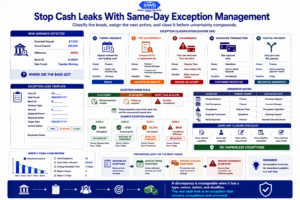
A variance becomes a cash leak when no one owns it. Every discrepancy should have a classification, responsible owner, next action, and deadline.
For every exception, record enough information to identify the discrepancy, assign responsibility, track the required action, and confirm when it is resolved. This takes about 60 seconds and prevents the break from lingering unresolved.
In your spreadsheet, add a row with:
- Date found: Today
- Exception type: (timing, fee, chargeback, duplicate, other)
- Amount: Dollar value of the discrepancy
- Owner: Who is responsible for resolving it (you, your bookkeeper, your processor)
- Action needed: (wait for next-day deposit, call processor, issue refund, dispute chargeback)
- Target resolution date: Today or next business day
Common failure: Logging the exception but never following up. Set a calendar reminder for the target resolution date. If the exception is still open after two business days, escalate it.
Step 8: Resolve or Escalate Within 24 Hours
Timing variances resolve themselves. Confirm the deposit arrives the next business day and close the exception.
Fee discrepancies require you to compare the deducted amount against your merchant agreement. If the fee is correct but unexpected (such as an annual PCI compliance fee), note it in your calendar for next year. If the fee seems incorrect, contact your processor with the batch ID and fee amount.
Chargebacks require a response within the dispute window (typically 7 to 30 days depending on the card network). If your processor offers proactive chargeback defense tools, use them to respond with documentation before the deadline.
Duplicates require you to void or refund the second capture immediately, then verify the customer was not double-charged.
Step 9: Close the Loop and Update Your Records
Once the exception is resolved, update your spreadsheet with the resolution date and outcome. Adjust your accounting records if the variance affected your revenue recognition or fee totals.
Expected result: Your exception log shows zero open items older than two business days. Your bank balance and dashboard totals agree for every completed settlement cycle.
Configuration and Customization
Adjust for Your Transaction Volume
If you process fewer than 50 transactions per day, a simple spreadsheet with the columns described above may be sufficient. At 50 to 500 daily transactions, consider using your accounting software’s bank feed reconciliation feature to match deposits automatically. At higher volumes, automate routine matches and direct manual attention to transactions that do not meet your reconciliation rules. Modern Treasury describes this approach as automatically matching payments and returns to bank transactions while reserving manual review for exceptions.
Key Variables to Adjust
- Settlement timing (T+1, T+2, T+3): This is the single most important variable. Get it wrong and every day’s comparison will be off by a full batch. Confirm your exact funding schedule with your processor. Merchants using BAMS, for example, benefit from next-day funding that reduces timing variances to a minimum and simplifies the daily matching step.
- Fee deduction method: Some processors deduct fees from each deposit (net settlement). Others deduct fees in a single monthly lump sum. Know which model you are on, because it changes your expected deposit calculation.
- Currency and multi-gateway setups: If you accept payments through more than one gateway or in multiple currencies, run a separate reconciliation for each funding stream.
Verification and Testing
After running this routine for five consecutive business days, verify the following:
- Zero unexplained variances older than two business days. Every open exception should have an owner, an action, and a target date.
- Your expected deposit calculation is within 0.05% of the actual deposit on days with no exceptions. If your estimate is consistently off by more, your effective fee rate needs recalibrating.
- You can trace any single transaction from your eCommerce platform through your processor dashboard to your bank deposit. Pick three random orders and walk them through the chain.
If all three checks pass, your daily reconciliation process is working. You now have a reliable, auditable view of your cash flow every morning.
Common Payment Processing Errors and Fixes
1. Deposit Amount Does Not Match Dashboard Total
Symptom: Your bank deposit is $200 less than your dashboard says it should be.
Cause: A chargeback or monthly fee was deducted from the batch without a separate line item in your dashboard summary view.
Fix: Drill into the batch detail report. Look for line items labeled “adjustment,” “chargeback debit,” or “fee.” If you still cannot find the deduction, contact your processor with the batch ID.
2. Deposit Arrives a Day Late
Symptom: Yesterday’s expected deposit is not in your bank account this morning.
Cause: A weekend, bank holiday, or processor maintenance window shifted the funding cycle by one business day.
Fix: Check your processor’s status page or funding calendar. Log it as a timing variance and verify it arrives the next business day. If it does not arrive within two business days, escalate.
3. Duplicate Transactions Inflate Gross Sales
Symptom: Your gross sales figure is roughly double a specific order amount.
Cause: A customer’s payment was captured twice, often due to a checkout timeout and retry.
Fix: Void or refund the duplicate capture immediately. Review your checkout flow for timeout settings that may trigger double submissions.
4. Refund Not Reflected in Deposit
Symptom: You issued a refund yesterday but your deposit was not reduced by that amount.
Cause: The refund will be deducted from a future batch, not the same day’s deposit. Refund settlement timing often differs from sale settlement timing.
Fix: Note the refund in your exception log with the expected deduction date. Verify it appears in the correct future deposit.
5. Fees Seem Higher Than Your Agreed Rate
Symptom: Your calculated fee percentage is 0.5% higher than your merchant agreement states.
Cause: Card network assessments, international card surcharges, or a mid-cycle rate change you were not notified about.
Fix: Pull your processor’s fee detail report and compare each line item against your agreement. If you find unauthorized increases, contact your processor or account manager with the specific transactions and fee amounts.
Next Steps and Extensions
Once your daily routine is solid, consider these extensions to strengthen your financial operations:
- Automate the match. Connect your processor’s API to your accounting software so transaction matching happens automatically. You then only review exceptions, not every transaction.
- Build a weekly cash flow forecast. Use your reconciliation data to predict deposits for the coming week, factoring in settlement timing, expected refunds, and pending chargebacks. This lets you make smarter decisions about inventory purchases and ad spend.
- Audit your fee schedule quarterly. Compare your effective processing rate each quarter against your merchant agreement. Even small rate creep (0.1%) compounds into thousands of dollars annually at scale.
The goal is not to spend more time on reconciliation. It is to spend 10 focused minutes each morning so you never wonder where your money is. Predictable deposits mean predictable reinvestment, and that is what turns payment processing from a cost center into a growth lever.
Frequently Asked Questions
What is deposit reconciliation in merchant services?
Deposit reconciliation is the process of matching the funds your payment processor says it sent to your bank against the actual deposit your bank received. It confirms that gross sales minus refunds, chargebacks, and processor fees equal the amount that landed in your account. For eCommerce businesses, this is the primary way to verify that every dollar of revenue is accounted for.
Why is timing important in merchant deposit reconciliation?
Your processor does not send funds instantly. Depending on your agreement, deposits arrive on a T+1 (next business day), T+2, or T+3 schedule. Weekends and bank holidays add further delays. If you compare the wrong sales date to the wrong deposit date, you will see a variance that is not actually an error. Mapping your processor’s exact funding cadence eliminates false exceptions and saves you time every morning.
When should I perform deposit reconciliation for my merchant account?
Daily, ideally first thing in the morning before you make spending decisions. Running a quick 10-minute check each business day prevents small discrepancies from compounding. Waiting until month-end means you are trying to untangle 30 days of transactions at once, which is slower, harder, and more likely to result in unrecovered funds.
Which factors can affect the timing of merchant service deposits?
Several factors influence when your deposit arrives: your processor’s settlement schedule (T+1 vs. T+2), weekends and bank holidays, risk holds on high-value transactions, batch cutoff times (if you close your batch after the daily cutoff, funds shift to the next cycle), and your bank’s own posting schedule. Processors that offer next-day funding reduce most of these variables.
What are common challenges faced during deposit reconciliation?
The most common challenges include timing mismatches (comparing the wrong sales date to the wrong deposit), hidden fee deductions that reduce your deposit without a clear line item, chargebacks that appear on a different date than the original transaction, and duplicate captures from checkout timeouts. Each of these creates a variance that looks alarming but is usually explainable once you know where to look.
How can I optimize my merchant services for better reconciliation?
Start by choosing a processor with transparent, itemized reporting and predictable settlement timing. Use a processor that provides batch-level detail with fee breakdowns. Automate transaction matching through your accounting software where possible, and reserve your manual effort for exceptions only. Finally, review your merchant agreement quarterly to catch any fee changes before they accumulate.
Sources
- https://www.moderntreasury.com/journal/what-is-automatic-reconciliation
- https://www.moderntreasury.com/journal/manual-reconciliation-for-expected-payments
- https://corporate.visa.com/en/solutions/acceptance/payments.html
- https://www.occ.treas.gov/publications-and-resources/publications/comptrollers-handbook/files/merchant-processing/pub-ch-merchant-processing.pdf