7 Apple Pay Checkout Fixes That Speed Deposits
Last Updated on October 6, 2026 by Dimitri Akhrin
Diagnose the gateway configuration gaps that delay your funds and cost you winnable chargebacks
Learn which post-transaction settings in your Apple Pay checkout pipeline cause deposit delays and chargeback losses. This guide pinpoints the compliance fields and gateway configurations that determine dispute outcomes.
TL;DR
- Deposit delays aren’t an Apple Pay problem – They’re caused by gateway batch timing misalignment and processors that don’t include tokenized payments in next-day funding programs. Audit both.
- Most Apple Pay chargebacks are winnable – But only if your gateway captures and retains DPAN, ECI, and CAVV fields. Without this data, you lose the liability shift that Apple Pay’s biometric authentication provides.
- Switch to auth-then-capture for Apple Pay – Dual-message processing prevents amount mismatches that trigger processor holds and automatic disputes on modified or partially fulfilled orders.
- Build dispute evidence before disputes happen – Pre-assembled templates with tokenization proof, authentication type, and fulfillment records let your team respond in minutes instead of hours.
- Start with three changes – Verify tokenization fields pass through your gateway, align batch close with processor cutoffs, and confirm next-day funding covers Apple Pay. These three fixes address the majority of deposit delays and dispute losses.
Why Apple Pay Deposits Stall and What You Can Do About It
You enabled Apple Pay checkout to speed things up. Customers tap, authenticate, and move on. But behind the scenes, your deposits sit in limbo for two, three, sometimes four business days. The irony is hard to ignore: the fastest checkout experience in eCommerce is feeding one of the slowest funding cycles your business has seen.
The problem isn’t Apple Pay itself. It’s what happens after the transaction clears. Settlement timelines, gateway configurations, and missing compliance fields quietly conspire to slow your cash flow and, worse, leave you exposed to chargebacks you should be winning. Apple Pay is accepted by more than 85% of U.S. retailers, but most merchants never audit the post-transaction pipeline that determines when (and whether) those funds actually land.
This guide is built for eCommerce managers at established online businesses who are tired of treating deposit delays and chargeback losses as separate problems. They’re not. They share the same root cause: checkout and payment gateway settings that were configured for “working” instead of “optimized.”
What This List Covers (and What It Doesn’t)
You won’t find Apple Pay setup tutorials here. If you need integration basics, start with this guide to accepting Apple Pay in your eCommerce store. This list focuses on what happens after a customer taps “Pay”: the configuration gaps, compliance oversights, and data-capture failures that delay your deposits and cost you winnable disputes.
Each item targets a specific lever you can adjust in your payment gateway, processor relationship, or checkout flow. The goal is faster funding and fewer chargeback losses from the same Apple Pay transactions you’re already processing.
How These Items Were Selected
Every item on this list meets two criteria. First, it directly affects either settlement speed or chargeback win rate for Apple Pay transactions. Second, it’s something an eCommerce manager can act on without a full platform migration. These are configuration-level changes, not infrastructure overhauls.
7 Ways to Eliminate Deposit Delays and Win More Apple Pay Disputes
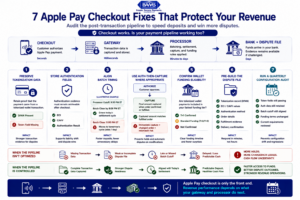
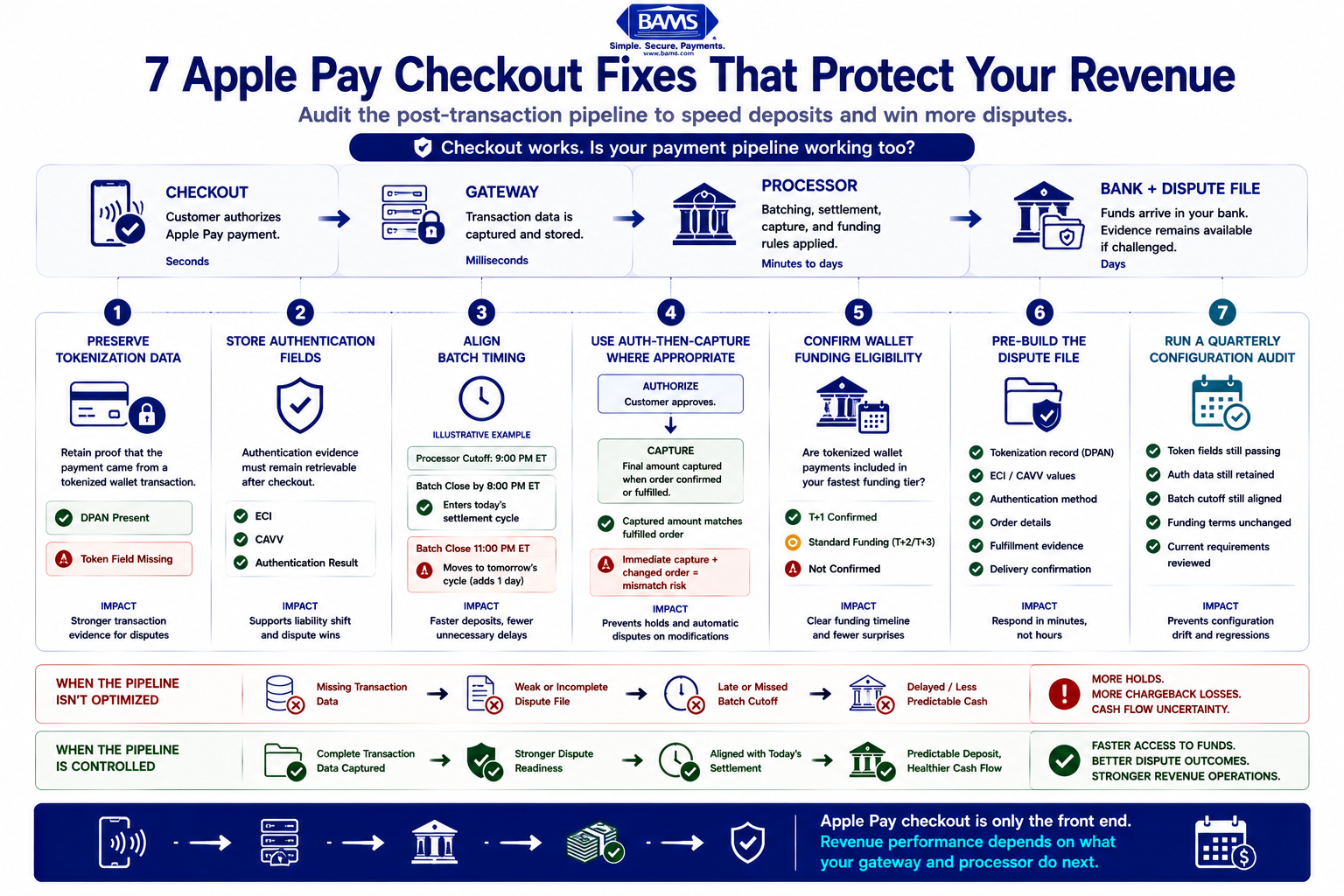
A seven-point Apple Pay optimization guide covering tokenization data, authentication fields, settlement timing, capture settings, funding, disputes, and compliance.
1. Confirm Your Gateway Passes Tokenization Fields, Not Just Authorization Codes
Why it matters: Apple Pay replaces your customer’s card number with a Device Account Number (DPAN) during checkout. This tokenized transaction is your strongest evidence against unauthorized-use chargebacks. But many gateways strip or fail to store DPAN data in the settlement file. When a dispute arrives, your team can’t prove the payment came from a verified wallet session.
What it looks like today:Merchants who prioritize disputes where the transaction used a DPAN have stronger proof than those relying on raw card numbers. Yet most eCommerce platforms default to passing only basic authorization data.
How to apply it: Log into your payment gateway’s admin panel and locate the transaction detail for a recent Apple Pay sale. Look for fields labeled “DPAN,” “Device Account Number,” or “Token.” If they’re empty or absent, contact your gateway provider and request that tokenization metadata be included in settlement records. This single change strengthens every future dispute response.
2. Capture and Store ECI and CAVV Values at Checkout
Why it matters: Electronic Commerce Indicator (ECI) and Cardholder Authentication Verification Value (CAVV) are the cryptographic receipts that prove a transaction was authenticated. Without them, you can’t demonstrate liability shift during a dispute. Apple Pay liability typically shifts to the issuer when these authentication markers are present, but only if your system actually retains them.
What it looks like today: Many merchants assume their gateway handles this automatically. In practice, some gateways log ECI/CAVV only temporarily or omit them from exportable transaction records. When a chargeback arrives weeks later, the data is gone.
How to apply it: Ask your gateway provider whether ECI and CAVV fields persist in your transaction history for at least 180 days (the standard dispute window). If not, configure your system to write these values to your order management database at the moment of authorization. Treat this as non-negotiable compliance infrastructure.
If your systems store, process, or transmit payment card data, any changes to transaction logging and data retention should also remain consistent with the merchant guidance published by the PCI Security Standards Council. Retain only the payment data your business is permitted and required to maintain, and protect it according to your PCI DSS responsibilities.
3. Audit Your Settlement Batch Timing
Why it matters: Deposit speed depends heavily on when your gateway submits its daily settlement batch to your processor. If your batch closes after your processor’s cutoff time, your funds sit idle for an extra business day. For Apple Pay transactions, this delay compounds because tokenized payments sometimes route through additional verification steps.
What it looks like today: Most eCommerce platforms default to a batch close time that was set during initial setup and never revisited. A batch closing at 11 PM Eastern might miss a processor cutoff at 9 PM, adding 24 hours to every deposit.
How to apply it: Check your gateway’s batch settlement schedule and compare it to your processor’s published cutoff time. Adjust your batch close to at least one hour before the cutoff. If your processor offers real-time or rolling authorization-and-capture, enable it for Apple Pay transactions specifically. This is the simplest path to shaving a full day off your deposit timeline.
4. Enable Dual-Message Processing for Apple Pay Transactions
Why it matters: Single-message processing (where authorization and capture happen simultaneously) can speed up checkout but creates problems downstream. If an order is modified, partially fulfilled, or cancelled, you’re already captured on a transaction that no longer matches the final amount. This mismatch triggers processor holds and, in some cases, automatic chargebacks.
What it looks like today: Many eCommerce setups use single-message processing as the default for digital wallet payments because it appears faster. But “faster checkout” and “faster deposit” are different things.
How to apply it: Switch Apple Pay transactions to auth-then-capture (dual-message) processing. Authorize at checkout, then capture only when the order ships or is confirmed. This aligns the captured amount with the fulfilled order, reduces processor holds, and gives you a clean transaction record for dispute defense. Most gateways support this toggle per payment method.
5. Verify Your Processor Supports Next-Day Funding for Tokenized Payments
Why it matters: Not all processors treat Apple Pay transactions the same way they treat standard card-present or card-not-present sales. Some processors route tokenized payments through separate settlement queues with longer timelines. If your processor doesn’t explicitly support next-day funding for digital wallet transactions, you may be waiting two to three days for deposits that should arrive overnight.
What it looks like today: Processors that offer next-day funding often qualify it with conditions: transaction volume thresholds, risk scoring, or payment method restrictions. Apple Pay transactions may not qualify by default.
How to apply it: Contact your processor and ask specifically whether Apple Pay (DPAN-based) transactions are eligible for next-day funding under your current agreement. If they aren’t, this is a negotiation point. BAMS, for example, offers next-day funding as a standard feature for qualifying merchants and includes Apple Pay transactions in that timeline, removing the guesswork around when tokenized payments settle.
6. Build a Pre-Assembled Dispute Evidence Template for Apple Pay
Why it matters:Apple Pay disputes filed 30+ days after a biometric-authenticated transaction are a strong indicator of friendly fraud, and they’re among the most winnable dispute types. But you only win if you respond quickly with the right evidence. Face ID, Touch ID, or passcode authentication logs are described as the strongest evidence for contesting unauthorized-use claims.
What it looks like today: Most merchants build dispute responses from scratch each time, hunting through multiple systems for order details, authentication records, and delivery confirmation. This reactive approach wastes hours and misses filing deadlines.
How to apply it: Create a standardized evidence template that pre-populates with DPAN verification, ECI/CAVV values, biometric authentication type, device metadata, and delivery/fulfillment records. When a dispute arrives, your team fills gaps rather than starting from zero. BAMS offers proactive chargeback defense that includes this kind of structured evidence assembly, helping merchants respond in minutes rather than days.
7. Monitor Apple Pay Compliance Requirements as a Recurring Task
Why it matters: Apple Pay compliance isn’t a one-time checkbox. Card network rules, regional authentication requirements, and Apple’s own merchant guidelines evolve. Falling out of compliance can silently disable liability shift, meaning you absorb chargeback costs that should fall on the issuer.
For U.S. merchants, review current dispute guidance from Visa and your processor, and keep your payment-security practices aligned with the PCI Security Standards Council’s merchant guidance.
What it looks like today: Most eCommerce teams treat Apple Pay integration as “set and forget.” Compliance drift happens gradually: a gateway update changes default settings, a card network revises its dispute rules, or a new region’s regulations take effect.
How to apply it: Add a quarterly review to your operations calendar. Check three things: (1) your gateway still passes all required authentication fields, (2) your processor confirms liability shift is active for Apple Pay transactions, and (3) your Apple Pay checkout flow meets current platform and network requirements. Fifteen minutes per quarter prevents thousands in avoidable losses.
The Pattern Behind These Fixes
Every item on this list shares a common thread: the problem isn’t at checkout, it’s in the data pipeline between checkout and settlement. Deposit delays and chargeback losses both stem from the same gap. Your system processes the payment but fails to retain, route, or time the transaction data correctly.
The merchants who get paid fastest and win the most disputes aren’t using different technology. They’re capturing more data at authorization, aligning batch timing with processor cutoffs, and treating dispute defense as a checkout configuration issue rather than a customer service problem. These aren’t separate initiatives. They’re one system.
The tradeoff is upfront audit time versus ongoing losses. Spending a few hours reviewing gateway settings and processor agreements now eliminates recurring friction that compounds every month.
Where to Start
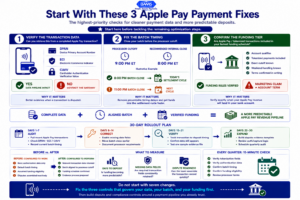
A prioritized Apple Pay payment audit showing how to verify tokenization fields, align batch cutoffs, and confirm faster funding for wallet transactions.
You don’t need to implement all seven changes at once. Start with three: verify your gateway passes tokenization fields (#1), audit your batch settlement timing (#3), and confirm next-day funding eligibility for Apple Pay (#5). These three changes address the most common causes of delayed deposits and weak dispute responses.
Once those are in place, layer in the evidence template (#6) and compliance monitoring (#7). The remaining items refine what you’ve already built. Treat this as a 30-day project, not a weekend task, and measure the result in days-to-deposit and dispute win rate.
Frequently Asked Questions
Why are my Apple Pay deposits slower than regular card transactions?
Tokenized payments like Apple Pay sometimes route through separate settlement queues at your processor. If your gateway’s batch close time doesn’t align with your processor’s cutoff, or if your processor doesn’t explicitly include DPAN-based transactions in next-day funding, Apple Pay deposits can take an extra one to two business days compared to standard card sales.
What transaction data do I need to win an Apple Pay chargeback?
The most important fields are the Device Account Number (DPAN), ECI and CAVV authentication values, biometric authentication type (Face ID, Touch ID, or passcode), and device metadata. These prove the transaction came from a verified wallet on an authenticated device. Without them, you’re relying on the same evidence you’d use for any card-not-present dispute, which is significantly weaker.
Does Apple Pay automatically shift chargeback liability to the issuer?
Not automatically. Liability shift depends on whether authentication fields (ECI, CAVV) are correctly passed and stored, and it varies by card network, country, and acquirer. In PSD2-regulated regions, Apple Pay satisfies Strong Customer Authentication requirements, which supports liability shift. But if your gateway strips these fields, you lose that protection regardless of region.
How do I check if my payment gateway stores tokenization data?
Pull up a recent Apple Pay transaction in your gateway’s admin panel and look for fields labeled DPAN, Device Account Number, Token, ECI, or CAVV. If these fields are empty or missing entirely, contact your gateway provider to request that tokenization and authentication metadata be included in transaction records and retained for at least 180 days.
Which payment processors support Apple Pay integration with next-day funding?
Not all processors that support Apple Pay for businesses include tokenized transactions in their next-day funding programs. You need to ask your processor specifically whether DPAN-based Apple Pay sales qualify. Some processors require minimum volume thresholds or charge additional fees for accelerated settlement on digital wallet payments.
How often should I audit my Apple Pay checkout configuration?
Quarterly reviews are a practical minimum. Card network rules, regional authentication requirements, and Apple’s own merchant guidelines change periodically. A 15-minute check each quarter confirming that authentication fields are being passed, liability shift is active, and batch timing is aligned with your processor’s cutoff prevents compliance drift that leads to slower deposits and lost disputes.